1
6 TROUBLESHOOTING
MELSEC-A
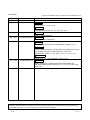
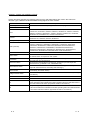
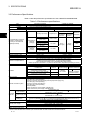
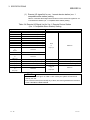
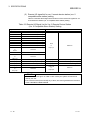
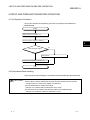
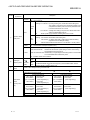
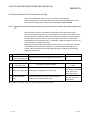
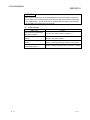
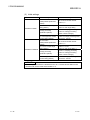
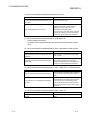
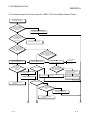
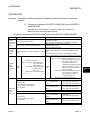
6.3 When the digital output value cannot be read
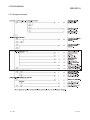
Check item
6-4
Corrective action
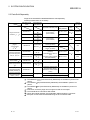
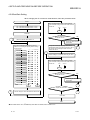
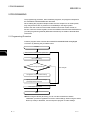
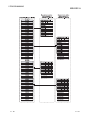
Is the "POWER" LED off?
Take action as described in Section 6.2 (1).
Is the "RUN" LED flashing or off?
Take action as described in Section 6.2 (2), (3).
Is the "L RUN" LED off?
Take action as described in Section 6.2 (4).
Is the "L ERR." LED on?
Take action as described in Section 6.2 (7).
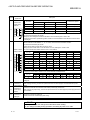
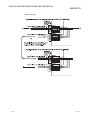
Check the error details according to the master
module user's manual.
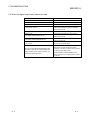
Is the programmable controller CPU "RUN" LED
flashing or off?
Check the error details according to the
programmable controller CPU user's manual.
Is the master module "RUN" LED off?
Check the error details according to the master
module user's manual.
Is the master module [RD] [SD] LED on?
Check the error details according to the master
module user's manual.
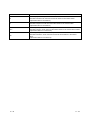
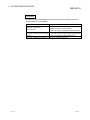
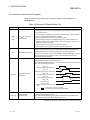
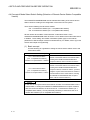
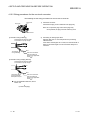
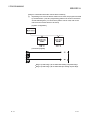
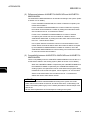
Is the analog input signal line disconnected, cut off,
or any errors?
Check the error area by checking the signal line
visually or by conductive check.
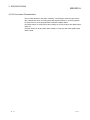
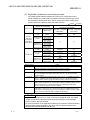
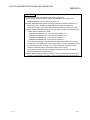
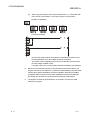
Remove the AJ65VBTCU-68ADVN/ADIN analog
input cable. Apply the test voltage (stable power
supply or battery) to this module's terminal, and
measure the digital output value.
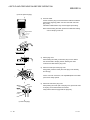
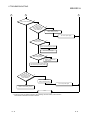
If he AJ65VBTCU-68ADVN/ADIN module digital
output value is normal, the effects are being
received by noise from an external wiring. So check
the wiring and grounding method.
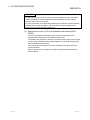
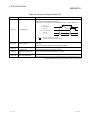
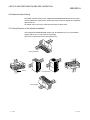
Lift the AJ65VBTCU-68ADVN/ADIN from the
system, and remove the grounding circuit. (install to
the DIN rail.)
6-4