1
FOCUSING
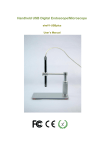
The focus distance can be adjustable by turning
the knob of the pen microscope (see right
photo).
And the pen microscope can be move up and
down by turning the pillar (see left photo) for
getting larger photo area or smaller photo area.
TAKE PHOTOS
Click on ‘option’ on the top
of image window.
Then
click
on
‘high
resolution’ in the drop-down
menu to make sure there is
a tick mark here.
Close the drop-down menu.
Push down the button of
the dimmer that located on the USB cable to freeze an image.
Or click ‘snap’ on the top of image window to take a photo.
The photos you have taken will be saved in the computer and display an
icon on the screen.
If your system could not freeze an
image please follow steps to make it
works:
1, click on ‘file’ that is on the top of
image window.
2, click on the ‘set photo folder’
3, designate the folder you want to
save the photos
4, click OK to confirm
MORE WAYS TAKING PHOTOS
Click on ‘option’ on the top of image