1
®
®
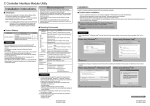
• If an overwrite install has been done to upgrade the version of Position Board Utility2 when using Windows 8.1/Windows 8/
®
®
Windows 7/Windows Vista , the following message may be displayed. In this case, select "This program installed correctly".
®
®
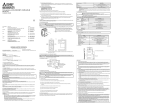
Installing the PCI/PCI Express device driver
®
®
When using Windows XP, in order to connect with a position board via PCI/PCI Express BUS interface, the PCI/PCI
®
®
®
®
®
Express device driver needs to be installed. When using Windows 8.1/Windows 8/Windows 7/Windows Vista , the
®
PCI/PCI Express device driver is automatically installed.
®
When using Windows 8.1/Windows 8/
®
®
Windows 7/Windows Vista
®
When using Windows XP
1.The "Found New Hardware Wizard" appears when connecting the position
board to the personal computer only for the first time. The same screen
appears when the slot to be connected is changed.
2.The "Welcome to the Found New Hardware Wizard" dialog may appear. In
this case, select "No, not this time".
3.The "This wizard helps you install software for." dialog appears. Select "Install
the software automatically [Recommended]".
4.The "The Wizard has finished installing the software for." dialog appears. The
1.Select "This program installed correctly".
®
installing of the PCI/PCI Express device driver completes by clicking "Finish".
• The "Found New Hardware Wizard" may temporarily appear during the installation. This occurs for requesting a device registration to
®
®
Windows , and this screen will disappear automatically after the completion of the registration processing of Windows . At this time,
never execute any operation to the "Found New Hardware Wizard".
®
®
• When using Windows Vista /Windows XP, by not installed, the "Found New Hardware Wizard" may appear, when turning on the
power supply of personal computer connecting a position board. In this case, select "Cancel" for all, although the screen appears only
the number of the connected position boards that have not been recognized.
®
When using Windows Vista
®
When using Windows XP
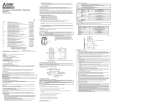
Installing the USB device driver
®
When using Windows XP, in order to connect with a position board via USB interface, the USB device driver needs to be
®
®
®
®
installed. When using Windows 8.1/Windows 8/Windows 7/Windows Vista the USB device driver is automatically
installed.
®
When using Windows XP
1.The "Found New Hardware Wizard" appears when connecting the USB of the
position board to the personal computer only for the first time. The same
screen appears when the USB port to be connected is changed.
2.The "Welcome to the Found New Hardware Wizard" dialog may appear. In this
case, select "No, not this time".
3.The "This wizard helps you install software for." dialog screen appears. Select
"Install the software automatically [Recommended]".
4.The dialog of Windows Logo Test appears. The installing of the USB device
1.Select "Cancel".
driver completes by clicking "Continue Anyway".
1.Select "Cancel".
Uninstallation
Uninstall Position Board Utility2 from a personal computer.
1.Execute the Position Board Utility2 uninstallation from the control panel of
®
Windows .
Microsoft, Windows are registered trademarks of Microsoft Corporation in the United States and other countries.
Intel, Pentium and Celeron are trademarks or registered trademarks of Intel Corporation in the United States and other countries.
PCI Express is US registered trademarks and/or service marks of PCI-SID
Adobe Reader is a registered trademark of Adobe Systems Incorporated.
Other company names and product names herein are trademarks or registered trademarks of their respective owners.
BCN-B62008-303C
PBUTL2-I-INSE
BCN-B62008-303C
PBUTL2-I-INSE