1
User Manual for Matrix Maker
Page 5
ii.
ASCII Code
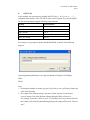
In this method, you can assign any printable ASCII Codes, i.e. A-Z, a-z, 0-9, +, - ,* , / ,
and punctuation symbols. Up to 255 ASCII codes can be assigned. Five special symbols
can also be assigned by using the following representations:
Symbol
Representation
Enter Character
\n or \N
Esc Character
\e or \E
Tab Character
\t or \T
\ Character
\\
Delay 0.5 second
\d or \D
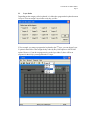
For example, if you program a button with Hello\nWorld, as shown in the following
diagram,
After programming this button, if you type this button in Notepad, it will display,
Hello
World
Note:
1. By using this method, no matter you press Caps Lock or not, it will always display the
same character string.
2. The output of the character string is the same as what you enter if you choose a
correct Country Code in the Keyboard Setting dialogue (Refer to Section 3).
For example, if you enter “How are you?” in a Germany OS, but you choose USA for
the Country Code in the Keyboard Setting dialogue, the ouptut will become “How are
zou?”.