1
User Manual for Matrix Maker
Page 2
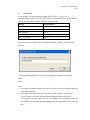
Select the category of the keyboard you want to program, and then press OK button. The
following instructions are based on S78A model, but they can also be applied for other
models.
2. Edit Key Map
(If a magnetic card reader is selected in the Keyboard Category dialogue, you can treat
Header, Separator, and Suffix as buttons in the keyboard and program them by ‘Key
Code’ and ‘ASCII code’ methods. For details, please refer to the Section 4.)
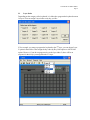
A button in the keyboard layout changing dark grey when the mouse cursor is on top of it
indicates that the button can be programmable.
Click the left mouse button on that programmable button, a popup menu appears. There
are totally two methods to assign the key map. One method is called ‘Key Code’ and
another is ‘ASCII Code’. After assigning codes for a button, you can choose ‘Clear’ in the
popup menu to clear the codes. Choose “Layer Index” to assign an index to a key.
Key Lock
Note:
Not all models have Key Lock.