1
5.3 Copy task options
Copiaris
Copy source options
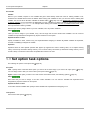
Deflate64, - also called Enhanced Deflate, newer algorithm and gives slightly better compression with shorter time, but older
decompression programs may not support it.
BZip2 - new advanced compression format giving best compression ratio but only some newer decompression programs
support it.
Note that program used to decompress these zip files later must support selected method.
Zip encryption method
AES - industry standard encryption with 256-bit key. Decompression supported only by new zip programs.
Classic ZIP - compatible with old decompression programs but not secure by today's standards. Not recommended to use.
Note that program used to decompress these zip files later must support selected method.
Zip encryption password
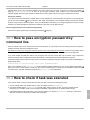
If you want to encrypt zip files then enter password, otherwise clear all text. The password is stored in script file in plain text
format so it is recommended that instead of assigning real password here you use <UserInput password> variable to
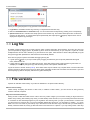
prompt for password at runtime (GUI only) so it is not stored in script file. See Asking zip encryption password at runtime (
page 52).
Zip stores full paths
Select if you want to store full paths in zip files. By default relative paths are stored in combined zip and no paths are stored
in separate zips. Full path does not store drive letter.
5
Zip stores Unicode file names
Select to store Unicode file names in zip file header to support international characters in file names in zip file. You need
current decompression program that supports Unicode file names to decompress zip files created with that option turned on.
Old unzip programs do not support this feature.
Zip use local temporary file for
By default when zipping to removable or network drive local temporary file is used because usually these drive types are
slow and it is faster to create zip file locally first and then copy over to destination. If you don't want to create local local zip
file first then unselect these drive types.
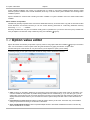
5.3.8 Copy source options
Source options
Include sub-directories
Choose if sub-directories of source directory are included or not.
Source directories
One or more source directories from where to copy files to destination directory. Variables (
multiple directories by ";".
page 35) allowed. Separate
Note: If you specify multiple source directories here then same copy options are used for all specified directories. To use
different copy options with source directories create separate copy source for each such directory. See Copy task ( page
16).
Advanced source options
Delete source files
Specify if source files must be deleted after copying them to destination successfully. BY SELECTING THIS OPTION ALL
YOUR SOURCE FILES WILL BE DELETED!
29