1
3.4. Electric installation.
ATTENTION: Electric installation work should be carried out by a certified electrician.
- Lead out the power cables to the place of installation of the wall switch and between wall switch and screen.
- Screen power line should be fused with 1A fuse.
- Switch off the screen power line during installation work.
- Manual wall steering switch should be installed at the place meeting the following conditions:
a) installation150-180 cm above the floor level,
b) the screen should be visible by the wall switch operator during the screen operation,
c) wall switch operator cannot stay in reach of any of the screen’s moving parts during the screen operation .
d) the wall switch must be visible from the each part of the room irrespective of the screen position.
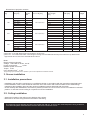
Screen
bl - blue (common)
br - brown (rolling down)
yg - yellow-green (protective)
bk - black (rolling up)
yg bl
br
Zasilanie
L1 - brown (live)
N - blue (neutral)
G - yellow-green (protective)
bk
~
Pic.5 Wall switch connection
Pic.6 Lower bar fine tuning
3.5. Screen programming.
The screen is programmed properly at the factory and there is no need to reprogram it without any important
reason. Setting of screen extreme positions was made by manufacturer.
If you need to change the screen extreme position follow the instructions described below.
Programing the length of the rolled out screen (screen bottom bar position).
- Roll up the screen until it will stop automatically in the upper position.
- Insert regulation wrench included in the screen set into the regulation slot (see picture. 6) located in the left bottom
part of the screen .
Regulation knob “2” (red color) enables setting of the lower extreme position of the screen bottom bar:
„+” - means increasing the lenght of the fabrics is rolled down when the screen is rolled out,
„–” - means decreasing the length of the fabrics is rolled down when the screen is rolled out.
Regulation knob “1” (white color) enables setting of the upper extreme position of the screen bottom bar:
“-“ - means increasing the lenght of the fabrics is rolled down when the screen is rolled in,
“+” - means decreasing the length of the fabrics is rolled down when the screen is rolled in.
IMPORTANT!
Do not decrease (tuning knob 1+) the range of the rolled down surface. It can damage the screen.
Do not increase (regulation 2+) the range of the surface which was rolled down behind the STOP mark, placed in
the upper right corner of the screen. Rolling down the screen behind the mark can damage the screen.
7