1
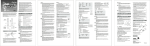
Assets templates will be displayed if the Incident_Assets layer is
checked.
Figure 2-41
Figure 2-40
Once the asset has been entered on the map, the Attributes
dialog box pops up. You can add data about each asset as
In the same way you established your subject’s PLS, click the
it’s created. If the pop-up dialog box isn’t displayed, check
asset type you want to add to the map. If you want to establish
Troubleshooting for Attribute Assistant, but in the TOC, you
a point by simply locating it on the map, move an icon over that
can bring up the attribute table by right-clicking Incident_Assets
spot and click once. If you know and want to use the coordinates
> Open Attribute Table. You’ll also want to do this to edit or
to establish a point, right-click Absolute X, Y. Choose the
review all incident assets.
coordinate system, type in the coordinates, then press Enter.
MapSAR User’s Manual July, 2012
44
Chapter 2: Tutorial