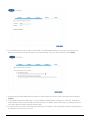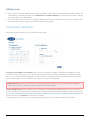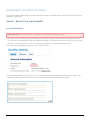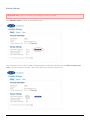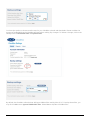
1
CLOUDBOX USER MANUAL
CLICK HERE TO ACCESS AN UP-TO-DATE ONLINE VERSION
of this document. Online User Manuals feature easy navigation, expandable illustrations, and
search capability.
LaCie
1
INTRODUCTION
The LaCie CloudBox is a great solution for storing and backing up data. As a
local network device with ample storage, you can keep your important files
on its disk drive. For added security, all data stored on the CloudBox is
automatically backed up to your Online Backup account each day. This
manual will help you to configure and administer the CloudBox on your
network.
WHAT IS A CLOUDBOX ONLINE BACKUP?
With local storage and online backup, your data is now secure on two fronts. Files stored on the LaCie CloudBox
are safe on your local network if you experience problems with your computer’s hard drive or operating system.
Since they are also backed up online, your files are kept secure outside of the home or office. This means that
your most critical data is protected against more grave concerns, such as theft, fire, or flood. Further, a
CloudBox Online Backup encrypts your data using 128-bit encryption before it is uploaded to your account.
After you have configured the CloudBox, your Online Backups will run daily at a scheduled time. When the
scheduled backup starts, the Online Backup will search the CloudBox for the data to upload to your Online
Backup account. The Online Backup account will retain all the data stored on the CloudBox at the time of the
scheduled backup.
For example, along with many other files, Text Document A is stored on your CloudBox. Each day, the Online
Backup understands to retain Text Document A since it is consistently stored on the CloudBox. After a month,
you delete Text Document A from your CloudBox. Text Document A will also be deleted from your Online
Backup account during the next scheduled Online Backup.
INITIAL BACKUP AND UNSUPPORTED FILES
Depending upon the amount of data stored on the CloudBox, your initial online backup may require some time.
Please do not be alarmed if the backup takes many hours or several days. All online backups occur in the
background, leaving you free to operate your computer or workstation.
Factors that may contribute to longer Online Backups:
■
■
■
■
The amount of data (tens of gigabytes at once will significantly increase the backup time)
Network bandwidth
Network activity
The amount of files being backed up at one time
LaCie
2
Unsupported File Types
The following file and/or folder types are not supported by the CloudBox Online Backup:
■
■
Files and/or folders containing “\” or “/” in their names. For example, a file that is named “Business
Tasks/Shopping List” will not be accepted by the Online Backup.
Files greater than 8GB.
MINIMUM SYSTEM REQUIREMENTS
■
■
■
■
■
■
Computer with an Ethernet network adapter
Latest version of Windows® XP 32- or 64-bit / Mac® OS X 10.5 / Linux system based on a 2.6 kernel
Minimum free disk space: 100MB
Ethernet switch or router with DHCP
Internet connectivity
Web browsers: Internet Explorer® 7.0 and Safari® 3.0
Important note: In almost all instances, the use of the LaCie CloudBox should not incur additional fees
from an Internet Service Provider. Please note that under no circumstances will LaCie be held responsible for
any indirect or additional charges from an Internet Service Provider or any other company that provides a
portal to the Internet.
RECOMMENDED SYSTEM HARDWARE AND SOFTWARE
The following list of peripheral hardware and system software may improve your CloudBox’s performance:
■
■
■
■
■
■
Computer Hardware: a Gigabit Ethernet network adapter, 2 GB RAM or higher, and 2 GHz CPU or higher.
Latest version of Windows Vista® or Windows 7 / Mac OS X 10.6
Gigabit Ethernet switch or router with DHCP
Ethernet switch or router with DHCP
High-speed Internet connectivity
Web browsers: Internet Explorer 8.0, Firefox® 3.5, and Safari 5.0
LaCie
3
BOX CONTENT
1.
2.
3.
4.
5.
6.
LaCie CloudBox
External power supply
Ethernet cable
Quick Install Guide
Utilities CD-ROM with LaCie Network Assistant, LaCie Backup Assistant, and the User Manual
Leaflet with the One Year Online Backup Contract and device ID numbers
Important info: Please save your packaging. In the event that the drive should need to be repaired or
serviced, it must be returned in its original packaging. Do not forget to keep the leaflet in a safe and
accessible location. It contains your contract number, which is mandatory for setting up your device and
keeping your account up to date. To maintain your security and prevent others from logging into your Online
Backup account, your contract number cannot be requested for recovery purposes.
LaCie
4
VIEWS OF THE DRIVES
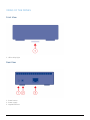
Front View
1. LED activity light
Rear View
1. Power button
2. Power supply
3. Gigabit Ethernet
LaCie
5
LED BEHAVIOR
The front LED changes to indicate different drive behavior.
LED Behavior
Indication
Off
Device is off
Blue: Fast blinking
Drive activity
Backup in progress
Blue: Static
Ready
Blue: Slow blinking
Startup
Shutdown
Red: Static
The CloudBox is being restored to Factory Settings
Hardware failure
Red: Slow blinking
Backup or Restore failed
Red blinking will continue until the next backup completes successfully (scheduled or
manual)
Blinks for five seconds to start a Restore to Factory Settings
Red/Blue: blinking
Firmware update in progress
Technical note: Even if you have turned off the front LED using the Dashboard administration page (see
Dashboard: General Settings), events triggering a red light will always cause the front LED to turn on.
POWER BUTTON FUNCTIONS
■
■
Switching on the drive: Turn on the drive by pressing the power button on the back of the drive for two
seconds. The front LED will blink.
Switching off the drive: To turn off the drive, press and hold the power button for five seconds until the LED
blinks. When the LED turns off, the drive has shut down.
Note: You may also power down the CloudBox via the Dashboard.
LaCie
6
CONNECTING TO YOUR NETWORK
This chapter explains how to connect the CloudBox to your network. Please note that your network must have
access to the Internet for the CloudBox installation, setup, and general use.
ETHERNET
Ethernet is the most widely used local area network (LAN) technology. A Gigabit (Gb) Ethernet cable is included
with your LaCie device to connect it to a network. Please note that the images in the table below may not reflect
the precise cable or connector positions of your LaCie device or router. However, the ends of the Ethernet cable
are the same, allowing for easy connection to the LaCie product and your router.
Connector Face
(to router)
LaCie
Cable End
(to computer)
Cable End
(to product)
7
Connector Face
(to router)
SETUP
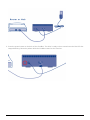
STEP 1 - Ethernet and Power
1. Connect the Ethernet cable to the Ethernet port on the back of the LaCie CloudBox.
2. Connect the other end of the Ethernet cable into an available Ethernet port on your router, switch, or hub.
Your network router or switch must support DHCP to run the Setup Wizard. Most consumer and business
networks include a DHCP router.
3. Connect the power supply to a wall outlet and to the LaCie CloudBox.
LaCie
8
4. Press the power button on the back of the CloudBox. The drive is ready to be accessed once the blue LED has
stopped blinking. Please be patient while the CloudBox starts for the first time.
LaCie
9
Caution: Only use the AC adapter supplied with your specific LaCie device. Since each product is unique, do
not substitute a power supply from another LaCie device or another manufacturer for the LaCie CloudBox.
Please note that the AC adapter provided with your LaCie device includes connectors for electrical outlets in
multiple regions. Thanks to its 100-240 Volt power supply, you may use your device in a foreign country.
However, LaCie accepts no responsibility for any damage to the drive resulting from the use of an
inappropriate adapter.
Further, your warranty will be void if you: a) Use any other power cable, power supply, or power adapter
other than one that has been authorized by LaCie, or b) Keep your AC adapter connected to the LaCie device
when transporting it. Doing so may damage the device.
Important info: Please make certain that your switch or router supports DHCP. The Setup Wizard cannot
run in a network that does not support DHCP. You may adjust the IP settings on your CloudBox once the
Setup Wizard is complete.
LaCie
10
STEP 2 - LaCie Network Assistant
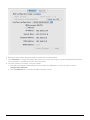
Once installed, LaCie Network Assistant will appear in your system tray (Windows) or in the menu bar (Mac).
LaCie Network Assistant - Windows
LaCie Network Assistant - Mac
LaCie Network Assistant will automatically search for LaCie storage devices on your network. When a new
device is found, the icon will blink. LaCie Network Assistant also provides a link to the Dashboard, the
Web-based administration tool for the CloudBox (see Administering Your LaCie CloudBox). LaCie recommends
using LaCie Network Assistant to launch the CloudBox Setup Wizard.
Technical note: You may be running an earlier version of LaCie Network Assistant if you already own LaCie
network storage. To avoid potential conflicts, LaCie recommends launching the Setup Wizard with the
version on your CloudBox Utilities CD-ROM. Before loading the CD-ROM, please quit LaCie Network Assistant
and uninstall it from your computer.
Windows Vista/7: Start > Control Panel > LaCie Network Assistant, right-click to select Uninstall.
Mac: Go to the Applications folder to drag LaCie Network Assistant to the Trash. Empty the Trash.
LaCie
11
Install
1. Insert the LaCie CloudBox Utilities CD-ROM into your computer’s optical drive.
2. Windows: the CD should appear in My Computer/Computer.
Mac: the CD should appear on the desktop. Double-click the CD icon, then double-click LaCie Network
Assistant Setup.
3. Complete the LaCie Network Assistant installation.
LaCie
12
THE CLOUDBOX SETUP WIZARD - FIRST INSTALL
To properly configure your CloudBox, please run the Setup Wizard to completion. Though the CloudBox may be
listed on your network, the storage will not be accessible until the Setup Wizard has been completed. The Setup
Wizard can be started via LaCie Network Assistant or directly in your web browser.
LAUNCH THE SETUP WIZARD VIA LACIE NETWORK ASSISTANT
(RECOMMENDED)
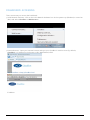
1. Open LaCie Network Assistant.
Windows Users: Select LaCie Network Assistant in Start > All Programs. The LaCie Network Assistant icon
will appear in the system tray.
Mac Users: Select LaCie Network Assistant in your Applications folder. The LaCie Network Assistant icon will
appear in the menu bar.
2. Click on the icon in the system tray (Windows) or menu bar (Mac) and select CloudBox > Web Access…
■
■
LaCie Network Assistant - Windows
LaCie Network Assistant - Mac
LaCie
13
LAUNCH THE SETUP WIZARD DIRECTLY IN A WEB BROWSER
1. Open your Internet browser (Firefox, Internet Explorer, or Safari)
2. Type the default device name in the browser’s address bar. Depending upon your operating system and
browser, you can use http://CloudBox or http://CloudBox.local.
Completing the CloudBox Setup Wizard
The Setup Wizard will guide you through the installation, from creating an account to configuring the CloudBox
settings.
Please locate the leaflet with your 1-Year Online Backup contract number before continuing with
the Setup Wizard. You will be asked for the contract number during the setup.
Administrator and Users - A Quick Note Before Starting
The Username you enter during the Setup Wizard will become the default administrator of the CloudBox.
Please note your Username and Password on paper for future reference since the information
cannot be recovered.
An administrator may add up to nine more users to the CloudBox to store and backup data. Further, the
administrator can revise or remove users. While user names may be edited at any time, the administrator
Username remains the same once it is created during the Setup Wizard.
LaCie
14
Important note: If you are unsure of your IP settings, please contact the person or company responsible for
managing the network. For example, home users should contact their Internet Service Provider (ISP).
Important note: The Username and Password entered during the Setup act as the default login for the
CloudBox administrator. For security reasons, they cannot be recovered. Therefore, LaCie highly
recommends that you mark your Username and Password on paper. Keep the information in a safe,
convenient location so that you can easily recall your Username and Password.
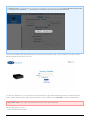
1. Welcome:
Select your language and time zone.
■
2. Network: Please make certain that your switch or router supports DHCP. You may adjust the IP settings on
your CloudBox once the Setup Wizard is complete.
Standard DHCP Network: The Setup Wizard will begin to configure the CloudBox on your network. Click
NEXT.
■
LaCie
15
■
Proxy Server: If the CloudBox cannot connect to the Internet, the Setup will ask for a proxy server. Enter the
proxy server IP address and the password (if necessary). Click NEXT.
Before moving to the next step, the Setup Wizard will search for a more recent version of software.
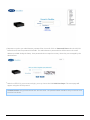
3. Account:
Locate the leaflet with your CloudBox 1-Year Online Backup Contract number.
■
LaCie
16
■
■
LaCie
In the Setup Wizard, enter the contract number provided on the leaflet. The contract number is
case-sensitive. Click NEXT.
Enter a Username and Password. The Username can run from 1 to 20 characters. It is case-sensitive and
does not support symbols.
17
■
■
■
■
■
■
LaCie
As the first user, the name entered during this step becomes the sole administrator of the CloudBox.
This is the only user name that cannot be changed once the CloudBox setup is complete.
It is very important to make note of the administrator Username and Password. To protect Online Backup
accounts from unauthorized access, administrator Usernames and Passwords cannot be recovered. Of
course, non-administrator Usernames and Passwords may be recovered by the CloudBox administrator.
Enter an email address to receive your CloudBox Online Backup verification code. The verification code will
allow you to continue with the Setup Wizard. Click NEXT.
Check your email for the verification code.
Enter the verification code into the Setup Wizard. Please remember that the code is case-sensitive. Click
NEXT.
18
4. Finish: Your CloudBox account has been configured and you are now ready for online backup. Any files you
copy onto the CloudBox will be automatically backed up to your online storage. Click FINISH to launch the
Dashboard administration tool.
You will receive an email confirming your CloudBox Online Backup account.
Proceed to Administering Your LaCie CloudBox for further information on using and managing your LaCie
CloudBox. You can also visit http://cloudbox.lacie.com for product details and updates.
LaCie
19
THE CLOUDBOX SETUP WIZARD - EXISTING CONTRACT
RUNNING THE CLOUDBOX SETUP WIZARD WITH AN EXISTING ONLINE
BACKUP ACCOUNT
You may have to run the Setup Wizard again due to:
■
■
Restoring the device to factory settings
Installing a replacement unit
If your contract number is associated with an active Online Backup account, you will have the option to restore
your last backup:
1. Launch LaCie Network Assistant and select CloudBox > Web access…
2. Select your language and time zone. Click NEXT.
3. Please make certain that your switch or router supports DHCP. You may adjust the IP settings on your
CloudBox once the Setup Wizard is complete.
Standard DHCP Network: The Setup Wizard will begin to configure the CloudBox on your network. Click
NEXT.
Proxy Server: If the CloudBox cannot connect to the Internet, the Setup will ask for a proxy server. Enter the
proxy server IP address and the password (if necessary). Click NEXT.
4. Enter your contract number in the Setup Wizard. Click NEXT.
■
■
5. Enter your Username and Password. Click NEXT.
LaCie
20
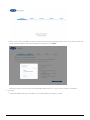
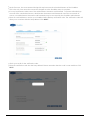
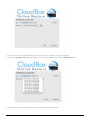
6. Your Online Backup account will be discovered. The Setup Wizard will ask if you wish to perform a Full
Restore of the data currently stored in your Online Backup. Once you have selected, click FINISH.
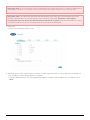
7. A prompt will provide additional information on the Full Restore. Please read it carefully before selecting
FINISH.
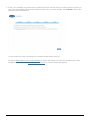
8. The CloudBox Dashboard will open. You may CANCEL THE RESTORE in progress or LOG OUT. Dashboard
administration will not be accessible until the Restore is complete. Please note that your settings from the
last Online Backup will be restored with the data.
9. You will receive an email confirming that the Restore is complete. The Dashboard will also provide details on
the Restore the next time you log in.
LaCie
21
Important info: Please note that data is not accessible during a Full Restore.
CLOUDBOX ONLINE CONTRACT RENEWAL AND EXPIRATION
LaCie recommends renewing your Online Backup contract each year. In keeping your Online Backup contract up
to date, you can continue to enjoy secure updates to your private account. The Home page on the CloudBox
Dashboard lets you know how many days remain before the contract expiration date. You will also receive an
email one month before the expiration date as a friendly reminder.
You can renew your contract at http://cloudbox.lacie.com.
For two months following the contract expiration date, it is possible to restore data backed up online. To restore
a backup after an Online Backup contract has expired, please use the restore application available at
http://cloudbox.lacie.com.
Technical note: With or without an active Online Backup contract, your CloudBox will provide 100GB of
storage accessible via your local network.
LaCie
22
ACCESSING AND TRANSFERRING FILES
ABOUT USER FOLDERS
The LaCie CloudBox creates a separate folder for each user. The user can copy important data to his folder for
local and online backup.
For example: the person who runs the Setup Wizard decides upon the Username “admin”. A corresponding
folder called “admin” is also created by the CloudBox. The admin may now store files in his admin folder.
Each user added by an administrator can copy files to his respective CloudBox user folder. All data stored on the
CloudBox is automatically backed up online. To add users, see Administering Your LaCie CloudBox.
Please note that one user folder may be accessed on a computer at one time. For example, if the administrator
has mounted his folder “admin” onto Computer A, he cannot add another CloudBox user folder to the list of
Computer A’s active network drives. In order to mount another user folder on Computer A, the administrator
must disconnect from the “admin” user folder.
However, a user folder may be mounted on more than one computer on the same network at the same time.
For example, the user folder “admin” may be mounted on Computer B while it is mounted on Computer A.
Accessing User Folders Via LaCie Network Assistant
When your computer is connected to the network, LaCie Network Assistant will help you quickly access your
user folder. You can also configure the user folder to be available every time you log on to your computer.
1. Launch LaCie Network Assistant.
Windows Users: Select LaCie Network Assistant in Start/Programs and the icon will appear in the
system tray. LaCie Network Assistant automatically detects your LaCie CloudBox and any other LaCie
devices on your network.
■
Mac Users: Select LaCie Network Assistant in your Applications folder and the icon will appear in the menu
bar. LaCie Network Assistant automatically detects your LaCie CloudBox and any other LaCie devices on
your network.
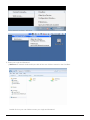
2. Click on the icon in the system tray (Windows) or menu bar (Mac) and select CloudBox > Connect
Manually.
■
LaCie
23
LaCie Network Assistant - Windows
LaCie Network Assistant - Mac
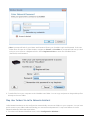
3. Enter your Login and Password.
Windows: A network window will open with all the user folders created on the CloudBox.
■
Double-click on your user folder to enter your Login and Password.
LaCie
24
■
Mac: A prompt will ask for your Name and Password. Enter your CloudBox Login and Password. If the user
folder does not open in a Finder window, navigate to Shared > CloudBox. A prompt will ask how you wish
to log on, as a Guest or a Registered User. Select Registered User to enter the CloudBox Name
(Username) and Password.
4. Transfer files from your computer to the CloudBox user folder. You can copy and paste or drag and drop files
directly to the user folder.
Map User Folders Via LaCie Network Assistant
LaCie Network Assistant can be configured to automatically mount user folders on your computer. You can have
quick access to your folders without entering your username and password. To map user folders via LaCie
Network Assistant, follow the steps below:
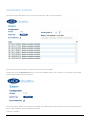
1. From the LaCie Network Assistant menu, select Configuration Window….
LaCie
25
2. Click the Volumes tab.
3. If you wish to map password-protected user folders, click the Authentication button. A prompt will ask for
your username and password.
LaCie
26
4. Next to the user folder you wish to map, click the check box under the column Auto Mount.
Windows: The user folder will mount in My Computer/Computer automatically when the computer detects the
CloudBox on the network.
LaCie
27
Mac: The user folder icon will appear in your Finder when the computer detects the CloudBox on the network.
Map User Folders Via the Operating System
Windows XP, Vista, and Windows 7 Users
1. From an Explorer window in Windows XP, select Tools > Map Network Drive.
LaCie
28
For Windows Vista and Windows 7, open an Explorer window, navigate to Computer, and click Map
Network Drive.
2. Browse to and select your [User Folder].
3. Windows will offer the option to mount the user folder each time you log on to the computer.
4. You now have access to your user folder from an Explorer window.
Mac Users
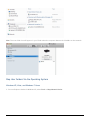
1. Open a new Finder window. In the SHARED section on the left, click on CloudBox (or, the new name of
your device) > [User Folder].
2. Choose Connect As…
3. Select Registered User to enter your Name and Password.
4. You now have access to your user folder from the Finder.
To mount the user folder each time you log on to you computer:
LaCie
29
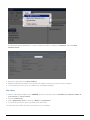
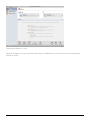
1. From the Apple icon in the menu bar, select System Preferences > Accounts > Login Items.
2. Click on the ”+” sign to add a new item to the list and browse for the user folder. Please note that the user
folder must be mounted to add it to the list.
3. When you log on to the Mac OS, the user folder will automatically mount on your desktop.
COPY AND BACKUP
Your data is not modified or compressed when backed up online. Further, you decide the type of backup that
best suits your working environment. Backup preferences range from copying files manually to automated
solutions such as Windows Backup and Restore.
Desktop Copy
Your user folder acts like any other folder or drive when it is mounted on your computer. Once you have opened
your user folder, you can:
■
■
Drag and drop folders and files directly into it.
Copy and paste folders and files directly into it.
Backup Solutions for Windows and Mac
The CloudBox supports most automated backup solutions for Windows. For example, you may use the CloudBox
as the target disk for Windows Backup and Restore.
LaCie
30
Run LaCie Backup Assistant on the included Utilities CD-ROM to install professional versions of Genie Timeline
for Windows or Intego for Mac. Both offer excellent backup options for your CloudBox.
Genie Timeline Professional - Windows
LaCie
31
Intego Backup Manager Pro - Mac
With the CloudBox, your local system backups enjoy an added level of security since they are automatically
backed up online.
LaCie
32
ADMINISTERING YOUR LACIE CLOUDBOX
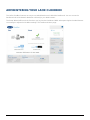
The LaCie CloudBox features an easy-to-use administration tool called the Dashboard. You can access the
Dashboard via LaCie Network Assistant or directly in your Web browser.
The Setup Wizard will launch the first time you log into the Dashboard. With subsequent logins the administrator
can manage or adjust the CloudBox settings. The Dashboard Home page:
LaCie
33
DASHBOARD: ACCESSING
There are two ways to access the Dashboard:
■
■
LaCie Network Assistant - Click on the LaCie Network Assistant icon in the system tray (Windows) or menu bar
(Mac) and select CloudBox > Web Access…
Internet Browser - Open your Internet browser and type your CloudBox’s machine name (by default,
CloudBox) or IP address in the browser’s URL (Web address) field.
http://CloudBox or http://CloudBox.local
IP address
LaCie
34
Technical note: The IP address of your LaCie CloudBox can be found by clicking LaCie Network Assistant
> Configuration Window… > [CloudBox or the name you have given the device].
The LaCie CloudBox login page will open in a new browser window or tab. If your browser is not open, LaCie
Network Assistant will open it for you.
To open the Dashboard, you must enter the administrator Login and Password that were created during the
Setup. Please note that the Login and Password are case sensitive. Click LOG ON to enter the Dashboard.
Important note: User logins and passwords will not open the Dashboard.
On the login page, you can:
■
Select a preferred language
LaCie
35
■
■
Request to receive your administrator password hint via email. Click on Password hint under the LOG ON
button then fill out the password hint fields. The administrator’s password hint will be sent to the email
address provided during the Setup. User passwords do not require recovery since they are managed by the
administrator.
Switch to HTTPS: For a more secure login, you may choose the link Switch to https. The same page will
appear using the HTTPS protocol.
Technical note: Only password hints are sent via email. The password itself should be easy to recover once
the hint is received.
LaCie
36
DASHBOARD: HOME PAGE
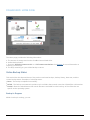
The Home page provides the following information:
a. The amount of storage used on the CloudBox internal hard drive.
b. Online Backup Status.
c. Choose a Selective restore to PC or a Full restore on the Box. See Restore for more information on
restoring your backups.
d. The days remaining on your Online Backup contract.
Online Backup Status
This section lists the date and times of the previous and next backups, backup history, data sent, and the
current backup status. Examples of a backup status:
■
■
■
Done - The backup completed successfully.
Failed - The backup encountered a problem such as folders that contain more than 15,000 files or directories.
Partial - Alerts the administrator that certain files were excluded from the backup, such as files that are
specific to the operating system.
Backup In Progress
While a backup is running, you can:
LaCie
37
a. Click the “i” icon to see the backup progress window.
b. Click STOP THE BACKUP to cancel the backup in progress.
LaCie
38
Between Backups
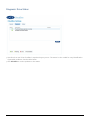
Click the “i” icon for a History of your backups. You may also view and download the logs for each backup.
DASHBOARD: NAVIGATION
The Dashboard is made up of a central area surrounded by “widgets”. Widgets are small boxes that represent
the different pages that make up the Dashboard. No matter your place in the Dashboard, a widget displays a
summary for easy reference. For full information, navigate to the page itself by clicking directly on the widget.
■
■
■
■
To navigate to a page, click the widget below its title; or, drag and drop a widget to the center of the window.
To minimize a widget, click the X next to its title.
To expand a minimized widget, drag its icon over an expanded widget, which replaces it.
To rearrange widgets, drag the minimized widget icon or the expanded widget’s heading onto the place of
another widget.
LaCie
39
DASHBOARD: LOGGING OUT
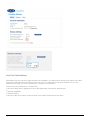
To log out of the Dashboard or restart/shutdown the CloudBox, click the Shutdown Options button in the
upper right-hand corner of any Dashboard page.
■
■
If you are not restarting or shutting down the CloudBox, LaCie recommends logging out for security reasons.
Logging out is very important if the computer is for public use.
Please note that a backup in progress will be stopped if you shut down or restart the device. The Dashboard
will warn you if a backup is in progress.
LaCie
40
DASHBOARD: GENERAL SETTINGS
The administrator can use this page to modify some of the CloudBox’s general parameters. To make changes,
click on the selection to view a prompt for additional choices. For example, click on the Machine Name Cloudbox
to open the field that permits you to type a new name.
Machine Name: Modify the machine name. The machine name identifies your CloudBox in LaCie Network
Assistant and on the local network. The machine name is limited to 15 characters. Please use alphanumeric
characters without spaces or symbols.
Date (mm/dd/yy): The date is set by your CloudBox Online Account.
Workgroup: Your CloudBox can join an existing Windows Workgroup. Click on Workgroup to change the name.
Technical note: Mac users connected to a network with Windows computers can access user folders in a
Workgroup. From the Finder, select Shared > [Workgroup] > CloudBox. “[Workgroup]” is the name of
the Windows workgroup.
Time: The time is set by your CloudBox Online Account.
Language: Choose your preferred language.
Time Zone: Set the time zone.
Status Light: The status light is enabled by default. Deselecting the checkbox will turn off the CloudBox’s front
light. However, the drive will report potential errors via the light.
LaCie
41
DASHBOARD: USERS
Manage user accounts on this page.
User data is organized by a table:
Login: All user Logins may be revised by clicking on the name. The administrator name created during the Setup
cannot be modified.
Password: Please note that all Passwords are listed with asterisks for the security of each user. User Passwords
may be revised by clicking on the current password. To change the administrator password, go to the CloudBox
Settings page and select the General tab. Please note that the CloudBox must have a connection to the
Internet to change the administrator password.
Usage: If you have set a quota for a user, the amount of space used will be indicated as a percentage.
Quota: Set the limit that a user may store on the CloudBox. For example, a user may be assigned 10GB of
storage space for his data.
Delete User: The column on the far right allows the administrator to delete a user and the user's data. Note that
the administrator (“admin”) does not have an “X” in the far right column since the name cannot be deleted.
Adding a New User
A private folder is automatically created with each new user. The name of the user folder is conveniently
associated with the user login. For example, the user “Sally”, has a user folder with the same name. If Sally
changes her login to Bill, the user folder will also change to Bill.
1. Click ADD USER.
2. In the window prompt, enter:
LaCie
42
The login name for the user. You may use between 1 and 20 characters including letters (case sensitive),
numbers, the hyphen, and the underscore. Spaces and other symbols are not supported.
A password up to 32 characters. You must confirm the password. ASCII characters only.
A quota for disk usage. The number value is in gigabytes (GB). For example, enter “5” means that the user
may only use up to 5 GB of storage on the CloudBox.
3. Click the green check sign on the right to create the user account.
■
■
■
Deleting a User
Important info: Deleting a user will also remove the associated user folder, the data within the user folder,
and related backup jobs. Once deleted, the user and user data will not be included in the next online backup.
1. Click the gray X to the right of the user listing in the table.
2. In the confirmation box, click Delete.
Note that the administrator (“admin”) does not have an “X” in the far right column since the name cannot be
deleted.
LaCie
43
Editing a User
1. Click on the text in any field in the user table to modify a value. Please remember that the Login name for the
administrator cannot be changed. Go to Dashboard: CloudBox Settings for instructions on how to change
the password for the administrator.
2. If the user folder was mounted on a computer while the account was modified, unmount it. The changes will
take effect the next time you mount the user folder on a computer.
DASHBOARD: NETWORK
Adjust the network settings for your CloudBox on this page.
Configure using DHCP or manually: Most consumer networks are DHCP, assigning an IP address to each
connected device. As a result, users will see that the table has been filled in with values assigned by a DHCP
server. If you select Configure manually, you will be able to modify the table values. Please make certain that
you are entering the correct IP address if you select a manual IP configuration.
Important Info: Please use caution when selecting Configure manually. Entering an incorrect IP address
could create network conflicts or problems connecting to the CloudBox.
Proxy Configuration: The CloudBox may be used with a network that includes a proxy server for Internet
access. Select the checkbox next to Enable proxy in order to enter the IP address and port number for the proxy
server. Select the Authorization required checkbox if a Name and Password are needed to reach the Internet via
the proxy server. Click APPLY to execute the changes.
The Dashboard may close once you have applied the changes to the CloudBox network configuration.
LaCie
44
DASHBOARD: CLOUDBOX SETTINGS
This page provides Online Backup account information and the CloudBox health status via three tabs: General,
Diagnosis, and History.
General - Backup Time and Bandwidth
Account Information
Important Info: Click on the words or asterisks of the settings you wish to change.
■
■
■
View the name of the Main user (the administrator) and the expiration date for the Online Backup contract.
Your account is activated during the Setup Wizard, allowing you to perform online backups for one year. After
one year, you will be asked if you wish to extend the benefits of your Online Backup account.
To change the administrator password, click on the asterisks.
A new window will open asking for your current and new passwords as well as an optional hint. Please note
that the CloudBox must have an Internet connection to change the administrator password.
LaCie
45
Backup Settings
Important Info: Click on the words of the settings you wish to change.
Click BACKUP NOW to initiate an immediate backup.
Select the time of day for the CloudBox online backup by clicking the selection next to Online backup start
time. LaCie recommends choosing a time of day when your network is less active.
LaCie
46
You have the option to choose transfer rates for your CloudBox uploads and downloads. Please consider the
amount of bandwidth that the CloudBox will use before making any changes. To initiate a change, click on the
settings next to Download limit and Upload limit.
By default, the CloudBox online backup will ignore hidden files used by Mac OS X. To backup these files, you
may click on No next to Ignore hidden Mac files. Select Yes to skip Mac OS hidden files.
LaCie
47
Your First Online Backup
Depending upon the amount of data stored on the CloudBox, your initial online backup may require some time.
Please do not be alarmed if the backup takes many hours or several days. All online backups occur in the
background, leaving you free to operate your computer or workstation.
Factors that may contribute to a slow backup:
■
■
■
■
Amount of data (tens of gigabytes at once will significantly increase the backup time)
Network bandwidth
Network activity
Amount of files at one time (numerous files at once will increase the backup time)
LaCie
48
Diagnosis: Drive Status
■
■
Use this tab to see if the CloudBox is experiencing any errors. The status is color coded for easy identification
of potential problems. See the table below.
Click RELOAD to receive updates on the status.
LaCie
49
CloudBox service running
CloudBox connection quality
Normal operation
Normal operation
Warning
(Yellow)
Not applicable
The CloudBox network connection is very weak.
*Please verify the network cable connections.
*Confirm that there are no conflicts on your
router ports. See your router user manual for
more information on ports.
*Speak with your network administrator or
provider. You may require a proxy server to
connect to the Internet.
Error (Red)
The Online Backup service is experiencing
difficulty.
*Wait for a minute before clicking RELOAD.
*If the problem persists, try rebooting the
The CloudBox is not connected to the Internet.
CloudBox.
*If the above options do not resolve the
issue, try to restore the CloudBox to
factory settings.
Not available
(Grey)
There is a problem connecting to the
CloudBox. Try to save the system logs
while troubleshooting.
*Logout and reboot the browser. Go to the
Dashboard login to see if the problem is
resolved.
*If the problem persists, try rebooting the
CloudBox.
*If the above options do not resolve the
issue, try to reset the CloudBox.
Ok (Green)
History
Review the logs of your most recent online backups.
LaCie
50
There is a problem connecting to the CloudBox.
Try to save the system logs while
troubleshooting.
*Logout and reboot the browser. Go to the
Dashboard login to see if the problem is
resolved.
*If the problem persists, try rebooting the
CloudBox.
*If the above options do not resolve the issue,
try to reset the CloudBox.
Click on the words Done, Failed, or In progress to see the log. A fourth option, Partial, indicates that the
backup was successful but skipped unsupported files.
LaCie
51
DASHBOARD: SUPPORT
The support page will allow you to access the system log and set up email alerts.
Version: The level of firmware currently being used by the CloudBox.
System log: Click the Download button to save the CloudBox log to your computer. The system log is helpful
when speaking with Technical Support.
Email notification: When the checkbox is selected, the administrator will receive email notices concerning the
state of the CloudBox. Email notifications include:
■
Backup complete
LaCie
52
■
■
■
■
■
Backup failed
Restore complete
Restore failed
Contract expiration notice
Password hint
Default email notifications are sent to the administrator’s email address even if the Alert notification box is not
checked:
■
■
■
Expiration date notice
Expiration date warning
Backup failed
Logs: CloudBox warnings sent via email are also listed in the Alerts box. To clear the alerts box, click the Trash
can icon on the right.
AUTO-Update: See Update Method 1: AUTO-Update for further information.
Restore to Factory Settings
Important info: Since all data and settings on the CloudBox will be erased and the device will revert to its
original firmware, LaCie does not recommend performing a reset unless you have exhausted all other means
of troubleshooting.
Caution: Resetting the device will erase all the Dashboard settings such as users, online backup schedule,
etc. You can recover the settings when performing a Full Restore as part of the Setup Wizard (The CloudBox
Setup Wizard - Existing Contract). The CloudBox must have successfully completed an Online Backup in
order to perform a Full Restore. Please take a moment to consider if you have made any changes to your
settings since the last Online Backup.
To reset the CloudBox to its out-of-the-box state:
1. Make certain that the CloudBox is off.
2. Press and hold the power button for 10 seconds. Release the button when the LED becomes solid red.
3. Upon releasing the button, the LED will blink red. To reset the CloudBox, press the button while the LED
blinks red. Please note that the LED will only blink red for five seconds. You must press the button again
to confirm the reset before the five seconds elapse. If you do not press the button while the red light is
blinking, the drive will start normally and the reset process will be aborted.
4. Following a successful reset, the CloudBox will restart automatically, returning to its factory settings. Please
be patient as the CloudBox may take longer than usual to boot.
LaCie
53
Update Product Software
Important info: Do not interrupt the CloudBox while it is updating the firmware. Turning off the
CloudBox during an update can harm the device beyond repair.
LaCie may improve your network device software or add new features over time.
To find the latest version of CloudBox software, go to Dashbaord > Support. Under Configuration, look for
Version. The number that follows is the version of software installed on your CloudBox.
There are two methods for updating your CloudBox software.
Update Method 1: AUTO-Update (Preferred)
Your network hard drive is configured to obtain the latest software updates through the Internet. If a new
version of software is found, you will receive a notification to update the device by email. If you do not see an
email, please check your Spam filter. Consider revising your Spam settings if it contains email notifications from
the CloudBox.
In most instances, the prompt for an update will also appear when you log into the Dashboard. You can go
directly to the CloudBox Dashboard Support page to begin the update.
Updating your CloudBox should not erase your configuration or data.
a. Click the screwdriver and wrench icon to set the time that the CloudBox searches for firmware updates.
b. Manually search for an update:
1. Open Dashboard > Support.
2. In the AUTO-Update box, click the gray downward-facing arrow to check for a new update.
LaCie
54
3. If an update is available, the download will begin automatically.
4. Once the download has concluded, click the Details link to see the change log. Click the Install button to
continue.
5. The drive will reboot and disappear from the network temporarily. Installation can take several minutes.
When it reappears, you can verify the new software version on the Dashboard Support page.
Update Method 2: Update with LaCie Network Assistant Software
Recommendations for Updating Using LaCie Network Assistant:
■
■
■
■
Connect your PC or Mac to the network using an Ethernet cable (turn off the wireless connection)
Make sure users on your network have stopped data transfers to the CloudBox
Turn off all network attached storage on the network save for the CloudBox
Unmount all user folders associated with the CloudBox from computers on the network
This update procedure will not erase your configuration or files saved to the drive:
1. Confirm that you are using the latest version of LaCie Network Assistant by visiting www.lacie.com. If you
download a newer version, make sure to uninstall your current version of LaCie Network Assistant before
installing the update.
2. Check www.lacie.com for the latest update of your LaCie CloudBox. Download the update to your computer.
Please note that the name of the update includes .capsule.
3. Run LaCie Network Assistant.
4. Go to LaCie Network Assistant > Preferences to confirm that IPConf Support is deactivated. You will
know that IPConf Support is not active if the button reads Activate.
5. Go to LaCie Network Assistant > Configuration to select your product from the list on the left. Click on
the Update your NAS button. Enter your administrator username and password.
LaCie
55
6. Browse to and load the update package (.capsule file) you downloaded.
7. Click Continue… to begin the update. Mac users may receive a prompt to type the administrator password
for the computer. Installation can take several minutes.
8. Once the update is complete, verify the update.
1. Click the LaCie Network Assistant logo in the system tray (Windows) or menu bar (Mac) to select
Configuration Window.
2. Click the Network tab to see the CloudBox software version.
LaCie
56
RESTORE
There are two easy ways to restore your data:
1. Selective Restore: Browse your online backup history to restore individual files. This option allows for greater
control in choosing only the files that you need. You can log onto your online account via the CloudBox Online
Restore application to browse the last 10 complete backups for specific files.
2. Full Restore: Restore the entirety of your data and settings to the CloudBox via the Dashboard or the
CloudBox Online Application. This option is recommended when:
■
■
Your CloudBox is replaced due to loss, theft or technical problems
Data and settings are lost or corrupt on your CloudBox.
The CloudBox Online Restore Application
The CloudBox Online Restore application has an intuitive interface to:
■
■
■
■
Browse files backed up online.
View files from the last 10 Backup Points, or successful online backups.
Restore individual files to your computer desktop
Restore the entirety of one of your last 10 backups to the CloudBox.
Download the CloudBox Online Restore application at http://cloudbox.lacie.com from any computer with an
Internet connection. The CloudBox Online Restore application is compatible with Windows or Mac. Once it is
available on your computer:
1. Launch the application
2. Enter your Contract ID, Username, and Password. Click Login.
3. Choose between Browse for a Selective Restore or Full Restore. See the details below for each type of
restore.
LaCie
57
SELECTIVE RESTORE
To begin a Selective Restore, launch the CloudBox Online Restore application to select Browse. You will be
directed to your online backup account.
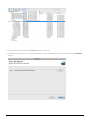
1. Select one or more files and click Restore at the top of the application window. You can download the files
directly to your computer.
2. Browse files from your last 10 successful Backup Points.
LaCie
58
3. Once the files are selected, click Restore from the menu bar.
4. A window will prompt you to choose a destination. Select a target folder for the files and click the RESTORE
button.
LaCie
59
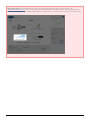
Important info: The Dashboard Home page has Selective restore on PC to link you directly to
http://cloudbox.lacie.com. Once at the site, you can download the CloudBox Online Restore application to
your computer. If you have already downloaded the application, you can launch it to view and restore data.
LaCie
60
FULL RESTORE
If you wish to restore a small portion of your data from an online backup, a Selective Restore offers more
flexibility to choose specific files than a Full Restore. However, if you have to replace your CloudBox due to theft
or technical problems or your data is corrupt or lost, a Full Restore can restore one of your last 10 backups
directly to the device. You will also recover your Dashboard settings, which is helpful if a user has been
accidentally deleted (Dashboard only).
A Full Restore is available:
■
■
■
On the Dashboard Home page - Run a Full Restore via the Dashboard if you wish to restore the last successful
backup point to your CloudBox.
From the CloudBox Online Restore application - Run a Full Restore via the CloudBox Online Restore application
if you wish to select a restore from the last 10 successful backup points or your CloudBox is unavailable. The
CloudBox Online Restore application allows you to select your computer hard drive or external storage as the
destination for the Full Restore.
When running the Setup Wizard after the CloudBox has been restored to factory settings or on a replacement
unit. Please note that this will restore the last successful backup point. See The CloudBox Setup Wizard Existing Contract for further information.
Important info: All data stored on the CloudBox will be deleted in favor of the Full Restore. Please copy
files from the CloudBox that you wish to preserve before starting a Full Restore.
Important info: Please note that Dashboard administration and data on the CloudBox are not accessible
during a Full Restore. However, you may browse files via the CloudBox Online Restore application
Important info: Settings that have been changed in the Dashboard can be lost with a Full Restore. For
example: The CloudBox administrator created user “A” following the last successful backup. Eight hours
later, the administrator decides to perform a Full Restore due to a large group of corrupt files. In order to
avoid corrupting the next online backup, the administrator had to initiate the Full Restore. While the files are
no longer corrupt on the CloudBox following the Full Restore, user “A” has been deleted since the setting
was not saved online.
Technical note: Please be patient during the Full Restore. The time to complete the restore may take many
hours or several days depending upon the size of the backup, the bandwidth of your Internet connection,
and the amount of network activity.
LaCie
61
Full Restore - Dashboard
Choosing a Full Restore from the Dashboard will automatically restore the last successful backup. If you wish to
select an earlier backup point, please see the instructions for a Full Restore using the CloudBox Online Restore
application.
1. Go to the CloudBox Dashboard.
2. Choose the Home page.
3. Click on Full restore on Box.
4. Read the warning prompt. If you wish to continue with the Full Restore, click YES.
5. The entirety of the last complete online backup will be restored to the CloudBox. The Dashboard settings
from the same backup will also be restored.
Full Restore - CloudBox Online Restore Application
To begin a Full Restore, launch the CloudBox Online Restore application to select Full Restore.
1. A prompt will ask you to choose a destination for the Full Restore and a Backup point.
LaCie
62
2. You may choose another destination such as your internal hard drive or external storage.
3. Choose the Backup Point that you wish to use for the Full Restore then click the RESTORE button.
4. The entirety of the selected backup will be restored to the target location.
LaCie
63
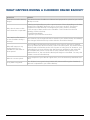
WHAT HAPPENS DURING A CLOUDBOX ONLINE BACKUP?
Question
Answer
How does an Online Backup Files stored on the CloudBox are indexed and prepared for upload to your Online
begin?
Backup account.
Why does it seem to take
more time than I expected?
Indexing and uploading may take a good amount of time depending on the data
stored on the CloudBox. Backups can run from hours to days. The time to
complete an Online Backup is contingent upon many factors, including:
* The amount of data stored on the CloudBox. This includes the size and
quantity of files to backup.
* Available bandwidth.
* Speed of your Internet connection.
Can I work on files stored
on the CloudBox during a
backup?
Yes. However, the changes will not be stored to your Online Backup immediately.
The changes will be backed up online with the next Online Backup.
What will happen to my
Online Backup if my
CloudBox is shut down or
loses power?
The CloudBox should restart automatically once power is restored. If needed,
you may restart the device manually. Due to the interruption, the Online Backup
will be noted as Failed due to the loss of power or being shut off. However, your
Online Backup account will keep the data that was uploaded to the point that
the CloudBox lost power or was shut off (also called a restore point). Once
powered back on, the next Online Backup will begin as scheduled. You may also
initiate a manual Online Backup.
What is a restore point?
It is a snapshot of your data at a given time, such as the backup start date and
time.
Is my data encrypted?
Yes. All data is encrypted using 128-bit AES (Advanced Encryption Standard)
before it is uploaded to your Online Backup.
LaCie
64
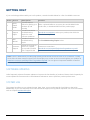
GETTING HELP
If you are having problems with your LaCie product, consult the table below for a list of available resources.
Order Source
Description
Location
1
Quick
Install
Guide
Concise steps to
follow for getting your Either a printed leaflet or accessory box and included in the
product up and
product box, or download PDF from the product page
running
2
Support
Pages
Includes interactive
troubleshooting
topics for most
common problems
www.lacie.com/support/, select your product, then click the
“Troubleshooting” tab
3
User
Manual
Includes common
troubleshooting
topics
See Troubleshooting Topics below
4
Customer
Support
Create an account on
lacie.com, register
your product, and fill
out a support ticket
Create an account here:
www.lacie.com/us/mystuff/login.htm?logout&rtn=mystuff
Note: LaCie is dedicated to providing high quality products that enrich the lives of our customers. To help
LaCie offer the best customer support, we encourage you to create an account and register your product at
www.lacie.com/us/mystuff/login.htm? logout&rtn=mystuff. You can give us important feedback as well as
receive updated information on your LaCie device.
SOFTWARE UPDATES
LaCie frequently releases firmware updates to improve the functionality of products. Please check frequently for
recent updates to firmware and to LaCie Network Assistant to ensure optimum product performance.
SYSTEM LOG
The system log allows you to review the type, date, time, source, and event ID of activities on the LaCie .
Additionally, if you ever need help from LaCie technical support, the log will be important. For more information,
refer to chapter Dashboard:Support.
LaCie
65
TROUBLESHOOTING TOPICS
Note: Interactive troubleshooting, a highly effective way to resolve problems with your product, is available
from www.lacie.com/support/. Select your product to click the “Troubleshooting” tab.
Troubleshooting the Network Connection
The CloudBox is not recognized by the computer.
Q: Does your computer's configuration meet the minimum system requirements?
A: Check Recommended System Hardware and Software for more information.
Q: Is the system's power supply connected and is the LED on the front of the drive on?
A: Make sure that: the power supply is properly connected; that the system has been powered on pushing the
power button; and that the power supply outlet has a sufficient supply of power.
Q: Is the LED on the front of the device flickering for an inordinate period of time?
A: If the LED is flickering or will not turn on, the power supply may be defective. Please contact your LaCie
reseller or LaCie Customer Support.
Q: Did you follow the correct installation steps?
A: Review the installation steps Connecting to your Network.
Q: Are both ends of the Ethernet cable firmly connected?
A: Disconnect the Ethernet cable, wait 10 seconds and then reconnect.
Ensure that the interface connectors are properly aligned. The Ethernet cable can only be inserted one way.
Make sure it is correctly oriented.
Check that the Ethernet connectors are straight and fully seated in the Ethernet ports.
Make sure that you use the Ethernet cable provided with the LaCie CloudBox.
The CloudBox does not appear on the network.
By default the LaCie CloudBox is configured to retrieve its IP address from a DHCP server. If your network is
managed by a DHCP server and you cannot access your LaCie CloudBox, try checking your DHCP server's log.
To get the IP address, run LaCie Network Assistant, which is located on the LaCie Storage Utilities CD-ROM. If no
DHCP server detected, the product will run APIPA to assign itself an IP address.
Q: Is the IP address properly set?
A: For more information, please see Dashboard: Network.
LaCie
66
Q: Does your network require devices to be assigned a static IP address?
A: To assign a static IP address, see Dashboard: Network.
LaCie Network Assistant is not working as described in this manual.
Q: Are you using an obsolete version of LaCie Network Assistant?
A: Confirm the latest version of Lacie Network Assistant to ensure all features work correctly.
1. If LaCie Network Assistant is not running, launch the program.
2. Go to LaCie Network Assistant > Preferences to find the current version of LaCie Network Assistant.
3. Go to www.lacie.com to find the latest version of LaCie Network Assistant.
4. If there is a more recent version LaCie Network Assistant, follow the online instructions to download and
install it.
A user does not have access to his CloudBox user folder.
Q: Has the administrator created an account for the user?
A: In order for a user to access his LaCie CloudBox user folder, two conditions must be met:
1. The administrator must create and provide the user with username and password.
2. The LaCie CloudBox must be connected to the network via Ethernet for users to access the storage.
I have noticed a delay in accessing the user folder.
Q: Are you transferring multiple files simultaneously?
A: Access to a user folder can slow down during simultaneous file transfers.
LaCie
67
PRECAUTIONS
Caution: It is essential that you use only the power supply that shipped with your product, since it is a
shielded-type power cord that meets FCC emission limits as well as to prevent interference to the nearby
radio and television reception.
Caution: Modifications not authorized by the manufacturer may void the user's authority to operate this
device.
Important info: Any loss, corruption or destruction of data while using a LaCie drive is the sole
responsibility of the user, and under no circumstances will LaCie be held liable for the recovery or
restoration of this data. To help prevent the loss of your data, LaCie highly recommends that you keep TWO
copies of your data; one copy on your external hard disk, for instance, and a second copy either on your
internal hard disk, another external hard disk or some other form of removable storage media. If you would
like more information on backup, please refer to our website.
Important info: Some enhancements brought to the product during its lifetime may cause discrepancies
between the information and screenshots in the manual and the actual user experience.
Important info: 1TB (Terabyte) = 1,000GB. 1GB = 1000MB. 1MB = 1,000,000 Bytes. Total accessible
capacity varies depending upon operating environment (typically up to 10% less per TB).
HEALTH AND SAFETY PRECAUTIONS
■
■
■
■
Only qualified persons are authorized to carry out maintenance on this device.
Read this User Manual carefully and follow the correct procedure when setting up the device.
Do not open the casing or attempt to disassemble or modify it. Never insert any metallic object into the casing
to avoid any risk of electrical shock, fire, short-circuiting or dangerous emissions. This LaCie product contains
no user-serviceable parts. If it appears to be malfunctioning, have it inspected by a qualified LaCie Technical
Support representative.
Never expose your device to rain, or use it near water, or in damp or wet conditions. Never place objects
containing liquids on the product, as they may spill into its openings. Doing so increases the risk of electrical
shock, short-circuiting, fire or personal injury.
GENERAL USE PRECAUTIONS
■
■
Power requirements 100-240 V~, 50-60 Hz, (supply voltage fluctuations not exceeding ± 10% of the nominal
and transient over-voltages according to over-voltage category II).
Do not expose the LaCie product to temperatures outside the range of 5º C to 30º C (41º F to 86º F); or to
operational humidity beyond 10-80%, non-condensing, or non-operating humidity beyond 5-90%,
LaCie
68
■
■
■
■
■
■
■
■
non-condensing. Doing so may damage the LaCie product or disfigure its casing. Avoid placing your LaCie
product near a source of heat or exposing it to sunlight (even through a window). Inversely, placing your LaCie
product in an environment that is too cold may damage the unit.
Rated cooling for altitudes up to 2000 meters.
If your product features a power cable, always unplug it from the electrical outlet if there is a risk of lightning
or if it will be unused for an extended period of time. Otherwise, there is an increased risk of electrical shock,
short-circuiting or fire.
Use only the power supply shipped with the device (if applicable).
Do not use the LaCie product near other electrical appliances such as televisions, radios or speakers. Doing so
may cause interference which will adversely affect the operation of the other products.
Do not place the LaCie product near sources of magnetic interference, such as computer displays, televisions
or speakers. Magnetic interference can affect the operation and stability of your LaCie product.
Never use excessive force on your LaCie product. If you detect a problem, consult the troubleshooting section
in this manual.
Protect your LaCie product from excessive exposure to dust during use or storage. Dust can build up inside the
device, increasing the risk of damage or malfunction.
Never use benzene, paint thinners, detergent or other chemical products to clean the outside of the LaCie
product. Such products will disfigure and discolor the casing. Instead, use a soft, dry cloth to wipe the device.
LaCie
69
WARRANTY INFORMATION
LaCie offers first-rate service and support through our generous three-tiered warranty policy. Our 1-, 2-, 3-, and
5-year policies include comprehensive, complimentary web-based resources, expert in-house technical support,
and worldwide repair and/or replacement coverage. To benefit from this warranty, please contact LaCie Support
at www.lacie.com/us/support where you can find online support and contact information. You may also contact
representatives at the original point of purchase who will be able to help guide you.
Standard warranties vary depending on the product. To verify your product’s warranty status and to see which
standard warranty is included with your product, type in your product’s serial number at
www.lacie.com/us/support. If no warranty is listed under your product’s name, this means that the warranty has
expired.
WARRANTY UPGRADES
If you wish to extend your warranty coverage, you can purchase Silver, Gold, or Platinum Care or Advanced
Exchange. For details, see www.lacie.com/warranties.
LEGAL INFORMATION
A standard LaCie limited warranty is included with all products. Please read the terms and conditions below.
LaCie Limited Warranty Policy
LaCie (“LaCie”) warrants, to the original purchaser, that this equipment shall be free of defects in materials and
workmanship for a period of one (1), two (2), three (3), or five (5) years, depending on the model, from LaCie's
date of original shipment when the equipment is used normally and is properly serviced when needed. If you
discover a defect covered by the warranty set forth above, your sole and exclusive remedy will be for LaCie, in
its sole discretion to (i) repair or replace the product at no charge to you; or, if a repaired unit or replacement
product is not available, (ii) to refund the current market value of your product. You acknowledge and agree
that replacement product, at the sole option of LaCie, may be a new product or a remanufactured product. In
order to receive the remedy set forth above, you must return the product during the warranty period and
include with each returned product (i) a copy of your original purchase invoice to verify your warranty; (ii) a
Return Material Authorization number; (iii) your name, address and telephone number; (iv) a copy of the bill of
sale bearing the appropriate LaCie serial numbers as proof of date of original retail purchase; and (v) a
description of the problem. The customer must pay all transportation costs for a returned product. The product
will need to be returned to LaCie within the country of original retail purchase. This warranty applies only to
hardware products; LaCie software, media, and manuals are licensed and warranted pursuant to separate
written agreement. This warranty does not apply if the product has been misused or has been damaged by
accident, abuse, misuse, or misapplication; if it has been modified without permission of LaCie; or if any LaCie
serial number has been removed or defaced. If a customer has purchased a LaCie Advance Care Option (ACO)
to go with this equipment, the ACO shall be valid for three (3) years from activation.
LaCie
70
EXCEPT FOR THE LIMITED WARRANTY SET FORTH ABOVE, ALL PRODUCTS ARE SOLD “AS IS” AND LACIE
EXPRESSLY DISCLAIMS ALL WARRANTIES OF ANY KIND, WHETHER EXPRESS, IMPLIED OR STATUTORY,
INCLUDING THE IMPLIED WARRANTIES OF MERCHANTABILITY, NONINFRINGEMENT AND FITNESS FOR A
PARTICULAR PURPOSE. WITHOUT FURTHER LIMITING THE GENERALITY OF THE FOREGOING, DOES NOT
WARRANT (1) THE PERFORMANCE OR RESULTS OBTAINED FROM USING THIS PRODUCT, (2) THAT THE PRODUCT
IS APPROPRIATE FOR THE CUSTOMER'S PURPOSES, (3) THE MANUAL IS ERROR FREE, OR (4) THAT NO DATA WILL
BE LOST WHILE USING THE PRODUCT. THE ENTIRE RISK AS TO THE RESULTS AND PERFORMANCE IS ASSUMED
BY THE CUSTOMER. THE WARRANTY AND REMEDIES SET FORTH ABOVE ARE EXCLUSIVE AND IN LIEU OF ALL
OTHERS, ORAL OR WRITTEN, EXPRESS OR IMPLIED.
EXCLUSIONS AND LIMITATIONS
This Limited Warranty applies only to hardware products manufactured by or for LaCie that can be identified by
the “LaCie” trademark, trade name, or logo affixed to them. The Limited Warranty does not apply to any
non-LaCie hardware products or any software, even if packaged or sold with LaCie hardware. Manufacturers,
suppliers, or publishers, other than LaCie, may provide their own warranties to the end user purchaser, but
LaCie, in so far as permitted by law, provides their products “as is”. Software distributed by LaCie with or
without the LaCie brand name (including, but not limited to system software) is not covered under this Limited
Warranty. Refer to the licensing agreement accompanying the software for details of your rights with respect to
its use.
LaCie does not warrant that the operation of the product will be uninterrupted or error-free. LaCie is not
responsible for damage arising from failure to follow instructions relating to the product's use. This warranty
does not apply: (a) to consumable parts, unless damage has occurred due to a defect in materials or
workmanship; (b) to cosmetic damage, including but not limited to scratches, dents and broken plastic on ports;
© to damage caused by use with non-LaCie products; (d) to damage caused by accident, abuse, misuse, flood,
fire, earthquake or other external causes; (e) to damage caused by operating the product outside the permitted
or intended uses described by LaCie; (f) to damage caused by service (including upgrades and expansions)
performed by anyone who is not a representative of LaCie or a LaCie Authorized Service Provider; (g) to a
product or part that has been modified to alter functionality or capability without the written permission of LaCie;
or (h) if any LaCie serial number on the product has been removed or defaced.
No LaCie dealer, agent, or employee is authorized to make any modification, extension, or addition to this
warranty.
Any loss, corruption or destruction of data while using a LaCie drive is the sole responsibility of the user, and
under no circumstances will LaCie be held liable for the recovery or restoration of this data. To help prevent the
loss of your data, LaCie highly recommends that you keep TWO copies of your data; one copy on your external
hard disk, for instance, and a second copy either on your internal hard disk, another external hard disk or some
other form of removable storage media. LaCie offers a complete line of CD and DVD drives. If you would like
more information on backup, please refer to our website.
LACIE IS NOT RESPONSIBLE FOR SPECIAL, INCIDENTAL, OR CONSEQUENTIAL DAMAGES RESULTING FROM ANY
BREACH OF WARRANTY, OR UNDER ANY LEGAL THEORY, INCLUDING LOST PROFITS, DOWNTIME, GOODWILL,
DAMAGE TO OR REPLACEMENT OF EQUIPMENT AND PROPERTY, AND ANY COSTS OF RECOVERING,
REPROGRAMMING, OR REPRODUCING ANY PROGRAM OR DATA STORED IN OR USED WITH LACIE PRODUCTS
EVEN IF IT HAS BEEN ADVISED OF THE POSSIBILITY OF SUCH DAMAGES.
Some states do not allow the exclusion or limitation of implied warranties or liability for incidental or
consequential damages, so the above limitation or exclusion may not apply to you. This warranty gives you
specific legal rights, and you may have other rights, which vary from state to state.
Your opening of your package, your use of the product, or your return of the enclosed Registration Card
acknowledges that you have read and agree to the terms of this Agreement. You further agree that it is the
complete and exclusive state of the agreement between us and supersedes any proposal or prior agreement,
oral or written, and any other communications between us relating to the subject matter of this Agreement.
Read carefully all information related to warranty and precautions of use of your new LaCie product in the user
manual.
LaCie
71
For products purchased in the United States, you may contact LaCie at 22985 NW Evergreen Parkway, Hillsboro,
Oregon 97124. Email: [email protected]. Website: www.lacie.com. Customer service: 503-844-4503.
Service DOA
On rare occasions, a newly purchased LaCie product may be delivered in non-working order. We are working to
avoid these issues, but unfortunately, these situations may arise from time to time. Within the 15 calendar days
of purchase, should you experience an issue with your new LaCie product, we ask you to return the product to
the place where it was originally bought. You will be required to give a proof of purchase.
Customer Warning
Please be sure to back up your data before returning your drive to LaCie for repair. LaCie cannot under any
circumstances guarantee the integrity of data remaining on a returned drive. We make no provisions for data
recovery and cannot be held liable for any data loss on drives or media returned to LaCie.
All products returned to LaCie must be securely packaged in their original box and shipped with postage prepaid,
except for Products registered under the Advance Care Option.
NOTE TO AUSTRALIAN CUSTOMERS
Our goods come with guarantees that cannot be excluded under the Australian Consumer Law. You are entitled
to a replacement or refund for a major failure and for compensation for any other reasonably foreseeable loss or
damage. You are also entitled to have the goods repaired or replaced if the goods fail to be of acceptable
quality and the failure does not amount to a major failure.
Contact us:
LaCie Australia, 458 Gardeners Road Alexandria, NSW 2015 AUSTRALIA.
Phone: 02 8063 3711
Email: [email protected]
For fast technical support, create a support ticket after registering your product at www.lacie.com/au/register.
LaCie
72
LEGAL INFORMATION
COPYRIGHTS
Copyright © 2012 LaCie. All rights reserved. No part of this publication may be reproduced, stored in a retrieval
system, or transmitted in any form or by any means, electronic, mechanical, photocopying, recording or
otherwise, without the prior written consent of LaCie.
CHANGES
The material in this document is for information only and subject to change without notice. While reasonable
efforts have been made in the preparation of this document to assure its accuracy, LaCie assumes no liability
resulting from errors or omissions in this document, or from the use of the information contained herein. LaCie
reserves the right to make changes or revisions in the product design or the product manual without reservation
and without obligation to notify any person of such revisions and changes.
FEDERAL COMMUNICATION COMMISSION INTERFERENCE STATEMENT
This equipment has been tested and found to comply with the limits for a Class B digital device, pursuant to Part
15 of the FCC Rules. These limits are designed to provide reasonable protection against harmful interference in
a residential installation. This equipment generates, uses and can radiate radio frequency energy and, if not
installed and used in accordance with the instructions, may cause harmful interference to radio communications.
However, there is no guarantee that interference will not occur in a particular installation. If this equipment does
cause harmful interference to radio or television reception, which can be determined by turning the equipment
off and on, the user is encouraged to try to correct the interference by one of the following measures:
1.
2.
3.
4.
Reorient or relocate the receiving antenna.
Increase the separation between the equipment and receiver.
Connect the equipment into an outlet on a circuit different from that to which the receiver is connected.
Consult the dealer or an experienced radio/TV technician for help.
FCC Caution: Any changes or modifications not expressly approved by the party responsible for compliance
could void the user's authority to operate this equipment.
This device complies with Part 15 of the FCC Rules. Operation is subject to the following two conditions: (1) This
device may not cause harmful interference, and (2) this device must accept any interference received, including
interference that may cause undesired operation.
Important info: FCC Radiation Exposure Statement: This equipment complies with FCC radiation
exposure limits set forth for an uncontrolled environment. This equipment should be installed and operated
with minimum distance 20 cm between the radiator & your body.
This transmitter must not be co-located or operating in conjunction with any other antenna or transmitter.
The availability of some specific channels and/or operational frequency bands are country dependent and are
firmware programmed at the factory to match the intended destination. The firmware setting is not accessible
by the end user.
LaCie
73
WEEE
This symbol on the product or on its packaging indicates that this product must not be disposed of
with your other household waste. Instead, it is your responsibility to dispose of your waste
equipment by handing it over to a designed collection point for the recycling of waste electrical and
electronic equipment. The separate collection and recycling of your waste equipment at the time of
disposal will help to conserve natural resources and ensure that it is recycled in a manner that
protects human health and the environment. For more information about where you can drop off your waste
equipment for recycling, please contact your local city office, your household waste disposal service, or the shop
where you purchased the product.
TRADEMARKS
Apple, Mac, Time Machine, and Macintosh are registered trademarks of Apple Computer, Inc. Microsoft,
Windows XP, Windows Vista, and Windows 7 are registered trademarks of Microsoft Corporation. Other
trademarks mentioned in this manual are the property of their respective owners.
LICENCES AND FREE SOFTWARE
Your LaCie product ships with copyrighted software that are licensed under the GPL, AFL, Apache, Apple, BSD,
GNU LGPL, MIT, OpenLDAP, OpenSSL, PHP, Python, and Creative Common. It also includes free software, the
source code for which can be downloaded from the LaCie website: www.lacie.com/support/
© 2007-2008, Thomas BERNARD. © 2006 Allan Saddi [email protected] © 2004, Jan Kneschke, incremental. ©
2001-2006, Patrick K. O’Brien and Contributors. © 2003-2009 Stuart Bishop [email protected]. © 2006
Kirill Simonov. © 1996-2006 Julian R Seward. © 2004, 2005 Darren Tucker. All rights reserved. © 1997-2008
University of Cambridge. All rights reserved. © 2007-2008, Google Inc. All rights reserved. © 1990-2003
Sleepycat Software. All rights reserved. © 1995-2004 Jean-loup Gailly and Mark Adler. © 2004 Micah Dowty. ®
1997-2006 by Secret Labs AB ® 1995-2006 by Fredrik Lundh. © 1988,1990,1993,1994 by Paul Vixie. ©
2007-2009 Charles du Jeu.
This list of licenses can evolve over time and can be found on the user interface under the heading “Credits.”
CANADA COMPLIANCE STATEMENT
This Class A digital apparatus meets all requirements of the Canadian Interference-Causing Equipment
Regulations.
LaCie
74
JAPAN COMPLIANCE STATEMENT
This is a Class A product based on the standard of the Voluntary Control Council for Interference from
Information Technology Equipment (VCCI). If this is used near a radio/TV receiver, it may cause radio
interference. Install the equipment according to the manual.
MANUFACTURER'S DECLARATION FOR CE CERTIFICATION
We, LaCie, solemnly declare that this product conforms to the following European standards:
Electromagnetic Compatibility Directive (2004/108/EC); Low-Voltage Directive: 2006/95/EC
LaCie
75