1
Launch Your Business to the Next Level
CHAPTER 7
DESIGNING A WEBSITE
In this chapter, you will:
Understand Web design in MXAE and identify its tools
Understand MXAE template chunking
7.1. Basics of Website Design
Good website design is not just about “nice” design but also involves content, tone and the way
information is arranged, as well as accessibility and usability for visitors. You (or your Web
Designer) can create designs using various tools such as Adobe Dreamweaver, Microsoft
Frontpage and many more. No matter what tool was used, although not mandatory, but it is
recommended that the design should be “chunked” in order to make the work easier when
developing templates in MXAE.
7.2. What is Chunking?
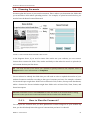
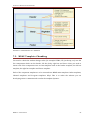
Website design can be divided into several categories based on creativity of your Web Designer.
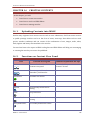
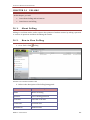
However, a typical webpage layout can usually be divided into five main sub-sections namely:
a) Header
b) Left bar
c) Body
d) Right bar
e) Footer
A web designer can pretty much come up with unlimited layouts for a website by just playing
with a variation of these sub-sections. There are always certain properties attached to each of
these components on how it is being used throughout the site:
Header and footer are seldom or never change
Body is the part that change most often
Left bar and right bar will always stay consistent across the same Channel or Program
MXAE 2.5.1 User Manual
56