1
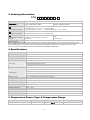
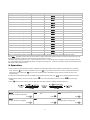
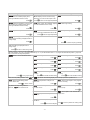
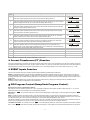
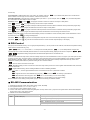
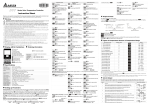
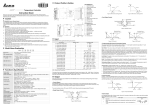
Input Temperature Sensor Type Register Value 4 ~ 20mA Analog Input 16 LED Display Temperature Range -999 ~ 9,999 0 ~ 20mA Analog Input 15 -999 ~ 9,999 0V ~ 10V Analog Input 14 -999 ~ 9,999 0V ~ 5V Analog Input 13 -999 ~ 9,999 Platinum Resistance (Pt100) 12 -200 ~ 600 C Platinum Resistance (JPt100) 11 -20 ~ 400 C Thermocouple TXK type 10 -200 ~ 800 C Thermocouple U type 9 -200 ~ 500 C Thermocouple L type 8 -200 ~ 850 C Thermocouple B type 7 100 ~ 1,800 C Thermocouple S type 6 0 ~ 1,700 C Thermocouple R type 5 0 ~ 1,700 C Thermocouple N type 4 -200 ~ 1,300 C Thermocouple E type 3 0 ~ 600 C Thermocouple T type 2 -200 ~ 400 C Thermocouple J type 1 -100 ~ 1,200 C Thermocouple K type 0 -200 ~ 1,300 C o o o o o o o o o o o o o Note 1: An internal 249 precision resistor for the current input is built-in, please refer to the item “How To Set Up Current Input”. Note 2: (Operation mode) must be set if user wishes to specify decimal point position. Except for the thermocouple B, S, R type, the decimal point positions of all the other thermocouple type input sensors can be set. The default range of analog input is -999 ~ 9,999. For example, when a 0 ~ 20mA analog input is selected as the input temperature sensor type, -999 indicates 0mA and 9,999 indicates 20mA. If change the input range to 0 ~ 2,000, then 0 indicates 0mA and 2,000 indicates 20mA. One display scale is equal to 0.01mA. Operation There are three modes of operation: operation, regulation and initial setting. When power is applied, controller gets into the operation mode. Press the key to switch to regulation mode. If the initial setting mode. Pressing the operation mode. key is pressed for more than 3 seconds, controller will switch to the key while in the regulation mode or initial setting mode, forces the controller to return to the PV/SV: Sets the temperature set point and displays the temperature process value. Use Setting method: While in any function mode, press the keys to set the temperature set point. key to select the desired function and use the keys to change settings. Press key to save the changes. The next flow chart shows how to switch for settings and internal functions: Regulation Mode Operation Mode Use Auto-tuning (Set in PID control and RUN mode) Press key to set temperature set Set input type point Press 4 groups PID modes (n=0~3). When n=4, PID control is auto regulated. Press Initial Setting Mode Control setting RUN or STOP Press -3- Press Set temperature unit (Not display when in analog input) Press