1
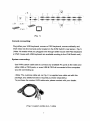
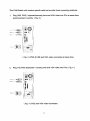
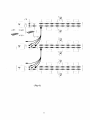
3. All of PC ports of Master KVM Switch and Slave KVM Switches could be
support connecting PCs or Servers via through methods ( Fig 3 ),
or ( Fig.4 ) or ( Fig. 5 ).
4.
You can do console operating your Master KVM Switch via either USB and/or
PS/2 keyboard and mouse arbitrarily, even USB mouse with PS/2 keyboard, or
PS/2 mouse with USB keyboard both are available to Master KVM Switch.
5. Plug in the power adapter for the first level Master KVM Switch and connected
PCs, and then plug in power adapter for each level Slave KVM Switch and
connected PCs sequently.
6. After all of the level of KVM Switches are up, power on the computers.
Initial Power-Up Process:
You must power up the Master KVM Switch first before turning on any other
devices.
Note: You may hot plug any powered-down computer and Slave KVM at any
time after initial power up process completed.
Hot plug and Hot Swap:
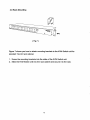
a) You can replace keyboard or mouse of the Master KVM CONSOLE port at
any time without powering down the Master KVM.
b) Plug in or out of PC port or swap PC port could be at any time without
powering down th KVM.
10