1
3. System Requirements
Console
A VGA, SVGA, Multisync monitor capable of the highest resolution.
PS/2 and/or USB Keyboard/Mouse
Computer or Server
The following equipment must be equipped with each computer or server.
- A VGA, SVGA or Multisync card.
- Type A USB port or PS/2 6 pin mini-DIN for Keyboard and Mouse.
Cables
The Combo Free KVM Switch must be used specific custom 4-in-1 cables.
To purchase the specific cable sets, please contact your dealer.
4.
Installation
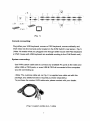
4.1 Front View
8-Port
16-Port
LED Indicators:
Selected : RED LED indicates that the KVM Switch is selected to the corresponding PC.
On-Line : GREEN LED indicates that the KVM Switch is ready to the corresponding PC.
Reset Switch :
Press this switch when a system reset. This switch must be pushed with a thin object,
for example, such as the end of a paper clip, or a ball point pen.