1
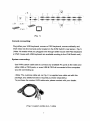
4.2 Rear View
8-Port
(=5
16-Port
n ettfsa1© eilEgJfc Gf.ffigJ©
4.3 Single stage installation
Precaution:
1.
Make sure all of devices are turning off as connecting up with KVM Switch.
You must unplug the power cords of any computers which might have the
Keyboard Power On function in advance. Otherwise, the switch will receive
power from the computer.
2.
With under running OS Windows 98 , we sugget that the PC must be plugged
to PS/2 ports, because of Windows 98 is not support installation at first time as
through USB HID installation driver.
3.
There are some of older PCs supported USB ports only, please open
BIOS USB setting in advance.
4.
The console plugging is not support USB keyboard of having USB HUB.