1
7.
OSD Operation
OSD (On-Screen-Display) Operation
•
OSD Main Menu for Administrator
1
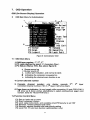
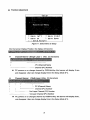
Figure 8: Administrator OSD
7.1 OSD Main Menu
1.KVM layer number: 1st. 2nd, 3rd
2. PC name (defined by user): 31 characters (Max.)
3. PC Status: (Status: STA, See above figure 8)
4
Buzzer sound on
X Buzzer sound off
L Locked port indication, and normal is blank
9
s
Indicating the computer is powered on
Indicating the channel scan function is on
4. Current channel number
5. Cascade
channel
number:
only
display
cascade
2
connected channel number ; if it's in 1 layer, it will show blank.
,
3
layer
6. Page down-up indicator: (to next page) while connecting 16 port OSD KVM, it
will show up & down arrows alternatively to select previous/next page's port
number. (Only for 16-port KVM only.)
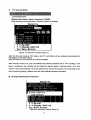
7.2 Function Control Menu
F1:
F2:
F3:
F4:
F5:
F6:
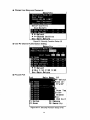
Set up: basic set up menu
Scan: autoscan function
Lock: setup lock/unlock, and available when F5 Security is set 'ON'
Rename: rename selected port name.
Security: security function and user priority setting
Lock Port: PC port lock function (administrator only)
17