1
Chapter 11 – A Detailed Example
281
The default command button is [RUN] which processes the commands sequentially and continuously
without giving you a chance to change or even monitor the results. In this automatic run you will use the
[EDIT] button to pause after each command to display the result and give you a chance to modify the
parameters.
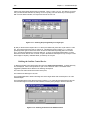
Click on [EDIT]. MIDUSS 98 displays the Time Parameters and the mouse pointer is automatically
positioned on the [Accept] button of the form. The maximum storm duration is 180 minutes, which is
enough for the historic storm. Click [Accept] to close the form.
Change the Storm Event
After you have accepted the time parameters, the mouse pointer is relocated over the [EDIT] button on
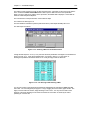
the Control Panel and the next record (number 14) is seen to be the Storm command. Click on [EDIT] to
show the Storm window with the 2-hour Chicago hyetograph.
To change the storm the first step is to click on the Historic tab on the Storms form to display the data for
the Historic storm. You should:
•
Check the box labelled ‘Check to set rainfall to zero’, and
•
Increase the duration from 120 to 180 minutes
•
Click on the [Display] command button.
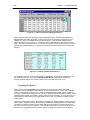
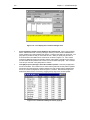
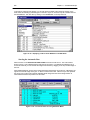
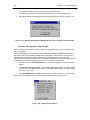
The Historic tab should be similar to Figure 11-25 below, with the exception that the Rainfall depth will be
zero. The Graph window will be empty and the tabular form will have an extra row added with all the 36
cells having a value of ‘0.00’.
Figure 11-25 – The Historic tab of the Storms window with 21 values entered.
Defining the Historic Storm.
The Historic table is initially blank (unless you deliberately wanted to copy the previous storm intensities)
and the first cell should have a slightly heavier gray outline. If it does not show this, click on it with the
mouse ponter.
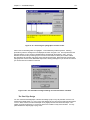
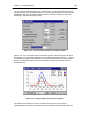
You can now start typing in the intensities shown in Table 11-3. As soon as you type a number (even the
first ‘1’) you will notice that the first bar of the storm hyetograph is plotted and the Rainfall depth in the
Storm window is updated. As each cell value is entered, use the Right-arrow key on the keyboard to