1
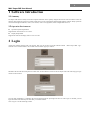
1 MAC-SuperCMS User Manual 1 Software Introduction 1.1 Summary The Super CMS which is mainly used in the computer with MAC OS is specially designed for network video surveillance. After the network video monitoring system is well built, multi devices can be connected and monitored through this software. Many operations can be done through this software, such as, live monitor, video record, playback, remote configuration and so on. 1.2 Operation Environment Operation System Requirement Supports MAC OS Version 10.7.0 or above Display Requirement Supports the wide-screen display with 16:10 or 16:9 ratio 2 Login Acquire the software package from your supplier. Then you will see the icon of this software named “MAC Super CMS…app”. Click this icon to run this software. An account creation window pops up as follows: Self-define the account name and password. Then click “Create” button to create account for Super CMS. This will bring up a login window as shown below: You can check “Remember” to remember the account and password for quick login next time. If “Auto login” is checked, you will login the software automatically next time after you run this software. Click “Login” to see the following window.