1
Creating the cylinder
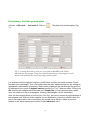
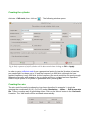
Activate: CAD tools, then click on
. The following window opens:
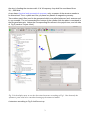
Fig 6: Only a quarter of a full cylinder will be discretized when clicking on OK or Apply
In order to get a sufficient mesh from a geometrical point of view the 'Number of patches
per wavelength' has been set to 12 and the frequency to 600 MHz, although the max.
applied frequency is only 300 MHz. At this frequency the mesh would be not good enough.
Magnetic symmetry with respect to the y-z plane and the x-z plane has been specified.
Hence only a quarter of a cylinder is generated when pressing OK.
Creating the wire
The wire could be easily introduced as has been described in example 1, simply be
entering the coordinates (0,0,0), (0,0,0.02) under Simulation → Wires → Edit a new wire
file. There is another way of generating wires. Click on the 'Wires' button in the Cad tools
1 section. The 'Add' button will be activated automatically.
6