1
Chapter 5
Synchronously Acquiring a Single Frame to
Memory
To synchronously acquire a single frame to memory, perform the
following steps:
1.
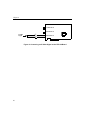
If you are using a composite video input signal, connect the video
input signal to connector J2. If you are using an S-video (Y/C)
input, connect the video input signal to connector J3.
2.
From the DT-Acquire main menu, click Setup, then click Select
Device.
3.
Select the alias that you gave to the DT3120 board when you
configured the device driver, then click OK. To get started, select
device −1.
4.
Leave the remainder of the settings under Setup at their default
values.
5.
From the DT-Acquire main menu, click Run, then Single Frame
Acquire!.
A single frame is acquired (synchronously) and displayed on the screen.
6.
To acquire another frame, repeat step 5.
7.
If you wish, modify the parameters available for the DT3120
board by clicking the desired parameter under Setup and
changing the associated values, then repeat step 5.
8.
If you want to save the graphic, click File from the
DT-Acquire main menu, then click Save Graphic File.
9.
When you are finished with this utility, from the DT-Acquire
main menu, click Setup, then click Close Device.
10. Close the application.
34