1
ITK-24i Printer User Manual
6.2.2
Low Paper Monitoring.
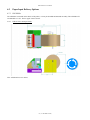
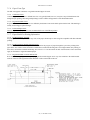
When the low paper sensor is used there are several options for how the printer will react to this low paper information. The
programmable options are: “STATUS Only”; “WARNING ONLY”; “BUSY after document printed”; “DISABLED.”
(refer to section 8.3.5
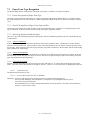
6.2.2.1 Low Paper Host Status Information
The low paper status information is always available, for reading by the host system, unless the “DISABLED” option is
selected. It is the responsibility of the connected host system to detect and react to this condition by dispatching service
personnel to attend to the paper condition.
6.2.2.2 Printer Reactions to the Low Paper Condition
There are several programmable printer responses to the low paper condition. If the “STATUS Only” (default mode) is
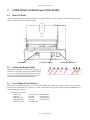
selected, the printer will only display the condition on the switch and display panel, by a slow flashing of the P/P
(Power/Paper) LED. If the “WARNING ONLY” is selected, the printer will sound a warning beep each time a document is
printed. If the “BUSY after document printed” option is selected the printer will complete the document in process and go
offline. This reaction is distinguished from out of paper, in that the low paper warning provides enough paper in the path to
complete the document in process. If the “DISABLED” option is selected the printer ignores the low paper signal. In all cases
except “DISABLED”, status is reported to the Windows Spooler as “Paper Problem”.
6.2.2.3 Active Cable Detection
The low paper sensor provides an active signal which can be used to indicate that the cable has been disconnected. If you are
not using a low paper sensor, you will need to confirm this control is set to PASSIVE mode. Refer to section 8.3.6.
-22- (V1.00 Dated 9/24/07)