1
different languages, and test for speed,
reliability, integration into ArcToolbox,
and ease of use.
From these requirements, the
following course of action was chosen:
examine functionality of the existing
ArcView 3.3 tool, choose various
functions from the tool to convert to
VBA within ArcMap, then duplicate the
same functionality in the other
languages.
The functions chosen from the
tool were as follows. 1. Random points:
Within a selected group of polygons,
generate n number of randomly spaced
points. 2. Systematic square points:
Within a selected group of polygons,
generate a matrix of points, evenly
spaced by n degrees. 3. Systematic
triangle points: Within a selected group
of polygons, generate a matrix of points,
evenly spaced by n degrees. Every other
row of points, offset by n * ½ degrees,
resulting in points arranged in a
triangular pattern. 4. Tiled hexagons:
Within a selected group of polygons,
generate a tiling of hexagons, having
sides of n degrees long, completely
covering the area. This was completed
by first generating the triangle points,
and connecting the points in a hexagonal
pattern. The code for each tool could
easily be changed to space the points by
any unit of measure: meters, miles, feet,
etc.
(Welcome to ArcObjects Online, n.d.).
Therefore, languages that support COM
are the only valid languages to review.
Of those languages, the following will
be studied: VBA (Visual Basic for
Applications), VB Script, Python Script,
Microsoft Visual Basic, Microsoft
Visual C++, and C#.NET. This study
will choose an example ArcView tool
written in Avenue, the programming
language used in ArcView, and duplicate
all or part of its functionality using all of
the above technologies, comparing and
contrasting the different languages with
regards to ease of development, ease of
use, speed of execution, reliability,
supportability, and integration into
ArcToolbox and Model Builder.
Methods
Description of Original Tool
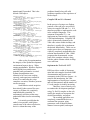
With cooperation of the Minnesota
DNR, a sample Avenue application was
provided. It performs a number of
useful GIS functions of varying
complexity. The tool, as stated in the
user manual: “The Sampling Tool was
designed to assist biologists in using
ArcView to generate spatially explicit
random or systematic sampling schemes
to support resource monitoring,
mapping, and research needs. The tool
works either with polygons in a theme or
with graphics that have been added to a
view. Samples can be entirely within a
single polygon or shape, or distributed
among several disjoint polygons or
shapes. A number of user defined
constraints and settings are offered as
input options” (Minnesota DNR, 2005).
The requirements of this project
were to select a sample of existing tools
from the given ArcView 3.3 application,
implement the same functionality in
Implement the Tool in ArcMap
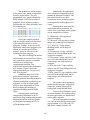
Keeping in mind the original project
parameters, the true graphical user
interface (GUI) – oriented design of the
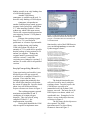
original tool was unacceptable. The
original project parameters were to
develop a tool that would work within
ArcToolbox or Model Builder.
2