1
operations: overlap, within, intersect,
etc. With successful use of the relational
operator function, the random point
function was obtainable – draw random
points until the exact desired number of
points fall within the target area.
A brief outline of the original
point/hexagon tool is stated here:
The ArcView 3.3 tool worked by
selecting a polygon in ArcView, then
processing was done on the selection.
The ArcMap tool was developed to start
with a shapefile containing polygons.
The entire group of polygons served as
the input for processing.
Therefore, porting the tool to a
command line program that accepts
parameters such as shapefile name,
distance between points, and output file
name could easily be done. From there,
the tool could be integrated into
ArcToolbox and Model Builder.
Previous coursework at Saint Mary’s
University of Minnesota created a
toolbox that contained examples of a
command line script that received its
parameters from ArcToolbox, thus
proving it can be done.
During the development of the
VBA code, there was difficulty with
implementation of the relational operator
function, so an alternate plan was
devised: draw a “blanket” of points and
hexagons larger than the target area, and
use the ArcToolbox tools to clip the
points and hexagons that fell within the
target area.
Discussions with the DNR
resulted in some new ideas and example
code using the relational operator,
eliminating the need to perform the clip
operations. The example code provided
many interesting ideas, but the code
ended up not being used. Eventually,
after experimentation inspired by the
example code, the relational operator
became workable. With the relational
operator successfully implemented, as
each point or hexagon is generated, the
relational operator method asks: “Does it
overlap the target area?” If it does, the
feature is saved, otherwise it is ignored.
The actual implementation asked “not
disjoint” which covered all “true”
1. Get extent of the target area
2. Get user input on how far apart
to put the points
3. Add a small amount to the
extent, to make it bigger
4. Create blanket of points over
adjusted extent
5. If hexagons are requested, draw
hexagons over adjusted extent
6. Call clip tools to clip points
7. Call clip tools to clip hexagons
exactly by target area [clipped
hexagons]
8. Call clip tools to do spatial join
of hexagons to target area
[complete hexagons]
After implementing the relational
operator, the logic changed slightly:
1. Create relational operator on
target area
2. Get user input on how far apart
to put the points
3. Create blanket of points over
adjusted extent
4. If hexagons are requested, draw
hexagons over adjusted extent
5. If relational operator is not
disjoint, save feature
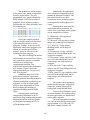
The triangle points are the vertices of
the hexagons. Generating the points in
this manner do not use the trigonometry
functions which require much more
processing time. Instead, alternate rows
of points are offset by half the distance
3