1
User Manual for FCK Editor
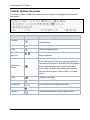
Select all
Select all of the text in the HTML page (usually used
before copy or cut or to apply a style or format to the
whole page).
Remove Format
Remove the formatting from highlighted text.
Bold / Italic /
Underline /
Strike Through
Bold, italic, underline or strikethrough, the highlighted
text.
Subscript /
Superscript
Superscript or subscript the highlighted text.
Lists
Add numbering or bullets to highlighted text lines.
Indent
Increase or decrease the highlighted text's indentation.
Alignment
Aligns the highlighted text (left, centered, right, justified).
Insert/ Edit Link
and Upload
Other Files
Adds or removes the hyperlink from highlighted text.
Insert/Edit
anchor
For defining the bookmarks. Marks the highlighted text
as a bookmark. Users can then jump to these
bookmarked portions through hyperlinks.
Image
upload/Insert
Using this icon, user can upload or insert images into the
HTML page.
Insert/Edit Table
Inserts a table. Lets user change the various table
parameters - Number of columns or rows, table width,
height, borders, & alignment.
Insert horizontal
Line
Inserts the divider line (horizontal rule).
Insert smiley
Inserts emoticons (e.g. smiley faces, email icon,
lightbulb).
Insert special
character
Insert symbols & special characters (trademarks,
currency, etc.).
Text color
Change the color of the highlighted text.
Background
color
Change the background color behind the highlighted
text.