1
Preface
1
Preface
This manual explains how to use the RTX51 Tiny Real-Time Operating System and gives
an overview of the functionality of RTX51 Full. The manual is not a detailed introduction to real-time applications and assumes that you are familiar with Keil C51, A51, the
related Utilities, the DOS operating system and the hardware and instruction set of the
8051 microcontrollers.
The following literature is recommended as an extensive introduction in the area of realtime programming:
Deitel, H.M., Operating Systems, second edition,
Addison-Wesley Publishing Company, 1990
Ripps, David, A Guide to Real-Time Programming, Englewood Cliffs, N.J,
Prentice Hall, 1988/
Allworth, S.T., Introduction to Real-Time Software Design,
Springer-Verlag Inc., New York
This user’s guide contains 6 parts:
Part 1:
Overview, describes the functionality of a the RTX51 real-time opeating
systems and discusses the basic features and differences of RTX51 Tiny and
RTX51 Full. Also included are the technical data of RTX51 Full and
RTX51 Tiny.
Part 2:
Requirements and Definitions, discusses the development tools and the
target system requirements of RTX51 Tiny, explains the terms used in the
the RTX51 Tiny manual and decribes the task definition.
Part 3:
Creating RTX51 Tiny Applicaitons, describes the steps necessary to create RTX51 Tiny applications.
Part 4:
Library Functions, provides a reference for all RTX51 Tiny library routines.
Part 5:
System Debugging, describes the stack handling of RTX51 Tiny and contains information about the system debugging.
Part 6:
Applications Examples, contains several examples using RTX51 Tiny and
describes the software development process. This information can be used
as a guideline for your real-time designs.
2
Contents
OVERVIEW .......................................................................................................... 7
Introduction ............................................................................................................... 7
Single Task Program.................................................................................................. 8
Round-Robin Program............................................................................................... 8
Round-Robin Scheduling With RTX51..................................................................... 8
RTX51 Events ........................................................................................................... 9
Compiling and Linking with RTX51 ....................................................................... 11
REQUIREMENTS AND DEFINITIONS .............................................................. 15
Development Tool Requirements............................................................................................................ 15
Target System Requirements................................................................................................................... 15
Interrupt Handling ................................................................................................... 15
Reentrant Functions ................................................................................................. 16
C51 Library Functions ............................................................................................. 16
Usage of Multiple Data Pointers and Arithmetic Units ........................................... 16
Registerbanks........................................................................................................... 17
Task Definition ....................................................................................................................................... 17
Task Management ................................................................................................................................... 17
Task Switching ........................................................................................................ 18
Events ...................................................................................................................... 18
CREATING RTX51 TINY APPLICATIONS ........................................................ 21
RTX51 Tiny Configuration..................................................................................................................... 21
Compiling RTX51 Tiny Programs .......................................................................................................... 23
Linking RTX51 Tiny Programs .............................................................................................................. 23
Optimizing RTX51 Tiny Programs ......................................................................................................... 23
RTX51 TINY SYSTEM FUNCTIONS.................................................................. 25
Function Reference ................................................................................................................................. 26
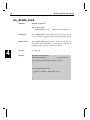
isr_send_signal.................................................................................................................................. 27
os_clear_signal.................................................................................................................................. 28
Preface
3
os_create_task....................................................................................................................................29
os_delete_task....................................................................................................................................30
os_running_task_id............................................................................................................................31
os_send_signal...................................................................................................................................32
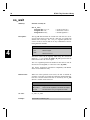
os_wait...............................................................................................................................................34
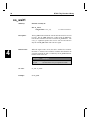
os_wait1.............................................................................................................................................36
os_wait2.............................................................................................................................................37
SYSTEM DEBUGGING ...................................................................................... 41
Stack Management...................................................................................................................................41
Debugging with dScope-51......................................................................................................................41
APPLICATION EXAMPLES ............................................................................... 45
RTX_EX1: Your First RTX51 Program.................................................................................................45
RTX_EX2: A Simple RTX51 Application .............................................................................................47
TRAFFIC: A Traffic Light Controller ....................................................................................................49
Traffic Light Controller Commands .........................................................................49
Software ...................................................................................................................49
Compiling and Linking TRAFFIC............................................................................62
Testing and Debugging TRAFFIC ...........................................................................62
RTX Tiny
5
Notational Conventions
This manual uses the following format conventions:
Examples
Description
BL51
Bold capital texts used for the names of executable programs, data files,
source files, environment variables, and other commands entered at the
DOS command prompt. This text usually represents commands that you
must type in literally. For example:
CLS
C51
DIR
A51
DS51.INI
SET
Note that you are not actually required to enter these commands using all
capital letters.
Courier
Text in this typeface is used to represent the appearance of information
that would be displayed on the screen or printed on the printer.
This typeface is also used within the text when discussing or describing
items which appear on the command line.
KEYS
Text in this typeface represents actual keys on the keyboard. For
example, “Press Enter to Continue.”
ALT+<x>
Indicates an Alt key combination; the Alt and the <x> key must be
simultaneously pressed.
CTRL+<x>
Indicates an control key combination; the Ctrl and the <x> key must be
simultaneously pressed.
1
RTX Tiny
7
Overview
RTX51 is a multitasking real-time operating system for the 8051 family of processors.
RTX51 simplifies software design of complex, time-critical projects.
There are two distinct versions of RTX51 available:
RTX51 Full
Performs both round-robin and preemptive task switching using up
to four task priorities. RTX51 works in parallel with interrupt
functions. Signals and messages may be passed between tasks using a mailbox system. You can allocate and free memory from a
memory pool. You can force a task to wait for an interrupt, timeout, or signal or message from another task or interrupt.
RTX51 Tiny
Is a subset of RTX51 that will easily run on single-chip 8051 systems without any external data memory. RTX51 Tiny supports
many of the features found in RTX51 with the following exceptions: RTX51 Tiny only supports round-robin and the use of signals for task switching. Preemptive task switching is not supported. No message routines are included. No memory pool allocation routines are available.
The remainder of this chapter uses RTX51 to refer to both variants. Differences between
the two are so stated in the text as their need becomes applicable.
Introduction
Many microcontroller applications require simultaneous execution of multiple jobs or
tasks. For such applications, a real-time operating system (RTOS) allows flexible scheduling of system resources (CPU, memory, etc.) to several tasks. RTX51 implements a
powerful RTOS which is easy to use. RTX51 works with all 8051 derivatives.
You write and compile RTX51 programs using standard C constructs and compiling them
with C51. Only a few deviations from standard C are required in order to specify the task
ID and priority. RTX51 programs also require that you include the real-time executive
header file and link using the BL51 Linker/Locator and the appropriate RTX51 library
file.
1
8
1
RTX51 Real-Time Operating System
Single Task Program
A standard C program starts execution with the main function. In an embedded application, main is usually coded as an endless loop and can be thought of as a single task which
is executed continuously. For example:
int counter;
void main (void) {
counter = 0;
while (1) {
counter++;
}
/* repeat forever */
/* increment counter */
}
Round-Robin Program
A more sophisticated C program may implement what is called a round-robin pseudomultitasking scheme without using a RTOS. In this scheme, tasks or functions are called
iteratively from within an endless loop. For example:
int counter;
void main (void) {
counter = 0;
while (1) {
check_serial_io ();
process_serial_cmds ();
/* repeat forever */
/* process serial input */
check_kbd_io ();
process_kbd_cmds ();
/* process keyboard input */
adjust_ctrlr_parms ();
/* adjust the controller */
counter++;
/* increment counter */
}
}
Round-Robin Scheduling With RTX51
RTX51 also performs round-robin multitasking which allows quasi-parallel execution of
several endless loops or tasks. Tasks are not executed concurrently but are time-sliced.
The available CPU time is divided into time slices and RTX51 assigns a time slice to
every task. Each task is allowed to execute for a predetermined amount of time. Then,
RTX51 switches to another task that is ready to run and allows that task to execute for a
while. The time slices are very short, usually only a few milliseconds. For this reason, it
appears as though the tasks are executing simultaneously.
RTX Tiny
9
RTX51 uses a timing routine which is interrupt driven by one of the 8051 hardware timers. The periodic interrupt that is generated is used to drive the RTX51 clock.
RTX51 does not require you to have a main function in your program. It will automatically begin executing task 0. If you do have a main function, you must manually start
RTX51 using the os_create_task function in RTX51 Tiny and the os_start_system
function in RTX51.
The following example shows a simple RTX51 application that uses only round-robin
task scheduling. The two tasks in this program are simple counter loops. RTX51 starts
executing task 0 which is the function names job0. This function adds another task
called job1. After job0 executes for a while, RTX51 switches to job1. After
job1 executes for a while, RTX51 switches back to job0. This process is repeated indefinitely.
#include <rtx51tny.h>
int counter0;
int counter1;
void job0 (void) _task_ 0 {
os_create (1);
while (1) {
counter0++;
}
}
void job1 (void) _task_ 1 {
while (1) {
counter1++;
}
}
/* mark task 1 as ready */
/* loop forever */
/* update the counter */
/* loop forever */
/* update the counter */
RTX51 Events
Rather than waiting for a task’s time slice to be up, you can use the os_wait function to
signal RTX51 that it can let another task begin execution. This function suspends execution of the current task and waits for a specified event to occur. During this time, any
number of other tasks may be executing.
Using Time-outs with RTX51
The simplest event you can wait for with the os_wait function is a time-out period in
RTX51 clock ticks. This type of event can be used in a task where a delay is required.
This could be used in code that polled a switch. In such a situation, the switch need only
be checked every 50ms or so.
The next example shows how you can use the os_wait function to delay execution while
allowing other tasks to execute.
1
10
RTX51 Real-Time Operating System
#include <rtx51tny.h>
1
int counter0;
int counter1;
void job0 (void) _task_ 0 {
os_create (1);
while (1) {
counter0++;
os_wait (K_TMO, 3);
}
}
void job1 (void) _task_ 1 {
while (1) {
counter1++;
os_wait (K_TMO, 5);
}
}
/*
/*
/*
/*
mark task 1 as ready */
loop forever */
update the counter */
pause for 3 clock ticks */
/* loop forever */
/* update the counter */
/* pause for 5 clock ticks */
In the above example, job0 enables job1 as before. But now, after incrementing
counter0, job0 calls the os_wait function to pause for 3 clock ticks. At this time,
RTX51 switches to the next task, which is job1. After job1 increments counter1,
it too calls os_wait to pause for 5 clock ticks. Now, RTX51 has no other tasks to execute, so it enters an idle loop waiting for 3 clock ticks to elapse before it can continue
executing job0.
The result of this example is that counter0 gets incremented every 3 timer ticks and
counter1 gets incremented every 5 timer ticks.
Using Signals with RTX51
You can use the os_wait function to pause a task while waiting for a signal (or binary
semaphore) from another task. This can be used for coordinating two or more tasks.
Waiting for a signal works as follows: If a task goes to wait for a signal, and the signal
flag is 0, the task is suspended until the signal is sent. If the signal flag is already 1 when
the task queries the signal, the flag is cleared, and execution of the task continues. The
following example illustrates this:
#include <rtx51tny.h>
int counter0;
int counter1;
void job0 (void) _task_ 0 {
os_create (1);
while (1) {
if (++counter0 == 0)
os_send_signal (1);
}
}
/*
/*
/*
/*
mark task 1 as ready */
loop forever */
update the counter */
signal task 1 */
RTX Tiny
11
void job1 (void) _task_ 1 {
while (1) {
os_wait (K_SIG, 0, 0);
counter1++;
}
}
/* loop forever */
/* wait for a signal */
/* update the counter */
In the above example, job1 waits until it receives a signal from any other task. When it
does receive a signal, it will increment counter1 and again wait for another signal.
job0 continuously increments counter0 until it overflows to 0. When that happens,
job0 sends a signal to job1 and RTX51 marks job1 as ready for execution. job1
will not be started until RTX51 gets its next timer tick.
Priorities and Preemption
One disadvantage of the above program example is that job1 is not started immediately
when it is signaled by job0. In some circumstances, this is unacceptable for timing reasons. RTX51 allows you to assign priority levels to tasks. A task with a higher priority
will interrupt or pre-empt a lower priority task whenever it becomes available. This is
called preemptive multitasking or just preemption.
NOTE
Preemption and priority levels are not supported by RTX51 Tiny.
You can modify the above function declaration for job1 to give it a higher priority than
job0. By default, all tasks are assigned a priority level of 0. This is the lowest priority
level. The priority level can be 0 through 3. The following example shows how to define
job1 with a priority level of 1.
void job1 (void) _task_ 1 _priority_ 1 {
while (1) {
/* loop forever */
os_wait (K_SIG, 0, 0);
/* wait for a signal */
counter1++;
/* update the counter */
}
}
Now, whenever job0 sends a signal to job1, job1 will start immediately.
Compiling and Linking with RTX51
RTX51 is fully integrated into the C51 programming language. This makes generation of
RTX51 applications very easy to master. The previous examples are executable RTX51
programs. You do not need to write any 8051 assembly routines or functions. You only
have to compile your RTX51 programs with C51 and link them with the BL51
Linker/Locator. For example, you should use the following command lines if you are
using RTX51 Tiny.
C51 EXAMPLE.C
BL51 EXAMPLE.OBJ RTX51TINY
Use the following command lines to compile and link using RTX51.
1
12
1
RTX51 Real-Time Operating System
C51 EXAMPLE.C
BL51 EXAMPLE.OBJ RTX51
Interrupts
RTX51 works in parallel with interrupt functions. Interrupt functions can communicate
with RTX51 and can send signals or messages to RTX51 tasks. RTX51 Full allows the
assignment of interrupts to a task.
Message Passing
RTX51 Full supports the exchange of messages between tasks with the functions: SEND
& RECEIVE MESSAGE and WAIT for MESSAGE. A message is a 16-bit value, which
can be interpreted as a number or as a pointer to a memory block. RTX51 Full supports
variable sized messages with a memory pool system.
CAN Communication
Controller Area Networks are easily implemented with RTX51/CAN. RTX51/CAN is a
CAN task integrated into RTX51 Full. A RTX51 CAN task implements message passing
via the CAN network. Other CAN stations can be configured either with or without
RTX51.
BITBUS Communication
RTX51 Full covers Master and Slave BITBUS tasks supporting message passing with the
Intel 8044.
Events
RTX51 supports the following events for the WAIT function:
•
Timeout: Suspends the running task for a defined amount of clock ticks.
•
Interval: (RTX51 Tiny only) is similar to timeout, but the software timer is not
reset to allow generation of periodic intervals (required for clocks).
•
Signal: For inter task coordination.
•
Message: (RTX51 Full only) for exchange of messages.
•
Interrupt: (RTX51 Full only) A task can wait for 8051 hardware interrupts.
•
Semaphore: (RTX51 Full only) binary semaphores for management of shared
system resources.
RTX Tiny
13
RTX51 Functions
The following table shows all RTX51 functions; RTX51 Tiny supports only the functions
marked with (*). (Timings are measured with RTX51 Full)
Execution Time
(cycles)
Function
Description
os_create (*)
os_delete (*)
os_send_signal (*)
move a task to execution queue
remove a task from execution queue
send a signal to a task (call from tasks)
os_clear_signal (*)
isr_send_signal (*)
os_wait (*)
delete a sent signal
send a signal to a task (call from interrupt)
wait for event
sage
os_attach_interrupt
os_detach_interrupt
os_disable_isr
os_enable_isr
os_send_message/
os_send_token
assign task to interrupt source
remove interrupt assignment
disable 8051 hardware interrupts
enable 8051 hardware interrupts
send a message or set a semaphore (call
from task)
isr_send_message
isr_recv_message
os_create_pool
os_get_block
os_free_block
os_set_slice
send a message (call from interrupt)
receive a message (call from interrupt)
define a memory pool
get a block from a memory pool
return a block to a memory pool
define RTX51 system clock value
302
172
408 with task switch.
316 with fast task switch
71 without task switch
57
46
68 for pending signal
160 for pending mes119
96
81
80
443 with task switch
343 with fast task switch
94 without task switch
53
71 (with message)
644 (size 20 * 10 bytes)
148
160
67
Additional DEBUG and SUPPORT functions: check_mailboxes,
check_tasks, check_mail, check_pool, set_int_mask, reset_int_mask.
check_task,
CAN Functions (only available with RTX51 Full)
CAN controllers supported: Philips 82C200, 80C592 and Intel 82526 (more CAN controllers in preparation).
CAN Function
Description
can_task_create
can_hw_init
can_def_obj
can_start / can_stop
can_send
can_write
can_read
can_receive
can_bind_obj
can_unbind_obj
can_wait
can_request
can_get_status
create the CAN communication task
CAN controller hardware initialization
define the communication objects
start and stop the CAN communication
send an object over the CAN bus
write new data to an object without sending it
read an objects data direct
receive all not bound objects
bind an object to a task; task is started when object is received
untie the binding between task and object
wait for receiving of a bound object
send a remote frame for the specified object
get the actual CAN controller status
1
14
1
RTX51 Real-Time Operating System
Technical Data
Description
RTX51 Full
RTX51 Tiny
Number of tasks
RAM requirements
256; max. 19 tasks active
40 .. 46 bytes DATA
20 .. 200 bytes IDATA (user stack)
min. 650 bytes XDATA
6KB .. 8KB
timer 0 or timer 1
1000 .. 40000 cycles
< 50 cycles
70 .. 100 cycles (fast task)
180 .. 700 cycles (standard task)
depends on stack load
8 mailboxes with 8 int entries each
up to 16 memory pools
8 * 1 bit
16
7 bytes DATA
3 * <task count> IDATA
Code requirements
Hardware requirements
System clock
Interrupt latency
Context switch time
Mailbox system
Memory pool system
Semaphores
900 bytes
timer 0
1000 .. 65535 cycles
< 20 cycles
100 .. 700 cycles
depends on stack load
not available
not available
not available
RTX Tiny
15
Requirements and Definitions
The following chapter describes the software and hardware requiremens of RTX51 Tiny
and defines the terms used within this manual. RTX51 Tiny uses a combination of system
calls as well as the _task_ keyword for the task definition which is built in to the C51
compiler. The task definition and the major features of RTX51 Tiny are also described
within this chapter.
Development Tool Requirements
The following software products are required to operate RTX51 Tiny:
• C51 Compiler
• BL51 Code Banking Linker
• A51 Macro Assembler
The library file RTX51TNY.LIB must be stored in the library path specified with the
DOS envirionment variable C51LIB. Usually this is the directory C51\LIB.
The include file RTX51TNY.H must be stored in the include path specified with the
DOS envirionment variable C51INC. Usually this is the directory C51\INC.
Target System Requirements
RTX51 Tiny can run on single-chip 8051 systems without any external data memory.
However the application can access external memory. RTX51 Tiny can use all memory
models supported by C51. The selected memory model only influences the location of
application objects. The RTX51 Tiny system variables and the stack area of the application are always stored in internal 8051 memory (DATA or IDATA). Typically, RTX51
Tiny applications are implemented in the SMALL model.
RTX51 Tiny performs round-robin task switching only. Preemptive task switching and
task priorities are not supported. If your application needs preemptive task switching you
need to use the RTX51 Full Real-Time Executive.
RTX51 Tiny is not designed for use with bank switching programs. If you require
real-time multitasking in your code banking applications you need to use the RTX51 Full
Real-Time Executive.
Interrupt Handling
RTX51 Tiny can operate parallel with interrupt functions. Similar to other 8051 applications, the interrupt source must be enabled in the 8051 hardware registers in order to trigger for an interrupt. RTX51 Tiny does not contain any management for interrupts; for
this reason, the interrupt enable is sufficient to process interrupts.
2
16
Introduction to RTX51 Tiny
RTX51 Tiny uses the 8051 timer 0 and the timer 0 interrupt of the 8051. Globally disabling all interrupts (EA bit) or the timer 0 interrupt stops therefore the operation of
RTX51 Tiny. Except for a few 8051 instructions, the timer 0 interrupt should not be disabled.
Reentrant Functions
2
It is not allowed to call non-reentrant C functions from several tasks or interrupt procedures. Non-reentrant C51 functions store their parameters and automatic variables (local
data) in static memory segments; for this reason, this data is overwritten when multiple
function calls occur simultaneously. Therefore non-reentrant C functions can only be call
for several tasks, if the user can ensure that they are not called recursive. Usally this
means that the Round-Robin task scheduling must be disabled and that such functions do
not call any RTX51 Tiny system functions.
C functions which are only using registers for parameter and automatic variables are inherently reentrant and can be called without any restrictions from different RTX51 Tiny
tasks.
The C51 Compiler provides also reentrant functions. Refer to the C51 User’s Manual for
more information. Reentrant functions store their parameters and local data variables on
a reentrant stack and the data are protected in this way against multiple calls. However,
RTX51 Tiny does not contain any management for the C51 reentrant stack. If you are
using reentrant functions in your application you must ensure that these functions do not
call any RTX51 Tiny system functions and that reentrant functions are not interrupted by
the Round-Robin task scheduling of RTX51 Tiny. The full version, RTX51 Full contains
a stack management for reentrant functions.
C51 Library Functions
All C51 library functions which are reentrant can be used in all tasks without any restrictions.
For C51 library functions which are non-reentrant the same restrictions apply as for nonreentrant C functions. Refer to Reentrant Functions for more information.
Usage of Multiple Data Pointers and Arithmetic Units
The C51 compiler allows you to use Multiple Data Pointers and Arithmetic Units of various 8051 derivatives. Since RTX51 Tiny does not contain any management for these
hardware components it is recommended that you are not using these components together with RTX51 Tiny. However you can use Multiple Data Pointers and Arithmetic
Units if you can ensure that there is no round-robin task during the execution of program
parts using such additional hardware components.
RTX Tiny
17
Registerbanks
RTX51 Tiny assigns all tasks to registerbank 0. For this reason, all task functions must
be compiled with the default setting of C51, REGISTERBANK (0). The interrupt functions can use the remaining registerbanks. However, RTX51 Tiny requires 6 permanent
bytes in the registerbank area. The registerbank used by RTX51 Tiny for these bytes can
be defined with the configurarion variable INT_REGBANK. Refer to chapter 3, RTX51
Tiny configuration for more information.
Task Definition
Real-Time or multitasking applications are composed of one or more tasks that perform
specific operations. RTX51 Tiny allows for up to 16 tasks. Tasks are simply C functions
that have a void return type and a void argument list and are declared using the _task_
function attribute using the following format
void func (void) _task_ num
where
num is a task ID number from 0 to 15.
Example:
void job0 (void) _task_ 0 {
while (1) {
counter0++;
}
}
/* increment counter */
defines the function job0 to be task number 0. All that this task does is increment a
counter and repeat. You should note that all tasks are implemented as endless loops in
this fashion.
Task Management
Each task that you define for RTX51 Tiny can be in one of a number of different states.
The RTX51 Tiny Kernel maintains the proper state for each task. Following is a description of the different states.
State
Description
RUNNING
The task currently being executed is in the RUNNING State. Only one task can be
running at a time.
READY
Tasks which are waiting to be executed are in the READY STATE. After the currently
running task has finished processing, RTX51 Tiny starts the next task that is ready.
WAITING
Tasks which are waiting for an event are in the W AITING STATE. If the event occurs,
the task is placed into the READY STATE.
DELETED
Tasks which are not started are in the DELETED STATE.
TIME-OUT
Tasks which were interrupted by a round-robin time-out are placed in the TIME-OUT
STATE. This state is equivalent to the READY STATE.
2
18
Introduction to RTX51 Tiny
Task Switching
2
RTX51 Tiny performs round-robin multitasking which allows quasi-parallel execution of
several endless loops or tasks. Tasks are not executed concurrently but are time-sliced.
The available CPU time is divided into time slices and RTX51 Tiny assigns a time slice
to every task. Each task is allowed to execute for a predetermined amount of time. Then,
RTX51 Tiny switches to another task that is ready to run and allows that task to execute
for a while. The duration of a time slice can be defined with the configurarion variable
TIMESHARING. Refer to chapter 3, RTX51 Tiny configuration for more information.
Rather then wait for a task’s time slice to expire, you can use the os_wait system function
to signal RTX51 Tiny that it can let another task begin execution. os_wait suspends the
execution of the current task and waits for a specified event to occur. During this time,
any number of other tasks may be executing.
The section of RTX51 Tiny which assigns the processor to a task is called the scheduler.
The RTX51 Tiny scheduler defines which task is running according to the following
rules:
The currently running task is interrupted if…
1.
2.
The task calls the os_wait function and the specified event has not occurred.
The task has executed for longer than the defined round-robin time-out.
Another task is started if…
1.
2.
No other task is running.
The task which is to be started is in the READY or TIME-OUT State.
Events
The os_wait function of RTX51 Tiny supports the following event types:
SIGNAL:
Bit for task communication. A signal can be set or cleared using RTX51
Tiny system functions. A task can wait for a signal to be set before continuing. If a task calls the os_wait function to wait for a signal and if the
signal is not set, the task is suspended until the signal gets set. Then, the
task is returned to the READY State and can begin execution.
TIMEOUT:
A time delay which is started by the os_wait function. The duration of the
time delay is specified in timer ticks. The task who is calling the os_wait
funciton with a TIMEOUT value is suspended until the time delay is over.
Then, the task is returned to the READY State and can begin execution.
INTERVAL: A interval delay which is started by the os_wait function. The interval delay
is also specified in in timer ticks. The difference to a timeout delay is that
the RTX51 timer is not reset. Therefore the event INTERVAL works with a
timer which is running permantly. An interval can be used if the task is to
be executed in synchronous intervals; a simple example is a clock.
RTX Tiny
19
Note:
The event SIGNAL can be combined with the events TIMEOUT and so that
RTX51 Tiny waits for both a signal and a time period.
2
RTX Tiny
21
Creating RTX51 Tiny Applications
Writing RTX51 Tiny programs requires that you include the RTX51TNY.H header file
found in the \C51\INC\ subdirectory in your C program and that you declare your tasks
using the _task_ function attribute.
RTX51 Tiny programs do not require a main C function. The linking process will include code that will cause execution to begin with task 0.
RTX51 Tiny Configuration
You can modify the RTX51 Tiny configuration file CONF_TNY.A51 found in the
\C51\LIB\ subdirectory. You can change the following parameters in this configuration
file.
n
n
n
n
n
Register bank used for the system timer tick interrupt
Interval for the system timer
Round-robin time-out value
Internal data memory size
Free stack size after RTX51 Tiny is started
A portion of this file is listed below.
;----------------------------------------; This file is part of the 'RTX51 tiny' Real-Time Operating System Package
;----------------------------------------; CONF_TNY.A51: This code allows configuration of the
;
'RTX51 tiny' Real Time Operating System
;
; To translate this file use A51 with the following invocation:
;
;
A51 CONF_TNY.A51
;
; To link the modified CONF_TNY.OBJ file to your application use the following
; BL51 invocation:
;
;
BL51 <your object file list>, CONF_TNY.OBJ <controls>
;
;----------------------------------------;
; 'RTX51 tiny' Hardware-Timer
; ===========================
;
; With the following EQU statements the initialization of the 'RTX51 tiny'
; Hardware-Timer can be defined ('RTX51 tiny' uses the 8051 Timer 0 for
; controlling RTX51 software timers).
;
;
; define the register bank used for the timer interrupt.
INT_REGBANK EQU
1
; default is Registerbank 1
;
;
; define Hardware-Timer Overflow in 8051 machine cycles.
INT_CLOCK
EQU
10000
; default is 10000 cycles
;
;
; define Round-Robin Timeout in Hardware-Timer Ticks.
TIMESHARING EQU
5
; default is 5 ticks.
;
;
;
; note: Round-Robin can be disabled by using value 0.
;
3
22
3
Creating RTX51 Tiny Applications
; Note:
Round-Robin Task Switching can be disabled by using '0' as
;
value for the TIMESHARING equate.
;----------------------------------------;
; 'RTX51 tiny' Stack Space
; =========================
;
; The following EQU statements defines the size of the internal RAM used
; for stack area and the minimum free space on the stack. A macro defines
; the code executed when the stack space is exhausted.
;
;
; define the highest RAM address used for CPU stack
RAMTOP
EQU
0FFH
; default is address (256 - 1)
;
FREE_STACK
EQU
20
; default is 20 bytes free space on stack
;
STACK_ERROR MACRO
CLR
EA
; disable interrupts
SJMP $
; endless loop if stack space is exhausted
ENDM
;
;-----------------------------------------
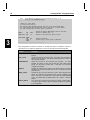
This configuration file defines a number of constants that may be modified to suit the requirements of your particular application. These are described in the following table.
Variable
Description
INT_REGBANK
indicates which register bank is to be used by RTX51 Tiny for the system
interrupt.
INT_CLOCK
defines the interval for the system clock. The system clock generates an
interrupt using this interval. The defined number specifies the number of
CPU cycles per interrupt.
TIMESHARING
defines the time-out for the round-robin task switching. The value
indicates the number of timer tick interrupts that must elapse before
RTX51 Tiny will switch to another task. If this value is 0, round-robin
multitasking is disabled.
RAMTOP
indicates the highest memory location in the internal memory of the 8051
derivative. For the 8051, this value would be 7Fh. For the 8052, this value
would be 0FFh.
FREE_STACK
specifies the size of the free stack area in bytes. When switching tasks,
RTX51 Tiny verifies that the specified number of bytes is available in the
stack. If the stack is too small, RTX51 Tiny invokes the STACK_ERROR
macro. The default value for FREE_STACK is 20. Values 0 .. 0FFH are
allowed.
STACK_ERROR
is the macro that is executed when RTX51 Tiny detects a stack problem.
You may change this macro to perform whatever operations are necessary
for your application.
RTX Tiny
23
Compiling RTX51 Tiny Programs
RTX51 Tiny applications require no special compiler switches or settings. You should be
able to compile your RTX51 Tiny source files just as you would ordinary C source files.
Linking RTX51 Tiny Programs
RTX51 Tiny applications must be linked using the BL51 code banking linker/locator.
The RTX51TINY directive must be specified on the command line after all object files.
Refer to the RTX51TINY directive in Utilities manual.
Optimizing RTX51 Tiny Programs
The following items should be noted when creating RTX51 applications.
n If possible, disable round-robin multitasking. Tasks which use round-robin multitasking require 13 bytes of stack space to store the task context (registers, etc.). This
context storage is not required if task switching is triggered by the os_wait function.
The os_wait function also produces an improved system reaction time since a task
which is waiting for execution does not have to wait for the entire duration of the
round-robin time-out.
n Do not set the timer tick interrupt rate too fast. Setting the tick rate to a low number
increases the number of timer ticks per second. There is about 100 to 200 CPU cycles of overhead for each timer tick interrupt. Therefore, the timer tick rate should be
set high enough to minimize interrupt latency.
3
RTX Tiny
25
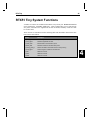
RTX51 Tiny System Functions
A number of routines are included in the RTX51 Tiny Library file RTX51TNY.LIB that
can be found in the \C51\LIB\ subdirectory. These routines allow you to create and destroy tasks, send and receive signals from one task to another, and delay a task for a number of timer ticks.
These routines are summarized in the following table and described in detail in the function reference that follows.
Routine
Description
isr_send_signal
Sends a signal to a task from an interrupt
os_clear_signal
Deletes a signal that was sent
os_create_task
Moves a task to the execution queue
os_delete_task
Removes a task from the execution queue
os_running_task_id
Returns the task ID of the task that is currently running
os_send_signal
Sends a signal to a task from another task
os_wait
Waits for an event
os_wait1
Waits for an event
os_wait2
Waits for an event
4
26
RTX51 Tiny Function Library
Function Reference
The following pages describe the RTX51 Tiny system functions. The system functions
are described here in alphabetical order and each is divided into several sections:
4
Summary:
Briefly describes the routine’s effect, lists include file(s) containing
its declaration and prototype, illustrates the syntax, and describes
any arguments.
Description:
Provides a detailed description of the routine and how it is used.
Return Value:
Describes the value returned by the routine.
See Also:
Names related routines.
Example:
Gives a function or program fragment demonstrating proper use of
the function.
RTX Tiny
27
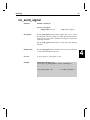
isr_send_signal
Summary:
#include <rtx51tny.h>
char isr_send_signal (
unsigned char task_id);
Description:
/* ID of task to signal */
The isr_send_signal function sends a signal to task task_id. If the
specified task is already waiting for a signal, this function call will
ready the task for execution. Otherwise, the signal is stored in the
signal flag of the task.
The isr_send_signal function may be called only from interrupt
functions.
Return Value:
The isr_send_signal function returns a value of 0 if successful and
-1 if the specified task does not exist.
See Also:
os_clear_signal, os_send_signal, os_wait
Example:
#include <rtx51tny.h>
void tst_isr_send_signal (void) interrupt 2
{
.
.
isr_send_signal (8);
/* signal task #8 */
.
.
.
}
4
28
RTX51 Tiny Function Library
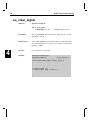
os_clear_signal
Summary:
#include <rtx51tny.h>
char os_clear_signal (
unsigned char task_id);
4
/* task ID of signal to clear */
Description:
The os_clear_signal function clears the signal flag for the task
specified by task_id.
Return Value:
The os_clear_signal function returns a value of 0 if the signal flag
was successfully cleared. A value of -1 is returned if the specified
task does not exist.
See Also:
isr_send_signal, os_send_signal
Example:
#include <rtx51tny.h>
#include <stdio.h>
/* for printf */
void tst_os_clear_signal (void) _task_ 8
{
.
.
.
os_clear_signal (5);
/* clear signal flag in task 5 */
.
.
.
}
RTX Tiny
29
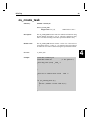
os_create_task
Summary:
#include <rtx51tny.h>
char os_create_task (
unsigned char task_id);
/* ID of task to start */
Description:
The os_create_task function starts the defined task function using
the task number specified by task_id. The task is marked as ready
and is executed according to the rules specified for RTX51 Tiny.
Return Value:
The os_create_task function returns a value of 0 if the task was
successfully started. A value of -1 is returned if the task could not
be started or if no task was defined using the specified task number.
See Also:
os_delete_task
Example:
#include <rtx51tny.h>
#include <stdio.h>
4
/* for printf */
void new_task (void) _task_ 2
{
.
.
.
}
void tst_os_create_task (void) _task_ 0
{
.
.
.
if (os_create_task (2))
{
printf ("Couldn't start task 2\n");
}
.
.
}
30
RTX51 Tiny Function Library
os_delete_task
Summary:
#include <rtx51tny.h>
char os_delete_task (
unsigned char task_id);
4
/* ID of task to stop and delete */
Description:
The os_delete_task function stops the task specified by the
task_id argument. The specified task is removed from the task list.
Return Value:
The os_delete_task function returns a value of 0 if the task was
successfully stopped and deleted. A return value of -1 indicates the
specified task does not exist or had not been started.
See Also:
os_create_task
Example:
#include <rtx51tny.h>
#include <stdio.h>
/* for printf */
void tst_os_delete_task (void) _task_ 0
{
.
.
.
if (os_delete_task (2))
{
printf ("Couldn't stop task 2\n");
}
.
.
.
}
RTX Tiny
31
os_running_task_id
Summary:
#include <rtx51tny.h>
char os_running_task_id (void);
Description:
The os_running_task_id function determines the task id of the
currently executing task function.
Return Value:
The os_running_task_id function returns the task ID of the currently executing task. This value is a number in the range 0 to 15.
See Also:
os_create_task, os_delete_task
Example:
#include <rtx51tny.h>
#include <stdio.h>
/* for printf */
void tst_os_running_task (void) _task_ 3
{
unsigned char tid;
tid = os_running_task_id ();
/* tid = 3 */
}
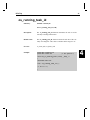
4
32
RTX51 Tiny Function Library
os_send_signal
Summary:
#include <rtx51tny.h>
char os_send_signal (
unsigned char task_id);
Description:
/* ID of task to signal */
The os_send_signal function sends a signal to task task_id. If the
specified task is already waiting for a signal, this function call
readies the task for execution. Otherwise, the signal is stored in the
signal flag of the task.
The os_send_signal function may be called only from task functions.
4
Return Value:
The os_send_signal function returns a value of 0 if successful and
-1 if the specified task does not exist.
See Also:
isr_send_signal, os_clear_signal, os_wait
RTX Tiny
33
Example:
#include <rtx51tny.h>
#include <stdio.h>
/* for printf */
void signal_func (void) _task_ 2
{
.
.
os_send_signal (8);
/* signal task #8 */
.
.
}
void tst_os_send_signal (void) _task_ 8
{
.
.
os_send_signal (2);
/* signal task #2 */
.
.
}
4
34
RTX51 Tiny Function Library
os_wait
Summary:
#include <rtx51tny.h>
char os_wait (
unsigned char event_sel,
unsigned char ticks,
unsigned int dummy);
Description:
4
/* events to wait for */
/* timer ticks to wait */
/* unused argument */
The os_wait function halts the current task and waits for one or
several events such as a time interval, a time-out, or a signal from
another task or interrupt. The event_sel argument specifies the
event or events to wait for and can be any combination of the following manifest constants:
Event constant
Description
K_IVL
Wait for a timer tick interval.
K_SIG
Wait for a signal.
K_TMO
Wait for a time-out.
The above events can be logically ORed using the vertical bar
character ( | ). For example, K_TMO | K_SIG, specifies that the
task wait for a time-out or for a signal.
The ticks argument specifies the number of timer ticks to wait for
an interval event ( K_IVL ) or a time-out event ( K_TMO ).
The dummy argument is provided for compatibility with RTX51
and is not used in RTX51 Tiny.
Return Value:
See Also:
Example:
When one of the specified events occurs, the task is enabled for
execution. Execution is restored and a manifest constant that identifies the event that restarted the task is returned by the os_wait
function. Possible return values are:
Return Value
Description
SIG_EVENT
A signal was received.
TMO_EVENT
A time-out has completed or an interval has expired.
NOT_OK
The value of the event_sel argument is invalid.
os_wait1, os_wait2
#include <rtx51tny.h>
RTX Tiny
35
#include <stdio.h>
/* for printf */
void tst_os_wait (void) _task_ 9
{
while (1)
{
char event;
event = os_wait (K_SIG + K_TMO, 50, 0);
switch (event)
{
default:
/* this should never happen */
break;
case TMO_EVENT:
/* time-out */
/* 50 tick time-out occurred */
break;
case SIG_EVENT:
/* signal recvd */
/* signal received */
break;
}
}
}
4
36
RTX51 Tiny Function Library
os_wait1
Summary:
#include <rtx51tny.h>
char os_wait1 (
unsigned char event_sel);
/* events to wait for */
Description:
The os_wait1 function halts the current task and waits for an event
to occur. The os_wait1 function is a subset of the os_wait function and does not allow all of the events that os_wait offers. The
event_sel argument specifies the event to wait for and can have
only the value K_SIG which will wait for a signal.
Return Value:
When the signal events occurs, the task is enabled for execution.
Execution is restored and a manifest constant that identifies the
event that restarted the task is returned by the os_wait1 function.
Possible return values are:
4
Return Value
Description
SIG_EVENT
A signal was received.
NOT_OK
The value of the event_sel argument is invalid.
See Also:
os_wait, os_wait2
Example:
See os_wait.
RTX Tiny
37
os_wait2
Summary:
#include <rtx51tny.h>
char os_wait2 (
unsigned char event_sel,
unsigned char ticks);
Description:
/* events to wait for */
/* timer ticks to wait */
The os_wait2 function halts the current task and waits for one or
several events such as a time interval, a time-out, or a signal from
another task or interrupt. The event_sel argument specifies the
event or events to wait for and can be any combination of the following manifest constants:
Event constant
Description
K_IVL
Wait for a timer tick interval.
K_SIG
Wait for a signal.
K_TMO
Wait for a time-out.
The above events can be logically ORed using the vertical bar
character ( | ). For example, K_TMO | K_SIG, specifies that the
task wait for a time-out or for a signal.
The ticks argument specifies the number of timer ticks to wait for
an interval event ( K_IVL ) or a time-out event ( K_TMO ).
Return Value:
When one of the specified events occurs, the task is enabled for
execution. Execution is restored and the manifest constant that
identifies the event that restarted the task is returned by the
os_wait2 function. Possible return values are:
4
38
4
RTX51 Tiny Function Library
Return Value
Description
SIG_EVENT
A signal was received.
TMO_EVENT
A time-out has completed or an interval has expired.
NOT_OK
The value of the event_sel argument is invalid.
See Also:
os_wait, os_wait1
Example:
See os_wait.
RTX Tiny
39
4
RTX Tiny
41
System Debugging
This chapter contains additonal information about the stack handling and the system debugging with dScope-51.
Stack Management
RTX51 Tiny reserves an individual stack area for each task. Due to the design of RTX51
Tiny which uses only the on-chip memory resources of the 8051, the entire stack is manage in the internal memory (IDATA) of the 8051. To allocate the largest available stack
space to the current running task, the stack space used by other not running tasks is
moved. The following figure illustrates the stack assignment of the individual tasks.
Stack Area
for Task 2
RAMTOP
0FFH
Stack Area
for Task 2
0F8H
RAMTOP
0FFH
RAMTOP
0FFH
0F8H
Stack Area
for Task 1
Stack Area
for Task 2
0F0H
Stack Area
for Task 1
60H
Stack Area
for Task 0
Stack Area
for Task 1
58H
?STACK
(50H)
Stack Assignment for
Task0 = Running Task
Stack Area
for Task 0
?STACK
(50H)
Stack Assignment for
Task1 = Running Task
58H
Stack Area
for Task 0
?STACK
(50H)
Stack Assignment for
Task2 = Running Task
The figure illustrates that RTX51 Tiny always allocates the entiere free memory as a
stacka area for thye currently running task. The memory used for the stack starts at the
symbol ?STACK which denotes the start address of the ?STACK segment. The ?STACK
symbol reserves the first unassigned byte in the internal memory.
Debugging with dScope-51
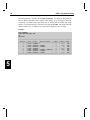
A RTX51 Tiny application can be tested using the dScope-51 Source-Level Debugger.
The RTX51 system status is displayed using a debug function. The use of this debug
function is explained in the following.
5
42
RTX51 Tiny Specifications
The debug function is defined in the file DBG_TINY.INC (for Windows dScope the file
name is DBG_TINY.DSW) and is loaded within dScope-51 by entering the following
commands. The RTX51 Tiny application must be loaded prior to defining this debug
function. The debug function is activated by pressing the F3-KEY and displays then the
status of RTX51 Tiny. In addition every task switch is displayed with a message.
Example:
DS51 TRAFFIC
>INCLUDE DBG_TINY.INC
>G
<F3-KEY>
+------------------------------------------------------------------------+
¦ Task ID ¦ Start ¦ State
¦ Wait for Event
¦ Signal ¦ Timer ¦ Stack ¦
¦----------+-------+---------+------------------+--------+-------+-------¦
¦
0
¦ 0026H ¦ DELETED ¦
¦
0
¦
131 ¦
84H ¦
¦
1
¦ 00D1H ¦ WAITING ¦ SIGNAL
¦
0
¦
131 ¦
84H ¦
¦
2
¦ 0043H ¦ WAITING ¦ TIMEOUT
¦
0
¦
5 ¦
86H ¦
¦
3
¦ 0278H ¦ DELETED ¦
¦
0
¦
131 ¦
88H ¦
¦
4
¦ 02ACH ¦ WAITING ¦ SIGNAL & TIMEOUT ¦
0
¦
220 ¦
88H ¦
¦
5
¦ 032BH ¦ WAITING ¦ TIMEOUT
¦
0
¦
1 ¦
8AH ¦
¦
6
¦ 000EH ¦ WAITING ¦ SIGNAL
¦
0
¦
131 ¦
FBH ¦
+------------------------------------------------------------------------+
5
RTX Tiny
43
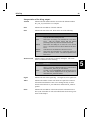
Interpretation of the debug output:
Task ID
Indicates the task number which is used in the task definition within
the _task_ keyword of the C51 Compiler.
Start
Indicates the start address of the task function.
State
Indicates the state of the task. State can be one of the following:
Wait for Event
State
Description
RUNNING
The task currently being executed is in the RUNNING State.
Only one task can be running at a time.
READY
Tasks which are waiting to be executed are in the READY
STATE.
After the currently running task has finished
processing, RTX51 Tiny starts the next task that is ready.
WAITING
Tasks which are waiting for an event are in the W AITING
STATE. If the event occurs, the task is placed into the READY
STATE.
DELETED
Tasks which are not started are in the DELETED STATE.
TIME-OUT
Tasks which were interrupted by a round-robin time-out are
placed in the TIME-OUT STATE. This state is equivalent to the
READY STATE.
Indicates which events the task is currently waiting for. The events
can be a combination of the following:
Event
Description
TIMEOUT
The task is in the state WAITING until the Timer reaches the
value 0. This event is displayed when the os_wait function is
called with the K_TMO or K_IVL event selector.
SIGNAL
The task is in the state WAITING until the signal flag goes to
one. This event is displayed when the os_wait function is
called with the K_SIG event selector.
Signal
Indicates the state of the signal flag: 1 for signal set, 0 for signal reset.
Timer
Indicates the number of timer ticks which are required for a timeout.
It should be noted that the Timer is free running and only set to the
timeout value when the os_wait function is called with a K_TMO argument.
Stack
Indicates the start address of the local task stack in the IDATA area.
The layout of the RTX-51 tasks is described under Stack Management
earlier in this chapter.
5
44
5
RTX51 Tiny Specifications
RTX TINY
45
Application Examples
RTX_EX1: Your First RTX51 Program
The program RTX_EX1 demonstrates round-robin multitasking using RTX51 Tiny.
This program is composed of only one source file RTX_EX1.C located in the
\C51V4\RTX_TINY\RTX_EX1 or \CDEMO\51\RTX_TINY\RTX_EX1 directory. The
contents of RTX_EX1.C is listed below.
/******************************************************************************/
/*
*/
/*
RTX_EX1.C: The first RTX51 Program
*/
/*
*/
/******************************************************************************/
#pragma CODE DEBUG OBJECTEXTEND
#include <rtx51tny.h>
/* RTX51 tiny functions & defines
int counter0;
int counter1;
int counter2;
/* counter for task 0
/* counter for task 1
/* counter for task 2
*/
*/
*/
*/
/******************************************************************************/
/*
Task 0 'job0': RTX51 tiny starts execution with task 0
*/
/******************************************************************************/
job0 () _task_ 0 {
os_create_task (1);
/* start task 1
*/
os_create_task (2);
/* start task 2
*/
while (1) {
counter0++;
}
/* endless loop
/* increment counter 0
*/
*/
}
/******************************************************************************/
/*
Task 1 'job1': RTX51 tiny starts this task with os_create_task (1)
*/
/******************************************************************************/
job1 () _task_ 1 {
while (1) {
/* endless loop
*/
counter1++;
/* increment counter 1
*/
}
}
/******************************************************************************/
/*
Task 2 'job2': RTX51 tiny starts this task with os_create_task (2)
*/
/******************************************************************************/
job2 () _task_ 2 {
while (1) {
/* endless loop
*/
counter2++;
/* increment counter 2
*/
}
}
To compile and link RTX_EX1, type the following commands at the DOS command
prompt.
C51 RTX_EX1.C DEBUG OBJECTEXTEND
BL51 RTX_EX1.OBJ RTX51TINY
Once RTX_EX1 is compiled and linked, you can test it using DS51. Type
6
46
Application Examples
DS51 RTX_EX1 INIT(RTX_EX1.INI)
The INIT(RTX_EX1.INI) directive loads an initialization file that configures the DS51
screen; loads the appropriate IOF driver file; initializes watchpoints for the variables
counter0, counter1, and counter2; and finally starts execution of RTX_EX1.
As each task gets to execute, you will see the corresponding counter increase. The counter variables are displayed in the watch window at the top of the screen.
Enter CTRL+C to halt execution of RTX_EX1, then type
INCLUDE DBG_TINY.INC
at the DS51 command prompt. This will load an include file that allows you to display
status information of the tasks. You may need to increase the size of the exe window using ALT+U so all of the task information is displayed.
Once the include file is loaded, press F3 to display status information for the three tasks
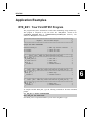
defined in this program.
+------------------------------------------------------------------------+
¦ Task ID ¦ Start ¦ State
¦ Wait for Event
¦ Signal ¦ Timer ¦ Stack ¦
¦----------+-------+---------+------------------+--------+-------+-------¦
¦
0
¦ 000EH ¦ TIMEOUT ¦
¦
0
¦
217 ¦
20H ¦
¦
1
¦ 0023H ¦ RUNNING ¦
¦
0
¦
217 ¦
2FH ¦
¦
2
¦ 002EH ¦ TIMEOUT ¦
¦
0
¦
217 ¦
F0H ¦
+------------------------------------------------------------------------+
6
RTX TINY
47
RTX_EX2: A Simple RTX51 Application
The program RTX_EX2 demonstrates an RTX51 Tiny application that uses the os_wait
function and signal passing. This program is composed of one source file RTX_EX2.C
located in the \C51V4\RTX_TINY\RTX_EX2 or \CDEMO\51\RTX_TINY\RTX_EX2 directory. The contents of RTX_EX2.C is listed below.
/******************************************************************************/
/*
RTX_EX2.C: A RTX51 Application
*/
/******************************************************************************/
#pragma CODE DEBUG OBJECTEXTEND
#include <rtx51tny.h>
/* RTX51 tiny functions & defines
int
int
int
int
/*
/*
/*
/*
counter0;
counter1;
counter2;
counter3;
counter
counter
counter
counter
for
for
for
for
task
task
task
task
0
1
2
2
*/
*/
*/
*/
*/
/******************************************************************************/
/*
Task 0 'job0': RTX51 tiny starts execution with task 0
*/
/******************************************************************************/
job0 () _task_ 0 {
os_create_task (1);
/* start task 1
*/
os_create_task (2);
/* start task 2
*/
os_create_task (3);
/* start task 3
*/
while (1) {
counter0++;
os_wait (K_TMO, 5, 0);
}
/* endless loop
/* increment counter 0
/* wait for timeout: 5 ticks
*/
*/
*/
}
/******************************************************************************/
/*
Task 1 'job1': RTX51 tiny starts this task with os_create_task (1)
*/
/******************************************************************************/
job1 () _task_ 1 {
while (1) {
/* endless loop
*/
counter1++;
/* increment counter 1
*/
os_wait (K_TMO, 10, 0);
/* wait for timeout: 10 ticks
*/
}
}
/******************************************************************************/
/*
Task 2 'job2': RTX51 tiny starts this task with os_create_task (2)
*/
/******************************************************************************/
job2 () _task_ 2 {
while (1) {
/* endless loop
*/
counter2++;
/* increment counter 2
*/
if (counter2 == 0) {
/* signal overflow of counter 2
*/
os_send_signal (3);
/* to task 3
*/
}
}
}
/******************************************************************************/
/*
Task 3 'job3': RTX51 tiny starts this task with os_create_task (3)
*/
/******************************************************************************/
job3 () _task_ 3 {
while (1) {
/* endless loop
*/
os_wait (K_SIG, 0, 0);
/* wait for signal
*/
counter3++;
/* process overflow from counter 2
*/
}
}
6
48
Application Examples
Enter the following commands at the DOS prompt to compile and link RTX_EX2.
C51 RTX_EX2.C DEBUG OBJECTEXTEND
BL51 RTX_EX2.OBJ RTX51TINY
When RTX_EX2 is compiled and linked, you can test it using DS51. Type
DS51 RTX_EX2
to run DS51 and load RTX_EX2. When DS51 is loaded, type the following commands at
the DS51 command prompt.
WS
WS
WS
WS
G
counter0
counter1
counter2
counter3
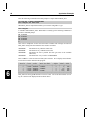
This will set watchpoints for the four task counter variables and will begin execution of
RTX_EX2. RTX_EX2 increments the four counters as follows:
counter0
counter1
counter2
counter3
incremented every 5 RTX51 timer ticks
incremented every 10 RTX51 timer ticks
incremented as fast as possible (this task gets most of the available
CPU’s time)
incremented for every overflow of counter2
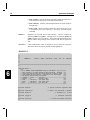
Enter CTRL+C to halt execution of RTX_EX1 and enter F3 to display status information for the four tasks defined in this program.
6
+------------------------------------------------------------------------+
¦ Task ID ¦ Start ¦ State
¦ Wait for Event
¦ Signal ¦ Timer ¦ Stack ¦
¦----------+-------+---------+------------------+--------+-------+-------¦
¦
0
¦ 000EH ¦ WAITING ¦ TIMEOUT
¦
0
¦
5 ¦
28H ¦
¦
1
¦ 0032H ¦ WAITING ¦ TIMEOUT
¦
0
¦
10 ¦
2AH ¦
¦
2
¦ 0047H ¦ RUNNING ¦
¦
0
¦
196 ¦
2CH ¦
¦
3
¦ 005DH ¦ WAITING ¦ SIGNAL
¦
0
¦
196 ¦
FDH ¦
+------------------------------------------------------------------------+
RTX_EX2 uses the os_wait function to wait for events. The event that each task is waiting for is shown in the displayed task list shown above.
RTX TINY
49
TRAFFIC: A Traffic Light Controller
The preceding examples, RTX_EX1 and RTX_EX2, show only the basic features of
RTX51 Tiny. These examples could just as easily have been implemented without using
RTX51. This example, a pedestrian traffic light controller, is more complex and can not
be easily implemented without a multitasking real-time operating system like RTX51.
TRAFFIC is a time-controlled traffic light controller. During a user-defined clock time
interval, the traffic light is operating. Outside this time interval, the yellow light flashes.
If a pedestrian presses the request button, the traffic light goes immediately into a “walk”
state. Otherwise, the traffic light works continuously.
Traffic Light Controller Commands
You can communicate with the traffic light controller via the serial port interface of the
8051. You can use the serial window of DS51 to test the traffic light controller commands.
The serial commands that are available are listed in the following table. These commands
are composed of ASCII text characters. All commands must be terminated with a carriage return.
Command
Serial Text
Description
Display
D
Display clock, start, and ending times.
Time
T hh:mm:ss
Set the current time in 24-hour format.
Start
S hh:mm:ss
Set the starting time in 24-hour format. The traffic light
controller operates normally between the start and end
times. Outside these times, the yellow light flashes.
End
E hh:mm:ss
Set the ending time in 24-hour format.
Software
The TRAFFIC application is composed of three files that can be found in the
\C51V4\RTX_TINY\TRAFFIC or \CDEMO\51\RTX_TINY\TRAFFIC directory.
TRAFFIC.C
contains the traffic light controller program which is divided into the following tasks:
• Task 0 Initialize: initializes the serial interface and starts all other
tasks. Task 0 deletes itself since initialization is only needed once.
• Task 1 Command: is the command processor for the traffic light
controller. This task controls and processes serial commands received.
• Task 2 Clock: controls the time clock.
• Task 3 Blinking: flashes the yellow light when the clock time is outside the active time range.
6
50
Application Examples
• Task 4 Lights: controls the traffic light phases while the clock time is
in the active time range (between the start and end times).
• Task 5 Button: reads the pedestrian push button and sends signals to
the lights task.
• Task 6 Quit: checks for an ESC character in the serial stream. If one
is encountered, this task terminates a previously specified display
command.
SERIAL.C
implements an interrupt driven serial interface. This file contains the
functions putchar and getkey. The high-level I/O functions printf and
getline call these basic I/O routines. The traffic light application will also
operate without using interrupt driven serial I/O. but will not perform as
well.
GETLINE.C
is the command line editor for characters received from the serial port.
This source file is also used by the MEASURE application.
TRAFFIC.C
/*****************************************************************************
*/
/*
*/
/*
TRAFFIC.C:
Traffic Light Controller using the C51 Compiler
*/
/*
*/
/*****************************************************************************
*/
6
code char menu[] =
"\n"
"+***** TRAFFIC LIGHT CONTROLLER using C51 and RTX-51 tiny *****+\n"
"| This program is a simple Traffic Light Controller. Between |\n"
"| start time and end time the system controls a traffic light |\n"
"| with pedestrian self-service. Outside of this time range
|\n"
"| the yellow caution lamp is blinking.
|\n"
"+ command -+ syntax -----+ function ---------------------------+\n"
"| Display | D
| display times
|\n"
"| Time
| T hh:mm:ss | set clock time
|\n"
"| Start
| S hh:mm:ss | set start time
|\n"
"| End
| E hh:mm:ss | set end time
|\n"
"+----------+-------------+-------------------------------------+\n";
#include <reg52.h>
*/
#include <rtx51tny.h>
*/
#include <stdio.h>
*/
#include <ctype.h>
*/
#include <string.h>
*/
/* special function registers 8052
/* RTX-51 tiny functions & defines
/*
/*
standard
I/O
character
.h-file
functions
/* string and memory functions
RTX TINY
51
extern getline (char idata
*/
extern serial_init ();
*/
#define
*/
#define
*/
#define
*/
#define
*/
#define
*/
#define
*/
#define
*/
INIT
*,
COMMAND
4
KEYREAD
5
GET_ESC
6
line
init serial UART
command
/* task number of task:
/* task number of task:
clock
blinking
/* task number of task:
/* task number of task:
/* task number of task:
init
signal
keyread
get_escape
/* structure of the time record
hour;
/*
hour
min;
/*
minute
sec;
/*
second
struct time ctime = { 12,
0,
*/
struct time start = {
7, 30,
*/
struct time end
= { 18, 30,
*/
idata
*/
input
/* task number of task:
3
LIGHTS
function:
/* task number of task:
2
BLINKING
external
/* external function:
1
CLOCK
red
/*
0
struct time
{
*/
unsigned
char
*/
unsigned
char
*/
unsigned
char
*/
};
sbit
*/
sbit
*/
sbit
*/
sbit
*/
sbit
*/
sbit
*/
char);
= P1^2;
0 };
/* storage for clock time values
0 };
/* storage for start time values
0 };
/* storage for end
/* I/O Pin:
red
time values
lamp output
yellow = P1^1;
/* I/O Pin:
yellow lamp output
green
= P1^0;
/* I/O Pin:
green
lamp output
stop
= P1^3;
/* I/O Pin:
stop
lamp output
walk
= P1^4;
/* I/O Pin:
walk
lamp output
key
= P1^5;
char inline[16];
/* I/O Pin:
self-service key input
/* storage for command input line
/*****************************************************************************
*/
/*
Task
0
'init':
Initialize
*/
/*****************************************************************************
*/
6
52
Application Examples
init () _task_ INIT
{
*/
serial_init ();
*/
os_create_task (CLOCK);
*/
os_create_task (COMMAND);
*/
os_create_task (LIGHTS);
*/
os_create_task (KEYREAD);
*/
os_delete_task (INIT);
*/
}
bit display_time = 0;
*/
6
/* program execution starts here
/* initialize the serial interface
/*
/*
/*
/*
start
start
start
start
clock
task
command
task
lights
task
keyread
task
/* stop init task (no longer needed)
/* flag:
signal cmd state display_time
/*****************************************************************************
*/
/*
Task
2
'clock'
*/
/*****************************************************************************
*/
clock () _task_ CLOCK {
while (1)
{
/* clock is an endless loop
*/
if (++ctime.sec == 60)
{
/* calculate the second
*/
ctime.sec = 0;
if (++ctime.min == 60)
{
/* calculate the minute
*/
ctime.min = 0;
if
(++ctime.hour
==
24)
{
/*
calculate
the
hour
*/
ctime.hour = 0;
}
}
}
if (display_time) {
/* if command_status == display_time
*/
os_send_signal (COMMAND);
/* signal to task command: time changed
*/
}
os_wait (K_IVL, 100, 0);
/* wait interval:
1 second
*/
}
}
struct time rtime;
*/
/* temporary storage for entry time
/*****************************************************************************
*/
/*
readtime: convert line input to time values & store in rtime
*/
/*****************************************************************************
*/
bit readtime (char idata *buffer) {
RTX TINY
53
unsigned char args;
/* number of arguments
*/
rtime.sec = 0;
/* preset second
*/
args = sscanf (buffer, "%bd:%bd:%bd",
/* scan input line for
*/
&rtime.hour,
/* hour, minute and second
*/
&rtime.min,
&rtime.sec);
if (rtime.hour > 23
||
rtime.min > 59
||
/* check for valid inputs
*/
rtime.sec > 59
|| args < 2
|| args == EOF)
printf ("\n*** ERROR: INVALID TIME FORMAT\n");
return (0);
{
}
return (1);
}
#define ESC
*/
bit
*/
0x1B
escape;
/* ESCAPE character code
/* flag: mark ESCAPE character entered
/*****************************************************************************
*/
/*
Task 6 'get_escape': check if ESC (escape character) was entered
*/
/*****************************************************************************
*/
get_escape () _task_ GET_ESC {
while (1)
{
/* endless loop
*/
if (_getkey () == ESC)
escape = 1;
/* set flag if ESC entered
*/
if (escape) {
/* if escape flag send signal
*/
os_send_signal (COMMAND);
/* to task 'command'
*/
}
}
}
/*****************************************************************************
*/
/*
Task 1 'command': command processor */
/*****************************************************************************
*/
command () _task_ COMMAND {
unsigned char i;
printf (menu);
/* display command menu
*/
while (1)
{
/* endless loop
*/
printf ("\nCommand: ");
*/
/* display prompt
6
54
Application Examples
getline (&inline, sizeof (inline));
/* get command line input
*/
for (i = 0; inline[i] != 0; i++)
{
/* convert to uppercase
*/
inline[i] = toupper(inline[i]);
}
for
(i
=
0;
inline[i]
==
'
';
i++);
/*
skip
blanks
*/
switch (inline[i])
{
/* proceed to command function
*/
case 'D':
/* Display Time Command
*/
printf ("Start Time: %02bd:%02bd:%02bd
"
"End Time: %02bd:%02bd:%02bd\n",
start.hour, start.min, start.sec,
end.hour,
end.min,
end.sec);
printf ("
type ESC to abort\r");
os_create_task (GET_ESC);
/* ESC check in display loop
*/
escape = 0;
/* clear escape flag
*/
display_time = 1;
/* set display time flag
os_clear_signal (COMMAND);
/* clear pending signals
*/
*/
while (!escape)
{
/* while no ESC entered
*/
printf ("Clock Time: %02bd:%02bd:%02bd\r",
/* display time
*/
ctime.hour, ctime.min, ctime.sec);
os_wait (K_SIG, 0, 0);
/* wait for time change or ESC
*/
}
os_delete_task (GET_ESC);
6
/* ESC check not longer needed
*/
display_time = 0;
/* clear display time flag
*/
printf ("\n\n");
break;
case 'T':
/* Set Time Command
*/
if (readtime (&inline[i+1]))
{
/* read time input and
*/
ctime.hour
=
rtime.hour;
/*
store
in
'ctime'
*/
ctime.min
ctime.sec
= rtime.min;
= rtime.sec;
}
break;
case 'E':
/* Set End Time Command
*/
if (readtime (&inline[i+1]))
{
/* read time input and
*/
end.hour
*/
=
rtime.hour;
/*
store
in
'end'
RTX TINY
55
end.min
end.sec
= rtime.min;
= rtime.sec;
}
break;
case 'S':
if (readtime (&inline[i+1]))
{
/* Set Start Time Command */
/* read time input and
*/
start.hour
=
rtime.hour;
/*
store
in
'start'
*/
start.min
start.sec
= rtime.min;
= rtime.sec;
}
break;
default:
/* Error Handling
*/
printf (menu);
/* display command menu
*/
break;
}
}
}
/*****************************************************************************
*/
/*
signalon: check if clock time is between start and end
*/
/*****************************************************************************
*/
bit signalon ()
{
if (memcmp (&start, &end, sizeof (struct time)) < 0) {
if (memcmp (&start, &ctime, sizeof (struct time)) < 0 &&
memcmp (&ctime, &end,
sizeof (struct time)) < 0) return (1);
}
else {
if (memcmp (&end,
&ctime, sizeof (start)) > 0 &&
memcmp (&ctime, &start, sizeof (start)) > 0) return (1);
}
return (0);
/* signal off, blinking on
*/
}
/*****************************************************************************
*/
/*
Task 3 'blinking': runs if current time is outside start & end time
*/
/*****************************************************************************
*/
blinking () _task_ BLINKING
{
/* blink yellow light
*/
red
= 0;
/* all lights off
*/
yellow = 0;
green = 0;
stop
= 0;
walk
= 0;
while (1)
*/
{
/* endless loop
6
56
Application Examples
yellow = 1;
/* yellow light on
*/
os_wait (K_TMO, 30, 0);
/* wait for timeout: 30 ticks
*/
yellow = 0;
/* yellow light off
*/
os_wait (K_TMO, 30, 0);
/* wait for timeout: 30 ticks
*/
if (signalon ())
{
/* if blinking time over
*/
os_create_task
(LIGHTS);
/*
start
lights
*/
os_delete_task (BLINKING);
/* and stop blinking
*/
}
}
}
6
/*****************************************************************************
*/
/*
Task 4 'lights': executes if current time is between start & end time
*/
/*****************************************************************************
*/
lights () _task_ LIGHTS {
/* traffic light operation
*/
red
= 1;
/* red & stop lights on
*/
yellow = 0;
green = 0;
stop
= 1;
walk
= 0;
while (1)
{
/* endless loop
*/
os_wait (K_TMO, 30, 0);
/* wait for timeout: 30 ticks
*/
if (!signalon ()) {
/* if traffic signal time over
*/
os_create_task (BLINKING);
/* start blinking
*/
os_delete_task (LIGHTS);
/* stop lights
*/
}
yellow = 1;
os_wait (K_TMO, 30, 0);
/* wait for timeout: 30 ticks
*/
red
= 0;
/* green light for cars
*/
yellow = 0;
green = 1;
os_clear_signal (LIGHTS);
os_wait (K_TMO, 30, 0);
/* wait for timeout: 30 ticks
*/
os_wait (K_TMO + K_SIG, 250, 0);
/* wait for timeout & signal
*/
yellow = 1;
green = 0;
os_wait (K_TMO, 30, 0);
/* wait for timeout: 30 ticks
*/
red
= 1;
/* red light for cars
*/
yellow = 0;
RTX TINY
57
os_wait (K_TMO, 30, 0);
/* wait for timeout: 30 ticks
*/
stop
= 0;
/* green light for walkers
*/
walk
= 1;
os_wait (K_TMO, 100, 0);
/* wait for timeout: 100 ticks
*/
stop
= 1;
/* red light for walkers
*/
walk
= 0;
}
}
/*****************************************************************************
*/
/*
Task 5 'keyread': process key stroke from pedestrian push button
*/
/*****************************************************************************
*/
keyread () _task_ KEYREAD {
while (1)
{
/* endless loop
*/
if (key)
{
/* if key pressed
*/
os_send_signal (LIGHTS);
/* send signal to task lights
*/
}
os_wait (K_TMO, 2, 0);
/* wait for timeout: 2 ticks
*/
}
}
SERIAL.C
/*****************************************************************************
*/
/*
*/
/*
SERIAL.C:
Interrupt Controlled Serial Interface for RTX-51 tiny
*/
/*
*/
/*****************************************************************************
*/
#include <reg52.h>
*/
#include <rtx51tny.h>
*/
#define
*/
unsigned
*/
unsigned
*/
idata
*/
unsigned
*/
OLEN
8
char
ostart;
char
oend;
char
char
/* special function register 8052
/* RTX-51 tiny functions & defines
/* size of serial transmission buffer
outbuf[OLEN];
otask = 0xff;
/* transmission buffer start index
/* transmission buffer end index
/* storage for transmission buffer
/* task number of output task
6
58
Application Examples
#define
*/
unsigned
*/
unsigned
*/
idata
*/
unsigned
*/
#define
*/
#define
*/
bit
*/
bit
*/
bit
*/
6
ILEN
8
char
istart;
char
iend;
char
char
/* size of serial receiving buffer
/* receiving buffer start index
/* receiving buffer end index
inbuf[ILEN];
/* storage for receiving buffer
itask = 0xff;
/* task number of output task
CTRL_Q
0x11
/* Control+Q character code
CTRL_S
0x13
/* Control+S character code
sendfull;
sendactive;
sendstop;
/* flag: marks transmit buffer full
/* flag: marks transmitter active
/* flag: marks XOFF character
/*****************************************************************************
*/
/*
putbuf:
write a character to SBUF or transmission buffer
*/
/*****************************************************************************
*/
putbuf (char c) {
if (!sendfull) {
/* transmit only if buffer not full
*/
if (!sendactive && !sendstop)
{
/* if transmitter not active:
*/
sendactive = 1;
/* transfer the first character direct
*/
SBUF = c;
/* to SBUF to start transmission
*/
}
else
{
/* otherwize:
*/
outbuf[oend++ & (OLEN-1)] = c; /* transfer char to transmission buffer
*/
if (((oend ^ ostart) & (OLEN-1)) == 0) sendfull = 1;
}
/* set flag if buffer is full
*/
}
}
/*****************************************************************************
*/
/*
putchar:
interrupt
controlled
putchar
function
*/
/*****************************************************************************
*/
char putchar (char c) {
if (c == '\n')
{
/* expand new line character:
*/
while (sendfull) {
/* wait for transmission buffer empty
*/
RTX TINY
59
otask
=
os_running_task_id
();
/*
set
output
task
number
*/
os_wait (K_SIG, 0, 0);
/* RTX-51 call: wait for signal
*/
otask = 0xff;
/* clear output task number
*/
}
putbuf (0x0D);
/* send CR before LF for <new line>
*/
}
while (sendfull)
{
/* wait for transmission buffer empty
*/
otask
=
os_running_task_id
();
/*
set
output
task
number
*/
os_wait (K_SIG, 0, 0);
/* RTX-51 call: wait for signal
*/
otask = 0xff;
/* clear output task number
*/
}
putbuf
(c);
/*
send
character
*/
return (c);
/* return character: ANSI requirement
*/
}
/*****************************************************************************
*/
/*
_getkey:
interrupt
controlled
_getkey
*/
/*****************************************************************************
*/
char _getkey (void) {
while (iend == istart) {
itask
=
os_running_task_id
();
/*
set
input
task
number
*/
os_wait (K_SIG, 0, 0);
/* RTX-51 call: wait for signal
*/
itask = 0xff;
/* clear input task number
*/
}
return (inbuf[istart++ & (ILEN-1)]);
}
/*****************************************************************************
*/
/*
serial:
serial
receiver
/
transmitter
interrupt
*/
/*****************************************************************************
*/
serial () interrupt 4 using 2
{
/* use registerbank 2 for interrupt
*/
unsigned char c;
bit
start_trans = 0;
if (RI)
{
/* if receiver interrupt
*/
c
=
SBUF;
/*
read
character
*/
RI = 0;
*/
/* clear interrupt request flag
6
60
Application Examples
switch
(c)
{
/*
process
character
*/
case CTRL_S:
sendstop = 1;
/* if Control+S stop transmission
*/
break;
case CTRL_Q:
start_trans
=
sendstop;
/*
if
Control+Q
start
transmission
*/
sendstop = 0;
break;
default:
/* read all other characters into inbuf
*/
if (istart + ILEN != iend) {
inbuf[iend++ & (ILEN-1)] = c;
}
/*
if
task
waiting:
signal
ready
*/
if (itask != 0xFF) isr_send_signal (itask);
break;
}
}
if
(TI
||
start_trans)
{
/*
if
transmitter
interrupt
*/
TI = 0;
/* clear interrupt request flag
*/
if (ostart != oend)
{
/* if characters in buffer and
*/
if
(!sendstop)
{
/*
if
not
Control+S
received
*/
SBUF
=
outbuf[ostart++
&
(OLEN-1)];
/*
transmit
character
*/
sendfull
=
0;
/*
clear
'sendfull'
flag
*/
/*
if
task
waiting:
signal
ready
*/
if (otask != 0xFF)
6
isr_send_signal (otask);
}
}
else sendactive = 0;
/* if all transmitted clear 'sendactive'
*/
}
}
/*****************************************************************************
*/
/*
serial_init:
initialize
serial
interface
*/
/*****************************************************************************
*/
serial_init () {
SCON = 0x50;
/* mode 1: 8-bit UART, enable receiver
*/
TMOD |= 0x20;
/* timer 1 mode 2: 8-Bit reload
*/
TH1
= 0xf3;
/* reload value 2400 baud
*/
RTX TINY
61
TR1
=
1;
/*
timer
1
run
*/
ES
= 1;
/* enable serial port interrupt
*/
}
GETLINE.C
/*****************************************************************************
*/
/*
*/
/*
GETLINE.C:
Line
Edited
Character
Input
*/
/*
*/
/*****************************************************************************
*/
#include <stdio.h>
#define
#define
#define
#define
#define
#define
CNTLQ
CNTLS
DEL
BACKSPACE
CR
LF
0x11
0x13
0x7F
0x08
0x0D
0x0A
/***************/
/* Line Editor */
/***************/
void getline (char idata *line, unsigned char n)
unsigned char cnt = 0;
char c;
do
{
{
if
((c
if
(c
=
_getkey
())
==
CR)
c
=
LF;
/*
read
character
process
backspace
*/
==
BACKSPACE
||
c
==
DEL)
{
/*
*/
if (cnt != 0)
cnt--;
{
/* decrement count
*/
line--;
/* and line pointer
*/
putchar
(0x08);
/*
echo
backspace
*/
putchar (' ');
putchar (0x08);
}
}
else
if
(c
!=
CNTLQ
&&
c
!=
CNTLS)
{
/*
ignore
Control
S/Q
*/
putchar (*line = c);
/* echo and store character
*/
line++;
/* increment line pointer
*/
cnt++;
/*
and
count
*/
}
}
*/
while (cnt < n - 1
&&
c != LF);
/* check limit and line feed
6
62
Application Examples
*line = 0;
/* mark end of string
*/
}
Compiling and Linking TRAFFIC
Enter the following commands at the DOS prompt to compile and link TRAFFIC.
C51 TRAFFIC.C DEBUG OBJECTEXTEND RF (TRAFFIC.REG)
C51 SERIAL.C DEBUG OBJECTEXTEND RF (TRAFFIC.REG)
C51 GETLINE.C DEBUG OBJECTEXTEND RF (TRAFFIC.REG)
BL51 @TRAFFIC.LIN
Alternatively, there is a batch file called TRAFFIC.BAT that you can use to compile,
link, and automatically run DS51.
Testing and Debugging TRAFFIC
Once you have compiled and linked TRAFFIC, you can test it using DS51. Type
DS51 TRAFFIC
to run DS51 and load including the DS51.INI initialization file. This file will automatically load the IOF driver, load the traffic program, load an include file for displaying task
status, active watchpoints for the traffic lights, define a function for the pedestrian button
(which is activated using F4), and start the TRAFFIC application. Following is the listing of DS51.INI.
load ..\..\ds51\8052.iof
/* load 8052 CPU driver*/
include dbg_tiny.inc
/* load debug function for RTX51 Tiny */
6
/* define watch variables */
ws red
ws yellow
ws green
ws stop
ws walk
/* set P1.5 to zero: Key Input */
PORT1 &= ~0x20;
/* define a debug function for the pedestrian push button */
signal void button (void) {
PORT1 |= 0x20;
/* set Port1.5
*/
twatch (50000);
/* wait 50 ms
*/
PORT1 &= ~0x20;
/* reset Port1.5 */
}
/* define F4 key as call to button () */
set F4="button ()"
You can start the execution of the application TRAFFIC with the GO command:
g
RTX TINY
63
When DS51 starts executing TRAFFIC, the serial window will display the command
menu and waits for you to enter a command. Change to the serial window with Alt+S;
type d and press the ENTER key. This will display the current time and the start and
end time range for the traffic light. For example:
Start Time: 07:30:00
Clock Time: 12:00:11
End Time: 18:30:00
type ESC to abort
As the program runs, you can watch the red, yellow, and green lamps of the traffic light
change. The pedestrian button is simulated using F4. Press F4 to see the traffic light
switch to red and the walk light switch to on.
You can display the task status using F3 much as before. The following task information
will be displayed:
+------------------------------------------------------------------------+
¦ Task ID ¦ Start ¦ State
¦ Wait for Event
¦ Signal ¦ Timer ¦ Stack ¦
¦----------+-------+---------+------------------+--------+-------+-------¦
¦
0
¦ 0026H ¦ DELETED ¦
¦
0
¦
131 ¦
84H ¦
¦
1
¦ 00D1H ¦ WAITING ¦ SIGNAL
¦
0
¦
131 ¦
84H ¦
¦
2
¦ 0043H ¦ WAITING ¦ TIMEOUT
¦
0
¦
5 ¦
86H ¦
¦
3
¦ 0278H ¦ DELETED ¦
¦
0
¦
131 ¦
88H ¦
¦
4
¦ 02ACH ¦ WAITING ¦ SIGNAL & TIMEOUT ¦
0
¦
220 ¦
88H ¦
¦
5
¦ 032BH ¦ WAITING ¦ TIMEOUT
¦
0
¦
1 ¦
8AH ¦
¦
6
¦ 000EH ¦ WAITING ¦ SIGNAL
¦
0
¦
131 ¦
FBH ¦
+------------------------------------------------------------------------+
If the Exe window is not large enough to show the entire status text, you can press
ALT+R to remove the register window. You can also increase the vertical size of the Exe
window. Press ALT+E to select the Exe window then enter ALT+U several times to increase the size of the window.
When you are through using DS51, type EXIT at the DS51 command prompt.
6
64
Application Examples
A
Application Example
RTX Example
TRAFFIC
Arithmetic Unit
I
45, 47
49
16
B
bank switching
BITBUS Communication
6
16
15
12
13
11
23
21
22
22
22
22
22
22
D
DBG_TINY.INC
Debugging with dScope-51
Development Tool Requirements
42
41
15
9, 12, 18
18
18
18
F
FREE_STACK
K_IVL
K_SIG
K_TMO
34, 37
34, 37
34, 37
L
Linking
Linking RTX51 Tiny Programs
11
23
M
Message Passing
Multiple Data Pointer
Multitasking Routines
isr_send_signal
os_clear_signal
os_create_task
os_delete_task
os_running_task_id
os_send_signal
os_wait
os_wait1
os_wait2
12
16
25
25
25
25
25
25
25
25
25
N
E
Event
Interval
Signal
Timeout
22
17, 22
15
12
25, 27
K
15
12
C
C51 Library Functions
C51 memory model
CAN Communication
CAN Functions
Compiling
Compiling RTX51 Tiny Programs
CONF_TNY.A51
Configuration Variables
FREE_STACK
INT_CLOCK
INT_REGBANK
RAMTOP
STACK_ERROR
TIMESHARING
INT_CLOCK
INT_REGBANK
Interrupt Handling
Interrupts
isr_send_signal
22
NOT_OK
Notational Conventions
34, 36, 38
5
O
Optimizing RTX51 Tiny Programs
os_clear_signal
os_create_task
os_delete_task
os_running_task_id
23
25, 28
25, 29
25, 30
25, 31
RTX TINY
os_send_signal
os_wait
os_wait1
os_wait2
65
25, 32
25, 34
25, 36
25, 37
P
Preemption
Priorities
22
16
17
8
8
7
7
7
21
25
15, 21
15
Target System Requirements
Task Definition
Task Management
Task State
Deleted
Ready
Running
Time-out
Waiting
Task Switching
Technical Data
Timer 0
Interrupt
TIMESHARING
TMO_EVENT
15
17
17
17
17
17
17
17
18
14
16
16
18, 22
34, 38
U
Using Signals
Using Time–outs
S
SIG_EVENT
8
41
22
41
13
T
11
11
R
RAMTOP
Reentrant Functions
Registerbanks
Round-Robin Program
Round-Robin Scheduling
RTX51
Introduction
RTX51 Full
RTX51 Tiny
RTX51 Tiny Configuration
RTX51 Tiny System Functions
RTX51TNY.H
RTX51TNY.LIB
Single Task Program
Stack Management
STACK_ERROR
System Debugging
System Functions
10
9
34, 36, 38
6
Information in this document is subject to change without notice and does not represent a
commitment on the part of Keil Elektronik GmbH. The software and/or databases described in this document are furnished under license agreement or nondisclosure agreement and may be used or copied only in accordance with the terms of the agreement. It is
against the law to copy the software on any medium except as specifically allowed in the
license or nondisclosure agreement. The purchaser may make one copy of the software
for backup purposes. No part of this manual and/or databases may be reproduced or
transmitted in any form or by any means, electronic or mechanical, including photocopying, recording, or information storage and retrieval systems, for any purpose other than
for the purchaser’s personal use, without the express written permission of Keil Elektronik
GmbH.
© Copyright 1995, Keil Elektronik GmbH. All rights reserved.
Printed in the Germany.
ISHELL, Keil C166, Keil C51, dScope, and Professional Developers Kit are trademarks
of Keil Elektronik GmbH.
Microsoft®, MS–DOS®, Windows and MASM® are registered trademarks of Microsoft
Corporation.
IBM and PC® are registered trademarks of International Business Machines Corporation.
Intel, MCS, AEDIT, ASM–51, and PL/M–
51 are registered trademarks of Intel Corporation.
Germany and Europe
KEIL ELEKTRONIK GmbH
Bretonischer Ring 15
D-85630 Grasbrunn b. München
Tel: (49) (089) 46 50 57
FAX: (49) (089) 46 81 62
Keil Software is market in the United States and Canada also under the Franklin Software, Inc.
KEIL ELEKTRONIK GmbH has representatives in the following countries: Australia, Austria, Belgium, CFR, Denmark, Finland, France, Germany, India,
Ireland, Israel, Italy, Netherlands, Norway, Poland, Spain, South Africa, Sweden, Switzerland, Taiwan, United Kingdom, United States and Canada.
Contact KEIL ELEKTRONIK GmbH to obtain the name and address of the distributor nearest to you.
Printed in Germany 2-95, Document #9443-1
RTX51 TINY
REAL– TIME OPERATING SYSTEM
User’s Guide 2.95