1
SVAN 953 USER MANUAL
_
The value set in the POST is confirmed and the window is closed after pressing the <ENTER>
push-button. After pressing the <ESC> push-button the window is closed ignoring the settings made
in the POST.
5.5
Selection of dose meter parameters - DOSEMETER SETUP
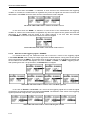
The DOSEMETER SETUP is accessible in the INPUT list in the DOSE METER mode but
it is not present in the LEVEL METER or 1/1 OCTAVE mode. This sub-list is opened after the selection
of the DOSEMETER SETUP text from the INPUT list by means of the <>, <> (or <>, <>) pushbuttons and pressing the <ENTER> one.
The DOSEMETER SETUP consists of the parameters, which influence the calculation of the dose
meter results: the CRITERION LEVEL, THRESHOLD LEVEL and EXCHANGE RATE (the definitions of
the dose meter results are given in App. D).
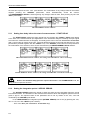
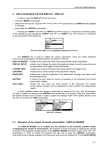
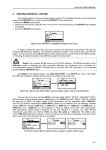
<ENTER>
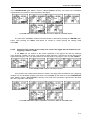
DOSEMETER SETUP selected in INPUT list and the DOSEMETER SETUP window
5.5.1
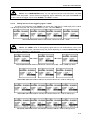
Setting criterion sound level - CRITERION LEVEL
The criterion sound level influences the calculations of the DOSE and D_8h results.
The
CRITERION LEVEL
line
is
accessible
after
pressing
the
<>
push-button
in the DOSEMETER SETUP window.
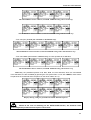
The available values are as follows: 80 dB, 84 dB, 85 dB or 90 dB. They can be selected by means
of the <>, <> push-buttons. The confirmation of any change made in the line requires pressing
the <ENTER> push-button, which simultaneously closes the window. The DOSEMETER SETUP is closed
ignoring any changes made in there, after pressing any time the <ESC> push-button.
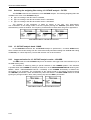
DOSEMETER SETUP windows with CRITERION LEVEL selection
5.5.2
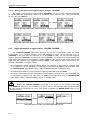
Setting criterion sound level - THRESHOLD LEVEL
The threshold level influences the calculations of the dose meter results, namely DOSE, D_8h and
LAV. The THRESHOLD LEVEL line is accessible after pressing the <>, <> push-buttons
in the DOSEMETER SETUP window.
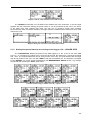
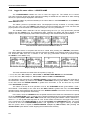
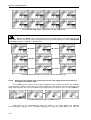
The available values are as follows: None, 75 dB, 80 dB, 85 dB or 90 dB. They can be selected by
means of the <>, <> push-buttons. The confirmation of any change made in the line requires pressing
the <ENTER> push-button, which simultaneously closes the window. The DOSEMETER SETUP is closed
ignoring any changes made in there, after pressing any time the <ESC> push-button.
5-18