1
SVAN 953 USER MANUAL
_
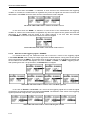
the user has to press the <>, <> push-buttons. The confirmation of any change made in the sub-list
requires pressing the <ENTER> push-button, which simultaneously closes the sub-list.
The MEASUREMENT SETUP is closed ignoring any changes made in there, after pressing any time the
<ESC> push-button.
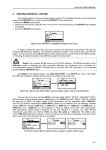
MEASUREMENT SETUP windows
5.1.1
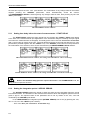
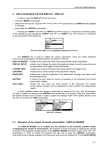
Setting time delay before the start of measurements - START DELAY
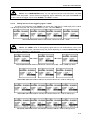
The START DELAY defines the delay period from the pressing the <START / STOP> push-button
to the start of the measurements (the digital filters of the instrument analyse constantly the input signal
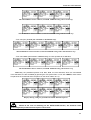
even when the measurements are stopped). This delay period can be set from 0 second to 60 seconds
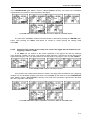
(with 1-second step by means of the <>, <> push-buttons and with 10-seconds step with the <>, <>
push-buttons pressed together with the <SHIFT> one). The <ENTER> push-button must be pressed for
the confirmation of the selection, which closes simultaneously the MEASUREMENT SETUP window.
MEASUREMENT SETUP windows; the setting of START DELAY with 1-second step
...
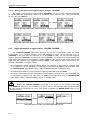
MEASUREMENT SETUP windows; the setting of START DELAY with 10-seconds step
Notice: The minimum delay period is equal to 0 second. In the CALIBRATION mode, the
delay period is equal to 5 seconds.
5.1.2
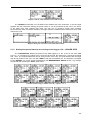
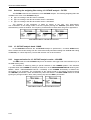
Setting the integration period - INTEGR. PERIOD
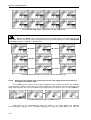
The INTEGR. PERIOD defines the period in which the signal is being averaged during the sound
level measurements. The definitions of the measurement results in which the integration period is used is
given in App. D. The required value of this parameter can be set by means of the <>, <> and
confirmed by the <ENTER> push-button.
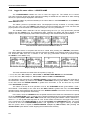
In the LEVEL METER the integration period (INTEGR. PERIOD) can be set (by pressing the <>,
<> or <>, <> with <SHIFT> push- buttons):
- From 1 s to 59 s (with 1-second or 10-seconds step).
5-2