1
Remote-Access Card User Manual-Draft Copy
INTRODUCTION
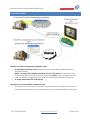
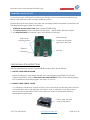
With the introduction of new Remote-Access Card and Remote Monitor & Control (RMC)
software EZSeries TouchPanels now offer a unique set of remote capabilities as shown below:
• Remote Monitoring
• Remote Control
• Remote Programming
• Data Acquisition and Storage
• Alarm-Emails
A user can remotely log on to a panel and monitor any of the panel screens with live data
including the currently displayed screen. (See Exceptions Section)
With right access permissions and authentication, a user can remotely “touch” the objects on
the panel, to control a machine/plant effectively. Remote control feature can be invaluable for
remote diagnostics, unmanned operations, or supervisory monitoring. (See Exception Section)
CAUTION: Remote “touch” must be used with extreme caution as the changes may cause
accidents and can cause damage to machine and harm personnel.
In addition to remote monitoring and control, user may also program the panels remotely over
Ethernet, allowing OEMS to remotely upgrade the screen programs within the panels.
Panel allows flexible data acquisition and storage. Any tag value may be collected based on
regular time interval, events, or at specific times. The data can be saved on a SD card. The card
can later be removed to read the values in a PC.
Finally, the panels support sending alarm emails to a set of recipients under selected alarm
conditions.
1-877-774-3279 (EASY)
www.EZAutomation.net
Page 7 of 32