1
Mitel NuPoint Messenger Technical Documentation - Release 7.0
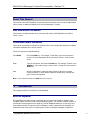
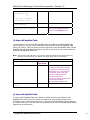
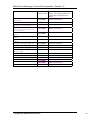
Table 3-7 Report on all Subscriber Groups
Prompts
Example of
User Input
Comments
Option C sends the
report to the console
screen.
Option F sends the
report to a file.
Option X exits this
function.
Subscriber Suffix Suffix
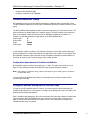
If you select C, a
C
Group
Prefix Range Start Range
report appears on the
End
console. This display
======================================
shows 24 lines at a
=
time. To continue
nn
nn
nn
nn
scrolling, press the
space bar or to scroll
a single line, press
Enter.
Enter filename:
If you select F, you
F
<file name> must specify a full
<path> and
<filename>. If you do
not specify a path, the
program uses the .rpt
extension to save the
report to this location:
/usr/vm/config/<filena
me>.rpt
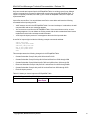
Total of nn tables and nn records
After the file is saved,
stored to file
a message similar to
/usr/vm/config/<filename>.rpt
this appears on the
console.
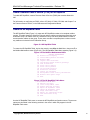
DISPLAY RAPID DIAL TABLE MENU
(C) Display to console
(F) Output to file
(X) Exit
(V) View Subscriber Group
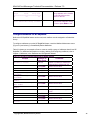
To see a specific Subscriber Group in the NP RapidDial Table, select V from the NP RapidDial
Table menu (Figure 3-3). You can view the prefix, suffix range start, and suffix range end for the
selected Subscriber Group.
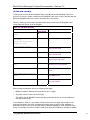
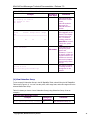
Table 3-8 shows you how to view a Subscriber Group (using Subscriber Group 10 as an
example).
Table 3-8 View Subscriber Group
Prompts
Example of
User Input
Enter Subscriber Group (1-1000): 10
©Copyright 2002, Mitel Networks Corporation
Comments
View Subscriber Group 10.
11