1
Mitel NuPoint Messenger Technical Documentation - Release 7.0
outside of their Subscriber Group.
Using Configuration Menus
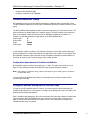
This manual describes many operations that are performed through the NuPoint Voice Main
Menu and its submenus:
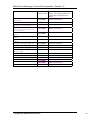
MAIN MENU
(M)
(R)
(S)
(X)
Mailbox maintenance
Report generation
System maintenance
Exit
Select a menu option by typing the character shown in parenthesis next to the menu option, or
pressing Enter to accept the current terminal setting.
Input data at any prompt by typing a value, then pressing Enter. If the value you enter is out of
range or not valid, an error message appears.
To exit from a prompt without changing the current value, press Enter.
2
Installing NP RapidDial
This chapter describes how to install the NP RapidDial Optional Feature software onto the server.
Software Requirements
The NP RapidDial software is supplied on the CD-ROM. To install NP RapidDial, do the following:
Follow the instructions in the Installation and Service Manual, chapter 3 for the appropriate
manual, to install an optional feature
Model 70
Model 120
Model 640
•
3
Configuring NP RapidDial
This section provides the information required to configure the NP RapidDial feature on a NuPoint
Messenger system.
After you install NP RapidDial, you must:
•
Determine Subscriber Groups
•
Configure a variable dialing plan for the linegroup
•
Create a Features Class of Service (FCOS) for NP RapidDial
©Copyright 2002, Mitel Networks Corporation
3