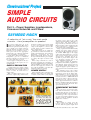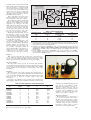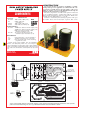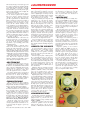
1
Copyright 2001, Wimborne Publishing Ltd (Allen House, East Borough, Wimborne, Dorset, BH21 1PF, UK) and Maxfield & Montrose Interactive Inc., (PO Box 857, Madison, Alabama 35758, USA) All rights reserved. WARNING! The materials and works contained within EPE Online — which are made available by Wimborne Publishing Ltd and Maxfield & Montrose Interactive Inc — are copyrighted. You are permitted to make a backup copy of the downloaded file and one (1) hard copy of such materials and works for your personal use. International copyright laws, however, prohibit any further copying or reproduction of such materials and works, or any republication of any kind. Maxfield & Montrose Interactive Inc and Wimborne Publishing Ltd have used their best efforts in preparing these materials and works. However, Maxfield & Montrose Interactive Inc and Wimborne Publishing Ltd make no warranties of any kind, expressed or implied, with regard to the documentation or data contained herein, and specifically disclaim, without limitation, any implied warranties of merchantability and fitness for a particular purpose. Because of possible variances in the quality and condition of materials and workmanship used by readers, EPE Online, its publishers and agents disclaim any responsibility for the safe and proper functioning of reader-constructed projects based on or from information published in these materials and works. In no event shall Maxfield & Montrose Interactive Inc or Wimborne Publishing Ltd be responsible or liable for any loss of profit or any other commercial damages, including but not limited to special, incidental, consequential, or any other damages in connection with or arising out of furnishing, performance, or use of these materials and works. GAS MASKS RUSSIAN, new and boxed, NATO filter, £39. LOW COST NIGHT VISION system, Russian handheld complete with infra-red illuminator, l00m range. Runs on 2 AA batteries, just £109.95. COBRA NIGHT VISION equipment also stocked, more info on our web site at www.cobra-optics.co.uk. ELECTRIC SCOOTERS 18kph, 24V motor, 6 hour charge time, 22kg weight, max load 90kg, running time up to 1 hour, range 15km, 8·5A motor, 24V, direct drive. Our Price £229.95. Ref ESCOOT. VOICE CHANGERS Hold one of these units over your phone mouthpiece and you can adjust your voice using the controls on the unit. Battery operated, £15. Ref CC3. EMMINENCE LOUDSPEAKERS 12in. dia., 50W nom, 100W peak, 16 ohm impedance. Pack of 4 just £39.95. Ref SPEAK39. PIR SECURITY SWITCHES These brand new swivel mounting PIR units will switch up to 2 kilowatts. Adjustable sensitivity, light level and time delay (9 seconds to 10 minutes), 15m detection range, mains operated, waterproof. £5.99 Ref PIR1PACK or a pack of 5 for £22.95 Ref PIR5PACK or 10 for £39.95 Ref PIR10PACK. 12V 12Ah SEALED LEAD ACID BATTERIES, 100mm x 150mm x 95mm, 4kg. £15 each. Ref SSLB. SEALED LEAD-ACID CHARGER AND FLOAT CHARGER. Complete unit will charge 12V lead acids and maintain them with an automatic trickle charge. Charger on its own is £15 Ref LAC or charger and a 12V 12Ah battery (all fully cased) is £25 Ref ACB. AERIAL PHOTOGRAPHY KIT. This rocket comes with a built-in camera! It flies up to 500 feet (150m), turns over and takes an aerial photograph of the ground below. The rocket then returns with its film via its parachute. Takes 110 film. Supplied with everything including a launch pad and 3 motors (no film). £29.98 Ref Astro. BUILD YOUR OWN WINDFARM FROM SCRAP. New publication gives step-by-step guide to building wind generators and propellors. Armed with this publication and a good local scrapyard could make you self-sufficient in electricity! £12. Ref LOT81. MAGNETIC CREDIT CARD READERS AND ENCODING INFO, £9.95. Cased with flyleads, designed to read standard credit cards! Complete with control electronics p.c.b. and manual covering everything you could want to know about what’s hidden in that magnetic strip on your card! Just £9.95 Ref BAR31. 77 KILO LIFT MAGNET. These Samarium magnets measure 57mm x 20mm and have a threaded hole (5/16th UNF) in the centre and a magnetic strength of 2·2 gauss. We have tested these on a steel beam running through the offices and found that they will take more than 170lb. (77kg) in weight before being pulled off. Supplied with keeper. £19.95 ea. Ref MAG77. HYDROGEN FUEL CELL PLANS. Loads of information on hydrogen storage and production. Practical plans to build hydrogen fuel cell (good workshop facilities required). £8 set. Ref FCP1. STIRLING ENGINE PLANS. Interesting information pack covering all aspects of Stirling engines, pictures of home made engines made from an aerosol can running on a candle! £12 STIR2. 12V OPERATED SMOKE BOMBS. Type 3 is a 12V trigger and 3 smoke cannisters, each cannister will fill a room in a very short space of time! £14.99. Ref SB3. Type 2 is 20 smaller cannisters (suitable for mock equipment fires etc.) and 1 trigger module for £29. Ref SB2. Type 1 is a 12V trigger and 20 large cannisters, £49. Ref SB1. BRAND NEW NATO ISSUE RADIATION DETECTORS, SALE PRICE JUST £69.95. Current NATO issue standard emergency services unit. Used by most of the world’s military personnel. New and boxed. Normal retail price £400, Bull’s bargain price just £69.95. Ref PDRM. BASIC GUIDE TO BIO DIESEL. How to make diesel fuel from used kitchen oil, £6. Ref BIOF. SAVE £££££s. RCB UNITS. Inline IEC lead with fitted RC breaker. Installed in seconds. Fit to any computer, monitor, office equipment and make it safe! Pack of 10 just £9.98. Ref LOT5B. INFRA-RED REMOTE CONTROL WATCHES, £16.99. VIBRATING WATCHES, vibrate when your phone rings, £16.99. PULSE WATCHES, display your pulse, £16.99. www.quemex.co.uk STEPPER MOTORS. Brand new stepper motors, 4mm fixing holes with 47·14mm fixing centres, 20mm shaft, 6·35mm diameter, 5V/phase, 0·7A/phase, 1·8 deg. step (200 step). Body 56mm x 36mm. £14.99 each. Ref STEP6, pack of 4 for £49.95. BASIC GUIDE TO LOCKPICKING. New publication gives you an insight! £6, Ref LPK. NEW HIGH POWER MINI BUG. With a range of up to 800 metres and 3 days use from a PP3 this is our top selling bug! Less than 1in. square and a 10m voice pick-up range. £28. Ref LOT102. IR LAMP KIT. Suitable for CCTV cameras, enables the camera to be used in total darkness! £6. Ref EF138. INFRA-RED POWERBEAM. Handheld battery powered lamp, 4in. reflector, gives out powerful pure infra-red light! Perfect for CCTV use, nightsights, etc. £29. Ref PB1. YOUR HOME COULD BE SELF-SUFFICIENT IN ELECTRICITY. Comprehensive plans with loads of info on designing systems, panels, control electronics etc. £7. Ref PV1. 200 WATT INVERTERS, plugs straight into your car cigarette lighter socket and is fitted with a 13A socket so you can run your mains operated devices from your car battery. £49.95. Ref SS66. THE TRUTH MACHINE. Tells if someone is lying by micro tremors in their voice, battery operated, works in general conversation and on the ‘phone and TV as well! £42.49. Ref TD3. INFRA-RED FILM. 6in. square piece of flexible infra-red film that will only allow IR light through. Perfect for converting ordinary torches, lights, headlights etc. to infra-red output using only standard light bulbs. Easily cut to shape. 6in. square. £15. Ref IRF2 or a 12in. square for £29.95. Ref IRF2A. SMOKE ALARMS. Mains powered, made by the famous Gent company, easy fit next to light fittings, power point. Pack of 5 £15, Ref SS23, pack of 12 £24, Ref SS24. CCTV CAMERAS FROM £25. Check out our web site at www.cctvstuff.co.uk and www.home-cctv.co.uk. 14 WATT SOLAR PANELS. Amorphous silicon panel fitted in an anodised aluminium frame. Panel measures 3ft. by 1ft. with 3m leads for easy connection. 3ft. x 1ft. solar panel £79. Ref MAG45. Unframed 4 pack, 8-9W (3ft. x 1ft.) £99, Ref SOLX. 35 watts of solar power for just £99. 4 panels, each one 3ft. x 1ft. and producing 8W min., 13V. Pack of four £99, Ref SOLX. AIR RIFLES FROM LESS THAN £40, CROSSBOWS, WIDE RANGE OF BB GUNS, AMMO, TARGETS, PISTOLS, REPLICA GUNS, UZI MACHINE GUN REPLICAS (BB), REPEATERS, LASER SIGHTS, ELECTRIC BB, GAS BB www.airpistol.co.uk INKJET CARTRIDGES FROM JUST £3 AT www.officebits.co.uk POWERSAFE DEEP CYCLE BATTERIES 6V 100AH £39 EACH NEW 12V 12in. SQUARE SOLAR PANEL. Kevlar backed, 3 watt output, copper strips for easy solder connections. £14.99 Ref 15P42. Pack of four just £39.95, Ref 15P42SP. NEW UNIVERSAL SOLAR CHARGER. Charges AAAs, AAs, Cs and D-type NiCads. £9.99, Ref UNISOL. 12V SOLAR POWER WATER PUMP. Perfect for many 12V d.c. uses, from solar fountains to hydroponics! Small and compact yet powerful, works direct from our 10W solar panel in bright sun. Max HD: 17ft, max flow = 8 Lpm, 1·5A. Ref AC88. £18.99. SOLAR MOTORS. Tiny motors which run quite happily on voltages from 3V-12V d.c. Works on our 6V amorphous 6in. panels and you can run them from the sun! 32mm dia., 20mm thick. £1.50 each. MAMOD STEAM ENGINES and a full range of spare parts. Check out www.mamodspares.co.uk. SUPER WIDEBAND RADAR DETECTOR. Whistler 1630. Detects both radar and laser, X, K and KA bands, speed cameras and all known speed detection systems. 360 degree coverage, front and rear waveguides, 1·1in. x 2·7in. x 4·6in., fits on visor or dash, new low price £99, Ref WH1630. Other models available at www.radargun.co.uk. BUG DETECTORS. A new detector at a sensible price! Detects bugs hidden in rooms, computers etc., between 1-200MHz, adjustable sensitivity, 9V PP3 battery required. £29.95, Ref BDET2. GIANT WEATHER BALLOONS made by Totex, we blew one up to 7ft. diameter then it popped due to stones on the ground! £13.99, Ref TOTEX. PHILIPS VP406 LASER DISC PLAYERS, sale price just £9.95. Scart output, just put your video disk in and press play, standard audio and video outputs. £9.95, Ref VP406. 12V DC SIRENS. Very loud, suitable for indoors or outdoors, twotone, 160mm x 135mm, finished in white with bracket. £4.99, Ref SIR2A. FREEZER/MAINS FAIL ALARMS. Designed to fit around the mains cable on a freezer this alarm will sound if the device is unplugged from the mains supply, battery operated, cased, built-in sounder. Ideal for TVs, Hi-Fi equipment etc. £7.01, Ref FRE2. BARNET CROSSBOWS. We stock the entire range of crossbows, check out our web site at www.xbows.co.uk. HOT AIR BALLOON KITS. Everything you need to build a 1·7m high, 4·5m in circum. hot air balloon, launch over a small burner or heater. £12.49, Ref HA1. CROOKES RADIOMETER. Fascinating glass bulb contains blades driven around by the sun, £9.99, Ref SC120B. GIANT TV OR PC VIEWING SCREEN. Turn your TV into a supersize screen, converts small screens into a super size 26in. £26.99, Ref SVGA2. RADIOSONDES. Made by Valsala, unused, they measure pressure, temperature and humidity. Model RS80, good stripper at £15, Ref SONDE. AIR WIND POWER MODULE. Produces nearly 400 watts of power from the wind, 1·14m blade, 12V d.c. output, 3 year warranty, built-in battery regulator. £549, Ref AIR1. WORMERIES. The ideal solution for your kitchen waste! Supplied complete with worms. Turn your rubbish into liquid feed! Two sizes available, small (ideal for 1-2 people), £25.45, Ref WM2, and a large one (ideal for 4 or more), £42.44, Ref WM1. COMPLETE WIRELESS CCTV SYSTEM. Includes monitor, camera, up to 100m range, audio and video, UK legal, complete with infra-red lights. £169, Ref WMS333. PELTIER MODULES. 56W, 40mm x 40mm, 16V, sealed edges, new and boxed. Supplied with 18-page Peltier design manual featuring circuit designs, design information etc. 1 module and manual is £29.99, Ref PELT1, pack of 4 modules and manual is £99.99, Ref PELT2. The manual on its own is £4, Ref PELT3. DC MOTOR. 12V d.c., general purpose model motor, 70mm x 50mm, 12V d.c., permanent magnet, 4mm x 25mm shaft. £6, Ref GPM1, pack of 10 is just £40, Ref GPM2. 180R.P.M. MAINS MOTOR. Induction type, 90mm x 70mm, 50mm x 5mm shaft, 12A continuous rating, thermal protected. £22, Ref MGM1. SOLID STATE RELAYS. P.C.B. mounting, these relays require 332V d.c. to operate but will switch up to 3A a.c. mains. Pack of 4 £5, Ref SPEC1B. 12V RELAYS. 2 x 2 c/o 16A contacts p.c.b. mount (will fit Vero), tray of 25 relays for just £9.95, Ref SPEC1. VENNER TIME CONTROLS. Designed to be wired in permanently they will switch up to 16A 240V a.c. motorised with dial and pins. New and boxed. £15, Ref VTS. GYROSCOPES. We still sell original 1917 design, hours of fun for all the family, complete with stand, string, box and info. £6, Ref EP70. INNOVATIONS. We also sell a wide range of innovative products for the home, these are at www.seemans.com. INVERTERS. Convert 12V d.c. into 240V mains (modified sine wave), 300 watt (150 watt continuous), £59.95, Ref VER3. 600 watt model (330 watt continuous), £79.97, Ref VER4. 10 WATT SILICON SOLAR PANEL, 10 year life, waterproof, 365mm x 365mm x 26mm, 14V, 10W, 1.8kg, framed. £84.99, Ref PAN. BULL ELECTRICAL UNIT D, HENFIELD BUSINESS PARK, HENFIELD, SUSSEX BN5 9SL TERMS: CASH, PO OR CHEQUE WITH ORDER PLUS £5.00 P&P (UK) PLUS VAT 24 HOUR SERVICE £7.50 (UK) PLUS VAT OVERSEAS ORDERS AT COST PLUS £3.50 (ACCESS/VISA/SWITCH ACCEPTED) ’phone: 01273 491490 Fax 491813 [email protected] STICKY LABELS. Small address labels etc. are very useful and can be ordered online at www.stickon.co.uk. MICROSOFT TRACKBALL AND MOUSE. Called the Microsoft Ballpoint this has 4 buttons, a trackball and PS2 connector. Will work with most PCs. £5.99, Ref EP50. MAXON WALKIE TALKIES, up to 2 mile range, UK legal, 300 channel, 2 x walkie talkies, £74.95, Ref. Maxon1. Chargers £14, Ref. Maxonc, battery packs £12, Ref. Maxonb (otherwise uses AAA batteries). 2-WAY MIRROR KIT. Contains enough material to make up to a 500mm x 2200mm mirror (excl. glass), full instructions. £19.95, Ref WF001. .22 AIR RIFLE. Under lever type, powerful Chinese training rifle, £38.26, Ref A1047. 500 pellets, £2.68, Ref A1091. .22 AIR RIFLE STANDARD TYPE. Chinese training rifle, on legal limit for air rifles, £29.75, Ref A1040. Pellets £2.68, Ref A1091. SHUT THE BOX. Check out www.bullybeef.co.uk for a range of pub games and magic tricks. WANT TO MAKE SOME MONEY? STUCK FOR AN IDEA? We have collated 140 business manuals that give you information on setting up different businesses, you peruse these at your leisure using the text editor on your PC. Also included is the certificate enabling you to reproduce (and sell) the manuals as much as you like! £14, Ref EP74. ANICS CO2 GAS POWERED PISTOL. Russian handheld pistol powered by Sparklets CO2 cylinders (give approx. 70 shots), fires steel BB. Pistol £58.22, Ref AGA101, tub of 1,500 BB shot £5.10, Ref A1015, pack of 5 CO2 cartridges £3.50, Ref GAS5. 33 KILO LIFT MAGNET. Neodynium, 32mm diameter with a fixing bolt on the back for easy mounting. Each magnet will lift 33 kilos, 4 magnets bolted to a plate will lift an incredible 132 kilos! £15, Ref MAG33. Pack of 4 just £39, Ref MAG33AA. BSA METEOR AIR RIFLE. UK made .22 rifle, top quality professional air rifle, £84.15, Ref BSAMET 500 Lazapell pellets £5, Ref LAZAPELL. MAMOD 1313 TE1A TRACTION ENGINE. Attractive working model of traditional steam engine, £85, Ref 1313. MAMOD STEAM ROADSTER (white), magnificent working steam model car, £112, Ref 1319. MAMOD STEAM WAGON. Working model steam wagon finished in blue. £112, Ref 1318. Brown version (with barrels), £122, Ref 1450. POCKET SPY MONOCULAR. Clever folding monocular with 8 x 21 magnification, made by Helios, with case. £14.99, Ref MONOC. KEVLAR BRITISH ARMY HATS. Broken or missing straps, hence just £8 each. Ref KEV99. CCTV SYSTEMS, £24.99. Complete with camera, 20 metres of cable, p.s.u. and info simple connection to scart, £24.99. Ref CCTVCAM2. FM BROADCAST BAND HIGH POWER TRANSMITTERS can be viewed and bought online at www.veronica-kits.co.uk. TONER CARTRIDGES FOR COPIERS AND PRINTERS can be bought online at www.nationaltoners.co.uk. VELOSOLEX. Traditional French style two-stroke moped (engine over front wheels), black only, £695, Ref VELO. Delivered direct in a box, you need to fit the pedals etc. then register it with your local DVLC. HYDROPONIC GROWING SYSTEMS. Complete, everything you need apart from plants and light, contains grow tank, nutrients, pump, tester etc. GT205 710mm x 390mm, NFT system, £31.45, Ref GT205. GT424 1070mm x 500mm, NFT system, £58.65, Ref GT424. ELECTRIC BIKES, £679, Viking, built-in indicators, radio, lights, 13mph, 5 hour charge, Shimano gears, up to 50 mile range, horn, 26in. wheels, suspension, no licence needed, key operated, £679, Ref VIKING. PIR PCBs. These contain a standard PIR detector circuit with all components, easy to wire up and use. Pack of 4 £6, Ref PIR8. NEBULISER, WATER ATOMISER. Ultrasonic module that you place in water, atomises the water into a very fine mist, many applications from special effects to scientific. £69, Ref NEB6. PORTABLE X-RAY MACHINE PLANS. Easy to construct plans on a simple and cheap way to build a home X-ray machine! Effective device, X-ray sealed assemblies, can be used for experimental purposes. Not a toy or for minors! £6/set, Ref F/XP1. TELEKINETIC ENHANCER PLANS. Mystify and amaze your friends by creating motion with no known apparent means or cause. Uses no electrical or mechanical connections, no special gimmicks yet produces positive motion and effect. Excellent for science projects, magic shows, part demonstrations or serious research and development of this strange and amazing psychic phenomenon. £4/set, Ref F/TKE1. ELECTRONIC HYPNOSIS PLANS & DATA. This data shows several ways to put subjects under your control. Included is a full volume reference text and several construction plans that when assembled can produce highly effective stimuli. This material must be used cautiously. It is for use as entertainment at parties etc only, by those experienced in its use. £15/set, Ref F/EH2. GRAVITY GENERATOR PLANS. This unique plan demonstrates a simple electrical phenomena that produces an anti-gravity effect. You can actually build a small mock spaceship out of simple materials and without any visible means cause it to levitate. £10/set, Ref F/GRA1. TESLA COIL/LIGHTNING DISPLAY GLOBE PLANS. Produces up to 750,000 volts of discharge, experiment with extraordinary HV effects, ‘Plasma in a jar’, St Elmo’s fire, corona, excellent science project or conversation piece. £5/set, Ref F/BTC1/LG5. COPPER VAPOUR LASER PLANS. Produces 100mW of visible green light. High coherency and spectral quality similar to argon laser but easier and less costly to build, yet far more efficient. This particular design was developed at the Atomic Energy Commission of NEGEV in Israel. £10/set, Ref F/CVL1. VOICE SCRAMBLER PLANS. Miniature solid-state system turns speech sound into indecipherable noise that cannot be understood without a second matching unit. Use on telephone to prevent third party listening and bugging. £6/set, Ref F/VS9. PULSED TV JOKER PLANS. Little handheld device utilises pulse techniques that will completely disrupt TV picture and sound! Works on FM too! Discretion advised. £8/set, Ref F/TJ5. BODYHEAT TELESCOPE PLANS. Highly directional long range device uses recent technology to detect the presence of living bodies, warm and hot spots, heat leaks etc. Intended for security, law enforcement, research and development etc. Excellent security device or very interesting science project. £8/set, Ref F/BHT1. BURNING, CUTTING CO2 LASER PLANS. Projects an invisible beam of heat capable of burning and melting materials over a considerable distance. This laser is one of the most efficient, converting 10% input power into useful output. Not only is this device a workhorse in welding, cutting and heat processing materials, but it is also a likely candidate as an effective directed energy beam weapon against missiles, aircraft, ground-to-ground etc. Burning and etching wood, cutting, plastics, textiles etc. £12/set, Ref F/LC7. www.bullnet.co.uk ISSN 0262 3617 PROJECTS . . . THEORY . . . NEWS . . . COMMENTS . . . POPULAR FEATURES . . . VOL. 31. No. 7 JULY 2002 www.epemag.wimborne.co.uk EPE Online: www.epemag.com Cover illustration by Jonathan Robertson Projects and Circuits INFRA-RED AUTOSWITCH by Max Horsey Keeps work-surface lights turned on only while you are near to them INGENUITY UNLIMITED hosted by Alan Winstanley Velocity Detector; Car Battery Trickle Charger EPE STYLOPIC by John Becker Have fun with a modern interpretation of a classic musical instrument! SIMPLE AUDIO CIRCUITS – 3. Power Supplies, Loudspeakers, Crossover Networks and Filters by Raymond Haigh A compendium of useful audio amplifier circuits for the experimenting constructor ROTARY COMBINATION LOCK by Thomas Scarborough Pure logic and a “stack of cards” function enhance security 476 486 488 500 512 Series and Features NEW TECHNOLOGY UPDATE by Ian Poole 484 Holographic techniques could revolutionise computer data storage USING THE PIC’S PCLATH COMMAND by John Waller 509 How to access PIC addresses beyond 2K and place tables outside the basic 256 byte block CIRCUIT SURGERY by Alan Winstanley and Ian Bell 519 Bandgap Voltages; More on X and Y capacitors; Yaesu Battery Charger again PRACTICALLY SPEAKING by Robert Penfold 522 A practical look at interpreting component codings NET WORK – THE INTERNET PAGE surfed by Alan Winstanley 527 Search Engines; Tiscali 10.0 TEACH-IN 2002 – 9. Filters, Analogue-to-Digital Conversion, 528 Sampling and Nuclear Radiation Sensing by Ian Bell and Dave Chesmore Regulars and Services EDITORIAL 475 482 © Wimborne Publishing Ltd 2002. Copyright in all drawings, photographs and articles published in EVERYDAY PRACTICAL ELECTRONICS is fully protected, and reproduction or imitations in whole or in part are expressly forbidden. NEWS – Barry Fox highlights technology’s leading edge Plus everyday news from the world of electronics READOUT John Becker addresses general points arising BACK ISSUES Did you miss these? Many now on CD-ROM! SHOPTALK with David Barrington, The essential guide to component buying for EPE projects PLEASE TAKE NOTE World Lamp; L.E.D. Sequencer; Toolkit TK3 CD-ROMS FOR ELECTRONICS A wide range of CD-ROMs for hobbyists, students and engineers DIRECT BOOK SERVICE A wide range of technical books available by mail order PRINTED CIRCUIT BOARD AND SOFTWARE SERVICE PCBs for EPE projects. Plus EPE software ELECTRONICS MANUALS Essential reference works for hobbyists, students and service engineers ADVERTISERS INDEX Our August 2002 issue will be published on Thursday, 11 July 2002. See page 467 for details Readers Services ) Editorial and Advertisement Departments 475 Everyday Practical Electronics, July 2002 495 498 507 507 524 536 539 540 544 465 Visit our website www.distel.co.uk THE ORIGINAL SURPLUS WONDERLAND! THIS MONTH'S SELECTION FROM OUR VAST EVER CHANGING STOCKS GIANT 10” 7-SEGMENT DISPLAYS IC's -TRANSISTORS - DIODES A bulk purchase enables us to bring to you these GIANT 7-segment digital displays at a now affordable price!! The 10” character size gives exceptional readability at long distances and enables a host of applications including, score boards, digital clocks, counters, event timers etc. As the units are a simple electromechanical device and operate from 12V DC, simple switching via switches, relays, PIC or PC may be used to control single or multiple digits. Units feature integral ‘Zero Power’ memory which greatly simplifies desgn. For an excellent DIY practical article, see the May issue of ‘Everyday Practical Electronics’ magazine. Ideal School / College construction project. Supplied in good RFE condition, complete with data sheet. OBSOLETE – SHORT SUPPLY – BULK Less than 30% of makers price ! Surplus always wanted for cash! Only £29.95(B) or 4 / £99.00(D) Order RW44 Order PH26 THE AMAZING TELEBOX TV SOUND & VIDEO TUNER CABLE COMPATIBLE * Converts your colour monitor into a QUALITY COLOUR TV!! The TELEBOX is an attractive fully cased mains powered unit, containing all electronics ready to plug into a host of video monitors or AV equipment which are fitted with a composite video or SCART input. The composite video output will also plug directly into most video recorders, allowing reception of TV channels not normally receivable on most television receivers* (TELEBOX MB). Push button controls on the front panel allow reception of 8 fully tuneable 'off air' UHF colour television channels. TELEBOX MB covers virtually all television frequencies VHF and UHF including the HYPERBAND as used by most cable TV operators. Ideal for desktop computer video systems & PIP (picture in picture) setups. For complete compatibility – even for monitors without sound – an integral 4 watt audio amplifier and low level Hi Fi audio output are provided as standard. Brand new – fully guaranteed. TELEBOX ST for composite video input type monitors £36.95 TELEBOX STL as ST but fitted with integral speaker £39.50 TELEBOX MB Multiband VHF/UHF/Cable/Hyperband tuner £69.95 For overseas PAL versions state 5.5 or 6 mHz sound specification. *For cable / hyperband signal reception Telebox MB should be connected to a cable type service. Shipping on all Telebox's, code (B) of the art PAL (UK spec) UHF TV tuner module W State with composite 1V pp video & NICAM hi fi stereo sound NE outputs. Micro electronics all on one small PCB only 73 x 160 x 52 mm enable full tuning control via a simple 3 wire link to an IBM pc type computer. Supplied complete with simple working program and documentation. Requires +12V & + 5V DC to operate. BRAND NEW - Order as MY00. Only £39.95 code (B) See www.distel.co.uk/data_my00.htm for picture + full details HARD DISK DRIVES 2½" - 14" 2½" TOSHIBA MK1002MAV 1.1Gb laptop(12.5 mm H) New £59.95 2½" TOSHIBA MK4313MAT 4.3Gb laptop (8.2 mm H) New £105.00 2½" TOSHIBAMK6409MAV 6.1Gb laptop (12.7 mm H) New £98.00 2½" TOSHIBA MK1614GAV 18 Gb laptop (12 mm H) New £149.95 2½" to 3½" conversion kit for Pc's, complete with connectors £15.95 3½" COMPAQ 313706-B21 (IBM) 9 gb ULT/SCSI3 New £199.00 3½" FUJI FK-309-26 20mb MFM I/F RFE £59.95 3½" CONNER CP3024 20 mb IDE I/F (or equiv.) RFE £59.95 3½" CONNER CP3044 40 mb IDE I/F (or equiv.) RFE £69.00 3½" QUANTUM 40S Prodri ve 42mb SCSI I/F, New RFE £49.00 5¼" MINISCRIBE 3425 20mb MFM I/F (or equiv.) RFE £49.95 5¼" SEAGATE ST-238R 30 mb RLL I/F Refurb £69.95 5¼" CDC 94205-51 40mb HH MFM I/F RFE tested £69.95 5¼" HP 97548 850 Mb SCSI RFE tested £99.00 5¼" HP C3010 2 Gbyte SCSI differential RFE tested £195.00 £99.00 8" NEC D2246 85 Mb SMD interface. New 8" FUJITSU M2322K 160Mb SMD I/F RFE tested £195.00 8" FUJITSU M2392K 2 Gb SMD I/F RFE tested £345.00 Many other floppy & H drives, IDE, SCSI. ESDI etc from stock, see website for full stock list. Shipping on all drives is code (C) 10,000,000 items EX STOCK For MAJOR SAVINGS CALL or see web site www.distel.co.uk COMPUTER MONITOR SPECIALS Legacy products High spec genuine multysync. CGA, EGA, VGA, SVGA Mitsubishi FA3415ETKL 14” SVGA Multisync colour monitor with fine 0.28 dot pitch tube and resolution of 1024 x 768. A variety of inputs allows connection to a host of computers including IBM PC's in CGA, EGA, VGA & SVGA modes, BBC, COMMODORE (including Amiga 1200), ARCHIMEDES and APPLE. Many features: Etched faceplate, text switching and LOW RADIATION MPR specification. Fully guaranteed, in EXCELLENT little used condition. Tilt & Swivel Base £4.75 Order as VGA cable for IBM PC included. (E) CG73 External cables for other types of computers available - CALL Only £129 Generic LOW COST SVGA Monitors We choose the make, which includes Compaq, Mitsubishi, IBM, etc. Supplied ready to run with all cables, Standard RTB 90 day guarantee. 14” £59.00 15” £69.00 Supplied in good used condition. Shipping code (D) VIDEO MONITORS PHILIPS HCS35 (same style as CM8833) attractively styled 14” colour monitor with both RGB and standard composite 15.625 Khz video inputs via SCART socket and separate phono jacks. Integral audio power amp and speaker for all audio visual uses. Will connect direct to Amiga and Atari BBC computers. Ideal for all video monitoring / security applications with direct connection to most colour cameras. High quality with many features such as front concealed flap controls, VCR correction button etc. Good used condition - fully tested - guaranteed Dimensions: W14" x H12¾" x 15½" D. (E) PHILIPS HCS31 Ultra compact 9” colour video monitor with standard composite 15.625 Khz video input via SCART socket. Ideal for all monitoring / security applications. High quality, ex-equipment fully tested & guaranteed (possible minor screen burns). In attractive square black plastic case measuring W10" x H10" x 13½" D. 240 V AC mains powered. Only £79.00 (D) Only £99.00 INDUSTRIAL COMPUTERS Tiny shoebox sized industrial 40 Mhz 386 PC system measuring only (mm) 266 w X 88 h X 272 d. Ideal for dedicated control applications running DOS, Linux or even Windows ! Steel case contains 85 to 265 V AC 50 / 60 hz 70 Watt PSU, a 3 slot ISA passive backplane and a Rocky 318 (PC104) standard, single board computer with 8 MByte NON VOLATILE solid state 'Disk On Chip' RAMDISK. System comprises: Rocky 318 (PC104) SBC ISA card with 40MHz ALi 386SX CPU, 72 pin SIMM slot with 16 Mbyte SIMM, AMI BIOS, battery backed up real time clock. 2 x 9 pin D 16550 serial ports. EPP/ECP printer port, mini DIN keyboard connector, floppy port, IDE port for hard drives up to 528 MByte capacity, watchdog timer and PC/104 bus socket. The 8 MByte solid state 'disk on a chip' has its own BIOS, and can be fdisked, formatted & booted. Supplied BRAND NEW fully tested and guaranteed. For full data see featured item on website. Order as QG36 100’s of applications inc: firewall, routers, robotics etc ALL MAIL TO Dept PE, 29 / 35 Osborne Rd Thornton Heath Surrey CR7 8PD Open Mon - Fri 9.00 - 5:30 Est. 26 Years Only £99.00 (D) Unless marked NEW, items in this section are pre owned. HP6030A 0-200V DC @ 17 Amps bench power supply £1950 Intel SBC 486/125C08 Enhanced Multibus (MSA) New £1150 Nikon HFX-11 (Ephiphot) exposure control unit £1450 PHILIPS PM5518 pro. TV signal generator £1250 Motorola VME Bus Boards & Components List. SAE / CALL £POA Trio 0-18 vdc linear, metered 30 amp bench PSU. New £550 Fujitsu M3041R 600 LPM high speed band printer £1950 Fujitsu M3041D 600 LPM printer with network interface £1250 Siemens K4400 64Kb to 140Mb demux analyser £2950 Perkin Elmer 299B Infrared spectrophotometer £500 Perkin Elmer 597 Infrared spectrophotometer £3500 VG Electronics 1035 TELETEXT Decoding Margin Meter £3250 LightBand 60 output high spec 2u rack mount Video VDA's £495 Sekonic SD 150H 18 channel digital Hybrid chart recorder £1995 B&K 2633 Microphone pre amp £300 Taylor Hobson Tallysurf amplifier / recorder £750 ADC SS200 Carbon dioxide gas detector / monitor £1450 BBC AM20/3 PPM Meter (Ernest Turner) + drive electronics £75 ANRITSU 9654A Optical DC-2.5G/b waveform monitor £5650 ANRITSU ML93A optical power meter £990 ANRITSU Fibre optic characteristic test set £POA R&S FTDZ Dual sound unit £650 R&S SBUF-E1 Vision modulator £775 WILTRON 6630B 12.4 / 20GHz RF sweep generator £5750 TEK 2445 150 MHz 4 trace oscilloscope £1250 TEK 2465 300 Mhz 300 MHz oscilloscope rack mount £1955 TEK TDS380 400Mhz digital realtime + disk drive, FFT etc £2900 TEK TDS524A 500Mhz digital realtime + colour display etc £5100 HP3585A Opt 907 20Hz to 40 Mhz spectrum analyser £3950 PHILIPS PW1730/10 60KV XRAY generator & accessories £POA VARIACS - Large range from stock - call or see our website CLAUDE LYONS 12A 240V single phase auto. volt. regs £325 CLAUDE LYONS 100A 240/415V 3 phase auto. volt. regs £2900 TEST EQUIPMENT & SPECIAL INTEREST ITEMS MITSUBISHI FA3445ETKL 14” Ind. spec SVGA monitors £245 FARNELL 0-60V DC @ 50 Amps, bench Power Supplies £995 FARNELL AP3080 0-30V DC @ 80 Amps, bench Suppy £1850 KINGSHILL CZ403/1 0-50V @ DC 200 Amps - NEW £3950 1kW to 400 kW - 400 Hz 3 phase power sources - ex stock £POA IBM 8230 Type 1, Token ring base unit driver £760 Wayne Kerr RA200 Audio frequency response analyser £2500 INFODEC 1U, 24 port, RJ45 network patchpanels. #TH93 £49 3COM 16670 12 Port Ethernet hub - RJ45 connectors #LD97 £69 3COM 16671 24 Port Ethernet hub - RJ45 connectors £89 3COM 16700 8 Port Ethernet hub - RJ45 connectors NEW £39 IBM 53F5501 Token Ring ICS 20 port lobe modules £POA IBM MAU Token ring distribution panel 8228-23-5050N £45 AIM 501 Low distortion Oscillator 9Hz to 330Khz, IEEE I/O £550 ALLGON 8360.11805-1880 MHz hybrid power combiners £250 Trend DSA 274 Data Analyser with G703(2M) 64 i/o £POA Marconi 6310 Programmable 2 to 22 GHz sweep generator £4500 Marconi 2022C 10KHz-1GHz RF signal generator £1550 HP1650B Logic Analyser £3750 HP3781A Pattern generator & HP3782A Error Detector £POA HP6621A Dual Programmable GPIB PSU 0-7 V 160 watts £1800 HP6264 Rack mount variable 0-20V @ 20A metered PSU £475 HP54121A DC to 22 GHz four channel test set £POA HP8130A opt 020 300 MHz pulse generator, GPIB etc £7900 HP A1, A0 8 pen HPGL high speed drum plotters - from £550 HP DRAFTMASTER 1 8 pen high speed plotter £750 EG+G Brookdeal 95035C Precision lock in amp £1800 Keithley 590 CV capacitor / voltage analyser £POA Racal ICR40 dual 40 channel voice recorder system £3750 Fiskers 45KVA 3 ph On Line UPS – New batteries £4500 Emerson AP130 2.5KVA industrial spec.UPS £1499 Mann Tally MT645 High speed line printer £2200 Intel SBC 486/133SE Multibus 486 system. 8Mb Ram £945 17” £79.00 ve Sa££’s £ 19" RACK CABINETS Europe’s Largest Stocks of Europe’s Largest Stocks of quality qualityrack rackcabinets, cabinets, enclosures and accessories. enclosures and Over 1000 Racks from stock BIG This month’s special 33 / 42 / 47 U - High Quality SAVE £ R All steel Rack Cabinets Made by Eurocraft Enclosures Ltd to the highest possible spec, rack features all steel construction with removable side, front and back doors. Front and back doors are hinged for easy access and all lockable with five secure 5 lever barrel locks. The front door is constructed of double walled steel with a ‘designer style’ smoked acrylic front panel to enable status indicators to be seen through the panel, yet remain unobtrusive. Internally the rack features fully slotted reinforced vertical fixing members to take the heaviest of 19” rack equipment. The two movable vertical fixing struts (extras available) are pre punched for standard ‘cage nuts’. A mains distribution panel internally mounted to the bottom rear, provides 8 x IEC 3 pin Euro sockets and 1 x 13 amp 3 pin switched utility socket. Overall ventilation is provided by fully louvered back door and double skinned top section with top and side louvres. The top panel may be removed for fitting of integral fans to the sub plate etc. Other features include: fitted castors and floor levelers, prepunched utility panel at lower rear for cable / connector access etc. Supplied in excellent, slightly used condition with keys. Colour Royal blue. some grey available – CALL – Can be supplied in many other configurations. 33U 42U 47U Order as BC44 Order as DT20 Order as RV36 External dimensions mm=1625H x 635D x 603 W. (64” H x 25” D x 23¾” W ) External dimensions mm=2019H x 635D x 603 W. (79.5” H x 25” D x 23¾” W ) External dimensions mm=2019H x 635D x 603 W. (88” H x 25” D x 23¾” W ) Only £245 Only £345 Only £410 Call for shipping quotation LOW COLOUR COST CCD RAM CAMERAS & CPU’S B S IG Undoubtedly a miracle of modern technology & our special buying power ! A quality product featuring a fully cased COLOUR CCD camera at a give away price ! Unit features full autolight sensing for use in low light & high light applications. A 10 mm fixed focus wide angle lens gives excellent focus and resolution from close up to long range. The composite video output will connect to any composite monitor or TV (via SCART socket) and most video recorders. Unit runs from 12V DC so ideal for security & portable applications where mains power not available. Overall dimensions 66 mm wide x 117 deep x 43 high. Supplied BRAND NEW & fully guaranteed with user data, 100's of applications including Security, Home Video, Web TV, Web Cams etc, etc. AV Order as LK33 £ ER ONLY £79.00 or 2 for £149.00 (B) LOW SOFTWARE COST RAM SPECIALS & CPU’S NT4 WorkStation, complete with service pack 3 and licence - OEM packaged. ONLY £89.00 (B) ENCARTA 95 - CDROM, Not the latest - but at this price ! £7.95 DOS 5.0 on 3½" disks with concise books c/w QBasic . £14.95 Windows for Workgroups 3.11+ Dos 6.22 on 3.5" disks £55.00 Windows 95 CDROM Only - No Licence £19.95 Wordperfect 6 for DOS supplied on 3½" disks with manual £24.95 shipping charges for software is code B LOW SOLID COST STATE RAMLASERS & CPU’S Visible red, 670nm laser diode assembly. Unit runs from 5 V DC at approx 50 mA. Orginally made for continuous use in industrial barcode scanners, the laser is mounted in a removable solid aluminium block, which functions as a heatsink and rigid optical mount. Dims of block are 50 w x 50 d x 15 h mm. Integral features include over temperature shutdown, current control, laser OK ouput, and gated TTL ON / OFF. Many uses for experimental optics, comms & lightshows etc. Supplied complete with data sheet. Order as TD91 ONLY £24.95 (A) DC POWER SUPPLIES Virtually every type of power supply you can imagine.Over 10,000 Power Supplies Ex Stock - Call or see our web site. RELAYS LOW COST - 200,000 RAM FROM & CPU’S STOCK Save ££££'s by choosing your next relay from our Massive Stocks covering types such as Military, Octal, Cradle, Hermetically Sealed, Continental, Contactors, Time Delay, Reed, Mercury Wetted, Solid State, Printed Circuit Mounting etc., CALL or see our web site www.distel.co.uk for more information. Many obsolete types from stock. Save ££££'s 18 Million Items On Line Now ! Secure ordering, Pictures, Information www.distel.co.uk email = [email protected] ALL ENQUIRIES 0208 653 3333 FAX 0208 653 8888 All prices for UK Mainland. UK customers add 17.5% VAT to TOTAL order amount. Minimum order £10. Bona Fide account orders accepted from Government, Schools, Universities and Local Authorities - minimum account order £50. Cheques over £100 are subject to 7 working days clearance. Carriage charges (A)=£3.50, (B)=£6.50, (C)=£10, (D)=£15.00, (E)=£18.00, (F)=CALL. Allow approx 3 days for shipping - faster CALL. All goods supplied to our Standard Conditions of Sale which can be viewed at our website and unless stated guaranteed for 90 days. All guarantees on a return to base basis. All rights reserved to change prices / specifications without prior notice. Orders subject to stock. Discounts for volume. Top CASH prices paid for surplus goods. All trademarks, tradenames etc acknowledged. © Display Electronics 2002. E & O E.. NEXT MONTH PIC WORLD CLOCK Inspired by a display originally seen in a hotel lobby, this design graphically shows calendar, clock and global timezone data. Based on a PIC16F877 microcontroller and a graphics l.c.d., the following functions are available: * Simplified World map * Current UK clock and calendar data * Clock data for any other timezone, adjustable via switches * Flashing marker for sun’s current highest position, i.e. true noon at that longitude (angle in relation to 0°, GMT) * Marker’s position vertically (latitude) varies with the weeks and months throughout the year, spanning the Tropics of Capricorn and Cancer * Multi-paged text display of 150 major cities and their timezone displacements in relation to GMT (e.g. New York –5 hours, Sydney +11 hours) * Additional city timezones can be readily added by readers who have PIC Toolkit Mk2 or Mk3 (TK3 V1.2) * Accuracy of clock time-keeping adjustable via switches * Principal clock and calendar data stored in the PIC’s non-volatile EEPROM for recall in the event of power failure. * Runs from a mains powered 9V battery adaptor, plus standby battery back-up. A REVOLUTION IN EVOLUTION BIG-EARS BUGGY We hear about advances in electronics all the time – smaller circuits, faster chips, new devices and technologies. But there’s another revolution happening, one that in a few years may change electronics forever and perhaps even lead to the development of the first truly intelligent machines. This new revolution is called Evolutionary Electronics. One of the most interesting and unusual attributes of this revolution is its accessibility to hobbyists. The answers to the big questions aren’t clear yet and the rewards for getting it right are immense. The experiments don’t need million dollar machines or laboratories, just access to some good computing equipment and a degree of ingenuity. We all know what evolution is: it is a simple and elegant concept. If you take a population of animals which have random genes and leave them in a particular environment, those with good traits will survive and those that are not as fit will die. The better-suited members of the population survive to breed and to mix and pass on their good traits to the next generation. So, why not do the same with circuits? Set them up randomly, test how good they are (their fitness), and allow the best ones to survive and mix their traits (to breed!). Well, this can be done and it has been done with some very interesting results, as you will see next month. A simple fun buggy that will move towards a sound – speak to it and it will turn and move towards you. Uses inexpensive circuitry bolted to a simple chassis. The circuit could find a number of other applications where the direction of sound needs to be monitored. NO ONE DOES IT BETTER DON'T MISS AN ISSUE – PLACE YOUR ORDER NOW! Demand is bound to be high AUGUST 2002 ISSUE ON SALE THURSDAY, JULY 11 Everyday Practical Electronics, July 2002 467 QUASAR ELECTRONICS Limited Established 1990 PO Box 6935, BISHOPS STORTFORD, Herts. CM23 4WP TEL: 01279 467799 FAX: 07092 203496 ADD £2.00 P&P to all orders (or 1st Class Recorded £4, Next day (Insured £250) £7, Europe £5.00, Rest of World £10.00). We accept all major credit cards. Make cheques/PO's payable to Quasar Electronics. Prices include 17.5% VAT. MAIL ORDER ONLY FREE CATALOGUE with order or send 2 x 1st class stamps (refundable) for details of over 150 kits & publications. PROJECT KITS * 2 x 25W CAR BOOSTER AMPLIFIER Connects to the output of an existing car stereo cassette player, CD player or radio. Heatsinks provided. PCB 76x75mm. 1046KT. £24.95 * 3-CHANNEL WIRELESS LIGHT MODULATOR No electrical connection with amplifier. Light modulation achieved via a sensitive electret microphone. Separate sensitivity control per channel. Power handing 400W/channel. PCB 54x112mm. Mains powered. Box provided. 6014KT £24.95 * 12 RUNNING LIGHT EFFECT Exciting 12 LED light effect ideal for parties, discos, shop-windows & eye-catching signs. PCB design allows replacement of LEDs with 220V bulbs by inserting 3 TRIACs. Adjustable rotation speed & direction. PCB 54x112mm. 1026KT £15.95; BOX (for mains operation) 2026BX £9.00 * DISCO STROBE LIGHT Probably the most exciting of all light effects. Very bright strobe tube. Adjustable strobe frequency: 1-60Hz. Mains powered. PCB: 60x68mm. Box provided. 6037KT £28.95 * ANIMAL SOUNDS Cat, dog, chicken & cow. Ideal for kids farmyard toys & schools. SG10M £5.95 * 3 1/2 DIGIT LED PANEL METER Use for basic voltage/current displays or customise to measure temperature, light, weight, movement, sound levels, etc. with appropriate sensors (not supplied). Various input circuit designs provided. 3061KT £13.95 * IR REMOTE TOGGLE SWITCH Use any TV/VCR remote control unit to switch onboard 12V/1A relay on/off. 3058KT £10.95 SPEED CONTROLLER for any common DC motor up to 100V/5A. Pulse width modulation gives maximum torque at all speeds. 5-15VDC. Box provided. 3067KT £12.95 * 3 x 8 CHANNEL IR RELAY BOARD Control eight 12V/1A relays by Infra Red (IR) remote control over a 20m range in sunlight. 6 relays turn on only, the other 2 toggle on/off. 3 operation ranges determined by jumpers. Transmitter case & all components provided. Receiver PCB 76x89mm. 3072KT £52.95 PRODUCT FEATURE COMPUTER TEMPERATURE DATA LOGGER PC serial port controlled 4-channel temperature meter (either deg C or F). Requires no external power. Allows continuous temperature data logging of up to four temperature sensors located 200m+ from motherboard/PC. Ideal use for old 386/486 computers. Users can tailor input data stream to suit their purpose (dump it to a spreadsheet or write your own BASIC programs using the INPUT command to grab the readings). PCB just 38mm x 38mm. Sensors connect via four 3-pin headers. 4 header cables supplied but only one DS18S20 sensor. Kit software available free from our website. ORDERING: 3145KT £23.95 (kit form); AS3145 £29.95 (assembled); Additional DS18S20 sensors £4.95 each * SOUND EFFECTS GENERATOR Easy to build. Create an almost infinite variety of interesting/unusual sound effects from birds chirping to sirens. 9VDC. PCB 54x85mm. 1045KT £8.95 * ROBOT VOICE EFFECT Make your voice sound similar to a robot or Darlek. Great fun for discos, school plays, theatre productions, radio stations & playing jokes on your friends when answering the phone! PCB 42x71mm. 1131KT £8.95 * AUDIO TO LIGHT MODULATOR Controls intensity of one or more lights in response to an audio input. Safe, modern opto-coupler design. Mains voltage experience required. 3012KT £8.95 * MUSIC BOX Activated by light. Plays 8 Christmas songs and 5 other tunes. 3104KT £7.95 * 20 SECOND VOICE RECORDER Uses nonvolatile memory - no battery backup needed. Record/replay messages over & over. Playback as required to greet customers etc. Volume control & built-in mic. 6VDC. PCB 50x73mm. 3131KT £12.95 * TRAIN SOUNDS 4 selectable sounds : whistle blowing, level crossing bell, ‘clickety-clack’ & 4 in sequence. SG01M £6.95 X FACTOR PUBLICATIONS THE EXPERTS IN RARE & UNUSUAL INFORMATION! Full details of all X-FACTOR PUBLICATIONS can be found in our catalogue. N.B. Minimum order charge for reports and plans is £5.00 PLUS normal P.&P. * SUPER-EAR LISTENING DEVICE Complete plans to build your own parabolic dish microphone. Listen to distant voices and sounds through open windows and even walls! Made from readily available parts. R002 £3.50 * LOCKS - How they work and how to pick them. This fact filled report will teach you more about locks and the art of lock picking than many books we have seen at 4 times the price. Packed with information and illustrations. R008 £3.50 * RADIO & TV JOKER PLANS We show you how to build three different circuits for disrupting TV picture and sound plus FM radio! May upset your neighbours & the authorities!! DISCRETION REQUIRED. R017 £3.50 * INFINITY TRANSMITTER PLANS Complete plans for building the famous Infinity Transmitter. Once installed on the target phone, device acts like a room bug. Just call the target phone & activate the unit to hear all room sounds. Great for home/office security! R019 £3.50 * THE ETHER BOX CALL INTERCEPTOR PLANS Grabs telephone calls out of thin air! No need to wire-in a phone bug. Simply place this device near the phone lines to hear the conversations taking place! R025 £3.00 * CASH CREATOR BUSINESS REPORTS Need ideas for making some cash? Well this could be just what you need! You get 40 reports (approx. 800 pages) on floppy disk that give you information on setting up different businesses. You also get valuable reproduction and duplication rights so that you can sell the manuals as you like. R030 £7.50 468 * PC CONTROLLED RELAY BOARD Convert any 286 upward PC into a dedicated automatic controller to independently turn on/off up to eight lights, motors & other devices around the home, office, laboratory or factory. Each relay output is capable of switching 250VAC/4A. A suite of DOS and Windows control programs are provided together with all components (except box and PC cable). 12VDC. PCB 70x200mm. 3074KT £31.95 * 2 CHANNEL UHF RELAY SWITCH Contains the same transmitter/receiver pair as 30A15 below plus the components and PCB to control two 240VAC/10A relays (also supplied). Ultra bright LEDs used to indicate relay status. 3082KT £27.95 * TRANSMITTER RECEIVER PAIR 2-button keyfob style 300-375MHz Tx with 30m range. Receiver encoder module with matched decoder IC. Components must be built into a circuit like kit 3082 above. 30A15 £14.95 * PIC 16C71 FOUR SERVO MOTOR DRIVER Simultaneously control up to 4 servo motors. Software & all components (except servos/control pots) supplied. 5VDC. PCB 50x70mm. 3102KT £15.95 * UNIPOLAR STEPPER MOTOR DRIVER for any 5/6/8 lead motor. Fast/slow & single step rates. Direction control & on/off switch. Wave, 2-phase & half-wave step modes. 4 LED indicators. PCB 50x65mm. 3109KT £14.95 * PC CONTROLLED STEPPER MOTOR DRIVER Control two unipolar stepper motors (3A max. each) via PC printer port. Wave, 2-phase & half-wave step modes. Software accepts 4 digital inputs from external switches & will single step motors. PCB fits in Dshell case provided. 3113KT £17.95 * 12-BIT PC DATA ACQUISITION/CONTROL UNIT Similar to kit 3093 above but uses a 12 bit Analogueto-Digital Converter (ADC) with internal analogue multiplexor. Reads 8 single ended channels or 4 differential inputs or a mixture of both. Analogue inputs read 0-4V. Four TTL/CMOS compatible digital input/outputs. ADC conversion time <10uS. Software (C, QB & Win), extended D shell case & all components (except sensors & cable) provided. 3118KT £52.95 * LIQUID LEVEL SENSOR/RAIN ALARM Will indicate fluid levels or simply the presence of fluid. Relay output to control a pump to add/remove water when it reaches a certain level. 1080KT £5.95 * AM RADIO KIT 1 Tuned Radio Frequency frontend, single chip AM radio IC & 2 stages of audio amplification. All components inc. speaker provided. PCB 32x102mm. 3063KT £10.95 * DRILL SPEED CONTROLLER Adjust the speed of your electric drill according to the job at hand. Suitable for 240V AC mains powered drills up to ROOM SURVEILLANCE * MTX - MINIATURE 3V TRANSMITTER Easy to build & guaranteed to transmit 300m @ 3V. Long battery life. 3-5V operation. Only 45x18mm. B 3007KT £6.95 AS3007 £11.95 MRTX - MINIATURE 9V TRANSMITTER Our best selling bug. Super sensitive, high power - 500m range @ 9V (over 1km with 18V supply and better aerial). 45x19mm. 3018KT £7.95 AS3018 £12.95 HPTX - HIGH POWER TRANSMITTER High performance, 2 stage transmitter gives greater stability & higher quality reception. 1000m range 612V DC operation. Size 70x15mm. 3032KT £9.95 AS3032 £18.95 * MMTX - MICRO-MINIATURE 9V TRANSMITTER The ultimate bug for its size, performance and price. Just 15x25mm. 500m range @ 9V. Good stability. 6-18V operation. 3051KT £8.95 AS3051 £14.95 * VTX - VOICE ACTIVATED TRANSMITTER Operates only when sounds detected. Low standby current. Variable trigger sensitivity. 500m range. Peaking circuit supplied for maximum RF output. On/off switch. 6V operation. Only 63x38mm. 3028KT £12.95 AS3028 £24.95 HARD-WIRED BUG/TWO STATION INTERCOM Each station has its own amplifier, speaker and mic. Can be set up as either a hard-wired bug or two-station intercom. 10m x 2-core cable supplied. 9V operation. 3021KT £15.95 (kit form only) * TRVS - TAPE RECORDER VOX SWITCH Used to automatically operate a tape recorder (not supplied) via its REMOTE socket when sounds are detected. All conversations recorded. Adjustable sensitivity & turn-off delay. 115x19mm. 3013KT £9.95 AS3013 £21.95 700W power. PCB: 48mm x 65mm. Box provided. 6074KT £17.95 * 3 INPUT MONO MIXER Independent level control for each input and separate bass/treble controls. Input sensitivity: 240mV. 18V DC. PCB: 60mm x 185mm 1052KT £16.95 * NEGATIVE\POSITIVE ION GENERATOR Standard Cockcroft-Walton multiplier circuit. Mains voltage experience required. 3057KT £10.95 * LED DICE Classic intro to electronics & circuit analysis. 7 LED’s simulate dice roll, slow down & land on a number at random. 555 IC circuit. 3003KT £9.95 * STAIRWAY TO HEAVEN Tests hand-eye co-ordination. Press switch when green segment of LED lights to climb the stairway - miss & start again! Good intro to several basic circuits. 3005KT £9.95 * ROULETTE LED ‘Ball’ spins round the wheel, slows down & drops into a slot. 10 LED’s. Good intro to CMOS decade counters & Op-Amps. 3006KT £10.95 * 12V XENON TUBE FLASHER TRANSFORMER steps up a12V supply to flash a 25mm Xenon tube. Adjustable flash rate. 3163KT £13.95 * LED FLASHER 1 5 ultra bright red LED’s flash in 7 selectable patterns. 3037MKT £5.95 * LED FLASHER 2 Similar to above but flash in sequence or randomly. Ideal for model railways. 3052MKT £5.95 * INTRODUCTION TO PIC PROGRAMMING. Learn programming from scratch. Programming hardware, a P16F84 chip and a two-part, practical, hands-on tutorial series are provided. 3081KT £21.95 * SERIAL PIC PROGRAMMER for all 8/18/28/40 pin DIP serial programmed PICs. Shareware software supplied limited to programming 256 bytes (registration costs £14.95). 3096KT £12.95 * ATMEL 89Cx051 PROGRAMMER Simple-touse yet powerful programmer for the Atmel 89C1051, 89C2051 & 89C4051 uC’s. Programmer does NOT require special software other than a terminal emulator program (built into Windows). Can be used with ANY computer/operating system. 3121KT £24.95 * 3V/1·5V TO 9V BATTERY CONVERTER Replace expensive 9V batteries with economic 1.5V batteries. IC based circuit steps up 1 or 2 ‘AA’ batteries to give 9V/18mA. 3035KT £5.95 * STABILISED POWER SUPPLY 3-30V/2.5A Ideal for hobbyist & professional laboratory. Very reliable & versatile design at an extremely reasonable price. Short circuit protection. Variable DC voltages (3-30V). Rated output 2.5 Amps. Large heatsink supplied. You just supply a 24VAC/3A transformer. PCB 55x112mm. Mains operation. 1007KT £16.95. TELEPHONE SURVEILLANCE * MTTX - MINIATURE TELEPHONE TRANSMITTER Attaches anywhere to phone line. Transmits only when phone is used! Tune-in your radio and hear both parties. 300m range. Uses line as aerial & power source. 20x45mm. 3016KT £8.95 AS3016 £14.95 * TRI - TELEPHONE RECORDING INTERFACE Automatically record all conversations. Connects between phone line & tape recorder (not supplied). Operates recorders with 1.5-12V battery systems. Powered from line. 50x33mm. 3033KT £9.95 AS3033 £18.95 * TPA - TELEPHONE PICK-UP AMPLIFIER/WIRELESS PHONE BUG Place pick-up coil on the phone line or near phone earpiece and hear both sides of the conversation. 3055KT £11.95 AS3055 £20.95 HIGH POWER TRANSMITTERS * 1 WATT FM TRANSMITTER Easy to construct. Delivers a crisp, clear signal. Two-stage circuit. Kit includes microphone and requires a simple open dipole aerial. 8-30VDC. PCB 42x45mm. 1009KT £14.95 * 4 WATT FM TRANSMITTER Comprises three RF stages and an audio preamplifier stage. Piezoelectric microphone supplied or you can use a separate preamplifier circuit. Antenna can be an open dipole or Ground Plane. Ideal project for those who wish to get started in the fascinating world of FM broadcasting and want a good basic circuit to experiment with. 12-18VDC. PCB 44x146mm. 1028KT. £22.95 AS1028 £34.95 * 15 WATT FM TRANSMITTER (PRE-ASSEMBLED & TESTED) Four transistor based stages with Philips BLY 88 in final stage. 15 Watts RF power on the air. 88108MHz. Accepts open dipole, Ground Plane, 5/8, J, or YAGI antennas. 12-18VDC. PCB 70x220mm. SWS meter needed for alignment. 1021KT £99.95 * SIMILAR TO ABOVE BUT 25W Output. 1031KT £109.95 * STABILISED POWER SUPPLY 2-30V/5A As kit 1007 above but rated at 5Amp. Requires a 24VAC/5A transformer. 1096KT £27.95. * MOTORBIKE ALARM Uses a reliable vibration sensor (adjustable sensitivity) to detect movement of the bike to trigger the alarm & switch the output relay to which a siren, bikes horn, indicators or other warning device can be attached. Auto-reset. 6-12VDC. PCB 57x64mm. 1011KT £11.95 Box 2011BX £7.00 * CAR ALARM SYSTEM Protect your car from theft. Features vibration sensor, courtesy/boot light voltage drop sensor and bonnet/boot earth switch sensor. Entry/exit delays, auto-reset and adjustable alarm duration. 6-12V DC. PCB: 47mm x 55mm 1019KT £11.95 Box 2019BX £8.00 * PIEZO SCREAMER 110dB of ear piercing noise. Fits in box with 2 x 35mm piezo elements built into their own resonant cavity. Use as an alarm siren or just for fun! 6-9VDC. 3015KT £10.95 * COMBINATION LOCK Versatile electronic lock comprising main circuit & separate keypad for remote opening of lock. Relay supplied. 3029KT £10.95 * ULTRASONIC MOVEMENT DETECTOR Crystal locked detector frequency for stability & reliability. PCB 75x40mm houses all components. 4-7m range. Adjustable sensitivity. Output will drive external relay/circuits. 9VDC. 3049KT £13.95 * PIR DETECTOR MODULE 3-lead assembled unit just 25x35mm as used in commercial burglar alarm systems. 3076KT £8.95 * INFRARED SECURITY BEAM When the invisible IR beam is broken a relay is tripped that can be used to sound a bell or alarm. 25 metre range. Mains rated relays provided. 12VDC operation. 3130KT £12.95 * SQUARE WAVE OSCILLATOR Generates square waves at 6 preset frequencies in factors of 10 from 1Hz-100KHz. Visual output indicator. 5-18VDC. Box provided. 3111KT £8.95 * PC DRIVEN POCKET SAMPLER/DATA LOGGER Analogue voltage sampler records voltages up to 2V or 20V over periods from milli-seconds to months. Can also be used as a simple digital scope to examine audio & other signals up to about 5KHz. Software & D-shell case provided. 3112KT £18.95 * 20 MHz FUNCTION GENERATOR Square, triangular and sine waveform up to 20MHz over 3 ranges using ‘coarse’ and ‘fine’ frequency adjustment controls. Adjustable output from 0-2V p-p. A TTL output is also provided for connection to a frequency meter. Uses MAX038 IC. Plastic case with printed front/rear panels & all components provided. 7-12VAC. 3101KT £69.95 30-in-ONE GAIN BARUY!! B Electronic Projects Lab Great introduction to electronics. Ideal for the budding electronics expert! Build a radio, burglar alarm, water detector, morse code practice circuit, simple computer circuits, and much more! NO soldering, tools or previous electronics knowledge required. Circuits can be built and unassembled repeatedly. Comprehensive 68-page manual with explanations, schematics and assembly diagrams. Suitable for age 10+. Excellent for schools. Requires 2 x AA batteries. Order Code EPL030 ONLY £14.95 (phone for bulk discounts). 130, 300 and 500-in-ONE also available. WEB: http://www.QuasarElectronics.com email: [email protected] Secure Online Ordering Facilities Full Kit Listing, Descriptions & Photos Kit Documentation & Software Downloads Everyday Practical Electronics, July 2002 Credit Card Sales: 01279 467799 www.QuasarElectronics.com Our electronic kits are supplied complete with all components, high quality PCBs (NOT cheap Tripad strip board!) and detailed assembly/operating instructions SURVEILLANCE High performance surveillance bugs. Room transmitters supplied with sensitive electret microphone & battery holder/clip. All transmitters can be received on an ordinary VHF/FM radio between 88-108MHz. Available in Kit Form (KT) or Assembled & Tested (AS). EE239 135 Hunter Street, Burton-on-Trent, Staffs. DE14 2ST Tel 01283 565435 Fax 546932 http://www.magenta2000.co.uk E-mail: [email protected] All Prices include V.A.T. ADD £3.00 PER ORDER P&P. £6.99 next day MAIL ORDER ONLY ) CALLERS BY APPOINTMENT EPE MICROCONTROLLER P.I. TREASURE HUNTER The latest MAGENTA DESIGN – highly stable & sensitive – with I.C. control of all timing functions and advanced pulse separation techniques. ) High stability drift cancelling ) Easy to build & use ) No ground effect, works in seawater PIC PIPE DESCALER KIT 868 ....... £22.95 ) Detects gold, silver, ferrous & non-ferrous metals ) Efficient quartz controlled microcontroller pulse generation. ) Full kit with headphones & all hardware KIT 847 . . . . . . . . .£63.95 POWER UNIT......£3.99 MICRO PEsT SCARER TEACH-IN 2000 KIT 879 £44.95 MULTIMETER £14.45 Plug-in power supply £4.99 KIT 842......................£22.56 A novel wind speed indicator with LED readout. Kit comes complete with sensor cups, and weatherproof sensing head. Mains power unit £5.99 extra. 68000 ) NEW PCB DESIGN ) 8MHz 68000 16-BIT BUS ) MANUAL AND SOFTWARE ) 2 SERIAL PORTS ) PIT AND I/O PORT OPTIONS ) 12C PORT OPTIONS KIT 849 . . . . . . . . . . . .£16.99 WINDICATOR KIT 856. . . . . . . . . . . . . . . . . . . . . . . . . . . . .£28.00 0 TENS UNIT 0 DUAL OUTPUT TENS UNIT As featured in March ‘97 issue. KIT 621 £99.95 ) ON BOARD 5V REGULATOR ) PSU £6.99 ) SERIAL LEAD £3.99 Magenta have prepared a FULL KIT for this. excellent new project. All components, PCB, hardware and electrodes are included. Designed for simple assembly and testing and providing high level dual output drive. Set of 4 spare electrodes £6.50 KIT 866. . Full kit including four electrodes £32.90 1000V & 500V INSULATION TESTER MD200...200 step...£12.99 Superb new design. Regulated output, efficient circuit. Dual-scale meter, compact case. Reads up to 200 Megohms. Kit includes wound coil, cut-out case, meter scale, PCB & ALL components. MD24...Large 200 step...£22.95 KIT 848. . . . . . . . . . . . £32.95 Stepping Motors MD38...Mini 48 step...£8.65 MD35...Std 48 step...£9.99 MOSFET MkII VARIABLE BENCH POWER SUPPLY 0-25V 2·5A Based on our Mk1 design and preserving all the features, but now with switching preregulator for much higher efficiency. Panel meters indicate Volts and Amps. Fully variable down to zero. Toroidal mains transformer. Kit includes punched and printed case and all parts. As featured in April 1994 EPE. An essential piece of equipment. 472 An innovative and exciting project. Wave the wand through the air and your message appears. Programmable to hold any message up to 16 digits long. Comes pre-loaded with “MERRY XMAS”. Kit includes PCB, all components & tube plus instructions for message loading. SK DI KIT 867. . . . . . . . . . . . . . . . . . . . . . . . . . . . .£19.99 KIT + SLAVE UNIT. . . . . . . . . . . . . . . . . . . .£32.50 84 E 6C AR C1 W PI FT H O IT S W & W HIP NOM C RO PP EE SPACEWRITER A powerful 23kHz ultrasound generator in a compact hand-held case. MOSFET output drives a special sealed transducer with intense pulses via a special tuned transformer. Sweeping frequency output is designed to give maximum output without any special setting up. DEVELOPMENT TRAINING KIT Full set of top quality NEW components for this educational series. All parts as specified by EPE. Kit includes breadboard, wire, croc clips, pins and all components for experiments, as listed in introduction to Part 1. *Batteries and tools not included. Our latest design – The ultimate scarer for the garden. Uses special microchip to give random delay and pulse time. Easy to build reliable circuit. Keeps pets/ pests away from newly sown areas, play areas, etc. uses power source from 9 to 24 volts. )RANDOM PULSES )HIGH POWER ) DUAL OPTION PORTABLE ULTRASONIC PEsT SCARER EPE TEACH-IN 2000 )SIMPLE TO BUILD )SWEPT )HIGH POWER OUTPUT FREQUENCY )AUDIO & VISUAL MONITORING An affordable circuit which sweeps the incoming water supply with variable frequency electromagnetic signals. May reduce scale formation, dissolve existing scale and improve lathering ability by altering the way salts in the water behave. Kit includes case, P.C.B., coupling coil and all components. High coil current ensures maximum effect. L.E.D. monitor. EPE PROJECT PICS 12V EPROM ERASER A safe low cost eraser for up to 4 EPROMS at a time in less than 20 minutes. Operates from a 12V supply (400mA). Used extensively for mobile work - updating equipment in the field etc. Also in educational situations where mains supplies are not allowed. Safety interlock prevents contact with UV. KIT 790 . . . . . . . . . . . .£29.90 SUPER BAT DETECTOR 1 WATT O/P, BUILT IN SPEAKER, COMPACT CASE 20kHz-140kHz NEW DESIGN WITH 40kHz MIC. A new circuit using a ‘full-bridge’ audio amplifier i.c., internal speaker, and headphone/tape socket. The latest sensitive transducer, and ‘double balanced mixer’ give a stable, high performance superheterodyne design. KIT 861 . . . . . . . . . . .£24.99 ALSO AVAILABLE Built & Tested. . . £39.99 ULTRASONIC PEsT SCARER Keep pets/pests away from newly sown areas, fruit, vegetable and flower beds, children’s play areas, patios etc. This project produces intense pulses of ultrasound which deter visiting animals. Programmed PICs for ) KIT INCLUDES ALL all* EPE Projects COMPONENTS, PCB & CASE 16C84/18F84/16C71 ) EFFICIENT 100V ) UP TO 4 METRES All £5.90 each TRANSDUCER OUTPUT RANGE PIC16F877 now in stock ) COMPLETELY INAUDIBLE ) LOW CURRENT TO HUMANS DRAIN £10 inc. VAT & postage Kit No. 845 . . . . . . . .£64.95 (*some projects are copyright) KIT 812. . . . . . . . . . . . . . . . . . . . . . . . . . . . . . £15.00 Everyday Practical Electronics, July 2002 INCREDIBLE LOW PRICE! Kit 857 £12.99 Power Supply £3.99 INCLUDES 1-PIC16F84 CHIP SOFTWARE DISK, LEAD CONNECTOR, PROFESSIONAL PC BOARD & INSTRUCTIONS EXTRA CHIPS: PIC 16F84 £4.84 Based on February ’96 EPE. Magenta designed PCB and kit. PCB with ‘Reset’ switch, Program switch, 5V regulator and test L.E.D.s, and connection points for access to all A and B port pins. PIC 16C84 DISPLAY DRIVER INCLUDES 1-PIC16F84 WITH DEMO PROGRAM SOFTWARE DISK, PCB, INSTRUCTIONS AND 16-CHARACTER 2-LINE LCD DISPLAY Kit 860 £19.99 Power Supply £3.99 FULL PROGRAM SOURCE CODE SUPPLIED – DEVELOP YOUR OWN APPLICATION! Another super PIC project from Magenta. Supplied with PCB, industry standard 2-LINE × 16-character display, data, all components, and software to include in your own programs. Ideal development base for meters, terminals, calculators, counters, timers – Just waiting for your application! PIC 16F84 MAINS POWER 4-CHANNEL CONTROLLER & LIGHT CHASER ) WITH PROGRAMMED 16F84 AND DISK WITH SOURCE CODE IN MPASM Now features full 4-channel chaser ) ZERO VOLT SWITCHING software on DISK and preMULTIPLE CHASE PATTERNS programmed PIC16F84 chip. Easily ) OPTO ISOLATED re-programmed for your own applica5 AMP OUTPUTS tions. Software source code is fully ) 12 KEYPAD CONTROL ‘commented’ so that it can be ) SPEED/DIMMING POT. followed easily. ) HARD-FIRED TRIACS Kit 855 £39.95 EW N EPE PIC TOOLKIT 3 SIMPLE PIC PROGRAMMER )THE LATEST TOOLKIT BOARD – 8, 18, 28 AND 40-PIN CHIPS )MAGENTA DESIGNED P.C.B. WITH COMPONENT LAYOUT AND EXTRAS )L.C.D., BREADBOARD AND PIC CHIP INCLUDED )ALL TOP QUALITY COMPONENTS AND SOFTWARE SUPPLIED KIT 880 . . . £34.99 with 16F84 . . . £39.99 with 16F877 PIC TOOLKIT V2 ) ) ) ) ) SUPER UPGRADE FROM V1 )18, 28 AND 40-PIN CHIPS READ, WRITE, ASSEMBLE & DISASSEMBLE PICS SIMPLE POWER SUPPLY OPTIONS 5V-20V ALL SWITCHING UNDER SOFTWARE CONTROL MAGENTA DESIGNED PCB HAS TERMINAL PINS AND OSCILLATOR CONNECTIONS FOR ALL CHIPS ) INCLUDES SOFTWARE AND PIC CHIP KIT 878 . . . £22.99 with 16F84 . . . £29.99 with 16F877 EPE PIC Tutorial At last! A Real, Practical, Hands-On Series ) Learn Programming from scratch using PIC16F84 ) Start by lighting l.e.d.s and do 30 tutorials to Sound Generation, Data Display, and a Security System. ) PIC TUTOR Board with Switches, l.e.d.s, and on board programmer PIC TUTOR BOARD KIT Includes: PIC16F84 Chip, TOP Quality PCB printed with Component Layout and all components* (*not ZIF Socket or Displays). Included with the Magenta Kit is a disk with Test and Demonstration routines. LOTS OF OTHER APPLICATIONS 8-CHANNEL DATA LOGGER KIT 870 .... £27.95, Built & Tested .... £42.95 Optional: Power Supply – £3.99, ZIF Socket – £9.99 LCD Display ........... £7.99 LED Display ............ £6.99 NE W ! As featured in Aug./Sept. ’99 EPE. Full kit with Magenta redesigned PCB – LCD fits directly on board. Use as Data Logger or as a test bed for many other 16F877 projects. Kit includes programmed chip, 8 EEPROMs, PCB, case and all components. Reprints Mar/Apr/May 98 – £3.00 set 3 KIT 877 £49.95 inc. 8 × 256K EEPROMS SUPER PIC PROGRAMMER ) READS, PROGRAMS, AND VERIFIES ) ) ) ) ) ) WINDOWSK SOFTWARE PIC16C6X, 7X, AND 8X USES ANY PC PARALLEL PORT USES STANDARD MICROCHIP )HEX FILES OPTIONAL DISASSEMBLER SOFTWARE (EXTRA) PCB, LEAD, ALL COMPONENTS, TURNED-PIN SOCKETS FOR 18, 28, AND 40 PIN ICs ) SEND FOR DETAILED INFORMATION – A SUPERB PRODUCT AT AN UNBEATABLE LOW PRICE. PIC Real Time In-Circuit Emulator * Icebreaker uses PIC16F877 in circuit debugger * Links to Standard PC Serial Port (lead supplied) TM * Windows (95+) Software included * Works with MPASM and MPLAB Microchip software * 16 x 2 L.C.D., Breadboard, Relay, I/O devices and patch leads supplied As featured in March ’00 EPE. Ideal for beginners AND advanced users. Programs can be written, assembled, downloaded into the microcontroller and run at full speed (up to 20MHz), or one step at a time. Full emulation means that all I/O ports respond exactly and immediately, reading and driving external hardware. Features include: Reset; Halt on external pulse; Set Breakpoint; Examine and Change registers, EEPROM and program memory; Load program, Single Step with display of Status, W register, Program counter, and user selected ‘Watch Window’ registers. Kit 862 £29.99 Power Supply £3.99 DISASSEMBLER SOFTWARE £11.75 PIC STEPPING MOTOR DRIVER INCLUDES PCB, Kit 863 £18.99 PIC16F84 WITH DEMO PROGRAM, SOFTWARE DISC, INSTRUCTIONS AND MOTOR. FULL SOURCE CODE SUPPLIED ALSO USE FOR DRIVING OTHER POWER DEVICES e.g. SOLENOIDS Another NEW Magenta PIC project. Drives any 4-phase unipolar motor – up to 24V and 1A. Kit includes all components and 48 step motor. Chip is pre-programmed with demo software, then write your own, and re-program the same chip! Circuit accepts inputs from switches etc and drives motor in response. Also runs standard demo sequence from memory. KIT 900 . . . £34.99 POWER SUPPLY Tel: 01283 565435 £3.99 STEPPING MOTOR £5.99 Fax: 01283 546932 Everyday Practical Electronics, July 2002 All prices include VAT. Add £3.00 p&p. Next day £6.99 E-mail: [email protected] 473 VOL. 31 No. 7 JUNE 2002 Editorial Offices: EVERYDAY PRACTICAL ELECTRONICS EDITORIAL WIMBORNE PUBLISHING LTD., 408 WIMBORNE ROAD EAST, FERNDOWN, DORSET BH22 9ND Phone: (01202) 873872. Fax: (01202) 874562. Email: [email protected] Web Site: http://www.epemag.wimborne.co.uk EPE Online www.epemag.com EPE Online Shop: www.epemag.wimborne.co.uk/shopdoor.htm See notes on Readers’ Technical Enquiries below – we regret lengthy technical enquiries cannot be answered over the telephone. Advertisement Offices: EVERYDAY PRACTICAL ELECTRONICS ADVERTISEMENTS MILL LODGE, MILL LANE THORPE-LE-SOKEN, ESSEX CO16 0ED Phone/Fax: (01255) 861161 Editor: MIKE KENWARD RIP OFF! Deputy Editor: DAVID BARRINGTON It’s a pity when a few spoil it for everyone – we see it all too often in modern society with football hooligans, young vandals, hackers and virus writers and, of course, those that are prepared to rip someone else off for their own gain and glorification. Why is this relevant to EPE, well, of course, it should not be – but then we exist in today’s world just like everyone else. Technical Editor: JOHN BECKER SERIOUS OFFENCE Administration: FAY KENWARD Over the last twenty years or so we have had just one or two instances where items we have published have turned out to have been copied from other magazines, but this month two such items have come to light – both have been published in our Ingenuity Unlimited column and both have been copied from other magazines. This has happened even though both readers have signed a legal form to say: “I hereby confirm that the above-mentioned submission for publication in the Ingenuity Unlimited column is my/our own work and has not been published or currently submitted for publication elsewhere. I have read and understand the Notice appearing below.” The Notice referred to reads: “This is a legally-binding agreement. Breach of copyright is now a serious offence. Material which is accepted for inclusion in Ingenuity Unlimited must not have been published or be currently submitted for publication elsewhere. In signing this form you agree to indemnify us from any damages and costs arising as a consequence of any breach of copyrights held by any other parties.” So these EPE readers are apparently quite happy to commit a serious offence and to take all of us for a ride. The items in question were previously published in Practical Wireless and Elektor magazines and we apologise to them for breaching their copyright. Fortunately, the Editors of both magazines have been very understanding – possibly because they, too, are well aware of the problems caused by a few unscrupulous readers, so hopefully we will not need to go after these readers for damages, although that might make others think before they copy. In one case the reader has not been paid and in the other we are taking steps to recover the payment made. Business Manager: DAVID J. LEAVER Subscriptions: MARILYN GOLDBERG Editorial/Admin: (01202) 873872 Advertisement Manager: PETER J. MEW, Frinton (01255) 861161 Advertisement Copy Controller: PETER SHERIDAN, (01202) 873872 On-Line Editor: ALAN WINSTANLEY EPE Online (Internet version) Editors: CLIVE (MAX) MAXFIELD and ALVIN BROWN We are now in the process of reviewing the future of our IU page, a pity but then, as I have said, so often the few spoil it for everyone. I hope those responsible are suitably shamed – you will find a special notice on our IU page this month. I guess after 30-odd years on PE/EE and EPE I should not be surprised, but I am rather sad. READERS’ TECHNICAL ENQUIRIES E-mail: [email protected] We are unable to offer any advice on the use, purchase, repair or modification of commercial equipment or the incorporation or modification of designs published in the magazine. We regret that we cannot provide data or answer queries on articles or projects that are more than five years old. Letters requiring a personal reply must be accompanied by a stamped self-addressed envelope or a selfaddressed envelope and international reply coupons. All reasonable precautions are taken to ensure that the advice and data given to readers is reliable. We cannot, however, guarantee it and we cannot accept legal responsibility for it. AVAILABILITY COMPONENT SUPPLIES We do not supply electronic components or kits for building the projects featured, these can be supplied by advertisers (see Shoptalk). We advise readers to check that all parts are still available before commencing any project in a back-dated issue. REVIEW Copies of EPE are available on subscription anywhere in the world (see below), from all UK newsagents (distributed by COMAG) and from the following electronic component retailers: Omni Electronics and Yebo Electronics (S. Africa). EPE can also be purchased from retail magazine outlets around the world. An Internet on-line version can be purchased and downloaded for just $9.99(US – approx £7.70) per year available from www.epemag.com SUBSCRIPTIONS Subscriptions for delivery direct to any address in the UK: 6 months £15, 12 months £28.50, two years £52; Overseas: 6 months £18 standard air service or £27 express airmail, 12 months £34.50 standard air service or £52 express airmail, 24 months £64 standard air service or £99 express airmail. Online subscriptions, for downloading the magazine via the Internet, $9.99(US – approx £7.70) for one year available from www.epemag.com. Cheques or bank drafts (in £ sterling only) payable to Everyday Practical Electronics and sent to EPE Subs. Dept., Wimborne Publishing Ltd. 408 Wimborne Road East, Ferndown, Dorset BH22 9ND. Tel: 01202 873872. Fax: 01202 874562. Email: [email protected]. Also via the Web at: http://www.epemag.wimborne.co.uk. Subscriptions start with the next available issue. We accept MasterCard, Amex, Diners Club, Switch or Visa. (For past issues see the Back Issues page.) BINDERS Binders to hold one volume (12 issues) are available from the above address. These are finished in blue p.v.c., printed with the magazine logo in gold on the spine. Price £5.95 plus £3.50 p&p (for overseas readers the postage is £6.00 to everywhere except Australia and Papua New Guinea which cost £10.50). Normally sent within seven days but please allow 28 days for delivery – more for overseas. Payment in £ sterling only please. Visa, Amex, Diners Club, Switch and MasterCard accepted. Send, fax or phone your card number and card expiry date with your name, address etc. Or order on our secure server via our UK web site. Overseas customers – your credit card will be charged by the card provider in your local currency at the existing exchange rate. Everyday Practical Electronics, July 2002 ADVERTISEMENTS Although the proprietors and staff of EVERYDAY PRACTICAL ELECTRONICS take reasonable precautions to protect the interests of readers by ensuring as far as practicable that advertisements are bona fide, the magazine and its Publishers cannot give any undertakings in respect of statements or claims made by advertisers, whether these advertisements are printed as part of the magazine, or in inserts. The Publishers regret that under no circumstances will the magazine accept liability for non-receipt of goods ordered, or for late delivery, or for faults in manufacture. TRANSMITTERS/BUGS/TELEPHONE EQUIPMENT We advise readers that certain items of radio transmitting and telephone equipment which may be advertised in our pages cannot be legally used in the UK. Readers should check the law before buying any transmitting or telephone equipment as a fine, confiscation of equipment and/or imprisonment can result from illegal use or ownership. The laws vary from country to country; readers should check local laws. 475 Constructional Project INFRA-RED AUTOSWITCH MAX HORSEY Simply waving your hand near this versatile IR switch will cause lights to switch on for a timed period. If you stay in the area the unit will remain triggered. Infra-Red Autoswitch described here will, no doubt, find many applications, but it was designed initially to switch on the concealed lighting around a set of kitchen units. Simply waving your hand near the unit will cause the lights to switch on for a timed period. Also, if you stay in the area the unit will remain triggered. The sensor employed here is similar to the auto-switches used in up-market public wash handbasins and handdriers, where the water or air is switched on when your hand is in place. It is important not to make the unit too sensitive otherwise false triggering will occur. The system is triggered when your hand is about 30cm from the unit. The prototype was concealed underneath a kitchen cupboard, the distance between the unit and the worksurface being too large to cause false triggering. The project was designed for maximum ease of assembly and fitting, with all components including the transformer being housed on a printed circuit board (p.c.b.). The only connections required are the mains supply input, and lighting output. T HE Fig.1. Block schematic diagram for the Infra-Red Autoswitch. INTELLIGENT SENSOR The infra-red system is based on the inexpensive but intelligent IS471F infrared sensor i.c. This i.c. provides a signal, which may be used to directly drive one or two infra-red l.e.d.s. A coded signal is applied to the IR l.e.d.s, and having transmitted the beam, the i.c. waits for the signal to be reflected. The reflected signal is detected by a window built into the i.c., and when the signal is received the output switches from positive to zero volts. A basic block schematic diagram is shown in Fig.1. The IS471F is a 4-pin device; pin 1 and pin 3 connect to the power supply, which should be between 4·5V and 16V. Pin 4 acts as a sink to provide the coded signal for the IR l.e.d.s, and pin 2 is the output. When a reflected signal is detected, the output at pin 2 switches from positive to 0V. This is used to trigger a monostable (timer). The monostable switches on a transistor and relay, which in turn switches on the lights or any other device. CIRCUIT DETAILS The full circuit diagram for the InfraRed Autoswitch is shown in Fig.2. The IS471F infra-red sensor (IC1) is connected to a pair of infra-red l.e.d.s D1 and D2 as shown. Note that no series resistor is required since the current is regulated by the i.c. In tests, two l.e.d.s provided a longer detection range than one, but three made no difference. If a shorter range is required a single l.e.d. could be employed, it is also possible to reduce the range by adding a resistor in series with the l.e.d.s. Everyday Practical Electronics, July 2002 The monostable is based around the well-tried-and-tested CMOS 4001B chip, which houses four NOR gates. Gates IC2b and IC2c are configured as a monostable and a positive signal is required at pin 5 of gate IC2b to trigger the time period. As stated, IC1 provides an output which switches to 0V when an object is detected. So it is necessary to invert this signal, and this is achieved by means of gate IC2a, whose inputs (pin 1 and pin 2) are connected together thus making it behave as a NOT gate or inverter. When an object is detected, pin 2 of IC1 switches to 0V, and this causes output pin 3 of IC2a to switch to positive (high). This signal is fed to input pin 5 of IC2b, so triggering the monostable formed by IC2b and IC2c. When triggered, pin 4 of IC2b switches to 0V, and this sudden change of voltage is transferred to the other side of capacitor C1, so reducing the voltage at pin 8 and pin 9 to 0V. Hence output pin 10 of IC2c switches to positive, and this is fed back to input pin 6 of IC2b, so latching the monostable into its new state. output pin 2 of IC1 switches to 0V (object detected), capacitor C1 is discharged. With this addition, timing is from the last time that an object was detected. So, if you stand near the sensor, the lights will remain on. Diode D3 prevents current flowing towards capacitor C1 when IC1 pin 2 is positive, and resistor R1 is needed to reduce the surge of current that might damage IC1. When the circuit is being tested, a time period of more than five minutes can be tedious! So resistor R3 was included together with solder pads P1 and P2. Terminal pins or a wire link may be soldered to these pads so that at the testing stage the time period can be reduced to just a few seconds. When the system is working, the link can be cut, so reverting to the full time period. If you wish to have a variable time period, then resistor R2 may be omitted, and a variable resistor (potentiometer) can be connected across pads P1 and P2. A value of 1 megohm will provide a sufficient range of times. COMPONENTS Resistors R1 R2 R3 R4 All 0·25W 5% See 680W 680k 10k 4k7 carbon film page SHOP TALK Capacitors C1, C3 C2 1000m radial elect. 25V (2 off) 100n disc ceramic Semiconductors D1, D2 D3, D4 TR1 IC1 IC2 IC3 REC1 infra-red light-emitting diode (2 off) 1N4001 1A 50V rect. diode (2 off) TIP122 npn Darlington transistor IS471F infra-red sensor 4001 quad 2-input NOR gate 78L12 +12V voltage regulator W005 1·5A 50V bridge rectifier µ Ω µ Fig.2. Complete circuit diagram, including mains power supply, for the Infra-Red Autoswitch. The monostable is not stable in its new state, since there is a voltage difference across resistor R2. Current therefore flows through R2, slowly charging up capacitor C1. So the voltage rises at IC2c pin 8 and pin 9 and as it crosses the half-way point, gate IC2c changes state and completes the time period. Now the change of logic level is fed back to IC2b pin 6 which causes IC2b output pin 4 to switch back to positive. This change of voltage is transferred across capacitor C1, so reinforcing the change already taking place. All this happens very quickly so producing a clean change of state to 0V at pin 10 of IC2c. Once the monostable is triggered, further triggering has no effect, and the time period is fixed from the first moment that triggering occurred. This can be irritating in this application, since the lights will switch off even if your hand is still near the sensor. Although they will be re-triggered immediately, this is not ideal, especially since kitchen units are generally fitted with fluorescent lights which flicker as they switch on. Hence resistor R1 and diode D3 were added so that every time Everyday Practical Electronics, July 2002 OUTPUT DRIVER Little current is available from the output of a CMOS gate, and so transistor TR1 is employed to amplify the current available. In fact, Darlington transistors cost little more than normal ones, and so a Darlington transistor was used in the prototype. The massive gain and power rating of a Darlington allows the use of almost any type of low voltage relay, and allows the value of resistor R4 to be sufficiently high not to adversely affect the logic level at the output. A relay with a 12V coil voltage should be employed for the output, and its contacts must be rated at 230V a.c., 5A or more. Note that many relays on sale have contacts rated at 120V. These are likely to burn out or fuse together in a short time. It is much easier and safer to house the relay directly on the p.c.b., and so check that the type obtained will fit. There seem to be two slightly different pin spacings in common use, and the p.c.b. has been designed to accommodate either. Diode D4 removes any back e.m.f. produced by the relay. Miscellaneous T1 RLA LP1 230V a.c. mains transformer, p.c.b. mounting, with twin 9V 0·028A secondaries; total rating 0·5VA mains p.c.b. mounting, low-profile relay with 12V d.c. 360 ohm coil and 12A 250V a.c. single-pole changeover contacts. The relay height should be 19mm or less to fit inside the specified case mains neon indicator, with integral resistor Printed circuit board available from the EPE PCB Service, code 358; plastic case, size 143mm x 82mm x 30mm; 14pin d.i.l. socket; 3-way, p.c.b. mounting screw terminal block (2 off); multistrand connecting wire; mains cable; nylon selfadhesive p.c.b. supports (3 off); solder pins; solder etc. Approx. Cost Guidance Only £19 excluding case 477 POWER SUPPLY A regulated mains power supply is included in the circuit diagram of Fig.1 and is made up of the components to the right of relay RLA1 contacts. The supply was included to simplify installation of the system. The main components are the mains transformer T1, bridge rectifier REC1, smoothing capacitor C3 and the +12V voltage regulator IC3. The Autoswitch circuit consumes very little power and so a fully encapsulated p.c.b. mounting mains transformer was employed. The specified transformer supplies a limited current and its secondary can be short-circuited without the transformer being damaged. Note that there are two separate secondary windings, and these are connected in parallel to double the current available. Select the transformer with care, so that its pins fit the p.c.b.. When the a.c. supply from transformer T1 secondaries is full-wave rectified by REC1, and smoothed by capacitor C3, the resulting d.c. voltage is increased by a factor of about 1·4 times, though this is subject to a voltage drop caused by the “bridge” diodes. The current available is reduced by the same percentage. So a transformer rated at 9V 28mA per secondary winding was employed, the two coils being connected in parallel to achieve 9V 56mA. After rectification and smoothing the voltage available is around 12V and the current around 40mA. REGULATION The original prototype design used this unregulated supply to drive the circuit, and all was well. However, the actual voltage produced by the transformer depends upon the current flowing, and when the circuit is in standby mode, the current is very small and so the voltage rises well above its nominal value. Small transformers of the type employed here are particularly bad in this respect. The i.c.s in the circuit can tolerate up to 16V, but there was a danger that the voltage may rise beyond this when in standby mode. So a +12V voltage regulator, IC3, was added. This limits the supply to 12V regardless of whether the circuit is in standby mode, or activated. The current required by the relay coil when activated will make the regulated supply dip a little below 12V, but this should not be a problem since a 12V relay should be capable of operating on 9V or less. Capacitor C2 is needed to remove any spikes from the supply line. No fuse was included though it is assumed that the circuit is driven from a fused supply. If this is not the case, then a fuse must be added in series with the Live connection on the mains input side; terminal block TB1. Neon indicator (with integral resistor) LP1 is included on the mains input side to provide a warning that the system is live. TIME OUT The period for which the output of the monostable (IC2b/IC2c) is positive is set by resistor R2 and capacitor C1. The formula is: Time (secs) = R (ohms) × C (farads) × 0·7 478 Fig.3. Printed circuit board topside component layout, lead-off wires and full-size underside copper foil master. The numbers can be simplified by taking R in megohms and C in microfarads mF. Hence using the values in the circuit diagram (Fig.2): Time = 0·68 × 1000 × 0·7 = 476 secs. = almost 8 minutes. Remember that this is the time for which the switch remains on, after the last time it was triggered. If the pads P1 and P2 on the p.c.b. are joined with a wire link, then resistor R3 reduces the time period considerably. Resistor R3 is so much lower than R2 that R2 can be ignored in the calculation, so the time is given by: Time = 0·01 × 1000 × 0·7 = 7 secs. Note that all these times are approximate as they depend upon the accuracy of the components used, particularly the capacitor. Some electrolytic capacitors may have a tolerance (error) of as much as 50 per cent, though most modern ones can do better! As stated earlier, if precise times are required, a potentiometer (wired as a variable resistor) could be employed so that the exact time may be set. The “variable resistor” should be connected to the p.c.b. pads P1 and P2 so that it is in series with resistor R3; this ensures that if the variable resistor is reduced to zero, there is not a direct link to the positive supply. The value of resistor R3 could be reduced to 1k if shorter times are required. The maximum resistance permitted is 1M, beyond that, timings may be unstable. If very long timings are required the value of capacitor C1 could be increased, though be cautious, as large value electrolytics can be very “leaky” and you may find that C1 never charges sufficiently to complete the timing cycle. Some experimentation may be necessary. CONSTRUCTION Apart from the mains neon indicator LP1, all the components for the Infra-Red Autoswitch are mounted on a small singlesided printed circuit board. The topside component layout and full-size copper foil master pattern are shown in Fig.3. This board is available from the EPE PCB Service, code 358. Begin construction by soldering in position the 14-pin i.c. socket followed by the resistors and diodes D3 and D4, checking that the diodes are fitted the correct way round. Now fit the larger components including bridge rectifier REC1 and the capacitors. Again, all must be fitted the correct way round, except C2 which may be either way. Fit transistor TR1 with its metal tab away from the edge of the board, and regulator IC3 with the flat side the way shown. Fit solder terminal pins into copper pads P1 and P2, or use a wire link (which will later be cut) to join these two pads together. This will help with testing as explained later. The infra-red l.e.d.s D1 and D2 must be fitted the correct way round (see Fig.3), and must stand proud of the board so that they may be bent over the edge later. Leave their wires as long as possible. Everyday Practical Electronics, July 2002 Component layout on the completed printed circuit board. The infra-red sensor and diode emitters are mounted on the lefthand edge. Note the two infra-red lightemitting diodes are “looped” over the edge of the p.c.b. WARNING: The IR l.e.d.s used in the using the components specified will be easprototype were supplied with their longer ier and safer. leads indicating cathode (k). This is very The mains and lighting cables are conunusual, normally long indicates anode (a). nected via 3-way terminal blocks (TB1 So take care with the orientation of the and TB2). These are soldered to the l.e.d.s. p.c.b., and provide a convenient way of Round l.e.d.s have a flat mark on the connecting leads at a later stage. base of the plastic, and this also indicates Likewise a 2-way block (TB3) can be cathode. In the prototype the flat mark was used to connect the mains neon indicator – correctly – on the cathode side. If you LP1. Alternatively. the mains neon may only require a single IR l.e.d. (for a shorter be soldered directly to the appropriate detection range) then fit a wire link in place p.c.b. pads, but before fitting the neon, of the l.e.d. not required. check which way it passes through the The infra-red sensor IC1 must also be case; if fitted from the outside, you will fitted correctly. The “bump” on the surface need to attach it to the case before solderof the i.c. indicates the rear (non-sensing) ing or screwing in its leads. side (see Fig.4). Hence, it should be fitted Finally, fit IC2 into its socket, checking with the smooth flat side towards the edge that its notch (or dot) is at the correct end, of the p.c.b. and taking the same anti-static precautions Touch an earthed surface (such as the as described earlier. case of a metal appliance which is plugged TESTING into the mains) in order to remove any staIt is strongly recommended that the tic electricity in your body before handling circuit board should first be tested on a IC1. Fit the sensor, allowing it to stand separate 9V or 12V battery supply before proud of the p.c.b. so that it can be folded connecting it to the mains, otherwise, over the edge later. house the circuit in its case first, and return Now fit the relay to the p.c.b., noting that to testing later. double holes are provided for some of the Connect a separate battery supply by relay tags, since – annoyingly – relays do clipping a pair of leads to the appropriate not always conform to a standard layout. tracks on the circuit board. Check that the Similarly the transformer should be solcorrect polarity is observed. The track at dered into place. Neither the specified the top, leading to IR diode D1 is the relay nor transformer will fit the wrong positive supply, and the track at the very way round. bottom of the p.c.b. is the negative (0V) If you employ a relay or transformer supply line. If terminal pins have been fitwhich is not designed for p.c.b. mounting, ted to pads P1 and P2, then join these then you must use insulated wires to make together for testing. the appropriate connections. However, Fig.4. Pinout details for the IS741F infra-red sensor. Everyday Practical Electronics, July 2002 IR sensor (centre) and diodes mounted at one end of the p.c.b. Switch on. The relay should click on. Assuming that you have not connected a mains supply, you can verify that the relay is working by connecting a multimeter set to “resistance” to the terminals marked “L” on TB1 and “L” on TB2. When the relay contacts close, the meter should give a reading of about zero, or bleep. When power is first applied to the board the relay should switch on. Assuming that pads P1 and P2 are joined together, the relay should remain on for about 7 seconds. If the relay remains on for longer, it may be because the IR receiver IC1 is being triggered by the IR l.e.d.s. Try shielding the sensor with thick paper, card or Blu-Tack. If all is well, disconnect the multimeter and temporary low voltage supply. Do not connect the mains supply until the p.c.b. is safely housed and secured into its case. FAULT FINDING Fault finding should only be carried out if the circuit is powered from a separate 9V or 12V battery supply as described earlier, i.e. do not connect the circuit to a mains supply. A voltmeter is the only test instrument required; connect the negative lead of the voltmeter to the 0V track (the very bottom) on the p.c.b.. Begin at the sensor (IC1) end of the circuit, and take readings with the positive lead of the voltmeter, starting with the power pins of IC1, pin 1 (positive) and 3 (0V). Now test pin 2 (output) of IC1. This should be positive when a signal is not received, switching to 0V when the IR beam is reflected from an object. A constant 0V signal may indicate that the beam is reaching the sensor directly, so try covering D1 and D2 with thick paper or BluTack (front, sides and back) to find out whether this is the case. Remember that when the circuit is housed in its case, direct transmission from infra-red l.e.d.s D1 and D2 to sensor IC1 should not be a problem. A constant positive signal may indicate that the l.e.d.s are not working at all. Check their connections carefully, and remember that the longer lead indicates cathode (k) on certain infrared l.e.d.s. If you have employed only one l.e.d., you should have fitted a wire link in place of the other one. If the output pin (2) of IC1 is working correctly, its logic levels should be copied to pin 1 and pin 2 of IC2. Pin 3 of IC1 should do the opposite. The best test point on the monostable IC2b/IC2c is pin 10. This should normally be around 0V switching to positive during the timed period. If its input side is working, but the output fails, check carefully the values of the components, and whether diode D3 is fitted the correct way round. If you have joined pads P1 and P2 then the timed period should be about 7 seconds. If the monostable never completes its timed period, try using a smaller capacitor for C1 since some electrolytic capacitors leak current. The value suggested should not suffer in this way, unless very old or connected the wrong way round. If the voltage at IC2c pin 10 is near positive, then TR1 and the relay should switch on. Failure at this point suggests that the transistor may be the wrong way round, or 479 cover on these supports, check that the sensor and l.e.d.s will fit into place. The l.e.d.s D1 and D2 should be neatly folded over the edge of the p.c.b. as shown in the photograph, so that they fit into the holes. You could have soldered the l.e.d.s to the copper side of the board, but exact alignment is much more difficult and it is hard to judge how long the leads should be to make a good fit. The method suggested is much easier. Having fixed the p.c.b., the mains wiring can be completed, but do not plug in, until the base is fixed to the lid. FINAL TESTING Suggested drilling and component positioning details for the case lid. the wrong type etc. You can check the operation of the relay by shorting together the two right hand pins (c and e) of TR1. This should trigger the relay. CASING UP A neat white plastic case, measuring 140mm × 80mm × 30mm, was used in the prototype as shown in the photographs. Decide which of the two halves will be used to house the circuit. If required for a kitchen unit, it is best to fit the p.c.b. in the lid i.e. the side where you can see the lid retaining screws. The base of the case can be fastened to the underside of a kitchen cupboard by means of one or two small wood screws. Begin case preparation by drilling holes for these screws in the base of the case. Turning your attention to the lid, cut a slot in the end for the sensor IC1. The use of a slot at the side of the case ensures that the IR beam cannot be received from the rear of the l.e.d.s, or by reflections inside the case. If you change the design, do ensure that this point is observed, otherwise use large amounts of Blu-Tack to protect the sensor from stray reflections! Now drill two holes for the IR l.e.d.s near the edge of the case as shown in the above photograph, plus a hole for the mains neon LP1. The latter can fit anywhere providing it does not foul the p.c.b. Check the position of the p.c.b. before drilling. You will also need a slot for the mains input and light output cables. The printed circuit board may be housed by means of nylon self-adhesive p.c.b. supports. Before removing the protective When the two halves of the case are screwed together, connect the unit to a fused mains supply. On switch-on, the relay should switch on with a click. If pads P1 and P2 are still joined, the timed period will be about 7 seconds. Test the system to ensure that the “trigger” range is satisfactory. Now disconnect from the mains supply, and remove or cut the link between pads P1 and P2. The timed period will now be about 8 minutes. When the case is safely back together, re-connect the mains supply. $ The printed circuit board should be positioned in the lid of the case using nylon selfadhesive pillars. Note the cutout slot for the IR sensor. Signed............................................................................. Name and Address......................................................... ........................................................................................ NEWSAGENTS ORDER FORM Please reserve/deliver a copy of Everyday Practical Electronics for me each month ........................................................................................ Post Code .......................... Everyday Practical Electronics is published on the second Thursday of each month and distributed S.O.R. by COMAG Make sure of your copy of EPE each month – cut out or photostat this form, fill it in and hand it to your newsagent. 480 Everyday Practical Electronics, July 2002 News . . . A roundup of the latest Everyday News from the world of electronics TV HISTORY REVISITED Big business ethics do not always favour the creative inventor, as Barry Fox reports. to popular belief, the world C very seldom beats a path to an inventor’s door, waving a cheque book; ONTRARY pioneers die broke and forgotten, and big business lawyers make mincemeat of lone inventors. The tragic story of how Edwin Howard Armstrong invented FM radio in 1933, and committed suicide in 1954 out of despair, is well documented in Man of High Fidelity by Lawrence Lessing, Bantam Books (although, be warned, the book is a eulogy and lacks any index). Armstrong struggled first to win frequencies for FM broadcasting from the Federal Communications Commission and then to win royalties on radio equipment from the giant RCA and its ruthless Chairman, David Sarnoff. Boy Genius The equally bitter struggle between David Sarnoff and US TV pioneer Philo Farnsworth, has so far been a lot less well documented. But a new book by Daniel Stashower just published in the USA (The Boy Genius and the Mogul, the Untold Story of Television, Broadway Books, ISBN 0-7679-0759-0), fills the gap. And of course the Internet now makes it much easier to buy books internationally. Stashower’s book also provides a useful reminder that no-one really invented television; the technology emerged as two competing streams of development, mechanical and all-electronic, converged. Although the mechanical systems were all doomed to failure, they put pictures on screen much earlier than the electronic systems could do, and so whetted the public’s appetite for “seeing by radio”. Paul Nipkow began it all with his 1884 idea for a spinning disc to scan an image. This was taken up by Charles Francis Jenkins in the USA in 1922, John Logie Baird in the UK in 1926 and Bell Labs in 1927. In 1928 Ernst Alexanderson at RCA switched from disc to mirrored drum. It was 1908 when A. A. Campbell Swinton proposed a cathode ray tube and inspired Edouard Belin who was experimenting in Paris by 1921. Karl Ferdinand Braun, Boris Rosing and Vladimir Zworykin took up the idea of displaying pictures on a CRT. Philo Farnsworth was a fifteen year old Idaho farm boy when, in 1922, he started to formulate plans for a television set with no moving parts while ploughing fields with a raster of furrows. Farnsworth filed 482 his key patents (USP 1,773,980 and 981) in 1927. Jenkins died in poverty in 1934 and although Baird lived until 1946, his mechanical system had long since been ousted in the UK by the all-electronic technology developed by EMI and Marconi, with a team including Alan Blumlein, the inventor of stereo sound recording. Baird had called on Farnsworth in 1934 to help him convert his mechanical system to an electronic one. The deal collapsed, because Baird’s operation was shut down by a disastrous fire at his Crystal Palace research labs in South London in 1936. At the time Farnsworth was also working with German broadcasters on televising the Berlin Olympics. And by then Philo Farnsworth and his small, under-funded company, were in head-on confrontation with David Sarnoff and RCA, who were backing Vladimir Zworykin’s approach. Zworykin had told RCA in 1929 it would cost $10,000 and take two years to make electronic television work. Sarnoff was later to complain it had taken ten years and cost $50 million. Farnsworth, the first ever for the company. But war was coming and by the time it was over, Farnsworth’s patents were dead. Ten years later, ITT took over what was left of the Farnsworth company and the inventor lived on until 1971 dreaming up ideas for nuclear power generation. Stashower’s story makes a good read and a timely antidote to some of today’s adverts for invention brokerage agencies which can lead the innocent into expecting too much, too easily from filing a patent. But although the story hangs on patents, they are not identified by number; this is a surprising omission. It is also clear that the author is much better at telling a story than analysing and explaining competing technologies. He would have benefited from some technical assistance. And I would add a final irony: some of the original mechanical technology has recently found a new life; the digital micro-mirror projectors which use a Texas Instrument chip often rely on a spinning filter wheel to add colour to the picture. WELLBERRY CASES Breaking Patents RCA’s policy under Sarnoff was that RCA collected royalties, and did not pay them. So although Farnsworth’s Image Dissector camera worked better than Zworykin’s Iconoscope (while Zworykin’s Kinescope display worked better than Farnsworth’s tube) Sarnoff was not willing to cut a deal. Instead, after Zworykin visited Edouard Belin in 1928 and Farnsworth in 1930, Sarnoff set out to break Farnsworth’s patents. RCA had vast financial resources from the pool of several thousand radio patents the company had accumulated through the 1920s, so could afford prolonged legal action, with the best lawyers. When Farnsworth won a round they just appealed. In 1935 RCA had hardened its commitment to television, instead of FM radio. RCA’s PR machine swung into action to tell the public what RCA was achieving. At the World’s Fair in New York in 1939, RCA made the headlines, with Farnsworth and his system nowhere to be seen. Farnsworth’s research had been starved of funds, despite a deal with Bell and AT&T in 1937; the inventor was on the breadline and in mental and physical decline. Sarnoff was earning $100,000 a year. In 1939, after ten years of legal battle, RCA finally took a licence from MOST of you are no doubt familiar with the “WB” range of project cases that has been around for many years. Wellberry Cases have reminded us that in fact it was in 1971 that these aluminium/steel cases with simulated leatherette texture finish were first introduced. In 1974 the same company also introduced the familiar EB range that so many readers have used for instrumentationtype housings. The good news is that not only are the cases still available after all these years, but that they are now available direct from the manufacturer, Wellberry, at a good price advantage! Not only that, Wellberry will also punch panels to your design if you have a requirement for at least 50 of them (kit suppliers take note!), and at a low price. For more information contact Wellberry Cases, Dept. EPE, Ion Farm, Lower Gravenhurst, Bedfordshire MK45 4HH. Tel: 01462 814788. Fax: 01525 860081. Web: www.wellberry.co.uk. Everyday Practical Electronics, July 2002 PICtutor V2 BACK in ‘98 we published John Becker’s well-acclaimed PIC Tutorial series of articles explaining to newcomers how to understand and use PIC microcontrollers. The success of that series led to the production of a CD-ROM based version in conjunction with Matrix Multimedia Ltd, and known as PICtutor, complete with its own simulator and development board. A new version of PICtutor has been introduced with many beneficially enhanced features. First, whereas the original was based on the TASM assembly dialect, John has revised V2 so that it is totally based upon the industry-standard MPASM dialect, giving a much more universal appeal to the tutorials, demonstrations and development exercises. Secondly, the development board through which PICs can be programmed during the tutorials, and in the user’s own later applications, has been totally redesigned with many new interface features, and allowing four different PIC sizes to be programmed. Of great significance, too, is the improvement that does away with the programming switches of V1. All program downloading is now fully under control of the PC computer, via a specially developed suite of software that is included on the CD. We are extremely pleased that Microchip, the manufacturers of PICs, has given its support to the new version. To suit their marketing recommendations, it has been renamed as Assembly for PICmicro Microcontrollers V2.0. For further details see the CD-ROMs for Electronics pages in this issue. Weather Instruments IT is well known that in the UK we are pretty much obsessed with the weather. Hardly surprising, perhaps, as despite the worthy efforts of our met forecasters, it is so irrationally changeable and seemingly unpredictable. Mindful of this, no doubt, American company Davis Instruments have sent a catalogue of their Precision Weather Instruments that will delight the heart of any weather watcher. Davis Instruments is a California-based manufacturer of high quality marine, weather and automotive products. They have a wide range of weather stations and accessories for many purposes, from education, agriculture, industry and expeditions, to “just for the hobbyist”. The Weather Wizard III Station, for example, is said to be “everything you need for measuring inside and outside temperature, wind speed and direction, wind chill, and daily and accumulative rainfall”. It is priced at US $250, although there are other units from $195 to $995. In the higher price range are included advanced stations that are solar powered and have radio links to a base station, which can include a PC interface and a suite of analytical software. For more information contact Davis Instruments, 3465 Diablo Ave., Hayward, CA 94545, USA. Tel: (510)732-9229. Fax: (510)732-9188. Web www.davisnet.com. Also browse www.sierracomm.com and www.icselectronics.co.uk/icsnet. Everyday Practical Electronics, July 2002 Greenweld E-bargains GREENWELD Electronics, who are noted for their bargain offers, tell us that their E-Newsletters may become a more regular item “thanks to a new member of staff who has got it into her head that we ought to actually tell all our customers about the latest bargains when they come in, instead of just sitting here drooling over them!” So, readers, get yourselves on Greenweld’s E-newslist and get to the bargains before they are snapped up by those just sitting at home waiting for the postman to deliver news about them through snailmail! For more information email: [email protected], or browse www.greenweld.co.uk. Networks Expo NETWORKS Telecom Europe 2002 takes place at Birmingham NEC from 25 to 27 June 2002 and provides a platform to explore new products, network with leading vendors and keep abreast of the latest issues facing the networking industry. There will be over 200 exhibitors, offering demonstrations and advice relating to new products and services. For more information visit: www.networks-telecom.com. Attractive Connections THE new Magtrix Connectors caused a bit of a stir on the newsdesk! They are magnetic and are said to be “an irresistible connection”. Indeed so, for their size they probably have the strongest permanent magnet we’ve encountered. A pair of them is shown in the photo, in which the two end surfaces are in strong magnetic connection to each other. The other ends have rigid wires attached to enable the magnets to be p.c.b. mounted so that they make strong electrical and physical contact with ferrous-based components, such as fuses and some types of battery casing, for instance. They really have an extremely powerful semi-permanent bonding effect, allowing components to be securely retained yet removed from a circuit without desoldering. They can even pick up two D-type batteries weighing in at 300g! The Magtrix connectors can also be used as the component part of actuators, Hall effect devices and generators. It seems that they must have many more applications in a hobbyist’s workshop as well! They are supplied as five pairs to a pack (code MC/53GNS) for £3.75. For more information contact Magtrix Connectors, Dept. EPE, 17 Larch Drive, Brinscall, Chorley PR6 8QN. Tel: 01254 830761. Fax: 01254 830408. Email: [email protected]. Magnifico FOR a bigger view of those tiny electronic components and their identities, you should “look into” Magnifico UK Ltd. They tell us they offer Britain’s best online selection of magnifiers, loupes and low-vision aids. On their website are over 100 products in six key categories, including handheld, illuminated, desk, sheet and handsfree. There is also a useful guide, Choosing A Magnifier to help with your selection. Prices range from £2.75 to £120, so there’s bound to be something for everyone. Prices include free delivery to any mainland UK address. For more information contact Magnifico UK Ltd., Dept. EPE, 12 Sussex Road, Harrow HA1 4LX. Tel/fax: 020 8891 6966. Web: www.magnifyingglasses.co.uk. Email: [email protected]. Magfield Sensors OVER recent years we have published three constructional projects that use the FGM-3 magnetic field sensor from Speake & Co. Bill Speake, the proprietor, tells us that he now has a website through which you can browse the company’s full range of products. It can be accessed by either of the following: www.speakesensors.co.uk, or www.speakesensors.com. 483 New Technology Update Holographic data storage promises to revolutionise the way the computer industry stores data and could even spell the end for the trusty disk drive, reports Ian Poole. and in particular long term M memory such as that supplied by disk drives, tape drives and the like is a key eleEMORY ment in electronics technology. Storage is being used at an ever increasing rate as software becomes more complicated and takes up more storage space. Also with the growing reliance on computer technology there is a greater need to take back-ups and have long term archive systems. Instead of requiring disk sizes in megabytes, the storage sizes will be measured in terabytes. Whilst there is plenty of room for development using today’s technologies, new ideas will be required for years into the future. Many of these new ideas are emerging even now. This is a necessity as often they require many years of development before they can be made successfully on a commercial scale. A company that is making some very significant inroads into storage developments that offer a quantum leap increase is called Polight Technologies. A Cambridge University spin-out, it has some interesting ideas that, it is claimed, are capable of revolutionising the way in which data is stored. In fact, its ideas could sound the death knell for some existing forms of mass storage and may even spell the end for the trusty disk drive that has been at the centre of computer technology for so many years. New Technology The idea is based around a group of semiconducting glasses known as chalcogenides that contain Group VI elements. These exhibit some significant changes when they are illuminated by a particular form of light. These can include changes in structure, volume, and various optical properties including the refractive index and level of light absorption. As a demonstration of some of the effects that can be created, it has been shown that a bi-layer cantilever can be deflected up and down by exposing it to polarised light. However, it is the change in refractive index that is of particular importance as this can be used to enable vast amounts of data to be stored. Up until now it has not been possible to use this form of optical storage commercially as a result of material problems. Holographic storage Now with the introduction of the new chalcogenides, a way forward is available and it is expected that it will be possible to commercialise this form of data storage using holographic techniques. This 484 LIGHT SENSOR (CMOS OR CCD) LENS RECORDING/STORAGE MEDIUM REFERENCE AND READ BEAM LENS SPATIAL MODULATOR MIRROR WRITE BEAM INCOMING LASER LIGHT BEAM BEAM SPLITTER Fig.1. Basic concept of the new data storage system being developed by Polight Technologies. involves optically writing data into a volume of photosensitive material. This is achieved using a laser. The data is encoded into the laser beam using what is known as a spatial light modulator. This beam is combined with a reference beam and the combined light is then projected into the material. To read the data the reference beam is projected into the material and emerging light contains the data that was written into the material and this can be converted into an electrical format using a CCD or CMOS sensor (see Fig.1). The amount of data that can be stored is enormous. This is due to the fact that multiple images can be stored in the recording material. This can be achieved because of the holographic nature of the images and the fact that the material has a very large dynamic range, each of the individual images uses up a portion of this range. To enable multiple images to be stored the angle of the reference beam is changed. Only when the angle of the reference beam used to read the data matches the angle of the reference beam used to write the data match can the data be retrieved. By enabling a large variety of angles to be used, the amount of data that can be stored can be multiplied many times. Work A wide variety of work is being undertaken to fully investigate the new materials. Computer simulations of the atomic vibrational characteristics of real glasses and of the new chalcogenides are being performed. Thus a greater understanding of the way in which light phonons are related to the vibrational modes can be gained. In turn this can be used to gain a better understanding of the way data can be stored using these materials. It is interesting to note that the early thermionic valve developments were greatly hindered by a lack of understanding of the way in which valves worked. This team are aiming to gain as full an understanding as possible. First units Polight’s first storage product is being developed with investment partners. Called the Holodisc, this first product is a 500 Gbyte storage unit and uses a 250 to 500 micron thick element of chalcogenide. This gives it a memory data density of around 110Gbit/cm2, a figure which is many times that of current disk drive technology. It is expected that it will revolutionise the corporate back-up and archive storage markets. The unit offers read and write speeds of 750Mbytes per second in comparison to a DVD which offers a capacity of only 4·7Gbytes and speeds of 3Mbytes per second. The market for the new product is expected to be huge, with sales in excess of $25 billion by the year 2005. This shows the potential that can be realised when investors and academia come together. Indeed, Professor Stephen Elliott commented: “This is an excellent example of Cambridge University and investors coming together to turn academic research into a real business opportunity. I’m delighted to see Polight complete this round: this company has a very exciting future in front of it”. Future For the future, holographic data storage is highlighted by industry experts as offering the prospect of a revolution in data storage. Until now commercialisation has not been possible for lack of a suitable media. Now Polight has the challenge to resolve the last problems with its inorganic glasses that are given the name “Holonide”. Michael Ledzion, Polight’s CEO commented: “Holographic data storage is the next big step forward for the removable data storage industry”. It will now be very interesting to see how this new and exciting technology develops over the next few years, and the impact it makes on the computer industry. Everyday Practical Electronics, July 2002 I NGENUITY UNLIMITED Our regular round-up of readers' own circuits. We pay between £10 and £50 for all material published, depending on length and technical merit. We're looking for novel applications and circuit designs, not simply mechanical, electrical or software ideas. Ideas must be the reader's own work and must not have been submitted for publication elsewhere. The circuits shown have NOT been proven by us. Ingenuity Unlimited is open to ALL abilities, but items for consideration in this column should be typed or word-processed, with a brief circuit description (between 100 and 500 words maximum) and full circuit diagram showing all relevant component values. Please draw all circuit schematics as clearly as possible. Send your circuit ideas to: Alan Winstanley, Ingenuity Unlimited, Wimborne Publishing Ltd., 408 Wimborne Road East, Ferndown Dorset BH22 9ND. (We do not accept submissions for IU via E-mail.) Your ideas could earn you some cash and a prize! WIN A PICO PC BASED OSCILLOSCOPE WORTH £586 ) 100MS/s Dual Channel Storage Oscilloscope ) 50MHz Spectrum Analyser ) Multimeter ) Frequency Meter )Signal Generator If you have a novel circuit idea which would be of use to other readers then a Pico Technology PC based oscilloscope could be yours. Every 12 months, Pico Technology will be awarding an ADC200-100 digital storage oscilloscope for the best IU submission. In addition, a DrDAQ Data Logger/Scope worth £69 will be presented to the runner up. Velocity Detector – Speed of Light optically-triggered counter/timer, which can be used to measure the time taken for a moving object to break two light beams in sucA cession, is shown in the circuit diagram of Fig.1. It is suggested that a N R3 10k pair of budget-price laser pointers could be used as precision light sources, with the beams shining onto a pair of small light-dependent resistors R2 and R4. The moving body interrupts the beams in succession, and a period is displayed by a timer circuit. When the object crosses “A” it sets the bistable formed from IC2a and IC2b which triggers a 555 timer, via IC3. The output waveform is sent to a dual decade counter. The number of pulses produced is counted, passed to a digital decoder driver and displayed on a seven segment l.e.d. display. The counter stops when the body moves past point “B”. In Fig.1, the multivibrator IC4 is wired as a gated astable to produce pulses of 50ms duration per pulse. The decade counters IC5 and IC7 are wired to produce BCD (binary coded decimal) outputs which are decoded by the BCD decoder/drivers IC6 and IC8. Common anode 7-segment displays are used to display tens and units. Clearly the accuracy of the design is determined by that of the 555 astable which may need trimming or adjusting with the aid of an oscilloscope. If the number of 50ms pulses clocked by a moving body is n (say 40 for example) and the distance between “A” and “B” is, for example, 10 metres, then its velocity in metres per second is 10/50 × 10–3 × n = 5 metres per second (obviously it takes two seconds to travel ten metres in this example). R. Subramaniam (age 18), Kodambakkam, India. R5 10k R1 10k IC1a 14 7404 1 14 2 2 IC2a 7402 1 3 RESET S1 IC2b R2 LDR A IC3 7402 6 4 1 14 7486 3 5 2 IC1b 4 3 SOURCE 7 IC2c 7404 * LASER 7402 12 13 11 7 R4 LDR IC2d B 7402 8 *SEE TEXT 10 9 7 Fig.1. Circuit diagram for the Velocity Detector. Don’t forget to ground the unused inputs of IC3. +5V CA R6 50k B X1 E A R7 50k 2 6 C C D E E F G A 3 14 3 DISCH INPUT 2 IC4 6 555 7 7490 THR +V 13 12 11 10 9 15 14 O0 O1 9 O2 8 O3 11 A 7 1 2 6 B C D E 4 G +V 1 2 F IC6 7447 8 14 16 2 3 3 4 6 5 7 INPUT 10 C C D E F G 8 13 12 11 10 9 15 14 1 12 IC7 7490 GND GND GND D F R16 TO R21 330Ω 1 12 IC5 B A G 5 +V OUT RST TRIG B X2 5 +V 7 D F R8 TO R14 330Ω 8 4 B A G CA O0 O1 9 O2 8 O3 11 A 7 1 2 6 B C D E 2 4 F G +V 1 IC8 7447 16 3 4 5 8 GND GND 8 10 1 C1 1µ 0V 486 Everyday Practical Electronics, July 2002 Car Battery Trickle Charger – A Sure Start away out of the country for long periods often resulted in the writer W returning home to find his car battery “dead”. ORKING Whilst proprietary trickle chargers are available, they tend to be rather expensive and very bulky. The simple trickle charger shown in the circuit diagram of Fig.2 was made from scrap components for just a couple of pounds. The prototype has been in use for 18 months and has provided “first time” starts to a 3·5 litre sports car after standing for a 21/2 month period, and a diesel saloon after six weeks in winter. A discarded mains adapter from an old answering machine formed the heart of the unit, which produced an (unregulated) d.c. output of 17V at 500mA. An LM317 voltage regulator IC1 was built into the adapter casing, the device then being connected to the car via the cigar lighter socket. The regulator provides a constant voltage under all conditions, and therefore a charging current inversely proportional to battery terminal voltage. A state of equilibrium is eventually reached between the charger output and the trickle charge requirement of the battery along with any loads formed by the car clock, alarm etc. A 200mA fuse near the cigar lighter plug guards against shorts. The prototype was set up by connecting an ammeter in the output circuit, connecting to car and mains supply and advancing the preset trimmer VR1 until a current of approximately 60mA was displayed. This corresponded to an output voltage of Everyday Practical Electronics, July 2002 IN FROM MAINS ADAPTER +17V D.C. 500mA IC1 OUT +VE FS1 200mA LM317T ADJ VR1 4k7 PRESET PL1 CIGAR LIGHTER PLUG approximately 14V. This value will need to be altered to suit the + C2 C1 R1 standing current drain 1µ 220n 220Ω PL1 ELECT. from any car acces0V sories permanently connected to the battery, but in practice a trickle current of Fig.2. Circuit diagram for the Car Battery Trickle Charger. around 50mA into the A novel application of a standard circuit. battery was found to be sufficient. observing all the usual precautions when Not all cigar lighter sockets may allow dealing with lead acid batteries. such a connection, so consider a direct conDavid-John Gibbs, nection to the battery as an alternative, Southport. APOLOGY We regret to say that the item Battery Discharger (EPE May 2002 issue) was not an original item. EPE has since received an apology from Liao Jian Mei, the author concerned. Our thanks to the reader who notified us promptly and EPE duly apologises to the publishers of Elektor magazine who published the original circuit. Additionally we are told that the item Emergency Light Unit by Steve Cartwright shown in the November 2001 issue is the same as a circuit devised by Alan Ainslie in Practical Wireless January 1976 and for this we apologise to PW Publishing. Everyday Practical Electronics publishes readers’ own circuits in good faith with a view to encouraging more efforts in circuit design, providing an outlet for ideas and inspiring readers to develop ideas for themselves. EPE does everything possible to authenticate the circuits and contributors are required to sign a written legal disclaimer and confirmation of originality. Copyright infringement is a serious matter and readers who copy material and claim it is their own could be prosecuted. Those who would attempt to defraud the column would do well to remember that EPE has many tens of thousands of very loyal readers around the world, some of them with extremely long memories. Any attempt to pass off a deliberately copied circuit as “original” will be exposed without mercy – both by upset readers as well as EPE. NOTE: The Emergency Light circuit in the May 2002 issue (which is original) was sent in by Thomas Scarborough. 487 Constructional Project EPE STYLOPIC JOHN BECKER Have fun with a modern interpretation of a classic musical instrument! OLF Harris is well known these days for his concern for sick animals. Back in the 1970s (and later) though, he was popular as an entertainer who would delight his audience by (amongst many other activities) playing the didgeridoo, wobble-board and the Stylophone. The latter was a compact hand-held electronic musical instrument having a built-in keyboard which was activated by an electrically conductive stylus. The EPE StyloPIC pays homage to this classic design, which is now relegated to the depths of history and enthusiast’s web sites (although we know some readers still have the real thing, and second-hand ones can still be found!). It is really simple in its concept, yet remarkably fun to play! R HISTORY Some of you familiar with the original Stylophone can be forgiven for perhaps thinking that Rolf Harris actually invented this superb little instrument. In fact, his involvement was purely promotional, but this was to prove crucial to the Stylophone’s success. The Stylophone came about as a result of a certain Brian Jarvis having been asked to repair his young niece’s toy piano. Not only did he do so, but added a modification that led to the idea of a completely new hand-held electronic instrument. Brian was one of a team who in 1967 had founded a company providing dubbing and recording services to the broadcast and film industry, from which services the company name Dubreq was derived. Brian and his partners, Bert and Ted Coleman, recognised that this instrument had great potential, if only it could be marketed effectively, with television being the obvious medium. With this in mind, the team also recognised that the popularity of Rolf Harris made him the ideal celebrity to help promote their innovative instrument. Bert demonstrated the Stylophone to Rolf, who is said to have been “very impressed”. This ultimately led to the instrument making its debut on Rolf’s BBC TV Saturday Show, in which a renowned support troupe of the era, The Young Generation, played along with Rolf on six additional Stylophones. The Rolf Harris connection was to lead to the Stylophone becoming known as the “greatest little instrument of the century”! EXPANSION Initially, Stylophones were hand-made and (in “pre-decimal money”) sold at £8 18s 6d (£8.92 “modern”), which is estimated to be the equivalent of £95 in today’s money. Production soon expanded and a move was made from Dubreq’s basement premises to a proper factory in Cricklewood, London. Staff numbers would eventually grow to around 75 during the company’s full production life. The original Stylophone was a monophonic instrument which comprised a metal keyboard, a stylus to play the notes, vibrato and on-off switches, plus a line-out socket. There was also a spindle underneath for fine tuning. Although Rolf and the Stylophone – “The greatest little instrument there were only two of the century!” Courtesy www.stylophone.fsnet.co.uk basic models made, there 488 were many variants, including the components used, and in the finish, colour, keyboard and packaging. Dubreq licensed the Stylophone to America, Germany, France and Hong Kong. Its major success, though, brought the inevitable copies and copyright infringements. During its production lifetime approximately four million units were sold in the UK alone. Developments in technology eventually caused the demise of the Stylophone in the early 1980s. The simple electronics around which it was based were superseded by the far more sophisticated technology being used in instruments originating from the Far East. Dubreq ceased manufacture in 1977 and was wound up in 1980. The original prototype Stylophone is said to still exist! STYLOPIC CONCEPT Whereas the original Stylophone had 20 keypad zones, the EPE StyloPIC has been extended to cover two full octaves – 25 notes including sharps and flats (C to C – 261Hz to 1046Hz). It too, of course, is activated by a stylus, which makes contact with the integral keyboard-style printed circuit board that also holds the electronic components. Its tuning accuracy is superb, the software making use of a technique hitherto unpublicised through EPE. Apart from the PIC microcontroller, there are only three active integrated circuits – a waveform converter, an envelope shaper and an amplifier. The circuit diagram in Fig.1 shows the detailed connections between the StyloPIC’s keyboard and the microcontroller, IC1, along with the waveform converter, IC2, and the simple regulated power supply, derived via IC3. The envelope shaper and amplifier are discussed later, referring to Fig.2. The keyboard contacts are formed on the printed circuit board (p.c.b.) in the style of a 25-note keyboard, plus an additional “modechange” contact which causes a change in the tonal quality of the notes produced. All contacts are connected to individual inputs of the PIC16F877 microcontroller. Note that in Fig.1, the keyboard notation is shown in the order best suited to illustrating the PIC’s port connections in an appropriate visual order. On the p.c.b., of course, the keyboard connections are in the correct musical order! Everyday Practical Electronics, July 2002 0V TO D2 RESET S2 1 0V CLK DATA VPP TB1 R1 10k C3 100n COM 78L05 IC3 C1 22µ + C2 100n C MODE G# A A# B E F A # B # C C# D D# E F F# G C # C D D # A G G # Below: Trackside of the prototype printed circuit board for the EPE StyloPIC in which the integral “keyboard” tracks can be seen. The large capacitor may be mounted on either side of the board to suit the housing used. 0V ON/OFF S1 +9V F OUT KEYBOARD +5V STYLUS RM1 10k RM2 10k *PROGRAMMER GND GND 12 31 MCLR RE1/AN6/WR 9 10 PSP7/RD7 RE2/AN7/CS PSP5/RD5 PSP6/RD6 30 29 PSP3/RD3 PSP4/RD4 28 27 PSP2/RD2 22 PSP0/RD0 PSP1/RD1 21 20 19 OSC2/CLKOUT OSC1/CLKIN 14 C5 10p X1 20MHz 13 C4 10p 8 RE0/AN5/RD PGCLK/RB6 RB5 PGDA/RB7 40 39 RB4 IC1 38 37 36 35 PIC16F877-20P 6 7 RA5/AN4/SS RA4/TOCK1 INT/RB0 RB1 34 33 4 5 RA3/AN3/VREF+ RA2/AN2/VREFTX/CK/RC6 RX/DT/RC7 26 25 RA1/AN1 SDO/RC5 24 RA0/AN0 SCK/SCL/RC3 SDI/SDA/RC4 23 18 T1OSI/CCP2/RC1 T1OSO/T1CKI/RC0 CCP1/RC2 17 16 +VE +VE R4 10k 15 32 11 R2 10k R3 1k D1 1N4148 k a 3 PGM/RB3 2 12 GND RB2 CS OUT2 DB6 5 4 DB7 15 REF DB4 DB5 6 7 IC2 TLC7524 DB3 DB2 DB1 9 8 3 10 2 WR 11 DB0 +VE OUT1 13 1 14 RFB 16 NC TO C6 +5V +9V IN Fig.1. Main control circuit diagram for the EPE StyloPIC. All contacts except for the eight connected to the PIC’s Port B are biassed normally-high via individual resistors, eight within each of resistor modules RM1 and RM2, plus two designated as R1 and R4. The connections to Port B (RB0 to RB7) are held normally-high by the PIC’s eight internal pull-up resistors. The stylus which causes the notes to be triggered is connected to the 0V line. When it connects with a note key, the respective PIC line is taken low, the PIC responding according to which line has been affected. Everyday Practical Electronics, July 2002 489 +9V D2 1N4148 a k FROM IC1 RE0 R9 100k R16 100k +5V 1 2 C12 2200µ 8 IC4 4 LM13600 7 c 2 FROM IC2 PIN15 C6 100n R5 100k 3 R14 22k b 5 6 7 1 AUDIO OUTPUT R15 10k C10 22µ 8 *SK1 4 R12 10k e + IC5 +L272 + 11 + C7 10µ + C8 22µ R8 1k R6 1k R10 47k + *SEE TEXT *VR1 R11 10k R13 10k R7 100k R17 10Ω 10k C9 22µ + C11 100n 0V Fig.2. Circuit diagram for the envelope shaper and output amplifier. In response to music keys being activated (as opposed to activating the Mode Change key) the PIC increments an internal counter at a rate related to the note frequency required. The counter’s value is output via Port A (RA0 to RA5) to six inputs of the 8-bit digital-to-analogue converter (DAC) IC2, whose other two inputs are held permanently low. The manner in which the counter’s value is output determines the tone of the note produced. This stage and the subsequent envelope and amplifier stages are essentially the same as used in the author’s PIC Magick Musick design of EPE Jan ’02. However, whereas that design always generated a rising ramp waveform via the DAC, the option to output a square waveform has been provided here. This tone-change function is triggered via the Mode key feeding into PIC pin RE1. Each time the key is activated the mode changes, alternating between the ramp and square options. It is believed that the original Stylophone probably output a squarewave, but the author finds the ramp (sawtooth) waveform more harmonious to the ear. Indeed, as shown through Magick Musick, when envelope shaping is applied as well, a very piano-like sound is created. The DAC is used in the mode which allows a voltage-related output to be generated in respect of digital input values (it can also generate current related outputs). In the voltage output mode, the voltage signal is taken from the device’s REF (reference) pin, with the two “normal” outputs (OUT1 and OUT2) connected to +5V and 0V respectively. If you wish to explore this Fig.3. Sawtooth waveform created via DAC IC2. 490 device’s attributes in detail, its datasheet can be download free from www.ti.com. An example of the ramp waveform generated is shown in Fig.3. ENVELOPE SHAPING Referring now to Fig.2, envelope shaping is performed by transconductance amplifier IC4, an LM13600 device, whose datasheet can be download from www.nsc.com (it was also discussed in Circuit Surgery Dec ’01). As in Magick Musick, it is used as a voltage controlled amplifier (VCA) that is under pulsed control as an envelope shaper (varying the amplitude of a frequency signal across a specific period). In this application, the pulse control is applied from PIC pin RE0 to IC4 pin 1. The pulse is modified by the action of diode D2, capacitor C7 and the combined resistance of R7 and R9. As will be seen from the waveform in Fig.4, the voltage at IC4 pin 1 rises rapidly when the pulse arrives from RE0. When it ceases, the voltage across C7 decays at a rate determined by the current flowing through R7 and R9. Fig.4. The envelope shaping pulse at capacitor C7 It is the current that flows into IC4 pin 1 that determines the amplitude of the audio signal “transconducted” through IC4, from pin 4 to pin 5, and secondarily governed by the value of resistor R10. The signal at R10 is then buffered by IC4’s internal Darlington transistor and output via capacitor C8 to potentiometer VR1, and thence to the audio amplifier stage around IC5. A typical waveform as seen at IC4 pin 8 is shown in Fig.5. It clearly illustrates the Fig.5. The attack and decay of a note as controlled by the envelope shaper. “attack” as a note is triggered by a pulse from the PIC, and the subsequent “decay” of the amplitude when the pulse has ended. Note that the software has been written so that the PIC’s trigger pulse remains high for as long as stylus contact with the key is maintained. This allows a certain amount of “colour” to be introduced to the musician’s playing. Whilst VR1 is shown as a preset potentiometer (mounted on the p.c.b.) an external rotary pot could be used instead, mounted in the chosen case. In this instance, a logarithmic (log) potentiometer is recommended. An L272 audio amplifier (IC5) is used for the final output stage. This device is capable of outputting about 1W and is suitable for coupling into loudspeakers or headphones having impedances as low as 89. The output is a.c. coupled via capacitor C12 and may also be fed to the line-input of a normal domestic amplifier. The device has been given a gain of about ×5 and the maximum output level is around 3V peak-to-peak. Resistor R17 and capacitor C11 give stability to this power op.amp (which is actually a dual channel device, although only one channel is used). POWER SUPPLY The circuit is basically run at 5V as regulated by IC3 (Fig.1), except for the power amp IC5, which is powered at the full voltage of the power supply. The latter may be any d.c. source between about 7V and 15V. Everyday Practical Electronics, July 2002 +9V RESET * S1 SK1 S2 *SEE TEXT ON/OFF 0V + TP1 C6 + IN C1 C8 C3 IC3 OUT COM C2 IC2 C4 C5 R2 R1 RM2 R D1 3 D2 a a VR1 R R 9 7 R R 8 6 R R R R 12 13 10 11 C10 MCLR + DA C7 CLK 0V IC1 IC4 k k X1 R 5 R4 + + C9 R R 15 14 C11 RM1 IC5 R 16 + * C12 R17 4·0 IN (101·6mm) 359 4.0IN (101.6mm) 6·06.IN (152·4mm) 0IN (152.4mm) C DE F GA B CD E F GA B C Fig.6. Component layout and full-size master track pattern for the EPE StyloPIC printed circuit board. Note that capacitor C12 may be mounted on either surface of the board to suit the housing used, and is best positioned “lying down” rather than vertically. Also note that several on-board link wires are required below the i.c. sockets, and that resistor modules RM1 and RM2 have “orientation” marks on their bodies which must correspond in position to the indications in the top figure. Everyday Practical Electronics, July 2002 491 A 9V battery may be used (e.g. PP3). Capacitor C1’s voltage rating should be increased to 25V for supply voltages above 12V. Maximum current consumption will depend on the amplitude output from the power amp. In the prototype, the current was about 14·5mA with no audio output, rising to about 80mA when driving an 8W speaker at full amplitude with IC5 powered at 9V. CONSTRUCTION The printed circuit board component layout and tracking details are shown in Fig.5. This board is available from the EPE PCB Service, code 359. Assemble in any convenient order you prefer, using sockets for the d.i.l. (dual-in-line) i.c.s, and observe the correct orientation for the polarity sensitive components (including resistor modules RM1 and RM2). Note that capacitor C12 is physically large. It may be mounted flat on either side of the board to suit the type of housing in which the StyloPIC is housed. It seems likely that in most instances mounting on the trackside would be more suitable (as done with the test model). Treat all i.c.s as static sensitive and discharge static electricity from your body before handling them (touch a water pipe or the bare metal of a grounded item of workshop equipment). Do not insert them until the correctness of the regulated 5V power supply has been proved. If you intend programming your PIC in situ (see later) do not connect Reset switch S2 until you have done so (it uses one of the programming terminals). STYLOPIC CASING The test model was not mounted in a case and is simply enjoyed as an unprotected fun instrument on the author’s workbench. No definitive suggestions for housing your own are offered, but you may find inspiration from the earlier photograph of an original Stylophone. A plastic slim-line case measuring about 180mm × 120mm × 40mm might also be considered. In this instance, the p.c.b. could perhaps be mounted so that it slides in and out of the front aperture, protruding just so far as is required when actually playing the keyboard. It is strongly recommended that the outer corners of the keyboard should be filed so that they are rounded and smoothed to avoid damage to your playing hand as it frantically keys-out Tie me Kangaroo Down Sport, or some other “Rolfarian refrain” or similar! You may need to glue a wooden or plastic support under the front of the keyboard area to prevent the board from tilting while playing. If using an internal speaker, the size of the above mentioned case would probably allow it to be mounted either under the lid, or above the base, with suitable holes drilled to let the sound out adequately. A rotary volume control and jack socket for external sound output could be mounted on the rear panel, along with switches S1 and S2. It seems likely that a PP3 battery will fit comfortably to the side of the p.c.b. Those are just idle thoughts, though – let not the author impose his will on your creativity! A word of caution, though. It is unusual for a p.c.b. to be used trackside upwards. Do ensure that the tracks around the i.c.s. cannot be shorted by inadvertent contact with anything conductive. However, the keyboard tracks themselves may (and must!) remain open and electrical shorts between them are permissible (and unavoidable when playing glissando). It is also important that undesirable external voltage sources are not applied to the unit, which could cause a safety hazard. If you are plugging the unit into another item of equipment, full consideration must be given to whether or not that equipment could potentially cause high voltages (e.g. mains a.c.) to be applied to the StyloPIC tracks. DURABILITY With the prototype, the stylus principally used is a round-ended probe from a multimeter. Occasionally the rounded tip of a 3·5mm jack plug has been used. Whatever your choice of stylus, ensure that the contact area is as smooth as possible to avoid damage to the p.c.b. It is acknowledged that the long-term durability of the p.c.b. tracks will be significantly lower than that provided by the COMPONENTS Resistors R1, R2, See R4, R11 to R13, R15 10k (7 off) R3, R6, R8 1k (3 off) R5, R7, R9, R16 100k (4 off) page R10 47k R14 22k R17 10W RM1, RM2 10k, 8-common resistor module (2 off) All 0·25W 5% carbon film except RM1 and RM2. SHOP TALK Potentiometer VR1 10k min. preset, round, or rotary log (see text) Capacitors C1, C8 to C10 C2, C3, C6, C11 C4, C5 C7 C12 22m radial elect. 16V (4 off) 100n ceramic, 5mm pitch (4 off) 10p ceramic, 5mm pitch (2 off) 10m radial elect. 16V 2200m radial elect. 25V Semiconductors D1, D2 1N4148 signal diode (2 off) IC1 PIC16F877-20 microcontroller (20MHz), preprogrammed (see text) IC2 TLC7524 digital-toanalogue converter IC3 78L05 +5V 100mA voltage regulator IC4 LM13600 transconductance amplifier IC5 L272 dual power op.amp Miscellaneous S1 min. s.p.d.t. switch S2 min. push-to-make switch SK1 3·5mm mono jack socket (see text) TB1 1mm terminal pins or pin-header (optional) X1 20MHz crystal Printed circuit board, available from the EPE PCB Service, code 359; 8-pin d.i.l. socket; 16-pin d.i.l. socket (2 off); 40pin d.i.l. socket; stylus (see text); loudspeaker or headphones (see text); case to suit (see text); supports for p.c.b. (see text); connecting wire; solder etc. £25 Approx. Cost Guidance Only excluding speaker, case & batts Component side of the StyloPIC. It is turned the “other-way-up” to play the keyboard! 492 steel-based keyboard of the Stylophone. Readers using the ready-made board from the EPE PCB Service should fare better in this respect since the boards are rollertinned, unlike the bare copper boards that (usually) result from making your own. Nonetheless, whilst you will periodically get carried away with rapid glissandos and staccato keying, try not to dig holes into the keyboard pads, and certainly avoid contact with the connections leading from Everyday Practical Electronics, July 2002 them to the PIC. Probably, though, a touch of the soldering iron will repair minor damage. SOFTWARE HIGHLIGHT It was mentioned earlier that the tuning accuracy of the StyloPIC surpasses that for any PIC-controlled music design previously published in EPE. You may recall that in PIC Magick Musick there was a brief discussion about the difficulty of accurately generating exact frequencies when using a PIC. That discussion related to “conventional” frequency generation in a which a counter is incremented by whole values (minimum of one unit) within a loop whose length is varied to change the resultant output frequency. There is another technique whose principle has been used by the author in other non-musical PIC applications in which fractional values can be added in the loop. Once such instance was with his bike computer (PIC-Agoras) of April ’87 in which distance was calculated in relation to precise wheel diameters, and required the use of binary fractions. However, the author had not thought to relate this technique to music generation until Peter Hemsley (of renown for his many PIC Tricks) pointed out the possibility. Thank you, Peter, it’s a superb way of achieving accuracy, and is used here in the StyloPIC! To achieve it, though, a much higher clock frequency is required to control the PIC than is usually employed for many designs. As you will see from Fig.1, the rate used here is 20MHz – effectively the top rate at which a PIC16F877 is designed to operate (although as many readers will have found, PICs can often be driven at rates in excess of their specifications – but we would be reluctant to actually publish over-driven designs). In “conventional” frequency-generating PIC software the following technique is typically used: START: FREQ: clrf COUNTER movf COUNTER,W movwf PORTB nop incf COUNTER,F goto FREQ In this routine the value of COUNTER is repeatedly incremented and output to one of the ports, Port B in this instance. The rate at which Port B bit 0 oscillates would be the highest frequency available from this loop. That at Port B bit 7 would be the slowest, at eight octaves below that at bit 0 (i.e. 256 times slower). The actual frequency range would be controlled by the number of NOP instructions included in the loop. In the “fractional” technique, a binary word (two bytes) holds a constant 16-bit value which is repeatedly added to a 3-byte counter (23 bits) within a loop. It is the value of the most significant byte (counter bits 16 to 23) which is output to the port. This technique provides a far greater potential for tuning accuracy due to the ability to change the additive value by as little as 1/65536. TUNING ADJUSTMENT In the StyloPIC tuning values for all 25 notes are held in two blocks within the PIC’s data Eeprom. When the PIC has been Everyday Practical Electronics, July 2002 newly programmed, the two blocks are identical, the second being regarded as holding the “author’s default” values, i.e. those which held true with the prototype unit. There will be slight differences between clock rates of individual versions of the StyloPIC due to the crystal-generated frequency not being at exactly 20MHz. This is a perfectly natural situation with crystals. As with other component types, crystal values have a manufacturing tolerance spread. Not only that, if the StyloPIC is to be used alongside other instruments, it may be desirable to change its pitch to suit the pitch set for the other instruments. Consequently, a pitch adjustment option has been provided within the software. Pitch tuning can be shifted symmetrically across all 25 notes, both upwards and downwards. The author’s default values can also be recalled to replace the user’s own values should the need arise. Tuning of individual notes is not allowed for, nor is it desirable since the frequency relationship between each note is mathematically derived (ideal note frequencies are shown in Table 1). Consequently, any frequency shift has to be applied equally relative to each note’s mathematical ideal. Table 1. Mathematically calculated ideal frequency values for the notes covered by the StyloPIC. Note C’ C’# D’ D’# E’ F’ F’# G’ G’# A” A”# B” C” C”# D” D”# E” F” F”# G” G”# A”’ A”’# B”’ C”’ Frequency (Hz) 261·625 277·182 293·664 311·126 329·627 349·229 369·994 391·995 415·304 440·000 466·163 493·883 523·251 554·364 587·328 622·252 659·254 698·458 739·988 783·990 830·608 880·000 932·326 987·766 1046·50 Thus, if you increase note Concert A from 440Hz to 441Hz, A at the next octave up is automatically increased to 882Hz, exactly twice that of the lower note. To change the pitch of the entire 25note block, Reset switch S2 is pressed (while the unit is fully powered) and the stylus applied to one of three keys. Keeping the stylus on the selected key, Reset is released and the program restarts from the beginning. During the initialisation it recognises which key is active and the program jumps to an appropriate correction routine. The interception routing is shown in Listing 1. As you will see, if top C is keyed, an increase in pitch is required. Keying bottom C causes a reduction in pitch, while LISTING 1 btfss PORTE,2 ; is increase in tuning freq needed? (top C keyed) call TUNEUP ; yes btfss PORTB,7 ; is decrease in tuning freq needed? (bot C keyed) call TUNEDOWN ; yes btfss PORTD,6 ; is restore of orig tuning freq needed? (A 440 key) call RESTORETUNE ; yes call GETNOTES keying Concert A 440Hz (A nearest to the left of the keyboard) results in the author’s defaults being restored. Readers having TK3 and its board could actually change the pitch by as little as one least significant bit via the MSG file amendment/programming option. RESTORING Any changes actioned are automatically stored back to the first block in the Eeprom, where they remain even after power has been switched off, being recalled again when the unit is next switched on. Tuning adjustment is in relation to the value held in the MSB (most significant byte) of the 2-byte tuning value in the author’s default block. For example, if tuning upwards is needed, the author’s MSB is retrieved from the Eeprom, halved and added to the LSB (least significant byte) of the value for the equivalent note in the user’s block, automatically incrementing the user’s note MSB if a Carry (roll over of the LSB) results from the addition. The process is automatically repeated by the software routine for all 25 notes. Similarly, if a decrease in pitch is required, half the value of the author’s MSB is subtracted from the user’s LSB/MSB. Restoration of the author’s defaults simply entails copying these values into the user’s data Eeprom block. Each adjustment is only performed once for any call via the Reset option. As soon as the adjustment has been made, the PIC waits until the stylus has been removed from the selected key. It then stores the new values back to the user’s Eeprom block. Having done so, and even if adjustment has not been called, the software extracts all values from the user’s Eeprom (GETNOTES routine called in Listing 1) and stores them into a 50-byte wide block (25 pairs of note values) of the normal data registers (NOTEVAL, commencing at $30). These are the tuning values then accessed by the software when the StyloPIC is in normal use. When the values have been extracted following switch-on or Reset, Concert A 440Hz is triggered, and will be heard from the loudspeaker or headphones as a hardattack, slow decay audio output (assuming you have turned up volume control VR1!). Although the audio output decays, the note itself continues to be generated at the pin 15 output of DAC IC2. This may be monitored by a frequency counter at test point TP1. To establish its true accuracy, use a frequency counter that shows the result to at least one decimal place. The frequency 493 for true Concert A should be exactly 440·0Hz. Should you decide that a further adjustment of the pitch is required, repeat the Reset procedure as just described. GENERATION GAME The software has been written so that all lines from the keyboard are constantly scanned to see if any is being touched by the stylus. If one has, a lookup table is used to determine which note frequency it refers to. If the note is different to the previous one called, that note’s 2-byte tuning value is then copied from the NOTEVAL block and stored into registers FREQHI and FREQLO (MSB and LSB respectively). Simultaneously, the envelope shaper is triggered via PIC output RE0. It is the FREQHI/LO value that is added to the frequency generation counter pair WAVEHI and WAVELO in routine PLAYIT. Each time the added value causes WAVEHI to rollover (Carry flag set), another counter, OUTPUT is incremented. It is the value of this counter that is output to Port A and DAC IC2. Listing 2 shows the structure of the PLAYIT routine. There are two points especially worth noting in Listing 2. First, it will be seen that the status of the Carry flag is not actually tested (e.g. BTFSS STATUS,C), but its status is extracted as a value which is then added to WAVEHI, regardless of whether the answer is 0 or 1. One of the most import aspects of music generation software is that all functions are absolutely consistent in their timings, irrespective of any intermediate actions that have to be performed during them. To have actually tested the Carry flag would have resulted in different loop timings, depending on the result of the test. This would probably be heard as a brief “hiccup” (unevenness) in the note. The process shown in Listing 2 avoids this brief deviation. Secondly, it is in the PLAYIT routine that the output waveform is set to either ramp or squarewave. Towards the end of Listing 2 is the command BTFSC MASK,0. Register MASK is that which holds the waveshape flag as triggered by touching the stylus on the keyboard’s righthand pad (marked with a triangle and squarewave) below it. If MASK bit 0 is set (= 1) then the ramp waveform is required and the routine jumps to label PLAY2 and then at OUTIT outputs the full value of the OUTPUT counter to Port A. If MASK bit 0 is not set (= 0), the squarewave output is required. This is generated by outputting a value of 0 or 31 (binary 00111111), depending on the state of the count. If bit 5 of COUNTER is high then 31 is output, otherwise the output value is 0. In both instances the four NOP commands at PLAY2 are bypassed. The NOPs are again there for timing balance, this time between the different times it takes to process the ramp waveform compared to the squarewave. If you study the full listing for the StyloPIC you will find numerous NOP commands inserted, all to maintain the timing balance between various stage aspects. IT IS IMPERATIVE that you do NOT change the number of NOPs. You will lose tuning consistency if you do. 494 LISTING 2 PLAYIT: movf FREQLO,W addwf WAVELO,F movf STATUS,W andlw 1 addwf WAVEHI,F movf STATUS,W andlw 1 addwf OUTPUT,F movf FREQHI,W addwf WAVEHI,F movf STATUS,W andlw 1 addwf OUTPUT,F movf OUTPUT,W btfsc MASK,0 goto PLAY2 movlw 0 btfsc OUTPUT,5 movlw %00111111 goto OUTIT PLAY2: nop nop nop nop OUTIT: movwf PORTA goto MAIN ; get freq LSB and add it to WAVE LSB ; add Carry (if any) to WAVE MSB ; add Carry (if any) to OUTPUT register ; get freq MSB and add it to WAVE MSB ; add Carry (if any) to OUTPUT register ; is MASK = 1 (ramp)? ; yes ; no, so square needed ; should output be low? ; no, it should be high ; timing balance delay ; output value to PORTA SOFTWARE The StyloPIC software was written in TASM grammar on Toolkit TK3, through which it can be translated to MPASM grammar for use with such software as MPLAB, for example. It is available on 3·5in disk (for which a small handling charge applies) from the EPE Editorial office, or by free download from the EPE ftp site. The easiest access to the ftp site is via our main web site at www.epemag.wimborne.co.uk. At the top of the main page click on the ftp option, then select in order of PUB – PICS – StyloPIC. There are four files involved: ASM (TASM), OBJ (TASM), HEX (MPASM) and MSG. The latter holds the data Eeprom tuning values in the format specific to Toolkit TK3 (whose software is also available for free download via our ftp site). Non-TK3 users will need to incorporate these values into the HEX file so that during programming they are loaded into the PIC’s data Eeprom commencing at location 0. PIC configuration is embedded into the HEX file. OBJ users should configure the PIC for HS crystal, WDT off, POR on. The printed circuit board includes connections through which the PIC can be programmed using TK3 and its MK3 board. The connections are in the author’s standard order (via TB1, see Fig.1). Remember to connect switch S2 after you have completed the programming. Programmed PICs are available as discussed in this month’s Shoptalk column (which also provides essential information on component sourcing for the StyloPIC). Stylophone, but also offer second-hand ones for sale (for about US $70 on one site). There are also sites that allow you to download and play with simulations of the Stylophone on your PC. Other sites deal with the spin-offs that resulted from the Stylophone craze, including information on the musicians and groups who used the instrument on their recordings, such as David Bowie, for example, on his Space Oddity (spelled Odyssey on some sites – never mind, it’s a superb track whatever its name!). There are too many sites for the author to provide a list of the most interesting ones, but one in particular is worth highlighting: www.stylophone.fsnet.co.uk which the author found especially fascinating, and from which the earlier “history” paragraphs were distilled (there is much more, and very interesting, information in the original – browse it!). The images of a Stylophone also came from this site. PUTTING ON THE STYLE Whilst the heyday of the Stylophone is long gone, it continues to live on as an excellent example of how someone’s innovative brainwave materialised as a product that really caught people’s imagination. It is hoped that many of you will find enjoyment through playing with the author’s modern re-interpretation of the original simple yet very effective idea. $ STYLOPHONE WEBSITES Doing a search on Stylophone via www.google.com revealed that at the time of writing it provides access to 2260 Stylophone-related sites, while www.yahoo.com has 1610 sites available. Some other sites not only offer history and other information about the Everyday Practical Electronics, July 2001 READOUT WIN A DIGITAL MULTIMETER E-mail: [email protected] A 31/2 digit pocket-sized l.c.d. multimeter which measures a.c. and d.c. voltage, d.c. current and resistance. It can also test diodes and bipolar transistors. John Becker addresses some of the general points readers have raised. Have you anything interesting to say? Drop us a line! Every month we will give a Digital Multimeter to the author of the best Readout letter. 0 LETTER OF THE MONTH 0 P.C.B. SIZES AGAIN Dear EPE, Regarding the enquiry by Dave Stacey on p.c.b. sizes (Readout June ’02), I have also had re-sizing problems with pdf file p.c.b. sizes, and with trying to import pdf files into Photo Suite, Photo Studio and Photo Plus for editing. The ubiquitous free Adobe Acrobat Reader unfortunately allows no graphics editing. Not only that, but scanning poor quality paper magazine layouts produces unwanted image artifacts, and can cause closely placed tracks and pads to merge on the final printout, making the scan unusable as a p.c.b. master image. I have found a solution: it is so simple, quick and easy, and produces such accurate and high quality p.c.b. masters from both pdf files and scanned images, that at first I could not believe that it worked. It is also free! Obtain a copy of Paint Shop Pro (PSP). I use version 4.15 but an evaluation copy of Paint Shop Pro 3.0 may be downloaded from www.jasc.com, and works just as well, although the toolbars are better on V4.15. (Other graphics packages may work with the following procedure, but I have no such experience. Maybe other readers can advise.) Install PSP, open to full screen size, and minimise. Open Acrobat to full screen size, load the relevant p.c.b. layout page and centralise the layout on the screen. Press the Print Screen key on the keyboard (this sends the screen image to the clipboard). Minimise Acrobat and maximise PSP and make it the active window. Press Ctrl-V (simultaneously), which pastes the clipboard to PSP. Select the p.c.b. layout, crop and zoom to 10:1. A bit map image in pixels is produced which may be manipulated in all forms. Pixels can be deleted or added as required by the various tools available, tracks and pads can be removed, or added to make minor additions to the layout, the printout can be re-sized and even specified for placement on the page (which can save valuable acetate). Don’t forget to save regularly while editing. My 1280 × 1024 screen gives a resolution in PSP of about 150 pixels/inch which is adequate for good resolution printouts with a manageable number of pixels to edit. Poorly reproduced magazine layouts are as simple, and the cheapest scanner should be adequate. Open PSP, go to File, Acquire and use the TWAIN interface to scan the magazine copy. Use Lineart, Resolution 200. Then edit the layout as above. Three additional points for making best p.c.b. production: 1. Mirror the layout before printing on acetate to allow the printed tracks to be in intimate contact with the photosensitive layer when exposing the board. 2. Special ink-jet (sand finish) acetate can produce acceptable masters with ink jet printers, but the cartridge and printer must be perfect. Any missing scan lines will etch hair line track breaks on the final board. 3. For consistent high quality masters a cheap 600 lines-per-inch laser printer is worth the investment. I also recommend Paint Shop Pro in Easy Steps by Stephen Copestake, £8.99. The publisher in UK is Computer Step – tel: 01926 817999. Roger Lucas, via email That appears to be very useful info, Roger. Whilst I have not tried it, it seems that the technique should also work with the standard Paint program supplied in the Accessories folder of all Windows-based PCs. DIGITAL MULTIMETER FED WIZPIC Dear EPE, Could you please send me any information you might have on digital multimeters. I am building a multimeter and I heard your magazine did an issue several years ago. I do not have this particular magazine and you not do back issues. Thank you for your support and great magazine. Meme, via email Dear EPE, I have been learning PIC assembler over the last few months with a regard to several projects I have been wanting to design/build for years. Last month, I came across Forest Electronic Developments (www.fored.co.uk) who sell a PIC development/simulation system, for Windows, called WIZ-ASM. This product is fantastic value for money, and it has allowed me to move on in leaps-andbounds. I now write code and test it (with appropriate simulated hardware) before I get near a programmer or a single “real” component. Fantastic. I rate this product 10/10 for value and usefulness. Well done, FED. Geoff Sim, via email We have not done anything on them in many years and cannot offer you any info. However, they are so cheap that it seems hardly worthwhile building one. But why do you believe we do not sell backissues? We certainly do, as our regular Back Issues pages prove. We also sell back issues on CD-ROMs. Even if we no longer have a back issue containing a particular project, we can provide a photocopy of that article, providing it is less than five years old. See the Back Issues page in this issue for prices. Everyday Practical Electronics, July 2002 Yes, Geoff, we know that FED do good products, and that they are a very helpful company. PIC627/8 DEVICES Dear EPE, I assume you’re aware that the price of the PlC16F84 and 16F84A has recently increased quite dramatically. Checking Farnell’s web site, I found that the 16F627 (and 628) were, by comparison, a bargain. If the price differential is likely to persist (which, I suspect, will be the case), then might it be time to make the cheaper 16F627/8 the entrylevel PIC in EPE? However I’m well aware that the additional complexity of these PICs might put beginners off. The 16F84(A) is, at least, fairly simple. Phil Cadman, via email The differential is likely to continue and I have experimented with the F627 and found that at its simplest level it can readily be used in place of the F84, with a simple software modification if Port A is to be used as normal I/O: First, add the equates: CMCON EQU H’1F’ Then prior to the initialising commands for the ports etc, make the statement (within Page 0): MOVLW 7 MOVWF CMCON Port A will then behave in the normal way. You must also ensure that all variables (user registers) start at H’20’ or later, not at H’0C’ as allowed by the C84 and F84. Toolkit TK3 software has been upgraded to handle F627/8 and is now on our web site as V1.3. A short article looking at basic F627/8 use and various mods made to TK3 to handle them will be published in the near future. TK3 has also been modified to allow users to add their own specified PICs (14-bit command types) to the list of those it handles. TK3 AND PIC12C508 Dear EPE, Here’s a handy tip for readers who have built the Toolkit TK3 programmer board and want to program 12C508 or other 12-bit code PICs. TK3 software only programs 14-bit code. First go to www.ic-prog.com and download the free programmer software and helpfile. Now the hard bit, on the TK3 circuit board you must cut the track between printer connector pin 6 (DA4) and TP4. Then unsolder the ends of resistors R7 and R3 connected to TP3 and lift them off the board. Now connect TP3 to TP4. I also took out the wire link connecting TP6 to IC2c pin 2 (but maybe not needed, try leaving it in first). Now run the ICPROG programmer you downloaded and under hardware select PROPIC2. ICPROG will treat TK3 like PROPIC2, and can program PICs TK3 software cannot. It’s easy to reverse these circuit changes. Stanley Cartwright, via email That’s useful Stanley, thanks. I have not yet found a situation where I wanted to use a 12C device. Should I ever do so I’ll probably upgrade TK3 to cope with it. 495 VIRUS ZAPPING Dear EPE, I have used a virus zapper of the type designed by Andy Flind and published in your March ’02 issue, but do not know whether or not it helped a virus infection I had for several weeks in an ear canal last year. I like to keep an open mind on these matters. Antibiotics had not been able to heal this infection. However, I recently had an identical infection in the same ear canal, and it hurt just the same, too much to ignore! So it happened with this new infection that a highly experimental “brain wave stimulator” I designed and built about 15 years ago forcibly came out of retirement to act as a source of capacitor-discharge spikes for a sixinch diameter coil I hurriedly wound. (Andy Flind’s Moodloop, Aug ’00 – Andy is a good source of information on brainwaves and why you would want to stimulate them.) I did this because I wanted a Rife-type of “magnetic pulser” and I was in too much discomfort to bother with making a proper one, with a proper frequency feed of squarewave a.c. (as per Aubrey Scoon’s The End to all Disease. April ’01). I knew from years earlier that my brain wave machine when fed into a one-turn room loop coil could influence the mood of people in the room. I was hoping that the d.c. spikes from it at 16·7Hz when fed into my small coil held close to my ear, would be powerful enough to ease possible weeks of pain such as I had last year. And it worked. The pain was mostly gone within 24 hours and in 48 hours I was a happy man. Why 16·7Hz? That’s the only Rife frequency that any brain wave machine can reach (it’s in the “beta” brain wave range). Allegedly (from Rife supporters) that frequency is totally wrong for infections but I was – again – hoping that it would work. It wasn’t a forlorn hope, as readers who follow alternative electrotherapy will realize that, while Rife has large numbers of frequencies, one for each ailment, a certain Dr Robert Beck offers a similar coil-type magnetic pulser, but in Beck’s case one 4Hz squarewave frequency does the lot! So now I have just helped myself with a d.c. train of spikes, not a.c., at an “unapproved” frequency! Which leaves me thinking: many people in the Rife and Beck camps apparently swear that their system is the right one. Therefore one must conclude that the choice of frequency is/isn’t important. And when I put my pennyworth in, we also understand that the supply should be a.c./d.c. Yes, they are silly statements, but how can they be refuted? I am not lying, and I am sure that the Rife and Beck supporters are not lying either! Are we mistaken then, as to what really heals us? Could be. I look forward to other readers’ opinions. May I also comment that the EPE PIC Virus Zapper carries no health warning and point out that Dr Hulda Clark in her book states “Do not zap if you are pregnant or wearing a pacemaker”. Stan Hood, Christchurch, New Zealand, via email Andy Flind replies: I recently had two really bad colds in quick succession. My original zapper has been loaned to a chap in Scotland, so I knocked up a generator for a zapper output, only this one can do both 2·5kHz and 20kHz. I applied it through adhesive electrodes on my wrists, and manually timed the sessions, not having a PIC programmed for this. The sore throat cleared up overnight, and on the day after the first treatment I felt a bit thickheaded (no, really!) as they say you sometimes will when you first use a zapper on a problem. Like Stan, I can’t say whether I’d have got better anyhow or the zapper did the job, but something fixed my problems. The first zapper circuit I built was Hulda’s original, from her book. It has a truly horrible 496 output waveform, and ran at about 18kHz if I recall. I used the bipolar 555 in case the rise and fall times of the output were significant, being faster than CMOS types. However, I’ve since found that the body appears to behave a bit like a capacitor, if the output drive current isn’t available it’ll slow the rise and fall times significantly. Hulda’s design has a 1k9 resistor in its output, which would be enough to cause the problem. Frequencies . . . I’ve used both, and didn’t notice any significant difference between them. One commercial supplier now claims that they work by achieving resonance with the target organisms and “bursting” them, but I think there’s some confusion with Rife here. They offer a unit which sweeps its output between 10kHz and 100kHz, though if it’s swept as fast as their ’scope picture suggests, it misses most of the intermediate ones. Yes, we should have had warnings. Andy Flind PIC INTERRUPTS Dear EPE, Referring to Malcolm Wiles’ Using PIC Interrupts articles (Mar/Apr ’02), the RETFIE instruction is by no means the only possible return from an ISR, RETURN and RETLW can also be used but will not set the GIE bit. This proved useful to me on one occasion when I needed to measure the width of an external pulse. The ISR in conjunction with TMR0 measured the pulse width and returned to the main program using a RETURN instruction. The main then tested GIE to be clear indicating a valid reading was available. Malcolm’s Listing 6 highlights the problem of reading a 2-byte value that is continually changing. Here is a solution that does not require interrupts to be disabled. Read and save the high byte, read and save the low byte, re-read the high byte and check if it is the same as the previous read, if not start over again. This translates to the following pic code. LOOP MOVF ISRCH,W MOVWF COUNTH MOVF ISRCL,W MOVWF COUNTL MOVF ISRCH,W XORWF COUNTH,W BTFSS STATUS,Z GOTO LOOP Malcolm is correct in respect of Microchip having fixed Murphy’s last trick. Here is an extract from the document 31008a.pdf which, as far as I know, does not appear elsewhere: “When an instruction that clears the GIE bit is executed, any interrupts that were pending for execution in the next cycle are ignored. The CPU will execute a NOP in the cycle immediately following the instruction which clears the GIE bit. The interrupts which were ignored are still pending to be serviced when the GIE bit is set again.” So if you clear GIE and are also counting instruction cycles for a timing critical section, beware! – the CPU may slip in an extra NOP instruction. The moral of this story? Read every Microchip document you can find, and read it very carefully! Finally, despite a few minor shortcomings an AVR is a programmer’s dream when compared to a PIC. Peter Hemsley, via email That’s useful, Peter, thanks. AVRs – that’s another story. A while ago we tried readers on an Atmel microcontroller design and no-one was significantly interested. Also, despite AVRs periodically being discussed in Readout, there’s not a great deal of interest coming in on correspondence. We have therefore concluded that PICs, which do have a good following, are the microcontroller that we should principally support. PIC, SHIFT REG AND L.C.D. Dear EPE, Thanks to John Becker for all his hard work in producing TK3. There are many expensive programmers and tutors etc. that fall far short of what TK3 will do, a confusing minefield for people who wish to start using PICs. How about a comparison feature in EPE? I have used TK3 with John’s excellent PIC Tutorial text downloaded with the TK3 software, with a bit of thought most tutorial examples can be run on the TK3 board. I found ASM easier to pick up this way than Basic. My own projects are being slowly thought out, worked out and programmed. The splendid TeachIn series is helping me with a weather station project, and an inverter project is also under way. Both have small programs that need only a 16F84. I did not want to use (waste) an F87x or buy a serial l.c.d. (too dear for alphanumerics) so I extended a routine for 8-bit shift registers I developed, added some of your l.c.d. bits and ended up with a routine to talk to intelligent l.c.d.s. it only uses three I/O pins and although not optimised, works ok. I would recommend TK3, as a tutor and development tool, excellent value, well done, many thanks. Thanks also to Malcolm Wiles for a very informative and (for me) timely article on interrupts. Graham Card, via email Very many thanks for the kind words and software offering – it looks interesting. It’s too long to quote in Readout, but I have put the code in the PIC Tricks folder on our FTP site. Regarding comparison articles – that would be extremely difficult for us to do in a meaningful manner since it would require someone to acquire and learn the various programmers that are available. No-one is realistically ever going to have the time to do this, nor would it be costeffective in respect of the research and equipment costs. It’s a nice idea, and a pity we could not undertake it. HIGH VOLTAGE GENERATORS Dear EPE, I want to build a high voltage generator of sufficient power and voltage to kill rodents. I built something in kit form some years back using a Darlington circuit which was used as a car ignition amplifier. Perhaps I could follow the same tack, but what I really want is a unit powered by about 6V to 12V d.c., storing voltage of the maximum that could be generated from this source, but perhaps not exceeding 30kV, until it is delivered through a short circuit that occurs when a rodent treads on a plate (earth) and the voltage discharged from an electrode through the rodent. I envisage something in solid state form. At present I am using mains voltage for this purpose. It fries the rodents, but each time I have to reset the 6A circuit breaker, and the unit is inconvenient as it cannot be used out of doors. Any idea where I can look for information? Anthony Bankside, via email Goodness, Anthony, I dread to think what animal (and human) welfare organisations might think of your extermination practice and intent! I will refrain from comment on this, but if you wish to investigate high voltage generation in a broad sense, the technology used in the Tesla coil generator for the DIY Tesla Lightning of March ’01 might be of interest to you. There are also many web sites devoted to Tesla coils – do a search on Tesla via www.google.com. Such voltages are, of course, highly dangerous. RUGBY CLOCK Dear EPE, I am thinking of decoding the time-signals from Rugby to use in a data logger. Has anybody made a program for a PIC? Dave, via email My PIC Time Machine (Nov ’97 plus Aug ’98) does it. The software’s on our FTP site. Everyday Practical Electronics, July 2002 BACK ISSUES We can supply back issues of EPE by post, most issues from the past three years are available. An EPE index for the last five years is also available – see order form. Alternatively, indexes are published in the December issue for that year. Where we are unable to provide a back issue a photocopy of any one article (or one part of a series) can be purchased for the same price. Issues from Jan. 2002 onwards are also available to download from www.epemag.com. DID YOU MISS THESE? MAR ’01 MAR ’02 PROJECTS ) Doorbell Extender ) Body Detector ) DIY Tesla Lightning ) Circuit Tester FEATURES ) Understanding Inductors ) The Schmitt Trigger–Part 5 ) Circuit Surgery ) Interface ) New Technology Update ) Net Work – The Internet Page. PROJECTS ) MK484 Shortwave Radio ) PIC Virus Zapper ) RH Meter ) PIC Mini-Enigma. FEATURES ) Teach-In 2002 – Part 5 ) Ingenuity Unlimited ) Programming PIC Interrupts–1 ) Circuit Surgery ) Practically Speaking ) New Technology Update ) Net Work – The Internet Page. APRIL ’01 PROJECTS ) Wave Sound Effect ) Intruder Alarm Control Panel–Part 1 ) Sound Trigger ) EPE Snug-Bug Pet Heating Control Centre. FEATURES ) The Schmitt Trigger–Part 6 ) Practically Speaking ) Ingenuity Unlimited ) Circuit Surgery ) Net Work – The Internet Page ) FREE supplement – An End To All Disease. APR ’02 NOV ’01 PROJECTS ) Capacitance Meter ) Pitch Switch ) Lights Needed Alert ) Teach-In 2002 Power Supply. FEATURES ) Teach-In 2002 – Part 1 ) Practically Speaking ) Circuit Surgery ) New Technology Update ) Ingenuity Unlimited ) Net Work – The Internet Page ) Free 16-page Supplement – PIC Toolkit TK3 For Windows . PROJECTS ) Electric Guitar Tuner ) PIC Controlled Intruder Alarm ) Solar Charge and Go ) Manual Stepper Motor Controller. FEATURES ) Teach-In 2002 – Part 6 ) Interface ) Programming PIC Interrupts–2 ) Circuit Surgery ) Ingenuity Unlimited ) New Technology Update ) Net Work – The Internet Page ) FREE Giant Op.Amp Data Chart. DEC ’01 MAY ’01 Photostats only PROJECTS ) Camcorder Mixer ) PIC Graphics L.C.D. Scope ) D.C. Motor Controller ) Intruder Alarm Control Panel–Part 2. FEATURES ) The Schmitt Trigger–Part 7 ) Interface ) Circuit Surgery ) Ingenuity Unlimited ) New Technology Update ) Net Work – The Internet Page. JUNE ’01 PROJECTS ) Hosepipe Controller ) In-Circuit Ohmmeter ) Dummy PIR Detector ) Magfield Monitor. FEATURES ) Controlling Jodrell Bank ) PIC1687x Extended Memory Use ) Practically Speaking ) Ingenuity Unlimited ) New Technology Update ) Circuit Surgery ) Net Work – The Internet Page. JULY ’01 PROJECTS ) Stereo/Surround Sound Amplifier ) PIC to Printer Interface ) Perpetual Projects 1– Solar-Powered Power Supply and Voltage Regulator ) MSF Signal Repeater and Indicator. FEATURES ) The World of PLCs ) Ingenuity Unlimited ) Circuit Surgery ) New Technology Update ) Net Work – The Internet Page. AUG ’01 PROJECTS ) Digitimer ) Lead-Acid Battery Charger ) Compact Shortwave Loop Aerial ) Perpetual Projects 2 – L.E.D. Flasher – Double Door-Buzzer. FEATURES ) Controlling Power Generation ) Ingenuity Unlimited ) Interface ) Circuit Surgery ) New Technology Update ) Net Work – The Internet Page. SEPT ’01 PROJECTS ) Water Monitor ) L.E.D. Super Torches ) Synchronous Clock Driver ) Perpetual Projects 3 – Loop Burglar Alarm – Touch-Switch Door-Light – Solar-Powered Rain Alarm. FEATURES ) Controlling Flight ) Ingenuity Unlimited ) Practically Speaking ) Circuit Surgery ) New Technology Update ) Net Work – The Internet Page. OCT ’01 Photostats only PROJECTS ) PIC Toolkit Mk3 ) Camcorder Power Supply ) 2-Valve SW Receiver ) Perpetual Projects 4 – Gate Sentinel – Bird Scarer – In-Out Register. FEATURES ) Traffic Control ) Ingenuity Unlimited ) New Technology Update ) Circuit Surgery ) Interface ) Net Work – The Internet Page ) Free 2 CD-ROMs – Microchip 2001 Tech Library. 498 PROJECTS ) Ghost Buster ) PIC Polywhatsit ) Twinkling Lights ) Mains Failure Alarm. FEATURES ) Teach-In 2002 – Part 2 ) Marconi – The Father of Radio ) Interface ) Ingenuity Unlimited ) Circuit Surgery ) New Technology Update ) Net Work – The Internet Page ) 2001 Annual Index. JAN ’02 PROJECTS ) PIC Magick Musick ) Time Delay Touch Switch ) Versatile Bench Power Supply ) Forever Flasher. FEATURES ) Teach-In 2002 – Part 3 ) Practically Speaking ) Ingenuity Unlimited ) New Technology Update ) Circuit Surgery ) Net Work – The Internet Page. FEB ’02 PROJECTS ) PIC Spectrum Analyser ) Guitar Practice Amp ) HT Power Supply ) Versatile Current Monitor. FEATURES ) Teach-In 2002 – Part 4 ) Ingenuity Unlimited ) Russian Space Shuttle Revisited ) Circuit Surgery ) Interface ) New Technology Update ) Net Work – The Internet Page. MAY ’02 PROJECTS ) PIC Big-Digit Display ) Simple Audio Circuits – 1 ) Freezer Alarm ) Washing Ready Indicator. FEATURES ) Teach-In 2002 – Part 7 ) Ingenuity Unlimited ) Practically Speaking ) New Technology Update ) Circuit Surgery ) Net Work – The Internet Page. JUNE ’02 PROJECTS ) Biopic Heartbeat Monitor ) Frequency Standard Generator ) Simple Audio Circuits – 2 ) World Lamp. FEATURES ) Teach-In 2002 – Part 8 ) Interface ) New Technology Update ) Circuit Surgery ) Ingenuity Unlimited ) Net Work – The Internet Page. BACK ISSUES ONLY £3.30 each inc. UK p&p. Overseas prices £3.80 each surface mail, £5.25 each airmail. We can also supply issues from earlier years: 1998 (except Jan. to May, July, Nov., Dec.), 1999, 2000 (except Feb., July), 2001 (except May, Oct.). Where we do not have an issue a photocopy of any one article or one part of a series can be provided at the same price. ORDER FORM – BACK ISSUES – PHOTOCOPIES– INDEXES 1 Send back issues dated . . . . . . . . . . . . . . . . . . . . . . . . . . . . . . . . . . . . . . . . . . . . . . . . . . . . . . . . . . . . . . . . . . . 1 Send photocopies of (article title and issue date) . . . . . . . . . . . . . . . . . . . . . . . . . . . . . . . . . . . . . . . . . . . . . . . . . 1 Send copies of last five years indexes (£3.30 for five inc. p&p – Overseas £3.80 surface, £5.25 airmail) Name . . . . . . . . . . . . . . . . . . . . . . . . . . . . . . . . . . . . . . . . . . . . . . . . . . . . . . . . . . . . . . . . . . . . . . . . . . . . . . . . . . . . Address . . . . . . . . . . . . . . . . . . . . . . . . . . . . . . . . . . . . . . . . . . . . . . . . . . . . . . . . . . . . . . . . . . . . . . . . . . . . . . . . . . . . . . . . . . . . . . . . . . . . . . . . . . . . . . . . . . . . . . . . . . . . . . . . . . . . . . . . . .Tel: . . . . . . . . . . . . . . . . . . . . . . . . . . . . . 1 I enclose cheque/P.O./bank draft to the value of £ . . . . . . . . . . . . . . . . . . . . . . . . . . . . . . . . . . . . . . . . . . . . . . . . 1 Please charge my Visa/Mastercard/Amex/Diners Club/Switch £ . . . . . . . . Switch Issue No. . . . . . . . . . Card No. . . . . . . . . . . . . . . . . . . . . . . . . . . . . . . . . . . . . . . . . . . . . . . Card Expiry Date . . . . . . . . . . . . . . . . . . . SEND TO: Everyday Practical Electronics, Wimborne Publishing Ltd., 408 Wimborne Road East, Ferndown, Dorset BH22 9ND. Tel: 01202 873872. Fax: 01202 874562. E-mail: [email protected] On-line Shop: www.epemag.wimborne.co.uk/shopdoor.htm Payments must be in £ sterling – cheque or bank draft drawn on a UK bank. Normally supplied within seven days of receipt of order. Send a copy of this form, or order by letter if you do not wish to cut your issue. M07/02 Everyday Practical Electronics, July 2002 STORE YOUR BACK ISSUES ON MINI CD-ROMS NOW VOL 6 AVAI LABL E ONLY £12.45 each including VAT and p&p A great way to buy EPE Back Issues – our mini CD-ROMs contain back issues from our EPE Online website plus bonus articles, all the relevant PIC software and web links. Note: no free gifts are included. All this for just £12.45 each including postage and packing. VOL 1 CONTENTS BACK ISSUES – November 1998 to June 1999 (all the projects, features, news, IUs etc. from all eight issues). Note: No advertisements are included. PIC PROJECT CODES – All the available codes for the PIC based projects published in these issues. NOTE: These mini CD-ROMs are suitable for use on any PC with a CD-ROM drive. They require Adobe Acrobat Reader (available free from the Internet – www.adobe.com/acrobat) VOL 2 CONTENTS BACK ISSUES – July 1999 to December 1999 (all the projects, features, news, IUs, etc. from all six issues). Note: No advertisements are included. PIC PROJECT CODES – All the available codes for the PIC-based projects published in these issues. VOL 3 CONTENTS BACK ISSUES – January 2000 to June 2000 (all the projects, features, news, IUs, etc. from all six issues). PIC PROJECT CODES – All the available codes for the PIC-based projects published in these issues. VOL 4 CONTENTS BACK ISSUES – July 2000 to Dec. 2000 (all the projects, features, news, IUs etc. from all six issues). PROJECT CODES – All the available codes for the programmable projects in these issues. VOL 5 CONTENTS BACK ISSUES – January 2001 to June 2001 (all the projects, features, news, IUs etc. from all six issues). PROJECT CODES – All the available codes for the programmable projects in these issues, including those for Interface. VOL 6 CONTENTS BACK ISSUES – July 2001 to December 2001 (all the projects, features, news, IUs etc. from all six issues). PROJECT CODES – All the available codes for the programmable projects in these issues, including those for Interface. EXTRA ARTICLES – ON ALL VOLUMES BASIC SOLDERING GUIDE – Alan Winstanley’s internationally acclaimed fully illustrated guide. UNDERSTANDING PASSIVE COMPONENTS – Introduction to the basic principles of passive components. HOW TO USE INTELLIGENT L.C.Ds, By Julyan Ilett – An utterly practical guide to interfacing and programming intelligent liquid crystal display modules. PhyzzyB COMPUTERS BONUS ARTICLE 1 – Signed and Unsigned Binary Numbers. By Clive “Max” Maxfield and Alvin Brown. PhyzzyB COMPUTERS BONUS ARTICLE 2 – Creating an Event Counter. By Clive “Max” Maxfield and Alvin Brown. INTERGRAPH COMPUTER SYSTEMS 3D GRAPHICS – A chapter from Intergraph’s book that explains computer graphics technology in an interesting and understandable way with full colour graphics. EXTRA ARTICLE ON VOL 1 & 2 THE LIFE & WORKS OF KONRAD ZUSE – a brilliant pioneer in the evolution of computers. A bonus article on his life and work written by his eldest son, including many previously unpublished photographs. Everyday Practical Electronics, July 2002 Order on-line from www.epemag.wimborne.co.uk/shopdoor.htm or www.epemag.com (USA $ prices) or by phone, Fax, E-mail or Post BACK ISSUES MINI CD-ROM ORDER FORM Please send me ........ (quantity) BACK ISSUES CD-ROM VOL 1 Please send me ........ (quantity) BACK ISSUES CD-ROM VOL 2 Please send me ........ (quantity) BACK ISSUES CD-ROM VOL 3 Please send me ........ (quantity) BACK ISSUES CD-ROM VOL 3 Please send me ........ (quantity) BACK ISSUES CD-ROM VOL 5 Please send me ........ (quantity) BACK ISSUES CD-ROM VOL 6 Price £12.45 each – includes postage to anywhere in the world. Name . . . . . . . . . . . . . . . . . . . . . . . . . . . . . . . . . . . . . . . . . . . . Address . . . . . . . . . . . . . . . . . . . . . . . . . . . . . . . . . . . . . . . . . . ................................................ . . . . . . . . . . . . . . . . . . . . . . . . . . Post Code . . . . . . . . . . . . . $I enclose cheque/P.O./bank draft to the value of £ . . . . . . . . . $Please charge my Visa/Mastercard/Amex/ Diners Club/Switch £ ............................................... Card No. . . . . . . . . . . . . . . . . . . . . . . . . . . . . . . . . . . . . . . . . . Expiry Date . . . . . . . . . . . . . . . . . . Switch Issue No. . . . . . . . SEND TO: Everyday Practical Electronics, Wimborne Publishing Ltd., 408 Wimborne Road East, Ferndown, Dorset BH22 9ND. Tel: 01202 873872. Fax: 01202 874562. E-mail: [email protected] Payments must be by card or in £ Sterling – cheque or bank draft drawn on a UK bank. Normally supplied within seven days of receipt of order. Send a copy of this form, or order by letter if you do not wish to cut your issue. 499 Constructional Project SIMPLE AUDIO CIRCUITS Part 3 – Power Supplies, Loudspeakers, Crossover Networks and Filters RAYMOND HAIGH A selection of pic-n-mix low-cost audio circuits from preamplifier to speaker! a modest output from one of the smaller power amplifiers (May ’02) is all that is required, dry batteries represent a suitable power supply. However, when the output is expected to exceed the half-watt level for sustained periods, a mains power unit is more appropriate. Savings in the cost of batteries will quickly cover expenditure on components. Compromises, inherent in the design of loudspeakers, give rise to limitations which are normally overcome by the use of two or more units and a crossover. Power supplies, loudspeakers and associated networks are the topics to be covered this month. I F SUPPLY REGULATION A simple mains power supply comprising a full-wave rectifier and capacitor input filter will deliver an off-load voltage of around 1·4 times the transformer secondary voltage. With a secondary rated at 12V a.c., the off-load d.c. output voltage will, therefore, be almost 17V. If the power supply output is close to the maximum safe operating voltage of the amplifier i.c., there is a danger that, under no-signal conditions, the device will be ruined. When fully loaded, the d.c. output voltage will fall to around 14V with an adequately rated transformer; lower when the transformer specification has been skimped. Voltage will, therefore, be low at the very moments when the power amplifier is being called upon to deliver a high output. These voltage variations are a cause of distortion and impair the performance of the power amplifier. Moreover, when highgain preamplifiers or radio tuners are fed from the same supply, the variations can also result in instability, even when substantial decoupling is provided. POWER SUPPLY These problems can be avoided by regulating the output of the power supply, and a versatile circuit, which can be adapted for single or stereo pairs of any of the amplifiers described in Part 1 (May ’02), is given in Fig.1. The mains voltage is stepped down by transformer T1, and a full-wave bridge rectifier arrangement, D1 to D4, produces the d.c. output. Reservoir capacitor C5 reduces supply ripple. Voltage regulators IC1 and IC2 virtually eliminate any voltage swings caused by load variations. The regulators also remove any residual 100Hz ripple on the supply voltage rails and permit the use of a lower value reservoir capacitor (C5). Low level electrical noise, extending into the r.f. spectrum, is present in the output of the i.c.s, and bypass capacitors, C6, C7, C8 and C9, shunt this to the 0V rail. The voltages required by amplifiers, preamplifiers and auxiliary equipment are often different, and provision is made for two regulated outputs. Alternatively, each output can supply a separate channel of a stereo system in order to double the current rating. The switching action of the rectifier diodes (D1 to D4) modulates any r.f. (radio frequencies) present in the mains input. This modulated r.f. can be picked up by radio receivers connected to the supply and it manifests itself as a 100Hz hum which only appears when a station is tuned in. Capacitors C1 to C4, connected across the diodes, suppress this interference, which is known as modulation hum. If radio tuners are to be powered from this circuit, these capacitors must be fitted. COMPONENT RATINGS Simple i.c. Power Amp. modules (left-to-right, topto-bottom) from May ’02 issue. * Single TDA2003 Amp * Twin TDA2003 Amp * TDA7052 Amp * TBA820M Amp * LM380N Amp * LM386N-1 Amp 500 Fuse It is good practice to protect the equipment with an internal fuse of the lowest possible rating. Because of the nature of the load, this should be of the anti-surge or slow-blow type, and a component rated at one amp (1A) would be suitable for power supplies serving the amplifiers described in this series of articles. Transformer The rectified d.c. voltage across the reservoir capacitor (C5) must be at least 3V more than the regulator output when Everyday Practical Electronics, July 2002 maximum current is being drawn from the supply. Further, the maximum input voltage to the regulator i.c., which is usually 35V for devices with a 2A rating, must not be exceeded. It is also desirable for the voltage drop across it to be no more than 10V or so, or power dissipation within the chip will be increased and more elaborate heatsinking will be required. These requirements can best be met if the mains transformer secondary voltage is 3V more than the regulated d.c. output. To determine the required current rating of the secondary winding, add together the demands of the amplifiers and ancillary equipment to be connected to the power supply, and increase this by at least 25 per cent to allow for the reactive load presented by the reservoir capacitor (C5). The current requirements of the power amplifiers were given in Part 1. For convenience, they are repeated here in Table 2. Manufacturers usually indicate the current delivering capacity of their mains transformers by quoting a VA rating. This is, of course, the secondary output voltage multiplied by the maximum current which the transformer can supply. In Europe, mains transformers often have two 115V primary windings and two identical secondary windings. The primary windings must be series or parallel connected to suit the local supply voltage, and the secondary connected to deliver the desired output. Parallel connecting the secondary will, of course, double the current available. Connect the windings in phase or the transformer will be short circuited. SEE TABLE 1 FOR DETAILS OF VOLTAGE REGULATORS IC1 AND IC2 MAINS TRANSFORMER PRIMARY TO SUIT SUPPLY VOLTAGE. SEE TABLE 1 FOR DETAILS OF SECONDARY C1 100n T1 230V 1A TIME DELAY (SLOW BLOW) FUSE D1 1N4002 k D3 a 1N4002 IC1 REGULATED OUTPUT 1 OUT +V C6 100n COM REGULATED OUTPUT 2 IN 0V C4 100n C2 100n N E + IC2 OUT +V COM C8 100n C5 2200µ SEE NOTE EURO STYLE MAINS INLET PLUG + C7 470µ k SEE + COMPONENT LIST a k D2 k D4 a 1N4002 1N4002 a FS1 PL1 L C3 IN 100n + C9 470µ 0V Fig.1. Circuit diagram for a Dual Output Regulated Power Supply. Table 1: Component Ratings Regulated Output V d.c. Transformer Sec. V r.m.s. Regulator I.C. (1A max output) C5 Working Voltage 6 9 12 15 9 12 15 18 L7806 L7809 L7812 L7815 25 25 35 35 NOTES: (1) To determine the transformer current rating, add together the current demands of pre and power amplifiers and any ancillary equipment, then increase the total by at least 25% to allow for the reactive load presented by C5. (2) A bridge-connected pair of TDA2003 i.c.s with a 4 ohm load will draw 1·7A from a 15V supply and the ratings of the rectifiers, regulator and reservoir capacitor must be increased. Use 1N5401 rectifiers, an L78S15 regulator and a 4700mF capacitor for C5 (35V working). (3) For two, bridge-connected pairs of TDA2003 i.c.s in a stereo combination, fit a 10000mF (or two 4700mF) 35V reservoir capacitor, two L78S15 regulators, (one for each stereo channel) and use P600D rectifiers. Rectifiers With a capacitor input filter, the rectifiers (D1 to D4) must have a p.i.v. (peak inverse voltage) rating at least three times the secondary voltage of the mains transformer. Their current rating should be at least 50 per cent greater than the maximum load on the power supply. Reservoir Capacitor The value of the reservoir capacitor, in microfarads (mF), should be at least 2500 times the maximum load current in amps when the supply is regulated, and double this value when unregulated. The working voltage should be at least double the secondary voltage of the mains transformer. Regulators The current rating of the voltage regulators (IC1 and IC2) must, of course, be equal to or greater than the maximum current demand on the power supply. The maximum input voltage rating (usually 30V to 35V) must be at least 1·5 times the secondary voltage of the mains transformer. Regulator i.c.s are available in a range of output voltages suitable for the audio amplifiers (May’02) and preamplifiers (June’02) described in this Completed power supply board. Table 2: Power Amplifier Current Requirements Power Amp I.C. Speaker Imp Ohms Supply volts V d.c. LM386N-1 LM386N-1 TDA7052 TDA7052 TBA820M TBA820M LM380N LM380N TDA2003 TDA2003 TDA2003 x 2 TDA2003 x 2 4 8 4 8 4 8 4 8 4 8 4 8 6 9 6 9 9 12 12 15 15 15 15 15 Current drain A Power output W 0·13 0·12 0·42 0·39 0·23 0·17 0·23 0·19 0·5 0·27 1·7 0·96 Current drain and power output measured just before the onset of clipping. Everyday Practical Electronics, July 2002 0·32 0·56 0·78 1 0·98 1·1 1·12 1·32 3·92 2·1 12·5 8·2 series. Maximum current ratings are 5A for 12V and 3A for 15V units, but chips rated at more than 2A can be difficult to obtain. When the current demand exceeds 2A; e.g. when two, bridge-connected, pairs of TDA2003 audio power amplifier modules are used in a stereo combination, fit a 2A regulator to each output of the power supply and use one for each stereo channel. Suppressor Capacitors The working voltage of capacitors C1 to C4, connected across the rectifier diodes, should be at least four times the secondary voltage of the mains transformer. Bypass capacitors C6, C7, C8 and C9, should have a working voltage at least 1·5 times the transformer secondary voltage to protect them in the event of regulator failure. 501 CONSTRUCTION DUAL OUTPUT REGULATED POWER SUPPLY Any readers who have no experience of building or commissioning mains-powered equipment are reminded that the voltages involved can kill! Anyone who feels unsure of his or her ability to complete a project of this kind MUST seek help and guidance from an experienced constructor. The small components are assembled on the printed circuit board (p.c.b.) as illustrated in Fig.2, together with a full-size copper foil master and the interwiring to off-board components. This board is available from the EPE PCB Service, code 356. Commence construction by first soldering in position on the p.c.b. the rectifier diodes and non-electrolytic capacitors. This can be COMPONENTS POWER SUPPLY Capacitors C1 to C4 C5 100n ceramic, 100V (4 off) 2200m radial elect. (see Table 1) 100n ceramic, 50V (2 off) 470m radial elect. 50V (2 off) C6, C8 C7, C9 See SHOP TALK page Semiconductors D1 to D4 1N4002 rect. diode for 1A max. output (4 off) 1N5401 rect. diode for 3A max. output (4 off) P60D rect. diode for 4A max. output, limited by regulators (4 off) 78 series for 1A; 78S series for 2A maximum output. See Table 1 (2 off) IC1, IC2 Miscellaneous T1 FS1 PL1 mains transformer – see text and Table 1 1A 20mm slow-blow fuse to suit holder Euro fused mains inlet, chassis mounting, plug with line socket Printed circuit board available from the EPE PCB Service, code 356 (PSU); metal case, size and type to choice; multistrand connecting wire; mains cable; aluminium sheet or proprietary heatsink and heatsink compound; solder pins; nuts, bolts and washers; stand-off pillars (4 off); solder etc. £20 Approx. Cost Guidance Only excluding case FS1 a D3 230V C 3 OUT D1 a k C 6 k C 1 + OUTPUT 1 C7 REGULATED +V COM IN IC1 IC2 0V a D2 k D4 a L SEPARATE EARTH (0V RAIL) RETURNS TO PREAMP, POWER AMP, ETC. C5 T1 C 4 k C 8 OUT C 2 COM IN C9 + + REGULATED +V OUTPUT 2 E SOLDER TAG N HEATSINK 3.4IN (86.4mm) 356 PL1 TYPE NUMBER IC1 AND IC2 CONNECTION DETAILS VIN 1.85IN (47mm) VOUT 1 2 3 COMMON Fig.2. Power Supply printed circuit board, full-size copper master and suggested mains transformer and separate panel fuseholder interwiring. The 16 s.w.g. aluminium heatsink measures 45mm x 45mm. 502 Everyday Practical Electronics, July 2002 followed by the larger electrolytic types and the voltage regulators IC1 and IC2. Finally, you will need to bolt a heatsink to the regulators and details of choosing a suitable heatsink will be given shortly. Solder pins, inserted at the lead-out points, simplify the task of off-board wiring. Diodes D1 to D4, the reservoir capacitor, C5, and the regulators, IC1 and IC2, have to be chosen to suit the voltage and current to be delivered by the power supply. The requirements are summarised in Table 1 and the associated notes. Details of the modest current needs of the various preamplifiers were given in Part 2 of the series, and the current demands of the power amplifiers are scheduled in Table 2. Dimensions and fixing arrangements for mains transformers vary and this heavy component should be mounted directly into or on the metal equipment case bottom or chassis panel. A Euro-style mains inlet plug, with a built-in fuseholder for FS1, is strongly recommended. You can, of course, use a separate panel-mounting fuseholder if you wish, see Fig.2. Mains Earth should be connected to any metal case and to the core and cladding of the transformer. (A solder tag bolted under one of the mains transformer mounting lugs makes a good earthing point for the mains Earth lead.) Interwiring details to off-board components are also shown in Fig.2. Leads connecting the mains transformer to the inlet plug and the p.c.b., and any mains switch wiring, should be tightly twisted to minimise external fields. Keep the transformer at least 150mm (6in.) away from signal input wiring. Toroidal transformers have a smaller external field than units with conventional cores. They are the component of choice when the equipment is particularly compact and/or high gain preamplifiers are used. HEATSINKING Unless the current drain is to be very low (say 20mA or less), the regulator i.c.s must be bolted to a heatsink. The 45mm × 45mm sheet of 16s.w.g. aluminium shown on the drawing (Fig.2) is sufficient for current drains up to 1A when the voltage drop across the regulators is not too extreme. For larger current loads it is suggested that the heatsink be extended and bolted to the metal case or chassis of the unit to ensure adequate heat transfer. Failure to properly dissipate heat from the regulators will result in the devices shutting down. COMMISSIONING Once construction has been completed, check the p.c.b. for poor soldered joints and bridged tracks. Check the orientation of electrolytic capacitors, diodes and regulators. Make sure that the primary windings of the mains transformer are connected to suit the local supply voltage, and that the secondary windings are connected, in phase, to deliver the correct voltage to the power supply p.c.b. It is a good idea to connect the transformer to the mains and check the secondary voltage with a test meter before linking it to the p.c.b. Extra care must be taken when carrying out this last task. Check the voltage across the reservoir capacitor C5, and that the voltages delivered by regulators (IC1 and IC2) are correct before using the supply to power any equipment. Everyday Practical Electronics, July 2002 LOUDSPEAKERS Loudspeaker (speaker) designers have to make compromises. Sensitivity, good transient and good high frequency response call for a lightweight cone and speech coil assembly. Power handling and an extended low frequency response require a large, strong (and heavy) cone and coil. For good sensitivity, the magnetic field cutting the voice coil must be intense. Unfortunately, this increases the impedance at the cone’s resonant frequency. However, this impedance rise can be controlled by the speaker enclosure, and a powerful magnet is always preferable. The reproduction of low frequencies involves large cone excursions and the suspension must be highly compliant. High compliance also lowers the cone’s resonant frequency, and this extends the speaker’s low frequency response. However, the need to maintain control of the position of the voice coil in the magnet gap imposes limits on how free the suspension can be. Cone movement for a given sound output reduces with increasing speaker size but, as we have seen, greater diaphragm mass impairs transient and high-frequency response. HORSES FOR COURSES To avoid performance being excessively degraded by these conflicting requirements, domestic “hi-fi” systems usually combine two or more speakers, each being designed to reproduce part of the audio frequency spectrum. The low frequency unit, or bass speaker, has a comparatively heavy cone and voice coil with a highly compliant suspension. Clever designers have managed to obtain reasonable results with small speakers, but an extended low frequency response and good power handling are more easy to achieve with speakers of 200mm (8in.) or more in diameter. Mid-range units are sometimes provided when the low frequency speaker is large (300mm to 450mm or 12in. to 18in. diameter). As one would expect, cones are lighter, the compliance is often stiffer, and the chassis can form a sealed enclosure. High-frequency units, or “tweeters”, have a very small diaphragm, which is commonly dome shaped to improve sound dispersal. Units of this kind always have sealed backs. Whilst moving coil tweeters are the preferred option for hi-fi applications, hornloaded piezoelectric units are often fitted in the high power speaker systems used by musicians. The impedance of these devices rises, and their power consumption falls almost to zero, as the applied frequency is lowered. They do not, therefore, require a “crossover unit”, and are easy to connect into multiple speaker systems. to be preferred. Clarity will be impaired if low frequencies are allowed to excite the cone of a speaker of this kind, and measures to prevent this were discussed in Part 1 (May ’02). IMPEDANCE Speech coil impedance is usually measured at around 400Hz. At this frequency, the inductance of the coil has a minimal effect, and its impedance is only one or two ohms more than its d.c. resistance. As frequency rises, the inductance of the speech coil has a growing impact and impedance mounts steadily. The movement of the speech coil in the magnetic field induces in it a voltage which opposes the signal voltage. At the cone’s resonant frequency, very little energy is needed to sustain it in motion, and it vibrates readily, over larger distances, for a comparatively small power input. These larger cone excursions generate a greater opposing voltage, or back-e.m.f., and speech coil impedance, at resonance, increases by as much as a factor of ten over its nominal value. The more powerful the magnetic field, the more dramatic the rise in impedance. Impedance peaking at cone resonance (between 30Hz and 100Hz for low frequency speakers), and the gradual rise in impedance with increasing frequency, makes the response of the speaker non-linear. (The power which can be fed to a speaker system falls as its impedance rises). Fortunately, the former can be tamed by good enclosure design, and the latter can be overcome by the use of filter networks and the addition of a tweeter. Care must always be taken to ensure that the rated impedance of a speaker system is not too low for the power amplifier. Too low an impedance will cause excessive dissipation in the output transistors and, if there is no overload protection circuitry, the power amplifier will be ruined. COMMUNICATIONS Loudspeakers intended primarily for speech reproduction in communications equipment have to perform well over a restricted frequency range, usually around 300Hz to 3000Hz. Inexpensive speakers of the type manufactured for portable receivers are better suited for this purpose, and, if space is available, a 102mm (4in.) diameter unit is 503 Safe supply voltage and speaker impedance combinations for the various i.c. power amplifiers were given in Part 1. They are summarised here in Table 2. CROSSOVERS When two or more speakers are used to improve performance, arrangements must be made to allocate the audio spectrum between them. The resistance presented by capacitors to the flow of alternating current decreases as frequency rises. With inductors, resistance increases with rising frequency. This frequency-dependant opposition to current flow is known as reactance. Capacitors and inductors can be combined in simple networks which utilise this phenomenon to allocate frequency bands to different speakers. Circuits and design data are given in Fig.3 and inductor and capacitor values for common speaker impedances, and a range of crossover frequencies, are set out in Table 3. The reactances of standard value capacitors, at Table 3: Crossover Network Inductor and Capacitor Values Crossover frequency Hertz 4 ohm Speaker 1st Order Filter 4 ohm Speaker 2nd Order Filter 8 ohm Speaker 1st Order Filter 8 ohm Speaker 2nd Order Filter L C L C L C L C 500 1000 1500 2000 2500 3000 3500 4000 4500 1·3 80 1·8 56 2·6 40 3·6 28 0·63 40 0·9 28 1·26 20 1·8 14 0·42 26 0·6 18 0·84 13 1·2 9 0·32 20 0·5 14 0·64 10 1 7 0·25 16 0·35 11 0·5 8 0·7 6 0·21 13 0·3 9 0·42 6·5 0·6 4·5 0·18 11 0·25 8 0·36 5·5 0·5 4 0·16 10 0·22 7 0·32 5 0·44 3·5 0·14 8 0·2 6 0·28 4 0·4 3 Inductance values, L, are given in mH (millihenries). Capacitor values, C, are given in mF (microfarads). See text for guidance on rounding figures up or down to nearest standard value. various audio frequencies, were tabulated in Part Two. FILTER ORDERS The simple “first order” filters shown in Fig.3a and Fig.3d are perfectly suitable for domestic systems rated at up to 15W. L Low frequency roll-off above the crossover frequency is 6dB per octave and this may not be sufficient to protect some tweeters when higher powered amplifiers are used. In these cases, the second order filters, shown in Fig.3b and Fig.3e, which produce a 12dB roll-off, are safer options. L C L1 INPUT C BASS INPUT MID RANGE INPUT C1 C1 C) BASS L1 TREBLE A) FIRST ORDER NETWORK MID-PASS ARRANGEMENT L2 FIRST ORDER NETWORK TWO SPEAKER SYSTEM Make reactance of inductor, L, and capacitor, C, at the crossover frequency, equal to the rated speaker impedance. Make the reactance of inductor, L, and capacitor, C, at the centre frequency of the pass band, equal to the rated speaker impedance. Assume a band centre frequency of 1000Hz when the circuit is being used as a band-pass filter for speech frequencies. C2 C2 L2 MID RANGE TREBLE E) L1 L INPUT C INPUT BASS C MID RANGE TREBLE B) SECOND ORDER NETWORK THREE SPEAKER SYSTEM (1) Calculate inductor and capacitor values as for the first order three speaker network. L2 C2 L BASS C1 TREBLE (2) Divide the capacitor values by 1·4 and multiply the inductor values by 1·4 to obtain the correct values for the second order three speaker network. D) SECOND ORDER NETWORK TWO SPEAKER SYSTEM (1) Calculate inductor and capacitor values, as for the first order network. (2) Divide the capacitor values by 1·4 and multiply the inductor values by 1·4 to obtain the correct values for the second order two speaker network. Inductors, L, are identical. Capacitors, C, are identical. 504 FIRST ORDER NETWORK THREE SPEAKER SYSTEM (1) Make inductor, L1, and capacitor, C1, reactances, at the bass/midrange cross-over frequency, equal to the rated speaker impedance. (2) Make inductor, L2, and capacitor, C2, reactances, at the mid-range/treble cross-over frequency, equal to the rated speaker impedance. Fig.3. Circuit and design data for loudspeaker crossover networks. Inductor and capacitor values for common speaker impedances and crossover frequencies are given in Table 3. Components with the same reference numbers have identical values – i.e. L1 and L2 are two inductors of the same value; C1 and C2 are capacitors of the same value. Everyday Practical Electronics, July 2002 CROSSOVER FREQUENCY CUT BOBBIN ENDS FROM 3mm HARDBOARD (MASONITE IN USA) USING A HOLE SAW IN AN ELECTRIC DRILL With two-speaker systems the crossover frequency is usually between 1kHz and 4·5kHz, and the tweeter manufacturer’s recommendations should be followed. If the unit is of uncertain origin, adopt a crossover frequency of around 2·5kHz: this will normally be satisfactory. When the bass speaker is large (12 inches diameter or more), a crossover at 1kHz or even lower can produce a more even frequency response. Suitable tweeters tend to be rather costly, but an inexpensive alternative will be described later. GLUE BOBBIN END TO PAPER TUBE CROSSOVER COMPONENTS Inductors Inductors for home-made crossovers have to be hand wound. The amount of wire, and the resistive losses, can be greatly reduced by winding the coils on short lengths of ferrite aerial rod. Core saturation problems should not arise at the power levels encountered in domestic installations. Bobbin construction is illustrated in Fig.4. Winding details for the inductor values likely to be encountered are given in Table 4. The wire should be wound on evenly, and masking tape, applied over each layer, will make the task a little easier. Constructors who have difficulty producing neat windings should increase the diameter of the bobbin ends for the larger inductance coils. Capacitors The bipolar electrolytic capacitors used in crossover networks are available in a limited range of values. Capacitors of this kind can be formed by connecting two ordinary electrolytics back-to-back, and this makes possible the production of nonstandard values. The details are given in Fig.5. Capacitors rated at 50V working Everyday Practical Electronics, July 2002 ROLLED AND GLUED PAPER TUBE 13mm O.D. Fig.4. Inductor bobbin construction details. Table 4: Inductance of Ferrite-cored Coils Induct 0·1 mH No. of 45 turns 0·2 0·3 0·4 0·5 0·75 1 1·5 2 2·5 3 3·5 60 75 90 100 125 150 175 200 225 250 275 Use 20 s.w.g. (19 a.w.g.) enamelled copper wire for coils up to 2mH. Use 22 s.w.g. (21 a.w.g.) enamelled copper wire for 2·5mH to 3·5mH coils. See illustration for details of bobbin and core. will be suitable for all of the power amplifiers described in Part 1. The performance of electrolytic capacitors can become uncertain at high audio frequencies, and the best crossover networks use components with a paper, polyester or polypropylene dielectric. Tolerances Variations in the composition of ferrite rod will affect the tabulated inductor values shown in Table 4 by plus or minus 10 per cent or so. Bipolar electrolytics, whether purchased or homemade, have a tolerance, at best, of plus or minus 20 per cent. Fortunately, loudspeaker crossover networks are very forgiving, and component spreads even greater than this produce no audible difference. When calculated values are being rounded up or down, it is prudent to err on the high side with inductors and on the low side with capacitors. FORMULAE FOR THE REACTANCE OF INDUCTORS AND CAPACITORS XL = 0·00628 f L ohms XC = 159000 ohms fc where f is in Hertz L is in millihenries (mH) mF) and C is in microfarads (m C1 C2 + Parallel connected bass speakers must be wired in phase to avoid cancellation of the lower audio frequencies. Use a 1·5V dry cell to test for phasing on unmarked speakers by noting the battery positive connection for the outward movement of the cone. Crossover networks introduce phase shift, but, as frequency increases, phasing becomes less important. Readers can try reversing the connections to mid-range units. However, unless they have a very refined ear, they are not likely to detect any difference. 25mm + PHASING 50mm 13mm THREE SPEAKERS Another way of ensuring a more even response when a large bass speaker is used is to install a third, mid-range unit. Suitable circuits are given in Fig.3d and Fig.3e. The bass/mid-range crossover point is usually around 500Hz with open chassis mid-range speakers, and 1000Hz with sealed back units. The mid-range/treble crossover is generally between 4·5kHz and 6kHz. Again, the recommendations of the speaker manufacturer should be followed. CORE 60mm LENGTH OF 9.5mm DIA FERRITE ROD C1 C2 BANDPASS FILTERS Mention has already been made of the desirability of restricting the audio bandwidth of speakers used primarily for speech communication. An inductor and capacitor can be combined to produce a bandpass effect, and a typical circuit is given in Fig.3c. As a starting point, select the inductor and capacitor values for a centre frequency of 1000Hz (1kHz). If a more severe attenuation of frequencies below 300Hz and above 3000Hz (3kHz) is required, reduce the capacitor and increase the inductor value. When using this network with earphones, connect both earpieces in parallel to produce an impedance of 16 ohms, and perform the calculations on this basis. Although extremely simple, this measure will greatly improve the clarity of speech, especially when signals are overlaid by received or generated noise within the amplifiers. CROSSOVER UNIT The circuit diagram for an inexpensive 8ohm Crossover/Filter unit suitable for a multi-purpose workshop speaker is shown + + Fig.5. Creating a bipolar electrolytic from two capacitors. FORMULAE FOR COMBINING CAPACITORS Two capacitors in series: Cx = C1 × C2 C1 + C2 Capacitors in parallel: Cx = C1 + C2 + C3 . . . . . The working voltage of each capacitor should be at least 1·5 times the peak-to-peak signal voltage developed across the loudspeaker at maximum input. 505 CROSSOVER/AUDIO FILTER COMPONENTS 4 S1a 3 TAP 100 TURNS P 2 START 1 C1 10m FINISH 200 TURNS 8 BIPOLAR ELECTROLYTIC CROSSOVER/AUDIO FILTER Capacitors C1 10m bipolar radial elect. 50V (Alternatively, two 22m standard elect. connected back-to-back – see text and Fig.5) L1 S1b 7 P INPUT FROM AMPLIFIER S1 POSITIONS 6 LS1 8Ω BASS SPEAKER LS2 8Ω TREBLE SPEAKER 5 L1 Fig.6. Circuit diagram for the Loudspeaker Crossover/Audio Filter. INPUT TERMINALS TAP S1 FINISH SK1 3 11 10 4 5 6 9 B 7 SHOP TALK 9·5mm (3/8in.) dia. ferrite rod, length page 63mm (2½in.); card, hardboard and glue for bobbin. Enamelled copper wire: Crossover only – 100 turns 20 s.w.g. (19 a.w.g.). Crossover and Filter – 200 turns 22 s.w.g. (21 a.w.g.). See Fig.4 and text Miscellaneous 1 12 2 A C C1 SK2 See Inductor 1) WIDE RANGE 2) LOW PASS 3) HIGH PASS 4) MID RANGE 8 S1 3-pole 4-way rotary switch (only two poles used) SK1, SK2 4mm screw terminal post/socket (2 off) Printed circuit board available from the EPE PCB Service , code 357 (Crossover/Filter); multistrand and connecting wire; plastic control knob; speaker terminals; solder pins; solder etc. L1 TREBLE BASS Approx. Cost Guidance Only £9 excluding speakers START SPEAKERS 1.95IN (49.5mm) 2·95IN (74·9mm) 357 Fig.7. Crossover/Audio Filter printed circuit board component layout, interwiring to off-board components and full-size copper foil master. The completed crossover is shown in the above photograph. 506 Everyday Practical Electronics, July 2002 in Fig.6. The first order filter serves as a basic crossover when the speaker is being used for testing or listening to “hi-fi” equipment. Switching out the Treble speaker and connecting the inductor in series with the Bass speaker gives a low-pass (top cut) effect. Connecting the capacitor in series with the speaker provides a high-pass (bass cut) arrangement. With the inductor and capacitor in series with the speaker, response to speech frequencies is emphasised, making the unit suitable for use with a communications receiver or for surveillance work. Rotary switch S1 selects the required function, and the inductor is tapped to provide appropriate values for the crossover and speech filter. if capacitor C1 is a single, bipolar electrolytic. Constructors interested only in “hi-fi” applications can ignore the switching arrangements and simply connect a 100turn (0·5mH) inductor and the capacitor as shown in Fig.3a. Next Month: The final part will deal with speaker enclosures and include a low-cost, high-performance design which incorporates this month’s Crossover/Filter unit. The construction of a simple and inexpensive oscillator and resonance detector, which can be used to match any speaker to an enclosure and optimise performance, will also be described. CONSTRUCTION Construction of the Crossover/Filter Unit is based on a small single-sided printed circuit board (p.c.b.). This board is available from the EPE PCB Service, code 357. The topside component layout, full-size copper foil master and off-board wiring details are illustrated in Fig.7. Again, solder pins at the lead-out points will simplify off-board wiring. The p.c.b. makes provision for series and parallel combinations of capacitors, and a wire link must be inserted Low Frequency Oscillator for loudspeaker resonance checking. Infra-Red Autoswitch As the Infra-Red Autoswitch project is mains powered, all the components have been specially selected to fit directly on the small printed circuit board (p.c.b.). If alternative, non-board mounting components, such as the mains transformer and relay, are used you must take extra care when building and testing this unit. In this case, it is very important that the p.c.b. and any offboard parts be mounted in its case before testing and that a separate battery supply is used for checking its operation, prior to mains connection. The special Sharp IS471F infra-red sensor/detector came from RS Components and carries the order code 564-396. They also supplied the p.c.b. mounting, short-circuit proof, mains transformer with twin 9V 0·027A (0·5VA total) secondaries, code 310-1263. These components can be ordered from any bona-fide RS stockists, including some of our advertisers. You can order direct (credit card only) on 2 01536 444079 or on the web at rswww.com. A post and handling charge will be made. The 12V d.c. low-profile relay, with 12A 250V a.c. rated single-pole changeover contacts, used in the model was purchased from Rapid Electronics (2 01206 751166 or www.rapid electronics.co.uk), code 604630. We understand that RS (see above) also stock a similar relay, code 198-6933. The specified low-profile case came from CPC (credit card only), 2 08701 202530, code EN55028. A post and packing charge is made on all orders under £30. The Autoswitch printed circuit board is available from the EPE PCB Service, code 358 (see page 539). Teach-In 2002 – Lab 9 Once again, it’s only the sensor and semiconductor devices called for in this month’s Teach-In 2002 Lab Work that will give some readers sourcing grief. Starting with the Nemoto NAP-7AU gas sensor/compensator pair, these were obtained from Maplin (2 0870 264 6000 or www.maplin.co.uk), code FM87U and are sold as a pair. We have found two listings for the precision low off-set op.amp type OP177 and it can be ordered from Rapid Electronics (2 01206 751166 or www.rapidelectronics.co.uk), code 82-0092, or RS Components (2 01536 444079 or on the web at rswww.com), code 127-2868. Expect to pay a handling and postage charge. If readers experience any difficulty in finding a local source for the 4093 quad 2-input NAND Schmitt trigger (Rapid 83-0420) and the ADC0804 8-bit analogue-to-digital chip (Maplin QQ00A or RS 411-674) they should contact the above mentioned companies. The relevant code numbers are shown in brackets. The Linear Technology LTC1062CN8 5th order switched capacitor lowpass filter i.c., used in the Anti-aliasing Filter (Lab 9.5), appears to be listed only by RS (see above), code 633-880. EPE Stylopic A couple of items proved hard to find when tracking down parts for the EPE StyloPIC project. The National Semiconductor LM13600 transconductance amplifier i.c. and the SGS-Thompson L272 dual power op.amp i.c. only appear to be listed by RS, codes 304-453 and 635-167 respectively. You can order Everyday Practical Electronics, July 2002 them direct from RS (credit card only) on 2 01536 444079 or on the web at rswww.com. A post and handling charge will be levied. The above company supplied the Texas TLC7524CN 8-bit digital-to-analogue converter chip, code 650-087. It is also currently listed by Rapid (2 01206 751166 or www.rapidelectronics.co.uk), code 82-0764, but double check it is the 16-pin device being supplied. For those readers unable to program their own PICs, a ready-programmed PIC16F877-20 microcontroller can be purchased from Magenta Electronics (2 01283 565435 or www.magenta2000.co.uk) for the inclusive price of £10 each (overseas add £1 p&p). It is the 20MHz version you require. The software is available on a 3·5in. PC-compatible disk (EPE Disk 5) from the EPE Editorial Office for the sum of £3 each (UK), to cover admin costs (for overseas charges see page 539). It is also available Free from the EPE web site: ftp://ftp.epemag.wimborne.co.uk/pub/PIC/StyloPIC. The printed circuit board/keyboard is available from the EPE PCB Service, code 359 (see page 539). Simple Audio Circuits – 3 Most of our components advertisers should be able to supply all the parts needed to construct the circuits in this month’s instalment of the Simple Audio Circuits. A suitable Bulgin fused Euro-style mains inlet, chassis mounting, plug (code MK18U or FT37S) together with an insulation, rear tag, protective cover (code JK67X) and line socket (UL16S) is listed by Maplin (2 0870 264 6000 or www.maplin.co.uk). They also list the 6A 200V P600D rectifier diode for one version of the Power Supply Unit, code UK60Q. If problems are experienced in obtaining a ferrite rod for the Crossover unit, we understand, from the author, that one is obtainable from JAB, PO Box 5774, Birmingham, B44 8PJ (mail order only), and J. Birkett (2 01522 520767). You will need to cut the rod down to size (take care, it is brittle!). These two firms can also supply 50g (2oz) reels of enamelled copper wire for the Crossover. The two printed circuit boards are available from the EPE PCB Service, codes 356 (PSU) and 357 (Crossover) – see page 539. Rotary Combination Lock Probably the most expensive item when purchasing components for the Rotary Combination Lock project is likely to be the heavy-duty power solenoid. The one in the model cost about £15 and came from RS (2 01536 444079 or rswww.com) and is their 12V d.c. standard pull action, spring return type, code 250-1303. They also supplied the Omron 12V d.c. ultramin., p.c.b. mounting relay, code 369-359. The two printed circuit boards are available from the EPE PCB Service, code 260 (Lock) and 361 (Interface). PLEASE TAKE NOTE L.E.D. Sequencer (Ingenuity Unlimited) June ’02 Page 406. To prevent the i.c. outputs (IC2, IC3) from adversely affecting each other, 1N4148 signal diodes should be inserted between each i.c. pin and the respective l.e.d. The anode on the pin and cathode on the l.e.d. June ’02 World Lamp Where it is said that VR1 should be turned clockwise, this should read anti-clockwise, and where anti-clockwise, clockwise. Toolkit TK3 Updated files for V1.2 are now on our FTP site. Only files Disk 1 and Disk 3 are affected. 507 A COMPLETE RANGE OF A Complete range of regulated inverters to power 220V and 240V AC equipment via a car, lorry or boat battery. Due to their high performance (>90%) the inverters generate very little heat. The high stability of the 150W TO 2500W - 12V & 24V output frequency (+/-1%) makes them equally suitable to power sensitive devices. These inverters generate a modified sine wave, which are considerably superior to the square waves which are produced by most other inverters. Due to this superior feature they are capable of powering electrical equipment such as TV,s, videos, desktop & notepad computers, microwave ovens, electrical lamps, pumps, battery chargers, etc. Low Battery Alarm The inverters give an audible warning signal when the battery voltage is lower than 10.5V (21V for the 24V version). The inverter automatically shuts off when the battery voltage drops below 10V (20V for the 24V version). Fuse protected input circuitry. Order Code Price Voltage Power INVERTERS REF D4 651.581 651.578 651.582 651.585 651.583 651.593 651.587 651.597 651.602 651.605 651.589 651.599 150W Continuous 150W Continuous 300W Continuous 300W Continuous 600W Continuous 600W Continuous 1000W Continuous 1000W Continuous 1500W Continuous 1500W Continuous 2500W Continuous 2500W Continuous 12V 24V 12V 24V 12V 24V 12V 24V 12V 24V 12V 24V £36.39 £36.39 £50.64 £50.64 £101.59 £101.59 £177.18 £177.18 £314.52 £314.52 £490.54 £490.54 ILLUSTRATION SHOWN IS 651.583 600W VERSION All prices are inclusive of V.A.T. Carriage £6.00 Per Order Many uses include:- * Fetes * Fairgrounds * Airshows * Picnics * Camping * Caravans * Boats * Carnivals * Field Research and * Amateur Radio field days * Powering Desktop & Notepad Computers. B.K. ELECTRONICS DELIVERY CHARGES ARE £6-00 PER ORDER. OFFICIAL ORDERS FROM SCHOOLS, COLLEGES, GOVT. BODIES, PLC,S ETC. PRICES ARE INCLUSIVE OF V.A.T. SALES COUNTER. VISA AND ACCESS ACCEPTED BY POST, PHONE OR FAX, OR EMAIL US AT [email protected] ALTERNATIVELY SEND CHEQUE OR POSTAL ORDERS MADE PAYABLE TO BK ELECTRONICS. For Full Specifications View our web site at:- UNIT 1, COMET WAY, SOUTHEND-ON-SEA, ESSEX. SS2 6TR TEL.: +44(0)1702-527572 FAX.:+44(0)1702-420243 W W W . B K E L E C . C O M / I N V E R T E R S . H T M 20% discount for EPE readers digimess® power supplies from £99.00 inc vat & del Vann Draper Electronics Ltd The test & measurement specialists www.vanndraper.co.uk Test equipment from Grundig, digimess, Kenwood, Hameg, Tektronix, Avo and more. 1 Use this coupon for your order Please supply me: Vann Draper is offering over 20% discount to readers of Everyday Practical Electronics on their new range of low cost digimess® power supplies. The range includes single, dual, triple and high current output types. All feature LED displays of voltage and current and can be operated in constant voltage or constant current modes. Dual and triple types have switching for independent, series, parallel and tracking modes. All models are supplied complete with mains lead, operating manual and a 1 year guarantee. (Qty) ......... (Model) .................................... (Price) ............... (Qty) ......... (Model) .................................... (Price) ............... Name: Address: Model number HY3003 HY3003-2 HY3003-3 HY3010 HY3020 Price (inc vat & del) £99.00 £169.00 £199.00 £275.00 £375.00 No of outputs Single Dual Triple Single Single Output voltage 0-30V 2 x 0-30V 2 x 0-30V, 5V 0-30V 0-30V Total £ Cheques payable to Vann Draper Electronics Ltd or debit my visa, mastercard or switch card: Output current 0-3A 2 x 0-3A 2 x 0-3A, 3A 0-10A 0-20A Card type: Load regulation <0·01% <0·01% <0·01% <0·02% <0·02% Card No: Ripple & noise <1mV rms <1mV rms <1mV rms <3mV rms <3mV rms Dimensions (mm) 291x158x136 365x265x164 365x265x164 365x265x164 Expiry date: Switch Issue No: 365x265x164 To order, simply post the coupon to: Vann Draper Electronics Ltd, Stenson House, Stenson, Derby DE73 1HL. Or Tel 01283 704706 Fax 01283 704707 Email [email protected] 508 Tel No: Signature: Overseas readers can still obtain this discount but carriage charges vary according to country. Please telephone, fax, email or write to Vann Draper. Everyday Practical Electronics, July 2002 Special Feature USING THE PICS PCLATH COMMAND JOHN WALLER How to use PCLATH to access a PICs higher program addresses and place tables where you want them. OHN Becker described extended data memory bank use in EPE June 2001, with particular reference to the PIC16F87x devices which contain up to 512 bytes of data memory. The data memory is divided into “banks” of 128 bytes, and John explained how to cope with the complexity of up to four banks. In a similar way, the program memory scope varies from 2K to 8K bytes, depending on the device, and is partitioned into 2048 (2K) byte-wide pages. Normally, the use of the term page would apply to sections of data memory and program memory; Microchip has chosen bank to apply to data memory (special function and general purpose registers), and has reserved the term page for program memory. It is convenient here to divide pages into sub-pages of 256 bytes each, with eight sub-pages to a page. The extension of program memory across page boundaries is somewhat transparent (of no concern) to the programmer, but there are constraints on setting the program counter which must be complied with for correct operation of the program. J PAGE ALLOCATION Most readers are probably very familiar with the PIC16x84, which has 1K of program memory in a single page. All the tables used in the PIC Tutorial series (Mar to May ’98), for example, are placed in the first 256 bytes of program memory in the ’x84, a constraint imposed for a reason that may not immediately be apparent. In fact, tables may be put anywhere in program memory space, once the operation of the PCLATH function is understood, and the table is wholly contained within a sub-page. The number of bits required to access different spans of program memory is shown in Table 1. The program counter (PC) value is held in a 13-bit special function register, which can be regarded as having two parts – PCH (Program Counter High) and PCL (Program Counter Low), for the high and low bytes, respectively. PCH resides in the upper five bits of the PC, whereas PCL resides in the lower eight bits. PCL can be written to directly, as is done when normally accessing tables, for example, and the response to amending PCL takes immediate effect. PCH, though, can only be written to via the lower five bits of special function register PCLATH. Writing to PCLATH, however, only takes effect when the CALL, GOTO or arithmetic operation involving PCL is performed. It is worth noting that PCLATH is a write-only buffer. It is not safe to read PCLATH in order to (perhaps) do PC arithmetic (although Microchip’s MPSIM simulator lets you do this). Table 2 shows starting addresses for pages and sub-pages which are accessed under PCLATH control. Table 2. Starting Addresses for Pages and Sub-Pages (Addresses are in hexadecimal.) Sub-page Page 0 Page 1 Page 2 Page 3 0 0000 0800 1000 1800 1 0100 0900 1100 1900 2 0200 0A00 1200 1A00 3 0300 0B00 1300 1B00 4 0400 0C00 1400 1C00 5 0500 0D00 1500 1D00 6 0600 0E00 1600 1E00 7 0700 0F00 1700 1F00 2048 (2K) 4096 (4K) 8192 (8K) Number of bits required in program counter 11 12 13 Everyday Practical Electronics, July 2002 There are three ways in which the programmer can set a value into the program counter (PC): * An instruction which carries out an arithmetic operation on the PC. The most commonly used such instruction is adding a value to the PC from the working register when accessing a table, such as ADDWF PCL,F as used in the example program listings. * A CALL or GOTO instruction which places the address of a label into the PC. * A RETURN instruction which places the contents of the stack top into the PC. ARITHMETIC OPERATIONS Arithmetic operations on the PC involve the working register and other 8-bit wide registers. It therefore follows that only PCL can be set with an arithmetic instruction. PCH remains at whatever value it holds at the time of the instruction. It is possible to place a table anywhere in program space by setting PCLATH before the call to the table is made. As explained presently, the purpose of PCLATH is to set PCH for the call itself. Then, at the arithmetic instruction, it is used again to set PCH, but with an important distinction: The call itself only requires bits 3 and 4 of PCH to be set, whereas the arithmetic instruction requires bits 0 to 4 to be set, for 8K program memory devices. For 4K program memory devices, bit 4 of PCH is ignored. The program example shows how this is done. Fortunately, the value may be set into PCLATH for all 5 (4) bits and need not be changed again until after the table has returned its value. Fig.1 illustrates this process. CALL AND GOTO Table 1. Number of Program Counter Bits Required in Relation to PCLATH Number of bytes in program memory SETTING PROGRAM COUNTER VALUE Number of bits required in PCLATH 0 1 2 The operation code for CALL and GOTO instructions sets 11 bits of the destination address, which is all that is needed in 2K program memory devices. The additional bits are set from PCLATH bit 3 for 4K program memory devices, and bits 3 and 4K for 8K devices. This is shown in Fig.2. 509 LISTING 1 MOVLW %00001000 MOVWF PCLATH MOVLW 2 CALL TABLE1 MOVWF PORTB CLRF PCLATH LOOP1: BTFSS PORTA,0 GOTO LOOP1 LISTING 3 ; Set up for page 1 ; sub-page 0 ; Get third line from ; first table ; Display it on Port B ; Set for page 0 and sub-page 0 ; Loop until button 0 ; pressed MOVLW %00001011 MOVWF PCLATH MOVLW 1 CALL TABLE2 MOVWF PORTB CLRF PCLATH LOOP2: BTFSS PORTA,1 GOTO LOOP2 LISTING 2 LISTING 4 .ORG %0000100001111111 ; 087Fh (hex), page 1 sub-page 0 TABLE1: ADDWF PCL,F RETLW %00100100 RETLW %01011100 RETLW %10000110 RETLW %00011001 RETURN INSTRUCTION .ORG %0000101101011001 ; 0B59h, page 1 sub-page 3 TABLE2: ADDWF PCL,F RETLW %11010001 RETLW %01110101 RETLW %10100000 RETLW %11000010 uncommitted l.e.d. outputs are connected to Port B. Ports A and B are initialised accordingly. The program comprises a series of table calls and jumps, with pauses waiting on a button press to allow the value returned from a table to be viewed on the l.e.d.s. The first operation from the example program, after initialisation, is shown in Listings 1 and 2 (the grammar used is TASM). The first two lines in Listing 1 set all bits in PCLATH to zero, except bit 3. The table in Listing 2 starts at address 087Fh. Table 2 shows this address is in page 1, sub-page 0, meaning only bit 3 in PCLATH should be set, to make it equal to 08h. The third line in Listing 1 sets the table line access parameter. The fourth line calls the table, whereby bits 3 and 4 of PCLATH are prepended to (placed in front of) the opcode to give the full table address, as in Fig.2. Execution now passes to the first line in Listing 2. There the first five bits in PCLATH are prepended to the ALU result of the arithmetic operation, as in Fig.1. A CALL instruction pushes PCL and PCH values onto the stack. A RETURN instruction pops those PCL and PCH values and puts them into the PC, and no manipulation of PCLATH is required. It might be necessary, however, to set PCLATH after the return, as shown in the following example. PROGRAM EXAMPLE This program example (the software for which is available as stated later) is designed for a PIC16F877 device plugged into the Toolkit Mk3 board (Oct ’01) with Port B connected to the l.e.d.s and Port A bits 0 to 3 connected to the four push-button switches. It can equally well be simulated through other equivalent hardware assemblies (as a breadboard assembly for instance). Throughout the example, program memory span is artificially extended by the use of ORG (origin) statements. The uncommitted switch inputs are connected to Port A bits 0 to 3 in active high mode. Button “X” will be used to refer to the switch connected to Port A bit X. The 7 6 5 4 3 2 1 0 PCLATH 12 11 10 9 8 7 6 5 4 3 2 10 9 8 7 6 5 4 3 2 1 0 1 0 program counter opcode Fig.1. Setting the Program Counter for an Arithmetic Instruction 7 6 5 4 3 2 1 0 PCLATH 12 11 10 9 8 7 6 5 4 3 2 1 7 6 5 4 3 2 1 0 ALU result 0 program counter Fig.2. Setting the Program Counter for a CALL or GOTO Instruction 510 ; Set up for page 1 ; sub-page 3 ; Get second line from ; second table ; Display it on port B ; Set up for page and sub-page 0 ; Loop until button 1 ; pressed Since the value in the working register (W) is 2, the program counter jumps to the third data line in the table and returns a value of %10000110, which is then shown on the l.e.d. display at the fifth line of Listing 1. The sixth line returns PCLATH back to its original value, an essential step if the following GOTO is to work correctly. The program now loops indefinitely until button 0 is pressed, whereby execution passes to Listings 3 and 4. The operation of the second pair of Listings (3 and 4) is almost the same as the first pair. The table address is still in page 1, but is in sub-page 3, since 0B59h – 0800h = 0359h, and 0359h / 256 = 3.35, or 3 rounded down to the nearest integer; this may also be determined from Table 2. In Listing 4 the second line from the table, %01110101 is returned and displayed, and the program loops until button 1 is pressed, whereby execution passes to Listing 5. TABLES BEYOND SUB-PAGE 0 Listing 5 shows how a table could be placed in the 16F84, for example, outside of the first 256 bytes of program memory within a page. Here the table is at address 0564h, or page 0, sub-page 5, as set by the first two lines. The next two lines call for the fourth line from the third table, which returns %01100110 for display on Port B, similarly to before. Since the GOTO destination address is in the same page as the third table address, there is no need to reset PCLATH before entering the loop, which may be subsequently exited by pressing button 2. On exit, the following three lines set up and execute a jump to page 3, as shown in Listing 6. Note that in Listing 6 it was sufficient to set bits 3 and 4 (in Listing 5) only of PCLATH for the jump to occur correctly; in other words, the sub-page is immaterial for this particular operation, as in Fig.2. But for the second and third lines of Listing 6, where preparations are made to access the table at TABLE4, setting subpage 2 is material, and this is done simply be setting bit 1 of PCLATH. The first line in the table is then accessed, and a value of %10010111 is returned for display on Port B. Pressing button 3 exits from the loop to the final, Everyday Practical Electronics, July 2002 LISTING 5 MOVLW %00000101 MOVWF PCLATH MOVLW 3 CALL TABLE3 MOVWF PORTB LOOP3: BTFSS PORTA,2 GOTO LOOP3 MOVLW %00011000 MOVWF PCLATH GOTO JUMP1 ; Set up for page 0 ; sub-page 5 ; Get fourth line from ; third table ; Display it on port B ; Loop until button 2 ; pressed ; Set up for page 3 ; sub-page 0 ; Go there .ORG %0000010101100100 ; 0564h, page 0 sub-page 5. TABLE3: ADDWF PCL,F RETLW %00110111 RETLW %11001101 RETLW %11100001 RETLW %01100110 and infinite, loop whereby %11111111 is shown on Port B. PROGRAMMERS TASK Every CALL and GOTO, and every arithmetic operation affecting the PC, requires that PCLATH contains the correct value for the operation concerned. Sometimes, for example, GOTO is used in a timing loop, which might have to allow for two additional PCLATH-setting instructions, and this loop might lie across a page boundary. Somehow these matters must be catered for in PIC programs, whether they are written in “normal” PIC code, or in a high level language, such as BASIC or C. As with so much in programming, there are diverse opinions on which is the best technique. A useful strategy, for instance, could be: 1. Assign a functionality to each of the pages which minimizes CALL and GOTO instructions across page boundaries. 2. If possible, provide buffer zones, with no instructions, near page boundaries. 3. Write a first pass for the code ignoring the need to set PCLATH; have it assembled and examine the listing. 4. Determine where CALL and GOTO instructions cross page boundaries, and where table calls (or other arithmetic operations on PCL) cross sub-page boundaries. 5. Readjust tables so they are completely contained in a sub-page. 6. Include PCLATH setting instructions where required. 7. Repeat steps 4, 5, and 6 until no further corrections are required. In an automatic program to do the above, steps 1, 2, and 3 would mostly be done by the programmer, and the automatic program would do the rest. The programmer might have to try again if the process does not converge. PRACTICALITIES In practical terms, though, manual inspection and iteration during program development is at the very least tedious and time consuming. At worst, it can be highly error prone. Each time a program is modified, you need to repeat the fix-up process, and on subsequent occasions the chances are that you have mostly forgotten how large chunks of the program work in detail. Everyday Practical Electronics, July 2002 LISTING 6 .ORG %0001101010011100 JUMP1: MOVLW 0 BSF PCLATH,1 CALL TABLE4 MOVWF PORTB LOOP4: BTFSS PORTA,3 GOTO LOOP4 FINAL: MOVLW $FF MOVWF PORTB GOTO FINAL TABLE4: ADDWF PCL,F RETLW %10010111 RETLW %00111111 RETLW %01101011 RETLW %10101010 Alternatively, every relevant instruction that might involve page boundaries could be preceded by PCLATH-setting instructions, whether they are needed or not, a brute-force approach. Whilst it can be argued that it would be cumbersome and consume valuable program memory space to set PCLATH for every such instruction, there is a lot to be said for the “brute force” approach if programming space permits it and there are doubts about where page boundaries might lie. The use of PCLATH is essential in many larger PIC programs, and it is a command that you should familiarise yourself with through experiment. Perhaps the best advice is to use it in a fashion you feel comfortable with, and which you have proved through experimentation to be reliable. While evolving that technique, remember that you have to keep your wits about you – but then, don’t you always in programming! STRUCTURED PROGRAMMING Program structure, whether in the PIC language, or a high-level language, is the province of the program author(s), although there are guide lines. For example, this author’s policy is: a. Where something seems to be overwhelmingly complex, break it down into chunks of manageable size. b. Try and write separate routines (terminated in a RETURN) for each of the chunks, and aim to keep routine size to a page or less; avoid what is called “spaghetti code” which goes on and on without a break. c. Make a routine self-contained with as few links to other routines as possible. Do not use GOTO instructions between routines (but remember the PIC’s stack only allows a limited number of “nested” calls). d. All variables (general purpose registers) in the PIC language are “global”, that is, visible to all routines. Be careful to reduce the number of routines which alter variable values to as small a number as possible, preferably one only, perhaps by defining more variables than is strictly necessary. Be especially cautious where variable values are altered in interrupt routines. Read Malcolm Wiles articles on Using PIC Interrupts (Mar/Apr ’02) carefully. e. Insert comments at the head of each routine which describe what the routine ; 1A9Ch, page 3 sub-page 2 ; For first line of table ; Set up for sub-page 2 ; fourth table ; Display it on Port B ; Loop until button 3 ; pressed does, what routine(s) it calls, and where it is called from. f. Nearly every line, or group of lines, in the code deserves its own comment, even if trivial. Define what each variable does. When mystified by some lines of code, or things seem to be ambiguous, a seemingly trivial comment can help. Use capitalisation or punctuation to make it clear how many lines comments apply to. In the listings shown in this article, comments start with a capital letter, and continue over more than one line where appropriate, to the line before another headed by a capital letter. For example, in Listing 1, the first comment applies to the first two lines. Check your spelling! g. Remember: comments are written once but read many times. Test your comment writing quality by reviewing what you wrote six months ago to determine if it still makes sense! h. Where appropriate, put things in alphabetical order. RESOURCE The full illustrative software listing for this article is available from the EPE Editorial office on 3·5in disk (EPE Disk 5 – for which a nominal handling charge applies, see PCB Service page), and is also available for free download from our ftp site, accessible via the top of the main page at www.epemag.wimborne.co.uk and held in folder PUB/PICS/PCLATH. Note that only the software for Toolkit TK3 V1.2 and higher version numbers can handle addresses above 2K and the PCLATH command. $ COMING SOON! We have a number of short PIC programming features in the pipeline. These are just two to look out for: Using PICs and Square Roots Algorithm. Peter Hemsley again shows us a programming routine that is extremely well thought-out, is neat and compact, and works beautifully – it is a superior maths function that the PIC family lack, yet which is often needed in a variety of applications (next month). TK3, Win2000 and WinXP. Mark Jones has unravelled the secrets of getting our Toolkit TK3 programming software running under the Windows 2000 and XP platforms. 511 Constructional Project ROTARY COMBINATION LOCK THOMAS SCARBOROUGH Pure logic and a stack of cards function help to maintain the security of your cherished possessions. HE purpose of this design is to emulate as closely and as simply as possible the traditional rotary combination lock. Full emulation would be possible with a complex design – close emulation is possible with a remarkably simple circuit – in this case using just two CMOS i.c.s and three transistors. Pseudo-rotary combination locks are well known. These usually use a combined dial and pushbutton, with limited rotation of the dial. The dial is usually turned to a number in the sequence, then a pushbutton is pressed to register the number. Both this and the characteristics of the standard wafer rotary switch (its rotation-limit-stop and snap-action) make such locks seem poor substitutes for the real thing. This design has smooth 360° rotation, does not use a pushbutton switch, and offers roughly twice the security of a 4digit keypad lock. It also prevents aimless turning of the dial, and is able to send a secret panic (duress) signal to another location. The last two features are optional, and may be built onto an additional printed circuit board, which may also be interfaced to a standard intruder alarm system. T other hand, there is better than one chance in two that the would-be thief’s first move will trigger an alarm. A particular advantage of the Rotary Combination Lock is that its fascia may be artistically altered to suit every taste. In fact the lock need not even be rotary – the circuit would also work with a standard keypad, or with various arrangements of momentary-action, normally-open switches. These switches need not even be mounted together in the same place. CIRCUIT DESCRIPTION The Rotary Combination Lock is based on a standard cascaded latch using four AND gates, IC2a to IC2d, as shown in Fig.1. Let us consider the action of just one of these gates. According to AND logic, output terminal pin 3 will remain low (logic 0) for all combinations of inputs at pins 1 and 2, except when both inputs go high (logic 1) together. In this case, output terminal pin 3 also goes high. Normally, pin 2 is held low through resistor R8 and pin 1 is held high through R14, consequently IC2a’s output pin 3 is held low. When IC2a pin 2 is taken high through the 12-way rotary switch S1 (see later) both inputs are now high, so pin 3 also goes high. As pin 3 is fed back to pin 2, the gate becomes “latched” with its output high. As a result, IC2b’s input pin 6 is also held high. This gate’s input pin 5 is normally held low through R9 and the same logic applies as with IC2a, so it too can be triggered when a pulse is received from switch S1, which enables IC2c to be triggered via S1, and so on through IC2d. Next, consider what happens when a negative-going (logic 0) pulse is applied to IC2a pin 1. This causes output pin 3 to go low and each of the four latches IC2a to IC2d now resets – collapsing, as it were, like a stack of cards, in accordance with AND logic. SYNC LOCKING The Rotary Combination Lock has one significant difference to the old mechanical lock – it needs to be turned “in sync” with a pulsed l.e.d. That is, the lock’s dial must point to each number in sequence at the moment that an l.e.d. pulses. Once opened, the lock is closed again by turning the dial to a Reset digit. Assuming that the rotary dial has twelve positions, there is one chance in 20,736 (that is 124) that a prospective thief would randomly hit the right combination. In practice, however, due to the construction of the wafer rotary switch, the chances of randomly hitting the right combination are much less than this. On the 512 Everyday Practical Electronics, July 2002 This reset action is triggered if switch S1 is set to any position other than the four which connect to the IC2 gate chain. The pulses from these other positions control the opening and closing of electronic switches IC1a and IC1b. Their control inputs are normally held low via resistors R4 and R6 and their “gate paths” remain open (very high impedance). When either of them receives a pulse from switch S1, the respective gate path closes, causing IC2a pin 1 to be pulled low via diode D3 or D4, so resetting the IC2 gate chain. If it is IC1b that is triggered, the negative-going pulse generated at the junction of R7 and IC1b pin 3 is used to activate the Interface alarm discussed later. However, IC1a is not connected to the alarm controller, and this allows one switch position to be used as a Reset digit, to close the lock after it has been opened, as well as six digits to trigger an alarm in the case of aimless turning of the dial. Diode D5 in IC2d’s feedback path prevents the possibility of a brief positivegoing pulse from S1 reaching the gate (g) of transistor TR3. When the third digit of the 4-digit code has been set by switch S1, IC2c pin 9 goes high, as does pin 12 of IC1d, causing this bilateral switch to close. This means that switch IC1c is now potentially able to conduct. When IC1c’s control pin 6 goes high, this causes a high pulse at IC1d pin 11. This pulse may also be sent to the Interface unit as a Duress signal. The Duress switch position may either replace the 4th digit in the 4-digit sequence, or add a 5th digit to the 4th. Thus someone who knows that this is a 4digit system would not notice anything out of the ordinary when the Duress position is selected. The Duress signal may also be sent after the 4th digit has been selected, e.g. on closing the lock again. UNIJUNCTION OSCILLATOR The positive-going pulses which are routed through the 12-way rotary switch S1 are produced by a unijunction transistor (u.j.t.) oscillator based on TR2. The u.j.t. oscillator is chosen for its simplicity – it uses just four components to flash l.e.d. D2 and provide a positive pulse at its base 1 (b1). A u.j.t. has a low “off” resistance (called its “inter-base” resistance, or RBB), and this would cause this l.e.d. to glow continuously if it were wired to base 1 or base 2. For this reason, it is wired to the emitter (e), which has a high emitter-to-base “off” resistance. Current through the l.e.d. is modest, so a high brightness l.e.d. would serve best in this position. Do not change the value of resistor R3. A u.j.t. is similar in its design to an nchannel field effect transistor (f.e.t.), but with some important differences. Perhaps most importantly, its n-type material is only slightly doped, which creates an “avalanche” effect when the emitter potential reaches the transistor’s “peak point” (in this case just over 8V), causing the u.j.t. to conduct simultaneously between its emitter and both bases. When the u.j.t. conducts, the potential at base 1 rises sharply, and a positive pulse is sent to transistor TR1, which now conducts. TR1 ensures that the u.j.t. oscillator Fig.2. Minor circuit change for “releasing” the lock µ Ω µ µ Fig.1. Circuit diagram for the Rotary Combination Lock. Note how positive pulses are routed through the 12-way rotary switch S1, via the 24-pin “combination” d.i.l. socket. Everyday Practical Electronics, July 2002 513 is not unduly loaded, and also that no negative-going pulses will reach the circuit and so unbalance it. SOLENOID The solenoid is powered by power MOSFET TR3, which conducts when the potential at its gate rises above about 4V, as provided by the output of IC2d. When IC2d latches, TR3 conducts, and the solenoid retracts with a convincing whack. The solenoid’s integral spring enables the lock to close again when the circuit receives a Reset pulse from switch S1. The specified MOSFET has an extremely low “on” resistance (0·04W), and this ensures that there is minimal power dissipation in the device, and therefore minimal generation of heat. In fact TR3 remains cool without any heatsinking. Note that TR3 should not be substituted with “any old” power MOSFET, since a power MOSFET with a higher “on” resistance will dissipate more power, thus generating more heat, which would then need the use of a suitable heatsink. A momentary action pushswitch may be wired between IC1a pin 13 and the +12V line if desired, so that the lock may be closed again with a button-press. Thus this lock could be used, for example, to open a door, and the pushbutton switch used to reset the lock after entering. COMPONENTS See Resistors SHOP TALK R1, R3 R2 R4 to R14 R15 1k (2 off) 150k 22k (11 off) 150W 1W page (see text) All 0·25W 5% carbon film, except R15. £40 INTERFACE MODULE Resistors R1 to R3 R4, R7 R5 R6 R8, R10 R9, R11 All 0·25W 5% 100k (3 off) 4k7 (2 off) 470W 220k 1k (2 off) 22k (2 off) carbon film Capacitors C1 C2 10m sub-min radial elect. 16V 1000m sub-min radial elect. 16V (see text) Semiconductors D1 D2 D3 to D6 D7 D8 TR1 TR2 TR3 IC1 IC2 S1 X1 green l.e.d., 3mm ultrabright red l.e.d. (3mm) 1N4148 signal diode (4 off) 1N4001 50V 1A rect. diode 1N5401 100V 3A rect. diode 2N3819 f.e.t. transistor 2N2646 u.j.t. transistor BUZ11 power MOSFET 4066 or 4016 quad bilateral switch 4081 quad AND gate 1-pole 12-way rotary switch, p.c.b. mounting Solenoid, standard pull action, spring return, 12V d.c. Printed circuit board, available from the EPE PCB Service, code 360; knob and dial for switch S1; 24-pin d.i.l. socket; 14-pin d.i.l. socket (2 off); connecting wire; solder pins; solder, etc. 514 £0 excluding batts ROTARY COMBINATION LOCK Miscellaneous The specified solenoid consumes nearly 10W, and this means that a 12V 1A power supply is required. The solenoid could also be replaced with a relay if this would better suit the requirements of the application. Although the solenoid is rated for a continuous 12V, with the prototype it was found that after 15 minutes or so it generated an uncomfortable amount of heat (it is supposedly permitted to warm to 105°C)! If the lock is likely to remain opened (solenoid active) for long periods, a simple modification to the circuit can be made as shown in Fig.2. This changes the lock from one that simply opens to one that briefly “releases”. A tapered plunger may then be used to click the lock shut. This arrangement may be used also where only a smaller 12V power supply (100mA upwards) is to hand. Note that diode D8 in the 0V line, which prevents reverse polarity power supply connection, warms as well when the lock is opened, and this is normal. If desired, a number of solenoids may be wired in parallel. In this case, separate MOSFETs must be used in place of the single one used as TR3, and their gates are commoned. The power supply’s rating must be suitably increased, as well as the rating of diode D8. Approx. Cost Guidance Only Finally, l.e.d. D1 is provided to test rotary switch S1. A test lead can be connected between the anode (a) of the l.e.d. and any position of S1 (row B). The switch is then turned until D1 pulses. This is very helpful in setting up the circuit (more later). CONSTRUCTION Begin construction by making modifications to the rotary switch, S1, to provide full and smooth 360° rotation. Without this, the switch would fail to give the “feel” of a genuine rotary combination lock, although the circuit would still work perfectly well. Potentiometers VR1, VR2 1M cermet preset (2 off) Capacitors C1 100n min. polyester C2, C4, C5 220m sub-min. radial elect. 16V (3 off) C3 1m sub-min. radial elect. 16V C6 100m sub-min. radial elect. 16V Semiconductors D1, D4, D5 1N4148 signal diode (3 off) D2 red l.e.d., 3mm D3 green l.e.d., 3mm D6 1N4001 50V 1A rect. diode TR1 BC337 npn transistor TR2 2N3819 f.e.t. transistor TR3, TR4 BC547 npn transistor (2 off) IC1 7556 dual CMOS timer Miscellaneous RLA, RLB S1 ultra-min, s.p.c.o. relay, 12V, low-power, p.c.b. mounting (2 off) min. s.p.s.t. pushswitch, p.c.b. mounting Printed circuit board, available from the EPE PCB Service, code 361; 14-pin d.i.l. socket, connecting wire, solder pins, solder, etc. Remove the switch’s rotation-limit washer and clip off its tab. Carefully prise open the switch, observing where each part fits. To cancel the snap-action of the switch, so that it will rotate smoothly, take out the spring and the two ball-bearings – if they have not shot out already! The author opens up such items inside a glass jar – the pieces can be awfully hard to find if they shoot into the air! Internally, there is a rotation-limit stop which is an integral part of the plastic moulding, which is to be found at the bottom of the switch’s well. Cut or chisel this out, then test to see that there is a smooth The rotary switch, before modification, showing the external limit washer and fixing nut and washer. Part of the switch body showing the internal rotation limit stop “pip” – which has to be removed to allow 360 degrees rotation. Everyday Practical Electronics, July 2002 360° rotation. Now snap the switch shut again, carefully, so as not to jog the small metal contacts out of place. Details of the main printed circuit board (p.c.b.) for the Rotary Combination Lock are shown in Fig.3. This board is available from the EPE PCB Service, code 360. Solder the link wires, solder pins, and the three dual-in-line (d.i.l.) sockets. Note that some of the link wires are soldered beneath the d.i.l. sockets, and that the two link wires beneath MOSFET TR3 should be sheathed to prevent contact with its body when it is mounted flat with the board. Next solder in position the resistors, diodes, and l.e.d.s, continuing with the capacitors and transistors. Transistor TR3 is static sensitive, and anti-static precautions should be observed, the most important being to ground your body immediately before handling (via a metal water tap for example). In the author’s experience, f.e.t. TR1 is also a fragile device, and should be handled with care. Be careful to observe the correct orientation of the electrolytic capacitors, transistors, diodes and i.c.s. Attach the solenoid and l.e.d. D2 to the allocated solder pins. Finally, solder rotary wafer switch S1 into place on the p.c.b. Thoroughly check the accuracy of your assembly and soldering and then insert the CMOS i.c.s IC1 and IC2, again observing anti-static precautions. No case is specified, since the Rotary Combination Lock could be used in any number of applications, and thus mounted in various places. Ensure that the p.c.b. and switch are well protected from the elements. The solenoid may be used as is, so that its plunger normally resides in a corresponding hole in a door frame. Alternatively, a mechanical arrangement may be used as shown in Fig.4. A suitable cover may then be used to enclose the mechanics. Firmly fix a dial with a pointer to the shaft of rotary switch S1 – if the pointer slips out of place, your combination could be lost! SETTING UP Having ensured that there are no solder bridges or short-circuits on the board, connect it to a 12V 1A power supply. Check first that power MOSFET TR3 remains cool. If it does not, turn off the power immediately, and re-check the circuit. 2·3IN (58mm) MAIN BOARD 3·75IN (95mm) Fig.3. Rotary Combination Lock printed circuit board component layout, full-size copper foil master and lead-off wires. Check that l.e.d. D2 is flashing. The solenoid should at this point not have closed yet. One of the most important aspects of setting up is to configure rotary switch S1. A 24-pin d.i.l. socket (two rows of 12 holes) is used for this purpose, with sheathed link wires being used to set the combination. This is relatively simple to do, and permits easy changing of the combination at a later stage. Fig.4. Mechanical “bolt” arrangement using a solenoid. Everyday Practical Electronics, July 2002 Completed prototype lock p.c.b. and suggested “combination” display scaling (above). 515 Alternatively, 24-pin plug-in sockets could be used to swap combinations in and out. Twelve sheathed link wires are used, with bared, untinned ends, each between 2cm and 4cm in length, as required. These are “jumped across” from Row A to Row B to set the combination. For example, suppose we want to set the first digit of the 4-digit code, which is pin 5 of the 24-pin d.i.l. socket (pins 5, 4, 3 and 2 are used for the 4-digit code – see Fig.1). Plug in a sheathed link wire at pin 5 (Row A). Next, turn the rotary dial more or less to the position you would prefer for this first digit. Temporarily connect the solder pin adjacent to D1 to each hole in Row B (pins 13 to 24), until you find which of these lights l.e.d. D1. You might need to give the dial a little “play” to find the exact position. Now plug in the spare end of this first digit’s wire into this hole. The same procedure is now followed for the remaining eleven wires (refer to Fig.1). When all twelve wires have been plugged in at both sides of the socket (Row A to Row B), test the lock by turning the dial to the correct 4-digit sequence in synchronisation with the flashing of l.e.d. D2 (that is, the dial must be pointing to each number at the moment that D2 flashes). The solenoid should operate decisively when the correct code has been selected. Turn to the Reset digit position that you have chosen to release the solenoid again. If it does not release, turn off the power and carefully re-check the circuit. Check again for warming in TR3 when the solenoid operates – there should be virtually no perceptible warming. Using plastic-covered wires to set up the lock’s combination in the board-mounted 24-pin d.i.l. socket. Note that a fairly precise turning of the switch dial is required. This is not difficult, but if you are a few degrees out of true when turning to a position on the dial, this could reset the lock, or send Alarm or Duress pulses to the Interface board. * The 4-digit code (1-2-3-4) ) followed by Duress (6) opens the lock, then sends a secret Duress signal. WORKED EXAMPLES Note that Duress only works as a substitute 4th digit, or as an additional 5th digit at the end of the 4-digit code. This feature remains disabled until the third digit of the 4-digit code has been selected. Suppose you are using a dial marked with 12 positions (as on a clock face), and have selected 1-2-3-4 on the dial as your 4-digit code (not recommended!), with 5 as the Reset digit, and 6 as the Duress digit. Digits 7, 8, 9, 10, 11, and 12 now remain, and these are therefore used as Alarm digits. The options include the following: * The 4-digit code (1-2-3-4) opens the lock. * Reset (5) closes the lock. * 1-2-3 (the first three digits of the 4-digit code) followed by Duress (6) opens the lock and simultaneously sends a secret Duress signal to the Interface p.c.b. * Duress (6) followed by Reset (5) sends the secret Duress signal just before closing the lock. * Positions 7, 8, 9, 10, 11 and 12 (Alarm) all trigger the alarm. * Selecting 1-2-2-3 would have no effect, since four separate digits are required for the 4-digit code, each one different from the other. * Finally, 2-1-5-3 (as an example) would represent a very lucky would-be thief! Each one of these digits misses both the Alarm and Duress digits. The chance of such a 4-digit lucky miss is about 1 in 33 (that is 1 / (5 / 12)4). ALARM INTERFACE HIS Interface circuit may be used not only to interface the Rotary Combination Lock just described to a standard intruder alarm system, but will also serve as a simple stand-alone, two-zone alarm system. It is also capable of switching powerful alarm sounders and beacons directly. Besides this, the Interface is capable of a variety of standard switching options, of which four are described. These include: * A “single-action” pushbutton * A “dead man’s handle” (strictly speaking, this term has been superseded by more politically correct terminology!) * A “conditional” switch * A timer T INTERFACE CIRCUIT The circuit for the Interface is relatively straightforward and its schematic diagram is shown in Fig.5. It uses a 7556 CMOS dual monostable timer (IC1) which is used to close relays RLA and RLB for specific periods when pulses are received from the lock’s main circuit board. Presets VR1 and VR2 are used to set the duration of triggering of each of the monostable timers between about 0·7 seconds and two-and-a-half minutes with the component values shown. The values of capacitors C2 and C5 may be increased for longer timing periods. IC1 requires a negative pulse at each of its trigger inputs, pin 6 and pin 8. A negative-going Alarm pulse is applied to IC1a’s trigger pin 6 from the main lock circuit. 516 However, the lock’s Duress pulse is positive-going, so this needs to be inverted before it is presented to IC1b’s trigger pin 8. This is accomplished with the help of transistor TR1, which is wired as a standard inverter. The purpose of capacitor C1 at TR1’s base is to damp any possible mains transients, since these may even pass through a regulated power supply. One would not want to rouse a rapid-reaction squad with a small mains transient (from a hairdryer, say)! The specified relays are rated at 60V d.c. 1A, with a maximum switched power of 30W, or 125V a.c. 1A, and a maximum switched power of 62·5VA. This means that they may be used to switch powerful alarm sounders and beacons directly – so long as their ratings are not exceeded. Alternatively, they could be used to switch power relays, which in turn could switch even bigger loads. OBLIGATORY INHIBITION The Interface circuit includes a significant inhibition, in the form of field effect transistor (f.e.t.) TR2. Assuming that a would-be thief would abandon the Rotary Combination Lock at the moment Everyday Practical Electronics, July 2002 of triggering the alarm, the rotary dial would then remain set to the Alarm position, and would thus continue to send trigger pulses to the Interface p.c.b. In short, the alarm would never stop sounding. Local regulations will usually set a limit to the amount of time that a public alarm may sound. In the UK this is 20 minutes. Therefore, when output pin 5 goes high capacitor C3 charges up through diode D1, the potential at TR2’s gate (g) rises – and so also does the potential at its source (s). Trigger pin 6 is now held high, and further trigger pulses are inhibited. Diode D1 prevents any rapid discharge of C3 through output pin 5, D3, and TR4. With the value shown for C3 (1mF), further triggering is tactile type which is provided so that an alarm sounder or beacon may be manually cancelled. This takes IC1’s reset pins 4 and 10 low, thus simultaneously resetting both monostable timer IC1a and IC1b, and instantly opening both relays, RLA and RLB. An alternative switch (perhaps a keyswitch) may be wired to the two solder pins on the p.c.b. at either side of S1, and taken to a convenient location. Resistor R6 and capacitor C4 are used to send a negative pulse of a few seconds to reset pins 4 and 10 at switch-on. This prevents any spurious triggering at switch-on, on condition that the Alarm and Duress inputs are not left “floating”, or disconnected. To keep them from floating, take these inputs high or low through 22kW resistors. be orientated so that each of its “commoned” sides is closest to the solder pins to either side of it. Alternative 12V miniature relays may be used in place of those specified. In this case, their coil resistances should be 250W or more so as not to overload transistors TR3 and TR4. As with the main p.c.b., no case is specified, since the unit could be mounted in various places as the situation dictates. Only four wires need to be taken from the Interface p.c.b. to the main p.c.b., namely 0V, +VE, Alarm and Duress. Make sure that there are no shorts where these wires are connected. As soon as these wires are connected, the Interface is ready to receive Alarm and Duress pulses from the lock. Fig.5. Complete circuit diagram for the Interface and “stand-alone-alarm” system. Note the TR2 “inhibit” function. The two sets of relay contacts can be used for a variety of switching applications. inhibited for about half an hour, which should allow ample time to reset the lock. This period would increase to about two hours with a value of 4m7, and would be reduced to about two-and-a-half minutes with a value of 100n. This inhibitory feature may be used to good effect with a front doorbell, so that the doorbell is only permitted to sound once during a specific time period (this is the “single-action” switch mentioned earlier). If you have callers who maddeningly press the doorbell every so many seconds, the Interface will permit only one bellpress to get through every so many seconds or minutes. UNDER DURESS The same feature is not provided for the Duress input, since Duress pulses can only reach the Interface board should at least three correct digits of the lock be selected beforehand. It, therefore, seems highly unlikely that anyone should accidentally send a Duress pulse to the Interface board – and besides, one may not want this to be cancelled until help has arrived. Switch S1 is a miniature pushbutton Everyday Practical Electronics, July 2002 Finally, l.e.d.s D2 and D3 are provided so as to give a visual indication of whether a relay has closed or not. A green l.e.d. lights on an Alarm pulse, and a red l.e.d. on Duress. Remember, the Alarm input is inhibited as long as capacitor C3 retains a certain charge, and will not work while inhibited. INTERFACE CONSTRUCTION Details of the topside component layout of the Interface p.c.b., together with the underside tracking details, are shown in Fig.6. This board is available from the EPE PCB Service, code 361. First solder in position the link wires, solder pins and the 14-pin d.i.l. socket, then the resistors, diodes and l.e.d.s, continuing with the capacitors and transistors. IC1 is a CMOS device and anti-static precautions are again advised. Be careful to observe the correct orientation of the electrolytic capacitors and the transistors, diodes and the i.c. Switch S1 is of the kind that has two commoned terminals at each side. It should INTERFACE SETTING-UP As the circuit stands, when an Alarm pulse is received, IC1a’s input at pin 6 is inhibited for about half an hour after the alarm has ceased sounding. This period may be altered by changing the value of C3 (see earlier). Beyond this, the only setting-up that is required is the adjustment of the timing periods of IC1a and IC1b, which may be set between about 0·7 seconds and twoand-a-half minutes with the component values shown. The timing periods are calculated with the following formulae: t = 0·69 × (VR1 + R4) × C2 t = 0·69 × (VR2 + R7) × C5 Where t is the timing period in seconds Resistance is in ohms Capacitance is in farads If you have an existing intruder alarm system, this would normally make provision for normally-closed loop inputs. The POLE and N/C outputs of the two relays 517 2·3IN (58mm) – or if, as the term suggests, the pump attendant should drop dead! This is accomplished as follows: the alarm sounder is connected to relay RLA’s POLE and N/O connections. The Interface’s Alarm input is then tied low with a 22k9 “pull-down” resistor, which is wired between the Alarm input and 0V. This means that monostable IC1a would continually be triggering, and the alarm would always be sounding – if TR2 were not there to inhibit incoming negativegoing pulses. Then the anode of D1 should be disconnected from its existing position and connected to IC1 pin 9 instead. A hole is provided for this purpose on the p.c.b., at the junction of R8 and R9 (see Fig.6). Now, every time a Duress pulse is received, the Alarm trigger is disabled. If, however, no Duress pulse is received, TR2’s Inhibit feature times out, monostable IC1a triggers, and RLA pole contact switches over to the normal open contact – sounding the alarm. The Duress input may be tied low with a 22k9 resistor, and a normally-open switch (perhaps a lever switch) wired between the input and the positive line to operate the “dead man’s handle”. All that now remains is for you to decide how soon you would like the alarm to sound after the unit has been abandoned (this is determined by capacitor C3 – see earlier), and how long you would like the alarm to sound (which is set by VR1). Adjust preset VR2 to its minimum value, since IC1b merely serves as a trigger in this application. Switch S1 serves to instantly cancel the alarm. CONDITIONAL SWITCH 2·4IN (60mm) Fig.6. Interface topside component layout, lead-off wiring details and full-size underside copper foil master pattern. on the Interface p.c.b. are taken to these inputs of the intruder alarm system – or the POLE and N/O outputs are taken to normally-open inputs of the intruder alarm system. STAND-ALONE ALARM The Interface p.c.b. may also be used as a simple stand-alone, two-zone alarm system. In this case, normally-closed switches may be wired in series (these would protect, for instance, doors and windows) and connected between the Alarm input and the positive power line, with a “pull-down” resistor of 22k9 taken from the input to 0V (see Fig.7a). Note that “normally-closed” refers to switches that are closed when the door, for example, is closed, but open when the door opens. The Duress input may serve the same purpose, only the switches are now wired between the Duress input and 0V, while a “pull-up” resistor of 22k9 is taken from this input to the positive power line (see Fig.7b). Bear in mind that the Alarm input has the Inhibit function, while the Duress input reacts immediately to every positive pulse it receives. The Inhibit function may be removed simply by taking out diode D1 from the p.c.b. Normally-open switches may also be used. These are wired in parallel, and in 518 Fig.7. Circuit details for a stand-alone alarm system. this case, the positions of the 22k9 resistors and the switches are swapped around. OTHER USES The “single-action” switch was described earlier. A “dead man’s handle” can perform a vitally important function in certain situations. In a recent highly publicised case near the author, a pump attendant left his pump (apparently for lunch), and a team in some water-filled caves below nearly lost their lives. A “dead man’s handle” could prevent such incidents by sounding an alarm if, for instance, a pump is abandoned for too long A “conditional” switch is one which switches on condition that another switch has (or has not) been activated during a predetermined period beforehand. This would have a wide variety of possible uses. For instance, it could be used to “authorise” the use of another switch for a predetermined period. It could also be used to disable another switch for a predetermined period, or be used as a form of doublehanded switch. The logic required to do this is simple, and the author leaves the details to the ingenuity of the constructor. In short, one set of relay contacts is wired in series with the opposite monostable timer’s input, so making one input dependent on the state of the opposite relay. Remember to use 22k9 “pull-up” or “pull-down” resistors where necessary, so that no inputs are left “floating”. TIME OUT Finally, the Alarm input may be used as a timer. This begins to time the instant that a pushbutton is pressed, and will receive no further trigger inputs until the timing period has ended. It may be instantly reset at any time by means of switch S1. For this purpose, the value of capacitor C3 may be reduced to 1nF, so that the pushbutton is disabled only for two or three seconds after the timing period has ended. A 22k9 “pull-up” resistor is wired between the input and the positive rail, and a momentary-action pushbutton is wired between the Alarm input and 0V. The instant the pushbutton is pressed, the timing period begins. The output is taken from relay RLA. $ Everyday Practical Electronics, July 2002 Regular Clinic CIRCUIT SURGERY ALAN WINSTANLEY and IAN BELL Our monthly surgeons examine the fundamentals of bandgap references, revisit Y-class capacitors and a supply surprise. Mind the Bandgap Regular EPE reader Gerard Galvin asks by email: What does the term ‘bandgap voltage’ mean? I’ve seen the term in data sheets and I think it relates to reference voltages. First of all, bandgap is a term relating to the physics of semiconductors and electrical conduction in general. In order for a material to be an electrical conductor the electrons must detach themselves from their atoms so that they can move around and form an electric current. “Attached” electrons near the “outside” of the atom posses a certain range of energy values known as the valence band. “Unattached” electrons, which are free to move around and hence take part in conduction, also have a range of possible energy values, known as the conduction band. Effects such as light-dependent conduction are related to the bandgap too – e.g. if a photon provides the correct amount of energy to an electron in a semiconductor valence band, it can jump into the conduction band. A full understanding of bandgaps and related issues requires some advanced physics and is therefore beyond the scope of this column. We will therefore move on to look at bandgap reference circuits. VCC I c b TR2 e c VBE b TR1 VCC I e I Fig.2. Two diode-connected transistors of different physical sizes provide a voltage, ,VBE, with a positive temperature coefficient. c b TR1 e VBE Band of Circuits Fig.1. Basic VBE voltage reference using a diode-connected transistor supplied with a constant current. VBE has a negative temperature coefficient. It is not possible for an electron to have an energy value between the valence and conduction ranges. The separation between these allowed energy ranges, that is from the top of the valence range to the bottom of the conduction range, is the bandgap. For insulators the bandgap is very large so conduction does not take place. For conductors such as metals the valence and conduction bands overlap so electrons can easily move between them and conduction readily takes place. For semiconductors the bandgap is small so things get interesting: we can significantly change the electrical properties by adding “impurity” atoms as we do with diodes and transistors. Everyday Practical Electronics, July 2002 In circuits such as analogue-to-digital converters it is essential to have an accurate and stable reference voltage if an accurate and stable conversion is required. We touch on this in Teach-In 2002 Part 9, but we did not have space to go into reference circuits in detail. A number of possibilities spring to mind when considering how we might design a voltage reference, with the most obvious perhaps being to use the diode voltage drop (or transistor base-emitter voltage of a diode-connected transistor – see Fig. 1) or a Zener diode. These approaches are used in circuits that do not have to be particularly stable, but they are not suitable for high precision applications because of the high sensitivity of these voltages to changes in temperature. The Zener diode is more stable than the VBE voltage by about a factor of three, but Zener diodes are noisy and the stability is simply not good enough for many critical applications. Note that the “arrow in a circle” symbol in Fig. 1 is a constant current source, which we have discussed before in Circuit Surgery. In this case we could simply use a resistor, on the assumption that the supply voltage and VBE voltages do not change much. The VBE voltage of the circuit in Fig. 1 would typically be about 0·6V at room temperature but it has a negative temperature coefficient – in fact VBE decreases by about 2mV per degree Celsius increase. Some temperature sensor circuits actually make use of this very characteristic. We can use the diode-connected transistor as long as we compensate for the temperature change. One way of doing this is to add VBE to another voltage which has the opposite temperature coefficient. If we take two transistors of different physical sizes supplied with the same current, as shown in Fig. 2, it turns out that the temperature coefficient of the difference between the two VBE voltages (labelled (,VBE or “delta VBE”) is positive. So if we build a circuit with an output Vref given by Vref = VBE + k ,VBE and we choose the right value for the constant k, then we get a temperature-stable voltage reference. We can obtain a current that is proportional to the difference in VBE using the VCONSTANT R1 I1 IOUT TR2 c b TR1 c b e e R2 Fig.3. Here, IOUT is proportional to the difference between the transistors’ VBE voltages and it has a positive temperature coefficient. 519 circuit in Fig.3. Here resistor R1 acts as a current source as both VCONSTANT and VBE of TR1 are fixed. The value of IOUT is equal to the current in resistor R2 (ignoring TR2’s base current). The current in R2 is set by the voltage across it, which is the difference in the VBE values (,VBE) of the two transistors. Thus IOUT is proportional to ,VBE. To get a voltage proportional to ,VBE we just pass IOUT through a resistor. The collector (c) of TR2 is the output of a current source and can therefore be set to any voltage within the operating range of the source. If we connect it to a voltage equal to VBE (supplied from the base of a conducting transistor with its emitter connected to ground – see Fig.4) then the voltage at the other end of a resistor, R3, carrying IOUT will be at VBE + R3.IOUT. As IOUT is proportional to ,VBE this gives us a reference voltage in the form we were looking for. After choosing component values which give the correct value for k the voltage obtained is around 1·2V and is related to the band gap for silicon. The voltage stability is about ten times better than a Zener and can be further enhanced by more sophisticated circuits. To get a practical reference circuit we note that the VCONSTANT we require for the current source input can be Vref – our reference output voltage (clever isn’t it!). The same voltage can also be used for VBIAS for the transistor supplying the VBE voltage. Current to the whole circuit can be supplied via a resistor (R4) from the power supply which gives us a basic temperaturecompensated voltage reference (see Fig.5). This circuit was published in 1971 by Robert Widlar (a highly respected engineer whose name often headed up many National Semiconductor application notes), and is one of the many implementations of the bandgap reference that are now available. The output from Fig.5. would usually be buffered by an op.amp to prevent loading effects. Other bandgap circuits put the op.amp and reference in a feedback loop to further stabilise the circuit. Bandgap references are available as integrated circuits such as the LM113 and LM10 from National Semiconductor. IMB. Capacitors: Class of Y2 Roger Warrington writes: With respect to Circuit Surgery in the June issue and the discussion about X-Class and Y-Class capacitors, the statements you made are essentially correct. However, I feel that the effect of the difference between Y1 and Y2 caps ought to have been pointed out since getting it wrong could be lethal. I speak as a retired safety test engineer for the British Standards Institute. There are various different standards for complete equipment but they all require TWO levels of insulation between dangerous voltage and the operator. The two levels can be “basic” and earth, or “double” or “reinforced”. Note for the purposes of all standards, both Live and Neutral sides of the mains are considered as dangerous for two reasons: (a) the spikes referred to in the article which are with respect to earth and (b) there is the possibility of reversing the Live and Neutral as occurs with some continental wall plugs etc. 520 VREF = VBE+IOUTR2 = VBE+K VBE VBIAS VCONSTANT R3 TR3 VBE b R1 I1 IOUT e TR2 c c b b TR1 c e e R2 Fig.4. Concept circuit for bandgap reference. VCC R4 VREF R1 TR3 R3 TR2 b TR1 c More Supply Surprises e b e e Thank you for filling us in with this technical information. As we mentioned previously, Y-Class capacitors are rated for direct connection to earth although they effectively bypass the mains insulation of the apparatus. X-Class capacitors are not permissible in that mode. Clearly, it is difficult to cover this in any depth without reference to the lengthy technical standards, something that I feel goes beyond the remit of Circuit Surgery. Nevertheless, even though EPE is a hobbyist magazine, where relevant we do try to set a good example by applying standards used by experts. ARW. c b c However, for non-medical use in Class II equipment (Class II means no safety earth) the limit is normally 0·25mA. Thus one can do the sums of E / Xc and deduce a maximum value of Y capacitance for 250V 50Hz of about 3nF. Of course, putting two in series will halve the effective capacitance so a single Y1 cap may be preferable. Roger Warrington C.Eng MIEE by email. R2 Fig.5. Practical circuit of Fig.4 – The Widlar Bandgap Reference. or the two-pin “figure eight” type of mains power cord used on some appliances. Now to the crux of the matter: a Y2 capacitor is only considered to be the equivalent of “basic” insulation. Thus it is suitable for use between mains and a safety earth because the safety earth provides the second level of protection in the event of failure. It is NOT suitable for use between mains and an unearthed ground or secondary circuit that may be touchable by the user. Generally speaking it is safer to consider that any secondary circuitry or conductive parts will be touchable by the operator (though there are plenty of exceptions in these days of plastics), but in order to confirm it one has to have a detailed knowledge of the spacing requirements for the particular voltage. In any case it’s safe to assume that your readers will have their fingers in the secondary circuit workings with the power on. After all that’s why they read the magazine. A number of switch-mode power supplies use Y capacitors between floating secondary circuits and the mains as an aid to suppressing interference or even to detect the presence of the mains. Since there is no safety earth, the requirement is for “double” or “reinforced” insulation. This requires the use of two equal Y2 capacitors in series, or one Y1 type. Note that there is an earth leakage current flowing through these caps and in the case of using two Y2 caps, the current through a single one should not exceed the limit. The limit varies with the standard, medical standards being much more critical for instance. Back in April 2002 Circuit Surgery we recounted the tale, with hopefully a happy ending, of a reader who had purchased a Yaesu transceiver but couldn’t locate a suitable Battery Charger for it. After talking to the manufacturers we suggested the RS 2501397 basic charging unit. I then heard back from George Jacobs who writes: I was ever so relieved to hear that my battery problem had been solved – thank you ever so much! I went along with your opinion and decided to buy the suggested power unit. However, when I rang RS Components they said they could not help me because they do not supply individual customers, only companies and business etc. That really flattened me. I have written twice to Yaesu but they have not replied. I may have to sell the Transceiver and buy another model instead. I was dismayed to hear that you had been turned away when you tried to buy the recharger. Firstly for the benefit of readers in the USA and elsewhere, RS Components has nothing to do with the vendor you may know as Radio Shack (or Tandy). You will see RS Components part numbers quoted frequently in our constructional articles as well as in Shoptalk. RS Components (http://rswww.com) is a vast UK-based component supplier that over the years has built up an excellent reputation for delivering a high quality service to industry. Even so, the information you received from RS Components was incorrect. A very apologetic RS advisor confirmed that although they are strictly speaking a “trade only” organisation they are still happy to deal with individuals on a credit card basis (only). They were keen to phone you to sort out your order. Readers should note that the only other way to buy from RS is via their web site, which is what I do if I need an RS part in a hurry. I suggested you give RS another try, this time asking for the New Customer Reception department if you have any further problems. ARW. Everyday Practical Electronics, July 2002 Video Surveillance ) C-MOS B/W Camera 15mm/15mm ) C-MOS Colour Camera 15mm/15mm ) PCB B/W Camera 32mm/32mm ) PCB Colour Camera w/Audio 32mm/32mm ) 23cm (1·3GHz) Video/Audio Transmitter ) 13cm (2·4GHz) Video/Audio Transmitter ) 1·2 Watt 2·4GHz Video/Audio Transmitter ) 4 TFT Boxed Colour Monitor w/Audio ) Video to VGA Converter ) VGA to Video Converter ) External USB Video Capture Box £29.00 £65.00 £24.00 £65.00 £35.00 £35.00 £120.00 £110.00 £65.00 £90.00 £55.00 All prices exclude VAT. Many more products on our website: WWW.BITZTECHNOLOGY.COM Tel: 01753 522 902 Fax: 01753 571 657 Wireless Remote Controls RC-11 3 channels RC-11 Key fob Control Transmitter with Rolling Code technology. UC-216 3 channels receiver with 2 relays output working from 9V to l2vdc UC-216 with learning mode and rolling code technology. RC-11 UC-216 UC-222 Also Price: £14.99 Wireless Wireless Wireless Wireless Wireless Wireless Wireless 9-l2Vdc 240 Vac pager alarm PG-4W PIR alarm JA-60S door magnet alarm smoke alarm glass break alarm alarm control panel alarm control panel with digital /voice dialler £29.00 £29.00 £125.00 £49.00 £39.00 £49.00 £49.00 £99.00 £149.00 Distributors Welcome. All prices exclude VAT and carriage. All transmitters are licence exempt working on 433.92Mhz. All transmitters work with rolling code technology. Bitz Technology Ltd [email protected] +44 (0) 1753 522 902 Everyday Practical Electronics, July 2002 521 PRACTICALLY SPEAKING Robert Penfold looks at the Techniques of Actually Doing It! T is generally conceived that it is the Igive colour-coded components that should the most identification problems to beginners at electronic project construction. However, once you have learnt the basic resistor colour code and one or two variations on it, there should be little difficulty in determining the value of any colour-coded component. Components that are marked with values or type numbers using letters and numbers should leave even less room for error, and each one should be exactly what it says on the casing. Clear as Mud and look for something that could be a type number or value. Things like batch numbers are usually in a form that avoids them being easily confused with type numbers or values. It helps to bear in mind that the convention with integrated circuits is for the type number to be given first, followed by any batch number, etc. Hence the eight-pin device shown in Fig.1 is an NE602AN and not an FSH4930 or 9501nA. Similarly, the 16-pin device is a MAX232CPE and not a 9450N. Unfortunately, the same convention is not used with capacitors and most other components. Not all integrated circuits are available with multiple prefixes. Some devices are only produced by one manufacturer, and this is particularly common with the more specialised types. Others are produced under the same type number regardless of which company actually made the device. The “NE” suffix for the eightpin chip in Fig.1 suggests it was made by Signetics, but the logo clearly indicates that it was made by Philips. Logic The devices that are most likely to have a variety of prefixes are the popuIt is clear from readers’ letters that lar operational amplifiers and logic Numbers Up things are not as straightforward as this devices, both of which are commonly Even if you manage to ignore the in practice. Readers having problems used in projects for the home construcspurious markings, there can still be with a project often include descriptions tor. In components lists it is normal for problems with the type number or of some of the components that they only the basic type number to be specvalue. Integrated circuits are undoubtsuspect of being the wrong thing. ified, or perhaps the basic type number edly the worst offenders, since the Semiconductors in general, and inteplus a suffix. same chip can be sold under different grated circuits in particular, are probaWith the 4000 series CMOS bly the worst offenders when it logic devices for example, a comes to spurious markings. type number such as 4066BE Even experienced project might be specified. Here “4066” builders can sometimes take a is the basic type number, and while to sort out the “wheat “BE” is the suffix. The same from the chaff”. Matters are cermethod of identification is often tainly easier if you understand used in component catalogues, the fundamentals of semiconwith no particular manufacturer ductor type numbers. being mentioned. Understandably, most semiSome of the very large supconductor manufacturers like pliers do offer devices from a their name or logo to be promispecific manufacturer, and nently displayed on their prodmay even offer a choice of ucts. Virtually all integrated cirmanufacturers in some cases. cuits carry a manufacturer’s Where there is a choice, simname such as “MAXIM” or ply opt for whichever one is the (more usually) a logo – see cheaper. Fig.1. One or other of these is There is a further complicaoften squeezed onto small tion with the 74** series TTL semiconductors such as lowlogic devices, because various power transistors. These are families of improved chips usually easy to spot and should have been introduced over the not give any major problems. years. The original devices had In addition to the name or basic type numbers that startlogo of the manufacturer and the type number, most semicon- Fig.1. The markings on integrated circuits usually include a ed with “74” and then had a two or three digit number (e.g. ductors usually have some lot of “excess baggage”. 74245). additional letters and numbers. type numbers. In general, the basic The original TTL logic integrated Over the years there has been a tentype number is the same, but it is precircuits are now largely obsolete. dency for the logos and additional ceded by the manufacturer’s code letLater logic families are identified by markings to become more prominent at ters and followed by a suffix that adding two or three letters after the the expense of type numbers, etc. This denotes the case style. “74” part of the type number. These can be very confusing for beginners, Having several manufacturers proare the identification letters for some but the secret of success is to look for ducing the same chip might seem a litcommon TTL logic families: meaningful markings and ignore everytle odd, but equipment producers do thing else. not like being tied to a single source for HC high-speed CMOS The extraneous markings are usually components. Having a second source (e.g. 74HC02) just things like batch numbers, the date of supply, or even several sources, HCT high-speed CMOS using of manufacture in some obscure form, makes a component more marketable. normal TTL logic levels a code number indicating the particular Unfortunately, it also results in the (e.g. 74HCT02) factory where the component was same component being marketed LS low-power Schottky made, and things of this general type. under several slightly different type (e.g. 74LS02) They are, of course, of no relevance to numbers. Provided you obtain the corLCX low-voltage and high-speed the project builder. rect chip, it should not matter which (e.g. 74LCX02) The secret of success with compoparticular manufacturer it was proLVX low-noise, low current and nent markings is to avoid panicking if duced by (unless stated otherwise). high-speed (e.g. 74LVX02) you are faced with a jumble of digits, 522 Everyday Practical Electronics, July 2002 There have been many other TTL logic families, but these have not stood the test of time and you are unlikely to encounter them. It is the first three in the list that are most commonly used in EPE projects. In general, compatibility between various TTL logic groups is not very good. They have different supply voltage ranges, logic voltage requirements, drive currents, and input currents. Some are more tolerant of supply noise than others. Unless you are sure you know what you are doing it is definitely not a good idea to use a device from the wrong logic family. A substitute of this type will sometimes work, but it is more likely to fail. There is also a risk of the supply voltage being inappropriate for the substitute device, which could result in it being damaged. Tail Piece On the face of it, the suffix is more crucial than the prefix. These days most integrated circuits are available in a variety of case styles, but only the dual in-line (d.i.l.) variety is normally used in do-it-yourself projects. In practice there is less than total uniformity in the suffixes, so what appears to be the wrong suffix can appear on a perfectly suitable device. On the other hand, an increasing range of surface-mount devices is listed in most component catalogues, so you have to be careful to order the right type. The original 4000 CMOS devices had an “AE” suffix, but the improved “B” series devices that are still in use today and have a “BE” suffix superseded these. The “E” simply means that the device is in a plastic d.i.l. encapsulation. A few devices are available with a “UBE” suffix, and the “U” stands for unbuffered. The “UBE” version should always be used if it is specified in a components list, but the standard “BE” variety should otherwise be used. An “E” in a suffix is not the only letter used to indicate a plastic d.i.l. encapsulation. Both “P” and “N” are commonly used to indicate this type of encapsulation, and there are further variants such as “G” or “H”. There are often two or three letters in the suffix, and some manufacturers seem to use one letter to denote the case material (plastic or ceramic) and another to indicate the pinout configuration. More commonly an additional letter is used to indicate whether the device is a commercial grade component or a higher-grade type such as an industrial or military type. Most EPE projects normally require the “bog standard” commercial variety and these normally have “C” in the suffix. Higher-grade devices should work perfectly well if used instead of a standard commercial grade component, since they are all basically the same chip. The superior versions have wider operating temperature ranges, and may be superior in other respects. Euro ICs Some integrated circuits have European type numbers, and these start with a “T” followed by two letters, a serial Everyday Practical Electronics, July 2002 number, and a suffix letter (e.g. TBA820M). Devices of this type have the same type number regardless of the manufacturer concerned, so it is important to obtain a component that has precisely the right type number. It is otherwise virtually certain that you will obtain completely the wrong device, or the right chip but in the wrong encapsulation. Transistors and Diodes Transistors and diodes do not have the same type number variations as integrated circuits. The prefix does not usually indicate the manufacturer, although there are some exceptions such as the “TI” and “TIL” prefix used by Texas Instruments. Devices having European codes start with two letters that indicate the semiconductor material used and the type of component, as detailed below: First Letter A B C R Second Letter A B C D E F K L N P Q T U X Y Z Meaning Germanium Silicon Gallium Arsenide Compound materials Meaning Small signal diode Rectifier or variable capacitance diode Small signal audio transistor Power transistor Point contact diode Low power high frequency transistor Hall-effect device High frequency power transistor Opto-isolator Photo diode LED Thyristor or triac High-voltage transistor Rectifier High-power rectifier Zener diode A BC109 for example, is therefore a small silicon transistor for audio use. The number is simply a serial type, starting from 100. American semiconductors have a “1N”, “2N”, or “3N” prefix. The number is one less than the number of leads the device has, so diodes and rectifiers have 1N*** type numbers, and transistors mostly have 2N*** type numbers. A few transistors have four leads and a 3N*** type number. Again, the number following the suffix is a serial type. Devices having Japanese Industry Standard (JIS) type numbers are occasionally used in EPE projects. These start with a number that indicates the number of leads in the same way as the American system. The next digit is always an “S”, and the third digit indicates the type of component using a code letter (“D” for a low-frequency npn transistor for example). This is followed by the usual serial number. One slightly confusing aspect of Japanese type numbers is that the first two digits are often absent from the actual components. A “2SC646” for example, would probably just be marked “C646”. Fig.2 shows two more examples. Since the first two digits are of little practical value, there absence is of no real importance. Transistor Suffixes Clearly, small semiconductors have rigidly standardised type numbers and there is not the “free-for-all’’ associated with integrated circuits. The only variations are in the suffixes applied to some transistors. With the American devices there is sometimes an “A” on the end of the type number, and this is used to indicate that the device concerned is an improved version of the basic device. The original and improved versions are effectively two different devices and it is not a good idea to use one in place of the other. Fig.2. The device on the left is a 2SD666A and the one on the right is a 2SA872A A more common variation is where a suffix letter is added to a European transistor type number. This letter indicates that the device is in a particular gain group, as follows: Letter Gain Range A 110 to 220 B 220 to 450 C 420 to 800 If no suffix is given in a components list it does not matter which gain group you use, and it is also all right to use a device that lacks the suffix. Where a particular gain group is specified it will usually be the highest (“C” suffix) group. It is quite likely that the project will not work properly if you use a transistor from the wrong gain group or one that is not graded. A few American devices, and the 2N2926 in particular, use coloured spots on the device to indicate its gain group. This method is based on the resistor colour code, with brown representing the lowest gain group, and red, orange, yellow, etc., representing progressively higher gain ranges. Again, if a particular colour is specified it is important to use a device from the correct gain group. Colour coding is little used with semiconductors, but there are some American diodes that use a variation on the resistor colour code to indicate the serial number. For example, a 1N914 diode would have white, brown, and yellow bands to respectively indicate the 9, 1, and 4 part of the type number. No multiplier band is used with this system. There should be no difficulty with this type of coding provided you know the resistor colour code. 523 EPE IS PLEASED TO BE ABLE TO OFFER YOU THESE ELECTRONICS CD-ROMS ELECTRONICS PROJECTS Electronic Projects is split into two main sections: Building Electronic Projects contains comprehensive information about the components, tools and techniques used in developing projects from initial concept through to final circuit board production. Extensive use is made of video presentations showing soldering and construction techniques. The second section contains a set of ten projects for students to build, ranging from simple sensor circuits through to power amplifiers. A shareware version of Matrix’s CADPACK schematic capture, circuit simulation and p.c.b. design software is included. The projects on the CD-ROM are: Logic Probe; Light, Heat and Moisture Sensor; NE555 Timer; Egg Timer; Dice Machine; Bike Alarm; Stereo Mixer; Power Amplifier; Sound Activated Switch; Reaction Tester. Full parts lists, schematics and p.c.b. layouts are included on the CD-ROM. Logic Probe testing ELECTRONICS CAD PACK ELECTRONIC CIRCUITS & COMPONENTS V2.0 N2 VERSIO Circuit simulation screen Provides an introduction to the principles and application of the most common types of electronic components and shows how they are used to form complete circuits. The virtual laboratories, worked examples and pre-designed circuits allow students to learn, experiment and check their understanding. Version 2 has been considerably expanded in almost every area following a review of major syllabuses (GCSE, GNVQ, A level and HNC). It also contains both European and American circuit symbols. Sections include: Fundamentals: units & multiples, electricity, electric circuits, alternating circuits. Passive Components: resistors, capacitors, inductors, transformers. Semiconductors: diodes, transistors, op.amps, logic gates. Passive Circuits. Active Circuits. The Parts Gallery will help students to recognise common electronic components and their corresponding symbols in circuit diagrams. Included in the Institutional Versions are multiple choice questions, exam style questions, fault finding virtual laboratories and investigations/worksheets. ANALOGUE ELECTRONICS Analogue Electronics is a complete learning resource for this most difficult branch of electronics. The CD-ROM includes a host of virtual laboratories, animations, diagrams, photographs and text as well as a SPICE electronic circuit simulator with over 50 pre-designed circuits. Sections on the CD-ROM include: Fundamentals – Analogue Signals (5 sections),Transistors (4 sections), Waveshaping Circuits (6 sections). Op.Amps – 17 sections covering everything from Symbols and Signal Connections to Differentiators. Amplifiers – Single Stage Amplifiers (8 sections), Multi-stage Amplifiers (3 sections). Filters – Passive Filters (10 sections), Phase Shifting Networks (4 sections), Active Filters (6 sections). Oscillators – 6 sections from Positive Feedback to Crystal Oscillators. Systems – 12 sections from Audio Pre-Amplifiers to 8-Bit ADC plus a gallery showing representative p.c.b. photos. PCB Layout Electronics CADPACK allows users to design complex circuit schematics, to view circuit animations using a unique SPICEbased simulation tool, and to design printed circuit boards. CADPACK is made up of three separate software modules. (These are restricted versions of the full Labcenter software.) ISIS Lite which provides full schematic drawing features including full control of drawing appearance, automatic wire routing, and over 6,000 parts. PROSPICE Lite (integrated into ISIS Lite) which uses unique animation to show the operation of any circuit with mouse-operated switches, pots. etc. The animation is compiled using a full mixed mode SPICE simulator. ARES Lite PCB layout software allows professional quality PCBs to be designed and includes advanced features such as 16-layer boards, SMT components, and an autorouter operating on user generated Net Lists. NEW ROBOTICS & MECHATRONICS Complimentary output stage DIGITAL ELECTRONICS V2.0 N2 VERSIO Virtual laboratory – Traffic Lights Digital Electronics builds on the knowledge of logic gates covered in Electronic Circuits & Components (opposite), and takes users through the subject of digital electronics up to the operation and architecture of microprocessors. The virtual laboratories allow users to operate many circuits on screen. Covers binary and hexadecimal numbering systems, ASCII, basic logic gates, monostable action and circuits, and bistables – including JK and D-type flip-flops. Multiple gate circuits, equivalent logic functions and specialised logic functions. Introduces sequential logic including clocks and clock circuitry, counters, binary coded decimal and shift registers. A/D and D/A converters, traffic light controllers, memories and microprocessors – architecture, bus systems and their arithmetic logic units. Sections on Boolean Logic and Venn diagrams, displays and chip types have been expanded in Version 2 and new sections include shift registers, digital fault finding, programmable logic controllers, and microcontrollers and microprocessors. The Institutional versions now also include several types of assessment for supervisors, including worksheets, multiple choice tests, fault finding exercises and examination questions. FILTERS Filter synthesis Filters is a complete course in designing active and passive filters that makes use of highly interactive virtual laboratories and simulations to explain how filters are designed. It is split into five chapters: Revision which provides underpinning knowledge required for those who need to design filters. Filter Basics which is a course in terminology and filter characterization, important classes of filter, filter order, filter impedance and impedance matching, and effects of different filter types. Advanced Theory which covers the use of filter tables, mathematics behind filter design, and an explanation of the design of active filters. Passive Filter Design which includes an expert system and filter synthesis tool for the design of low-pass, high-pass, band-pass, and band-stop Bessel, Butterworth and Chebyshev ladder filters. Active Filter Design which includes an expert system and filter synthesis tool for the design of low-pass, high-pass, band-pass, and band-stop Bessel, Butterworth and Chebyshev op.amp filters. PRICES Prices for each of the CD-ROMs above are: (Order form on third page) Case study of the Milford Instruments Spider Robotics and Mechatronics is designed to enable hobbyists/students with little previous experience of electronics to design and build electromechanical systems. The CD-ROM deals with all aspects of robotics from the control systems used, the transducers available, motors/actuators and the circuits to drive them. Full case study material (including the NASA Mars Rover, the Milford Spider and the Furby) is used to show how practical robotic systems are designed. The result is a highly stimulating resource that will make learning, and building robotics and mechatronic systems easier. The Institutional versions have additional worksheets and multiple choice questions. *Interactive Virtual Laboratories *Little previous knowledge required *Mathematics is kept to a minimum and all calculations are explained *Clear circuit simulations Hobbyist/Student ...................................................£45 inc VAT Institutional (Schools/HE/FE/Industry)..............£99 plus VAT Institutional 10 user (Network Licence) ..........£199 plus VAT Site Licence........................................................£499 plus VAT (UK and EU customers add VAT at 17.5% to “plus VAT’’ prices) PICmicro TUTORIALS AND PROGRAMMING HARDWARE VERSION 2 PICmicro MCU DEVELOPMENT BOARD Suitable for use with the three software packages listed below. This flexible development board allows students to learn both how to program PICmicro microcontrollers as well as program a range of 8, 18, 28 and 40-pin devices. For experienced programmers all programming software is included in the PPP utility that comes with the development board. For those who want to learn, choose one or all of the packages below to use with the Development Board. * Makes it easier to develop PICmicro projects * Supports low cost Flash-programmable PICmicro devices * Fully featured integrated displays – 13 individual l.e.d.s, quad 7-segment display and alphanumeric l.c.d. display * Supports PICmicro microcontrollers with A/D converters * Fully protected expansion bus for project work * All inputs and outputs available on screw terminal connectors for easy connection £145 including VAT and postage 12V 500mA plug-top PSU (UK plug) £7 25-way ‘D’ type connecting cable £5 SOFTWARE Suitable for use with the Development Board shown above. ASSEMBLY FOR PICmicro V2 (Formerly PICtutor) Assembly for PICmicro microcontrollers V2.0 (previously known as PICtutor) by John Becker contains a complete course in programming the PIC16F84 PICmicro microcontroller from Arizona Microchip. It starts with fundamental concepts and extends up to complex programs including watchdog timers, interrupts and sleep modes. The CD makes use of the latest simulation techniques which provide a superb tool for learning: the Virtual PICmicro microcontroller. This is a simulation tool that allows users to write and execute MPASM assembler code for the PIC16F84 microcontroller on-screen. Using this you can actually see what happens inside the PICmicro MCU as each instruction is executed which enhances understanding. * Comprehensive instruction through 39 tutorial sections * Includes Vlab, a Virtual PICmicro microcontroller: a fully functioning simulator * Tests, exercises and projects covering a wide range of PICmicro MCU applications * Includes MPLAB assembler * Visual representation of a PICmicro showing architecture and functions * Expert system for code entry helps first time users * Shows data flow and fetch execute cycle and has challenges (washing machine, lift, crossroads etc.) * Imports MPASM files. ‘C’ FOR PICmicro VERSION 2 The C for PICmicro microcontrollers CDROM is designed for students and professionals who need to learn how to program embedded microcontrollers in C. The CD contains a course as well as all the software tools needed to create Hex code for a wide range of PICmicro devices – including a full C compiler for a wide range of PICmicro devices. Although the course focuses on the use of the PICmicro microcontrollers, this CDROM will provide a good grounding in C programming for any microcontroller. * Complete course in C as well as C programming for PICmicro microcontrollers * Highly interactive course * Virtual C PICmicro improves understanding * Includes a C compiler for a wide range of PICmicro devices * Includes full Integrated Development Environment * Includes MPLAB software * Compatible with most PICmicro programmers * Includes a compiler for all the PICmicro devices. o NEW FLOWCODE FOR PICmicro Flowcode is a very high level language programming system for PICmicro microcontrollers based on flowcharts. Flowcode allows you to design and simulate complex robotics and control systems in a matter of minutes. Flowcode is a powerful language that uses macros to facilitate the control of complex devices like 7-segment displays, motor controllers and l.c.d. displays. The use of macros allows you to control these electronic devices without getting bogged down in understanding the programming involved. Flowcode produces MPASM code which is compatible with virtually all PICmicro programmers. When used in conjunction with the Version 2 development board this provides a seamless solution that allows you to program chips in minutes. *Requires no programming experience * Allows complex PICmicro applications to be designed quickly * Uses international standard flow chart symbols (ISO5807) * Full on-screen simulation allows debugging and speeds up the development process * Facilitates learning via a full suite of demonstration tutorials * Produces ASM code for a range of 8, 18, 28 and 40-pin devices * Institutional versions include virtual systems (burglar alarms, car parks etc.). Minimum system requirements for these items: Pentium PC running Windows 95, 98, NT, 2000, ME, XP; CD-ROM drive; 64MB RAM; 10MB hard disk space. Virtual PICmicro Burglar Alarm Simulation PRICES Prices for each of the CD-ROMs above are: (Order form on next page) Hobbyist/Student Institutional (Schools/HE/FE/Industry) Flowcode Institutional Institutional 10 user (Network Licence) Site Licence (UK and EU customers add VAT at 17.5% to “plus VAT’’ prices) £45 inc VAT £99 plus VAT £70 plus VAT £249 plus VAT £599 plus VAT TEACH-IN 2000 – LEARN ELECTRONICS WITH EPE EPE ’s own Teach-In CD-ROM, contains the full 12-part Teach-In series by John Becker in PDF form plus the Teach-In interactive software covering all aspects of the series. We have also added Alan Winstanley’s highly acclaimed Basic Soldering Guide which is fully illustrated and which also includes Desoldering. The Teach-In series covers: Colour Codes and Resistors, Capacitors, Potentiometers, Sensor Resistors, Ohm’s Law, Diodes and L.E.D.s, Waveforms, Frequency and Time, Logic Gates, Binary and Hex Logic, Op.amps, Sine wave relationship values Comparators, Mixers, Audio and Sensor Amplifiers, Transistors, Transformers and Rectifiers, Voltage Regulation, Integration, Differentiation, 7-segment Displays, L.C.D.s, Digital-to-Analogue. Each part has an associated practical section and the series includes a simple PC interface so you can use your PC as a basic oscilloscope with the various circuits. A hands-on approach to electronics with numerous breadboard circuits to try out. FREE BOOK WITH TEACH-IN 2000 CD-ROM including VAT and postage. Requires Adobe Acrobat (available free from the Internet – www.adobe.com/acrobat). FREE WITH EACH TEACH-IN CD-ROM – Electronics Hobbyist Compendium 80-page book by Robert Penfold. Covers Tools For The Job; Component Testing; Oscilloscope Basics. ELECTRONICS IN CONTROL Two colourful animated courses for students on one CD-ROM. These cover Key Stage 3 and GCSE syllabuses. Key Stage 3: A pictorial look at the Electronics section featuring animations and video clips. Provides an ideal introduction or revision guide, including multi-choice questions with feedback. GCSE: Aimed at the Electronics in many Design & Technology courses, it covers many sections of GCSE Electronics. Provides an ideal revision guide with Homework Questions on each chapter. Worked answers with an access code are provided on a special website. Multiple User £39 plus VAT Student copies (available only with a multiple user copy) £6 plus VAT (UK and EU customers add VAT at 17.5% to “plus VAT’’ prices) MODULAR CIRCUIT DESIGN Counter project Digital Works Version 3.0 is a graphical design tool that enables you to construct digital logic circuits and analyze their behaviour. It is so simple to use that it will take you less than 10 minutes to make your first digital design. It is so powerful that you will never outgrow its capability )Software for simulating digital logic circuits )Create your own macros – highly scalable )Create your own circuits, components, and i.c.s ) Easy-to-use digital interface )Animation brings circuits to life )Vast library of logic macros and 74 series i.c.s with data sheets )Powerful tool for designing and learning. Hobbyist/Student £45 inc. VAT. Institutional £99 plus VAT. Institutional 10 user £199 plus VAT. Site Licence £499 plus VAT. £12.45 Single User £29 inc. VAT. DIGITAL WORKS 3.0 VERSIO N3 Contains a range of tried and tested analogue and digital circuit modules, together with the knowledge to use and interface them. Thus allowing anyone with a basic understanding of circuit symbols to design and build their own projects. Version 3 includes data and circuit modules for a range of popular PICs; includes PICAXE circuits, the system which enables a PIC to be programmed without a programmer, and without removing it from the circuit. Shows where to obtain free software downloads to enable BASIC programming. Essential information for anyone undertaking GCSE or “A’’ level electronics or technology and for hobbyists who want to get to grips with project design. Over seventy different Input, Processor and Output modules are illustrated and fully described, together with detailed information on construction, fault finding and components, including circuit symbols, pinouts, power supplies, decoupling etc. Single User £19.95 inc. VAT. Multiple User £34 plus VAT (UK and EU customers add VAT at 17.5% to “plus VAT’’ prices) ELECTRONIC COMPONENTS PHOTOS A high quality selection of over 200 JPG images of electronic components. This selection of high resolution photos can be used to enhance projects and presentations or to help with training and educational material. They are royalty free for use in commercial or personal printed projects, and can also be used royalty free in books, catalogues, magazine articles as well as worldwide web pages (subject to restrictions – see licence for full details). Also contains a FREE 30-day evaluation of Paint Shop Pro 6 – Paint Shop Pro image editing tips and on-line help included! Price £19.95 inc. VAT Minimum system requirements for these CD-ROMs: Pentium PC, CD-ROM drive, 32MB RAM, 10MB hard disk space. Windows 95/98/NT/2000/ME/XP, mouse, sound card, web browser. CD-ROM ORDER FORM Please send me: Electronic Projects Electronic Circuits & Components V2.0 Analogue Electronics Digital Electronics V2.0 Filters Electronics CAD Pack Robotics & Mechatronics Assembler for PICmicro ‘C’ for PICmicro Flowcode for PICmicro Digital Works 3.0 Version required: Hobbyist/Student Institutional Institutional 10 user Site licence PICmicro Development Board (hardware) Development Board UK plugtop power supply Development Board 25-way connecting lead Teach-In 2000 + FREE BOOK Electronic Components Photos Electronics In Control – Single User Electronics In Control – Multiple User Modular Circuit Design – Single User Modular Circuit Design – Multiple User } Note: The software on each version is the same, only the licence for use varies. Full name: . . . . . . . . . . . . . . . . . . . . . . . . . . . . . . . . . . . . . . . . . . . . . . . . . . . . . . . . . . . . . . . . . . . . . . Address: . . . . . . . . . . . . . . . . . . . . . . . . . . . . . . . . . . . . . . . . . . . . . . . . . . . . . . . . . . . . . . . . . . . . . . . . .............................................................................. ORDERING ALL PRICES INCLUDE UK POSTAGE Student/Single User/Standard Version price includes postage to most countries in the world EU residents outside the UK add £5 for airmail postage per order Institutional, Multiple User and Deluxe Versions – overseas readers add £5 to the basic price of each order for airmail postage (do not add VAT unless you live in an EU (European Union) country, then add 17½% VAT or provide your official VAT registration number). Send your order to: Direct Book Service Wimborne Publishing Ltd 408 Wimborne Road East Ferndown, Dorset BH22 9ND To order by phone ring . . . . . . . . . . . . . . . . . . . . . . . . . . . .Post code: . . . . . . . . . . . . . . . .Tel. No: . . . . . . . . . . . . . . . . . . . . 01202 873872. Fax: 01202 874562 Signature: . . . . . . . . . . . . . . . . . . . . . . . . . . . . . . . . . . . . . . . . . . . . . . . . . . . . . . . . . . . . . . . . . . . . . . . I enclose cheque/PO in £ sterling payable to WIMBORNE PUBLISHING LTD for £ . . . . . . . . . . . . . . Please charge my Visa/Mastercard/Amex/Diners Club/Switch: £ . . . . . . .Card expiry date: . . . . . . . Goods are normally sent within seven days Card No: . . . . . . . . . . . . . . . . . . . . . . . . . . . . . . . . . . . . . . . . . . . . . . . . . . . Switch Issue No. . . . . . . . E-mail: [email protected] Online shop: www.epemag.wimborne.co.uk/shopdoor.htm ee50b SURFING THE INTERNET NET WORK ALAN WINSTANLEY A Fistful of Dollars W ELCOME to Net Work, our column written for Internet users. As regular readers will know, ever since its beta days Google (www.google.com) has been my preferred search engine for hunting down elusive information on the Internet. It is a “pure” search engine that runs on a whole farm of computers and it returns results almost instantaneously. Compare this with Yahoo! (www.yahoo.com), one of the world’s most popular directories: while Google searches the Internet, Yahoo! searches its own database of web sites instead, which it has organised in a highly structured manner. The same is true of the popular Open Directory Project, the largest human-edited directory on the web at www.dmoz.org. Web sites are included in the Yahoo! directory only with the permission of Yahoo! editors, and it’s an expensive affair: new business entries pay $299 per year to have their web site listed in Yahoo! Entry into the ODP is free. If you search Yahoo! but fail to find a result in its directory, Yahoo! will politely offer you more results gleaned from the rest of the Internet courtesy of... Google. This is typical of the way in which major search engine databases are used to feed results into other web sites such as AOL. Click the Directory tab on Google and you will see the similarity to the ODP. For a Few Dollars More its usual speed. Voice-controlled searches by phone are also on the cards. Other tools under development include Google Sets, an interesting attempt to return “sets” of terms that relate to a number of words or phrases that you enter. This can be great fun to play with. In the News One of the most important search functions provided is Google News (http://news.google.com). This searches their entire archive of Usenet, including those it inherited from Deja News. This is a priceless information resource that all readers should become familiar with. It works extremely well and runs directly in your web browser as an online newsreader. Still on the subject of Usenet archives, there is a fascinating archive of the last twenty years of Usenet posts at http:// www.google.com/googlegroups/archive_announce_20.html. Read about the first mention of Microsoft (May 1981), the first fax machine in February 1983, and the first mention of Tim BernersLee’s “world wide web” project (August 1991). On the 30 March 1998 we see the first mention of Google itself, which has since evolved from the Stanford University mathematical model into today’s indispensable research tool. Lastly, if you are at all keen on using the Internet for research you should download the extremely handy web browser toolbar from Google, which runs in Windows and needs Microsoft Internet Explorer version 5 or later. This month I highlight some other useful search tools that Google has to offer. Not only can Google search web pages but it Tiscali 10.0 can also hunt down images: simDespairing of spiralling phone ply click the Images tab on the bills and resigned to the fact that Google main page then enter a broadband access will not arrive search phrase. Google Images in the neighbourhood any day will return thumbnails of all the now, I finally ditched a LineOne relevant images it finds on the (now Tiscali) Surftime tariff web. (It is not quite clear why a which was paid for with the microscopic close-up of a creepy quarterly phone account. I crawly should appear under a listsigned up for a FRIACO account ing of CMOS chip, but there you (flat rate internet access call are.) origination – i.e. an unmetered Stuck for an answer to someconnection) with Tiscali instead. thing? Google Answers is a new This offers a £14.99 fixed price beta development whereby you can Google’s Image Search will find and display a gallery of service with no minimum call actually commission a little images that are published on the world wide web. charge and unlimited access with research to help you answer a a two-hour cut-off. thorny problem. Presently, Google Answers is hosted at Tiscali’s heavily advertised “10.0” package – the “great new https://answers.google.com/answers/main. For a small fee (you service that gives you instant access to our key products” – is just decide how much) Google researchers promise to supply a paragraph a consolidation of some ISP portal offerings of dial up access, or more of information that answers your question as well as links to web space, mail, text messaging and more. Bundle ten services websites that can provide more material. together, add some lifestyle-type TV advertising marketing and The more you bid, the quicker the reply is likely to be, and the more you get a trendy new account that, in my case, took a whole afterresearch that is needed, the more you should offer to pay. You could noon to set up, and suffered from incomprehensible error meseven apply online to be a Google researcher yourself, though you sages on the web site that needed several support calls at shouldn’t book an exotic holiday on the prospect of any rich rewards. 50p/minute to resolve. This in turn cancelled out any likely savSome interesting new developments from Google are presently ings for the first month. on show at http://labs.google.com. The most interesting one for In practice, access is not always proving that reliable, especially EPE readers will be the new Google Glossary: just type in an after dark, but overall it is quite workable. Remember that whichobscure acronym or phrase and Google will seek out a definition on ever ISP you dial up through, you will usually be using their SMTP the web. servers for your outgoing mail. I was quite shocked to suffer lengthy A test for typical electronics terms including TTL, mcu, vlsi and delays (several days) due to a broken mail server, which made comCMOS rapidly returned definitions together with a corresponding munications very garbled at times and made it more efficient to lists of web sites. Google Glossary is not America-centric either: it actually write a letter. immediately defined HMCE (Her Majesty’s Customs and Excise) See you next month for more Net Work. You can reach the author and DVLA (the UK’s Driver and Vehicle Licencing Authority) with by email at [email protected]. Everyday Practical Electronics, July 2002 527 EPE Tutorial Series TEACH-IN 2002 Part Nine – Analogue-to-Digital Conversion, Sampling and Nuclear Radiation Sensing IAN BELL AND DAVE CHESMORE Making Sense of the Real World: Electronics to Measure the Environment GOING DIGITAL main aim of this series has been to look in depth at sensors and the circuitry connected directly to them. However, apart from their use in very basic measurement instruments, sensors are usually part of larger systems where their signals are interpreted or processed in some form of computer or other complex digital circuit. For EPE readers, the PIC microcontroller is likely to form the heart of many sensor-based systems, but in general, a large range of microcontrollers, PCs, DSPs (digital signal processors) and custom designed integrated circuits are used to process sensor data. We will not be covering PIC programming or PIC interfacing in this series, but this month we look at the fundamental issues involved in converting sensor data from analogue to digital (A-to-D) form. As usual we will be looking at some sensors and this month it is the turn of nuclear radiation sensing. Since it is difficult to design labs for nuclear radiation sensing, we will be looking at analogue-to-digital conversion, problems and solutions. T HE WHY GO DIGITAL? Up to now, nearly all of our circuits have been analogue in nature, so why change to digital? There are several reasons why digital signals are better than analogue: * Digital signals are better for transmitting down long cables since an analogue signal is degraded due to the wire’s resistance and the addition of noise. So, at the end of the wire, the analogue signal’s SNR (signal-to-noise ratio) is lower. A digital signal also has a lower SNR but as long as it can still be detected as a logic 1 (high voltage), it can be reconstructed – a method known as regeneration. This becomes important when very long cables are used, such as undersea telephone cables for example. * Digital signals can be processed many ways in microcontrollers and specialized digital signal processors (DSPs) when the equivalent analogue circuits would be extremely complex. Just think how 528 many op.amps would be needed for a low-pass filter with a roll-off of 240dB per octave – at one op.amp per 24dB, we would need 10 op.amps plus 40 resistors and 20 capacitors! It is possible to implement such a filter in digital form using arithmetic on a DSP. * Digital signals can be stored in memory whereas analogue signals cannot easily be stored unless on tape. * Digital signals can be encrypted against interception and in theory can be made totally secure. Analogue signals can only be scrambled, i.e. the spectrum and/or the time domain waveform is mixed up and reconstructed when received. Scrambling is not secure since many of the signal’s characteristics (e.g. speech) are preserved and it is relatively easy to unscramble. Digital signals are not always good, though, especially if we are going to transmit them over, for example, radio because they need a much wider bandwidth than the original analogue signal. This so-called bandwidth expansion can be such that it is not always possible to use digital transmission. We will illustrate this later when we have introduced the concepts needed. SMART AND INTELLIGENT SENSORS Up to now, we have been looking at sensors separately from associated circuitry such as linearising and amplifying circuits. Advances in technology, particularly in integrated circuit fabrication, provide us with the ability to include most if not all signal conditioning circuitry on the same piece of silicon as the sensor. Such devices are called integrated sensors and we have already used some of these – TSL250 photodiode and integrated amplifier and LM35 temperature sensor are two examples. We can go further and add a microcontroller creating a so-called smart sensor. This allows much more functionality including: * data logging – storing values in memory at intervals * digital signal processing such as filtering, calculating averages, maximum and minimum values, transforming data into meaningful units, e.g. voltage from a temperature sensor into degrees Celsius; transmitting data, e.g. RS-232 or formatting data for a printer, display, etc. All this requires us to convert voltages, currents, etc. into a digital form, i.e. using an A-to-D converter. We can go one stage further and add “intelligence” to create intelligent sensors. By intelligence we mean artificial intelligence such as expert systems or artificial neural networks. These allow the intelligent sensor to perform tasks that normal microcontrollers cannot. Examples include detecting and sometimes “repairing” (or ignoring) faults in sensors, performing difficult signal analysis and actually recognizing different signals. We will be discussing intelligent sensors next month. ANY NUMBER YOU LIKE? A numerical value held in a digital circuit consists of a binary number with a fixed number of digits (bits). For example, if we have eight bits we can have binary numbers ranging from 00000000 to 11111111 (0 to 255) in decimal. We have a specific maximum and minimum value (0 and 255 in this case), and we also have a finite number of possible different values (256 in this case). This limits the step size in moving from one possible value to the next, for example, starting at two the next possible value is three. Compare this with an analogue signal. We would also usually have a fixed maximum and minimum, possibly set by the supply voltage or the characteristics of a sensor, but the number of possible values is effectively infinite. For example, starting at 2·0V we could step to 2·1V, 2·01V, 2·001V, 2·0001V and so on. There are practical limits, of course, due to how small a step we could either control or detect, but from the perspective of an ideal circuit the number of possible analogue values is infinite, whereas even for an ideal digital circuit it is specifically limited. Everyday Practical Electronics, July 2002 The mapping of an infinite range of analogue values onto the limited number of digital values is called quantisation. A circuit called an Analogue-to-Digital Converter (ADC) is used to obtain the digital representation of an analogue signal. ADCs come in many types and forms; they are available as individual i.c.s but are also built into some microcontrollers. To convert a digital signal to analogue we use a Digital-to-Analogue Converter (DAC). Similarly, these have a variety of forms and may be built into microcontrollers. We stated earlier that an 8-bit binary number gives us a range of 0 to 255. Does this mean that it would only be useful for a signal of 0V to 255V? The answer is no because we can scale the range of values represented by the binary number in any way we like. A range of 0 to 255 could represent 0V to 255mV in 1mV steps, 0V to 1V in 3·91mV steps, 0 to 1·02V in 4mV steps, 10V to 25V in 0·0588V steps, –3·55V to –1V in 0·01V steps, and so on. Note that the span of the signal represented by the binary number does not have to start at 0V. We can also represent both negative and positive numbers using our binary digits. The simplest way is to designate one of the bits as the sign (e.g. 0 for positive, 1 for negative) and use the remaining bits for the numerical value. For eight bits this would give a range of –127 to +127, which again could be scaled to represent any actual range of voltages or currents. Other ways of representing negative numbers in digital circuits and computers are in use (such as two’s complement), but a discussion of these is outside the scope of this series. As this series in mainly concerned with getting data from sensors we will look at the ADC in detail, however similar concepts (such as resolution) apply to DACs. ADC CHARACTERISTICS In Fig.9.1 are shown a schematic symbol of an ADC and the signals typically associated with it. There is the analogue input, the n-bit digital output, a reference voltage (which may be fixed for some ADCs), and a clock or “start conversion” control (which may not always be present). Fig.9.1. Signals associated with an ADC. The example shows parallel digital output, but some converters output the digital data in serial form. The ADC converts the range of voltages between 0V and the reference voltage, VREF, known as the full scale range (FSR) into a binary number 0 to 2n–1. Obtaining an accurate, stable (with time and temperature), and low noise voltage reference is quite difficult, but fortunately Everyday Practical Electronics, July 2002 such references are often built in to ADC chips. If not, separate voltage reference i.c.s are available for this purpose. Output codes other than binary (e.g. Gray code) are used by some ADCs, but we will only consider binary converters. To change the scaling of input voltage to output code, VREF can be Fig.9.2. Input-Output characteristics of a 3-bit DAC. changed within limits specified for the ADC. The graph also shows the output characterTo change the span of voltages converted, istic of a converter with infinite resolution shifting the converted range away from (dotted line). The difference between the starting at 0, or to change the scaling actual characteristic and the infinite resolubeyond that controllable via VREF, requires tion characteristic is known as the quantiexternal level shifting, gain or attenuation zation error, and results in quantization circuitry (e.g. using the shift and amplify noise in the digital representation of the circuits described in Teach-In 2002 Parts 2 signal. and 3). The binary output has n bits labelled D0 SAMPLING through to Dn. D0 represents the units colSo far we have only considered the voltumn of the binary number and is called the age response of the ADC, but we also need Least Significant Bit (LSB). Dn represents to look at the time and frequency aspects of the two-to-the-power-n column of the binaconverters. ADCs take a finite time to conry number (e.g. for eight bits this would be vert an analogue voltage to digital form, the 27s or 128s column). this means that there is a finite number of Dn is called the Most Significant Bit conversions per second – this is the sam(MSB). The binary number output by the pling frequency. ADC changes by one (that is, by an LSB) There is a very important rule that states for an input voltage change of VREF/2n. that we must sample a waveform at a rate This voltage is also referred to an LSB. of at least twice the highest frequency in The dynamic range of the ADC indicates the waveform. If we fail to do this, the the difference between the largest and sampled waveform will be a distorted and smallest output code and is given by the inaccurate representation of the original – ratio of FSR to LSB and is equal to 2n. in the worse cases the sampled waveform Expressed in decibels it is approximately may end up completely different from the 6n dB. Example dynamic range figures are original. given in Table 9.1. The rule is known Table 9.1 – ADC resolution as the Nyquist criterion (or sampling Number of Number of Dynamic Resolution/% theorem) and the Levels (2n) Range/dB bits (n) process by which dis3 8 18 12·5 tortion occurs due to 4 16 24 6·3 inadequate sampling 8 255 48 0·4 is called aliasing. The 10 1024 60 0·98 minimum sampling 12 4096 72 0·0224 frequency of twice the 16 65536 96 0·0015 signal frequency is 20 1048576 120 0·00010 known as the Nyquist rate. Later we do a Lab experiment to illustrate this. In some applications, such as sound proThe illustration in Fig.9.3 shows an anacessing (voice, music, etc.), dynamic range logue waveform and three sampled veris particularly important. The perceived (by sions of the waveform at different sampling humans) dynamic range can be improved by rates. Waveforms (b) to (d) are obtained using a non-linear conversion characteristic. using a sample and hold circuit, which The resolution of an ADC, which deterwould form part of an ADC. In an ADC it mines the smallest analogue change which is the stable value from the sample and it can distinguish with respect to its range, hold output that is converted to digital is specified by the number of bits, or by the form. percentage of full scale that the LSB repreThe signals in Fig.9.3 are all analogue in sents. Resolutions as a percentage of full nature, they are not digital codes. The flat scale for various numbers of bits are also (held) parts of waveforms (b) to (d) can still given in Table 9.1. take an infinite number of possible levels. It is instructive to compare these resoluSignals like this – which are analogue in tions with the accuracy available from senterms of levels, but which only change sors and their associated analogue circuits. value at specific points in time – are called For example, there would be little point in discrete time analogue signals, the usual using a 16-bit converter with a sensor and analogue signal (as in Fig.9.3a) is referred measurement circuit which had an inherent to as a continuous time analogue signal. (and acceptable) accuracy of two percent. There are some types of circuit that In Fig.9.2 is shown the output of an ideal directly process discrete time analogue 3-bit ADC plotted against the input voltage. 529 (a) Original waveform (b) Sampled and held version of (a) (c) Sampled at 1/3 sample frequency of (b) (d) Sampled at 1/6 sample frequency of (b) Fig.9.3. Example of the effect of sampling frequency. signals. Perhaps the most well-known of these are switched capacitor circuits, which have several important uses, including filters. Returning to the Nyquist sampling theorem, and looking at Fig.9.3, we conclude that waveform (b) is at a reasonable sampling rate – you can see that it resembles the original. Waveform (c) is either two slow or very close to the minimum sample rate. Waveform (d) is definitely too slow – the sampled waveform bears little resemblance to the original. If we only dealt with sinewaves it would be easy to ensure that we were sampling at the Nyquist rate, but real signals are complex and have a spectrum of frequencies present in them – and we may not always be sure exactly what to expect. In order to make sure that aliasing cannot lead to distortion of a converted waveform when using an ADC, we often need to filter the signal to remove all frequencies above half the ADC conversation rate. A low pass filter, preferably with a nice sharp cut-off and minimal pass-band distortion, is typically required (see last month for information on filters). Although we are concentrating on ADCs it is worth noting that the analogue signal obtained directly from a DAC would look something like Fig.9.3b. In order to obtain a smooth continuous time analogue signal the DAC output is filtered using a low pass filter with a cutoff at half the sample frequency. This would restore (b) to the form shown in (a). NYQUIST FORMULA The Nyquist sampling criterion is written mathematically as: fS ³ 2fMAX where fMAX is the maximum frequency in the signal. As we mentioned earlier, this is an extremely important concept and needs more explanation. Fig.9.4 shows three identical sinewaves sampled at exactly 2fMAX, 1·5fMAX and fMAX. The sampling points are denoted by the vertical lines and the dots. If we try to reconstruct the signal by putting the sampled signals through a low 530 Right: Fig.9.4. Illustration of aliasing. guarantee a good representation of the sigpass filter then we can see that in (a), the nal. Obviously, the higher the sampling signal can be reconstructed successfully rate, the better the representation (see but in (b) we get a lower frequency. In the Fig.9.3) but this has an immediate conseworst case, when fS = fMAX we get a d.c. signal! quence – more samples per second equates We can look at this another way by to more memory storage! examining what happens in the frequency So, there is a compromise between qualdomain. Fig.9.5a shows an amplitude-verity and memory storage. Audio CDs are a sus-frequency graph for a signal with energood example of this. The maximum input gy present up to fMAX. Note that we have frequency is typically 16kHz which means negative frequencies to –fMAX – don’t that the theoretical minimum sampling freworry about this, it is a consequence of the quency is 32kHz but the actual frequency is mathematics! 44·1kHz. There are some very clever ways When we sample this signal, we get a of reducing the sampling rate – compresgraph like that in Fig.9.5b which is a sion (e.g. MP3) but these rely on a knowlrepeated (to infinity) series of spectra edge of the way in which sounds are centred at ±fS, ±2fS, ±3fS, ±4fS, etc. Now, produced and only work on the correct if fS is greater than 2fMAX the spectra are types of signal. MP3 only works for speech separated, but if fS is smaller, the spectra overlap (Fig.9.5c). This is aliasing and it means that the original signal cannot be reconstructed. If the signal is a single frequency sinewave then, as its frequency is increased up to fS/2, it will be correctly sampled. Between fS/2 and fS the signal will appear to have a frequency of fS–f until f = fS when the output will be d.c. If the frequency is increased further then it will appear to start again at d.c. and increase. We will be looking at this in the Lab experiments. In practice, the sampling frequency is usually quite a bit larger than 2fMAX to Fig.9.5. Aliasing in the frequency domain. Everyday Practical Electronics, July 2002 and music and would not work for compressing video. ANTI-ALIASING FILTERS As we see from the experiments, the Picoscope ADC-40 exhibits this behaviour which means that we can get incorrect results for high frequencies. How do we stop this? We use a low pass filter called an anti-aliasing filter which is placed between the input signal and the ADC as shown in Fig.9.6. Fig.9.6. Preceding an ADC by an antialiasing filter. The filter must have a sharp roll-off and have a cut-off frequency at less than fS/2. One of the most common filters used nowadays is the switched capacitor filter, similar to that used last month. One of the Lab experiments this month uses a filter to stop aliasing on the Picoscope. BANDWIDTH EXPANSION Now we have all the requisite concepts, let us return to the idea that digital signal transmission needs a much wider bandwidth than transmitting the analogue signal directly. We will use the transmission of speech as an example. Human speech has frequency components up to 10kHz but we can reduce the bandwidth to around 3·4kHz without reducing the overall intelligibility. This 3·4kHz is the bandwidth of common analogue telephones. In order to turn the signal into a digital form, we need to sample it. According to the Nyquist sampling criterion, the minimum rate is 6·8kHz. However, a higher value of 8kHz is used since the anti-aliasing filter will not have an infinite roll-off. Once sampled the signal is then converted into digital form using an ADC. The smallest number of levels needed to give good quality is around 200 and an 8-bit ADC has 256 levels. We now have a signal sampled 8,000 times per second and converted into 8-bit samples. This gives 8 × 8,000 bits per second = 64,000 bits per second. A transmission path needs to have a bandwidth at least 64kHz to accommodate this. Compare this with the original of 3·4kHz – we need nearly 19 times the bandwidth! RADIATION SENSING Our main sensing topic this month is nuclear radiation. Obviously we won’t be able to carry out any experiments but we can look at the principles of nuclear radiation and how it can be measured. Before discussing sensors, we need to examine the causes of nuclear radiation. All elements are made up of a nucleus surrounded by a cloud of negatively charged electrons. The nucleus of any atom contains positively charged protons and neutrons (no charge), with the exception of hydrogen which consists of a proton. Everyday Practical Electronics, July 2002 The chemical properties of an atom are determined by its atomic number, which is the number of protons in its nucleus. The atomic mass is the number of protons plus the number of neutrons. An isotope of an element has the same number of protons but a different number of neutrons. Some isotopes are staFig.9.7. Geiger-Muller tube construction. ble and do not decay, but many are unstable www.bre.co.uk/radon/links.html. This is and undergo spontaneous disintegration the Building Research Establishment and forming another element and releasing electhe page referred to has links to bodies such tromagnetic radiation (gamma rays or Xas the DETR (Department of Transport and rays) or elementary particles such as beta or the Regions). alpha particles: Astronauts receive large doses of radiaAlpha particle. An alpha particle is a helition ranging from solar X-rays and solar um nucleus (positively charged) which is relparticles to cosmic rays. Electronic equipatively heavy compared with other particles ment in space is very susceptible to radiaand is easily absorbed by the air or materials tion and only radiation-hardened such as paper. The alpha particle is changed electronics can be used. into a helium atom by capturing two elecThe Galileo spacecraft orbiting Jupiter trons from other atoms, such as nitrogen and has encountered high levels of radiation oxygen atoms in the atmosphere. during its tour of Jupiter’s moons and as the Beta particle. Beta decay is characterspacecraft has become older, increasing ized by a nuclear reaction in which the numbers of faults have been occurring due atomic number changes but not the atomic to radiation damage. It has apparently mass. Beta particles can be negatrons (elecendured more than twice its designed trons) or positrons which have the mass of amount of radiation and is still operational. an electron but with a positive charge. The two major areas where we are likely Gamma ray emission. Many alpha and to hear of or encounter radiation are beta emission processes leave the nucleus nuclear power stations and in medicine. in an excited state which then returns to its Nuclear power stations are widespread in non-excited state accompanied by the the world and in some countries such as release of a gamma ray. Gamma rays are Belgium and France they produce as much electromagnetic in nature. as 69 percent of the country’s electricity. In We can write nuclear decay as an equaBritain, this is around 20 percent. tion. For example, the decay of uraniumPower stations can be highly dangerous 238 into thorium-234 is written as: and most of us will remember Chernobyl, 238U → 234Th + 4He where caesium released by the explosion 92 90 2 settled on grazing land in the UK and entered the human food chain, mainly via The top number is the atomic mass and sheep. the bottom the atomic number. This decay The other worry is the disposal of waste produces an alpha particle which, as just which may remain radioactive for thousaid, is a helium nucleus. As another examsands of years. It is ironic that nuclear ple, the conversion of carbon-14 to nitropower would appear to be the most envigen-14 produces a negatron and a neutrino ronmentally friendly if we think about (n) and is written as: global warming as it does not produce car14C→15N + b + n bon dioxide, but the waste products are cer6 7 tainly not environmentally friendly! In medicine, X-rays are well known but ENVIRONMENTAL radioactive isotopes are used for many purposes, such as labelling, where the radioacNUCLEAR RADIATION tive material is used to label a chemical Nuclear radiation always makes the (e.g. iodine) and its movement through the news because of an inherent fear of radiabody can be traced. tion-induced diseases such as leukaemia and cancers. Radiation is always present in NUCLEAR RADIATION very small quantities and it is calculated DETECTORS that 87 percent of the radiation to which we Perhaps the most well known radiation are exposed each year comes from natural detector is the Geiger-Muller (GM) tube. A sources such as rocks, soil, space (cosmic schematic diagram of a typical GM tube is rays) and food (source This Common shown in Fig.9.7 consisting of a tube filled Inheritance – Britain’s Environmental with argon through which passes a wire. Strategy, Government White Paper, 1990). The outside of the tube is grounded and the Most of the remainder is from medical wire has about 1kV on it. Any radioactive uses. particles (this includes X-rays and gamma Our exposure to radiation also depends rays) entering the tube ionize the gas, creon where we live – granite-bearing rocks ating ions and electrons. The electrons are produce radon (Rd), an inert but radioactive attracted to the wire whilst the ions are gas. In fact, it is estimated that 50 percent attracted to the grounded tube. The resultof radiation in the UK is from radon. If you ing drop in voltage at the wire is detected are interested in radon, browse 531 Example of a Geiger-Muller tube. and amplified to produce a digital pulse which can be counted. One problem with GM counters is that it takes time for the charge built up to dissipate, meaning that it exhibits a dead time, producing an upper limit to the number of counts per second. The dead time is of the order of 50ms to 200ms. Example of a photomultiplier. A second method is known as scintillation where X-rays and nuclear particles striking a special screen produce flashes of light. These flashes are extremely faint but can be amplified using a photomultiplier tube. One of the most common scintillation materials is sodium iodide; others include zinc sulphide, anthracene and terphenyl. The photomultiplier is a device in Fig.9.9. Lithium-drifted sensor. which an incoming n-type layer. The outer surface of the pphoton causes an electron to be emitted from type layer is coated with a thin gold layer to a surface, this is accelerated towards a cathact as an electrical contact. The output is ode at, say, 100V potential. When the electron taken from the n-type layer and amplified. hits the cathode it releases many more elecThe intrinsic layer, which is p-type silitrons which are then accelerated to another con, is doped with lithium in an unusual cathode at, say, 200V, and so on. A typical way. A lithium layer is deposited onto the photomultiplier may have 10 cathodes. p-type layer and the whole device heated to The resulting current at the final electrode around 400°C, at which point the lithium is many times more than one electron and diffuses into the silicon and converts the pcan be detected. Fig.9.8 shows a schematic type into n-type silicon. diagram of a scintillation detector. While it is still at 400°C, a d.c. potential A third method is to use semiconductors, is applied, which causes the lithium ions to sometimes known as lithium-drifted silidrift into the p-type layer and replace holes. con detectors. Germanium is sometimes The overall effect is for the intrinsic layer used. Fig.9.9 shows a diagram of such a to act in a similar manner to the gas in a device. It consists of three layers of doped GM tube and when a particle impinges on silicon – a p-type layer facing the radiation the sensor, a current spike is produced. to be sensed, an intrinsic zone and an One other thing – the sensor is cooled by liquid nitrogen to –196°C to reduce electrical noise. In fact, if the sensor is allowed to reach room temperature, its performance is degraded because the lithium will diffuse rapidly in the silicon. Fig.9.8. Scintillation detector. If you have any queries directly related to this series, you can write to the authors c/o the Editorial address, or you can email them at [email protected] (no file attachments or general electronic queries please). TEACH-IN 2002 – Lab Work 9 DAVE CHESMORE GAS SENSING, DIGITAL SAMPLING AND EXPERIMENTS WITH AN ADC Lab 9.1 Gas Sensor Circuit AST month we discussed the principles of gas sensing. Here, we present a circuit capable of sensing butane, ethanol, hydrogen and methane. It is based on the Nemoto NAP-7AU sensor. The sensor consists of two separate devices – the sensor itself and a compensator which has the same characteristics as the sensor but its resistance doesn’t change with the presence of gases. The sensor and compensator are resistive and placed in two arms of a bridge circuit. When a gas is present, the sensor’s L 532 resistance changes and the bridge becomes unbalanced. The complete circuit diagram of the Gas Sensor is shown in Fig.9.10. The bridge is powered from a 2·2V power supply derived from an LM317 variable voltage regulator (IC1). The output voltage is set by preset potentiometer VR1. The sensor and compensator are notated as X1 and X2 respectively. The other arms of the bridge are formed by 309 resistors (in our case 2 × 159) and balanced by potentiometer VR2. Since the output of the bridge is a difference voltage, we need to use a difference amplifier, which is formed by IC2. The gain is set to 21 but can be changed if the ratio between resistors R6, R7 and R8, R9 is changed. You can also use an instrumentation amplifier instead of IC2 to give a better CMRR. It is advisable to construct and set the 2·2V supply before attaching it to the bridge as the sensor X1 may be damaged by higher voltages. Once constructed, monitor the voltage at point A and vary VR1 until it reads 2·2V. Build the rest of the circuit and connect the 2·2V supply. Monitor the output and Everyday Practical Electronics, July 2002 COMPONENTS Ω Ω Lab 9.1 Ω Ω Ω Ω See Resistors R1 R2 to R5 SHOP TALK 330W 15W (4 off) R6, R7 5k6 (2 off) page R8, R9 120k (2 off) All 0·25W 5% carbon film. Potentiometers VR1 4k7 sub.min preset VR2 470W sub.min preset Semiconductors IC1 LM317 variable voltage regulator, 1·5A IC2 OP177 op.amp X1/X2 NAP-7AU gas sensor/compensator pair Miscellaneous Stripboard section (see photo). Lab 9.2 Fig.9.10. Gas Sensor circuit diagram. Resistors R1 120k R2, R3 2k2 (2 off) R4 12k R5 to R12 470W (8 off) All 0·25W 5% carbon film. Potentiometer VR1 10k rotary carbon, lin Capacitors C1 C2 C3 10m tantalum, 16V 100n polyester 150p ceramic/ polystyrene Semiconductors D1 to D8 red l.e.d. (8 off) (see text) IC1 4093 quad 2-input NAND Schmitt trigger IC2 ADC0804 8-bit ADC The sensor circuit in Fig.9.10 is assembled on stripboard. Lab 9.5 Resistors R1 6k8 R2 15k R3, R4 27k (2 off) R5 470k All 0·25W 5% carbon film. Capacitors C1 C2 C3, C5 C4 The stripboard is then connected to the op.amp on the breadboard. 82p ceramic/ polystyrene 100p ceramic/ polystyrene 10n polyester (2 off) 10m tantalum, 16V Semiconductors IC1 4093 quad 2-input NAND Schmitt trigger IC2 LTC1062 5th order switched capacitor low-pass filter N.B. Some components are repeated between Lab Works. Approx. Cost Guidance Only Fig.9.11. Response of Gas Sensor to alcohol. Everyday Practical Electronics, July 2002 £26 excl. hardware 533 vary VR2 until the output is 0V. The circuit is then ready to be tested with gases. Testing is straightforward as long as you are careful. Ethanol (alcohol) is probably the best to use as it is readily available! Soak a piece of cotton wool in some alcohol (e.g. vodka) and place it close to the sensor. The output of the circuit should change as indicated in Fig.9.11. The output for our test circuit reached about 3·5V. The reaction time is about 10 seconds. You can repeat the tests with other gases such as butane. Note that this circuit is not calibrated. Also note that the output will be negative if you have the sensor and compensator the wrong way round! Lab 9.2 A-D Converter Demonstration Circuit It is beyond the scope of these articles to provide complete circuits for ADCs, partly because there are so many available! Here, we will show how to control a common ADC at low speed so that the binary output can be observed for different input voltages. The complete circuit is shown in Fig.9.12 and it uses a readily available National Semiconductor ADC0804 8-bit ADC (IC2). The ADC has three control inputs, chip select (CS), write (WR) and read (RD), together with two analogue inputs, Vin(+) and Vin(-). The final input is for a reference voltage and is denoted as Vref/2. The binary output goes from 00000000 at Vin(-) to 11111111 at Vref. For example, if Vin(-) is 0V and the voltage at Vref/2 is 2·0V then the 00000000 is equivalent to 0·0V and 11111111 equivalent to 4·0V. In our demonstration circuit, the reference voltage is set at half the supply by potential divider R2 and R3; this makes 11111111 equal to 5V. Chip select (CS) is set low to permanently enable the device and Read (RD) set low to enable the outputs (D0 to D7). Control of the ADC is via the Write input (WR) which is active low and is derived from a low frequency squarewave oscillator (IC1) operating at about 200Hz. The internal operation of the ADC is controlled by an internal high speed oscillator operating at a frequency set by resistor R4 and capacitor C3. This means that each conversion takes place over about 100ms but at 200 samples per second. The input voltage to be converted to digital output is provided by VR1 and the binary output is displayed on l.e.d.s D1 to D8, which are buffered by resistors R5 to R12. (An l.e.d. array was used in the test model, but individual l.e.d.s. can be used instead.) Construct the circuit in Fig.9.12 and vary potentiometer VR1. You should see the l.e.d.s changing in a binary manner. The accompanying photograph shows a binary value of 01011111 which is equal to 95 in decimal (least significant bit is at the top of the array). Using the signal generator from Part 8, you could input a low frequency sinewave and watch the binary values changing. You can also vary the value of Vref/2 and show that the range can be changed. A full datasheet for the ADC0804 can be found at the National Semiconductor web site (www.natsemi.com). Lab 9.3 Illustration of Aliasing – Time Domain We can illustrate aliasing very easily using the Picoscope and the sinewave 534 Ω µ Ω Fig.9.12. A-to-D converter demonstration circuit. Breadboard assembly for the circuit in Fig.9.12. Fig.9.13. Picoscope display of a sinewave at 1kHz. Fig.9.14. Picoscope display at 4kHz, beginning to show a small amount of aliasing. should see something like that in Fig.9.15. It does not look much like a pure 10kHz sinewave! It is the sampling rate fixed inside the Picoscope software that causes this. generator from Part 8 (Fig.8.11). Connect the generator to the Picoscope input and set the frequency to about 1kHz. The Picoscope display should be similar to that in Fig.9.13, showing that the signal is almost correctly displayed. Now increase the signal to 4kHz; again the almost correct waveform should be displayed, but with a small amount of aliasing just beginning to appear (Fig.9.14). Increase the input frequency further until it is Fig.9.15. Picoscope display at 10kHz, dramatically showing about 10kHz – you how aliasing has disrupted the signal quality. Everyday Practical Electronics, July 2002 Lab 9.4 Illustration of Aliasing – Frequency Domain Aliasing can also be seen by using the Picoscope Spectrum Analyser. See Panel 9.1 for details of how to operate the analyser. Select the Spectrum Analyzer, set the sampling rate to 10kHz and FFT size to 1024. Input a 1kHz sinewave and observe the display – you should see a peak in the spectrum at about 1kHz. Increase the frequency to 4kHz; the peak in the display should correspond (Fig.9.16). Now increase it to 5kHz and then 6kHz. The peak will go from the far right hand side of the display (5kHz) and move to the left, reading 4kHz as shown in Fig.9.17! Fig.9.16. Spectrum analysing a 4kHz sinewave at 10kHz. PANEL 9.1. Picoscope Spectrum Analyzer The Picoscope Spectrum Analyzer can be started from within the oscilloscope display either by clicking the button on the panel (second button from the left) or via the View drop-down menu – select new spectrum. The spectrum is shown with frequency on the x-axis and signal power in dB on the y-axis. The default set-up is for a maximum frequency of 10kHz and an FFT (Fast Fourier Transform) size of 256 points. The number of points in the FFT determines the frequency resolution of the display – the higher the number of points (always a power of 2) the better the resolution, but the slower the update of the display because it takes longer to calculate the spectrum. The Spectrum Analyzer operates on blocks of data and calculates the FFT for each block. One problem with this is that the division of the signal into blocks introduces distortion in the form of sidelobes in the spectrum because the end of a block is abrupt, giving rise to additional false frequency components. This is overcome by multiplying the data by a window which reduces the data at the beginning and end of the block progressively to zero to remove the abrupt ends. There are many windows available which can be selected via the settings: This behaviour can be explained by Nyquist: the sampling frequency is 10kHz and the maximum input frequency is therefore 5kHz. For an input frequency f, below fS/2 the output is f; between fS/2 and fS, the output is fS–f. Fig.9.17. When spectrum analysing a 6kHz sinewave at 10kHz, aliasing causes the waveform to be shown as representing a 4kHz signal. Lab 9.5 Anti-aliasing Filter Build the circuit of Fig.9.19, which is nearly identical to Fig.8.16 in last month’s Lab Work. The filter has a cut-off frequency of 4kHz, determined by the oscillator formed around IC1a, which has an output at approximately 400kHz. Placing this filter between the input signal and the Picoscope should stop all options menu (F5). The default set-up is Blackman, which is best for reducing sidelobes. FFT size can be changed to between 128 and 4096 using the same menu option. In addition, you can change the display from dB to volts and display current spectrum, average spectrum or capture the spectrum peaks. Finally, the sampling frequency can be changed on the main display from a maximum of 10kHz to 100Hz. The default is 10kHz. The timebase option (settings: timebase, F2) also allows you to change the frequency. Spectrum Analyser Icon aliasing problems. Try repeating Labs 9.3 and 9.4 with the filter in place. Note that the filter has a cut-off frequency of 4kHz and not 5kHz; this is because the filter is not perfect and some energy is passed above the cut-off frequency which would be aliased if it were set to half of the sampling frequency. Also note that the cutoff frequency should be changed if the sampling frequency is changed. NEXT MONTH In Part 10 next month we conclude the Teach-In 2002 series by discussing smart and intelligent sensors, telemetry systems and sensor networks. Carry on increasing the frequency and see what happens. When the frequency is 10kHz, the peak should read 0Hz (Fig.9.18). Further increasing the input frequency continues to increase the displayed spectrum, which goes up again. Fig.9.18. When spectrum analysing a 10kHz sinewave at 10kHz, the display indicates that the signal is occurring at around 0Hz! Everyday Practical Electronics, July 2002 µ Fig.9.19. Anti-aliasing filter, having a cut-off frequency of 4kHz. 535 DIRECT BOOK SERVICE NOTE: ALL PRICES INCLUDE UK POSTAGE The books listed have been selected by Everyday Practical Electronics editorial staff as being of special interest to everyone involved in electronics and computing. They are supplied by mail order to your door. Full ordering details are given on the last book page. EPE TEACH-IN 2000 CD-ROM The whole of the 12-part Teach-In 2000 series by John Becker (published in EPE Nov ’99 to Oct 2000) is now available on CD-ROM. Plus the Teach-In 2000 interactive software covering all aspects of the series and Alan Winstanley’s Basic Soldering Guide (including illustrations and Desoldering). Teach-In 2000 covers all the basic principles of electronics from Ohm’s Law to Displays, including Op.Amps, Logic Gates etc. Each part has its own section on the interactive software where you can also change component values in the various on-screen demonstration circuits. The series gives a hands-on approach to electronics with numerous breadboard circuits to try out, plus a simple computer interface which allows a PC to be used as a basic oscilloscope. ONLY £12.45 including VAT and p&p Order code Teach-In CD-ROM Robotics Order code BP901 £14.99 MORE ADVANCED ROBOTICS WITH LEGO MINDSTORMS – Robert Penfold Covers the Vision Command System ANDROIDS, ROBOTS AND ANIMATRONS John Lovine Build your own working robot or android using both offthe-shelf and workshop constructed materials and devices. Computer control gives these robots and androids two types of artificial intelligence (an expert system and a neural network). A lifelike android hand can be built and programmed to function doing repetitive tasks. A fully animated robot or android can also be built and programmed to perform a wide variety of functions. The contents include an Overview of State-of-the-Art Robots; Robotic Locomotion; Motors and Power Controllers; All Types of Sensors; Tilt; Bump; Road and Wall Detection; Light; Speech and Sound Recognition; Robotic Intelligence (Expert Type) Using a Single-Board Computer Programmed in BASIC; Robotic Intelligence (Neutral Type) Using Simple Neural Networks (Insect Intelligence); Making a Lifelike Android Hand; A Computer-Controlled Robotic Insect Programmed in BASIC; Telepresence Robots With Actual Arcade and Virtual Reality Applications; A Computer-Controlled Robotic Arm; Animated Robots and Androids; Real-World Robotic Applications. 536 Order code MGH1 BASIC RADIO PRINCIPLES AND TECHNOLOGY Ian Poole Radio technology is becoming increasingly important in today’s high technology society. There are the traditional uses of radio which include broadcasting and point to point radio as well as the new technologies of satellites and cellular phones. All of these developments mean there is a growing need for radio engineers at all levels. Assuming a basic knowledge of electronics, this book provides an easy to understand grounding in the topic. Chapters in the book: Radio Today, Yesterday, and Tomorrow; Radio Waves and Propagation; Capacitors, Inductors, and Filters; Modulation; Receivers; Transmitters; Antenna Systems; Broadcasting; Satellites; Personal Communications; Appendix – Basic Calculations. AN INTRODUCTION TO AMATEUR RADIO I. D. Poole Amateur radio is a unique and fascinating hobby which has attracted thousands of people since it began at the turn of the century. This book gives the newcomer a comprehensive and easy to understand guide through the subject so that the reader can gain the most from the hobby. It then remains an essential reference volume to be used time and again. Topics covered include the basic aspects of the hobby, such as operating procedures, jargon and setting up a station. Technical topics covered include propagation, receivers, transmitters and aerials etc. 150 pages Order code BP257 £5.49 PROJECTS FOR RADIO AMATEURS AND S.W.L.S. R. A. Penfold This book describes a number of electronic circuits, most of which are quite simple, which can be used to enhance the performance of most short wave radio systems. The circuits covered include: An aerial tuning unit; A simple active aerial; An add-on b.f.o. for portable sets; A wavetrap to combat signals on spurious responses; An audio notch filter; A parametric equaliser; C.W. and S.S.B. audio filters; Simple noise limiters; A speech processor; A volume expander. Other useful circuits include a crystal oscillator, and RTTY/C.W. tone decoder, and a RTTY serial to parallel converter. A full range of interesting and useful circuits for short wave enthusiasts. VALVE RADIO AND AUDIO REPAIR HANDBOOK Chas Miller This book is not only an essential read for every professional working with antique radio and gramophone equipment, but also dealers, collectors and valve technology enthusiasts the world over. The emphasis is firmly on the practicalities of repairing and restoring, so technical content is kept to a minimum, and always explained in a way that can be followed by readers with no background in electronics. Those who have a good grounding in electronics, but wish to learn more about the practical aspects, will benefit from the emphasis given to hands-on repair work, covering mechanical as well as electrical aspects of servicing. Repair techniques are also illustrated throughout. A large reference section provides a range of information compiled from many contemporary sources, and includes specialist dealers for valves, components and complete receivers. 92 pages 288 pages Order code NE30 Order code BP304 £15.99 £4.45 Order code NE34 £20.50 88 Computers and Computing Shows the reader how to extend the capabilities of the brilliant Lego Mindstorms Robotic Invention System (RIS) by using Lego’s own accessories and some simple home constructed units. You will be able to build robots that can provide you with ‘waiter service’ when you clap your hands, perform tricks, ‘see’ and avoid objects by using ‘bats radar’, or accurately follow a line marked on the floor. Learn to use additional types of sensors including rotation, light, temperature, sound and ultrasonic and also explore the possibilities provided by using an additional (third) motor. For the less experienced, RCX code programs accompany most of the featured robots. However, the more adventurous reader is also shown how to write programs using Microsoft’s VisualBASIC running with the ActiveX control (Spirit.OCX) that is provided with the RIS kit. Detailed building instructions are provided for the featured robots, including numerous step-by-step photographs. The designs include rover vehicles, a virtual pet, a robot arm, an ‘intelligent’ sweet dispenser and a colour conscious robot that will try to grab objects of a specific colour. Order code BP902 298 pages £14.99 224 pages Radio 263 pages INTRODUCING ROBOTICS WITH LEGO MINDSTORMS Robert Penfold Shows the reader how to build a variety of increasingly sophisticated computer controlled robots using the brilliant Lego Mindstorms Robotic Invention System (RIS). Initially covers fundamental building techniques and mechanics needed to construct strong and efficient robots using the various “clicktogether’’ components supplied in the basic RIS kit. Then explains in simple terms how the “brain’’ of the robot may be programmed on screen using a PC and “zapped’’ to the robot over an infra-red link. Also, shows how a more sophisticated Windows programming language such as Visual BASIC may be used to control the robots. Details building and programming instructions provided, including numerous step-by-step photographs. 288 pages – large format For a further selection of books see the next two issues of EPE. £19.99 MULTIMEDIA ON THE PC Ian R. Sinclair In this book, you’ll find out what a CD ROM is, how it works, and why it is such a perfect add-on for a PC, allowing you to buy programmes, text, graphics and sound on a CD. It also describes the installation of a CD ROM drive and a sound card, pointing out the common problems that arise, and then shows how to use them to create a complete multimedia presentation that contains text, photos, a soundtrack with your own voice recorded as a commentary, even animation and edited video footage. 184 pages Order code PC112 £12.95 HOW TO BUILD YOUR OWN PC Morris Rosenthal More and more people are building the own PCs. They get more value for their money, they create exactly the machine they want, and the work is highly satisfying and actually fun. That is, if they have a unique beginner’s guide like this one, which visually demonstrates how to construct a state-of-the-art computer from start to finish. Through 150 crisp photographs and clear but minimal text, readers will confidently absorb the concepts of computer building. The extra-big format makes it easy to see what’s going on in the pictures. For non-specialists, there’s even a graphical glossary that clearly illustrates technical terms. The author goes “under the hood’’ and shows step-by-step how to create a socket 7 (Pentium and non-intel chipsets) and a Slot 1 (Pentium II) computer, covering: What first-time builders need to know; How to select and purchase parts; How to assemble the PC; How to install Windows 98. The few existing books on this subject, although badly outdated, are in steady demand. This one delivers the expertise and new technology that fledgling computer builders are eagerly looking for. 224 pages – large format Order code MGH2 £21.99 PIC YOUR PERSONAL INTRODUCTORY COURSE SECOND EDITION John Morton Discover the potential of the PIC microcontroller through graded projects – this book could revolutionise your electronics construction work! A uniquely concise and practical guide to getting up and running with the PIC Microcontroller. The PIC is one of the most popular of the microcontrollers that are transforming electronic project work and product design. Assuming no prior knowledge of microcontrollers and introducing the PIC’s capabilities through simple projects, this book is ideal for use in schools and colleges. It is the ideal introduction for students, teachers, technicians and electronics enthusiasts. The step-bystep explanations make it ideal for self-study too: this is not a reference book – you start work with the PIC straight away. The revised second edition covers the popular reprogrammable EEPROM PICs: P16C84/16F84 as well as the P54 and P71 families. 270 pages Order code NE36 £13.99 UNDERSTANDING PC SPECIFICATIONS R. A. Penfold (Revised Edition) If you require a microcomputer for business applications, or a high quality home computer, an IBM PC or compatible is often the obvious choice. They are competitively priced, and are backed up by an enormous range of applications programs, hardware add-ons, etc. The main difficulty for the uninitiated is deciding on the specification that will best suit his or her needs. PCs range from simple systems of limited capabilities up to complex systems that can happily run applications that would have been considered beyond the abilities of a microcomputer not so long ago. It would be very easy to choose a PC system that is inadequate to run your applications efficiently, or one which goes beyond your needs and consequently represents poor value for money. This book explains PC specifications in detail, and the subjects covered include the following: Differences between types of PC (XT, AT, 80386, etc); Maths coprocessors; Input devices (keyboards, mice, and digitisers); Memory, including both expanded (EMS) and extended RAM; RAM disks and disk caches; Floppy disk drive formats and compatibility; Hard disk drives (including interleave factors and access times); Display adaptors, including all standard PC types (CGA, Hercules, Super VGA, etc); Contains everything you need to know if you can’t tell your EMS from your EGA! 128 pages Order code BP282 £5.45 Everyday Practical Electronics, July 2002 Theory and Reference Bebop To The Boolean Boogie By Clive (call me Max) Maxfield Specially imported by EPE – Excellent value An Unconventional Guide to Electronics Fundamentals, Components and Processes This book gives the “big picture’’ of digital electronics. This indepth, highly readable, up-to-the-minute guide shows you how electronic devices work and how they’re made. You’ll discover how transistors operate, how printed circuit boards are fabricated, and what the innards of memory ICs look like. You’ll also gain a working knowledge of Boolean Algebra and Karnaugh Maps, and understand what ReedMuller logic is and how it’s used. And there’s much, MUCH more (including a recipe for a truly great seafood gumbo!). Hundreds of carefully drawn illustrations clearly show the important points of each topic. The author’s tongue-incheek British humor makes it a delight to read, but this is a REAL technical book, extremely detailed and accurate. A great reference for your own shelf, and also an ideal gift for a friend or family member who wants to understand what it is you do all day. . . . 470 pgs – large format Order code BEB1 BEBOP BYTES BACK (and the Beboputer Computer Simulator) CD-ROM Clive (Max) Maxfield and Alvin Brown £26.95 CD-R OM This follow-on to Bebop to the Boolean Boogie is a multimedia extravaganza of information about how computers work. It picks up where “Bebop I’’ left off, guiding you through the fascinating world of computer design . . . and you’ll have a few chuckles, if not belly laughs, along the way. In addition to over 200 megabytes of mega-cool multimedia, the CD-ROM contains a virtual microcomputer, simulating the motherboard and standard computer peripherals in an extremely realistic manner. In addition to a wealth of technical information, myriad nuggets of trivia, and hundreds of carefully drawn illustrations, the CDROM contains a set of lab experiments for the virtual microcomputer that let you recreate the experiences of early computer pioneers. If you’re the slightest bit interested in the inner workings of computers, then don’t dare to miss this! Over 800 pages in Adobe Acrobat format £21.95 including VAT and p&p Order code BEB2 CD-ROM ELECTRONICS MADE SIMPLE Ian Sinclair Assuming no prior knowledge, Electronics Made Simple presents an outline of modern electronics with an emphasis on understanding how systems work rather than on details of circuit diagrams and calculations. It is ideal for students on a range of courses in electronics, including GCSE, C&G and GNVQ, and for students of other subjects who will be using electronic instruments and methods. Contents: waves and pulses, passive components, active components and ICs, linear circuits, block and circuit diagrams, how radio works, disc and tape recording, elements of TV and radar, digital signals, gating and logic circuits, counting and correcting, microprocessors, calculators and computers, miscellaneous systems. Order code NE23 199 pages £13.99 SCROGGIE’S FOUNDATIONS OF WIRELESS AND ELECTRONICS – ELEVENTH EDITION S. W. Amos and Roger Amos Scroggie’s Foundations is a classic text for anyone working with electronics, who needs to know the art and craft of the subject. It covers both the theory and practical aspects of a huge range of topics from valve and tube technology, and the application of cathode ray tubes to radar, to digital tape systems and optical recording techniques. Since Foundations of Wireless was first published over 60 years ago, it has helped many thousands of readers to become familiar with the principles of radio and electronics. The original author Sowerby was succeeded by Scroggie in the 1940s, whose name became synonymous with this classic primer for practitioners and students alike. Stan Amos, one of the fathers of modern electronics and the author of many well-known books in the area, took over the revision of this book in the 1980s and it is he, with his son, who have produced this latest version. Order code NE27 400 pages £21.99 GETTING THE MOST FROM YOUR MULTIMETER R. A. Penfold This book is primarily aimed at beginners and those of limited experience of electronics. Chapter 1 covers the basics of analogue and digital multimeters, discussing the relative merits and the limitations of the two types. In Chapter 2 various methods of component checking are described, including tests for transistors, thyristors, resistors, capacitors and diodes. Circuit testing is covered in Chapter 3, with subjects such as voltage, current and continuity checks being discussed. In the main little or no previous knowledge or experience is assumed. Using these simple component and circuit testing techniques the reader should be able to confidently tackle servicing of most electronic projects. 96 pages Order code BP239 £4.49 DIGITAL GATES AND FLIP-FLOPS Ian R. SInclair This book, intended for enthusiasts, students and technicians, seeks to establish a firm foundation in digital electronics by treating the topics of gates and flip-flops thoroughly and from the beginning. Topics such as Boolean algebra and Karnaugh mapping are explained, demonstrated and used extensively, and more attention is paid to the subject of synchronous counters than to the simple but less important ripple counters. No background other than a basic knowledge of electronics is assumed, and the more theoretical topics are explained from the beginning, as also are many working practices. The book concludes with an explanation of microprocessor techniques as applied to digital logic. 200 pages Order code PC106 £9.95 Music, Audio and Video QUICK GUIDE TO ANALOGUE SYNTHESIS Ian Waugh Even though music production has moved into the digital domain, modern synthesisers invariably use analogue synthesis techniques. The reason is simple – analogue synthesis is flexible and versatile, and it’s relatively easy for us to understand. The basics are the same for all analogue synths, and you’ll quickly be able to adapt the principles to any instrument, to edit existing sounds and create exciting new ones. This book describes: How analogue synthesis works; The essential modules every synthesiser has; The three steps to synthesis; How to create phat bass sounds; How to generate filter sweeps; Advanced synth modules; How to create simple and complex synth patches; Where to find soft synths on the Web. If you want to take your synthesiser – of the hardware or software variety – past the presets, and program your own sounds and effects, this practical and wellillustrated book tells you what you need to know. 60 pages Order code PC118 £7.45 QUICK GUIDE TO MP3 AND DIGITAL MUSIC Ian Waugh MP3 files, the latest digital music format, have taken the music industry by storm. What are they? Where do you get them? How do you use them? Why have they thrown record companies into a panic? Will they make music easier to buy? And cheaper? Is this the future of music? All these questions and more are answered in this concise and practical book which explains everything you need to know about MP3s in a simple and easy-tounderstand manner. It explains: How to play MP3s on your computer; How to use MP3s with handheld MP3 players; Where to find MP3s on the Web; How MP3s work; How to tune into Internet radio stations; How to create your own MP3s; How to record your own CDs from MP3 files; Other digital audio music formats. Whether you want to stay bang up to date with the latest music or create your own MP3s and join the on-line digital music revolution, this book will show you how. Order code PC119 60 pages £7.45 ALL PRICES INCLUDE UK POST AND PACKING CD-ROM prices include VAT and/or postage to anywhere in the world Everyday Practical Electronics, July 2002 ELECTRONIC MUSIC AND MIDI PROJECTS R. A. Penfold Whether you wish to save money, boldly go where no musician has gone before, rekindle the pioneering spirit, or simply have fun building some electronic music gadgets, the designs featured in this book should suit your needs. The projects are all easy to build, and some are so simple that even complete beginners at electronic project construction can tackle them with ease. Stripboard layouts are provided for every project, together with a wiring diagram. The mechanical side of construction has largely been left to individual constructors to sort out, simply because the vast majority of project builders prefer to do their own thing in this respect. None of the designs requires the use of any test equipment in order to get them set up properly. Where any setting up is required, the procedures are very straightforward, and they are described in detail. Projects covered: Simple MIIDI tester, Message grabber, Byte grabber, THRU box, MIDI auto switcher, Auto/manual switcher, Manual switcher, MIDI patchbay, MIDI controlled switcher, MIDI lead tester, Program change pedal, Improved program change pedal, Basic mixer, Stereo mixer, Electronic swell pedal, Metronome, Analogue echo unit. Order code PC116 124 pages £10.95 VIDEO PROJECTS FOR THE ELECTRONICS CONSTRUCTOR R. A. Penfold Written by highly respected author R. A. Penfold, this book contains a collection of electronic projects specially designed for video enthusiasts. All the projects can be simply constructed, and most are suitable for the newcomer to project construction, as they are assembled on stripboard. There are faders, wipers and effects units which will add sparkle and originality to your video recordings, an audio mixer and noise reducer to enhance your soundtracks and a basic computer control interface. Also, there’s a useful selection on basic video production techniques to get you started. Complete with explanations of how the circuit works, shopping lists of components, advice on construction, and guidance on setting up and using the projects, this invaluable book will save you a small fortune. Circuits include: video enhancer, improved video enhancer, video fader, horizontal wiper, improved video wiper, negative video unit, fade to grey unit, black and white keyer, vertical wiper, audio mixer, stereo headphone amplifier, dynamic noise reducer, automatic fader, pushbutton fader, computer control interface, 12 volt mains power supply. 124 pages Order code PC115 £10.95 THE INVENTOR OF STEREO – THE LIFE AND WORKS OF ALAN DOWER BLUMLEIN Robert Charles Alexander This book is the definitive study of the life and works of one of Britain’s most important inventors who, due to a cruel set of circumstances, has all but been overlooked by history. Alan Dower Blumlein led an extraordinary life in which his inventive output rate easily surpassed that of Edison, but whose early death during the darkest days of World War Two led to a shroud of secrecy which has covered his life and achievements ever since. His 1931 Patent for a Binaural Recording System was so revolutionary that most of his contemporaries regarded it as more than 20 years ahead of its time. Even years after his death, the full magnitude of its detail had not been fully utilized. Among his 128 patents are the principal electronic circuits critical to the development of the world’s first elecronic television system. During his short working life, Blumlein produced patent after patent breaking entirely new ground in electronic and audio engineering. During the Second World War, Alan Blumlein was deeply engaged in the very secret work of radar development and contributed enormously to the system eventually to become ‘H25’ – blind-bombing radar. Tragically, during an experimental H2S flight in June 1942, the Halifax bomber in which Blumlein and several colleagues were flying, crashed and all aboard were killed. He was just days short of his thirtyninth birthday. PC MUSIC – THE EASY GUIDE Robin Vincent How do I make music on my PC? Can I record music onto my PC? What’s a sequencer? How can I get my PC to print a music score? What sort of a soundcard do I need? What hardware and software do I need? How do I connect a keyboard to my PC?: Just a few of the questions you’ve probably asked. Well, you’ll find the answers to all these questions, and many more, in this book. It will show you what can be done, what it all means, and what you will need to start creating your own music on your PC. It’s an easy read, it’s fully illustrated and it will help you understand how a computer can be used as a creative music tool. It covers soundcards, sequencers, hard disk digital audio recording and editing, plug-ins, printing scores with notation software, using your PC as a synthesiser, getting music onto and off the Internet, using Windows, sample PC music setups, FAQs, a glossary, advice on hardware and software, and a list of industry contacts. 116 pages £11.95 Order code PC117 420 pages 96 pages Order code NE32 £15.99 HIGH POWER AUDIO AMPLIFIER CONSTRUCTION R. A. Penfold Practical construction details of how to build a number of audio power amplifiers ranging from about 50 to 300/400 watts r.m.s. includes MOSFET and bipolar transistor designs. Order code BP277 £4.49 537 Project Building & Testing Circuits, Data and Design PRACTICAL ELECTRONIC FILTERS Owen Bishop This book deals with the subject in a non-mathematical way. It reviews the main types of filter, explaining in simple terms how each type works and how it is used. The book also presents a dozen filter-based projects with applications in and around the home or in the constructor’s workshop. These include a number of audio projects such as a rythm sequencer and a multi-voiced electronic organ. Concluding the book is a practical step-by-step guide to designing simple filters for a wide range of purposes, with circuit diagrams and worked examples. 88 pages Order code BP299 £5.49 DIGITAL ELECTRONICS – A PRACTICAL APPROACH FREE SOFTWARE With FREE Software: Number One Systems – EASY-PC Professional XM and Pulsar (Limited Functionality) Richard Monk Covers binary arithmetic, Boolean algebra and logic gates, combination logic, sequential logic including the design and construction of asynchronous and synchronous circuits and register circuits. Together with a considerable practical content plus the additional attraction of its close association with computer aided design including the FREE software. There is a ‘blow-by-blow’ guide to the use of EASY-PC Professional XM (a schematic drawing and printed circuit board design computer package). The guide also conducts the reader through logic circuit simulation using Pulsar software. Chapters on p.c.b. physics and p.c.b. production techniques make the book unique, and with its host of project ideas make it an ideal companion for the integrative assignment and common skills components required by BTEC and the key skills demanded by GNVQ. The principal aim of the book is to provide a straightforward approach to the understanding of digital electronics. Those who prefer the ‘Teach-In’ approach or would rather experiment with some simple circuits should find the book’s final chapters on printed circuit board production and project ideas especially useful. 250 pages (large format) Order code NE28 £17.99 A BEGINNER’S GUIDE TO TTL DIGITAL ICs R. A. Penfold This book first covers the basics of simple logic circuits in general, and then progresses to specific TTL logic integrated circuits. The devices covered include gates, oscillators, timers, flip/flops, dividers, and decoder circuits. Some practical circuits are used to illustrate the use of TTL devices in the “real world’’. 142 pages Order code BP332 £5.45 HOW TO USE OP.AMPS E. A. Parr This book has been written as a designer’s guide covering many operational amplifiers, serving both as a source book of circuits and a reference book for design calculations. The approach has been made as non-mathematical as possible. 160 pages Order code BP88 £4.49 CIRCUIT SOURCE BOOK 2 R. A. Penfold This book will help you to create and experiment with your own electronic designs by combining and using the various standard “building blocks’’ circuits provided. Where applicable, advice on how to alter the circuit parameters is provided. The circuits covered are mainly concerned with signal generation, power supplies, and digital electronics. The topics covered in this book include: 555 oscillators; sinewave oscillators; function generators; CMOS oscillators; voltage controlled oscillators; radio frequency oscillators; 555 monostables; CMOS monostables; TTL monostables; precision long timers; power supply and regulator circuits; negative supply generators and voltage boosters; digital dividers; decoders, etc; counters and display drivers; D/A and A/D converters; opto-isolators, flip/flops, noise generators, tone decoders, etc. Over 170 circuits are provided, which it is hoped will be useful to all those involved in circuit design and application, be they professionals, students or hobbyists. 192 pages Order code BP322 ELECTRONIC PROJECTS FOR EXPERIMENTERS R. A. Penfold Many electronic hobbyists who have been pursuing their hobby for a number of years seem to suffer from the dreaded “seen it all before’’ syndrome. This book is fairly and squarely aimed at sufferers of this complaint, plus any other electronics enthusiasts who yearn to try something a bit different. No doubt many of the projects featured here have practical applications, but they are all worth a try for their interest value alone. The subjects covered include:- Magnetic field detector, Basic Hall effect compass, Hall effect audio isolator, Voice scrambler/descrambler, Bat detector, Bat style echo location, Noise cancelling, LED stroboscope, Infra-red “torch’’, Electronic breeze detector, Class D power amplifier, Strain gauge amplifier, Super hearing aid. 138 pages Order code BP371 £5.45 ELECTRONIC PROJECT BUILDING FOR BEGINNERS R. A. Penfold This book is for complete beginners to electronic project building. It provides a complete introduction to the practical side of this fascinating hobby, including the following topics: Component identification, and buying the right parts; resistor colour codes, capacitor value markings, etc; advice on buying the right tools for the job; soldering; making easy work of the hard wiring; construction methods, including stripboard, custom printed circuit boards, plain matrix boards, surface mount boards and wire-wrapping; finishing off, and adding panel labels; getting “problem’’ projects to work, including simple methods of faultfinding. In fact everything you need to know in order to get started in this absorbing and creative hobby. 135 pages Order code BP392 £5.49 PRACTICAL FIBRE-OPTIC PROJECTS R. A. Penfold While fibre-optic cables may have potential advantages over ordinary electric cables, for the electronics enthusiast it is probably their novelty value that makes them worthy of exploration. Fibre-optic cables provide an innovative interesting alternative to electric cables, but in most cases they also represent a practical approach to the problem. This book provides a number of tried and tested circuits for projects that utilize fibre-optic cables. The projects include:- Simple audio links, F.M. audio link, P.W.M. audio links, Simple d.c. links, P.W.M. d.c. link, P.W.M. motor speed control, RS232C data links, MIDI link, Loop alarms, R.P.M. meter. All the components used in these designs are readily available, none of them require the constructor to take out a second mortgage. 132 pages Order code BP374 £5.45 RADIO BYGONES We also carry a selection of books aimed at readers of EPE’s sister magazine on vintage radio Radio Bygones. These books include the Comprehensive Radio Valve Guides (five books with a Free copy of the Master Index) for just £15. Also Jonathan Hill’s excellent Radio Radio, a comprehensive book with hundreds of photos depicting the development of the British wireless set up to the late 1960s. The three volumes of our own Wireless For the Warrior by Louis Meulstee are also available. These are a technical history of radio communication equipment in the British Army from pre-war through to the 1960s. For details see the shop on our UK web site at www.epemag.wimborne.co.uk or contact us for a list of Radio Bygones books. BOOK ORDERING DETAILS All prices include UK postage. For postage to Europe (air) and the rest of the world (surface) please add £1 per book. For the rest of the world airmail add £2 per book. CD-ROM prices include VAT and/or postage to anywhere in the world. Send a PO, cheque, international money order (£ sterling only) made payable to Direct Book Service or card details, Visa, Mastercard, Amex, Diners Club or Switch – minimum card order is £5 – to: DIRECT BOOK SERVICE, WIMBORNE PUBLISHING LTD., 408 WIMBORNE ROAD EAST, FERNDOWN, DORSET BH22 9ND. Books are normally sent within seven days of receipt of order, but please allow 28 days for delivery – more for overseas orders. Please check price and availability (see latest issue of Everyday Practical Electronics) before ordering from old lists. For a further selection of books see the next two issues of EPE. Tel 01202 873872 Fax 01202 874562. Email: [email protected] Order from our online shop at: www.epemag.wimborne.co.uk/shopdoor.htm BOOK ORDER FORM Full name: ............................................................................................................................................... Address: .................................................................................................................................................. ................................................................................................................................................................. ................................................................................................................................................................. .............................................. Post code: ........................... Telephone No: ............................................. Signature: ................................................................................................................................................ I enclose cheque/PO payable to DIRECT BOOK SERVICE for £ ................................................... Please charge my card £ .................................................................. Card expiry date.................... £5.45 Card Number ........................................................................................... Switch Issue No..................... For a further selection of books see the next two issues of EPE 538 Please send book order codes: .............................................................................................................. ................................................................................................................................................................. Please continue on separate sheet of paper if necessary If you do not wish to cut your magazine, send a letter or copy of this form Everyday Practical Electronics, July 2002 PCB SERVICE Printed circuit boards for most recent EPE constructional projects are available from the PCB Service, see list. These are fabricated in glass fibre, and are fully drilled and roller tinned. All prices include VAT and postage and packing. Add £1 per board for airmail outside of Europe. Remittances should be sent to The PCB Service, Everyday Practical Electronics, Wimborne Publishing Ltd., 408 Wimborne Road East, Ferndown, Dorset BH22 9ND. Tel: 01202 873872; Fax 01202 874562; E-mail: [email protected]. On-line Shop: www.epemag. wimborne.co.uk/shopdoor.htm. Cheques should be crossed and made payable to Everyday Practical Electronics (Payment in £ sterling only). NOTE: While 95% of our boards are held in stock and are dispatched within seven days of receipt of order, please allow a maximum of 28 days for delivery – overseas readers allow extra if ordered by surface mail. Back numbers or photostats of articles are available if required – see the Back Issues page for details. Please check price and availability in the latest issue. Boards can only be supplied on a payment with order basis. PROJECT TITLE oEPE Icebreaker – PCB257, programmed MAR ’00 PIC16F877 and floppy disc oMicro-PICscope APR ’00 Garage Link – Transmitter Receiver Versatile Mic/Audio Preamplifier MAY ’00 PIR Light Checker oMulti-Channel Transmission System – Transmitter Receiver Interface oCanute Tide Predictor JUNE ’00 oPIC-Gen Frequency Generator/Counter JULY ’00 g-Meter oEPE Moodloop AUG ’00 Quiz Game Indicator Handy-Amp Active Ferrite Loop Aerial SEPT ’00 oRemote Control IR Decoder Software only oPIC Dual-Channel Virtual Scope OCT ’00 Handclap Switch NOV ’00 oPIC Pulsometer Software only Twinkling Star DEC ’00 Festive Fader Motorists’ Buzz-Box oPICtogram oPIC-Monitored Dual PSU–1 PSU Monitor Unit Static Field Detector (Multi-project PCB) Two-Way Intercom JAN ’01 UFO Detector and Event Recorder Magnetic Anomaly Detector Event Recorder Audio Alarm oUsing PICs and Keypads Software only Ice Alarm FEB ’01 oGraphics L.C.D. Display with PICs (Supp) Using the LM3914-6 L.E.D. Bargraph Drivers Multi-purpose Main p.c.b. Relay Control L.E.D. Display oPC Audio Power Meter Software only Doorbell Extender: Transmitter MAR ’01 Receiver Trans/Remote Rec./Relay EPE Snug-bug Heat Control for Pets APR ’01 Intruder Alarm Control Panel Main Board External Bell Unit Camcorder Mixer MAY ’01 oPIC Graphics L.C.D. Scope Hosepipe Controller JUNE ’01 Magfield Monitor (Sensor Board) Dummy PIR Detector oPIC16F87x Extended Memory Software only Stereo/Surround Sound Amplifier JULY ’01 Perpetual Projects Uniboard–1 Solar-Powered Power Supply & Voltage Reg. MSF Signal Repeater and Indicator Repeater Board Meter Board oPIC to Printer Interface Lead/Acid Battery Charger AUG ’01 Shortwave Loop Aerial oDigitimer – Main Board – R.F. Board Perpetual Projects Uniboard–2 L.E.D. Flasher –– Double Door-Buzzer Perpetual Projects Uniboard–3 SEPT ’01 Loop Burglar Alarm, Touch-Switch Door-Light and Solar-Powered Rain Alarm L.E.D. Super Torches – Red Main – Display Red – White L.E.D. oSync Clock Driver oWater Monitor Everyday Practical Electronics, July 2002 Order Code Cost Set only £22.99 259 £4.99 261 262 Set £5.87 260 £3.33 263 £3.17 264 265 Set £6.34 266 267 £3.05 268 £5.07 269 £4.36 271 £5.47 272 £4.52 273 £4.52 274 £4.67 – – 275 £5.15 270 £3.96 – – 276 £4.28 277 £5.71 278 £5.39 279 £4.91 280 £4.75 281 £5.23 932 £3.00 282 £4.76 } } 283 284 285 – 287 288 } 289 290 291 – 292 293 294 295 296 } Set £6.19 – £4.60 £5.23 Set 297 298 299 300 301 302 303 – 304 305 £6.97 £4.76 £6.34 £5.07 £5.14 £4.91 £4.36 – £4.75 £3.00 306 307 308 309 310 311 312 £4.75 £4.44 £5.39 £4.99 £5.07 £6.50 £4.36 305 305 £3.00 £3.00 } Order Code 318 319 305 Cost £5.94 £8.24 £3.00 320 321 322 323 324 – 325 326 327 328 329 330 331 332 333 334 335 336 337 338 – – 339 341 342 343 344 345 346 347 348 340 £4.28 £5.39 £5.87 } Set £12.00 – £6.82 } Set £5.78 } Set £7.61 £4.44 £4.60 £5.87 £5.71 £7.13 £4.75 £5.39 £4.75 £4.28 – – £6.50 £6.02 £4.75 £4.28 £4.12 £4.44 £4.44 £4.60 £4.75 £5.71 349 350 351 352 353 354 355 £4.60 £4.75 £4.60 £4.75 £4.12 £6.82 £5.71 356 357 358 359 360 361 – £4.60 £4.44 £4.91 £6.50 £5.39 £4.91 – EPE SOFTWARE Software programs for EPE projects marked with a single asterisk o are available on 3·5 inch PC-compatible disks or free from our Internet site. The following disks are available: PIC Tutorial (Mar-May ’98); PIC Toolkit Mk2 V2·4d (May-Jun ’99); EPE Disk 1 (Apr ’95-Dec ’98); EPE Disk 2 (1999); EPE Disk 3 (2000); EPE Disk 4 (2001); EPE Disk 5 (Jan 2002 issue to current cover date); EPE Teach-In 2000; EPE Spectrum; EPE Interface Disk 1 (October ’00 issue to current cover date). ooPIC Toolkit TK3 software (Nov ’01) is on CD-ROM. The 3·5 inch disks are £3.00 each (UK), the CD-ROM is £6.95 (UK). Add 50p each for overseas surface mail, and £1 each for airmail. All are available from the EPE PCB Service. All files can be downloaded free from our Internet FTP site: ftp://ftp.epemag.wimborne.co.uk. £7.14 – £4.20 £4.60 £4.28 £4.92 £6.50 313 314 Set 315 316 317 PROJECT TITLE Camcorder Power Supply OCT ’01 PIC Toolkit Mk3 Perpetual Projects Uniboard–4. Gate Sentinel, Solarpowered Bird Scarer and Solar-Powered Register Teach-In 2002 Power Supply NOV ’01 Lights Needed Alert Pitch Switch Capacitance Meter – Main Board (double-sided) – Display Board (double-sided) ooPIC Toolkit TK3 – Software only 4-Channel Twinkling Lights DEC ’01 Ghost Buster – Mic – Main oPIC Polywhatsit – Digital – Analogue Forever Flasher JAN ’02 Time Delay Touch Switch oPIC Magick Musick Versatile Bench Power Supply oPIC Spectrum Analyser FEB ’02 Versatile Current Monitor Guitar Practice Amp oPIC Virus Zapper MAR ’02 RH Meter oPIC Mini-Enigma – Software only oProgramming PIC Interrupts – Software only oPIC Controlled Intruder Alarm APR ’02 oPIC Big Digit Display MAY ’02 Washing Ready Indicator Audio Circuits–1 – LM386N-1 – TDA7052 – TBA820M – LM380N – TDA2003 – Twin TDA2003 World Lamp JUNE ’02 Simple Audio Circuits–2 – Low, Med and High Input Impedance Preamplifiers (Single Trans.) Low-Noise Preamplifier (Dual Trans.) Tone Control Bandpass Filter Frequency Standard Generator – Receiver – Digital oBiopic Heartbeat Monitor Simple Audio Circuits – 3 JULY ’02 – Dual Output Power Supply – Crossover/Audio Filter Infra-Red Autoswitch oEPE StyloPIC Rotary Combination Lock – Main Board – Interface Board oUsing the PIC’s PCLATH Command – Software only £6.10 £4.28 £5.94 £4.91 EPE PRINTED CIRCUIT BOARD SERVICE Order Code Project Quantity Price ..................................................................................... Name ........................................................................... Address ....................................................................... .............................................................................. Tel. No. ......................................................................... I enclose payment of £................ (cheque/PO in £ sterling only) to: Everyday Practical Electronics MasterCard, Amex, Diners Club, Visa or Switch Card No. ................................................................................ Card Exp. Date................................ Switch Issue No............ Signature............................................................................... NOTE: You can also order p.c.b.s by phone, Fax, Email or via our Internet site on a secure server: http://www.epemag.wimborne.co.uk/shopdoor.htm 539 WHETHER ELECTRONICS IS YOUR HOBBY OR YOUR LIVELIHOOD . . . YOU NEED THE MODERN ELECTRONICS MANUAL and the ELECTRONICS SERVICE MANUAL THE MODERN ELECTRONICS MANUAL (CD-ROM VERSION ONLY) NEW RSION E OM V HE R D C CS OF T RONI T ELEC L N R MODE MANUA OW LE N LAB AVAI NLY O 5 9 . 9 2 £ The essential reference work for everyone studying electronics ) Over 800 pages ) In-depth theory ) Projects to build ) Detailed assembly instructions ) Full components checklists ) Extensive data tables ) Manufacturers’ web links ) Easy-to-use Adobe Acrobat format ) Clear and simple layout ) Comprehensive subject range ) Professionally written ) Regular Supplements EVERYTHING YOU NEED TO GET STARTED AND GO FURTHER IN ELECTRONICS! The revised CD-ROM edition of the Modern Electronics Base Manual (MEM) contains practical, easy-to-follow information on the following subjects: BASIC PRINCIPLES: Electronic Components and their Characteristics (16 sections from Resistors and Potentiometers to Crystals, Crystal Modules and Resonators); Circuits Using Passive Components (10 sections); Power Supplies; The Amateur Electronics Workshop; The Uses of Semiconductors; Digital Electronics (6 sections); Operational Amplifiers; Introduction to Physics, including practical experiments; Semiconductors (5 sections) and Digital Instruments (3 sections). CIRCUITS TO BUILD: There's nothing to beat the satisfaction of creating your own projects. From basic principles, like soldering and making printed circuit boards, to the tools needed for circuit-building, the Modern Electronics Manual and its Supplements describe clearly, with appropriate diagrams, how to assemble a radio, loudspeaker circuits, amplifiers, car projects, a computer interface, measuring instruments, workshop equipment, security systems, medical and musical circuits, etc. The Base Manual describes 12 projects including a Theremin and a Simple TENS Unit. ESSENTIAL DATA: Extensive tables on diodes, transistors, thyristors and triacs, digital and linear i.c.s. EXTENSIVE GLOSSARY: Should you come across a technical word, phrase or abbreviation you're not familiar with, simply look up the glossary included in the Manual and you'll find a comprehensive definition in plain English. The Manual also covers Safety and provides web links to component and equipment Manufacturers and Suppliers. The most comprehensive reference work ever produced at a price you can afford, the CD-ROM edition of THE MODERN ELECTRONICS MANUAL provides you with all the essential information you need. THE MODERN ELECTRONICS MANUAL (MEM – CD-ROM version only) Revised CD-ROM Edition of Basic Work: Contains over 800 pages of information in Adobe Acrobat format. Edited by John Becker. Regular Supplements: Additional CD-ROMs each containing approximately 500 pages of additional information on specific areas of electronics will be available for £19.95 each. Information on the availability and content of each Supplement CD-ROM will be sent to you as they become available. Presentation: CD-ROM suitable for any modern PC. Requires Adobe Acrobat Reader which is included on the MEM CD-ROM. Price of the Basic Work: £29.95 POST FREE. ORDER BOTH MANUALS TOGETHER AND SAVE £10 A mass of well-organised and clearly explained information is brought to you by expert editorial teams whose combined experience ensures the widest coverage Regular Supplements to these unique publications, keep you abreast of the latest technology and techniques if required ELECTRONICS SERVICE MANUAL (PRINTED VERSION ONLY) EVERYTHING YOU NEED TO KNOW TO GET STARTED IN REPAIRING AND SERVICING ELECTRONIC EQUIPMENT SAFETY: Be knowledgeable about Safety Regulations, Electrical Safety and First Aid. UNDERPINNING KNOWLEDGE: Specific sections enable you to Understand Electrical and Electronic Principles, Active and Passive Components, Circuit Diagrams, Circuit Measurements, Radio, Computers, Valves and Manufacturers' Data, etc. PRACTICAL SKILLS: Learn how to identify Electronic Components, Avoid Static Hazards, Carry Out Soldering and Wiring, Remove and Replace Components. TEST EQUIPMENT: How to Choose and Use Test Equipment, Assemble a Toolkit, Set Up a Workshop, and Get the Most from Your Multimeter and Oscilloscope, etc. SERVICING TECHNIQUES: The regular Supplements include vital guidelines on how to Service Audio Amplifiers, Radio Receivers, TV Receivers, Cassette Recorders, Video Recorders, Personal Computers, etc. TECHNICAL NOTES: Commencing with the IBM PC, this section and the regular Supplements deal with a very wide range of specific types of equipment – radios, TVs, cassette recorders, amplifiers, video recorders etc.. REFERENCE DATA: Detailing vital parameters for Diodes, Small-Signal Transistors, Power Transistors, Thyristors, Triacs and Field Effect Transistors. Supplements include Operational Amplifiers, Logic Circuits, Optoelectronic Devices, etc. The essential work for servicing and repairing electronic equipment )Around 900 pages )Fundamental principles )Troubleshooting techniques )Servicing techniques )Choosing and using test equipment )Reference data )Easy-to-use format )Clear and simple layout )Vital safety precautions )Professionally written )Regular Supplements )Sturdy gold blocked ring-binder ELECTRONICS SERVICE MANUAL £10 OFF (ESM – Printed version only) Basic Work: Contains around 900 pages of information. Edited by Mike Tooley BA Regular Supplements: Unlike a book or encyclopedia, this Manual is a living work – continuously extended with new material. If requested, Supplements are sent to you on approval approximately every three months. Each Supplement contains around 160 pages – all for only £23.50+£2.50 p&p. You can, of course, return any Supplement (within ten days) which you feel is superfluous to your needs. You can also purchase a range of past Supplements to extend your Base Manual on subjects of particular interest to you. Presentation: Durable looseleaf system in large A4 format Price of the Basic Work: £29.95 Buy b oth M anua ls an D d sa ON’ T M ve £10. THI ISS S! (to include a recent Supplement FREE). Guarantee Our 30 day money back guarantee gives you complete peace of mind. If you are not entirely happy with the Electronics Service Manual, for whatever reason, simply return it to us in good condition within 30 days and we will make a full refund of your payment – no small print and no questions asked. All we ask is that you pay the return postage. (Overseas buyers also have to pay our overseas postage charge). Sorry, but we can only make exchanges on the Modern Electronics Manual (CD-ROM version) if the CD-ROM is faulty, we cannot offer a money back guarantee on this product as the content can be printed out. Wimborne Publishing Ltd., Dept Y7, 408 Wimborne Road East, Ferndown, Dorset BH22 9ND. Tel: 01202 873872. Fax: 01202 874562. Online shop: www.epemag.wimborne.co.uk/shopdoor.htm PLEASE $ $ ORDER FORM send me THE MODERN ELECTRONICS MANUAL (CD-ROM version only) ELECTRONICS SERVICE MANUAL plus a FREE SUPPLEMENT (Printed version only) I enclose payment of £29.95 (for one Manual) or £49.90 for both Manuals (saving £10 by ordering both together) plus postage if applicable. I also require the appropriate ESM Supplements four times a year. These are billed separately and can be discontinued at any time. (Please delete if not required.) FULL NAME . . . . . . . . . . . . . . . . . . . . . . . . . . . . . . . . . . . . . . . . . . . . . . . . . . . . . . . . . . . . . (PLEASE PRINT) ADDRESS . . . . . . . . . . . . . . . . . . . . . . . . . . . . . . . . . . . . . . . . . . . . . . . . . . . . . . . . . . . . . . Simply complete and return the order form with your payment to the following address: Wimborne Publishing Ltd, Dept.Y7, 408 Wimborne Road East, Ferndown, Dorset BH22 9ND We offer a 30 day MONEY BACK GUARANTEE on ESM – see the panel above for details. POSTAGE CHARGES FOR ESM MEM CD-ROM POST FREE TO ALL COUNTRIES (Note we use the VAT portion of the MEM CD-ROM payment to pay for overseas postage) Price PER ESM PRINTED MANUAL Postal Region Surface Air . . . . . . . . . . . . . . . . . . . . . . . . . . . . . . . . . . . . . . . . . . . . . . . . . . . . . . . . . . . . . . . . . . . . . . . Mainland UK Scottish Highlands, . . . . . . . . . . . . . . . . . . . . . . . . . . . . . . . . . . . . . . . . . . . .POSTCODE . . . . . . . . . . . . . . . . . UK Islands & Eire Europe (EU) SIGNATURE . . . . . . . . . . . . . . . . . . . . . . . . . . . . . . . . . . . . . . . . . . . . . . . . . . . . . . . . . . . . . Europe (Non-EU) USA & Canada $ I enclose cheque/PO in UK pounds payable to Wimborne Publishing Ltd. Far East & Australasia $ Please charge my Visa/Mastercard/Amex/Diners Club/Switch Switch Issue No........... Rest of World Card No. . . . . . . . . . . . . . . . . . . . . . . . . . . . . . . . . . . . . . . . Card Exp. Date . . . . . . . . . . . FREE £7 each – £23 each £28 each £35 each £28 each – – £23 £30 £39 £43 £52 each each each each each Please allow four working days for UK delivery. NOTE: Surface mail can take over 10 weeks to some parts of the world. Each ESM weighs about 4kg when packed. mem-cd