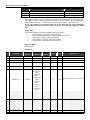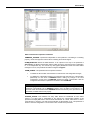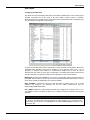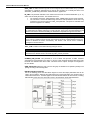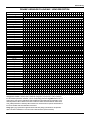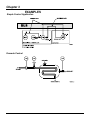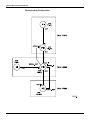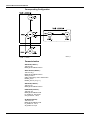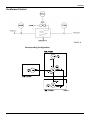
1
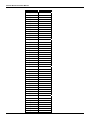
TM
FOUNDATION
JUL / 04
TM
FOUNDATION
F B L OC - F F ME
smar
web: www.smar.com
Specifications and information are subject to change without notice.
For the latest updates, please visit the SMAR website above.
BRAZIL
Smar Equipamentos Ind. Ltda.
Rua Dr. Antonio Furlan Jr., 1028
Sertãozinho SP 14170-480
Tel.: +55 16 3946-3510
Fax: +55 16 3946-3554
e-mail: [email protected]
ARGENTINA
Smar Argentina
Soldado de La Independencia, 1259
(1429) Capital Federal – Argentina
Telefax: 00 (5411) 4776 -1300 / 3131
e-mail: [email protected]
CHINA
Smar China Corp.
3 Baishiqiao Road, Suite 30233
Beijing 100873, P.R.C.
Tel.: +86 10 6849-8643
Fax: +86-10-6894-0898
e-mail: [email protected]
GERMANY
Smar GmbH
Rheingaustrasse 9
55545 Bad Kreuznach
Germany
Tel: + 49 671-794680
Fax: + 49 671-7946829
e-mail: [email protected]
MEXICO
Smar México
Cerro de las Campanas #3 desp 119
Col. San Andrés Atenco
Tlalnepantla Edo. Del Méx - C.P. 54040
Tel.: +53 78 46 00 al 02
Fax: +53 78 46 03
e-mail: [email protected]
SINGAPORE
Smar Singapore Pte. Ltd.
315 Outram Road
#06-07, Tan Boon Liat Building
Singapore 169074
Tel.: +65 6324-0182
Fax: +65 6324-0183
e-mail: [email protected]
USA
Smar International Corporation
6001 Stonington Street, Suite 100
Houston, TX 77040
Tel.: +1 713 849-2021
Fax: +1 713 849-2022
e-mail: [email protected]
Smar Laboratories Corporation
10960 Millridge North, Suite 107
Houston, TX 77070
Tel.: +1 281 807-1501
Fax: +1 281 807-1506
e-mail: [email protected]
Smar Research Corporation
4250 Veterans Memorial Hwy.
Suite 156
Holbrook , NY 11741
Tel: +1-631-737-3111
Fax: +1-631-737-3892
e-mail: [email protected]
FRANCE
Smar France S. A. R. L.
42, rue du Pavé des Gardes
F-92370 Chaville
Tel.: +33 1 41 15-0220
Fax: +33 1 41 15-0219
e-mail: [email protected]
Introduction
Introduction
Fieldbus is not a replacement for 4-20 mA or Intelligent/Smart Transmitter Protocols, it provides
much more. Fieldbus is a complete Control System Architecture enabling distribution of the
control function to equipment in the field; therefore it is a replacement for the DCS Architecture of
the 1970s.
To achieve the desired control the devices must be configured. That includes calibration but also
building of a control strategy. The latter is covered in this manual.
One of the major advantages of Fieldbus is interoperability. Some blocks described in this
manual are used not only by Smar devices, but other Foundation Fieldbus devices too. No
particular configuration tool is addressed in this manual, because the devices are independent of
configuration tool due to the DD technology.
Get the best results of the Fieldbus System by carefully reading these instructions.
This manual presents the necessary background knowledge to understand the programming
language of Function Blocks diagram focusing on Foundation Fieldbus technology.
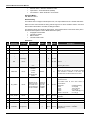
Besides that, it is explained in details blocks supported by the following devices:
-
LD292/LD302
TT302
IF302
TP302
FY302
FP302
FI302
FB700
DC302
DFI302
HI302 (all types)
DT302
FR302
Other Smar devices, that are members of System 302, may not be covered by this manual,
because they have specific manuals.
III
Function Blocks Instruction Manual
IV
Table of Contents
Table of Contents
INTRODUCTION ........................................................................................................................III
CHAPTER 1 - INTRODUCTION TO FUNCTION BLOCK APPLICATION ..................................1.1
Overview........................................................................................................................................................ 1.1
Function Block .............................................................................................................................................. 1.1
Transducer Block .......................................................................................................................................... 1.1
Resource Block ............................................................................................................................................. 1.1
Function Block Definitions ............................................................................................................................ 1.1
Function Block Linkages ...............................................................................................................................1.1
Link with Function Block executing in DFI302............................................................................................... 1.2
Information Access ....................................................................................................................................... 1.2
Function Block Application Structure............................................................................................................ 1.2
Block Object .................................................................................................................................................. 1.2
Block Parameters .......................................................................................................................................... 1.2
Parameter Identifiers.................................................................................................................................................................. 1.2
Parameter Storage..................................................................................................................................................................... 1.3
Parameter Usage ....................................................................................................................................................................... 1.3
Parameter Relationships............................................................................................................................................................ 1.4
Parameter Status ....................................................................................................................................................................... 1.4
Composition of Status................................................................................................................................... 1.5
Process Variable Calculation......................................................................................................................... 1.7
Setpoint Calculation ...................................................................................................................................... 1.7
Output Calculation......................................................................................................................................... 1.8
Cascade Control ............................................................................................................................................ 1.8
Mode Parameter .......................................................................................................................................... 1.10
Scaling Parameters ..................................................................................................................................... 1.17
Modbus Scale Conversion........................................................................................................................... 1.18
Fault State Handling .................................................................................................................................... 1.20
Fault State Active ........................................................................................................................................ 1.21
Alarms and Events – Alert Processing ........................................................................................................ 1.23
Simulation ................................................................................................................................................... 1.29
CHANNEL configuration .............................................................................................................................. 1.30
Block Instantiation....................................................................................................................................... 1.31
Order of Parameters during Download ........................................................................................................ 1.31
Data Type and Data Structure Definition ..................................................................................................... 1.32
Block Structure – DS-64 .......................................................................................................................................................... 1.32
Value & Status - Floating Point Structure – DS-65 .................................................................................................................. 1.33
Value & Status - Discrete Structure – DS-66 ........................................................................................................................... 1.33
Scaling Structure – DS-68 ....................................................................................................................................................... 1.33
Mode Structure – DS-69 .......................................................................................................................................................... 1.33
Access Permissions – DS-70................................................................................................................................................... 1.33
Alarm Float Structure – DS-71 ................................................................................................................................................. 1.34
Alarm Discrete Structure – DS-72............................................................................................................................................ 1.34
Event Update Structure – DS-73 ............................................................................................................................................. 1.34
Alarm Summary Structure – DS-74 ......................................................................................................................................... 1.34
Simulate - Floating Point Structure – DS-82 ............................................................................................................................ 1.34
Simulate - Discrete Structure – DS-83 ..................................................................................................................................... 1.35
Test Structure – DS-85 ............................................................................................................................................................ 1.35
Discrete Structure – DS-159 .................................................................................................................................................... 1.35
Discrete Structure – DS-160 .................................................................................................................................................... 1.36
Manufacturer Specific Data Structure.......................................................................................................... 1.36
Scaling Conversion Structure - DS-256 ................................................................................................................................... 1.36
Scaling Conversion Structure with Status - DS-257 ................................................................................................................ 1.37
Scaling Locator Structure - DS-258 ......................................................................................................................................... 1.37
Scaling Locator Structure with Status- DS-259........................................................................................................................ 1.37
Modbus Variable Locator Structure - DS-260 .......................................................................................................................... 1.38
Modbus Variable Locator Structure with Status- DS-261 ........................................................................................................ 1.38
FF Parameter ID Structure - DS-262 ....................................................................................................................................... 1.38
Slave Address Structure - DS-263 ........................................................................................................................................... 1.39
V
Function Blocks Instruction Manual
CHAPTER 2 - BLOCK LIBRARY..............................................................................................2.1
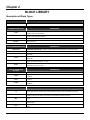
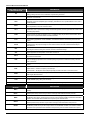
Description of Block Types ........................................................................................................................... 2.1
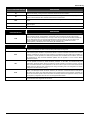
Block type availability and initial block set.................................................................................................... 2.4
Resource ....................................................................................................................................................... 2.6
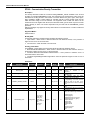
RS – Resource Block................................................................................................................................................................. 2.6
Transducer Blocks ...................................................................................................................................... 2.10
DIAG – Diagnostics Transducer Block..................................................................................................................................... 2.10
DSP - Display Transducer ....................................................................................................................................................... 2.12
HC – Hardware Configuration Transducer............................................................................................................................... 2.13
IDShell Transducer Block ........................................................................................................................................................ 2.16
Input Transducer Blocks ............................................................................................................................. 2.27
LD292 / LD302 - Pressure Transducer.................................................................................................................................... 2.27
DT302 - Concentration/Density Transmitter ............................................................................................................................ 2.28
TT302 - Temperature Transducer............................................................................................................................................ 2.29
IF302 - Current Fieldbus Transducer....................................................................................................................................... 2.31
TP302 – Position Fieldbus Transducer.................................................................................................................................... 2.32
TEMP – DF-45 Temperature Transducer ................................................................................................................................ 2.33
Input Function Blocks ................................................................................................................................. 2.37
AI - Analog Input ...................................................................................................................................................................... 2.37
DI - Discrete Input .................................................................................................................................................................... 2.41
MAI - Multiple Analog Input ...................................................................................................................................................... 2.44
MDI - Multiple Discrete Input.................................................................................................................................................... 2.46
PUL – Pulse Input .................................................................................................................................................................... 2.48
Control and Calculation Function Blocks .................................................................................................... 2.52
PID/EPID - PID Control/Enhanced PID Control ....................................................................................................................... 2.52
APID – Advanced Pid .............................................................................................................................................................. 2.61
ARTH - Arithmetic .................................................................................................................................................................... 2.67
SPLT-Splitter............................................................................................................................................................................ 2.73
CHAR - Signal Characterizer ................................................................................................................................................... 2.77
INTG - Integrator ...................................................................................................................................................................... 2.81
AALM - Analog Alarm .............................................................................................................................................................. 2.88
ISEL - Input Selector ................................................................................................................................................................ 2.94
SPG/ESPG - Setpoint Ramp Generator/Enhanced Setpoint Ramp Generator ....................................................................... 2.97
TIME – Timer and Logic......................................................................................................................................................... 2.104
LLAG - Lead Lag.................................................................................................................................................................... 2.112
OSDL - Output Signal Selector and Dynamic Limiter ............................................................................................................ 2.114
DENS - Density...................................................................................................................................................................... 2.119
CT – Constant........................................................................................................................................................................ 2.123
FFET - Flip-Flop and Edge Trigger........................................................................................................................................ 2.129
AEQU – Advanced Equations ................................................................................................................................................ 2.131
Modbus Function Blocks........................................................................................................................... 2.134
MBCF – ModBus Configuration ............................................................................................................................................. 2.134
MBCS – ModBus Control Slave............................................................................................................................................. 2.136
MBSS – ModBus Supervision Slave...................................................................................................................................... 2.140
MBCM – ModBus Control Master .......................................................................................................................................... 2.144
MBSM – ModBus Supervision Master ................................................................................................................................... 2.149
Output Function Blocks............................................................................................................................. 2.152
AO - Analog Output................................................................................................................................................................ 2.152
DO - Discrete Output ............................................................................................................................................................. 2.156
MAO - Multiple Analog Output ............................................................................................................................................... 2.159
MDO - Multiple Discrete Output ............................................................................................................................................. 2.162
STEP – Step Output Pid ........................................................................................................................................................ 2.165
Output Transducer Blocks......................................................................................................................... 2.172
FR302 – Fieldbus Relay ........................................................................................................................................................ 2.172
FY302 – Fieldbus Positioner Transducer............................................................................................................................... 2.173
FP302 - Fieldbus Pressure Transducer................................................................................................................................. 2.174
FI302 – Fieldbus Current Transducer .................................................................................................................................... 2.175
Flexible Function Block ............................................................................................................................. 2.176
HART Function Blocks .............................................................................................................................. 2.192
HCFG Block ........................................................................................................................................................................... 2.192
HIRT Block............................................................................................................................................................................. 2.195
HVT Block .............................................................................................................................................................................. 2.198
HBC – HART Bypass Communication ................................................................................................................................... 2.216
VI
Table of Contents
Block Options............................................................................................................................................ 2.219
Resource Block Bit Strings .................................................................................................................................................... 2.219
Function Block Options............................................................................................................................. 2.221
IO_OPTS ............................................................................................................................................................................... 2.221
CONTROL_OPTS.................................................................................................................................................................. 2.222
STATUS_OPTS..................................................................................................................................................................... 2.223
ALARM_SUM and ACK_OPTION ......................................................................................................................................... 2.224
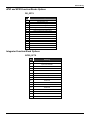
APID and EPID Function Blocks Options................................................................................................... 2.225
PID_OPTS ............................................................................................................................................................................. 2.225
Integrator Function Block Options ............................................................................................................ 2.225
INTEG_OPTS ........................................................................................................................................................................ 2.225
Timer Function Block Options................................................................................................................... 2.226
INVERT_OPTS...................................................................................................................................................................... 2.226
Arithmetic Function Block Options ........................................................................................................... 2.226
INPUT_OPTS ........................................................................................................................................................................ 2.226
Output Signal Selector and Dynamic Limiter Function Block Options ...................................................... 2.227
OSDL_OPTS ......................................................................................................................................................................... 2.227
Multiple Output Function Block Options ................................................................................................... 2.227
MO_STATUS_OPTS ............................................................................................................................................................. 2.227
MO_OPTS (Profile Rev. 0 – FB700)...................................................................................................................................... 2.228
MO_OPTS (Profile Rev. 1 – DFI302)..................................................................................................................................... 2.228
Hardware Configuration Block Options ..................................................................................................... 2.229
MODULE_STATUS_R0_3..................................................................................................................................................... 2.229
MODULE_STATUS_R4_7..................................................................................................................................................... 2.229
MODULE_STATUS_R8_11................................................................................................................................................... 2.230
MODULE_STATUS_R12_14................................................................................................................................................. 2.230
CHAPTER 3 - EXAMPLES .......................................................................................................3.1
Simple Control Application............................................................................................................................ 3.1
Cascade Control ............................................................................................................................................ 3.1
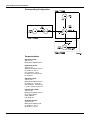
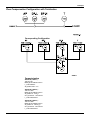
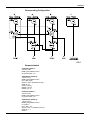
Corresponding Configuration ..................................................................................................................................................... 3.2
Parameterization ........................................................................................................................................................................ 3.3
Ratio Control ................................................................................................................................................. 3.3
Corresponding Configuration ..................................................................................................................................................... 3.4
Parameterization ........................................................................................................................................................................ 3.4
Feedforward Control...................................................................................................................................... 3.5
Corresponding Configuration ..................................................................................................................................................... 3.5
Parameterization ........................................................................................................................................................................ 3.6
Split Range Control ....................................................................................................................................... 3.6
Corresponding Configuration ..................................................................................................................................................... 3.7
Parameterization ........................................................................................................................................................................ 3.7
Level Control ................................................................................................................................................. 3.8
Corresponding Configuration ..................................................................................................................................................... 3.8
Parameterization ........................................................................................................................................................................ 3.9
Rate Control Loop with Lead - Lag ................................................................................................................ 3.9
Corresponding Configuration ................................................................................................................................................... 3.10
Parameterization ...................................................................................................................................................................... 3.10
Flow Compensation Configuration with Totalization ................................................................................... 3.11
Corresponding Configuration ................................................................................................................................................... 3.11
Parameterization ...................................................................................................................................................................... 3.11
Hydrostatic Tank Gauging ........................................................................................................................... 3.12
Corresponding Configuration ................................................................................................................................................... 3.13
Parameterization ...................................................................................................................................................................... 3.13
Combustion Control with Double Cross Limits ........................................................................................... 3.15
Corresponding Configuration ................................................................................................................................................... 3.16
Parameterization ...................................................................................................................................................................... 3.16
3 Element Boiler Level/Feedwater Control................................................................................................... 3.18
Corresponding Configuration ................................................................................................................................................... 3.19
Parameterization ...................................................................................................................................................................... 3.19
VII
Function Blocks Instruction Manual
VIII
Chapter 1
INTRODUCTION TO FUNCTION BLOCK
APPLICATION
Overview
Function block applications are defined as plant or factory applications that perform one or more
automatic monitoring and control functions.
Function Block
Function blocks represent the basic automation functions performed by the function block
application. Each function block processes input parameters according to a specified algorithm and
an internal set of control parameters. They produce output parameters that are available for use
within the same function block application or by other function block applications.
Transducer Block
Transducer blocks insulate function blocks from the specifics of I/O devices, such as sensors,
actuators, and switches. Transducer blocks control access to I/O devices through a device
independent interface defined for use by function blocks. Transducer blocks also perform functions,
such as calibration and linearization, on I/O data to convert it to a device independent
representation. Their interface to function blocks is defined as one or more implementation
independent I/O channels.
Resource Block
Resource blocks are used to define hardware specific characteristics of function block applications.
Similar to transducer blocks, they insulate function blocks from the physical hardware by containing
a set of implementation independent hardware parameters.
Function Block Definitions
Function blocks are defined by their inputs, outputs, control parameters, and by the algorithm that
operates on these parameters. Function blocks are identified using a name (Tag) and a numeric
index.
Tags provide a symbolic reference to function blocks. They are unambiguous within the scope of a
Fieldbus system. Numeric indices are numbers assigned to optimize access to function blocks. As
opposed to function block tags, which are global, numeric indices have meaning only within the
application that contains the function block.
Function block parameters define the inputs, outputs, and the data used to control function block
operation. They are visible and accessible over the network. Additional parameters, called
“contained within” parameters are used to define the private data of a function block. Although
visible over the network, they may not participate in function block linkages.
Function Block Linkages
Function block outputs may be linked to inputs of other function blocks. Each linkage indicates that
an input parameter of one function block obtains its value from specific output parameters of another
function block. While function block “pull” their values from upstream blocks, which block controls
the “pulling” depends on the characteristics of the underlying communications.
Two function blocks linked together may exist in the same function block application, or in separate
applications, either in the same device or in different devices.
To transfer the data for a function block link, the communication channel must be known, that
provide the transfer of parameter data (and other types of data) between applications.
1.1
Function Blocks Instruction Manual
Link with Function Block executing in DFI302
Any function block executing in DFI302 may be linked to any other function block being executed in
other device connected to any of four H1 channels available.
Information Access
Function block information may be grouped for access depending on how it is to be used. The
following four groups are defined for access purposes:
1)
2)
3)
4)
dynamic operation data,
static operation data,
all dynamic data, and
other static data.
To support access of operator interface information during function block execution, two levels of
network access are defined, one for operational traffic and one for background traffic. Operator
interface traffic is transferred as background traffic to prevent it from interfering with the operation of
time-critical function blocks.
Function Block Application Structure
Function block applications are modeled as a set of function blocks coordinated to execute a related
set of operations. This set of operations collectively provides a single, higher level control function.
Function block model is real-time algorithm that transforms input parameters into output parameters.
Their operation is controlled through the setting of control parameters.
Interoperation between function blocks is modeled by linking an input parameter of one function
block to an output parameter of another. Function blocks can be bound together within and across
devices. Interfaces between function blocks located in the same function block application are
locally defined. Those interfaces between function blocks in different devices use the
communication services.
To support function block operation, the function block architecture also provides transducer and
resource blocks, and display objects.
Function Block Application Process represents the function block application as an integrated set of
these components accessed to its network interface.
Block Object
A block object represents a logical processing unit composed of a set of input, processing, and
control parameters and an associated algorithm.
Each block is identified by its Tag which is defined to be unique throughout the control system at
one plant site. Block tags are defined as strings with a maximum length of 32 characters.
During system operation, a short hand reference, known as a numeric index is used for block
access purposes. A block’s numeric index is unique only within the function block application where
it exists.
The algorithm of a block is identified by its type and the revision level of its type. This information
indicates how the execution of the algorithm is affected by control parameters.
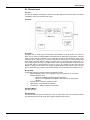
Block Parameters
Parameters define the inputs, outputs, and control data for a block. Their relationship to each other
and to the block algorithm is shown below.
Parameter Identifiers
Parameter names are unique within a block. Within a system, a parameter can be unambiguously
identified by qualifying its name with the tag of its block. This construction is referred to as
“Tag.Parameter”.
The Tag.Parameter construct is used to obtain the index of a parameter. This is the second way of
identifying a parameter.
1.2
Introduction to Function Block Application
Parameter Storage
Parameter attributes may be classified as dynamic, static, or non-volatile. The value of parameter
attributes may need to be restored after a power failure based on its classification:
Dynamic - a parameter attribute whose value is calculated by the block algorithm and therefore
does not need to be restored after a power failure.
Static - a parameter attribute which has a specific configured value that must be restored by a
device after power failure. An Interface or temporary devices may write to static parameter attributes
on an infrequent basis. Static parameter attribute values are normally tracked by a configuration
device. To support tracking changes in static parameter attributes, the associated block’s static
revision parameter will be incremented and an update event will be generated each time a static
parameter attribute value is modified.
Non-volatile - a parameter attribute whose value is written on a frequent basis and the last saved
value must be restored by the device after a power failure. Since the values of these parameter
attributes are constantly changing, they are not normally tracked by a configuration device.
The classification of a parameter attribute will determine the manner is which the attribute value is
stored within a device.
Parameter Usage
Parameters are defined for a block for a specific purpose. Each is defined for use as an input, an
output, or a control parameter. Control parameters are also referred to as “contained” parameters
because they may not be linked with parameters in other blocks. Each type of usage is defined as
follows:
Contained
A contained parameter is a parameter whose value is configured, set by an operator, higher level
device, or calculated. It may not be linked to another function block input or output. The mode
parameter is an example of a contained parameter common to all blocks.
Output
An output parameter is a parameter that may be linked to an input parameter of another function
block. Output parameters contain status. The output status indicates the quality of the parameter
value and the mode of the block when it was generated.
The value of an output parameter may not be obtained from a source external to the block. It may
be generated by the block algorithm, but does not have to be.
The values of certain output parameters are dependent on the value of the mode parameter of the
block. These output parameters may be referred to as mode-controlled output parameters.
Blocks whose purpose is to generate a single output contain one parameter designed as the primary
output parameter. Primary outputs are used by other blocks for control or calculation purposes.
These blocks also contain secondary output parameters such as alarm and event parameters that
play a supporting role to the primary output parameter.
Input
An input parameter obtains its value from a source external to the block. An input parameter may be
linked to an output parameter of another function block. Its value may be used by the algorithm of
the block.
Input parameter values are accompanied by status. When an input parameter is linked to an output
parameter, the status will be provided as the status of the output parameter. When it is not linked to
an output parameter, the status will indicate that the value was not provided by an output parameter.
When an expected input parameter value is not received, the function block supported services
responsible for delivering the data will set the status of the input parameter to indicate the failure.
If an input parameter is not linked to an output parameter, then it will be treated as a constant value
by the function block application. The difference between unlinked input parameters and contained
1.3
Function Blocks Instruction Manual
parameters is that input parameters have the capability to support a linkage and contained
parameters do not.
Blocks whose purpose is to transform or operate on a single input will contain one parameter
designed as the primary input parameter. One input parameter of some types of blocks is
designated as the primary input parameter. Primary inputs are used for control or calculation
purposes. These blocks may also contain secondary input parameters that support processing done
on the primary input parameter.
Parameter Relationships
The execution of a block involves the inputs, outputs, contained parameters, and the algorithm of
the block. The execution time for a block’s algorithm is defined as a parameter of the block. Its value
is dependent on how the block was implemented.
The input parameters are used by the algorithm in conjunction with the state of the function block
application containing the block to determine if the algorithm can achieve the target mode
established for it. The target mode is the part of the mode parameter that indicates what mode of
operation is desired for the block. It is normally set by a control device or the operator.
Under certain operating condition a block may not be able to function in the requested mode. In
such cases, the actual mode reflects the mode it is able to achieve. Comparison of the actual
against the target indicates whether the target was achieved.
The values for the mode parameter for a block are defined by the Permitted Mode parameter. Thus,
the modes available for controlling a block may vary with each block.
The values assigned to the Permitted Mode are selected from those defined by the block designer.
They are assigned during block configuration for the specific use of the function block application.
Once the actual mode is determined, the block execution progresses and the outputs are generated.
Parameter Status
All input and output parameters are structures composed of status and value, but some contained
parameter (internal parameter, not accessible by other blocks) have also that data type, for
example, RCAS_IN, ROUT_IN, SP and PV.
The Status field is composed of three parts: Quality, Sub-Status and Limits.
Quality – It indicates the quality of the parameter value.
Good Cascade – The quality of the value is good, and it may be part of a cascade structure.
Good Non-Cascade – The quality of the value is good, and the block doesn’t support a cascade
path.
Uncertain – The quality of the value is less than normal, but the value may still be useful.
Bad – The value is not useful.
Sub-Status – The sub-status is a complement of the quality status and takes information to initialize
or break a cascade control, alarms and others. There are different sets of sub-status for each
quality.
Limits – It provides information whether the associated value is limited or not, as well the direction.
The limits are classified as: Not Limited, High Limited, Low Limited, Constant.
When an input parameter is linked to an output parameter through the link object, the whole
structure (status and value) is copied (local link) or received from the bus (external link). If the input
is not linked, then the status may be set manually by the user, as well the value.
1.4
Introduction to Function Block Application
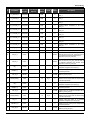
Composition of Status
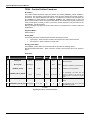
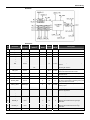
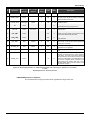
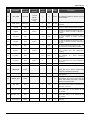
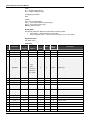
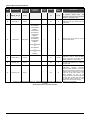
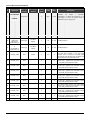
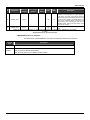
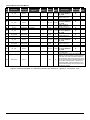
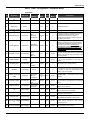
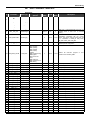
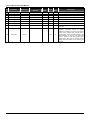
The Status has the following composition:
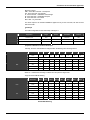
MSB
Quality
LSB
SubStatus
Limits
The quality, sub-status, and limit components of status are defined as follows:
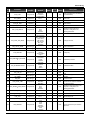
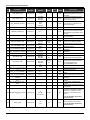
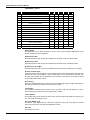
Quality - The quality used will be determined by the highest priority condition:
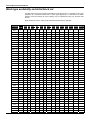
0 = Bad
1 = Uncertain
2 = Good (Non-cascade)
3 = Good (Cascade)
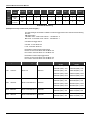
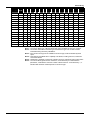
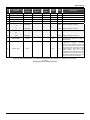
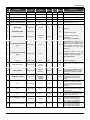
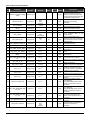
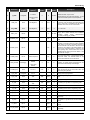
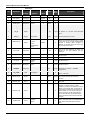
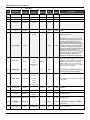
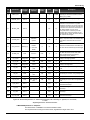
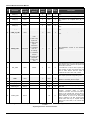
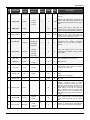
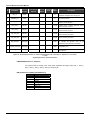
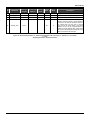
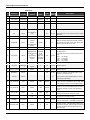
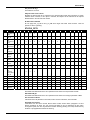
Sub status - Sub-status values in the status attribute are defined as shown in the following table.
Limit - The following limit conditions will be always available in the status attribute.
0 = Not limited
1 = Low limited
2 = High limited
3 = Constant
Examples:
0xC1 (in hexadecimal) is “Good-Cascade Non Specific and Low Limited” status
0xCF (in hexadecimal) is “Good-Cascade Not invited and Constant” status
0x4E (in hexadecimal) is “Uncertain Initial Value and High Limited” status
Bad
0 = Non-specific
Hex
value
0x00
Bad
1 = Configuration Error
0x04
Bad
2 = Not Connected
0x08
Bad
3 = Device Failure
0x0c
X
X
X
Bad
4 = Sensor Failure
0x10
X
X
X
Bad
5 = No Communication, with last usable value
0x14
Bad
6 = No Communication, with no usable value
0x18
Bad
7 = Out of Service (highest priority)
0x1c
Not in
cascade
X
Forward path
of cascade
Backward path
of cascade
Quality
Sub-status
Not in
cascade
X
Forward path
of cascade
X
Backward path
of cascade
X
X
X
X
Uncertain
0 = Non-specific
Hex
value
0x40
Uncertain
1 = Last Usable Value
0x44
X
Uncertain
2 = Substitute
0x48
X
Uncertain
3 = Initial Value
0x4c
X
Uncertain
4 = Sensor Conversion not Accurate
0x50
X
Uncertain
5 = Engineering Unit Range Violation
0x54
X
Uncertain
6 = Sub-normal
0x58
X
Quality
Sub-status
1.5
Function Blocks Instruction Manual
GoodNC
0 = Non-specific (lowest priority)
Hex
value
0x80
GoodNC
1 = Active Block Alarm
0x84
X
GoodNC
2 = Active Advisory Alarm
0x88
X
GoodNC
3 = Active Critical Alarm
0x8c
X
GoodNC
4 = Unacknowledged Block Alarm
0x90
X
GoodNC
5 = Unacknowledged Advisory Alarm
0x94
X
GoodNC
6 = Unacknowledged Critical Alarm
0x98
X
Hex
value
Not in
cascade
Quality
Sub-status
Quality
Sub-status
Not in
cascade
X
Forward path
of cascade
Backward path
of cascade
Forward path
of cascade
Backward path
of cascade
X
GoodC
0 = Non-specific
0xc0
X
GoodC
1 = Initialization Acknowledge(IA)
0xc4
X
GoodC
2 = Initialization Request(IR)
0xc8
X
GoodC
3 = Not Invited (NI)
0xcc
X
GoodC
4 = Not Selected(NS)
0xd0
X
GoodC
6 = Local Override(LO)
0xd8
X
GoodC
7 = Fault State Active(FSA)
0xdc
X
GoodC
8 = Initiate Fault State (IFS)
0xe0
X
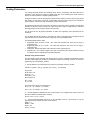
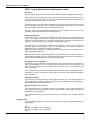
Example: Conversion from the Enumerations to Number
The following formula is used to obtain the enumeration number of a determinate status attribute:
Decimal Value Status = 64*Quality + 4* Sub-Status + Limit
For example, considering the following status:
“Uncertain - Initial Value - High Limited”
Where:
Quality = “uncertain” = 1
Sub-Status = “Initial Value” = 3
Limit = “High Limited “= 2
Applying the formula:
Decimal Value Status = 64 * 1 + 4 * 3 + 2 = 78 (in decimal) or 0x4E (in Hexadecimal)
Example: Conversion from Number to Enumerations
There are many forms to convert the enumerate number to the status string. Below is shown two
forms to do this.
The number is expressed in binary as:
Hex Value Status = 78 = 0x4E = 01001110 (in binary)
Dividing this binary number in quality, sub-status and limit fields:
Quality = 01 = 1 = “Uncertain”
Sub-Status = 0011 = 3 = “Initial Value”
Limit = 10 = 2 = “High Limited”
The corresponding status is “Uncertain - Initial Value - High Limited”.
Using the value of status in decimal format.
Decimal Value Status = 78
1.6
Introduction to Function Block Application
Divide the number by 64. The quotient will be the Quality and save the remainder:
Quality = 78 / 64 = 1
Remainder = 14
Divided the remainder by 4. The quotient will be the Sub-Status and the remainder will be the limit:
SubStatus = 14 / 4 = 3
Limit = 2
Process Variable Calculation
The process variable (PV) parameter reflects the value and status of the primary input value or
calculated value based on multiple inputs. The PV parameter is the IN parameter after filtering (PID
and AALM), or it reflects the value from the transducer after filtering (AI and AO-readback), or the
combination of two input parameters for range extension (ARTH).
The PV parameter has a status, although it is a contained parameter. This status is a copy of the
primary input status or the worst status when the PV is based on multiple inputs. The PV value
reflects the value of the calculated input regardless the mode of the block, unless this input is not
usable, then the PV holds the last usable value.
Optionally, a filter may be applied in the process value signal, whose time constant is PV_FTIME.
Considering a step change to the input, this is the time in seconds to the PV reaches 63,2% of the
final value. If the PV_FTIME value is zero, the filter is disabled.
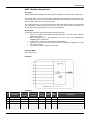
Setpoint Calculation
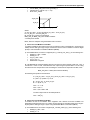
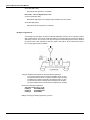
a) SP limits: SP_HI_LIM and SP_LO_LIM
At first, the SP will be limited to a range specified by the SP_HI_LIM and SP_LO_LIM parameters
only in Auto mode. However in the PID block, if the bit “Obey SP limits if Cas or Rcas” in
CONTROL_OPTS parameter is true, then the setpoint value will be also restricted to setpoint limits
in Cas and RCas mode.
b) SP rate limits: SP_RATE_UP and SP_RATE_DN
These parameters avoid bump in SP change, and they depend on the block type as well the mode
to be effective. The SP rate limits are applied for the PID block in Auto mode, and AO block in Auto,
Cas or Rcas modes.
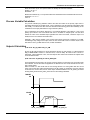
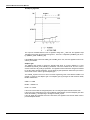
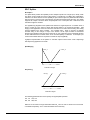
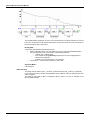
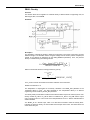
When the block is in Auto mode and the user change the SP to a value greater than the current
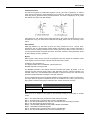
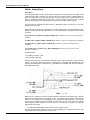
value, then the SP value ramps upward based on the SP_RATE_UP parameter. If the new setpoint
is less than the current value, the SP value ramps downward based on the SP_RATE_DN. When
the SP_RATE_DN and/or SP_RATE_UP is zero the rate limiting is disabled.
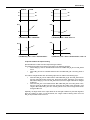
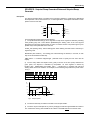
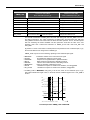
TARGET
SP
t
VALUE
SP
DELTA_2
DELTA_1
t
DELTA_1 / SP_RATE_UP
DELTA_2 / SP_RATE_DN
1.7
Function Blocks Instruction Manual
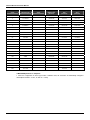
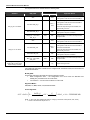
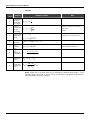
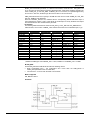
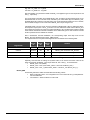
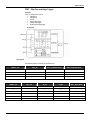
The below table summarizes the conditions for SP limits and SP rate limits.
Block type
Required configuration for SP
limits
Mode
Required configuration for SP rate limits
(SP_RATE_UP/SP_RATE_DN)
(SP_HI_LIM/SP_LO_LIM)
Auto
None
Cas/Rcas
CONTROL_OPTS.“Obey
limits if Cas or Rcas” is true
Auto
None
SP_RATE_UP / SP_RATE_DN different of zero
Cas/Rcas
Not apply
SP_RATE_UP / SP_RATE_DN different of zero.
PID
AO
SP_RATE_UP / SP_RATE_DN different of zero
SP
Not apply
c) SP tracking PV
Some control strategies require that the transition from a “manual” mode (Rout, Man, LO and Iman)
to an “auto” mode (Auto, Cas, Rcas) must be done with error equals to zero, therefore SP must be
equal to PV.
The CONTROL_OPTS of the PID block and the IO_OPTS of the AO block may be configured for
SP tracking PV when the block is in a “manual” mode.
This option is summarized in the following table:
CONTROL_OPTS
IO_OPTS
(PID)
(AO)
SP-PV Track in Man
X
X
SP-PV Track in Rout
X
SP-PV Track in LO or Iman
X
Bitstring
Meaning
The SP tracks the PV when the target mode is Man.
The SP tracks the PV when the actual mode is Rout.
X
The SP tracks the PV when the actual mode is LO or Iman.
Output Calculation
When the actual mode is AUTO, CAS or RCAS, the normal algorithm is executed. This calculation is
specific for each function block type. If the mode is a “manual” mode, the output is just following a
value provided by another block (LO, Iman), the user (Man) or a Control Application running on an
interface device (Rout).
The output value is limited high and low by the OUT_HI_LIM and OUT_LO_LIM parameters in PID
and ARTH blocks for all modes.
It is possible to disable the output limits in Manual mode in the PID block by setting “No OUT limits
in Manual” bit in CONTROL_OPTS.
Cascade Control
There is a linked output and input pair involved in each of the different forms of cascade, as shown
in the following table.
Mode
Forward
Backward
Cas
CAS_IN
BKCAL_OUT
RCas
RCAS_IN
RCAS_OUT
ROUT_IN
ROUT_OUT
ROut
Table 1 – Parameter Pairs
In a cascade, the upper control block provides an output value and status, which becomes the
cascade input to the lower block.
The lower block in the cascade provides an output value, which is communicated to the upper block
as back-calculation input.
1.8
Introduction to Function Block Application
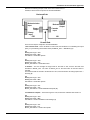
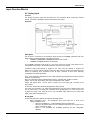
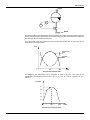
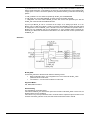
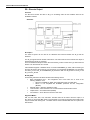
Based on the following example, which is the most common form of
cascade, it will be shown the process of cascade initialization.
Backward Path
Backcalculation
Input
Backcalculation
Output
Cascade
Input
Primary
Output
Primary
Input
PID
AO
Forward Path
There are four steps to complete a cascade initialization:
1. Not cascade mode – As the AO block is in Auto mode, the PID block is not calculating the output
(OUT), it is just following the backward value (AO.BKCAL_OUT -> PID.BKCAL_IN).
PID
MODE_BLK.Target = Auto
MODE_BLK.Actual = IMan
OUT.Status = GoodC-Non-specific
AO
MODE_BLK.Target = Auto
MODE_BLK.Actual = Auto
BKCAL_OUT.Status = GoodC-Not Invited
2. Initialize – The user changes the target mode of AO block to Cas, then the AO block sets
GoodC-IR in BKCAL_OUT. The value of BKCAL_OUT is the initial value for the PID starts to
calculate.
The AO block waits for the PID to set GoodC-IA in OUT, which is linked to AO.CAS_IN (PID.OUT ->
AO.CAS_IN).
PID
MODE_BLK.Target = Auto
MODE_BLK.Actual = IMan
OUT.Status = GoodC-Non-specific
AO
MODE_BLK.Target = Cas
MODE_BLK.Actual = Auto
BKCAL_OUT.Status = GoodC-Initialization Request (IR)
3. Initialization complete – The AO block goes to Cas, because the PID block sent GoodC-IA.
PID
MODE_BLK.Target = Auto
MODE_BLK.Actual = IMan
OUT.Status = GoodC- Initialization Acknowledge (IA)
AO
MODE_BLK.Target = Cas
MODE_BLK.Actual = Cas
BKCAL_OUT.Status = GoodC- Non-specific
1.9
Function Blocks Instruction Manual
4. Cascade complete – The PID block changes the status of OUT from GoodC-IA to GoodC-NS.
PID
MODE_BLK.Target = Auto
MODE_BLK.Actual = Auto
OUT.Status = GoodC- Non-specific
AO
MODE_BLK.Target = Cas
MODE_BLK.Actual = Cas
BKCAL_OUT.Status = GoodC- Non-specific
Notes:
• The remote cascade modes (Rcas and Rout) have a similar mechanism to the
process of cascade initialization.
• The function blocks prepared to work as the upper block in the cascade have the
BKCAL_IN parameter, as PID, SPLT, SPG and OSDL
• The function blocks prepared to work as the lower block in the cascade have the BKCAL_OUT
parameter, as PID, AO, SPLT and OSDL.
• The upper blocks will be in Iman mode when the lower block is not in cascade, whose main
reasons are:
• Link failure in backward path (lower.BKCAL_OUT -> upper.BKCAL_IN)
• Lower block can not execute in Cas: the target mode of lower block is not Cas, or there
is any condition forcing the lower block to a higher priority mode as fault state (AO in LO),
link failure in the forward path (OUT -> CAS_IN).
• Tracking (PID in LO), link failure in the primary input (PID in Man), and others. (See details
in the section Mode Parameter).
• Control Application running on as interface device works similarly an upper block in the
remote cascade modes (Rcas and Rout).
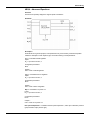
Mode Parameter
a) Mode types
The operation of the block is summarized for each mode type as follows:
Out of Service (O/S):
The block is not being evaluated. The output is maintained at last value or, in the case of output
class function blocks, the output may be maintained at an assigned Fault State value – last value or
configured Fault State value. Setpoint is maintained at last value.
Initialization Manual (IMan):
This mode means that the downstream block is not in cascade (Cas mode), therefore the normal
algorithm must not be executed and the block output will just follow an external tracking signal
(BKCAL_IN) coming from the downstream block. This mode cannot be requested through the target
mode.
Local Override (LO):
It applies to control block that supports a track input parameter, when the control block is LO, its
output is tracking the TRK_VAL input parameter.
The LO mode also applies to output block when it is in fault state. This mode cannot be requested
through the target mode.
Manual (Man):
The block output is not being calculated, although it may be limited. The operator may set directly
the outputs of the block.
Automatic (Auto):
The normal algorithm calculates the block output. If the block has a setpoint, it will be used a local
value that may be written by an operator through an interface device.
Cascade (Cas):
The setpoint comes from another block over a link (CAS_IN), therefore the operator cannot change
the setpoint. The normal algorithm calculates the block output based on that setpoint. In order to
achieve this mode, the algorithm uses the CAS_IN input and BKCAL_OUT output to establish the
cascade with the upstream block in a bumpless way.
1.10
Introduction to Function Block Application
Remote Cascade (RCas):
The block setpoint is being set by a Control Application running on an interface device to the
RCAS_IN parameter. The normal algorithm calculates the block output based on that setpoint, so
the block running in Rcas works similarly a “lower block” in cascade. In order to achieve this mode,
the block algorithm uses the RCAS_IN and RCAS_OUT to establish a relation like a cascade with
the interface device in a bumpless way. Therefore the Control Application works similarly as an
“upper block”, but its algorithm is not synchronized to the schedule and neither does it use a link to
transfer the setpoint to the block.
Remote Output (ROut):
The block output is being set by a Control Application running on an interface Device to the
ROUT_IN parameter. In order to achieve this mode, the block algorithm uses the ROUT_IN and
ROUT_OUT to establish a relation like a cascade with the interface device in a bumpless way.
Therefore the Control Application works similarly as an “upper block”, but its algorithm is not
synchronized to the schedule and neither does it use a link to transfer the output to the block. The
block running in ROut works similarly a “lower block” in cascade.
Auto, Cas, and RCas are the “automatic” modes, which calculate the primary output using the
normal algorithm. The “manual” modes are IMan, LO, Man, and ROut.
Mode type
Source of SP
Source of OUT
O/S
User
User
Iman
User
Other function block – following BKCAL_IN parameter
PID / EPID / APID : User
LO
AO / DO : Fault state (last value or
FSTATE_VAL)
PID / EPID / APID : Other function block – following
TRK_VAL parameter
AO / DO :Fault state (last value or FSTATE_VAL)
Man
User
User
Auto
User
Block algorithm
Cas
Other function block – following CAS_IN
parameter
Block algorithm
Rcas
Control Application running on an interface
device
Block algorithm
Rout
Block keeps last value
Control Application running on an interface device
b) Elements of MODE_BLK
The mode parameter (MODE_BLK) is defined in every function block. It is defined as having four
elements:
1) Target - This is the mode requested by the operator. Only one mode from those allowed by the
permitted mode parameter may be requested, that check will be done by the device.
2) Actual - This is the current mode of the block, which may differ from the target based on
operating conditions and block configuration, as input parameter status and bypass configuration,
for example. Its value is always calculated as part of block execution, therefore the user can not
write in this attribute.
3) Permitted – It defines the modes that are allowed for an instance of the block. The permitted
mode is configured based on the application requirement. For example, if a PID block does not have
link for CAS_IN, the Cas mode should not be permitted for that block. It is like a list of mode types
selected from the supported modes.
4) Normal - This is the mode which the block should be set to during normal operating conditions.
The normal attribute is used as a reminder. It does not affect the algorithm calculation.
Execution of a function or transducer block will be controlled through the mode parameter. The user
sets the target mode, which indicates what mode of operation is desired for the block. Then, the
algorithm evaluates if the block can be executed in the requested mode (target mode) or the nearest
higher priority mode possible. The actual mode reflects the mode of block operation.
1.11
Function Blocks Instruction Manual
Other concepts of mode:
Retained target: When the target mode is O/S, MAN, RCAS or ROUT the target mode attribute
may retain information about the previous target mode. This information may be used by the block in
mode shedding and setpoint tracking. This feature is optional and the interface device is responsible
to implement it.
Supported mode: Each block type has a set of mode types supported, it means that the block
definition specifies in which modes the block may operate.
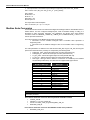
c) Priority of mode
The concept of priority is used when the block calculates the actual mode, and when determining if
write access is allowed for a particular mode or other of higher priority.
Mode
Description
Priority
O/S
Out of Service
7 – highest
IMan
Initialization Manual
6
Local Override
5
Man
Manual
4
Auto
Automatic
3
Cas
Cascade
2
Rcas
Remote Cascade
1
Rout
Remote Output
0 - lowest
LO
Priority of the Mode
d) Mode shedding
Interface devices such as a host computer, distributed control system (DCS) controller, or
programmable logic controller (PLC) may exist which not support the function blocks application
architecture but have proprietary control applications running on them.
Such applications may adjust the values of the block setpoint (RCas mode) and/or primary output
(ROut mode) parameters in a function block. When doing so, they provide the value of each
parameter along with its status.
If a new value is not received by the function block within a specified “update time” (SHED_RCAS
and SHED_ROUT), or a bad status is received, then the function block mode will be changed to a
non-remote mode of higher priority.
The SHED_OPT parameter configures the desired behavior when shedding from a remote mode
(Rcas and Rout); therefore it does not include the Cas mode. Also, it determines if the shed mode
is maintained once the RCAS_IN or ROUT_IN parameter updating is recovered (no return – target
mode receives the shed mode) or original mode will be restored when the cause of shedding has
cleared (normal return – no change in target mode).
The shed option has the following enumeration:
0 = Undefined – Invalid
1 = Normal shed, normal return – Actual mode changes to the next lowest priority non-remote mode
permitted but returns to the target remote mode when the remote computer completes the
initialization handshake.
2 = Normal shed, no return – Target mode changes to the next lowest priority non-remote mode
permitted. The target remote mode is lost, so there is no return to it.
3 = Shed to Auto, normal return.
4 = Shed to Auto, no return – Target mode changes to Auto on detection of a shed condition.
5 = Shed to Manual, normal return.
6 = Shed to Manual, no return – Target mode changes to Man on detection of a shed condition.
7 = Shed to Retained target, normal return.
8 = Shed to Retained target, no return (change target to retained target).
1.12
Introduction to Function Block Application
e) Mode calculation
The actual mode will be calculated based on the following:
Each mode type has some conditions that force the actual mode to be of higher priority than the
target mode.
Starting from the highest priority mode (O/S), it is analyzed its corresponding conditions. If they are
present, then the actual mode will be this one, otherwise it is necessary to check the conditions for
the next lower priority mode (Iman, LO, Man, Auto, Cas, Rcas and Rout) till the target mode,
exclusive. For instance, if the target mode is Cas, it is necessary to check the conditions for O/S,
IMan, LO, Man and Auto, in this order. If all those conditions are false, the actual mode will be the
target mode.
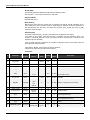
Mode
Conditions
O/S
Resource block is in O/S (resource state is Standby)
- Enumerated parameter has an invalid value
IMan
BKCAL_IN.status is Bad
BKCAL_IN.status is Good – Fault State Active, Not Invited or Initialization Request.
LO
Fault state is active (in an output function block)
CONTROL_OPTS.Track Enable active and TRK_IN_D is active.
If target is Man, then the CONTROL_OPTS.Track in Manual must be active.
Man
Target mode has just changed from O/S
(Status attribute of primary input parameter (IN parameter) is Bad or Uncertain with option to treat Uncertain as
Bad) and
(Bypass not set).
Target mode is RCas or ROut, and SHED_OPT=shed to Manual or shed to next
Auto
Target mode is Cas and (CAS_IN.status=Bad or cascade initialization not completed)
Target mode is RCas and RCAS_IN.status=Bad and SHED_OPT=shed to Auto or shed to next
Target mode is ROut and ROUT_IN.status=Bad and SHED_OPT = shed to Auto or shed to next.
Cas
Actual mode last execution was Cas.
Target mode is Cas and cascade initialization has just completed
Target mode is RCas and RCAS_IN.status=Bad and SHED_OPT=shed to next and cascade initialization has just
completed
Target mode is ROut and ROUT_IN.status=Bad and SHED_OPT=shed to next and cascade initialization has just
completed
RCas
RCas cascade initialization has just completed or actual mode last execution was RCas.
ROut
ROut cascade initialization has just completed or actual mode last execution was ROut.
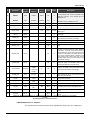
When the actual mode is different from the target, a good suggestion to find the cause is an analysis
of the corresponding conditions for the actual mode. The most frequent causes are shown below.
Mode
Frequent cause
O/S
Check the Resource block mode and all enumerated parameters
Iman
Check the BKCAL_IN.status:
Bad – No Comm : link failure in backward path (BKCAL_OUT -> BKCAL_IN)
NI : lower block can not execute in Cas (check the target mode of lower block as well fault state
condition) or link failure in forward path (OUT -> CAS_IN)
LO
Check :
Value and status of TRK_IN_D, TRK_VAL and CONTROL_OPTS (Track Enable, Track in Manual)
Output block : status of CAS_IN and the delay time for fault state established by FSTATE_TIME
Man
Status of IN
If the target is Cas, check the links with the upper block in backward path (BKCAL_OUT -> BKCAL_IN)
and forward path (OUT -> CAS_IN)
1.13
Function Blocks Instruction Manual
Frequent cause
Mode
If the block is not reaching the target mode Rcas or Rout, compare the updating rate of RCAS_IN and
ROUT_IN by a Control Application to SHED_RCAS and SHED_ROUT.
Auto
If the target is Cas, check the links with the upper block in backward path (BKCAL_OUT -> BKCAL_IN)
and forward path (OUT -> CAS_IN)
If the block is not reaching the target mode Rcas or Rout, compare the updating rate of
RCAS_IN and ROUT_IN by a Control Application to SHED_RCAS and SHED_ROUT.
Cas
If the block is not reaching the target mode Rcas or Rout, compare the updating rate of RCAS_IN and
ROUT_IN by a Control Application to SHED_RCAS and SHED_ROUT.
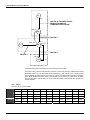
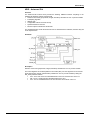
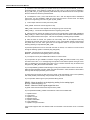
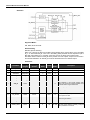
f) Cascade initialization
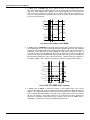
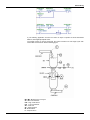
AI
LD302
LD302
AI
PID
AO
FY302
PID
BUS
BACKWARD PATH
READ
PID.OUT
FORWARD PATH
AO.BKCAL_OUT
MACROCYCLE
AO
READ PARAMETERS
FY302
PID: MODE_BLK, IN, BKCAL_IN, OUT
AO: MODE_BLK, CAS_IN, BKCAL_OUT
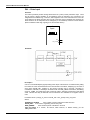
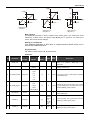
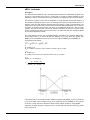
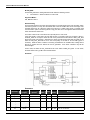
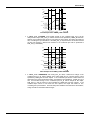
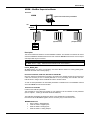
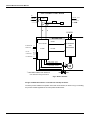
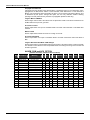
Fig.1 – Example to analyze the cascade initialization
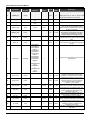
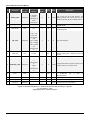
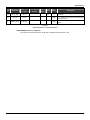
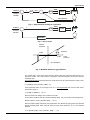
The following table shows the sequence of status exchange between the PID and AO blocks for
cascade initialization, and a link failure between PID.OUT and AO.CAS_IN (forward path) after
execution 8.
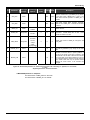
PID parameters
Execution
1
2
Target
O/S
Auto
IN
Bad
BKCAL_IN
3
4
5
6
7
8
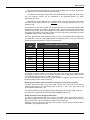
9
10
11
GNC
GNC
GNC
GNC
GNC
GNC
GNC
GNC
GNC
GNC
Bad
Bad-O/S
NI
IR
GC
GC
GC
GC
NI
NI
NI
Actual
O/S
Iman
IMan
IMan
Auto
Auto
Auto
Auto
IMan
IMan
IMan
OUT
Bad-O/S
GC
GC
IA
GC
GC
GC
GC
GC
GC
GC
3
4
5
6
7
8
9
10
11
AO parameters
Execution
1
2
Target
O/S
Cas
CAS_IN
Bad
GC
GC
IA
GC
GC
GC
Bad
Bad
Bad
Bad
Actual
O/S
Man
Auto
Cas
Cas
Cas
Cas
LO
LO
LO
LO
BKCAL_OUT
Bad-O/S
NI
IR
GC
GC
GC
GC
NI
NI
NI
NI
1.14
Introduction to Function Block Application
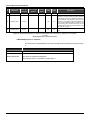
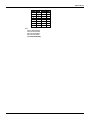
Meaning of status:
GNC – Good Non-Cascade – Non Specific
GC - Good Cascade – Non Specific
IA - Good Cascade – Initialization Acknowledge
IR - Good Cascade – Initialization Request
NI - Good Cascade – Not Invited
Bad – Bad – any sub-status
The above sequence for cascade initialization applies not only for the Cas mode, but also for Rcas
and Rout modes.
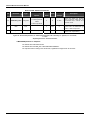
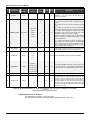
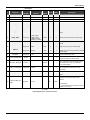
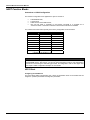
g) Example
The mode configuration for the control loop of the figure 1.
Supported
Target
Actual
Permitted
Normal
AI
O/S,Man,Auto
Auto
-
O/S,Auto
Auto
PID
O/S,Iman,LO,Man,Auto,Cas,Rcas,Rout
Auto
-
O/S,Man,Auto
Auto
AO
O/S,Iman,LO,Man,Auto,Cas,Rcas
Cas
-
O/S,Man,Auto,Cas
Cas
h) Specific information for driver developers
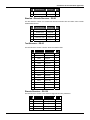
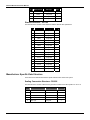
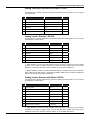
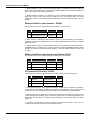
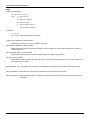
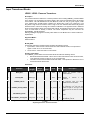
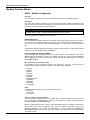
Internally, the each mode attribute is assigned within the bitstring in the following manner:
O/S
Hex value
Bit 7
Bit 6
Bit 5
Bit 4
Bit 3
Bit 2
Bit 1
Bit 0
0x80
1
0
0
X
X
X
X
X
Iman & LO
-
Man
0x10
0
0
0
1
0
X
X
X
Auto
0x08
0
0
0
0
1
0
0
0
Cas
0x0c
0
0
0
0
1
1
0
0
Rcas
0x0a
0
0
0
0
1
X
1
0
Rout
0x09
0
0
0
0
1
X
0
1
Not Valid Target Modes
Where: X = indicates the bit setting is retained from the previous target mode.
Target and Normal Mode Bitstring
Hex value
Bit 7
Bit 6
Bit 5
Bit 4
Bit 3
Bit 2
Bit 1
Bit 0
O/S
0x80
1
0
0
0
0
0
0
0
Iman
0x40
0
1
0
0
0
0
0
0
LO
0x20
0
0
1
0
0
0
0
0
Man
0x10
0
0
0
1
0
0
0
0
Auto
0x08
0
0
0
0
1
0
0
0
Cas
0x04
0
0
0
0
0
1
0
0
Rcas
0x02
0
0
0
0
0
0
1
0
Rout
0x01
0
0
0
0
0
0
0
1
Actual Mode Bitstring
1.15
Function Blocks Instruction Manual
Block
Permitted
modes
Hex value
O/S
-
-
Man
Auto
Cas
Rcas
Rout
AI
O/S,Auto
0x88
1
0
0
0
1
0
0
0
PID
O/S,Man,
Auto
0x98
1
0
0
1
1
0
0
0
AO
O/S,Man,
Auto,Cas
0x9c
1
0
0
1
1
1
0
0
Permitted Mode Bitstring
(Example for the loop control in the previous figure )
The retained target mechanism is suitable to work with toggle switch in the interface device following
the rules:
A/M toggle switch:
“automatic mode” Æ Man mode : Bit #4 <- 1 and Bit #3 Å 0
Man mode Æ “automatic mode” : Bit #4 <- 0 and Bit #3 Å 1
Cascade/Local toggle switch:
Cascade Æ Local: Bit #2 Å0
Local Æ Cascade: Bit #2 Å1
Remote/Non-remote setpoint toggle switch:
Remote Æ Non-remote: Bit #1 Å0 and Bit #0 Å0
Non-remote Æ Remote: Bit #1 Å1 and Bit #0 Å0
Remote/Non-remote output toggle switch:
Remote Æ Non-remote: Bit #1 Å0 and Bit #0 Å0
Non-remote Æ Remote: Bit #1 Å0 and Bit #0 Å1
Target mode
O/S :
Man:
100xxxxx
00010xxx
Rcas: 00001x10
Rout: 00001x01
1.16
Rule for toggle
Bit #7 Å0
Bit #4 Å0 and Bit #3 Å1
Bit #1 Å0 and Bit #0 Å0
Bit #1 Å0 and Bit #0 Å0
Value retained
000xxxxx
00001xxx
00001x00
00001x00
Possible retained
modes
00010000 (0x10) : Man
Target + Retained
modes
10010000 (0x90) : Man
00001000 (0x08) : Auto
10001000 (0x88) : Auto
00001100 (0x0c) : Cas
10001100 (0x8c) : Cas
00001010 (0x0a) : Rcas
10001010 (0x8a) : Rcas
00001001 (0x09) : Rout
10001001 (0x89) : Rout
00001000 (0x08) : Auto
00010000 (0x10) : Auto
00001100 (0x0c) : Cas
00010100 (0x14) : Cas
00001010 (0x0a) : Rcas
00010010 (0x12) : Rcas
00001001 (0x09) : Rout
00010001 (0x11) : Rout
00001000 (0x08) : Auto
00001010 (0x0a) : Auto
00001100 (0x0c) : Cas
00001110 (0x0e) : Cas
00001000 (0x08) : Auto
00001001 (0x09) : Auto
00001100 (0x0c) : Cas
00001101 (0x0d) : Cas
Introduction to Function Block Application
Scaling Parameters
The scaling parameter defines the operating range and the engineering units associated with a
parameter. It also defines the number of digits to the right of the decimal point, which should be
used by an interface device in displaying that parameter.
Scaling information is used for two purposes. Display devices need to know the range for bar graphs
and trending, as well as the units code. Control blocks need to know the range to use internally as
percent of span, so that the tuning constants may remain dimensionless.
The PID blocks take the error and convert it to percent of span using the PV_SCALE. The algorithm
operates on percent of span to produce an output in that form. This is converted back to a number
with engineering units by using the range of OUT_SCALE.
The AI block has the XD_SCALE parameter to define the engineering units expected from the
transducer.
The AO block uses the XD_SCALE to convert the SP value to the engineering unit expected by the
output transducer block, which is also the engineering unit of the readback value.
The following fields form the scale:
• Engineering Units at 100% of scale - The value that represents the upper end of range in
engineering unit;
• Engineering Units at 0% of scale - The value that represents the lower end of range in
engineering unit;
• Units Index - Device Description units code index for the engineering unit.
• Decimal Point - The number of digits to the right of the decimal point which should be used by
an interface device in displaying the specified parameter.
Example Using Scale Parameter
The PID algorithm works internally with values in percent of span. Therefore the PID block converts
the error to percentage (PV_SCALE), it calculates the output in percentage, and then it converts to
engineering unit of output (OUT_SCALE).
1. The PID takes the input IN and SP and converts to percentage of the PV_SCALE:
VALUE% = (VALUE – EU_0) * 100/ (EU_100 – EU_0)
[PV_SCALE]
PV_SCALE:
EU at 100% = 20
EU at 0% = 4
Units Index = mA
Decimal point = 2
SP = 15 mA
PV = 10 mA
The values of SP and PV in percentage are:
SP% = (15 – 4) * 100/( 20 – 4) = 68.75%
PV% = (10 – 4) * 100/(20 – 4) = 37.50%
2. The PID algorithm calculates the error in percentage. If it is configured the reverse action, the
error is the difference between SP% and PV%.
Error% = SP% - PV % = 31.25%
3. The PID algorithm applies the Error% to the calculation of the P, I and D terms. If only the
proportional term is enabled, the value of the output is:
GAIN = 1.0
RESET = +INF
RATE = 0.0
OUT% = 31.25%
1.17
Function Blocks Instruction Manual
4. The output value is converted from percentage to engineering units of the OUT_SCALE:
OUT = OUT% /100 * (EU_100 – EU_0) + EU_0 [OUT_SCALE]
OUT_SCALE:
EU at 100% = 15
EU at 0% = 3
Units Index = psi
Decimal point = 2
The output value of this example is:
OUT = 31.25/100 * (15 – 3) + 3 = 6.75 psi
Modbus Scale Conversion
The Modbus function blocks can read and write digital and analogical data of other Modbus slave or
master devices. For each configured analogical point, which for Modbus reading or writing, it is
associated a scale conversion parameter. The parameters and blocks which have Modbus
conversion scale are: MBCM.IN_x, MBCS.IN_x, MBCS_OUT.x, MBSM.PVALUE_x, which x=1, 2,
until the point limit of that block.
The scale conversion for the Modbus protocol has two purposes:
• Conversion from the Fieldbus analogical value to Modbus value expressed in
Engineering Units.
• Conversion from the Modbus analogical value to the Fieldbus value in Engineering
Units.
The scale parameters are defined in the data structures DS_256, DS_257, DS_258, and DS_259
(see the item “Data Structure”) and they are composed by the following fields:
•
FROM_EU_100% - defines the higher input unit value (actual data unit).
•
FROM_EU_0% - defines the lower input unit value (actual data unit).
•
TO_EU_100% - defines the higher output unit value (desired data unit).
•
TO_EU_0% - defines the lower output unit value (desired data unit).
•
Data Type – data type which it desires to convert from or to Modbus (in the Fieldbus
the data always will be float). The table with the supported data type is below:
Number of Data Type
1
2
3
4
5
6
7
8
9
10
11
12
13
14
Data Type
Float
Unsigned8
Unsigned16
Unsigned32
Integer8
Integer16
Integer32
Swapped.Float
Swapped.Unsigned8
Swapped.Unsigned16
Swapped.Unsigned32
Swapped.Integer8
Swapped.Integer16
Swapped.Integer32
Note
In despite of there are different data structures which have scale conversion, they follow the same
conversion procedure.
Procedure to handle the conversion from FF parameter to Modbus variable
•
Load INx_VALUE.
•
Calculate Y = (A * INx_VALUE + B).
•
Convert Y to DATA_TYPE_IN, generating MOD_VAR_IN.
•
Write MOD_VAR_IN.
Procedure to handle the conversion from Modbus variable to FF parameter:
•
1.18
Read MOD_VAR_OUT.
Introduction to Function Block Application
•
•
•
Convert MOD_VAR_OUT to float, generating Y
Calculate OUTx_VALUE = (A * Y + B).
Store OUTx_VALUE.
Y
To_EU_100%
To_EU_0%
from_EU_0%
from_EU_100%
X
Where:
A = (To_EU_100% - To_EU_0%)/(From_EU_100% - From_EU_0%)
B = To_EU_0% - A*From_EU_0%;
IN_VALUE, OUT_VALUE: FF parameters
MOD_VAR_IN, MOD_VAR_OUT: Modbus variables
Y: auxiliary float variable
Below, there are examples using the Modbus scale conversion.
1) Conversion from Modbus to Fieldbus
It considers a Modbus Slave device which has an analogical value of temperature in percentage (010000) with the data type Integer 2 bytes. It desired to use the value in Fieldbus in Celsius degree
(0-500). It uses the Master Control Block Modbus (MBCM).
A) In the MBCM block, the scale is configured (OUT_1.SCALE_LOC_OUT_1) of the following form:
•
FROM_EU_100% = 10000
•
FROM_0% = 0
•
TO_EU_100% = 500
•
TO_EU_0% = 0
•
DATATYPE = Integer16
B) The MBCM block reads the Modbus data from the slave and stores in MOD_VAR_OUT. Thus, it
converts the Y value. For last, it calculates the OUT output using the equation OUT = A*Y+B. Using
the values from the example above and considering the actual value of temperature is 6000, it has:
MOD_VAR_OUT = 6000 (value read from Modbus)
And following the equations showed above:
A = (TO_EU_100% - TO_EU_0%) / (From_EU_100% - From_EU_0%)
A = (500 – 0) / (10000 – 0) = 0,05
B = TO_EU_0% - A * From_EU_0%
B = 0 – (0,02 * 0) = 0
OUT = A * Y + B
OUT = 0,05 * Y
OUT = 0,05 * 6000 = 300
The OUT output value for this example will be:
o
OUT = 300 [ C]
2) Conversion from Fieldbus to Modbus
It considers the DFI is the Modbus slave equipment and it desires to become available one
temperature analogical value from one TT302, range 0-500 [ºC] for a Modbus master in the range 420 [mA] with the data type integer 2 bytes. Using the Modbus Block Control Slave (MBCS).
A) In the MBCS block, the scale is configured (IN_1.SCALE_CONV_IN_1) of the following form:
•
FROM_EU_100% = 500
•
FROM_0% = 0
1.19
Function Blocks Instruction Manual
•
•
•
TO_EU_100% = 20
TO_EU_0% = 4
DATATYPE = Integer16
B) The MBCS block reads the data from the Fieldbus in the IN input and stores in IN_VALUE. It
calculates the Y value following the equation Y = A * IN_VALUE + B. Thus, it converts the value to
the DATATYPE specified and saves in MOD_VAR_IN which it will be the value to be sent to the
Modbus.
Using the values from the example above and considering the actual value of temperature is 300, it
has:
IN_VALUE = 300 (value read from TT302)
And following the equations showed above:
A = (TO_EU_100% - TO_EU_0%) / (From_EU_100% - From_EU_0%)
A = (20 – 4) / (500 – 0) = 0,032
B = TO_EU_0% - A * From_EU_0%
B = 4 – (0,032 * 0) = 4
MOD_VAR_IN = A * IN_VALUE + B
MOD_VAR_IN = 0,032 * 300 + 4
MOD_VAR_IN = 13,6
The value of the Modbus variable read (after the conversion to integer) for this
example will be:
OUT = 14 [mA]
Fault State Handling
A) Definition
The Fault State is a special state that allows the output block to do safe action when it has been
detected an abnormal situation or the user set to Fault State in the Resource block.
The abnormal situation occurs to there is an unusable input (bad sensor, for example) or the loss of
the communication between function blocks longer than a specified time (FSTATE_TIME).
The blocks that support cascade control (as PID, OSDL and SPLT) propagate the fault state status
forward to the output block.
When the condition that activated the Fault State is normalized, the Fault State is cleared and the
block returns to the normal operation.
B) Generate the Initiate Fault State status (The fault was detected by the own block)
Blocks like PID, OSDL and SPLT may be configured to send an Initiate Fault State (IFS) status
when they detect an unusable input. The bit “IFS if bad IN” and/or the bit “IFS if bad CAS_IN” in the
STATUS_OPTS or OSDL_OPTS parameters must be true to generate an IFS status when the
corresponding input is unusable.
C) Propagate the Initiate Fault State status (The fault occurred in the upstream block)
The blocks that support the cascade control have special handling to propagate the fault to the
downstream blocks till the output block.
When the block, that is in cascade mode (Cas, RCas), receives an Initiate Fault State (IFS) status,
then this status will be reported to forward path. For example, it considers a PID block that is
receiving a “Good Cascade IFS” status in CAS_IN input. If the target mode of the PID is Cas, then
the IFS status will be the status of OUT, replacing the normal status. Otherwise, the IFS status will
not be propagated forward.
D) Using the Resource Block to activate the Fault State
The Fault State of the Resource block forces all output function blocks into the device to go
immediately to the fault state condition. The Resource block has some parameters that define the
fault state behavior:
1.20
Introduction to Function Block Application
•
•
•
•
FEATURES_SEL – The “Fault State supported” bit is used to enable the Fault State
characteristic into the Resource block. The default value is disabled.
FAULT_STATE – It only indicates the Fault State in the Resource block, not in individual
output block. For example, if an AO block is in Fault State because its CAS_IN input is bad,
the FAULT_STATE parameter will not be active.
SET_FSTATE – The user may force FAULT_STATE to active by setting this parameter to
On.
CLEAR_FSTATE – The user may force FAULT_STATE to clear by setting this parameter
to On.
Fault State Active
When the Output Function Blocks detects an abnormal condition, the block goes to a fault state. The
abnormal conditions are:
- Loss of communication to CAS_IN for a time that exceeds FSTATE_TIME;
- IFS status in the CAS_IN input when the target mode is Cas, for a time that exceeds
FSTATE_TIME;
- IFS status in the RCAS_IN when the target mode is Rcas, for a time that exceeds FSTATE_TIME;
- The FAULT_STATE parameter of the Resource block is Active because the user set to on the
SET_FSTATE parameter and the bit “Fault State supported” in the FEATURES_SEL is true.
When the output block is in the Fault State the output may retain the last value or goes to the preset
value determined by the FSTATE_VAL. The default is retaining the last value. The output goes to
the preset value if the bit “Fault State to value” in the IO_OPTS is true.
When the Fault State is active then the actual mode of the output block goes to Local Override (LO).
In the backward path, the block sends the Not Invited (NI) status to indicate that the block is in “Fault
State”.
Optionally, the target mode of the output block will be changed to Manual by the block algorithm
when the Fault State is active. In order to set this characteristic, the “Target to Man if Fault State
activated” bit in IO_OPTS needs to be true.
Examples
The following control loop must be considered for the examples below. The below tables show the
sequence of status exchange between the PID_1
1.21
Function Blocks Instruction Manual
A I_ 1
OUT
FAILURE IN THE EXECUTION 2:
SENSOR FAILURE OR
COMMUNICATION FAILURE
IN
BKCAL_IN
P ID _ 1
OUT
FAILURE 1
CAS_IN
BKCAL_OUT
BKCAL_IN
A I_ 2
OUT
IN
P ID _ 2
OUT
FAILURE 3
FAILURE 2
CAS_IN
AO
BKCAL_OUT
The Master, PID_2 Slave and AO blocks in a fault and normal condition.
The status of PID_1.IN becomes bad in the execution 2, which may be due to a Bad-Sensor Failure
detected by the AI_1 or a communication failure between AI_1.OUT and PID_1.IN. The PID_2 Slave
only propagates the status forward. The AO block receives the IFS status and active the Fault State.
In the safety condition the preset value of the FSTATE_VAL is used to the output of the AO block.
After the execution 6, the bad status in the IN of the PID master is cleared and the loop returns to
normal operation.
PID 1 – Master
STATUS _OPTS = “IFS if Bad IN”
Execution
1
Target
Auto
IN
2
…
4
5
6
7
8
9
10
11
GNC
Bad
…
Bad
Bad
Bad
Bad
GNC
GNC
GNC
GNC
BKCAL_IN
GC
GC
…
GC
GC
NI
NI
NI
NI
NI
IR
Actual
Auto
Man
…
Man
Man
Iman
Iman
Iman
Iman
Iman
Iman
OUT
GC
IFS
…
IFS
IFS
IFS
IFS
GC
GC
GC
IA
1.22
Introduction to Function Block Application
PID 2 – Slave
Execution
1
Target
Cas
CAS_IN
2
…
4
5
6
7
8
9
10
11
GC
IFS
…
IFS
IFS
IFS
GC
GC
GC
IA
GC
BKCAL_IN
GC
GC
…
GC
NI
NI
NI
IR
GC
GC
GC
Actual
Cas
Cas
…
Cas
Iman
Iman
Iman
Iman
Auto
Cas
Cas
GC
IFS
IFS
IFS
IFS
GC
IA
GC
GC
GC
100
100
100
100
NI
NI
NI
NI
IR
GC
GC
OUT
…
BKCAL_OUT
GC
GC
…
GC
AO
FSTATE_VAL = 100
FSTATE_TIME = 2 sec
IO_OPTS = “Fault State to value”
PV_SCALE (E0%-E100%)=0-100
XD_SCALE (E0%-E100%)= 4-20
2 sec
|------------------------|
Execution
1
Target
Cas
CAS_IN
SP
Actual
OUT
BKCAL_OU
T
GC
2
3
IFS
4
5
6
7
8
9
10
11
IFS
IFS
IFS
IFS
GC
IA
GC
GC
100
100
100
100
100
IFS
IFS
IFS
IFS
GC
IA
GC
GC
100
100
100
100
100
100
LO
LO
LO
LO
Auto
Cas
Cas
Cas
GC
GC
GC
GC
GC
GC
GC
GC
20
20
20
20
20
20
NI
NI
NI
NI
IR
GC
GC
GC
IFS
GC
IFS
IFS
Cas
Cas
GC
GC
Cas
GC
GC
GC
GC
Other link failures in the forward path could force the AO into Fault State since the configuration is
as it follows:
Failure 1) PID_1.OUT to PID_2.CAS_IN: PID_2.STATUS_OPTS = “IFS if Bad CAS_IN”
Failure 2) AI_2.OUT to PID_2.IN: PID_2.STATUS_OPTS = “IFS if Bad IN”
Failure 3) PID_2.OUT to AO.CAS_IN: No configuration is required for the AO block to force it to
Fault State.
Note:
•
•
FSTATE_VAL has the same engineering unit of SP. Therefore it is using the PV_SCALE,
not the XD_SCALE.
When the Resource block forces all output blocks to Fault State, the FSTATE_TIME is not
used.
Alarms and Events – Alert Processing
Alarms and events, known as alerts, represent state changes within function block applications.
In detection of a significant event, a function block may report this event to an interface device or
other field devices.
Alarms refer not only to the comparison between a variable and a limit, but also what is called block
alarm, that is used to report errors found in the software and/or hardware during block execution.
1.23
Function Blocks Instruction Manual
For alarms, both entering and exiting alarm condition are defined as an alert state, which will cause
a report message to be published onto the network. The time at which the alert state was detected
is included as a time stamp in the alert message. The reporting of alerts may be individually
suppressed by setting the corresponding priority.
Update event is a mechanism used to inform an interface device that a static parameter was
changed so the parameter is read only in this case. It is a much optimized way to keep track of such
kind of parameters without doing polling, because these parameters are changed very rarely
compared with dynamic parameters.
a) Alarm parameter (X_ALM parameter)
The alarm parameter is provided in a block to capture the dynamic information associated with an
alarm. The information contained in the alarm parameter is transferred to an alert object when the
alarm is reported. The following fields form the alarm parameter:
•
Unacknowledged
•
Alarm state
•
Time stamp
•
Subcode
•
Value
Each one of these fields is explained below.
Unacknowledged
When it is detected a positive transition of alarm state (entering in alarm active), it will be set to
Unacknowledged. This field is set to Acknowledged when the plant operator acknowledges the
alarm through the interface device, which is responsible for alarm management.
It is possible to configure the auto-acknowledgement feature for each type of alarm for the block
through the ACK_OPTION parameter. If a positive transition of alarm type happens and the
corresponding bit in the ACK_OPTION is true, then it will not be required an operator plant
acknowledgement.
The other form to auto-acknowledge the alarm notice is configuring the alert-priority of the
respective alarm to 0,1 or 2. The alert-priority will be discussed later.
Unacknowledged will have the following enumerations:
0 = Undefined
1 = Acknowledged
2 = Unacknowledged
Alarm state
This field gives an indication of whether the alert is active and whether it has been reported. The
Alarm State will have the following bit enumeration:
1 – Clear-Reported
2 – Clear-Not Reported
3 – Active-Reported
4 – Active-Not Reported
The alarm state is cleared when the block goes to Out of service mode.
Time stamp
Time stamp is the time when the change in alarm state was detected that is unreported. This value
will be maintained constant until alert confirmation has been received.
Sub code
This field contains an enumeration specifying the cause of the alert to be reported.
Value
The value of the associated parameter at the time the alert was detected.
1.24
Introduction to Function Block Application
b) Alarm limit (X_LIM parameter)
An analog alarm occurs when a value meets or exceeds a limit. For a high alarm, an alarm is true
when the analog value is greater than the limit. The status of the alarm remains true until the value
drops below the limit minus the alarm hysteresis.
The alarm type can be disabled setting its respective alarm limit parameter to +/- infinity, which is
the default of all alarm limits.
The analog parameter compared to alarm limit depends on the block type:
PID: PV and (PV-SP), regardless of CONTROL_OPTS.Direct acting
Analog alarm: PV
AI: OUT
Setpoint generator: BKCAL_IN – OUT
c) Alarm hysteresis (ALARM_HYS parameter)
Amount the PV or OUT must return within the alarm limits before the alarm condition clears. Alarm
Hysteresis is expressed as a percent of the PV/OUT span.
The span used depends on the block type:
PID: PV_SCALE
AI, Setpoint generator, Analog alarm: OUT_SCALE
d) Alert Priority (X_PRI parameter)
The alert priority is a parameter, which may be used to configure the priority value assigned to an
alarm or event.
The Alert Priority can be:
0-1 – The associated alert is not sent as a notification. The priority is above 1, and then the alert
must be reported. This priority is auto-acknowledged.
2 – Reserved for alerts that do not require the attention of a plant operator. Block alarm and update
event have this priority. This priority is auto-acknowledged.
3-7 – Advisory Alarms. In this priority is necessary to send an acknowledged.
8-15 – Critical Alarms. In this priority is necessary to send an acknowledged.
e) Alert key (ALERT_KEY parameter)
It is an identification number of the plant unit. This information may be used in the host for sorting
alarms, etc.
f) Alarm Summary (ALM_SUM parameter)
The parameter Alarm Summary summarizes the status of up to 16 process alarms of the same
block. For each alarm, the current status, unacknowledged status, unreported status, and disabled
status are maintained.
It has four attributes:
•
Current Alarms - the Active status of each alarm.
•
Unacknowledged - the Unacknowledged status of each alarm.
•
Unreported - the Unreported status of each alarm.
•
Disabled - the Disabled status of each alarm.
g) ACK_OPTION parameter
Selection of whether alarms associated with the block will be automatically acknowledged.
Bit = 0 -> auto-acknowledgment disabled
Bit = 1 -> auto-acknowledgment enabled
The correspondent bits for each type of alarm in the ACK_OPTION are the same of that defined for
ALARM_SUM except for the resource block.
1.25
Function Blocks Instruction Manual
Bit
Meaning
0
Discrete alarm
1
High High alarm
2
High alarm
3
Low Low alarm
4
Low alarm
5
Deviation High alarm
6
Deviation Low alarm
7
Block alarm
8
Not used
9
Not used
10
Not used
11
Not used
12
Not used
13
Not used
14
Not used
15
Not used
Association of bit number to alarm type
(ALARM_SUM and ACK_OPTION)
The ACK_OPTION of the resource block has a different association of bit number to alarm type from
the previous table; its special meaning is described below:
Bit #1 – Writes have been enabled (WRITE_ALM)
Bit #8 – Block Alarm (BLOCK_ALM)
h) FEATURES_SEL parameter
It is a resource block parameter that has an element to enable/disable alert report for the whole
resource, “report supported”.
i) CONFIRM_TIME parameter
A reply is required that confirms receipt of the alert notification. If the reply is not received within a
time-out period (CONFIRM_TIME), the alert will be re-transmitted. It is a resource block parameter,
so it is valid for all alert of that resource.
Therefore the alarm parameter is a structured object, which is defined in conjunction with other
parameters:
- Enable / disable alarm evaluation:
ALARM_SUM: enable/disable each alarm type for a specific block.
X_LIM: it is possible to disable the alarm evaluation by setting the limit to +INF or –INF.
- Enable / disable alarm report:
FEATURES_SEL: setting the bit “report supported” enables alarm report for the whole resource
X_PRI: besides configuring the FEATURES_SEL, it is necessary to set the priority of alarm greater
than or equal to 2 to enable the alarm report.
- Auto-acknowledgment:
X_PRI: the corresponding alarm will be auto-acknowledged if the alarm priority is 0, 1 or 2
ACK_OPTION: this parameter makes possible to enable/disable auto-acknowledgment for each
alarm type, regardless the configuration of X_PRI.
1.26
Introduction to Function Block Application
The information contained in the alarm parameter is transferred to an alert object when the alarm is
reported (if it is enabled) to an interface device. As an example, the following parameters are used
to configure the Low Low Alarm of the PID block: LO_LO_PRI (alarm priority), LO_LO_LIM (limit
parameter) and LO_LO_ALM (alarm parameter), ALARM_SUM, ACK_OPTION.
Summarizing, the function block detects the alarm condition. The communication stack is
responsible to send the alert report to the interface device, which must reply to device, otherwise the
alert report will be re-transmitted after a timeout defined by CONFIRM_TIME. The alarm
configuration (ACK_OPTION and priority) may require that a plant operator acknowledge it even
though the condition has cleared.
j) Example of analog alarm
It follows an example of AI block alarm configuration, which illustrates how is the alarm processing
as well the corresponding alert report.
RS parameter:
FEATURES_SEL = Reports supported
CONFIRM_TIME = 640 000 (20 seconds, multiple of 1/32 milliseconds)
AI parameters:
ALERT_KEY = 12 (this value could be related to a boiler, for example, therefore any alert received
by interface device with this alert key means an alert in that boiler)
OUT_SCALE.EU at 100% = 200
OUT_SCALE.EU at 0% = 0
HI_LIM = 190
HI_PRI = 4
ALARM_HYS = 5%
ALARM_SUM.DISABLED = Discrete, HiHi, LoLo, Lo, DevHi, DevLo, BlockAlm
ACK_OPTION = 0x00
Only the high alarm is enabled in ALARM_SUM.DISABLED and it is disabled the autoacknowledgement (HI_PRI=4 and bit reset in ACK_OPTION), therefore it is necessary an operator
plant intervention.
1.27
Function Blocks Instruction Manual
Fig. 2 – Alert processing
1.28
Introduction to Function Block Application
k) Block alarm (BLOCK_ALM parameter)
The block alarm is used for all configuration, hardware, connection failure or system problems in the
block. These problems detected by the block algorithm are registered in the BLOCK_ERR
parameter, which is a bit string, so that multiple errors may be shown.
Block error conditions is defined (0= inactive, 1 = active) as follows:
Bit
0
1
2
3
4
5
6
7
8
9
10
11
12
13
14
15
Description
Other (LSB)
Block Configuration Error
Link Configuration Error
Simulate Active
Local Override
Device Fail Safe Set
Device Needs Maintenance Soon
Input Failure/ process variable has BAD status
Output Failure
Memory Failure
Lost Static Data
Lost NV Data
Readback Check Failed
Device Needs Maintenance Now
Power-up
Out-of-Service (MSB)
The cause of the alert is entered in the Subcode field of BLOCK_ALM, for example, value 3 means
Simulate Active. The first condition to become active will set to Active the Alarm State attribute, if
other conditions also become active, no alert will be sent. When all conditions become inactive, then
an alert with Clear will be reported.
Block alarm has a fixed priority of 2, therefore it is auto-acknowledged (no operator plant
intervention is required).
l) Update Event (UPDATE_EVT parameter)
The update event parameter is provided in a block to capture the dynamic information associated
with a write to a static parameter within the block. An update alert object transfers the information
contained in the update event parameter when the alert is reported.
The index of the changed parameter (relative to the start of the function block in the OD) and the
new static revision level (ST_REV) are also included in the alert message.
Update event has a fixed priority of 2, therefore it is auto-acknowledged (no operator plant
intervention is required).
Simulation
All input and output class function blocks have a SIMULATE or SIMULATE_D or SIMULATE_P
parameter, which has a pair of status and values, and an enable switch. This parameter acts as a
switch at the interface between the I/O function block and the associated transducer block or
hardware channel.
Enable simulation
The simulate jumper must be ON to enable simulation in the SIMULATE (SIMULATE_D or
SIMULATE_P) parameter.
The BLOCK_ALM and BLOCK_ERR parameters will show the simulation condition (enable or
disable). Such parameters in the Resource Block (RS) will indicate the condition of simulate jumper,
while in the Input/Output Function Blocks they will indicate the enable switch condition in the
SIMULATE (SIMULATE_D or SIMULATE_P) parameter.
1.29
Function Blocks Instruction Manual
Simulation disabled
When disabled, the SIMULATE. Simulate Value and Status will track SIMULATE. Transducer Value
and Status in order to provide a bumpless transfer from disabled to enabled. The parameter will
always initialize to disabled and will be stored in dynamic memory.
Input Function Block (AI, DI, PUL)
The SIMULATE. Transducer Status and SIMULATE.Transducer Value come from the transducer
block or input channel, and contain what will be sent to the input block if the switch is off (disabled).
The SIMULATE.Simulate Value and SIMULATE.Simulate Status are presented to the input block
when the enable switch is on, and the transducer block or input channel is ignored. The status can
be used to simulate transducer faults. The transducer value and status will always be written with
transducer data at each evaluation of the input function block.
Simulation condition
Action
Enable
SIMULATE.Simulate Value and Status -> PV (after scaling, linearization
and filtering)
Disable
SIMULATE.Transducer Value and Status -> PV (after scaling,
linearization and filtering) and SIMULATE.Simulate Value and Status
Output Function Block (AO, DO)
The SIMULATE.Simulate Value and SIMULATE.Simulate status become the READBACK value and
status when the enable switch is on, and the transducer block is ignored. The status can be used to
simulate transducer faults. The transducer attribute value and status reflect the transducer readback
value and status when simulation is enabled and the transducer maintains last output and ignores
the OUT of the Output block.
Simulation condition
Action
Enable
SIMULATE.Simulate Value and Status -> READBACK
Disable
SIMULATE.Transducer Value and
SIMULATE.Simulate Value and Status
Status
->
READBACK
and
CHANNEL configuration
The CHANNEL parameter configuration depends on the device features as it follows:
a) Fixed I/O device: This type of device has a fixed number of I/O. All Smar field devices belong to
this class.
The channel is numbered from 1 to the maximum number of I/O.
The DC302 has specific rules to set the CHANNEL parameter as it follows:
- DI and DO Blocks: group A has inputs numbered from 1 to 8 and group B has inputs numbered
from 9 to 16.
- MDI and MDO Blocks: the whole group A is selected setting CHANNEL to 1, and group B to 2.
b) Configurable I/O device: The user may configure the number of I/O modules as well the I/O type
(input or output, discrete, analog, pulse…). The DFI302 is the only device classified as a
configurable I/O device.
All I/O modules have the I/O points arranged as it follows:
- Point (P): Ordinal number of I/O point in a group, it is numbered from 0 (first point) to 7(last point in
the group), and 9 means the whole group of points. The whole group may have 4 or 8 points of I/O.
- Group (G): Ordinal number of group in the specified I/O module, it is numbered from 0 (first group)
till number of groups minus 1. The I/O points are arranged in groups of 8 points, regardless how
they are grouped for electrical isolation.
If the I/O type is “8- discrete input/4- discrete output”, the inputs belong to the group 0 and the
outputs belong to the group 1.
- Slot (S): One slot supports one I/O module, and it is numbered from 0 (first slot in the rack) till 3
(last slot in the rack).
1.30
Introduction to Function Block Application
- Rack (R): Each rack has four slots. The rack is numbered from 0 (first rack) till 14 (last rack).
Therefore a single I/O point in the DFI302 may be identified by specifying the rack (R), slot (S),
group (G) and point (P). As the CHANNEL parameter in the multiple I/O blocks (MIO) must specify
the whole group (8 points), the point must be 9, which mean the whole group.
The value in the CHANNEL parameter is composed by those elements in the following form:
RRSGP.
For example, a CHANNEL parameter equals to 1203, it means rack 1, slot 2, group 0 and point 3. If
CHANNEL parameter of a MAI block is 10119, it means rack 10, slot 1, group 1 and point 9 (whole
group).
Before setting the CHANNEL parameter, it is recommended to configure the hardware in the HC
block. Because the write check will verify if the I/O type configured in the HC block is suitable for
block type. Therefore setting the CHANNEL parameter of AI block to access an I/O type different of
analog input will be rejected.
Block Instantiation
Before explaining block instantiation it is better to clarify some concepts:
Block type: It is an algorithm to process the input parameters based on the configuration in the
contained parameters, then it generates the outputs. It includes also method to write/read the
parameters, DD and others. Indeed all this information are stored in Flash memory of device,
therefore one device type has a predefined set of block type available in its firmware.
Block (block instance): It is a block type associated to a database where the block parameters are
stored (RAM and non-volatile memory).
Action Object: Through the action object, a block may be instantiated (created) or deleted. Before
instanting a block, it will be checked if the device supports the specified block type as well if there is
available RAM and non-volatile memory to store the parameters.
All Smar devices support block instantiation and the Block Library (set of block type) for each type of
device is shown in the item “Block type availability and initial block set”.
Order of Parameters during Download
Some block parameters have a write check based on the value of others parameters. Such
relationships are shown in the block parameter table of each block type in the columns “Valid
Range” and “Store/Mode”.
It follows the most common parameter relationship used in write check:
- It is required a mode to write the parameter.
- The valid range depends on a scale parameter
- For configurable I/O device, the CHANNEL parameter depends on the hardware configuration in
the HC block.
Due to these relationships between parameters in the write check, some times it is necessary to take
care about the order of parameters during a download of configuration.
The Smar configuration tool Syscon always sends the command to write in the MODE_BLK
parameter as last one for that block, it is enough to avoid a lot of problems in the download. The
user must observe the other cases and may change the parameter order easily using drag and drop
in Syscon.
1.31
Function Blocks Instruction Manual
Data Type and Data Structure Definition
In this section are defined every data structure and data types used in the system.
Object Index
Data Type
Description
1
Boolean
True or false
2
Integer8
1 byte
3
Integer16
2 bytes
4
Integer32
4 bytes
5
Unsigned8
1 byte
6
Unsigned16
2 bytes
7
Unsigned32
4 bytes
8
FloatingPoint
*
9
VisibleString
They are one byte per character, and include
the 7 bit ASCII character set.
10
OctetString
Octet strings are binary.
11
Date
Date and hour – 7 bytes
12
TimeofDay
Time in millisecond elapsed in the day – 6
bytes
13
TimeDifference
Time difference – 6 bytes
14
BitString
*
21
TimeValue
Integer – 8 bytes
It represents the date/hour to synchronize the
clock.
•
o
o
Date:
Date (3 bytes) – Format#Year#Month#(Week Day and Month Day)
Hour (4 bytes) – Format: HH#MM#MSEG
•
o
o
TimeofDay:
Time (4 bytes) – It counted in milliseconds from the Zero hour of the day.
Date (3 bytes) – It counted in days related to the January, 1, 1984.
•
•
TimeDifference: The structure is the same of the TimeofDay.
TimeValue: It used to represent Date and Hour to synchronize the clock. It is an integer with 8
bytes in the base of 1/32 milliseconds.
Block Structure – DS-64
This data structure consists of the attributes of a block.
1.32
E
Element Name
Data Type
Size
1
Block Tag
VisibleString
32
2
DD MemberId
Unsigned32
4
3
DD ItemId
Unsigned32
4
4
DD Revision
Unsigned16
2
5
Profile
Unsigned16
2
6
Profile Revision
Unsigned16
2
7
Execution Time
Unsigned32
4
8
Period of Execution
Unsigned32
4
9
Number of Parameters
Unsigned16
2
Introduction to Function Block Application
E
Element Name
Data Type
Size
10
Next FB to Execute
Unsigned16
2
11
Starting Index of Views
Unsigned16
2
12
NumberofVIEW_3
Unsigned8
1
13
NumberofVIEW_4
Unsigned8
1
Value & Status - Floating Point Structure – DS-65
This data structure consists of the value and status of floating point parameters that are Inputs or
Outputs.
E
Element Name
Data Type
Size
1
Status
Unsigned8
1
2
Value
Float
4
Value & Status - Discrete Structure – DS-66
This data structure consists of the value and status of discrete value parameters.
E
Element Name
Data Type
Size
1
Status
Unsigned8
1
2
Value
Unsigned8
1
Scaling Structure – DS-68
This data structure consists of the static data used to scale floating point values for display
purposes.
E
Element Name
Data Type
Size
1
EU at 100%
Float
4
2
EU at 0%
Float
4
3
Units Index
Unsigned16
2
4
Decimal Point
Integer8
1
Mode Structure – DS-69
This data structure consists of bit strings for target, actual, permitted, and normal modes.
E
Element Name
Data Type
Size
1
Target
Bitstring
1
2
Actual
Bitstring
1
3
Permitted
Bitstring
1
4
Normal
Bitstring
1
Access Permissions – DS-70
This data structure consists of access control flags for access to block parameters.
E
Element Name
Data Type
Size
1
Grant
Bit String
1
2
Deny
Bit String
1
1.33
Function Blocks Instruction Manual
Alarm Float Structure – DS-71
This data structure consists of data that describes floating point alarms.
E
Element Name
Data Type
Size
1
Unacknowledged
Unsigned8
1
2
Alarm State
Unsigned8
1
3
Time Stamp
Time Value
8
4
Subcode
Unsigned16
2
5
Value
Float
4
Alarm Discrete Structure – DS-72
This data structure consists of data that describes discrete alarms.
E
Element Name
Data Type
Size
1
Unacknowledged
Unsigned8
1
2
Alarm State
Unsigned8
1
3
Time Stamp
Time Value
8
4
Subcode
Unsigned16
2
5
Value
Unsigned8
1
Event Update Structure – DS-73
This data structure consists of data that describes a static revision alarm.
E
Element Name
Data Type
Size
1
Unacknowledged
Unsigned8
1
2
Update State
Unsigned8
1
3
Time Stamp
Time Value
8
4
Static Revision
Unsigned16
2
5
Relative Index
Unsigned16
2
Alarm Summary Structure – DS-74
This data structure consists of data that summarizes 16 alerts.
E
Element Name
Data Type
Size
1
Current
Bit String
2
2
Unacknowledged
Bit String
2
3
Unreported
Bit String
2
4
Disabled
Bit String
2
Simulate - Floating Point Structure – DS-82
This data structure consists of simulate and transducer floating point value and status and a
simulate enable/disable discrete.
1.34
E
Element Name
Data Type
Size
1
Simulate Status
Unsigned8
1
2
Simulate Value
Float
4
3
Transducer Status
Unsigned8
1
Introduction to Function Block Application
E
Element Name
Data Type
Size
4
Transducer Value
Float
4
5
Simulate En/Disable
Unsigned8
1
Simulate - Discrete Structure – DS-83
This data structure consists of a simulate and transducer discrete value and status and a simulate
enable/disable discrete.
E
Element Name
Data Type
Size
1
Simulate Status
Unsigned8
1
2
Simulate Value
Unsigned8
4
3
Transducer Status
Unsigned8
1
4
Transducer Value
Unsigned8
4
5
Simulate En/Disable
Unsigned8
1
Test Structure – DS-85
This data structure consists of function block test read/write data.
E
ElementName
DataType
Size
1
Value1
Boolean
1
2
Value2
Integer8
1
3
Value3
Integer16
2
4
Value4
Integer32
4
5
Value5
Unsigned8
1
6
Value6
Unsigned16
2
7
Value7
Unsigned32
4
8
Value8
FloatingPoint
4
9
Value9
VisibleString
32
10
Value10
OctetString
32
11
Value11
Date
7
12
Value12
Time of Day
6
13
Value13
Time Difference
6
14
Value14
Bitstring
2
15
Value15
Time Value
8
Discrete Structure – DS-159
This data structure consists of one status and eight discrete value parameters.
E
Element Name
Data Type
Size
1
Status
Unsigned8
1
2
Value1
Unsigned8
1
3
Value2
Unsigned8
1
4
Value3
Unsigned8
1
5
Value4
Unsigned8
1
1.35
Function Blocks Instruction Manual
E
Element Name
Data Type
Size
6
Value5
Unsigned8
1
7
Value6
Unsigned8
1
8
Value7
Unsigned8
1
9
Value8
Unsigned8
1
Discrete Structure – DS-160
This data structure consists of one status and sixteen discrete value parameters.
E
Element Name
Data Type
Size
1
Status
Unsigned8
1
2
Value1
Unsigned8
1
3
Value2
Unsigned8
1
4
Value3
Unsigned8
1
5
Value4
Unsigned8
1
6
Value5
Unsigned8
1
7
Value6
Unsigned8
1
8
Value7
Unsigned8
1
9
Value8
Unsigned8
1
10
Value9
Unsigned8
1
11
Value10
Unsigned8
1
12
Value11
Unsigned8
1
13
Value12
Unsigned8
1
14
Value13
Unsigned8
1
15
Value14
Unsigned8
1
16
Value15
Unsigned8
1
17
Value16
Unsigned8
1
Manufacturer Specific Data Structure
In this section are defined manufacturer specific data structure used in the system.
Scaling Conversion Structure - DS-256
This data structure consists of data used to generate constants A and B in equation Y= A*X + B.
1.36
E
Element Name
Data Type
Size
1
From EU 100%
Float
4
2
From EU 0%
Float
4
3
To EU 100%
Float
4
4
To EU 0%
Float
4
5
Data Type
Unsigned8
1
Introduction to Function Block Application
Scaling Conversion Structure with Status - DS-257
This data structure consists of data used to generate constants A and B in equation Y= A*X + B plus
the output status.
E
Element Name
Data Type
Size
1
From EU 100%
Float
4
2
From EU 0%
Float
4
3
To EU 100%
Float
4
4
To EU 0%
Float
4
5
Data Type
Unsigned8
1
6
Output Status
Unsigned8
1
Scaling Locator Structure - DS-258
This data structure consists of data used to generate constants A and B in equation Y= A*X + B plus
the addresses in a slave device.
E
Element Name
Data Type
Size
1
From EU 100%
Float
4
2
From EU 0%
Float
4
3
To EU 100%
Float
4
4
To EU 0%
Float
4
5
Data Type
Unsigned8
1
6
Slave Address
Unsigned8
1
7
Modbus Address of Value
Unsigned16
2
• Slave Address: It informs the slave address which is required to reference to the PVALUEn
parameter. For example, it suppose there is one LC700 with device address equal 3 and In this
equipment is required to monitor one specific variable. Thus, this Slave Address is 3.
• Modbus Address of Value: It informs the Modbus address of variable which it will be monitored.
In the example of the last element, it supposes the Modbus address of the monitored variable was
40032. Thus, element must receive this address.
Scaling Locator Structure with Status- DS-259
This data structure consists of data used to generate constants A and B in equation Y= A*X + B plus
the addresses in a slave device.
E
Element Name
Data Type
Size
1
From EU 100%
Float
4
2
From EU 0%
Float
4
3
To EU 100%
Float
4
4
To EU 0%
Float
4
5
Data Type
Unsigned8
1
6
Slave Address
Unsigned8
1
7
Modbus Address of Value
Unsigned16
2
8
Modbus Address of Status
Unsigned16
2
• Slave Address: It informs the slave address which is required to reference to the PVALUEn
parameter. For example, it suppose there is one LC700 with device address equal 3 and In this
equipment is required to monitor one specific variable. Thus, this Slave Address is 3;
1.37
Function Blocks Instruction Manual
• Modbus Address of Value: It informs the Modbus address of variable which it will be monitored.
In the example of the last element, it supposes the Modbus address of the monitored variable was
40032. Thus, element must receive this address.
• Modbus Address of Status: In this parameter, the user informs the Modbus address which the
status will be read or write. Each input and output has one correspondent status. The status
interpretation follows the Foundation Fieldbus Default (See the item “Parameter Status” for more
details).
Modbus Variable Locator Structure - DS-260
This data structure consists of data indicating the addresses in a slave device.
E
Element Name
Data Type
Size
1
Slave Address
Unsigned8
1
2
Modbus Address of Value
Unsigned16
2
• Slave Address: It indicates the Slave Address which the required variable to be monitored is
located. For example, if in an application one LC700 was adjusted with Device Address 1, the Slave
Address must be 1.
• Modbus Address Value: It writes the Modbus address of the variable which will be monitored in
the MBSM block. It supposes the user needs to monitor the variable with MODBUS Address 40001
located in one Slave I/O module with Device Address 1. Thus, the Modbus Address of Value must
be 40001.
Modbus Variable Locator Structure with Status- DS-261
This data structure consists of data indicating the addresses in a slave device.
E
Element Name
Data Type
Size
1
Slave Address
Unsigned8
1
2
Modbus Address of Value
Unsigned16
2
3
Modbus Address of Status
Unsigned16
2
FF Parameter ID Structure - DS-262
This data structure consists of data informing the position of the FF parameter requested.
E
Element Name
Data Type
Size
1
Block Tag
VisibleString(32)
2
Relative Index
Unsigned16
2
3
Sub Index
Unsigned8
1
32
• Block Tag: It informs the Block Tag that contains the variable which is required to visualization.
For example, the user needs to monitor the gain value from the PID block. Thus, it inserts the PID
Tag Block which contained the gain parameter required to be visualized in the Modbus Master.
• Relative Index: It is the parameter index of a function block which it desired to monitor. (See the
function block parameter tables). Thus, it inserts the relative index to the desired parameter to be
monitored. In the case above, to monitor the gain parameter from the ID relative block, the relative
index is 23.
• Sub Index: The Sub Index is used for parameters which posses structure. In this case, it is
necessary to indicate which structure element is being referred.
1.38
Introduction to Function Block Application
Slave Address Structure - DS-263
This data structure consists of data informing the IP address and the Modbus address of the slaves.
E
Element Name
Data Type
Size
1
IP Slave1
VisibleString(16)
16
2
IP Slave2
VisibleString(16)
16
3
IP Slave3
VisibleString(16)
16
4
IP Slave4
VisibleString(16)
16
5
IP Slave5
VisibleString(16)
16
6
IP Slave6
VisibleString(16)
16
7
IP Slave7
VisibleString(16)
16
8
IP Slave8
VisibleString(16)
16
9
Slave Address1
Unsigned8
1
10
Slave Address2
Unsigned8
1
11
Slave Address3
Unsigned8
1
12
Slave Address4
Unsigned8
1
13
Slave Address5
Unsigned8
1
14
Slave Address6
Unsigned8
1
15
Slave Address7
Unsigned8
1
16
Slave Address8
Unsigned8
1
1.39
Function Blocks Instruction Manual
1.40
Chapter 2
BLOCK LIBRARY
Description of Block Types
RESOURCE
RS
TRANSDUCER BLOCKS
DESCRIPTION
RESOURCE – This block contains data that is specific to the hardware that is associated with the resource.
DESCRIPTION
DIAG
DIAGNOSTICS TRANSDUCER – It provides online measurement of block execution time, check of links
between blocks and other features
DSP
DISPLAY TRANSDUCER – This block supported by devices with LCD display can be used to monitor and
actuate in local parameters of blocks.
HC
IDSHELL
INPUT TRANSUCER BLOCKS
HARDWARE CONFIGURATION TRANSDUCER – It configures the module type for each slot in the DFI302.
This transducer block provides configuration of the initial settings of the system and device and block
online diagnostics.
DESCRIPTION
LD292/LD302
PRESSURE TRANSDUCER – This is the transducer block for LD292/LD302, a pressure transmitter.
TT302
TEMPERATURE TRANSDUCER – This is the transducer block for TT302, a temperature transmitter.
IF302
CURRENT FIELDBUS TRANSDUCER – This is the transducer block for IF302, a Current to Fieldbus
Transmitter.
TP302
POSITION FIELDBUS TRANSDUCER – This is the transducer block for TP302, a Position Fieldbus
Transmitter.
TEMP
DF-45 TEMPERATURE TRANSDUCER – This is the transducer block for the module DF-45, an eight low
signal input module for RTD, TC, mV, Ohm.
DT302
CONCENTRATION/DENSITY TRANSDUCER – This is the transducer block for the DT302, a
concentration/density transmitter.
OUTPUT TRANSUCER
BLOCKS
DESCRIPTION
FY302
FIELDBUS POSITIONER TRANSDUCER - This is the transducer block for FY302, a Fieldbus Positioner.
FP302
FIELDBUS PRESSURE TRANSDUCER - This is the transducer block for FP302, a Fieldbus to Pressure
Converter.
FI302
FIELDBUS CURRENT TRANSDUCER - This is the transducer block for IF302, a Fieldbus to Current
Converter.
FR 302
FIELDBUS RELAY TRANSDUCER – This is the transducer block for the FR302, a Fieldbus relay
transmitter.
INPUT FUNCTION BLOCKS
DESCRIPTION
AI
ANALOG INPUT – This block takes the analog input data from the analog input signal and it makes available
to other function blocks. It has scaling conversion, filtering, square root, low cut and alarm processing.
DI
DISCRETE INPUT – This block takes the discrete input data from the discrete input signal, and it makes
available to other function blocks. It has option to invert, filtering and alarm processing.
MAI
MULTIPLE ANALOG INPUT– It provides a way to receive 8 analog variables from other modules or physical
inputs.
MDI
MULTIPLE DISCRETE INPUT– It provides a way to receive 8 discrete variables from other modules or
physical inputs.
PUL
PULSE INPUT – It provides an analog value that represents a totalization of pulses in a physical discrete
input.
2.1
Function Block Instruction Manual
CONTROL AND CALCULATION
FUNCTION BLOCKS
PID
DESCRIPTION
PID CONTROL – This standard block has a lot of valuables features as setpoint treatment (value and rate
limiting), filtering and alarm on PV, feedforward, output tracking and others.
EPID
ENHANCED PID – It has all the standard features plus: bumpless or hard transfer from a “manual” mode to an
“automatic” mode and bias.
APID
ADVANCED PID – It has all the standard features plus: bumpless or hard transfer from a “manual” mode to an
“automatic” mode, bias. adaptative gain, PI sampling, dead band for error, special treatment for error, ISA or
parallel algorithm,..
ARTH
ARITHMETIC – This calculation block provides some pre-defined equations ready for use in applications as
flow compensation, HTG, ratio control and others.
SPLT
SPLITTER – This block is used in two typical applications: split ranging and sequencing. It receives the output
of PID block, which is processed according to the selected algorithm, and then it generates the values for the
two analog output blocks.
CHAR
SIGNAL CHARACTERIZER – It has capability for two signal characterization based on the same curve. The
second input has an option for swapping “x” to “y”, providing an easy way to use the inverse function, which
may be used in signal characterization of readback variables.
INTG
INTEGRATOR – It integrates a variable in function of the time. There is a second flow input that may be used
for the following applications: net flow totalization, volume/mass variation in vessels and precise flow ratio
control.
AALM
ANALOG ALARM – This alarm block has dynamic or static alarm limits, hysteresis, and temporary expansion
of alarm limits on step setpoint changes to avoid nuisance alarms, two levels of alarm limits and delay for
alarm detection.
ISEL
INPUT SELECTOR – This block has four analog inputs that may be selected by an input parameter or
according to a criterion as first good, maximum, minimum, middle and average.
SPG
SETPOINT RAMP GENERATOR – This block generates setpoint following a profile in function of the time.
Typical applications are temperature control, batch reactors, etc.
ESPG
ENHANCED SETPOINT RAMP GENERATOR – It has an extra parameter to identify the step or segment of
the profile in the float format.
TIME
TIMER and Logic – This block has four discrete inputs that are processed by combination logic. The selected
timer processing type operates on the combined input signal to produce a measurement, delay, extension,
pulse or debounce.
LLAG
LEAD-LAG – This block provides dynamic compensation of a variable. It is used normally in a feedforward
control.
OUTPUT SELECTOR / DYNAMIC LIMITER – It has two algorithms:
OSDL
Output selector – selection of output by a discrete input
Dynamic limiter – this algorithm was developed specially for double cross limit in combustion control.
DENS
CT
2.2
DENSITY – This block has a special algorithm to calculate the density in different types of engineering units:
plato degree, INPM and others.
CONSTANT – It provides analog and discrete output parameters with constant values.
FFET
FLIP-FLOP AND EDGE TRIGGER – It can be configured to work as SR flip-flop, RS flip-flop, D-LATCH and
EDGE TRIGGER (rising, falling or bi-directional)
AEQU
ADVANCED EQUATIONS - This block was specially designed to support specific calculations.
MODBUS FUNCTION
BLOCKS
DESCRIPTION
MBCF
MODBUS CONFIGURATION – This transducer block is used to configure general features related to Modbus
gateway.
MBCS
MODBUS CONTROL SLAVE – When the device is working as gateway between Foundation Fieldbus and
Modbus (slave device), this block may be used to exchange control data between both protocols.
MBSS
MODBUS SUPERVISION SLAVE – When the device is working as gateway between Foundation Fieldbus
and Modbus (slave device), this block may be used to convert Foundation Fieldbus parameters into Modbus
variables. Such variables will be available to the supervisory with a Modbus driver.
MBCM
MODBUS CONTROL MASTER – When the device is working as gateway between Foundation Fieldbus and
Modbus (master device), this block may be used to exchange control data between both protocols.
MBSM
MODBUS SUPERVISION MASTER – When the device is working as gateway between Foundation Fieldbus
and Modbus (master device), this block may be used to convert Modbus variables into Foundation Fieldbus
parameters. Such parameters will be available to the supervisory with a Foundation Fieldbus driver (OPC).
Block Library
OUTPUT FUNCTION BLOCKS
DESCRIPTION
AO
ANALOG OUTPUT – The AO block provides an analog value to generate an analog output signa. It provides
value and rate limiting, scaling conversion, fault state mechanism and other features.
DO
DISCRETE OUTPUT – The DO block provides a discrete value to generate a discrete output signal. There is
option to invert the discrete value, fault state mechanism and other features.
MAO
MULTIPLE ANALOG OUTPUT – It provides a way to send 8 analog variables to other modules or physical
outputs.
MDO
MULTIPLE DISCRETE OUTPUT OUTPUT – It provides a way to send 8 discrete variables to other modules or
physical outputs.
STEP
STEP OUTPUT PID – It is used when the final control element has an actuator driven by an electric motor.
FLEXIBLE
FUNCTION BLOCK
FFB
DESCRIPTION
Flexible Function Block - The FFB block provides logic such as AND, OR, XOR and NOT and functions
such as Timer On-Delay, Timer Off-Delay, Timer Pulse, Pulse Counter Down (CTD), Pulse Counter
Up(CTU), RS Flip-Flop and SR Flip-Flop. The logic is done using the eight discrete variables available for
the FF network (OUT_Dx), the eight input parameters from the FF network (IN_Dx), the sixteen input
discrete variables from DC302 hardware(HIN), the eight output discrete variables from DC302
hardware(HOUT), failsafe(FSx) values and auxiliary bit variables(AUX’s).
HART FUNCTION BLOCKS
DESCRIPTION
HCFG
HART Configuration & Diagnostic – Concentrates general configuration parameters for module working,
in addition to parameters on HART Communication performance and diagnostic.
HIRT
HART Information & Dynamic Data – This block contains the main parameters, i.e., most commonly
used, besides dynamic variables. All parameters related to universal commands and some main “Common
Practice” commands are found here. There should be one HIRT block for each HART device installed, up
to 32 blocks. In normal operation, the HIRT block parameters show the HART device variables, since there
are mechanisms to keep the HI302 database updated. See the Appendix A or the Function Blocks
handbook for details.
HVT
HART Variable Template – This block is a large collection of variables for general use arranged in arrays.
It is now possible to access any HART instrument parameter. To this effect, the module should get a
configuration (HCD and HWPC blocks) to define the specific instrument one wants to access, and how
these commands will relate to each parameter on the block. There is just one HVT block that should be
shared among the devices when accessing them through the HART_TAG. This configuration is already
configured in the Smar device’s memory.
HCD
HART Commands Definition – It contains the HART command description for each device type or
version. This description stores information needed by the module to communicate and the data read on
the HIRT or HTV blocks. The HCD blocks defining the universal and the common practice commands, as
well as all commands specific to Smar instruments, are already stored in the equipment’s memory and do
not require any configuration from the user. See the Appendix B for details.
HWPC
HART Write Parameter Configuration – This block stores information about all parameters to be written
on the instrument and mapped on the HVT block.
2.3
Function Block Instruction Manual
Block type availability and initial block set
The table below shows how powerful and flexible the Smar devices are. For example, the user may
instantiate up to 20 blocks selected from 17 block types (algorithms) in a field device as LD302.
Indeed it means that almost all control strategy may be implemented using only the Smar field
devices.
Read carefully the notes in order to fully understand the information in this table.
Block type
RS (1)
LD292/
LD302
1
TT302 IF302 TP302 FY302 FP302 FI302 FB700 DC302 DFI302 FR302 DT302 HI302-O HI302-N HI302-I
1
1
1
1
1
1
1
1
1
1
1
1
1
1
1
1
1
1
1
1
1
1
1
1
DIAG (1)
1
1
1
1
1
1
1
DSP (1)
1
1
1
1
1
1
1
HC (1)
0
IDSH(1)
1
TRD-LD (1)
1
TRD-TT (2)
2
TRD-IF (3)
3
TRD-TP(1)
1
TEMP
0
TRD-FI (3)
3
TRD-FP (1)
1
TRD-FY (1)
AI (*)
1
1
2
3
1
0
DI(*)
0
MAI
2
MDI
3
0
PUL
PID
1
APID
0
ARTH
1
SPLT
1
0
0
1
0
0
0
1
1
1
1
1
1
1
0
0
0
0
0
0
0
0
0
0
1
0
1
1
0
0
0
0
0
1
1
1
1
1
1
1
0
0
0
0
0
0
1
0
0
1
1
1
1
1
1
0
0
1
1
INTG
1
0
1
1
0
1
0
AALM
1
2
1
1
1
1
1
1
0
0
1
1
ISEL
0
1
0
0
1
1
0
0
1
0
1
0
1
1
1
0
0
0
0
1
0
SPG
0
ESPG
2.4
0
0
EPID
CHAR
1
1
0
TIME
1
0
0
0
0
0
0
0
1
1
LLAG
1
0
0
0
0
0
0
0
0
1
OSDL
0
0
0
0
0
0
0
0
0
0
DENS
0
0
0
CT
0
0
0
0
0
0
0
0
0
0
Block Library
Block type
LD292/
LD302
TT302 IF302 TP302 FY302 FP302 FI302 FB700 DC302 DFI302 FR302 DT302 HI302-O HI302-N HI302-I
FFET
1
0
AEQU
0
MBCF(1)
0
MBCS(16)
0
MBSS(16)
0
MBCM(16)
0
MBSM(16)
0
MDO
STEP
4
0
0
0
0
1
0
0
1
HCFE
1
1
1
HIRT
8
8
8
HVT
1
1
1
HCD
0
0
0
HWPC
0
0
0
Note 1 – The column “Block type” indicates which block type is available for each type of device.
Note 2 – The number associated to the block type and the device type is the number of blocks
instantiated during the factory initialization.
Note 3 – If the function block type is not available to the device type, it will be indicated by blank
space.
Note 4 – Field devices and FB700 have a capability of 20 blocks, including resource, transducers
and function blocks.
Note 5 – DFI302 has a capability of 100 blocks, including resource, transducers and function blocks.
Note 6 – The column Block type shows the mnemonics, if it is followed by a number between
parenthesis, it indicates the maximum number of block instances. If it is followed by “*”, it
indicates that maximum number depends on the device type.
2.5
Function Block Instruction Manual
Resource
RS – Resource Block
Description
This block contains data that is specific to the hardware that is associated with the resource. All data
is modeled as Contained, so there are no links to this block. The data is not processed in the way
that a function block processes data, so there is no function schematic.
This parameter set is intended to be the minimum required for the Function Block Application
associated with the resource in which it resides. Some parameters that could be in the set, like
calibration data and ambient temperature, are more part of their respective transducer blocks.
The mode is used to control major states of the resource. O/S mode stops all function block
execution. The actual mode of the function blocks will be changed to O/S, but the target mode will
not be changed. Auto mode allows normal operation of the resource. IMan shows that the resource
is initializing or receiving a software download.
Parameters MANUFAC_ID, DEV_TYPE, DEV_REV, DD_REV, and DD_RESOURCE are required
to identify and locate the DD so that Device Description Services can select the correct DD for use
with the resource.
The parameter HARD_TYPES is a read only bitstring that indicates the types of hardware that are
available to this resource. If an I/O block is configured that requires a type of hardware that is not
available, the result will be a block alarm for a configuration error.
The RS_STATE parameter contains the operational state of the Function Block Application for the
resource containing this resource block.
RESTART parameter
The RESTART parameter allows degrees of initialization of the resource. They are:
1 - Run: it is the passive state of the parameter
2 - Restart resource: it is intended to clear up problems like garbage collection
3 - Restart with defaults: it is intended to wipe configuration memory; it works like a factory
initialization.
4 - Restart processor: it provides a way to hit the reset button on the processor associated with the
resource
This parameter does not appear in a view because it returns to 1 shortly after being
written.
Non-volatile parameters
The Smar devices do not support cyclic saving of non-volatile parameters to a non-volatile memory,
therefore NV_CYCLE_T parameter will always be zero, which means not supported feature.
On the other hand, the Smar devices have a mechanism to save non-volatile parameters into a nonvolatile memory during the power down, and they will be recovered in the power up.
Timeout for remote cascade modes
SHED_RCAS and SHED_ROUT set the time limit for loss of communication from a remote device.
These constants are used by all function blocks that support a remote cascade mode. The effect of
a timeout is described in Mode Calculation. Shedding from RCAS/ROUT shall not happen when
SHED_RCAS or SHED_ROUT is set to zero.
Alert Notification
The MAX_NOTIFY parameter value is the maximum number of alert reports that this resource can
have sent without getting a confirmation, corresponding to the amount of buffer space available for
alert messages. A user can set the number lower than that, to control alert flooding, by adjusting the
LIM_NOTIFY parameter value. If LIM_NOTIFY is set to zero, then no alerts are reported. The
CONFIRM_TIME parameter is the time for the resource to wait for confirmation of receipt of a report
before trying again. If the CONFIRM_TIME = 0 the device shall not retry.
2.6
Block Library
FEATURES / FEATURE_SEL parameters
The bit strings FEATURES and FEATURE_SEL determine optional behavior of the resource. The
first defines the available features, and is read only. The second is used to turn on an available
feature by configuration. If a bit is set in FEATURE_SEL that is not set in FEATURES, the result will
be a block alarm for a configuration error.
Smar devices support the following features: Reports supported, Fault State supported, Soft Write
lock supported.
Fault state for the whole resource
If the user sets the SET_FSTATE parameter, the FAULT_STATE parameter will indicate active and
it will cause all output function blocks in the resource to go immediately to the condition chosen
by the fault state Type I/O option. It may be cleared by setting the CLR_FSTATE parameter. The set
and clear parameters do not appear in a view because they are momentary.
Write lock by software
The WRITE_LOCK parameter, if set, will prevent any external change to the static or nonvolatile
data base in the Function Block Application of the resource. Block connections and calculation
results will proceed normally, but the configuration will be locked. It is set and cleared by writing to
the WRITE_LOCK parameter. Clearing WRITE_LOCK will generate the discrete alert WRITE_ALM,
at the WRITE_PRI priority. Setting WRITE_LOCK will clear the alert, if it exists.
Before setting WRITE_LOCK parameter to Locked, it is necessary to select the “Soft Write lock
supported” option in FEATURE_SEL.
Features being implemented
The parameter CYCLE_TYPE is a bitstring that defines the types of cycles that this resource can
do. CYCLE_SEL allows the configurator chooses one of them. If CYCLE_SEL contains more than
one bit, or the bit set is not set in CYCLE_TYPE, the result will be a block alarm for a configuration
error. MIN_CYCLE_T is the manufacturer specified minimum time to execute a cycle. It puts a lower
limit on the scheduling of the resource.
MEMORY_SIZE declares the size of the resource for configuration of function blocks, in kilobytes.
The parameter FREE_SPACE shows the percentage of configuration memory that is still available.
FREE_TIME shows the approximate percentage of time that the resource has left for processing
new function blocks, should they be configured.
BLOCK_ERR
The BLOCK_ERR of the resource block will reflect the following causes:
•
Device Fault State Set – When FAULT_STATE is active.
•
Simulate Active – When the Simulate jumper is ON.
•
Out of Service – When the block is in O/S mode.
Supported Modes
O/S, IMAN and AUTO
Parameters
Idx
Parameter
DataType
(length)
Valid Range/
Options
Default
Value
Units
Store /
Mode
1
ST_REV
Unsigned16
0
None
S/RO
2
TAG_DESC
OctString(32)
Spaces
Na
S
3
STRATEGY
Unsigned16
4
ALERT_KEY
Unsigned8
5
MODE_BLK
DS-69
6
BLOCK_ERR
Bitstring(2)
7
RS_STATE
8
9
0
None
S
0
None
S
O/S
Na
S
E
D / RO
Unsigned8
E
D / RO
TEST_RW
DS-85
None
D
DD_RESOURCE
VisibletString
(32)
Na
S / RO
1 to 255
Spaces
Description
See Mode Parameter
State of the function block application state
machine.
Read/write test parameter
conformance testing.
-
used
only
for
String identifying the tag of the resource which
contains the Device Description for this resource.
2.7
Function Block Instruction Manual
Idx
Parameter
DataType
(length)
Valid Range/
Options
Default
Value
Units
Store /
Mode
Description
0x0000030
2
None
S / RO
Manufacturer identification number - used by an
interface device to locate the DD file for the
resource.
Enumeration;
10
MANUFAC_ID
Unsigned32
controlled by FF
11
DEV_TYPE
Unsigned16
Set by mfgr
None
S / RO
Manufacturer’s model number associated with the
resource - used by interface devices to locate the
DD file for the resource.
12
DEV_REV
Unsigned8
Set by mfgr
None
S / RO
Manufacturer revision number associated with the
resource - used by an interface device to locate the
DD file for the resource.
13
DD_REV
Unsigned8
Set by mfgr
None
S / RO
Revision of the DD associated with the resource used by an interface device to locate the DD file for
the resource.
14
GRANT_DENY
DS-70
See Block
Options
Na
D
Options for controlling access of host computer and
local control panels to operating, tuning and alarm
parameters of the block.
15
HARD_TYPES
Bitstring(2)
Set by mfgr
Na
S / RO
The types of hardware available as channel
numbers.
E
D
Allows a manual restart to be initiated. Several
degrees of restart are possible.
0
1: Run,
2: Restart
resource,
16
RESTART
Unsigned8
3: Restart with
defaults,
4: Restart
processor
17
FEATURES
Bitstring(2)
19
FEATURE_SEL
Bitstring(2)
19
CYCLE_TYPE
Bitstring(2)
20
CYCLE_SEL
Bitstring(2)
21
MIN_CYCLE_T
Unsigned32
22
MEMORY_SIZE
Unsigned16
23
NV_CYCLE_T
Unsigned32
24
FREE_SPACE
Float
25
FREE_TIME
Float
26
SHED_RCAS
Unsigned32
27
SHED_ROUT
Unsigned32
28
FAULT_STATE
Unsigned8
Set by mfgr
Na
S / RO
Na
S
Na
S / RO
Identifies the block execution methods available for
this resource.
Na
S
Used to select the block execution method for this
resource.
Set by mfgr
1/32
millisec
S / RO
Time duration of the shortest cycle interval of which
the resource is capable.
Set by mfgr
kbytes
S / RO
Available configuration memory in the empty
resource. To be checked before attempting a
download.
1/32
millisec
S / RO
Interval between writing copies of NV parameters to
non-volatile memory. Zero means never.
0 to 100 %
%
D / RO
Percent of memory available for further
configuration. Zero in a preconfigured resource.
0 to 100%
%
D / RO
Percent of the block processing time that is free to
process additional blocks.
640000
1/32millis
ec
S
Time duration at which to give up on computer
writes to function block RCas locations.
640000
1/32
millisec
S
Time duration at which to give up on computer
writes to function block ROut locations.
0
Set by mfgr
0
1: Clear, 2:
Active
E
D
Used to show supported resource block options.
Used to select resource block options.
Condition set by loss of communication to an output
block, failure promoted to an output block or a
physical contact. When
Fault State condition is set, then output function
blocks will perform their FSAFE actions.
29
SET_FSTATE
Unsigned8
1: Off, 2: Set
1
E
D
Allows the fault state condition to be manually
initiated by selecting Set.
30
CLR_FSTATE
Unsigned8
1: Off, 2: Clear
1
E
D
Writing a Clear to this parameter will clear the
device fault state if the field condition, if any, has
cleared.
31
MAX_NOTIFY
Unsigned8
Set by mfgr
None
S / RO
Maximum number of unconfirmed notify messages
possible.
2.8
Block Library
Idx
Parameter
DataType
(length)
Valid Range/
Options
Default
Value
Units
Store /
Mode
Description
32
LIM_NOTIFY
Unsigned8
0 to MAX_
NOTIFY
MAX_
NOTIFY
None
S
Maximum number of unconfirmed alert notify
messages allowed.
33
CONFIRM_TIME
Unsigned32
640000
1/32
millisec
S
The minimum time between retries of alert reports.
34
WRITE_LOCK
Unsigned8
1
E
S
If set, no writes from anywhere are allowed, except
to clear WRITE_LOCK. Block inputs will continue to
be updated.
35
UPDATE_EVT
DS-73
Na
D
This alert is generated by any change to the static
data.
1:Unlocked,
2:Locked
36
BLOCK_ALM
DS-72
Na
D
The block alarm is used for all configuration,
hardware, connection failure or system problems in
the block. The cause of the alert is entered in the
subcode field. The first alert to become active will
set the Active status in the Status attribute. As soon
as the Unreported status is cleared by the alert
reporting task, another block alert may be reported
without clearing the Active status, if the subcode
has changed.
37
ALARM_SUM
DS-74
Na
S
The current alert status, unacknowledged states,
unreported states, and disabled states of the alarms
associated with the function block.
0
Na
S
Selection of whether alarms associated with the
block will be automatically acknowledged.
0
None
S
Priority of the alarm generated by clearing the write
lock.
0: Auto ACK
Disable
38
ACK_OPTION
Bitstring(2)
39
WRITE_PRI
Unsigned8
40
WRITE_ALM
DS-72
None
D
This alert is generated if the write lock parameter is
cleared.
41
ITK_VER
Unsigned16
Na
S/RO
This parameter informs which ITK version is the
device (only for certified devices).
1: Auto ACK
Enable
0 to 15
Legend: E – Enumerated parameter; na – Admensional parameter; RO – Read only; D – dynamic; N – non-volatile; S – static
Gray Background Line: Custom Parameters
2.9
Function Block Instruction Manual
Transducer Blocks
DIAG – Diagnostics Transducer Block
Description
This transducer block provides the following features:
•
Online measurement of block execution time
•
Hardware revision
•
Firmware revision
•
Serial number of device
•
Serial number of main board
The parameter BEHAVIOR will define which initial values for parameters will be used after a block
instantiation. The option Adapted selects a more suitable initial value set, it will avoid invalid values
for parameters. It is still possible to have the initial values defined by specification by selecting the
option Spec.
Supported modes
O/S and AUTO.
Parameters
Idx
Parameter
Data Type
Valid Range/
Default
(length)
Options
Value
Units
Store /
Mode
1
ST_REV
Unsigned16
0
None
S/RO
2
TAG_DESC
OctString(32)
Spaces
Na
S
3
STRATEGY
Unsigned16
4
ALERT_KEY
Unsigned8
1 to 255
0
None
S
0
None
S
O/S
Na
S
E
D/RO
Na
D
5
MODE_BLK
DS-69
6
BLOCK_ERR
Bitstring(2)
7
EXE_TIME_TAG
Visible String
(32)
spaces
Description
See Mode Parameter.
Block tag of the selected block to measure the
execution time.
8
MIN_EXE_TIME
Float
+INF
ms
D / RO
Minimum execution time of the selected block.
9
CUR_EXE_TIME
Float
0
ms
D / RO
Current execution time of the selected block.
10
MAX_EXE_TIME
Float
0
ms
D / RO
Maximum execution time of the selected
block.
11
HW_REV
Visible
String(5)
S / RO
Hardware revision.
12
FIRMWARE_REV
Visible
String(5)
S / RO
Firmware revision.
13
DEV_SN
Unsigned32
S / RO
Device serial number.
14
MAIN_BOARD_SN
Unsigned32
S / RO
Main board serial number.
15
BEHAVIOR
Unsigned8
16
PUB_SUB_STATUS
Unsigned8
0:Adapted
1:Spec
0
0-good
1-bad
E
S
Select the initial values for parameters, there
are two options Adapted and Spec.
E
D / RO
Indicate if all external links is good or if at
least one is bad.
E
D
0-first
17
LINK_SELECTION
Unsigned8
1-next
0
Select an external link.
2-previous
18
LINK_NUMBER
Unsigned16
D / RO
Number of the external link selected.
19
LINK_STATUS
Unsigned8
D / RO
Status of the external link selected (see table
below)
20
LINK_RECOVER
Unsigned8
D
Command a recovery process to the external
link selected.
2.10
0-no action
1-action
No action
E
Block Library
Idx
Parameter
Data Type
Valid Range/
Default
(length)
Options
Value
21
BLOCK_ALM
DS-72
22
SAVING_CONFIG
UNSIGNED
8
Legend:
0 – NOT SAVING
1 - SAVING
0
Store /
Mode
Description
Na
D
The block alarm is used for all configuration,
hardware, connection failure or system
problems in the block. The cause of the alert
is entered in the subcode field. The first alert
to become active will set the Active status in
the Status attribute. As soon as the
Unreported status is cleared by the alert
reporting task, another block alert may be
reported without clearing the Active status, if
the subcode has changed.
E
D
It indicates if the device is saving the
configuration in a non-volatile memory.
Units
E – Enumerated parameter; na – Admensional parameter; RO – Read only; D – dynamic; N – non-volatile; S - static
Gray Background Line: Custom Parameters
Description of the values given by the LINK_STATUS parameter
Publisher/
Link Status
General
Status
Connection
Status
Subscriber
Sending/Receiving
Block Update
0X00
Good
Publisher
0X40
Good
Subscriber
0X84
Bad
Publisher
Established
Sending/Receiving
Not updating
0X88
Bad
Publisher
Established
Not sending/receiving
Updating
0X8C
Bad
Publisher
Established
Not sending/receiving
Not updating
0X98
Bad
Publisher
Not established
Not sending/receiving
Updating
0X9C
Bad
Publisher
Not established
Not sending/receiving
Not updating
0XA8
Bad
Publisher
Pending
Not sending/receiving
Updating
0XAC
Bad
Publisher
Pending
Not sending/receiving
Not updating
0XBC
Bad
Publisher
Not configured
Not sending/receiving
Not updating
Not updating
0XC4
Bad
Subscriber
Established
Sending/Receiving
0XCC
Bad
Subscriber
Established
Not sending/receiving
Not updating
0XDC
Bad
Subscriber
Not established
Not sending/receiving
Not updating
0XEC
Bad
Subscriber
Pending
Not sending/receiving
Not updating
0XFC
Bad
Subscriber
Not configured
Not sending/receiving
Not updating
2.11
Function Block Instruction Manual
DSP - Display Transducer
Description
The display transducer is responsible to show on the LCD screen, one chose variable when it is in
monitoring mode or a configured menu when in local adjustment mode. The display transducer is
completely configured via SYSCON. It means, the user can select the best options to fit his
application. Among the possibilities, the following options can be emphasized: Mode block, Outputs
monitoring, Tag visualization and Tuning Parameters setting. The user, when configuring, may
select up to seven parameters of any block, executing in the local device. It means that the device
itself is executing that Display Transducer Block.
Supported Modes
OOS and AUTO.
Parameters
DataType
Valid Range/
Default
(length)
Options
Value
Idx
Parameter
7
BLOCK_TAG_PARAM
VisibleString
8
INDEX_RELATIVE
Unsigned16
9
SUB_INDEX
Unsigned8
10
MNEMONIC
INC_DEC
Float
12
DECIMAL_POINT_NUMBER
Unsigned8
ACCESS
Store
Description
None
S
This is a tag of the block to which the
parameter belongs to use up to a
maximum of 32 character.
0-65535
None
S
This is the index related to the parameter
to be actuated or viewed (1, 2, ..).
1-255
None
S
To visualize a certain tag, opt for the index
relative equal to zero, and for the subindex equal to one.
S
This is the mnemonic for the parameter
identification (maximum of 16 characters).
Choose the mnemonic, preferably with no
more than 5 characters because, this way,
it will not necessary to rotate it on display.
None
S
It is the increment and decrement in
decimal units when the parameter is Float
or Float Status time, or integer, when the
parameter is in whole units.
None
S
This is the number of digits after the
decimal point (0 to 3 decimal digits)
VisibleString
11
13
Units
Unsigned8
None
0-4
Monit/Action
None
The access allows the user to read, in the
case of the “Monitoring” option, and to
write when “action” option is selected, then
the display will show the increment and
decrement arrows.
These parameters include two options:
value and mnemonic. In option value it is
possible to display data both in the
alphanumeric and in the numeric fields,
this way, in the case of a data higher than
10000, it will be shown in the alphanumeric
field.
14
ALPHA_NUM
Unsigned8
Mnem/Value
None
S
63
DISPLAY_REFLESH
Unsigned8
1
None
D
2.12
Block Library
HC – Hardware Configuration Transducer
Overview
It configures the module type for each slot in the DFI302.
Description
The following table shows the available module types.
Code
Description
I/O Type
Available slot
No I/O
DF51
DFI302 Processor 1x10Mbps, 4xH1
No I/O
DF50
Power Supply 90-264VAC
No I/O
DF56
Power Supply for Backplane 20-30VDC
No I/O
DF52
Power Supply for Fieldbus
No I/O
DF49
2-channel Power Supply Impedance
No I/O
DF53
4-channel Power Supply Impedance
DF11
2 Groups of 8 24VDC Inputs (Isolated)
16-discrete input
DF12
2 Groups of 8 48VDC Inputs (Isolated)
16- discrete input
DF13
2 Groups of 8 60VDC Inputs (Isolated)
16- discrete input
DF14
2 Groups of 8 125VDC Inputs (Isolated)
16- discrete input
DF15
2 Groups of 8 24VDC Inputs (Sink)(Isolated)
16- discrete input
DF16
2 Groups of 4 120VAC Inputs (Isolated)
8- discrete input
DF17
2 Groups of 4 240VAC Inputs (Isolated)
8- discrete input
DF18
2 Groups of 8 120VAC Inputs (Isolated)
16- discrete input
DF19
2 Groups of 8 240VAC Inputs (Isolated)
16- discrete input
DF20
1 Group of 8 On/Off Switches
DF21
1 Group of 16 Open Collector Outputs
16- discrete output
DF22
2 Group of 8 Transistor Outputs (source) (Isolated)
16- discrete output
DF23
2 Groups of 4 120/240VAC Outputs
8- discrete output
DF24
2 Groups of 8 120/240VAC Outputs
16- discrete output
DF25
2 Groups of 4 NO Relays Outputs
8- discrete output
DF26
2 Groups of 4 NC Relays Outputs
8- discrete output
DF27
1 Group of 4 NO and 4 NC Relay Outputs
DF28
2 Groups of 8 NO Relays Outputs
DF29
2 Groups of 4 NO Relays Outputs (W/o RC)
8- discrete output
DF30
2 Groups of 4 NC Relays Outputs (W/o RC)
8- discrete output
DF31
1 Group of 4 NO and 4 NC Relay Outputs (W/o RC)
DF32
1 Group of 8 24VDC Inputs and 1 Group of 4 NO Relays
8- discrete input/4- discrete output
DF33
1 Group of 8 48VDC Inputs and 1 Group of 4 NO Relays
8- discrete input/4- discrete output
DF34
1 Group of 8 60VDC Inputs and 1 Group of 4 NO Relays
8- discrete input/4- discrete output
DF35
1 Group of 8 24VDC Inputs and 1 Group of 4 NC Relays
8- discrete input/4- discrete output
DF36
1 Group of 8 48VDC Inputs and 1 Group of 4 NC Relays
8- discrete input/4- discrete output
DF37
1 Group of 8 60VDC Inputs and 1 Group of 4 NC Relays
8- discrete input/4- discrete output
DF38
1 Group of 8 24VDC Inputs ,1 Group of 2 NO and 2 NC Relays
8- discrete input/4- discrete output
DF39
1 Group of 8 48VDC Inputs , 1 Group of 2 NO and 2 NC Relays
8- discrete input/4- discrete output
DF40
1 Group of 8 60VDC Inputs , 1 Group of 2 NO and 2 NC Relays
8- discrete input/4- discrete output
DF41
2 Groups of 8 pulse inputs – low frequency
16-pulse input
DF42
2 Groups of 8 pulse inputs – high frequency
16-pulse input
DF43
1 Group of 8 analog Inputs
8-analog input
DF44
1 Group of 8 analog inputs with shunt resistors
8-analog input
No I/O
8- discrete input
8- discrete output
16- discrete output
8- discrete output
2.13
Function Block Instruction Manual
Code
Description
I/O Type
DF57
1 Group of 8 differential analog inputs with shunt resistors
DF45
1 Group of 8 temperature Inputs
DF46
1 Group of 4 analog output
8-analog input
8-temperature
4-analog output
The execution method of this transducer block will write to all output modules and it will read all the
input modules. If any I/O module has failed in this scan, it will be indicated in BLOCK_ERR as well
in the MODULE_STATUS_x , It makes easy to find the module in failure or even the sensor.
All the I/O modules in the previous table may be accessed directly using Input/Output
Function Blocks without a transducer block, except for the DF-45 that requires the TEMP
block.
BLOCK_ERR
The BLOCK_ERR of the HC block will reflect the following causes:
•
Lost static data – Low battery voltage indication
•
Device needs maintenance now – High temperature in the CPU
•
Input Failure – a physical input point in failure
•
Output Failure – a physical output point in failure
•
Out of Service – When the block is in O/S mode.
Supported Modes
O/S and AUTO.
Parameters
DataType
Valid Range/
Default
(length)
Options
Value
Units
Store /
Mode
None
S
Idx
Parameter
1
ST_REV
Unsigned16
0
2
TAG_DESC
OctString(32)
Spaces
Na
S
3
STRATEGY
Unsigned16
0
None
S
4
ALERT_KEY
Unsigned8
0
None
S
5
MODE_BLK
DS-69
O/S
Na
S
6
BLOCK_ERR
Bitstring(2)
E
D / RO
0
E
S / O/S
Identification for master or slave remote
I/O.
1 to 255
Description
See Mode Parameter
0 : Master
1 : Remote I/O
Slave 1
2 : Remote I/O
Slave 2
7
REMOTE_IO
Unsigned8
3 : Remote I/O
Slave 3
4 : Remote I/O
Slave 4
5 : Remote I/O
Slave 5
6 : Remote I/O
Slave 6
8
IO_TYPE_R0
4 Unsigned8
0
E
S / O/S
Select module type for the rack 0
9
IO_TYPE_R1
4 Unsigned8
0
E
S / O/S
Select module type for the rack 1
10
IO_TYPE_R2
4 Unsigned8
0
E
S / O/S
Select module type for the rack 2
11
IO_TYPE_R3
4 Unsigned8
0
E
S / O/S
Select module type for the rack 3
12
IO_TYPE_R4
4 Unsigned8
0
E
S / O/S
Select module type for the rack 4
13
IO_TYPE_R5
4 Unsigned8
0
E
S / O/S
Select module type for the rack 5
14
IO_TYPE_R6
4 Unsigned8
0
E
S / O/S
Select module type for the rack 6
15
IO_TYPE_R7
4 Unsigned8
0
E
S / O/S
Select module type for the rack 7
16
IO_TYPE_R8
4 Unsigned8
0
E
S / O/S
Select module type for the rack 8
17
IO_TYPE_R9
4 Unsigned8
0
E
S / O/S
Select module type for the rack 9
2.14
Block Library
DataType
Valid Range/
Default
(length)
Options
Value
Units
Store /
Mode
0
E
S / O/S
Select module type for the rack 10
4 Unsigned8
0
E
S / O/S
Select module type for the rack 11
4 Unsigned8
0
E
S / O/S
Select module type for the rack 12
IO_TYPE_R13
4 Unsigned8
0
E
S / O/S
Select module type for the rack 13
IO_TYPE_R14
4 Unsigned8
0
E
S / O/S
Select module type for the rack 14
23
MODULE_STATUS_R0
_3
Bitstring(2)
D / RO
Status of modules in rack 0-3.
24
MODULE_STATUS_R4
_7
Bitstring(2)
D / RO
Status of modules in rack 4-7.
25
MODULE_STATUS_R8
_11
Bitstring(2)
D / RO
Status of modules in rack 8-11.
26
MODULE_STATUS_R1
2_14
Bitstring(2)
D / RO
Status of modules in rack 12-14.
27
UPDATE_EVT
DS-73
Idx
Parameter
18
IO_TYPE_R10
4 Unsigned8
19
IO_TYPE_R11
20
IO_TYPE_R12
21
22
28
BLOCK_ALM
DS-72
Na
Na
Description
D
This alert is generated by any change to
the static data.
D
The block alarm is used for all
configuration, hardware, connection
failure or system problems in the block.
The cause of the alert is entered in the
subcode field. The first alert to become
active will set the Active status in the
Status attribute. As soon as the
Unreported status is cleared by the alert
reporting task, another block alert may
be reported without clearing the Active
status, if the subcode has changed.
Legend: E – Enumerated parameter; na – Admensional parameter; RO – Read only; D – dynamic; N – non-volatile;
S - static
Gray Background Line: Custom Parameters
2.15
Function Block Instruction Manual
IDShell Transducer Block
Description
This transducer block provides the following features:
- Configuration of the Initial Settings of the System
- Device and Block Online Diagnostics and Configuration
It is a tool that helps to achieve the interoperability with new devices into System302.
Supported modes
O/S and AUTO.
Parameters
Idx
Parameter
Data Type
(length)
Valid Range/
Options
Default
Value
Units
Store/
Mode
1
ST_REV
unsigned int
0 to 216
0
None
S/RO
FF – 891
2
TAG_DESC
OctString(32)
Spaces
Na
RW
FF – 891
0
None
RW
FF – 891
1
None
RW
FF – 891
O/S
Na
3
STRATEGY
unsigned int
4
ALERT_KEY
unsigned char
5
MODE_BLK
DS-69
6
BLOCK_ERR
Bitstring(2)
7
UPDATE_EVT
EventUpdate
FF – 891
8
BLOCK_ALM
AlarmDiscrete
FF – 891
9
TRANSDUCER_DIRECTORY
unsigned int
0 to 216
RO
A directory that specifies the number
and the starting indices of the
transducers in the transducer block.
(FF – 903)
10
TRANSDUCER_TYPE
unsigned int
0 to 216
RO
Identifies the transducer that follows.
(FF – 903)
11
XD_ERROR
unsigned char
1 to 255
RO
Defines one of the error code. (FF –
903)
RO
A directory that specifies the number,
the starting indices, and DD Item IDs
of
data
collections
in
each
transducers in the transducer block.
(FF – 903)
12
COLLECTION_DIRECTORY
unsigned long
0 to 2
16
Description
1 to 255
E
0 to 232
FF – 891
D/RO
FF – 891
Role for the local device in the
redundancy
Passive, Active, Backup and
Active_Not_Link_Master are not
synchronized roles, valid only for
supervision and LAS redundancy.
Hot Standby redundancy are set via
the following roles:
1:Passive
2:Active
3:Backup
13
FUNCTION_IDS
Unsigned8
4:Active_Not_Link
_Master
7
E
D / RW
7:Sync_Idle
8:Sync_Main
Sync_Idle is the default role, after
factory initialization. The 4th port is
used to synchronize two different
DFI302 processors.
Sync_Main indicates the preferential
processor to assume the tasks.
9:Sync_Backup
Sync_Backup indicates the backup
processor to assume the tasks.
14
15
16
2.16
UPDATE_TIME
ATUAL_LINK_ADDRESS_1
CONF_LINK_ADDRESS_1
unsigned long
unsigned int
unsigned int
0 to 232
1000
RW
Update time for supervision.
0 to 2
16
0
RO
Actual link address for Port 1.
0 to 2
16
0
RW
Configured link address for Port 1.
Block Library
Idx
Parameter
Data Type
(length)
Valid Range/
Options
Default
Value
17
ATUAL_LINK_ADDRESS_2
unsigned int
0 to 216
292
RO
Actual link address for Port 2.
unsigned int
0 to 2
16
0
RW
Configured link address for Port 2.
0 to 2
16
293
RO
Actual link address for Port 3.
0 to 2
16
0
RW
Configured link address for Port 3.
0 to 2
16
294
RO
Actual link address for Port 4.
0 to 2
16
0
RW
Configured link address for Port 4.
0
RW
Extra
functionality
Application.
⎯
RO
Name
of
the
last
downloaded to PCI card.
RW
System Operation mode (single or
redundant). It will impact the
calculation of
SUP_UPDATE_SUGGESTED.
RW
Target update time configured to the
system. It may be achieved or not
depending on the scheduled traffic,
number of MVCs, number of Views,
bus parameters. See macro cycle
equation (1).
18
19
20
CONF_LINK_ADDRESS_2
ATUAL_LINK_ADDRESS_3
CONF_LINK_ADDRESS_3
unsigned int
unsigned int
21
ATUAL_LINK_ADDRESS_4
22
CONF_LINK_ADDRESS_4
unsigned int
23
SELECT_IDS
unsigned char
24
SOFTWARE_NAME
VisibleString
25
SYSTEM_OPERATION
26
27
SUP_UPDATE_CONFIGURE
D_ms
SUP_UPDATE_SUGGESTE
D_ms
unsigned int
unsigned char
unsigned long
unsigned long
0 to 256
Redundant
Single
0 to 232
0 to 232
Single
0
⎯
Units
Store/
Mode
RO
Description
of
IDShell
software
Suggested update time based on the
programmed traffic on the bus
(Scheduled traffic, MVCs, Views, bus
parameters, maintenance traffic).
Note: Not Available.
28
NO_DATA_CHANGE_TIMEO
UT_ms
unsigned long
0 to 232
29
RESOURCE_FAULT
unsigned char
Ok
Failure
Recovered
Disabled
R/W
2000
RW
Timeout to report data even if a
change is not observed.
RO
Indicates lack of resource on the
card.
30
MVC_ENABLE
unsigned char
Disabled
Enabled
31
SCHEDULE_UPDATE
unsigned char
Failed
Update Req
Updated
Updating
⎯
R/W
32
T1_ms
unsigned long
0 to 232
8,000
R/W
33
T2_ms
unsigned long
0 to 232
60,000
R/W
34
T3_ms
unsigned long
0 to 232
8,000
R/W
35
FIRST_UNPOLLED_ADDRE
SS
unsigned char
0 to 256
48
R/W
36
N_UNPOLLED_ADDRESS
unsigned char
0 to 256
184
R/W
Enables supervision by broadcast of
MVC configured by IDSHELL. When
disabled IDSHELL will use normal
procedures to update the requested
list of TAGs.
A write to this parameter will trigger
the update of the LAS schedule
based on the information on the
network.
T1 timer used to the SM manager to
timeout the confirmation of Assign
Tag, Assign Address, or Enable SM
Operation from the SM Agent. See
equation (2).
T2 timer used by the SM Agent to
timeout the Assign Address process.
See equation (2).
T3 timer used to the SM manager to
timeout before send the Enable SM
Operation. See equation (2).
The PCI acting as the LAS will not
poll N_UNPOLLED_ADDRESS
consecutive address starting on
FIRST_UNPOLLED_ADDRESS.
The PCI acting as the LAS will not
poll N_UNPOLLED_ADDRESS
consecutive address starting on
FIRST_UNPOLLED_ADDRESS.
2.17
Function Block Instruction Manual
Idx
Parameter
Data Type
(length)
Valid Range/
Options
37
SLOT_TIME_octet
unsigned int
0 to 2
38
MAX_RESPONSE_DELAY_o
ctet
unsigned int
39
MIN_INTER_PDU_DELAY_o
ctet
40
16
Default
Value
Units
Store/
Mode
10
R/W
0 to 216
8
R/W
unsigned char
0 to 256
12
R/W
TARGET_ROTATION_TIME_
ms
unsigned long
0 to 232
⎯
R/W
41
MAX_CONFIRM_DELAY_ON
_DATA_ms
unsigned int
0 to 216
8260
R/W
42
LOCAL_VCR_SELECT
unsigned char
First
Next
None
Previous
⎯
43
L_VCR_ID
unsigned char
44
L_VCR_TYPE_AND_ROLE
unsigned char
45
L_VCR_REMOTE_ADDRESS
octet string, 4
46
L_VCR_STATISTICS_RESET
unsigned char
47
48
49
L_VCR_ST_N_ABORT
L_VCR_ST_N_DT_PDU_SE
NT
L_VCR_ST_N_DT_PDU_RC
V
Bnu, Publisher
Bnu, Subscriber
Qub, Client
Qub, Server
Quu, Source
Quu, Sink
Undefined
Ok
Reset
⎯
R/W
VCR selected.
⎯
RO
VCR type and role.
⎯
RO
VCR Remote address.
⎯
R/W
unsigned long
0 to 2
32
⎯
RO
unsigned long
0 to 232
⎯
RO
unsigned long
0 to 232
⎯
RO
L_VCR_ST_N_DT_TIMEOUT
unsigned long
0 to 232
⎯
RO
51
L_VCR_ST_REQ_REJECTE
D
unsigned int
0 to 216
⎯
RO
52
L_VCR_ST_W_REQ_REJEC
TED
unsigned int
0 to 216
⎯
RO
bit string
Port 0 mismatch
Port 1 mismatch
Port 2 mismatch
Port 3 mismatch
Reserved
NET_STATUS
54
PORT_SELECT
unsigned char
55
PORT_ID
unsigned char
First
Next
None
Previous
RO
Resets statistics of the selected VCR.
Number of abort on the selected
VCR.
Number of DT PDU sent on the
selected VCR.
Number of DT PDU received on the
selected VCR.
Number of DT failures caused by
timeout.
Number of request that could not be
queued to this VCR.
Number of write request that could
not be queued to this VCR.
It will indicate any occurrence of
mismatching between
PORT_N_CONF_DEV and
PORT_N_DEV_READY.
Note: Not Available.
⎯
R/W
Selects the port to be analyzed or
configured in the following
parameters.
0
R/W
Port selected. (1, 2, 3 or 4)
⎯
R/W
Updates the database of all devices
on the selected port.
Configured macro cycle.
56
PORT_UPDATE_PROFILE
unsigned char
Ready
Start Update
Update
Processing
57
PORT_MACROCYCLE_CON
FIGURED_ms
unsigned long
0 to 232
0
R/W
58
PORT_MACROCYCLE_SUG
GESTED_ms
unsigned long
0 to 232
⎯
RO
2.18
Devices on the network will use
SLOT TIME and
MAX_RESPONSE_DELAY to set a
timeout to control some activity on
the network.
Devices on the network will use
SLOT TIME and
MAX_RESPONSE_DELAY to set a
timeout to control some activity on
the network.
Minimum time that the network needs
to be in silent to allow the device to
be prepared to receive the next frame
on the network.
Target time to LAS rotates the token
to all devices in the network.
Maximum timeout to be configured on
client/server VCRs to wait for data
confirmation.
Selects a local VCR in the interface
device that owns this transducer
block.
50
53
Description
Suggested macro cycle.
Note: Not Available.
Block Library
Idx
Parameter
Data Type
(length)
Valid Range/
Options
Default
Value
Store/
Mode
Description
59
PORT_TOKEN_ROTATION_
TIME_ms
unsigned long
0 to 232
⎯
RO
Actual period of time that the LAS
took to rotate the token to all devices
in the network.
60
PORT_N_CONF_DEV
unsigned char
0 to 256
⎯
R/W
Number of expects stations on this
network.
61
PORT_N_DEV
unsigned char
0 to 256
⎯
RO
Number of devices on the network.
62
PORT_N_DEV_READY
unsigned char
0 to 256
⎯
RO
Number of device with complete
database updated.
PORT_LIVE_LIST_STATUS_
1
PORT_LIVE_LIST_STATUS_
2
PORT_LIVE_LIST_STATUS_
3
PORT_LIVE_LIST_STATUS_
4
PORT_LIVE_LIST_STATUS_
5
PORT_LIVE_LIST_STATUS_
6
PORT_LIVE_LIST_STATUS_
7
PORT_LIVE_LIST_STATUS_
8
PORT_LIVE_LIST_STATUS_
9
PORT_LIVE_LIST_STATUS_
10
PORT_LIVE_LIST_STATUS_
11
PORT_LIVE_LIST_STATUS_
12
PORT_LIVE_LIST_STATUS_
13
PORT_LIVE_LIST_STATUS_
14
PORT_LIVE_LIST_STATUS_
15
PORT_LIVE_LIST_STATUS_
16
bit string , 8
bytes 256 bits
bit string , 8
bytes 256 bits
bit string , 8
bytes 256 bits
bit string , 8
bytes 256 bits
bit string , 8
bytes 256 bits
bit string , 8
bytes 256 bits
bit string , 8
bytes 256 bits
bit string , 8
bytes 256 bits
bit string , 8
bytes 256 bits
bit string , 8
bytes 256 bits
bit string , 8
bytes 256 bits
bit string , 8
bytes 256 bits
bit string , 8
bytes 256 bits
bit string , 8
bytes 256 bits
bit string , 8
bytes 256 bits
bit string , 8
bytes 256 bits
PORT_STATISTICS_RESET
unsigned char
Units
Note: Not Available.
63
64
65
66
67
68
69
70
71
72
73
74
75
76
77
78
79
De 0 a 15
⎯
RO
Live list on the selected port.
De 16 a 31
⎯
RO
Live list on the selected port.
De 32 a 47
⎯
RO
Live list on the selected port.
De 48 a 63
⎯
RO
Live list on the selected port.
De 64 a 79
⎯
RO
Live list on the selected port.
De 80 a 95
⎯
RO
Live list on the selected port.
De 96 a 111
⎯
RO
Live list on the selected port.
De 112 a 127
⎯
RO
Live list on the selected port.
De 128 a 143
⎯
RO
Live list on the selected port.
De 144 a 159
⎯
RO
Live list on the selected port.
De 160 a 175
⎯
RO
Live list on the selected port.
De 176 a 191
⎯
RO
Live list on the selected port.
De 192 a 207
⎯
RO
Live list on the selected port.
De 208 a 223
⎯
RO
Live list on the selected port.
De 224 a 239
⎯
RO
Live list on the selected port.
De 240 a 254
⎯
RO
Live list on the selected port.
Ok
Reset
Ok
R/W
80
PORT_ST_LIVE_LIST_REV
unsigned char
0 to 256
0
RO
81
PORT_ST_N_MACROCYCL
E
unsigned long
0 to 232
0
RO
32
0
RO
82
PORT_ST_PDU_SENT
unsigned long
0 to 2
83
PORT_ST_PDU_RECEIVED
unsigned long
0 to 232
0
RO
84
PORT_ST_WRONG_FCS
unsigned long
0 to 232
0
RO
85
PORT_ST_CLAIM_LAS
unsigned long
0 to 232
0
RO
86
PORT_ST_AP_DATA
unsigned long
0 to 232
0
RO
87
PORT_ST_CON_MAINTENA
NCE
unsigned long
0 to 232
0
RO
88
PORT_ST_MAINTENANCE_
DATA
unsigned long
0 to 232
0
RO
Resets port statistics.
Number of update on the live list. It is
incremented every time a device
leaves or enters in the live list.
Number of macro cycle executed by
the selected port.
Number of frames sent by the
selected port.
Number of frames received by the
selected port.
Number of frames with wrong FCS
received by the selected port.
Number of Claim Las process
initialized by the selected port.
Percent of application data on the
bus.
Percent of connection maintenance
data on the bus. Including residual
activity and connection frame.
Percent of maintenance data on the
bus.
2.19
Function Block Instruction Manual
Idx
89
Parameter
Data Type
(length)
Valid Range/
Options
Default
Value
DEVICE_CHANGE_PASSW
visible string, 32
ORD
Units
Store/
Mode
Description
R/W
Password to protect against
unexpected change of the device
address and device ID. Before write
to device address and device ID write
SYSTEM302 to this parameter.
90
DEVICE_SELECT
unsigned char
First
Next
None
Previous
⎯
R/W
Selects the device to be analyzed or
configured in the following
parameters.
91
DEV_ADDRESS
unsigned char
0 to 256
⎯
R/W
Address of the selected device. Also
used to select device by address.
92
DEV_ID
visible string
⎯
R/W
Device ID of the selected device.
93
DEV_TAG
visible string
⎯
RO
Device Tag.
⎯
RO
Device database
interface Device.
Ok
R/W
Write to this parameter triggers
interface device to force the selected
device to leave the network. It will be
polled afterwards.
94
DEV_STATUS
unsigned char
None
Alive
Complete DB
Force
Ok
status
95
DEV_FORCE_OUT
unsigned char
96
DEV_MANUFACTURER_ID
OctetString
⎯
RO
Device Manufacture ID.
97
DEV_TYPE_2
OctetString
⎯
RO
Device Type.
98
DEV_FIRST_BLOCK_INDEX
unsigned int
0 to 216
⎯
RO
99
DEV_FIRST_VCR_INDEX
unsigned int
0 to 216
⎯
RO
DEV_FIRST_OBJECT_LINK_
100
INDEX
unsigned int
0 to 216
⎯
RO
101
DEV_FIRST_FBSTART_IND
EX
unsigned int
0 to 216
⎯
RO
102
DEV_VFD_ID_SM
unsigned long
0 to 232
⎯
RO
103
DEV_VFD_ID_FBAP
unsigned char
0 to 256
⎯
RO
104
DEV_T1_ms
unsigned long
0 to 232
⎯
R/W
105
DEV_T2_ms
unsigned long
0 to 232
⎯
R/W
106
DEV_T3_ms
unsigned long
0 to 232
⎯
R/W
107
DEV_SLOT_TIME_octet
unsigned int
0 to 216
⎯
R/W
108
DEV_MAX_RESPONSE_DEL
AY_octet
unsigned int
0 to 216
⎯
R/W
109
DEV_MIN_INTER_PDU_DEL
AY_octet
unsigned int
0 to 216
⎯
R/W
110
DEV_MACROCYCLE_ms
unsigned long
0 to 232
⎯
R/W
111
DEV_BLOCK_SELECT
unsigned char
First
Next
None
Previous
2.20
R/W
in
the
Index of the first Function Block of the
selected device.
Index of the first VCR of the selected
device.
Index of the first Object Link of the
selected device.
Index of the first FB Start parameter
of the selected device. FB Start
defines the Function Block schedule.
VFD ID for system management and
network management.
VFD ID for function block application.
T1 timer used to the SM manager to
timeout the confirmation of Assign
Tag, Assign Address, or Enable SM
Operation from the SM Agent.
T2 timer used by the SM Agent to
timeout the Assign Address process.
T3 timer used to the SM manager to
timeout before send the Enable SM
Operation.
Devices on the network will use
SLOT TIME and
MAX_RESPONSE_DELAY to set a
timeout to control some activity on
the network.
Devices on the network will use
SLOT TIME and
MAX_RESPONSE_DELAY to set a
timeout to control some activity on
the network.
Minimum time that the network needs
to be silent to allow device to be
ready to receive the next frame on
the network.
Macro cycle for the function block
application.
Selects the block to be analyzed or
configured in the following
parameters.
Block Library
Idx
Parameter
Data Type
(length)
Valid Range/
Options
Default
Value
112
BLK_TYPE
unsigned char
No Selection
Resource
Transducer
Function Block
⎯
RO
Block Type (Resource, Transducer,
or Function Block).
113
BLK_INDEX
unsigned int
0 to 216
⎯
R/W
Block Index.
114
BLK_TAG
visible string
⎯
R/W
Block Tag.
115
BLK_DD_ITEM
octet string
⎯
RO
Block DD Item.
116
BLK_FIRST_VIEW_INDEX
unsigned int
0 to 216
⎯
RO
Block index of first View.
First
Next
None
Previous
⎯
R/W
Selects the device VCR to be
analyzed or configured in the
following parameters.
Units
Store/
Mode
Description
117
DEV_VCR_SELECT
unsigned char
118
VCR_INDEX
unsigned char
0 to 256
⎯
R/W
Selected VCR.
Bnu, Publisher
Bnu, Subscriber
Qub, Client
Qub, Server
Quu, Source
Quu, Sink
Undefined
⎯
R/W
VCR type and role.
⎯
R/W
VCR Local address.
⎯
R/W
VCR Remote address.
⎯
R/W
VCR priority.
⎯
R/W
VCR delivery features.
⎯
R/W
VCR authentication.
⎯
R/W
VCR Maximum Dlsdu size.
119
VCR_TYPE_AND_ROLE
unsigned char
120
VCR_LOCAL_ADDR
octet string ,4
121
VCR_REMOTE_ADDR
octet string, 4
Invalid
Normal
Time Available
Urgent
Classical
Disordered
Invalid
Ordered
Unordered
Invalid
Maximal
Short
Source
122
VCR_PRIOTIRY
unsigned char
123
VCR_DELIVERY_FEATURE
S
unsigned char
124
VCR_AUTHENTICATION
unsigned char
125
VCR_MAX_DLSDU_SIZE
unsigned int
126
VCR_VFD_ID
octet string, 4
⎯
R/W
octet string, 4
⎯
R/W
octet string, 4
⎯
R/W
⎯
R/W
⎯
R/W
Selects the device object link to be
analyzed or configured in the
following parameters.
VCR_FEATURES_SUPPORT
ED_SEND
VCR_FEATURES_SUPPORT
128
ED_RCV
127
129
VCR_WRITE_CMD
unsigned char
130
DEV_OBJECT_LINK_SELEC
T
unsigned char
131
OBJECT_LINK_ID
unsigned char
0 to 216
Access Ok
Read Req
Write Req
First
Next
None
Previous
VFD associated with the selected
VCR.
VCR features supported for the send
direction.
VCR features supported for the
receive direction.
A write to this parameter will trigger
the write for the selected VCR with
the changed values.
⎯
R/W
Selected object link.
16
⎯
R/W
Local index.
0 to 256
132
LNK_LOCAL_INDEX
unsigned int
0 to 2
133
LNK_VCR
unsigned int
0 to 216
⎯
R/W
Index of the VCR associated with the
selected object link.
134
LNK_REMOTE_INDEX
unsigned int
0 to 216
⎯
R/W
Remote index.
unsigned char
Alert
Local
MVC
Publisher
Subscriber
Trend
Undefined
⎯
R/W
Service performed by the selected
object link.
135
LNK_SERVICE
2.21
Function Block Instruction Manual
Idx
Parameter
Data Type
(length)
Valid Range/
Options
Default
Value
136
LNK_STALE_CNT
unsigned char
0 to 256
⎯
R/W
137
LNK_WRITE_CMD
unsigned char
Ok
R/W
138
DEV_FBSTART_SELECT
unsigned char
⎯
R/W
Select the device FB start parameter
to be analyzed or configured in the
following parameters.
139
FBSTART_ID
unsigned char
0 to 256
⎯
R/W
Selected FB Start.
140
FBSTART_OFFSET_ms
unsigned int
0 to 216
⎯
R/W
141
FBSTART_FB_INDEX
unsigned int
0 to 216
⎯
R/W
142
FBSTART_VFD_ID
unsigned long
0 to 232
⎯
R/W
Access Ok
Read Req
Write Req
First
Next
None
Previous
Access Ok
Read Req
Write Req
MIB
FBAP
Units
Store/
Mode
Access
Ok
R/W
⎯
R/W
0 to 216
⎯
R/W
0 to 256
⎯
Description
The maximum number of consecutive
stale input value before the status is
set to BAD.
A write to this parameter will trigger
the write for the selected object link
with the changed values.
Offset time from the start of each
macro cycle when the function block
associated with this parameter will be
executed.
Index of the function block associated
with this parameter.
VFD associated with this parameter.
A write to this parameter will trigger
the write for the selected FB Start
parameter with the changed values.
VFD to which the parameter to be
read/written belongs.
Index of a parameter to be
read/written.
Length of a parameter to be
read/written.
Read data or data to be written.
143
FBSTART_WRITE_CMD
unsigned char
144
WR_PARAMETER_VFD
unsigned char
145
RW_PARAMETER_INDEX
unsigned int
146
RW_PARAMETER_LENGTH
unsigned char
147
RW_PARAMETER_DATA
octet string, 100
148
RW_READ_CMD
unsigned char
Access Ok
Read Req
Write Req
Access
Ok
R/W
A write to this parameter will trigger
the read for the selected parameter.
149
RW_WRITE_CMD
unsigned char
Access Ok
Read Req
Write Req
Access
Ok
R/W
A write to this parameter will trigger
the write for the selected parameter
with the changed values in
RW_PARAMETER_DATA.
150
DEV_STATISTICS_RESET
unsigned char
Ok
Reset
⎯
R/W
DEV_ST_N_LIVE_LIST_IN_O
151
UT
152
153
DEV_ST_N_PT_RETRIES
DEV_ST_N_DT_RETRIES
DEV_ST_N_DLPDU_TRANS
MITTED
DEV_ST_N_GOOD_DLPDU_
155
RCV
DEV_ST_N_PARTIAL_RCV_
156
PDU
154
157 DEV_ST_N_FCS_FAILURES
158
DOWNLOAD_CONF_STATU
S
R/W
R/W
unsigned int
0 to 2
16
⎯
RO
unsigned int
0 to 216
⎯
RO
unsigned int
16
⎯
RO
unsigned long
0 to 232
⎯
RO
unsigned long
0 to 232
⎯
RO
unsigned long
0 to 232
⎯
RO
unsigned long
32
⎯
RO
unsigned char
0 to 2
0 to 2
Ok
No data
Processing
No data
RO
Resets Device Statistics.
Number of times the device get in the
interface device live list.
Number of pass token retries to this
device.
Number of data retries to this device.
Device number of DLPDU
transmitted.
Device number of good DLPDU
received.
Device number of partial DLPDU
received.
Device number of DLPDU with wrong
FCS received.
Status of maintenance procedure to
download a configuration to a device
based on the configuration saved
previously on the interface device
memory.
Note: Not Available. Replaced by
partial download.
159
2.22
READ_CONF
unsigned char
Ok
Run
Command to read configuration and
save on interface device memory.
Ok
R/W
Note: Not Available. Replaced by
partial download.
Block Library
Idx
160
Parameter
DOWNLOAD_CONF
Data Type
(length)
unsigned char
161
BLK_EXECUTION_TIME
unsigned long
162
APPLICATION_TIME
timevalue
163
164
165
FEATURES
HOT_SWAP_STATE
FB_LINK_STATUS
bitstring
unsigned char
unsigned char
Valid Range/
Options
Default
Value
Units
Store/
Mode
Description
Command to download the last saved
configuration to a device or set of
devices.
Ok
Run
Ok
0 to 232
0
RO
Block Execution Time. This
parameter belongs to the block
section.
⎯
R/W
Adjusts the application time, in the
interface device.
R/W
Note: Not Available. Replaced by
partial download.
SM Timers
optimization
Automatic set
tag/address
FB Link status
monitoring
Hot Swap
IDShell
Disable
Idle
Verifying
Configuring
Rebuilding
Enables automatic procedures of the
IDShell. Check notes (3).
Note: Not Available.
Reports the procedure status when a
device is replaced or re-configured.
Note: Not Available.
Indicates the status of the strategy
links.
Disable
Ok
Failure
Note: Not Available.
DD Database
Hot Swap
Database
MVC
Configuration Active Station
MVC
Configuration Backup Station
None
Triggers special procedures of the
IDShell Application. Check notes (4).
166
REBUILD
167
DD_DATABASE_STATUS
unsigned char
Disable
Failure
Building
Idle
Indicates the status of the database
kept by the Interface Device that
contains the information of data types
and function block objects.
168
MVC_STATE
unsigned char
Disable
Configuring
Idle
Reports the state of the machine that
configures the MVC.
Note: Not Available.
1:Passive
169
RED_ROLE_L
Unsigned8
2:Active
3:Backup
4:Active_Not_Link
_Master
7:Sync_Idle
7
E
D / RO
Redundancy Role for the local device
Idem FUNCTION_IDS description.
8:Sync_Main
9:Sync_Backup
Redundancy State for the local
device
0:Not Ready
170
RED_STATE_L
Unsigned8
1:Standby
2:Active
0
E
D / RO
Not Ready – Not ready to run.
Standby – Live but not running.
Active – Running the tasks.
2.23
Function Block Instruction Manual
Idx
Parameter
Data Type
(length)
Valid Range/
Options
Default
Value
Units
Store/
Mode
0: Not defined
Synchronism Status for the local
device
1: Stand Alone
0: Initial value
1: Stand alone operation
2: Synchronizing
2: Checking configuration for
synchronize
3: Updating
Remote
3: Transferring all the configuration to
remote
4: Maintenance
5: Synchronized
171
RED_SYNC_STATUS _L
Unsigned8
Description
6: WARNING:
Role Conflict
0
E
D / RO
4: Receiving all the configuration from
remote
5: The modules are completely
updated with each other
7: WARNING:
Sync Cable Fail
6: The spare module has the same
Role of that is running
8: WARNING:
Updating Remote
Fail
7: Fail on the synchronism cable
8: Fail on the updating remote
9: Warning 1
9: Future use
10: Warning 2
10: Future use
7:Sync_Idle
172
RED_ROLE_R
Unsigned8
8:Sync_Main
9:Sync_Backup
7
E
D / RO
Idem FUNCTION_IDS description.
0:Not Ready
173
RED_STATE_R
Unsigned8
1:Standby
0
E
D / RO
Idem RED_STATE_L description.
0: Not defined
Synchronism Status for the remote
device
1: Stand Alone
0: Initial value
1: Stand alone operation
2: Checking configuration for
synchronize
3: Updating
Remote
3: Transferring all the configuration to
remote
4: Maintenance
5: Synchronized
RED_SYNC_STATUS_R
Unsigned8
Redundancy State for the remote
device
2:Active
2: Synchronizing
174
Redundancy Role for the remote
device
6: WARNING:
Role Conflict
0
E
D / RO
4: Receiving all the configuration from
remote
5: The modules are completely
updated with each other
7: WARNING:
Sync Cable Fail
6: The spare module has the same
Role of that is running
8: WARNING:
Updating Remote
Fail
7: Fail on the synchronism cable
8: Fail on the updating remote
9: Warning 1
9: Future use
10: Warning 2
10: Future use
Bad conditions for the local device
175
RED_BAD_CONDITIONS_L
Bitstring(2)
<None>
E
D / RO
176
RED_BAD_CONDITIONS_R
Bitstring(2)
<None>
E
D / RO
177
RED_RESERVED1
Unsigned8
0 ~ 255
0
NA
D / RW
178
RED_RESERVED2
Unsigned8
0 ~ 255
0
NA
D / RW
See detailed description on users
manual
Bad conditions for the remote device
2.24
See detailed description on users
manual
Reserved for future use.
Reserved for future use.
Block Library
Idx
Parameter
Data Type
(length)
Valid Range/
Options
Default
Value
Units
Store/
Mode
179
RED_MAIN_WDG
Unsigned8
0 ~ 255
0
NA
D / RO
180
RED_BACKUP_WDG
Description
Watchdog indicating communication
with Main.
Watchdog indicating communication
with Backup.
Legend: E – Enumerated parameter; na – Admensional parameter; RO – Read only; D – dynamic; N – non-volatile;
S - static
Gray Background Line: Custom Parameters
Unsigned8
0 ~ 255
0
NA
D / RO
2.25
Function Block Instruction Manual
Notes:
(1) Macro cycle Equation:
T M = (NE * 30 + ND * TR) * 1.2
where
TM = macrocycle (ms)
NE = number of external links
ND = number of devices
TR = 30 ms for single operation or
60 ms for redundant operation
(2) Equation:
T1 < T2 > T3
T3 > cycle to poll the valid address in the network.
(3) SM Timers Optimization - default: enabled.
IDShell will find the value of T1, T2, T3 suitable to the system.
Automatic Set Tag/Address - default: enabled.
IDShell will automatically set a valid address and tag to a device added to the network. IDShell will solve any collision of
address and/or tag.
FB Link Status Monitoring - default: disabled.
IDShell monitor all function block links and indicates the status through FB_LINK_STATUS.
Hot Swap - default: disabled.
IDShell hold information of the function block links for all 4 ports and automatically perform the configuration of the device if
Hot Swap function is enabled.
(4) DD Database – the current database is created and a new database with the data types and function block object is rebuild.
Hot Swap Database – IDShell build the function block link database from the information in the network.
MVC Configuration - Active Station/Backup Station – IDShell re-configure the MVC to optimize the communication performance of
the network.
2.26
Block Library
Input Transducer Blocks
LD292 / LD302 - Pressure Transducer
Description
The pressure transducer makes the corrected pressure sensor reading RIMARY_VALUE available
to the AI block. The engineering unit and the primary value range are selected from the XD_SCALE
in the AI block. The units allowed are: Pa, KPa, MPa, bar, mbar, torr, atm, psi, g/cm², kg/cm², inH20
a 4°C, inH2O a 68°F, mmH20 a 68°F, mmH20 a 4°C, ftH20 a 68°F, inHg a 0°C, mmHg a 0°C. The
XD_SCALE range must be inside the sensor range in the unit selected. Note that the XD_SCALE
should be used to cancel out wet-legs etc. instead of calibration. The supported mode is OOS and
AUTO. As the transducer block runs together with AI block, the transducer block goes to AUTO only
if the AI mode block is already in AUTO. The sensor temperature may be read from the
SECONDARY_VALUE parameter.
Warning messages may appear in Primary Value status or in the Block Error in certain condition as
explain below.
Supported Modes
OOS and AUTO.
BLOCK_ERR
The BLOCK_ERR of the transducer block will reflect the following causes:
•
Input Failure – When sensor is disconnected from main electronic board, or the pressure is
higher or lower 27.5% of the sensor limit;
• Out of Service – When the block is in OOS mode.
Primary_Value Status
The PRIMARY_VALUE status of the transducer block will reflect the following causes:
•
Bad::SensorFailure:NotLimited – When sensor is disconnected from main electronic board,
or the pressure is higher or lower 27.5% of the sensor limit;
•
Uncertain::SensorConvertionNotAccurate:NotLimited – when pressure is between 27.5% of
sensor limit and the sensor limit.
Parameters
Idx
Parameter
DataType
(length)
5
MODE_BLK
DS-69
6
BLOCK_ERR
14
PRIMARY_VALUE
Valid
Range/
Options
Default
Value
Units
Store
None
D
Bitstring(2)
None
D/RO
DS-65
XD_SCALE
D
The measured value and
available to the Function Block.
XD_SCALE
S
The High and Low range limit values,
the engineering unit code and the
number of digits to the right of the
decimal point to be used for Primary
Value.
SVU
D
The secondary value, related to the
sensor
E
S
The engineering units to be used with
SECONDARY_VALUE.
OOS, AUTO OOS
15
PRIMARY_VALUE_RANGE
DS-68
29
SECONDARY_VALUE
DS-65
(-40) –100°C
30
SECONDARY_VALUE_UNIT
Unsigned16
°C, °F, °R,K
°C
Description
Indicates the operation
Transducer Block.
mode
of
Indicates the status associated with
hardware
or
software
in
the
Transducer.
status
Legend: E – Enumerated parameter; na – Admensional parameter; RO – Read only; D – dynamic; N – non-volatile;
S - static
Gray Background Line: Custom Parameters
2.27
Function Blocks Instruction Manual
DT302 - Concentration/Density Transmitter
Description
The density transducer makes the corrected reading PRIMARY_VALUE available to the AI block
according to configured MEASURED_TYPE. The engineering unit and the primary value range are
selected from the XD_SCALE in the AI block. The units allowed are: g/cm³, Kg/m³, lb/ft³, Kg/m³,
Kg/m³, degBaum, degBrix, %Plato, INPM, GL, %Soli/wt and API. The XD_SCALE range must be
inside the sensor range in the unit selected. The supported mode is OOS and AUTO. As the
transducer block runs together with AI block, the transducer block goes to AUTO only if the AI mode
block is already in AUTO. The sensor temperature may be read from the SECONDARY_VALUE
parameter.
Warning messages may appear in Primary Value status or in the Block Error in certain condition as
explain below.
Supported Modes
OOS and AUTO.
BLOCK_ERR
The BLOCK_ERR of the transducer block will reflect the following causes:
• Input Failure – When sensor is disconnected from main electronic board, or the pressure is
higher or lower 27.5% of the sensor limit.
• Out of Service – When the block is in OOS mode.
Primary_Value Status
The PRIMARY_VALUE status of the transducer block will reflect the following causes:
• Bad::SensorFailure:NotLimited – When sensor is disconnected from main electronic board, or
the pressure is higher or lower 27.5% of the sensor limit.
• Uncertain::SensorConvertionNotAccurate:NotLimited – when pressure is between 27.5% of
sensor limit and the sensor limit.
• Uncertain::EngUnitRangeViolation:HighLimited – when the pressure is higher or lower 27.5% of
sensor limit.
Parameters
DataType Valid Range/
(length)
Options
Idx
Parameter
5
MODE_BLK
DS-69
6
BLOCK_ERR
Bitstring(2)
13
PRIMARY_VALUE_TYPE
Unsigned16
14
PRIMARY_VALUE
15
Default
Value
Units
Store
None
D
None
D/RO
None
D
DS-65
XD_SCALE
D
PRIMARY_RANGE_RANGE
DS-68
XD_SCALE
S
29
SECONDARY_VALUE
DS-65
(-40) –100°C
SVU
D
30
SECONDARY_VALUE_UNIT
Unsigned16
°C, °F, °R,K
E
S
Unsigned8
g/cm³, Kg/m³,
Density 20°C,
Density 4°C,
Baume, Brix,
Plato, INPM, GL,
Solid
Porcentage,
lb/ft³, API
77
2.28
MEASURED_TYPE
OOS, AUTO
Density,
Pressure
OOS
Density
°C
Kg/m³
None
D
Description
Indicates the operation mode of
Transducer Block.
Indicates the status associated with
hardware
or
software
in
the
Transducer.
Defines
the
Transducer
Block
calculation type
The measured value and status
available to the Function Block.
The High and Low range limit values,
the engineering unit code and the
number of digits to the right of the
decimal point to be used for Primary
Value.
The secondary value, related to the
sensor
The engineering units to be used with
SECONDARY_VALUE.
When PRIMARY_VAL_TYPE is
density the measured type allowed are:
- Density (g/cm³)
- Density (Kg/m³)
- Relative Density 20°C (g/cm³)
- Relative Density 4°C (g/cm³)
- Degree Baume
- Degree Brix
- Degree Plato
- Degree INPM
- GL
- Solid Porcentage
- Density (lb/ft³)
- API
Block Library
TT302 - Temperature Transducer
Description
The temperature transducer makes the direct corrected input or linearized temperature sensor
reading PRIMARY_VALUE available to the AI block. The sensor type, the connection and the
calculation type are configured at SENSOR_TYPE, SENSOR_CONNECTION and
PRIMARY_VALUE_TYPE respectively. Note that when two sensor are being used (i.e. backup,
differential or double) the only sensor connection available is two wires. The engineering unit and
the primary value range are selected from the XD_SCALE in the AI block. The units allowed are:
Ohm for resistance sensor, mV for millivoltage sensor and °C, °F, °R, K for temperature sensor. The
XD_SCALE range must be inside the sensor range in the unit selected. The selection of transducer
number is done in SENSOR_TRANSDUCER_NUMBER. The second transducer will exist only
when the sensor connection is double two wires. In this case two sensors will generate inputs for
two transducers. When the sensor works as a backup the second sensor will generate the input if
the first one fails. When the sensor works as a differential, the output is the difference of the two
inputs. The AI block connected to this transducer has the CHANNEL the same selection as
SENSOR_TRANSDUCER_NUMBER. The supported mode is OOS and AUTO. As the transducer
block runs together with AI block, the transducer block goes to AUTO only if the AI mode block is
already in AUTO. The cold-junction temperature may be read from the SECONDARY_VALUE
parameter.
Warning messages may appear in Primary Value status or in the Block Error in certain condition as
explain below.
Supported Modes
OOS and AUTO.
BLOCK_ERR
The BLOCK_ERR of the transducer block will reflect the following causes:
•
Input Failure – When the sensor is broken or the sensor reading is out of limits
•
Out of Service – When the block is in OOS mode.
Primary_Value Status
The PRIMARY_VALUE status of the transducer block will reflect the following causes:
Bad::SensorFailure:NotLimited – When the sensor is broken or the sensor reading is out of limits.
Parameters
DataType
(length)
Idx
Parameter
5
MODE_BLK
DS-69
6
BLOCK_ERR
Bitstring(2)
13
PRIMARY_VALUE_TYPE
Unsigned16
Valid Range/
Options
Default
Value
Units
Store
OOS, AUTO
OOS
None
D
None
D/RO
Indicates the status associated with
hardware
or
software
in
theTransducer.
None
S
The type of measurement represented
by the primary value
XD_SC
ALE
D
The measured value and status
available to the Function Block.
( -200) °C
XD_SC
ALE
S
The High and Low range limit values,
the engineering unit code and the
number of digits to the right of the
decimal point to be used for Primary
Value.
Backup,
Differential
temp.,
Process
temp.
Description
Indicates the operation
Transducer Block.
mode
of
Process temp.
14
PRIMARY_VALUE
DS-65
850 –
15
PRIMARY_VALUE_RANGE
DS-68
20
SENSOR_TYPE
Unsigned16
See table below
Pt 100 IEC
PVU
S
The type of sensor.
27
SENSOR_CONNECTION
Unsigned8
See table below
3
None
S
The number of
temperature probe.
28
SECONDARY_VALUE
DS-65
(-40) –100°C
SVU
D
The secondary value, related to the
sensor
wires
for
the
2.29
Function Blocks Instruction Manual
Idx
Parameter
DataType
(length)
Valid Range/
Options
Default
Value
Units
Store
Description
29
SECONDARY_VALUE_UNIT
Unsigned16
°C, °F, °R,K
°C
E
S
The engineering units to be used with
SECONDARY_VALUE.
39
SENSOR_TRANSDUCER_N
UMBER
Unsigned8
1,2
0
None
S
Select the transducer number
Legend: E – Enumerated parameter; na – Admensional parameter; RO – Read only; D – dynamic; N – non-volatile;
S - static
Gray Background Line: Custom Parameters
Sensor Type
Class
Sensor range –
2-wire
(Celsius)
Sensor range –
Differential
(Celsius)
Cu 10 GE
RTD
-20 to 250
-270 to 270
Ni 120 DIN
-50 to 270
-320 to 320
Pt 50 IEC
-200 to 850
-1050 to 1050
Pt 100 IEC
-200 to 850
-1050 to 1050
Pt 500 IEC
-200 to 450
-650 to 650
Pt 50 JIS
-200 to 600
-800 to 800
Pt 100 JIS
-200 to 600
-800 to 800
0 to 100
-100 to 100
0 to 400
0 to 400
-400 to 400
0 to 2000
0 to 2000
-2000 to 2000
100 to 1800
-1700 to 1700
E NBS
-100 to 1000
-1100 to 1100
J NBS
-150 to 750
-900 to 900
K NBS
-200 to 1350
-1550 to 1550
N NBS
-100 to 1300
-1400 to 1400
R NBS
0 to 1750
-1750 to 1750
S NBS
0 to 1750
-1750 to 1750
T NBS
-200 to 400
-600 to 600
L DIN
-200 to 900
-1100 to 1100
U DIN
-200 to 600
-800 to 800
-6 to 22
-28 to 28
-10 to 100
-10 to 100
-110 to 110
-50 to 500
-50 to 500
-550 to 550
0 to 100
B NBS
-6 to 22
2.30
Ohm
TC
MV
Block Library
IF302 - Current Fieldbus Transducer
Description
The current fieldbus transducer makes the current input reading PRIMARY_VALUE available to the
AI block. The engineering unit and the primary value range are selected from the XD_SCALE in the
AI block. The only unit allowed is this case is mA. The XD_SCALE must be inside the current range
(0-21 mA). When the XD_SCALE range is set to 4 and 20, this makes the transducer follow the
NAMUR standard. For different values no status is issued. The selection of the input terminal for this
transducer is done in TERMINAL_NUMBER. The AI block connected to this transducer has the
CHANNEL the same selection as TERMINAL_NUMBER.
The supported mode is OOS and AUTO. As the transducer block runs together with AI block, the
transducer block goes to AUTO only if the AI mode block is already in AUTO.
Warning messages may appear in Primary Value status or in the Block Error in certain condition as
explain below.
Supported Modes
OOS and AUTO.
BLOCK_ERR
The BLOCK_ERR of the transducer block will reflect the following causes:
•
Input Failure – When input current higher than 20.7 and XD_SCALE EU100 = 20.0 or input
current lower than 3.7 and XD_SCALE EU0 = 4.0.
•
Out of Service – When the block is in OOS mode.
Primary_Value Status
The PRIMARY_VALUE status of the transducer block will reflect the following causes:
•
Bad::SensorFailure:NotLimited – When input current higher than 20.7 and XD_SCALE
EU100 = 20.0 or input current lower than 3.7 and XD_SCALE EU0 = 4.0;
•
Uncertain::EngUnitRangeViolation:LowLimited – When input current between 3.7 and 3.98
and XD_SCALE EU0 = 4.0;
•
Uncertain::EngUnitRangeViolation:HighLimited – When input current between 20.02 and
20.7 and XD_SCALE EU100 = 20.0.
Parameters
Idx
Parameter
DataType
(length)
Valid
Range/
Options
Default
Value
Units
Store
5
MODE_BLK
DS-69
OOS,
AUTO
OOS
None
D
6
BLOCK_ERR
Bitstring(2)
None
D/RO
Indicates the status associated with
hardware or software in theTransducer.
14
PRIMARY_VALUE
DS-65
0-21
XD_SCALE
D
The measured value and status available
to the Function Block.
15
PRIMARY_VALUE_RANGE
DS-68
0-21
4-20 mA
XD_SCALE
S
The High and Low range limit values, the
engineering unit code and the number of
digits to the right of the decimal point to be
used for Primary Value.
25
TERMINAL_NUMBER
Unsigned8
1,2,3
0
None
S
Indicates the input terminal number
Description
Indicates
the
operation
Transducer Block.
mode
of
Legend: E – Enumerated parameter; na – Admensional parameter; RO – Read only; D – dynamic; N – non-volatile;
S - static
Gray Background Line: Custom Parameters
2.31
Function Blocks Instruction Manual
TP302 – Position Fieldbus Transducer
Description
The position fieldbus transducer makes the position input reading PRIMARY_VALUE available to
the AI block. The engineering unit and the primary value range are selected from the XD_SCALE in
the AI block. The only unit allowed is this case is %. The AI block connected to this transducer has
the CHANNEL the same selection as TERMINAL_NUMBER. The supported mode is OOS and
AUTO. As the transducer block runs together with AI block, the transducer block goes to AUTO only
if the AI mode block is already in AUTO. The sensor module temperature may be read from the
SECONDARY_VALUE parameter.
Warning messages may appear in Primary Value status or in the Block Error in certain condition as
explain below.
Supported Modes
OOS and AUTO.
BLOCK_ERR
The BLOCK_ERR of the transducer block will reflect the following causes:
•
Input Failure – When mechanic module is disconnected from main electronic board.
•
Out of Service – When the block is in OOS mode.
Primary_Value Status
The PRIMARY_VALUE status of the transducer block will reflect the following causes:
Bad::SensorFailure:NotLimited – When mechanic module is disconnected from main electronic
board.
Parameters
Idx
Parameter
DataType
(length)
Valid Range/
Options
Default
Value
Units
Store
5
MODE_BLK
DS-69
OOS, AUTO
OOS
None
D
6
BLOCK_ERR
Bitstring(2)
None
D/RO
14
PRIMARY_VALUE
DS-65
XD_SCALE
D
The measured value and
available to the Function Block.
XD_SCALE
S
The High and Low range limit values,
the engineering unit code and the
number of digits to the right of the
decimal point to be used for Primary
Value.
SVU
D
The secondary value, related to the
sensor
E
S
The engineering units to be used with
SECONDARY_VALUE.
0-100
15
PRIMARY_VALUE_RANGE
DS-68
0-100 %
25
SECONDARY_VALUE
DS-65
(-40) –100°C
26
SECONDARY_VALUE_UNIT
Unsigned16
°C, °F, °R,K
0-100 %
°C
Description
Indicates the operation
Transducer Block.
of
Indicates the status associated with
hardware or software in the Transducer.
Legend: E – Enumerated parameter; na – Admensional parameter; RO – Read only; D – dynamic; N – non-volatile;
S - static
Gray Background Line: Custom Parameters
2.32
mode
status
Block Library
TEMP – DF-45 Temperature Transducer
Overview
This is the transducer block for the module DF-45, an eight low signal input module for RTD, TC, mV,
Ohm.
Description
This transducer block has parameters to configure the eight inputs of low signal, as well an individual
status and value in engineering units for each input. Therefore it is enough to configure only the
TEMP block if the purpose is to monitor variables.
If the application is a control loop or calculation, it is also necessary to configure an AI or MAI block
to address these variables. One important difference for the TEMP block, when using an AI block to
access an input : write to VALUE_RANGE_x parameter is disabled. The user must configure the
scale in the XD_SCALE parameter of the AI block, that will be copied to the corresponding
VALUE_RANGE_x parameter.
BLOCK_ERR
The BLOCK_ERR will reflect the following causes:
•
Block Configuration Error - When it is not compatible the CHANNEL parameter and HC
configuration (DFI302);
•
Input Failure – At least one input is in failure (DFI302);
•
Out of Service – When the block is in O/S mode.
Supported Modes
O/S and AUTO.
Parameters
Idx
Parameter
DataType
(length)
1
ST_REV
2
Valid Range/
Options
Default
Value
Units
Store /
Mode
Unsigned16
0
None
S/RO
TAG_DESC
OctString(32)
Spaces
Na
S
3
STRATEGY
Unsigned16
0
None
S
4
ALERT_KEY
Unsigned8
0
None
S
5
MODE_BLK
DS-69
O/S
Na
S
6
BLOCK_ERR
Bitstring(2)
E
D / RO
7
CHANNEL
Unsigned16
None
S / O/S
8
TEMP_0
DS-65
D
Temperature of point 0.
9
TEMP_1
DS-65
D
Temperature of point 1.
10
TEMP_2
DS-65
D
Temperature of point 2.
11
TEMP_3
DS-65
D
Temperature of point 3.
12
TEMP_4
DS-65
D
Temperature of point 4.
13
TEMP_5
DS-65
D
Temperature of point 5.
14
TEMP_6
DS-65
D
Temperature of point 6.
15
TEMP_7
DS-65
D
Temperature of point 7.
16
VALUE_RANGE_0
DS-68
1 to 255
0-100%
VR0
S / O/S
Description
See Mode Parameter
The rack and slot number of the
associated DF-45 module coded as
RRSXX.
If it is connected to AI block, it is a copy
of XD_SCALE. Otherwise the user may
write in this scaling parameter.
2.33
Function Blocks Instruction Manual
Idx
Parameter
DataType
(length)
Valid Range/
Options
Default
Value
Units
Store /
Mode
Description
3
E
S / O/S
Connection of the sensor 0.
Pt 100 IEC
E
S / O/S
Type of sensor 0.
0-100%
VR1
S / O/S
If it is connected to AI block, it is a copy
of XD_SCALE. Otherwise the user may
write in this scaling parameter.
3
E
S / O/S
Connection of the sensor 1.
Pt 100 IEC
E
S / O/S
Type of sensor 1.
0-100%
VR2
S / O/S
If it is connected to AI block, it is a copy
of XD_SCALE. Otherwise the user may
write in this scaling parameter.
3
E
S / O/S
Connection of the sensor 2.
Pt 100 IEC
E
S / O/S
Type of sensor 2.
0-100%
VR3
S / O/S
If it is connected to AI block, it is a copy
of XD_SCALE. Otherwise the user may
write in this scaling parameter.
3
E
S / O/S
Connection of the sensor 3.
Pt 100 IEC
E
S / O/S
Type of sensor 3.
0-100%
VR4
S / O/S
If it is connected to AI block, it is a copy
of XD_SCALE. Otherwise the user may
write in this scaling parameter.
3
E
S / O/S
Connection of the sensor 4.
Pt 100 IEC
E
S / O/S
Type of sensor 4.
0-100%
VR5
S / O/S
If it is connected to AI block, it is a copy
of XD_SCALE. Otherwise the user may
write in this scaling parameter.
3
E
S / O/S
Connection of the sensor 5.
Pt 100 IEC
E
S / O/S
Type of sensor 5.
1 : differential
17
SENSOR_CONNECTION_0
Unsigned8
2 : 2-wire
3 : 3-wire
18
SENSOR_TYPE_0
Unsigned8
19
VALUE_RANGE_1
DS-68
See table below
1 : differential
2 : 2-wire
20
SENSOR_CONNECTION_1
Unsigned8
3 : 3-wire
21
SENSOR_TYPE_1
Unsigned8
22
VALUE_RANGE_2
DS-68
See table below
1 : differential
2 : 2-wire
23
SENSOR_CONNECTION_2
Unsigned8
3 : 3-wire
24
SENSOR_TYPE_2
Unsigned8
25
VALUE_RANGE_3
DS-68
See table below
1 : differential
26
SENSOR_CONNECTION_3
Unsigned8
2 : 2-wire
3 : 3-wire
27
SENSOR_TYPE_3
Unsigned8
28
VALUE_RANGE_4
DS-68
See table below
1 : differential
2 : 2-wire
29
SENSOR_CONNECTION_4
Unsigned8
3 : 3-wire
30
SENSOR_TYPE_4
Unsigned8
31
VALUE_RANGE_5
DS-68
See table below
1 : differential
2 : 2-wire
32
SENSOR_CONNECTION_5
Unsigned8
3 : 3-wire
33
2.34
SENSOR_TYPE_5
Unsigned8
See table below
Block Library
Idx
Parameter
DataType
(length)
34
VALUE_RANGE_6
DS-68
Valid Range/
Options
Default
Value
Units
Store /
Mode
Description
0-100%
VR6
S / O/S
If it is connected to AI block, it is a copy
of XD_SCALE. Otherwise the user may
write in this scaling parameter.
3
E
S / O/S
Connection of the sensor 6.
Pt 100 IEC
E
S / O/S
Type of sensor 6.
0-100%
VR7
S / O/S
If it is connected to AI block, it is a copy
of XD_SCALE. Otherwise the user may
write in this scaling parameter.
3
E
S / O/S
Connection of the sensor 7.
Pt 100 IEC
E
S / O/S
Type of sensor 7.
Na
D
This alert is generated by any change to
the static data.
D
The block alarm is used for all
configuration, hardware, connection
failure or system problems in the block.
The cause of the alert is entered in the
subcode field. The first alert to become
active will set the Active status in the
Status attribute. As soon as the
Unreported status is cleared by the alert
reporting task, another block alert may
be reported without clearing the Active
status, if the subcode has changed.
1 : differential
2 : 2-wire
35
SENSOR_CONNECTION_6
Unsigned8
3 : 3-wire
36
SENSOR_TYPE_6
Unsigned8
37
VALUE_RANGE_7
DS-68
See table below
1 : differential
2 : 2-wire
38
SENSOR_CONNECTION_7
Unsigned8
3 : 3-wire
39
SENSOR_TYPE_7
Unsigned8
40
UPDATE_EVT
DS-73
41
BLOCK_ALM
DS-72
See table below
Na
Legend: E – Enumerated parameter; na – Admensional parameter; RO – Read only; D – dynamic; N – non-volatile;
S - static
Gray Background Line: Custom Parameters
2.35
Function Blocks Instruction Manual
Code
Sensor Type
Class
Sensor range –
Differential
(Celsius)
Sensor range – 2wire
(Celsius)
Sensor range – 3wire
(Celsius)
1
Cu 10 GE
RTD
-270 to 270
-20 to 250
-20 to 250
2
Ni 120 DIN
-320 to 320
-50 to 270
-50 to 270
3
Pt 50 IEC
-1050 to 1050
-200 to 850
-200 to 850
4
Pt 100 IEC
-1050 to 1050
-200 to 850
-200 to 850
5
Pt 500 IEC
-270 to 270
-200 to 450
-200 to 450
6
Pt 50 JIS
-850 to 850
-200 to 600
-200 to 600
7
Pt 100 JIS
-800 to 800
-200 to 600
-200 to 600
51
0 to 100
0 to 100
0 to 100
52
0 to 400
0 to 400
0 to 400
53
0 to 2000
0 to 2000
0 to 2000
151
B NBS
152
Ohm
TC
-1600 to 1600
100 to 1800
E NBS
-1100 to 1100
-100 to 1000
153
J NBS
900 to 900
-150 to 750
154
K NBS
-1550 to 1550
-200 to 1350
155
N NBS
-1400 to 1400
-100 to 1300
156
R NBS
-1750 to 1750
0 to 1750
157
S NBS
-1750 to 1750
0 to 1750
158
T NBS
-600 to 600
-200 to 400
159
L DIN
-1100 to 1100
-200 to 900
160
U DIN
-800 to 800
-200 to 600
201
-6 to 22
202
-10 to 100
MV
-10 to 100
-6 to 22
203
-50 to 500
-50 to 500
If BEHAVIOR parameter is “Adapted”:
• When the configuration of sensor type means a different class, the connection is automatically changed to
default (RTD and Ohm – 3-wire, TC and mV – 2-wire).
2.36
Block Library
Input Function Blocks
AI - Analog Input
Overview
The Analog Input block takes the input data from the Transducer block, selected by channel
number, and makes it available to other function blocks at its output.
Schematic
Description
The AI block is connected to the transducer block through the CHANNEL parameter that must
match with the following parameter in the transducer block:
•
SENSOR_TRANSDUCER_NUMBER parameter for the TT302
•
TERMINAL_NUMBER parameter for the IF302
The CHANNEL parameter must be set to 1 (one) if the AI block is running in the LD302, and no
configuration is necessary in the transducer block to connect it to the AI block.
Transducer scaling (XD_SCALE) is applied to the value from the channel to produce the
FIELD_VAL in percent. The XD_SCALE engineering units code and range must be suitable to the
sensor of transducer block connected to the AI block, otherwise a block alarm indicating
configuration error will be generated.
The L_TYPE parameter determines how the values passed by the transducer block will be used into
the block. The options are:
Direct - the transducer value is passed directly to the PV. Therefore OUT_SCALE is useless.
Indirect - the PV value is the FIELD_VAL value converted to the OUT_SCALE.
Indirect with Square Root - the PV value is square root of the FIELD_VAL converted to the
OUT_SCALE.
PV and OUT always have identical scaling based on OUT_SCALE.
The LOW_CUT parameter is an optional characteristic that may be used to eliminate noise near
zero for a flow sensor. The LOW_CUT parameter has a corresponding “Low cutoff” option in the
IO_OPTS bit string. If the option bit is true, any calculated output below the low cutoff value
(LOW_CUT) will be changed to zero.
BLOCK_ERR
The BLOCK_ERR of the AI block will reflect the following causes:
•
Block Configuration Error – the configuration error occurs when one or more of the
following situations occur:
o When the CHANNEL or L_TYPE parameters have an invalid value;
o When the XD_SCALE does not have a suitable engineering unit or range for the
sensor of transducer block.
o When it is not compatible the CHANNEL parameter and HC configuration
(DFI302).
2.37
Function Blocks Instruction Manual
•
•
•
Simulate Active – When the Simulate is active.
Input Failure – I/O module failure (DFI302)
Out of Service – When the block is in O/S mode.
Supported Modes
O/S, MAN and AUTO.
Status Handling
The AI block does not support cascade path. Then, The output status has not a cascade sub-status.
When the OUT value exceeds the OUT_SCALE range and no worse condition exists in the block
then the OUT status will be “uncertain, EU Range Violation”.
The following options from STATUS_OPTS apply, where Limited refers to the sensor limits: (see in
the Function block options to more details about each option)
•
Propagate Fault Forward
•
Uncertain if Limited
•
BAD if Limited
•
Uncertain if Man mode
Parameters
DataType
Valid Range/
(length)
Options
Default
Value
Units
Store /
Mode
Unsigned16
0
None
S/RO
TAG_DESC
OctString(32)
Spaces
Na
S
3
STRATEGY
Unsigned16
0
None
S
4
ALERT_KEY
Unsigned8
0
None
S
5
MODE_BLK
DS-69
O/S
Na
S
6
BLOCK_ERR
Bitstring(2)
E
D / RO
7
PV
DS-65
PV
D / RO
Process analog value for use in executing the
function.
8
OUT
DS-65
OUT
D / Man
The analog value calculated as a result of
executing the function.
D
Allows the input value to be manually supplied
when simulate is enabled. In this case, the
simulate value and status will be the PV value.
Idx
Parameter
1
ST_REV
2
1 to 255
OUT_SCALE +/10%
Description
See Mode Parameter
1: Disable ;
2: Active
9
SIMULATE
DS-82
are the
Enable/Disable
options.
Disable
The high and low scale values, to transducer for a
specified channel.
10
XD_SCALE
DS-68
11
OUT_SCALE
DS-68
12
GRANT_DENY
DS-70
Depends on the
Depends on
device type. See
the device
the manual. See
type. See
the corresponding description
manual for details. for details.
The Default value for each Smar device is
showed below:
XD
S / Man
0-100%
OUT
S / Man
0
na
D
LD292/302:
IF302:
TT302:
TP302:
DT302:
DFI302: 100,0,1342
0 to5080 [mmH2O]
4 to 20 [mA]
-200 to 850 [ºC]
0 to 100 [%]
1000 to 2500 [kg / m3]
0 to 100 [%]
The high and low scale values to the OUT
parameter.
13
IO_OPTS
Bitstring(2)
See Block Options
0
na
S / O/S
See Block Options
14
STATUS_OPTS
Bitstring(2)
See Block Options
0
Na
S / O/S
See Block Options
15
CHANNEL
Unsigned16
0
None
S / O/S
For more details about the configuration of this
parameter, see Chapter 1 “CHANNEL
Configuration”.
2.38
Block Library
Idx
Parameter
DataType
(length)
Valid Range/
Options
Default
Value
Units
Store /
Mode
1: Direct
16
L_TYPE
Unsigned8
2: Indirect
Description
Determines how the values passed by the
transducer block may be used:
0
E
S / Man
Directly (Direct); with a percent (Indirect) ; or with
a percent and with square root (Ind Sqr Root).
3: Indirect Square
Root
17
LOW_CUT
Float
Non-Negative
0
OUT
S
A value of zero percent of scale is used in block
processing if the transducer value falls below this
limit, in % of scale. This feature may be used to
eliminate noise near zero for a flow sensor.
18
PV_FTIME
Float
Non-Negative
0
Sec
S
Time constant of a single exponential filter for the
PV, in seconds.
19
FIELD_VAL
DS-65
%
D / RO
Raw value of the field device in percent of the PV
range, with a status reflecting the Transducer
condition,
before
signal
characterization
(L_TYPE) or filtering (PV_FTIME).
20
UPDATE_EVT
DS-73
Na
D
This alert is generated by any change to the static
data.
Na
D
The block alarm is used for all configuration,
hardware, connection failure or system problems
in the block. The cause of the alert is entered in
the subcode field. The first alert to become active
will set the Active status in the Status attribute. As
soon as the Unreported status is cleared by the
alert reporting task, another block alert may be
reported without clearing the Active status, if the
subcode has changed.
Na
S
The current alert status, unacknowledged states,
unreported states, and disabled states of the
alarms associated with the function block.
0
Na
S
Selection of whether alarms associated with the
block will be automatically acknowledged
0.5%
%
S
Alarm hysteresis parameter. In order to clear the
alarm the amount the PV must return within the
alarm limit plus hysteresis.
S
Priority of the high high alarm.
S
The setting for high high alarm in engineering
units.
S
Priority of the high alarm.
S
The setting for high alarm in engineering units.
S
Priority of the low alarm.
S
The setting for low alarm in engineering units.
S
Priority of the low low alarm.
OUT
S
The setting for low low alarm in engineering units.
21
BLOCK_ALM
DS-72
22
ALARM_SUM
DS-74
See Block Options
0: Auto ACK
Disable
23
ACK_OPTION
Bitstring(2)
1: Auto ACK
Enable
24
ALARM_HYS
Float
0 to 50 %
25
HI_HI_PRI
Unsigned8
0 to 15
26
HI_HI_LIM
Float
OUT_SCALE,
+INF
27
HI_PRI
Unsigned8
0 to 15
28
HI_LIM
Float
OUT_SCALE,
+INF
29
LO_PRI
Unsigned8
0 to 15
30
LO_LIM
Float
OUT_SCALE, -INF
31
LO_LO_PRI
Unsigned8
0 to 15
32
LO_LO_LIM
Float
OUT_SCALE, -INF
33
HI_HI_ALM
DS-71
OUT
D
The status for high high alarm and its associated
time stamp.
34
HI_ALM
DS-71
OUT
D
The status for high alarm and its associated time
stamp.
35
LO_ALM
DS-71
OUT
D
The status for low alarm and its associated time
stamp.
36
LO_LO_ALM
DS-71
OUT
D
The status for low low alarm and its associated
time stamp.
+INF
+INF
-INF
-INF
OUT
OUT
OUT
2.39
Function Blocks Instruction Manual
Legend: E – Enumerated parameter; na – Admensional parameter; RO – Read only; D – dynamic; N – non-volatile;
S - static
Gray Background Line: Custom Parameters
If BEHAVIOR parameter is “Adapted”:
The default value of CHANNEL is the lowest available number.
The default value of L_TYPE is direct.
The required mode for writing is the actual mode, regardless the target mode : OUT
2.40
Block Library
DI - Discrete Input
Overview
The DI block takes the manufacturer’s discrete input data, selected by channel number, and makes
it available to other function blocks at its output.
Schematic
Description
The FIELD_VAL_D shows the true on/off state of the hardware, using XD_STATE. The Invert I/O
option can be used to do a BooleanNOT function between the field value and the output. A discrete
value of zero(0) will be considered to be a logical zero(0) and an non-zerodiscrete value will be
considered to be a logical (1) e.g. if invert is selected, the logical NOT of a non-zero field value
would result in azero(0) discrete output, the logical NOT of a zero field value would result in a
discrete output vlaue of one(1). PV_FTIME may be used to set the time that the hardware must be
in one state before it gets passed to the PV_D. The PV_D is always the value that the block
willplace in OUT_D if the mode is Auto. If Man is allowed, someone may write a value to OUT_D.
The PV_D and the OUT_D always have identical scaling. OUT_STATE provides scaling for PV_D.
BLOCK_ERR
The BLOCK_ERR of the DI block will reflect the following causes:
•
Block Configuration Error – the configuration error occurs when one or more of the
following situations occur:
o When the CHANNEL parameter has an invalid value;
o When it is not compatible the CHANNEL parameter and HC configuration
(DFI302).
•
Simulate Active – When the Simulate is active;
•
Input Failure – I/O module failure (DFI302);
•
Out of Service – When the block is in O/S mode.
Supported Modes
O/S, Man, and Auto.
Status Handling
The DI block does not support cascade path. Then, the output status has not a cascade sub-status.
The following options from STATUS_OPTS apply: Propagate Fault Forward
2.41
Function Blocks Instruction Manual
Idx
Parameter
Parameters
DataType
Valid Range/
(length)
Default
Options
Units
Store/
Mode
Value
Description
1
ST_REV
Unsigned16
0
None
S/RO
2
TAG_DESC
OctString(32)
Spaces
Na
S
3
STRATEGY
Unsigned16
0
None
S
4
ALERT_KEY
Unsigned8
0
None
S
5
MODE_BLK
DS-69
O/S
Na
S
6
BLOCK_ERR
Bitstring(2)
E
D / RO
7
PV_D
DS-66
PV
D / RO
The primary discrete value for use in executing
the function, or a process value associated
with it.
8
OUT_D
DS-66
OUT
D / Man
The primary discrete value calculated as a
result of executing the function.
D
Allows the transducer discrete input or output
to the block to be manually supplied when
simulate is enabled. When simulation is
disabled, the simulate value and status track
the actual value and status.
1 to 255
OUT_STATE
1: Disable ;
2: Active
SIMULATE_D
9
DS-83
Disable
are the
Enable/Disable
options.
See Mode Parameter
10
XD_STATE
Unsigned16
0
XD
S
Index to the text describing the states of a
discrete for the value obtained from the
transducer.
11
OUT_STATE
Unsigned16
0
OUT
S
Index to the text describing the states of a
discrete output.
12
GRANT_DENY
DS-70
0
na
D
0
na
S / O/S
See Block Options
0
Na
S / O/S
See Block Options
0
None
S / O/S
For more details about the configuration of this
parameter, see Chapter 1 “CHANNEL
Configuration”.
0
Sec
S
Time constant of a single exponential filter for
the PV, in seconds.
13
IO_OPTS
Bitstring(2)
See Block
Options
14
STATUS_OPTS
Bitstring(2)
See Block
Options
15
CHANNEL
Unsigned16
16
PV_FTIME
Float
17
FIELD_VAL_D
DS-66
On/Off
18
UPDATE_EVT
DS-73
Na
19
BLOCK_ALM
DS-72
20
ALARM_SUM
DS-74
2.42
Non-Negative
See Block
Options
D / RO
Raw value of the field device discrete input,
with a status reflecting the Transducer
condition.
D
This alert is generated by any change to the
static data.
Na
D
The block alarm is used for all configuration,
hardware, connection failure or system
problems in the block. The cause of the alert is
entered in the subcode field. The first alert to
become active will set the Active status in the
Status attribute. As soon as the Unreported
status is cleared by the alert reporting task,
another block alert may be reported without
clearing the Active status, if the subcode has
changed.
Na
S
The current alert status, unacknowledged
states, unreported states, and disabled states
of the alarms associated with the function
block.
Block Library
Idx
21
Parameter
ACK_OPTION
DataType
Valid Range/
Default
(length)
Options
Value
Bitstring(2)
0: Auto ACK
Disable
0
Units
Na
Store/
Mode
Selection of whether alarms associated with
the block will be automatically acknowledged
S
1: Auto ACK
Enable
22
DISC_PRI
Unsigned8
0 to 15
0
23
DISC_LIM
Unsigned8
PV_STATE
0
24
DISC_ALM
DS-72
Description
S
Priority of the discrete alarm.
PV
S
State of discrete input which will generate an
alarm.
PV
D
The status and time stamp associated with the
discrete alarm.
Legend: E – Enumerated parameter; na – Admensional parameter; RO – Read only; D – dynamic; N – non-volatile;
S - static
Gray Background Line: Custom Parameters
2.43
Function Blocks Instruction Manual
MAI - Multiple Analog Input
Description
The MAI block makes available for the FF network eight analog variables of the I/O subsystem
through its eight output parameters OUT_1 through OUT_8.
Status indication in the output parameters OUT_x depends on the I/O subsystem and the transducer
block, that is manufacturer specific. For example, if there is individual detection of sensor failure, it
will be indicated in the status of related OUT_x parameter. Problem in the interface to the I/O
subsystem will be indicated in the status of all OUT_x as BAD – Device Failure.
BLOCK_ERR
The BLOCK_ERR of the MAI block will reflect the following causes:
•
Other – the number of MDI, MDO, MAI and MAO blocks or the device tag in FB700 is
different from LC700;
•
Block Configuration Error
– the configuration error
occurs when the
OCURRENCE/CHANNEL has an invalid value (FB700) or it is not compatible the
CHANNEL parameter and HC configuration (DFI302);
•
Input failure – the CPU of LC700 stopped working (FB700) or I/O module failure (DFI302);
•
Power up – there is no CPU of LC700 in the rack or the hardware configuration of LC700
has an error;
•
Out of Service – When the block is in O/S mode.
Status Handling
The status of OUT_x will be the following if the BLOCK_ERR indicates:
•
Other – Bad : Configuration Error
•
Input failure – Bad : Device Failure
•
Power up – Bad : Device Failure
Supported Modes
O/S, MAN and AUTO.
Schematic
2.44
Block Library
Idx
Parameter
Parameters
DataType Valid Range/
(length)
Options
Default
Value
Units
Store /
Mode
1
ST_REV
Unsigned16
0
None
S/RO
2
TAG_DESC
OctString(32)
Spaces
Na
S
3
STRATEGY
Unsigned16
0
None
S
4
ALERT_KEY
Unsigned8
0
None
S
5
MODE_BLK
DS-69
O/S
Na
S
6
BLOCK_ERR
Bitstring(2)
E
D / RO
1 to 255
/
Unsigned16
0
None
See Mode Parameter
S / O/S
For more details about the configuration of this
parameter, see Chapter 1 “CHANNEL Configuration”.
It defines the transducer to be used going to or from
the physical world. It addresses a group of eight
points.
OCCURRENCE
7
Description
CHANNEL
8
OUT_1
DS-65
D / Man
Numbered analog input 1.
9
OUT_2
DS-65
D / Man
Numbered analog input 2.
10
OUT_3
DS-65
D / Man
Numbered analog input 3.
11
OUT_4
DS-65
D / Man
Numbered analog input 4.
12
OUT_5
DS-65
D / Man
Numbered analog input 5.
13
OUT_6
DS-65
D / Man
Numbered analog input 6.
14
OUT_7
DS-65
D / Man
Numbered analog input 7.
15
OUT_8
DS-65
D / Man
Numbered analog input 8.
16
BLOCK_ALM
DS-72
Na
D
17
UPDATE_EVT
DS-73
Na
D
Legend: E – Enumerated parameter; na – Admensional parameter; RO – Read only; D – dynamic; N – non-volatile;
S - static
Gray Background Line: Custom Parameters
If BEHAVIOR parameter is “Adapted”:
The default value of OCCURRENCE is the number of MAI blocks instantiated for the FB700.
The required mode for writing is the actual mode, regardless the target mode : OUT_1, OUT_2, …,
OUT_8.
Device
type
Description
FB700
Block has OCCURRENCE parameter
DFI302
Block has CHANNEL parameter
2.45
Function Blocks Instruction Manual
MDI - Multiple Discrete Input
Description
The MDI block makes available for the FF network eight discrete variables of the I/O subsystem
through its eight output parameters OUT_D1 through OUT_D8. Status indication in the output
parameters OUT_Dx depends on the I/O subsystem and the transducer block, that is manufacturer
specific. For example, if there is individual detection of sensor failure, it will be indicated in the status
of related OUT_Dx parameter. Problem in the interface to the I/O subsystem will be indicated in the
status of all OUT_Dx as BAD – Device Failure.
BLOCK_ERR
The BLOCK_ERR of the MDI block will reflect the following causes:
•
Other – the number of MDI, MDO, MAI and MAO blocks or the device tag in FB700 is
different from LC700;
•
Block Configuration Error – the configuration error occurs when the OCCURRENCE has an
invalid value (FB700) or it is not compatible the CHANNEL parameter and HC configuration
(DFI302);
•
Input failure – the CPU of LC700 stopped working (FB700) or I/O module failure (DFI302);
•
Power up – there is no CPU of LC700 in the rack or the hardware configuration of LC700
has an error;
•
Out of Service – When the block is in O/S mode.
Status Handling
The status of OUT_Dx will be the following if the BLOCK_ERR indicates:
•
Other – Bad : Configuration Error
•
Input failure – Bad : Device Failure
•
Power up – Bad : Device Failure
Supported Modes
O/S, MAN and AUTO.
Schematic
2.46
Block Library
Parameters
DataType
Valid Range/
(length)
Options
Default
Value
Units
Store /
Mode
Unsigned16
0
None
S/RO
TAG_DESC
OctString(32)
Spaces
Na
S
3
STRATEGY
Unsigned16
0
None
S
4
ALERT_KEY
Unsigned8
0
None
S
5
MODE_BLK
DS-69
O/S
Na
S
6
BLOCK_ERR
Bitstring(2)
E
D / RO
Idx
Parameter
1
ST_REV
2
1 to 255
OCCURRENCE
7
/
Unsigned16
0
None
S / O/S
CHANNEL
Description
See Mode Parameter
For more details about the configuration of this
parameter, see Chapter 1 “CHANNEL
Configuration”. It defines the transducer to be
used going to or from the physical world. It
addresses a group of eight points.
8
OUT_D1
DS-66
D / Man Numbered discrete input 1.
9
OUT_D2
DS-66
D / Man Numbered discrete input 2.
10
OUT_D3
DS-66
D / Man Numbered discrete input 3.
11
OUT_D4
DS-66
D / Man Numbered discrete input 4.
12
OUT_D5
DS-66
D / Man Numbered discrete input 5.
13
OUT_D6
DS-66
D / Man Numbered discrete input 6.
14
OUT_D7
DS-66
D / Man Numbered discrete input 7.
15
OUT_D8
DS-66
D / Man Numbered discrete input 8.
16
BLOCK_ALM
DS-72
Na
D
17
UPDATE_EVT
DS-73
Na
D
Legend:
E – Enumerated parameter; na – Admensional parameter; RO – Read only; D – dynamic; N – non-volatile;
S - static
If BEHAVIOR parameter is “Adapted”:
The default value of OCCURRENCE is the number of MAI blocks instantiated for the FB700.
Device type
FB700
DFI302 AND DC302
Description
Block has OCCURRENCE parameter
Block has CHANNEL parameter
2.47
Function Blocks Instruction Manual
PUL – Pulse Input
Overview
The Pulse Input Block provides analog values based on a pulse (counter) transducer input. There
are two primary outputs available. An accumulation output is intended to be connected to an
integrator block for differencing, conversion, and integration. This is most useful when the count rate
is low relative to the block execution rate. For high count rates, the accumulated count of pulses per
block execution can be interpreted as an analog rate (vs. accumulation) value and can be alarmed.
(Alarm conditions include high, high-high, low, and low-low alarms.)
pulse
input
OUT
OUT_ACCUM
Schematic
Description
OUT is a connectable bipolar (signed) analog value output of the PI block. It is determined by taking
the number of counts accumulated since the last execution of the block, multiplying by the value of
each pulse (PULSE_VAL), dividing by the block's execution rate in seconds, converting to
units/minute, units/hour, or units/day in accordance with the TIME_UNITS enumeration, and filtering
using PV_FTIME. PV_FTIME is the time constant for a filter. Alarming is performed on this filtered
value. Reverse flow may be detected from the transducer and indicated via a negative value of
OUT.
Pre-filtered value = (change_in_counts * PULSE_VAL / exec_period) * time_unit_factor
Where,
CHANGE_IN_COUNTS
is the number of counts received since last execution
PULSE_VAL
is the value in engineering units of each pulse
EXEC_PERIOD
is the execution period of the block in seconds
Time_Unit_Factor is 1 sec/sec, 60 sec/min, 3600 sec/hour, or 86400 sec/day, per the
TIME_UNITS index.
2.48
Block Library
For example, 70 pulse counts are received by the transducer in the 0.5 second execution period of
the PI block. The metering device manufacturer specifies that each pulse represents 0.1 gallons of
flow. The user wants the flow rate expressed in "gallons per minute". PULSE_VAL should be set to
0.1. TIME_UNITS should be set to "units/minute". The related time_unit_factor will be "60 sec/min".
Using the above equation, the pre-filtered rate value will then be computed as:
((70 pulses * 0.1 gallons/pulse) / 0.5 sec) * 60 sec/min =
(7.0 gallons/ 0.5 sec) * 60 sec/min =
(14.0 gallons/sec) * 60 sec/min =
840 gallons/min
OUT_ACCUM is a connectable float output of the PI block. It is intended to be connected to the
Integrator block for totalization, so it only accumulates enough to avoid rollover between executions
of the Integrator block. It represents a continuous accumulation of counts from the transducer,
limited to the range of values from 0 to 999,999. It can count either up or down. An increment of
the accumulation 999,999 by 1 will result in the accumulation 0 and a decrement of the
accumulation 0 by 1 will result in the accumulation 999,999. A maximum change to the
accumulation of ±499,999 counts is permitted to be reflected in OUT_ACCUM in a single execution
of the block. If a change of counts greater in magnitude than 499,999 occurs at the transducer:
• The change in OUT_ACCUM is limited to 499,999 of the proper sign,
• The OUT_ACCUM status's quality is set to uncertain,
• The OUT_ACCUM status's sub-status is set to "Engr. Units Range Violation",
• The OUT_ACCUM status's limits = low (if negative) or limits = high (if positive) indicator is set
• A BLOCK_ALM must be issued.
CHANNEL is used to associate the block with the hardware that is connected to this block. It
defines the transducer to be used coming from the physical world.
Supported Modes
O/S, Manual and Auto modes are supported.
Mode Handling
Manual mode "disconnects" the input from the output and permits manual substitution of the value.
OUT is the alarmed value and the value which normally would be substituted, but OUT_ACCUM
may also be substituted.
On transition from Manual to Auto, the PV filter will be initialized to the value of OUT, and the
accumulated total will be set to the value of OUT_ACCUM.
Status Handling
This block has no inputs from other blocks and therefore does not react to status of other blocks.
Both the OUT and the OUT_ACCUM outputs have status and will reflect the status of the transducer
(e.g. hardware failure) and the mode of the block (e.g., out-of-service, manual, etc.) using the
conventional rules of status.
An unusable status (bad) for OUT will cause the alarm processing to be suspended. Current alarms
will not be cleared and new alarms will not be generated until the status returns to a usable status.
Simulation
The SIMULATE_P parameter is provided to simulate pulse input as a rate in pulses/second, rather
than the actual transducer value. The value entered in the SIMULATE_P record is considered to be
the signed change in accumulation per second. The quality of the status entered is passed to the
status of OUT and OUT_ACCUM.
2.49
Function Blocks Instruction Manual
Parameters
DataType Valid Range/
(length)
Options
Default
Value
Units
Store /
Mode
Unsigned16
0
None
S/RO
TAG_DESC
OctString(32)
Spaces
Na
S
3
STRATEGY
Unsigned16
0
None
S
4
ALERT_KEY
Unsigned8
0
None
S
5
MODE_BLK
DS-69
O/S
Na
S
6
BLOCK_ERR
Bitstring(2)
E
D / RO
7
PV
DS-65
PV
D / RO
Process analog value for use in executing the
function.
8
OUT
DS-65
OUT
D / Man
The analog value calculated as a result of
executing the function.
N / Man
This parameter is the number of counts
accumulated in an on-going basis. It is not
normally reset except that it wraps around to
zero after reaching 999,999 counts. The
value is based on the transducer input in
Auto mode and is the last transducer value of
the value specified by the operator/engineer
in Man mode. (Its meaning is most useful
when the number of counts received between
executions of the block is small.) It is
intended to be connected to the counter input
of an integrator block. The OUT_ACCUM
value may increase or decrease by a
maximum of 499,999 counts per execution.
D
Allows the transducer input to the Pulse Input
block to be manually supplied when simulate
is enabled. When simulation is disabled, the
simulate value and status track the actual
value and status. The value is the rate of
change of the transducer count in counts per
second, not the accumulation.
Idx
Parameter
1
ST_REV
2
9
OUT_ACCUM
1 to 255
OUT_SCALE
+/- 10%
DS-65
None
1: Disable ;
2: Active
SIMULATE_P
10
11
DS-82
PULSE_VAL
are the
Enable/Disable
options.
Float
Disable
Description
See Mode Parameter
Value of each metered pulse in engineering
units. Used only to calculate PV and OUT.
Not used for OUT_ACCUM calculation.
0
None
0
E
S
1: seconds
2: minutes
12
TIME_UNITS
Unsigned8
3: hours
4: days
Time units factor to be used in the conversion
of the output.
5: [day[hr:[min[:sec]]]]
The high and low scale values to the OUT
parameter.
13
OUT_SCALE
DS-68
0-100%
OUT
S / Man
14
GRANT_DENY
DS-70
0
na
D
15
IO_OPTS
Bitstring(2)
See Block
Options
0
na
S / O/S
See Block Options
16
STATUS_OPTS
Bitstring(2)
See Block
Options
0
Na
S / O/S
See Block Options
17
CHANNEL
Unsigned16
0
None
S / O/S
For more details about the configuration of
this parameter, see Chapter 1 “CHANNEL
Configuration”.
18
PV_FTIME
Float
0
Sec
S
2.50
Non-Negative
Time constant of a single exponential filter for
the PV, in seconds.
Block Library
Idx
Parameter
DataType
(length)
19
FIELD_VAL
20
UPDATE_EVT
Units
Store /
Mode
DS-65
%
D / RO
DS-73
Na
D
This alert is generated by any change to the
static data.
Na
D
The block alarm is used for all configuration,
hardware, connection failure or system
problems in the block. The cause of the alert
is entered in the subcode field. The first alert
to become active will set the Active status in
the Status attribute. As soon as the
Unreported status is cleared by the alert
reporting task, another block alert may be
reported without clearing the Active status, if
the subcode has changed.
Na
S
The current alert status, unacknowledged
states, unreported states, and disabled states
of the alarms associated with the function
block.
0
Na
S
Selection of whether alarms associated with
the block will be automatically acknowledged
0.5%
%
S
Alarm hysteresis parameter. In order to clear
the alarm the amount the PV must return
within the alarm limit plus hysteresis
(percentage of OUT_SCALE).
S
Priority of the high high alarm.
S
The setting for high high alarm in engineering
units.
S
Priority of the high alarm.
S
The setting for high alarm in engineering
units.
S
Priority of the low alarm.
S
The setting for low alarm in engineering units.
S
Priority of the low low alarm.
OUT
S
The setting for low low alarm in engineering
units.
21
BLOCK_ALM
DS-72
22
ALARM_SUM
DS-74
Valid Range/
Options
Default
Value
See Block
Options
0: Auto ACK
Disable
23
ACK_OPTION
Bitstring(2)
1: Auto ACK
Enable
Description
Raw value of the field device with a status
reflecting the Transducer condition, before
filtering (PV_FTIME).
24
ALARM_HYS
Float
0 to 50 %
25
HI_HI_PRI
Unsigned8
0 to 15
26
HI_HI_LIM
Float
OUT_SCALE,
+INF
27
HI_PRI
Unsigned8
0 to 15
28
HI_LIM
Float
OUT_SCALE,
+INF
29
LO_PRI
Unsigned8
0 to 15
30
LO_LIM
Float
OUT_SCALE, INF
31
LO_LO_PRI
Unsigned8
0 to 15
32
LO_LO_LIM
Float
OUT_SCALE, INF
33
HI_HI_ALM
DS-71
OUT
D
The status for high high alarm and its
associated time stamp.
34
HI_ALM
DS-71
OUT
D
The status for high alarm and its associated
time stamp.
35
LO_ALM
DS-71
OUT
D
The status for low alarm and its associated
time stamp.
36
LO_LO_ALM
DS-71
OUT
D
The status for low low alarm and its
associated time stamp.
+INF
+INF
-INF
-INF
OUT
OUT
OUT
Legend: E – Enumerated parameter; na – Admensional parameter; RO – Read only; D – dynamic; N – non-volatile;
S - static
Gray Background Line: Custom Parameters
If BEHAVIOR parameter is “Adapted”:
The default value of CHANNEL is the lowest available number.
The required mode for writing is the actual mode, regardless the target mode : OUT
2.51
Function Blocks Instruction Manual
Control and Calculation Function Blocks
PID/EPID - PID Control/Enhanced PID Control
Overview
The PID block offers a lot of control algorithms that use the Proportional, integral and derivative
terms.
Schematic
Description
The algorithm of the PID is the non-iterative or ISA. In this algorithm, the GAIN is applied to all terms
of the PID, and the Proportional and the Integral actuate over the error, and the derivative actuates
over the PV value. Therefore user changes of SP will not cause bump in the output due to the
derivative term when the block is in Auto.
As long as an error exists, the PID function will integrate the error, which moves the output in a
direction to correct the error. PID blocks may be cascaded when the difference in process time
constants of a primary and secondary process measurement makes it necessary or desirable.
See the PV calculation and SP calculation section for details.
Direct and Reverse Acting
It is possible to choose the direct or reverse action of control that is made through the
“Direct Acting” bit in the CONTROL_OPTS parameter:
•
•
If the “Direct acting” bit is true then the error is obtained subtracting the SP from the PV:
Error = (PV – SP)
If the “Direct acting” bit is false (clear), the choice is “Reverse acting” then the error is
obtained subtracting the PV from the SP:
Error = (SP – PV)
The Default value of the “Direct acting” bit is false, it means “reverse action”.
2.52
Block Library
Feedforward Control
The PID block supports the feedforward algorithm. The FF_VAL input is supplied by an external
value, which is proportional to some disturbance in the control loop. The value is converted to output
scale using the FF_SCALE and OUT_SCALE parameters. This value is multiplied by the FF_GAIN
and added to the output of the PID algorithm.
If the status of FF_VAL is Bad, the last usable value will be used. When the status returns to good,
the difference of FF_VAL values will be subtracted from BIAS_A/M in order to avoid bump in the
output.
PID Constants
GAIN (Kp), RESET (Tr), and RATE (Td) are the tuning constants for the P, I and D terms,
respectively. Gain is a dimensionless number. RESET and RATE are time constants expressed in
seconds. There are existing controllers that are tuned by the inverse value of some or all of them,
such as proportional band and repeats per minute. The human interface to these parameters should
be able to display the user’s preference.
Bypass
When bypass is active the SP value will be transferred to the OUT without the calculation of PID
terms. Bypass is used in secondary cascade controller when the PV is bad.
Conditions to turn the Bypass on:
The “Bypass Enable” bit in the CONTROL_OPTS must be true.
BYPASS parameter is changed to ON.
The BYPASS parameter is the ON/OFF switch that activates the bypass. By default, it can be
changed only when the block mode is Man or O/S. Optionally, when the “Change of Bypass in an
automatic mode” bit in the FEATURES_SEL parameter in Resource block is true, then the block
permits that the BYPASS switch changes in automatic modes too.
There is special treatment when the Bypass parameter changes ON/OFF in order to avoid bump in
the output. When the bypass is switched to ON, the SP receives the OUT value in percent of the
OUT_SCALE. And when the bypass is switched to OFF, the SP receives the PV value.
Transition in BYPASS
Action
OFF -> ON
OUT -> SP with scaling conversion
ON -> OFF
PV -> SP
Below, there is an example of the bypass in the PID block working as a PID slave in cascade
control.
Step 1 – the status of IN is bad, therefore the actual mode of PID is Man
Step 2 - the target mode is changed to Man in order to write BYPASS
Step 3 – the user sets BYPASS to ON, and OUT is transferred to SP with scaling conversion
Step 4 – the user changes the target mode to Cas
Step 5 – the PID block reaches the Cas mode, despite of IN.Status.
Step 7 – the status of IN becomes good
Step 8 - the target mode is changed to Man in order to write BYPASS
Step 9 – the user sets BYPASS to OFF, and PV is transferred to SP
2.53
Function Blocks Instruction Manual
CONTROL_OPTS = “Bypass Enable”
Steps
1
Target
Cas
Bypass
Off
IN
Bad
2
3
Man
4
5
6
7
Cas
8
Man
On
Bad
Bad
9
10
11
Cas
Off
Bad
Bad
GNC
GNC
GNC
GNC
GNC
80
80
80
80
80
Bad
GC
GC
GC
GC
GC
GC
GC
GC
GC
GC
GC
50
50
20
20
20
20
20
20
80
80
80
Man
Man
Man
Man
Cas
Cas
Cas
Man
Man
Man
Cas
NI
NI
NI
IR
GC
GC
GC
NI
NI
IR
GC
GC
GC
GC
GC
GC
GC
GC
GC
GC
GC
GC
20
20
20
20
20
20
20
20
20
20
20
SP
Actual
BKCAL_OUT
OUT
Legend: GNC-Good Non Cascade status; GC-Good Cascade status
Output Tracking
The PID block supports the output track algorithm, which allows the output to be forced to a tracking
value when the tracking switch is on.
In order to activate the output tracking, the block should attend the following conditions:
•
The “Track Enable” bit in the CONTROL_OPTS must be true.
•
The target mode is an “automatic” mode (Auto, Cas and Rcas) or Rout.
•
The TRK_VAL and TRK_IN_D status are usable, it means that the status is good or
uncertain with the STATUS_OPTS.”Use Uncertain as good” bit true.
•
The TRK_IN_D value is active.
If the target mode is Man, it is necessary besides the above conditions:
•
The “Track in Manual” bit in CONTROL_OPTS must be true;
•
When the output tracking is active, the output OUT will be replaced by the TRK_VAL
converted to OUT_SCALE. The output limit status becomes constant and the actual mode
goes to LO;
•
If the TRK_IN_D or TRK_VAL status is unusable, the Output tracking will be off and the
PID will return to the normal operation.
Additional features for the Enhanced PID block (EPID)
The EPID function block provides the following additional features:
1- Different type of transfer from a “manual” mode to an “automatic” mode.
The BUMPLESS_TYPE parameter provides four types of transfer from a “manual” mode to an
“automatic” mode:
a.bumpless : This is the default value and the behavior of the standard PID block. The block starts
to calculate from the last value in the “manual “ mode.
b.Last + proportional: The block starts to calculate from the last value in the “manual “ mode plus
the proportional term
c. Bias: The block starts to calculate from the BIAS parameter.
d. Bias + proportional: The block starts to calculate from the BIAS parameter plus the proportional
term.
2.54
Block Library
MANUAL
AUTOM.
MANUAL
AUTOM.
50
SP
50
SP
40
PV
40
PV
t
t
OUT
OUT
50
50
20
t
t
a) BUMPLESS_TYPE = "BUMPLESS"
c) BUMPLESS_TYPE = "BIAS"; BIAS = 20
OUT
OUT
60
50
50
t
b) BUMPLESS_TYPE = "LAST + PROPORCIONAL"
30
t
d) BUMPLESS_TYPE = "BIAS + PROPORCIONAL"; BIAS = 20
2-.Special treatment to Output Tracking
Special treatment is made when the output tracking is enabled:
The algorithm generates an IFS status in the output in the following situations:
•
When TRK_IN_D has an unusable status and the “IFS if Bad TRK_IN_D” bit in PID_OPTS
is true.
•
When TRK_VAL has an unusable status and the “IFS if Bad TRK_VAL” bit in PID_OPTS is
true.
The mode is changed to Man when the tracking inputs are not usable in the following ways:
•
When the TRK_IN_D is not usable and the “Man if Bad TRK_IN_D” bit in PID_OPTS is true
then the mode will be Man and the OUT will be the last value. Optionally, if the “target to
Man if Bad TRK_IN_D” bit in the PID_OPTS is true, then the target mode will be changed
to Man too.
•
When the TRK_VAL is not usable and the “Man if Bad TRK_VAL” bit in PID_OPTS is true,
then the mode will be Man and the OUT will be the last usable value. Optionally, if the
“target to Man if Bad TRK_VAL” bit in the PID_OPTS is true, then the target mode will be
changed to Man too.
Optionally, the target mode of the output block will be changed to Manual by the block algorithm
when the “tracking” is active. To set this feature, the “Target to Man if tracking active” bit in the
PID_OPTS parameter needs to be true.
2.55
Function Blocks Instruction Manual
The required actions are summarized in the following table:
Situation
PID_OPTS
Mode
Target
0x00
Actual
“auto”
Algorithm Action
. Output tracking is not active.
. The algorithm continues the normal calculation.
. Output tracking is not active.
“auto” ->
Iman
IFS if Bad TRK_IN_D
. The algorithm continues the normal calculation.
. OUT.Status is GoodC-IFS.
. When the output block goes to fault state, the
upper blocks go to Iman.
TRK_IN_D is not usable
Man if Bad TRK_IN_D
“Target to Man if Bad
TRK_IN_D” ; “Man if Bad
TRK_IN_D”
Man
Man
0x00
Man
“auto”
. Output tracking is not active.
. The algorithm stops the calculation.
. Output tracking is not active. The target mode is
changed to Man.
. Output tracking is not active.
. The algorithm continues the normal calculation.
. Output tracking is not active.
“auto” ->
Iman
IFS if Bad TRK_VAL
. The algorithm continues the normal calculation.
OUT.Status is GoodC-IFS.
. When the output block goes to fault state, the
upper blocks go to Iman.
TRK_VAL is not usable
Man if Bad TRK_VAL
“Target to Man if Bad
TRK_VAL” ; “Man if Bad
TRK_VAL”
TRK_IN_D and TRK_VAL is
usable, TRK_IN_D is active,
output tracking is enabled
Man
Man
. Output tracking is not active.
. The algorithm stops the calculation.
Man
. Output tracking is not active. the target mode is
changed to Man.
LO
Output Tracking is active.
If the additional parameters of EPID block is configured with the default values, the block works as
the standard PID block.
BLOCK_ERR
The BLOCK_ERR of the PID block will reflect the following causes:
•
Block Configuration Error – the configuration error occurs when the BYPASS and
SHED_OPT parameters have an invalid value;
•
Out of Service – it occurs when the block is in O/S mode.
Supported Modes
O/S,IMAN, LO, MAN, AUTO, CAS, RCAS and ROUT.
Control Algorithm
E
RATE ∗ S
⎡
⎤
OUT = GAIN ∗ ⎢ E +
∗ PV +
+ BIAS _ A / M + FEEDFORWARD
RESET ∗ S ⎥⎦
1 + α ∗ RATE ∗ S
⎣
NOTE: c BIAS_A/M: Internal BIAS Calculated on changing to automatic modes (RCAS, CAS, AUTO).
•
α: Pseudo - Derivative Gain Equals to 0.13
2.56
Block Library
Parameters
Data Type
Valid Range/
(length)
Options
Default
Value
Units
Store /
Mode
Unsigned16
0
None
S/RO
TAG_DESC
OctString(32)
Spaces
Na
S
STRATEGY
Unsigned16
0
None
S
ALERT_KEY
Unsigned8
0
None
S
O/S
Idx
Parameter
1
ST_REV
2
3
4
1 to 255
Description
5
MODE_BLK
DS-69
Na
S
6
BLOCK_ERR
Bitstring(2)
E
D / RO
7
PV
DS-65
PV
D / RO
Process analog value. This is the IN value
after pass over the PV filter.
8
SP
DS-65
PV_SCALE +/10%
PV
N / Auto
The analog set point. Can be set manually,
automatically through the interface device or
another field device.
9
OUT
DS-65
OUT_SCALE +/10%
OUT
N / Man
The output value result of the PID calculation.
10
PV_SCALE
DS-68
0-100%
PV
S / Man
The high and low scale values to the PV and
SP parameter.
11
OUT_SCALE
DS-68
0-100%
OUT
S / Man
The high and low scale values to the OUT
parameter.
See Mode Parameter
0
na
D
Options for controlling access of host
computer and local control panels to
operating, tuning and alarm parameters of the
block.
See Block Options
0
na
S / O/S
See Block Options
See Block Options
0
Na
S / O/S
See Block Options
PV
D
The primary input value of the block, or PV
value.
0
Sec
S
Time constant of a single exponential filter for
the PV, in seconds.
0
E
S / Man
When bypass is set, the setpoint value (in
percent) will be directly transferred to the
output.
D
This parameter is the remote setpoint value,
which must come from another Fieldbus
block, or a DCS block through a defined link.
PV/Sec
S
Ramp rate at which upward setpoint changes
in PV units per second. It is disable if is zero
or +INF. Rate limiting will apply only in AUTO
mode.
+INF
PV/Sec
S
Ramp rate at which downward setpoint
changes in PV units per second. It is disable if
is zero or +INF. Rate limiting will apply only in
AUTO mode.
PV_SCALE +/10%
100
PV
S
The setpoint high limit is the highest setpoint
operator entry that can be used for the block.
PV_SCALE +/10%
0
PV
S
The setpoint low limit is the lowest setpoint
operator entry that can be used for the block.
0
None
S
Proportional term of the PID. It is the Kp
value.
sec
S
Integral term of the PID. It is the Tr value.
12
GRANT_DENY
DS-70
13
CONTROL_OPTS
Bitstring(2)
14
STATUS_OPTS
Bitstring(2)
15
IN
DS-65
16
PV_FTIME
Float
17
BYPASS
Unsigned8
18
CAS_IN
DS-65
19
SP_RATE_DN
Float
Positive
+INF
20
SP_RATE_UP
Float
Positive
21
SP_HI_LIM
Float
22
SP_LO_LIM
Float
23
GAIN
Float
24
RESET
Float
Non-Negative
1:Off
2:On
Positive
+INF
This specifies the time for the internal working
value of bias or ratio to return to the operator
set bias or ratio, in seconds.
25
BAL_TIME
Float
Positive
0
sec
S
In the PID block, it may be used to specify the
time constant at which the integral term will
move to obtain balance when the output is
limited and the mode is Auto, Cas, or Rcas.
2.57
Function Blocks Instruction Manual
Idx
Parameter
Data Type
(length)
Valid Range/
Options
Default
Value
Units
Store /
Mode
26
RATE
Float
Positive
0
sec
S
Derivative term of the PID. It is the Td value.
27
BKCAL_IN
DS-65
OUT
N
The value and status from a lower block's
BKCAL_OUT that is used to prevent reset
windup and to initialize the control loop.
28
OUT_HI_LIM
Float
100
OUT
S
Limits the maximum output value.
29
OUT_LO_LIM
Float
0
OUT
S
Limits the minimum output value.
30
BKCAL_HYS
Float
0.5%
%
S
31
BKCAL_OUT
DS-65
PV
D / RO
32
RCAS_IN
DS-65
PV
D
33
ROUT_IN
DS-65
OUT
D
OUT_SCALE +/10%
OUT_SCALE +/10%
0 to 50%
1: NormalShed,
NormalReturn
2: NormalShed,
NoReturn
3: ShedToAuto,
NormalReturn
4: ShedToAuto,
NoReturn
5: ShedToMan,
NormalReturn
6: ShedToMan,
NoReturn
7:
ShedToRetainedT
arget,
NormalReturn
8:
ShedToRetainedT
arget,
NoReturn
34
SHED_OPT
Unsigned8
35
RCAS_OUT
DS-65
PV
D / RO
36
ROUT_OUT
DS-65
OUT
D / RO
37
TRK_SCALE
DS-68
TRK
S / Man
38
TRK_IN_D
DS-66
On/Off
D
39
TRK_VAL
DS-65
TRK
D
40
FF_VAL
DS-65
FF
D
41
FF_SCALE
DS-68
0-100%
FF
S
42
FF_GAIN
Float
0
none
S/Man
43
UPDATE_EVT
DS-73
Na
D
2.58
0
0-100%
S
Description
The amount that the output must change
away from its output limit before the limit
status is turned off, expressed as a percent of
the span of the output.
The value and status required by an upper
block’s BKCAL_IN so that the upper block
may prevent reset windup and provide
bumpless transfer to closed loop control.
Target setpoint and status provided by a
supervisory Host to a analog control or output
block.
Target output and status provided by a Host
to the control block for use as the output (Rout
mode).
Defines action to be taken on remote control
device timeout.
Block setpoint and status after ramping provided to a supervisory Host for back
calculation and to allow action to be taken
under limiting conditions or mode change.
Block output and status - provided to a Host
for back calculation in ROut mode and to
allow action to be taken under limited
conditions or mode change
The high and low scale values, engineering
units code, and number of digits to the right of
the decimal point, associated with TRK_VAL.
This discrete input is used to initiate external
tracking of the block output to the value
specified by TRK_VAL.
This input is used as the track value when
external tracking is enabled by TRK_IN_D.
The feed forward value and status.
The feedforward input high and low scale
values, engineering units code, and number of
digits to the right of the decimal point.
The gain that the feed forward input is
multiplied by before it is added to the
calculated control output.
This alert is generated by any change to the
static data.
Block Library
Idx
Parameter
Data Type
(length)
Valid Range/
Options
44
BLOCK_ALM
DS-72
45
ALARM_SUM
DS-74
See Block Options
46
ACK_OPTION
Bitstring(2)
0: Auto ACK
Disable
1: Auto ACK
Enable
47
ALARM_HYS
Float
48
HI_HI_PRI
49
50
Default
Value
Units
Store /
Mode
Na
D
Na
S
0
Na
S
0 to 50 %
0.5%
%
S
Unsigned8
0 to 15
0
HI_HI_LIM
Float
PV_SCALE, +INF
+INF
HI_PRI
Unsigned8
0 to 15
0
51
HI_LIM
Float
PV_SCALE, +INF
+INF
PV
S
52
53
54
LO_PRI
LO_LIM
LO_LO_PRI
Unsigned8
Float
Unsigned8
0 to 15
PV_SCALE, +INF
0 to 15
0
-INF
0
PV
S
S
S
55
LO_LO_LIM
Float
PV_SCALE, +INF
-INF
PV
S
56
DV_HI_PRI
Unsigned8
0 to 15
0
57
DV_HI_LIM
Float
0 to PV span, +INF
+INF
58
DV_LO_PRI
Unsigned8
0 to 15
0
59
DV_LO_LIM
Float
-INF, -PV span to 0
-INF
60
HI_HI_ALM
61
S
PV
S
S
S
PV
S
S
PV
S
DS-71
PV
D
HI_ALM
DS-71
PV
D
62
LO_ALM
DS-71
PV
D
63
LO_LO_ALM
DS-71
PV
D
64
DV_HI_ALM
DS-71
PV
D
65
DV_LO_ALM
DS-71
PV
D
Description
The block alarm is used for all configuration,
hardware, connection failure or system
problems in the block. The cause of the alert
is entered in the subcode field. The first alert
to become active will set the Active status in
the Status attribute. As soon as the
Unreported status is cleared by the alert
reporting task, another block alert may be
reported without clearing the Active status, if
the subcode has changed.
The current alert status, unacknowledged
states, unreported states, and disabled states
of the alarms associated with the function
block.
Selection of whether alarms associated with
the block will be automatically acknowledged
Alarm hysteresis parameter. In order to clear
the alarm the amount the PV must return
within the alarm limit plus hysteresis.
Priority of the high high alarm.
The setting for high high alarm in engineering
units.
Priority of the high alarm.
The setting for high alarm in engineering
units.
Priority of the low alarm.
The setting for low alarm in engineering units.
Priority of the low low alarm.
The setting for low low alarm in engineering
units.
Priority of the deviation high alarm.
The setting for deviation high alarm in
engineering units.
Priority of the deviation low alarm.
The setting for deviation low alarm in
engineering units.
The status for high high alarm and its
associated time stamp.
The status for high alarm and its associated
time stamp.
The status for low alarm and its associated
time stamp.
The status for low low alarm and its
associated time stamp.
The status for deviation high alarm and its
associated time stamp.
The status for deviation low alarm and its
associated time stamp.
2.59
Function Blocks Instruction Manual
Enhanced PID - Additional Parameters
Idx
Parameter
Type
Valid Range/
Default
Options
Value
Units
Mode To
Change
0: Bumpless
66
BUMPLESS_TYPE
Unsigned8
1: Last+Proportional
2: Bias
0
E
S / Man
Options that defines the algorithm
action to start the output when the
block transfer from a “manual” to an
“automatic” mode.
0
OUT
S
The bias value to use in the PID
algorithm when the BUMPLESS type
is “Bias” or “Bias+Proportional”.
S / O/S
The options for handling the additional
features of the output tracking.
3: Bias+Proportional
67
BIAS
Float
68
PID_OPTS
Bitstring(2)
See block options
Description
0
Legend: E – Enumerated parameter; na – Admensional parameter; RO – Read only; D – dynamic; N – non-volatile;
S - static
Gray Background Line: Custom Parameters
If BEHAVIOR parameter is “Adapted”:
The default value of BYPASS is OFF.
The default value of SHED_OPT is NormalShed/NormalReturn.
The required mode for writing is the actual mode, regardless the target mode: SP and OUT.
2.60
Block Library
APID – Advanced Pid
Overview
The advanced PID function block provides the following additional features comparing to the
standard PID algorithm and the enhanced PID:
•
Selection of the terms (proportional, integral, derivative) calculated on error or process variable
•
PI Sampling algorithm
•
Adaptive gain
•
Configurable Limits of anti reset wind-up
•
Special treatment for the error
•
Discrete output to indicate the actual mode
The standard features as well the enhanced ones are described in the PID block, therefore they will
not be repeated here.
Schematic
Description
Selection of the terms (proportional, integral, derivative) calculated on error or process variable.
The control algorithm can be ideal parallel or not iterative (ISA). For each algorithm can choose the
terms (proportional, integral, and derivative) calculated on error or process variable by setting the
PID_TYPE parameter. Where:
•
PI.D - The P and I terms are calculated based on the error and the D term on the PV.
•
PID - The P, I and D terms are calculated based on the error.
•
I.PD - The I is calculated based on the error and the P and D terms on the PV.
2.61
Function Blocks Instruction Manual
PI Sampling algorithm
The output is calculated based on the PI algorithm during time to. After that, the algorithm stops
calculating and it holds the last value during time t1, The time to is adjusted by SAMPLE_ON, and t1
by (SAMPLE_PER – SAMPLE_ON).
If the SAMPLE_PER is less than SAMP_ON or SAMP_ON is zero, then the algorithm works as an
ordinary PI controller.
Adaptive gain
The adaptive gain permits to change the algorithm PID terms by a factor obtained in a curve
established by CURVE_X and CURVE_Y parameters. This curve is based in SP, PV, Error, OUT or
another value set in AD_GAIN_IN parameter. The algorithm actions that will be changed are defined
by the AD_GAIN_ACTION parameter. The AD_GAIN_IN_SEL parameter selects the input value to
enter into the curve in order to get the adaptive gain.
The CURVE_X points of the curve are in the same engineering units of the selected variable. The
CURVE_Y points are the adaptive gain. The adaptive gain (G) changes the PID constants GAIN,
RESET and RATE to:
GAIN’= G * GAIN
RESET’ = RESET / G
RATE’ = G * RATE
If the curve has less than 20 configured points, the non-configured points shall be set with +INF.
If the curve has a configuration error, then the BLOCK_ALM indicates it, and the adaptive gain value
will be the CURVE_Y corresponding to the highest CURVE_X point.
If the AD_GAIN_IN is selected and it has a bad status, the algorithm uses the last usable value to
provide bumpless transfer.
2.62
Block Library
STEAM
LT
LIC
WATER
The volume variations are nonlinear with the level variations. The dotted line of figure below shows the
volume gain with the level. Note that the volume varies slowly (low gain), around 50% level and varies
very fast (high gain) around the level extremes.
The control action must have a gain that is the inverse of the process gain. This is shown by the
continuous line of the figure below.
GAIN
CONTROLLER
GAIN
PROCESS
GAIN
0
50%
100%
LEVEL
Process and Controller Gain
The adaptative gain characteristic can be configured as shown in Fig 4.9.7. This curve can be
represented by the following points of Curve 1: (X1 = 0; Y1 = 0.2; X2 = 20; Y2 = 0.8; X3 = 40; Y3 =
0.96; etc.).
FACTOR G
1.0
0.8
0.6
0.4
0.2
50%
100%
LEVEL
Gain Curve as a Function of PV
2.63
Function Blocks Instruction Manual
While planning the configuration, observe the following:
1.
It is not necessary to use all 13 points of the curve.
2. It is fundamental to use the 0% and the 100% of the determining variable (-100 and +100% for the
Error).
3. It is recommendable to program the variable up to 102%, since the variable may be above 100%.
4. Tuning is normally done for G = 1. In the example, the control becomes slower above or below
50% of the level.
Adaptative Gain is also very useful for pH control.
Configurable Limits of anti reset wind-up
The saturation limits to integral term can be changed by the ARW_LOW and ARW_UP parameters.
Then the control algorithm stops the integral calculation when the output signal reaches the antireset wind-up limits. The proportional and derivative calculations are not affected.
The Anti Reset Wind-up will not be stopped to the output limits, i.e., when the ARW_UP limit is
greater than OUT_HI_LIM, the OUT is clamped in the OUT_HI_LIM value, but internally the
algorithm continue the integral calculation until the ARW_UP limit. The user can avoid this case
configuring the ARW_UP less or equal to OUT_HI_LIM. The same idea applies to the low limit.
Special treatment for the error
The treatment of the error in the control process can be chosen by the ERROR_TYPE parameter.
The quadratic error can be applied on only integral term or on all PID terms. In the quadratic error,
the considered error for the calculation will be:
ê=
e* e
100
In order to use the GAP control to consider the cases where the control is unstable over a band
around SP due the dead band of the actuator or due the noise or other things, there is a special gain
in the error type.
In order to use the ERROR_TYPE as special gain it is necessary to define the ERROR_BAND
where it will be applied the special gain GAIN_BAND parameter on the error. If the ERROR_BAND
is zero the algorithm will not apply the special gain.
2.64
Block Library
ê[%]
ê[%]
ê[%]
20%
10%
10%
-10%
-30
-20
-10%
-10
-10
10
20
30
-10%
e[%]
e[%]
10%
10%
e[%]
-10%
ERROR_BAND
ERROR_BAND
ERROR_BAND
-20
ERROR_BAND = 10%
GAIN_BAND = 0
ERROR_BAND = 10%
GAIN_BAND = 0,5
ERROR _BAND = 10%
GAIN_BAND = 2,0
Mode indication
The MODE_IND parameter is used to configure which mode(s) types in the actual mode will be
indicated by a TRUE value in the discrete output MODE_OUT. If more than one mode type is
chosen, then it will be used an OR logic.
Working as a standard PID
If the additional parameters of APID block is configured with the default values, then it
works as the standard PID block.
Supported modes
O/S, IMAN, LO, MAN, AUTO, CAS, RCAS and ROUT.
Parameters
Data Type
Valid Range/
Default
(length)
Options
Value
Idx
Parameter
66
MODE_OUT
DS-66
67
MODE_IND
Bitstring
Actual mode
bitstring
Units
0
Store /
Mode
Description
D / RO
This output parameter indicates if one of selected
modes in the parameter “MODE_IND” is the
actual mode
D
Selection of mode(s) to be indicated in the output
parameter “MODE_OUT”.
0: Disable
1: PID
68
AD_GAIN_ACTION
Unsigned8
2: PI
3: P
0
E
It chooses the term(s) of PID algorithm multiplied
S / Man by the adaptive gain.
0
E
It selects the input to enter into the curve in order
S / Man to get the adaptive gain. The option Error may be
selected if ERROR_TYPE is Normal.
4: I
5: D
0: SP
1: PV
69
AD_GAIN_IN_SEL
Unsigned8
2: Error
3: OUT
4: AD_GAIN_IN
70
AD_GAIN_IN
DS-65
71
CURVE_X
20 Floats
0’s
EU of
variable
selected
by
AD_GAI
N_IN_S
EL
72
CURVE_Y
20 Floats
0’s
Na
D
Input parameter to enter into the curve in order to
get the adaptive gain.
S
Curve input points. The xi points of the curve are
defined by an array of twenty points.
S
Curve output points. The yi points of the curve are
defined by an array of twenty points.
2.65
Function Blocks Instruction Manual
Idx
Parameter
Data Type
Valid Range/
Default
(length)
Options
Value
Units
Store /
Mode
Description
0: Normal
73
ERROR_TYPE
Unsigned8
1: Quadratic
(Integral)
2: Quadratic (all
terms)
0
E
Type of error used by the PID algorithm. The
S / Man options Quadratic and Special gain may be
selected if AD_GAIN_IN_SEL is different of Error.
3: Special gain
74
75
ERROR_BAND
Float
0-300%
0
%
S
It is applied a special treatment for error within the
“ERROR_BAND”.
GAIN_BAND
Float
0-10
0
Na
S
Special gain applied to the error, if it is selected in
the ERROR_BAND.
0
E
S
Type of PID algorithm.
0-10800
0
Sec
S
Time interval of the PID algorithm activity,
therefore (SAMP_PER – SAMP_ON) means the
hold time.
0-10800
0
Sec
S
Period of the PI sampling algorithm.
0
E
S / Man
This parameter defines the type of transfer from a
“manual” mode to an “automatic” mode.
0:PI.D + ISA
1:PID + ISA
2:I.PD + ISA
3:PI Sampling
+ ISA
76
PID_TYPE
Unsigned8
4:PI.D + Parallel
5:PID + Parallel
6:I.PD + Parallel
7:PI
Sampling+Paral
lel
77
SAMP_ON
Float
78
SAMP_PER
Float
0: Bumpless
79
BUMPLESS_TYPE
Unsigned8
1:
Last+Proportion
al
2: Bias
3:
Bias+Proportion
al
BIAS
Float
0
OUT
S
The bias value to use in the PID algorithm when
the
BUMPLESS
type
is
“Bias”
or
“Bias+Proportional”.
81
ARW_UP
Float
+ INF
OUT
S
High limit for anti reset windup.
82
ARW_LOW
Float
- INF
OUT
S
Low limit for anti reset windup.
83
PID_OPTS
Bitstring(2)
0
80
S / O/S
A bit string for handling the
characteristics of the output tracking.
Legend: E – Enumerated parameter; na – Admensional parameter; RO – Read only; D – dynamic;
N – non-volatile; S – static
Gray Background Line: Custom Parameters
2.66
additional
Block Library
ARTH - Arithmetic
Description
The ARTH block is intended for use in calculating measurements from combinations of signals from
sensors. It is not intended to be used in a control path, so it does not support cascades or back
calculation. It does no conversions to percent, so scaling is not supported. It has no process alarms.
The block has 5 inputs. The first two are dedicated to a range extension function that results in a
PV, with status reflecting the input in use. The remaining three inputs are combined with the PV in a
selection of four term math functions that have been found useful in a variety of measurements. The
inputs used to form the PV must come from devices with the desired engineering units, so that the
PV enters the equation with the right units. Each of the additional inputs has a bias and gain
constant. The bias can be used to correct for absolute temperature or pressure. The gain can be
used to normalize terms within a square root function. The output also has gain and bias constants
for any further adjustment required.
The range extension function has a graduated transfer, controlled by two constants referenced to
IN. An internal value, g, is zero for IN less than RANGE_LO. It is one when IN is greater than
RANGE_HI. It is interpolated from zero to one over the range of RANGE_LO to RANGE_HI.
The equation for PV follows:
PV = g∗ IN + (1 − g)∗ IN _ LO
if :
IN < RANGE_LO or
IN_LO < RANGE_HI and status of IN is unusable and status of IN_LO is usable:
g=0
IN > RANGE_HI or
IN > RANGE_LO and status of IN is usable and status of IN_LO is unusable:
g=1
RANGE_LO ≤ IN ≤ RANGE_HI:
g=
IN − RANGE _ LO
RANGE _ HI − RANGE _ LO
If the status of IN_LO is unusable and IN is usable and greater than RANGE_LO, then g will be set
to one. If the status of IN is unusable, and IN_LO is usable and less than RANGE_HI, then g will be
set to zero. In each case the PV will have a status of Good until the condition no longer applies.
Otherwise, the status of IN_LO is used for the PV if g is less than 0.5, while IN is used for g greater
than or equal to 0.5.
2.67
Function Blocks Instruction Manual
Six constants are used for the three auxiliary inputs. Each has a BIAS_IN_i and a GAIN_IN_i. The
output has a BIAS and GAIN static constant. For the inputs, the bias is added and the gain is
applied to the sum. The result is an internal value called t_i in the function equations.
t_i = (IN_i + BIAS_IN_i) ∗ GAIN_IN_i
The flow compensation functions have limits on the amount of compensation applied to the PV, to
assure graceful degradation if an auxiliary input is unstable.
The following equations have the compensation factor limited to COMP_HI_LIM and
COMP_LO_LIM:
•
flow compensation , linear
•
flow compensation, square root
•
flow compensation, approximate
•
BTU flow
•
Traditional multiply divide
Arithmetic exceptions :
a) Division by zero will produce a value equals to OUT_HI_LIM or OUT_LO_LIM, it depends on the
sign of PV.
b) Roots of negative numbers will produce the root of the absolute value, with a negative sign.
Although the output is not scaled, it still has absolute high and low limits, to keep the values
reasonable.
MINIMUM CONFIGURATION
RANGE_HI and RANGE_LO: If the range extension function is not used, these two parameters
must be set to INF. Therefore the PV will be a copy of IN.
If the ARITH_TYPE is one of five first equations, the COMP_HI_LIM and COMP_LO_LIM
parameters must be set properly. The default value of COMP_HI_LIM parameter is zero.
As the default value of GAIN parameter is zero, it is necessary to set a suitable value.
BLOCK_ERR
The BLOCK_ERR of the Arithmetic block will reflect the following causes:
•
Block Configuration Error – the configuration error occurs when the ARITH_TYPE has an
invalid value;
•
Out of Service – When the block is in O/S mode.
Supported Modes
O/S, MAN and AUTO.
Status Handling
The status of PV depends on the factor “g”, if it is less than 0.5, then it will be used the status of
IN_LO, and otherwise it will be the status of IN.
The INPUT_OPTS parameter allows the usage of auxiliary inputs with less than good status. The
status of unused inputs is ignored.
The status of the output will be that of the PV, except for when the status of PV is good and the
status of a used auxiliary input is not good and INPUT_OPTS is not configured to use it. In this
case, the status of OUT will be Uncertain.
2.68
Block Library
Schematic
Parameters
Idx
Parameter
DataType
Valid Range/
Default
(length)
Options
Value
Units
Store /
Mode
1
ST_REV
Unsigned16
0
None
S/RO
2
TAG_DESC
OctString(32)
Spaces
Na
S
3
STRATEGY
Unsigned16
4
ALERT_KEY
Unsigned8
5
MODE_BLK
DS-69
6
BLOCK_ERR
Bitstring(2)
7
PV
DS-65
8
OUT
DS-65
9
PRE_OUT
DS-65
10
PV_UNITS
Unsigned16
11
OUT_UNITS
12
Description
0
None
S
0
None
S
O/S
Na
S
E
D / RO
PV
D / RO
Process analog value for use in executing the
function.
OUT
D / Man
The analog value calculated as a result of
executing the function.
OUT
D / RO
Displays what would be the OUT value and
status if the mode was Auto or lower.
0
PV
S
The engineering units index for display. See
Arithmetic block.
Unsigned16
0
OUT
S
The engineering units of the output for display.
GRANT_DENY
DS-70
0
na
D
Options for controlling access of host computer
and local control panels to operating, tuning and
alarm parameters of the block.
13
INPUT_OPTS
Bitstring(2)
0
na
S / O/S
Option bit string for handling the status of the
auxiliary inputs.
14
IN
DS-65
PV
D
The primary input of the block
15
IN_LO
DS-65
PV
D
Input for the low range transmitter, in a range
extension application.
16
IN_1
DS-65
None
D
Numbered input 1.
17
IN_2
DS-65
None
D
Numbered input 2.
18
IN_3
DS-65
None
D
Numbered input 3.
19
RANGE_HI
Float
0
PV
S
Constant value above which the range
extension has switched to the high range
transmitter.
20
RANGE_LO
Float
0
PV
S
Constant value below which the range
extension has switched to the low range
transmitter.
21
BIAS_IN_1
Float
0
None
S
The constant to be added to IN_1.
1 to 255
OUT_SCALE +/10%
See Mode Parameter
2.69
Function Blocks Instruction Manual
DataType
Valid Range/
Default
(length)
Options
Value
Units
Store /
Mode
0
None
S
The constant to be multiplied times (IN_1 +
bias).
Float
0
None
S
The constant to be added to IN_2.
GAIN_IN_2
Float
0
None
S
The constant to be multiplied times (IN_2 +
bias).
25
BIAS_IN_3
Float
None
S
The constant to be added to IN_3.
26
GAIN_IN_3
Float
0
None
S
The constant to be multiplied times (IN_3 +
bias).
27
COMP_HI_LIM
Float
0
None
S
The high limit imposed on the PV compensation
term.
28
COMP_LO_LIM
Float
0
None
S
The low limit imposed on the PV compensation
term.
0
E
S
The identification number of the arithmetic
algorithm.
Idx
Parameter
22
GAIN_IN_1
Float
23
BIAS_IN_2
24
Description
1= Flow comp.
linear
2= Flow comp.
square root
3= Flow comp.
approx.
4= BTU flow
29
ARITH_TYPE
Unsigned8
5= Traditional
mult. div.
6= Average
7= Traditional
summer
8= Fourth order
polynomial
9= HTG comp.
level
This specifies the time for the internal working
value of bias or ratio to return to the operator set
bias or ratio, in seconds.
30
BAL_TIME
Float
31
BIAS
32
0
Sec
S
Float
0
OUT
S
The bias value used in computing the function
block output, expressed in engineering units.
GAIN
Float
0
None
S
Dimensionless value used by the
algorithm in calculating the block output.
33
OUT_HI_LIM
Float
100
OUT
S
Limits the maximum output value.
34
OUT_LO_LIM
Float
0
OUT
S
Limits the minimum output value
D
This alert is generated by any change to the
static data.
35
36
2.70
UPDATE_EVT
DS-73
Positive
Na
In the PID block, it may be used to specify the
time constant at which the integral term will
move to obtain balance when the output is
limited and the mode is Auto, Cas, or RCas.
block
The block alarm is used for all configuration,
hardware, connection failure or system
problems in the block. The cause of the alert is
entered in the subcode field. The first alert to
become active will set the Active status in the
BLOCK_ALM
DS-72
Na
D
Status attribute. As soon as the Unreported
status is cleared by the alert reporting task,
another block alert may be reported without
clearing the Active status, if the subcode has
changed.
Legend: E – Enumerated parameter; na – Admensional parameter; RO – Read only; D – dynamic; N – non-volatile;
S - static
Gray Background Line: Custom Parameters
Block Library
If BEHAVIOR parameter is “Adapted”:
The default value of ARITH_TYPE is the Gas flow compensation for linear transmitters, equation
type 1.
The required mode for writing is the actual mode, regardless the target mode : OUT
Equation Types
ARITH_
TYPE
1
Flow
comp.
Linear
2
Flow
comp.
Square
root
3
Flow
comp.
Approx.
4
BTU flow
Equation
OUT = PV ∗ f ∗ GAIN + BIAS
⎡ T1 ⎤
where f = ⎢ ⎥ is limited
⎣T 2 ⎦
OUT = PV ∗ f ∗ GAIN + BIAS
⎡
T1 ⎤
where f = ⎢
⎥ is limited
2
⎣ T *T3 ⎦
OUT = PV ∗ f ∗ GAIN + BIAS
where f =
[ T 1 * T 2 * T 3 ]is limited
2
OUT = PV * f * GAIN + BIAS
where f = [T1 − T 2] is limited
5
OUT = PV * f * GAIN + BIAS
Traditional
mult. div.
⎡ T1
⎤
where f = ⎢ + T 3⎥ is limited
⎣T 2
⎦
6
Average
OUT =
PV + T1+ T2 + T 3
∗GAIN + BIAS
f
Where f is number of inputs used in computation (unusable inputs are not used).
7
OUT = ( PV + T1 + T 2 + T3)∗GAIN + BIAS
Traditional
summer
8
Fourth
order
polynomial
OUT = ( PV + T12 + T 2 3 + T 34 ) ∗ GAIN + BIAS
9
HTG
comp.
Level
OUT =
PV − T 1
∗ G AIN + BIAS
PV − T 2
2.71
Function Blocks Instruction Manual
Examples
ARITH_
TYPE
Example
1
Gas flow
compensation
for linear
transmitters
(e.g. turbine)
2
3
4
5
6
Gas flow
compensation
For DP
transmitters.
Approx. liquid
& steam flow
comp.
BTU meter
(heat flow)
Simple “hard”
(noncascade)
ratio
Average of
four
temperature
measurement
s
7
Difference in
pressure (or
level)
9
Simple HTG
compensated
level
Example equation
Qb = Q f ∗ K∗
Qb = Q f ∗ K ∗
Note
P
T
P
T∗ Z
Z may be constant or an input from
other block
(AGA3)
Qb = Q f ∗ K ∗ ( K + K∗ T + K ∗ T 2 )
Temperature connected to 3 and 4
Qb = Q f ∗ K ∗ ( K + K∗ P )
QHEAT = K ∗ QVOL ∗ (t1 − t2 )
QSP = QWILD∗ RATIO
ta =
t1 + t2 + t3 + t 4
f
output is setpoint to PID block
.
Pbm = Pb − Pm
h BT =
PB − PT
∗ h BM
PB − PM
NOTE: Square root of the third power may be achieved by selecting ARITH_TYPE = 3 and
connecting input to IN and IN_1. Square root of the fifth power may likewise be achieved by
connecting the input to IN, IN_1 and IN_3.
2.72
Block Library
SPLT-Splitter
Description
The splitter block provides the capability to drive multiple outputs from a single input, usually a PID.
This block would normally be used in split ranging or sequencing of multiple valve applications.
Included in the block features are the capability to open valves as part of a predetermined schedule
and leave open or closed a given valve after the controller has transitioned off the valve. The splitter
supports two outputs. Since this block will participate in the control path after a PID block, back
calculation support is included.
The application(s) targeted for the splitter block would be a single output from a controller which is
used to control up to two valves in either split ranging fashion or as sequenced operation. Split
ranging is that application where two valves are used such as a reactor where heating and cooling
must be applied by the same controller. The controller action , direct or reversing, is implicitly
reversed owing to the change in slope of the function as the input increases or decreases.
Sequencing as applied to this document is when two or more valves are used to manipulate the flow
of some material and the controller action is not reversed implicitly or otherwise. An example is pH
control where added valves are required to increase the loop rangeability.
A graphical representation of the splitter vs. controller output is shown below. Both a Split range
and Sequencing application are shown.
Split Ranging
OUT_1
OUT_2
0-----------50----------100%
Controller Output
Sequencing
OUT_1
OUT_2
0-----------50------------100%
Controller Output
The following parameters are used to specify the signal splitter operation:
X11, Y11 X12, Y12
X21, Y21 X22, Y22
Where XnJ is the value of CAS_IN associated with OUT_n and Xn1 and Xn2 refers to the 1st and 2nd
coordinates respectively. The Y values are defined in the same way.
2.73
Function Blocks Instruction Manual
IN_ARRAY
OUT_ARRAY
X11
Y11
X12
Y12
X21
Y21
X22
Y22
By specifying the coordinates as shown above the endpoints of the lines are defined. The contents
of the respective X’s and Y’s are held in IN_ARRAY and OUT_ARRAY parameters. If a set of points
is specified such that a region of the input range is not specified then the block will interpolate to the
endpoint of the input value, either high or low.
The parameter LOCKVAL provides an option to specify whether OUT_1 remains at its ending level
when control is switched to OUT_2, or goes to zero. If LOCKVAL is true, OUT_1 remains at its
current value when OUT_2 is non-zero. If LOCKVAL is false then as soon as the OUT_2 becomes
non-zero then OUT_1 goes to zero.
Additionally, the parameter LOCKVAL = “SP on Cas Restart” does the return output BKCAL_OUT
for the upper block uses the SP value instead of the BKCAL_IN in the cascade initialization.
Supported Modes
O/S, IMAN, Auto and Cas.
Status Handling
Sub-status values received at CAS_IN will be passed to both outputs, except for those used in the
cascade handshake. An IFS will go to both the active and the inactive outputs. The back
calculation status will only come from the active output. An output held by LOCKVAL is not active.
Limit status must be inverted if the slope of the active output is negative. No limits are sent back on
BKCAL_OUT if neither output is active.
Actual mode BKCAL_IN_1
BKCAL_IN_2
BKCAL_OUT
NI
NI
NI
BKCAL_OUT limited high and low to (X12 + X21)/2
Auto or Cas
NI
OK
OK
BKCAL_OUT limited to X21 low and X22 high
Auto or Cas
OK
NI
OK
BKCAL_OUT limited to X11 low and X12 high
Iman
IR
NI
IR
Initialize cascade to value given by curve X1 vs Y1
Auto or Cas
IR
OK
OK
Initialize OUT_1 using internal offset from Y1
Iman
NI
IR
IR
Initialize cascade to value given by curve X2 vs Y2
Auto or Cas
OK
IR
OK
Initialize OUT_2 using internal offset from Y2
Iman
ACTION
Legend: NI-not invited; IR-initialization request; OK-working in cascade
2.74
Block Library
Schematic
Parameters
Idx
Parameter
Data Type
Valid Range/
Default
(length)
Options
Value
Units
Store /
Mode
Description
1
ST_REV
Unsigned16
0
None
S/RO
2
TAG_DESC
OctString(32)
Spaces
Na
S
3
STRATEGY
Unsigned16
0
None
S
4
ALERT_KEY
Unsigned8
0
None
S
5
MODE_BLK
DS-69
O/S
Na
S
6
BLOCK_ERR
Bitstring(2)
E
D/RO
7
SP
DS-65
8
OUT_1
DS-65
OUT1
D / RO
Numbered output parameter 1.
9
OUT_2
DS-65
OUT2
D / RO
Numbered output parameter 2.
10
OUT_1_UNITS
Unsigned16
0
E
S
The units code for the corresponding output.
11
OUT_2_UNITS
Unsigned16
0
E
S
The units code for the corresponding output.
12
GRANT_DENY
DS-70
0
Na
S / O/S
Options for controlling access of host computer and
local control panels to operating, tuning and alarm
parameters of the block.
13
STATUS_OPTS
Bitstring(2)
0
Na
S
Options which the user may select in the block
processing of status.
14
CAS_IN
DS-65
D
This parameter is the remote setpoint value, which
must come from another Fieldbus block, or a DCS
block through a defined link.
15
BKCAL_OUT
DS-65
D / RO
The value and status required by an upper block’s
BKCAL_IN so that the upper block may prevent
reset windup and provide bumpless transfer to
closed loop control.
16
IN_ARRAY
4 Floats
0’s
S
An array which contains the values of the input or X
variables.
17
OUT_ARRAY
4 Floats
0’s
S
An array which contains the values of the output or
Y variables.
1 to 255
N / Auto
See Mode Parameter
The analog set point.
0:FALSE
1:TRUE
18
LOCKVAL
Unsigned8
2- SP on Cas
restart
3- Lock & SP On
cas restart
FALSE
E
S
Flag for holding the first output at current value
when the other output is non-zero.
It also allowed BKCAL_OUT receives SP or
BKCAL_IN in the cascade initialization.
2.75
Function Blocks Instruction Manual
Data Type
Valid Range/
Default
(length)
Options
Value
Store /
Mode
Description
DS-65
N
The back calculated input required to initialize a
lower cascade 1.
BKCAL_IN_2
DS-65
N
The back calculated input required to initialize a
lower cascade 2.
21
BAL_TIME
Float
Sec
S
This specifies the time for the internal working value
of bias or ratio to return to the operator set bias or
ratio, in seconds.
22
UPDATE_EVT
DS-73
na
D
This alert is generated by any change to the static
data.
D
The block alarm is used for all configuration,
hardware, connection failure or system problems in
the block. The cause of the alert is entered in the
subcode field. The first alert to become active will
set the Active status in the Status attribute. As soon
as the Unreported status is cleared by the alert
reporting task, another block alert may be reported
without clearing the Active status, if the subcode
has changed.
Idx
Parameter
19
BKCAL_IN_1
20
23
BLOCK_ALM
DS-72
0
Units
na
Legend: E – Enumerated parameter; na – Admensional parameter; RO – Read only; D – dynamic; N – non-volatile;
S - static
Gray Background Line: Custom Parameters
If BEHAVIOR parameter is “Adapted”:
The required mode for writing is the actual mode, regardless the target mode: SP
2.76
Block Library
CHAR - Signal Characterizer
Description
The signal characterizer block has two sections, each with an output that is a non-linear function of
the respective inputs. The function is determined by a single look-up table with x-y coordinates of
twenty points each. The status of input is copied to the corresponding output, so the block may be
used in the control or process signal path. An option can swap the axes of the function for section 2,
so that it can be used in the backward control path.
The block interpolates correlates the input IN_1 to the output OUT_1 and the input IN_2 to the
output OUT_2
according to a curve given by the points:
[x1 ;y1 ], [x2 ; y2 ]..............[x20 ; y20 ]
where x corresponds to the Input and y to the Output. The x-coordinates are given in engineering
units of the input. The y-coordinates are given in engineering units of the output.
How to configure not used points
If the curve has m points, m<20, the non-configured points, [xm+1; ym+1], [xm+2; ym+2],…. [x20; y20] shall
be set with +INFINITY.
Working with more than One Characterizer Block in Series
When the application needs more than the limit of a CHAR block (more than 20 points in the curve),
it can use many CHAR blocks in series. To do this, it is necessary to configure in the SWAP_2
parameter:
•
Indicate which is the first, the intermediate blocks and the last block of the CHAR series.
Thus, the input parameters will be limited by the lower X value of the curve indicated by
FIRST (Low Limit) and the upper X value of the curve indicated by LAST (High Limit).
•
If the SWAP was used, thus all the curve blocks must be defined with “Swap & xxxx”
(SWAP & FIRST, SWAP & INTERMEDIATE, SWAP & LAST).
•
The first, intermediate and last values are for the two inputs: IN_1 and IN_2.
•
When the SWAP_2 value is equal 0 – No Swap or 1 – Swap, the block will work as “Alone”,
that is, as not supporting CHAR blocks in series.
To work in series, the CURVE_X parameter must be always crescent in relation to the points inside
the block and also in relation to the other blocks of the CHAR cascade. For example, the order of
the block configuration of the example below must be followed:
1. CHAR1 – Swap_2 = “First”.
2. CHAR2 – Swap_2 = “Intermediate”
3. CHAR3 – Swap_2 = “Intermediate”
4. CHAR4 – Swap_2 = “Last”
If the order was not followed correctly, the blocks will not indicate configuration error, but the
algorithm will not work correctly.
The status limit “Constant” will be used between the CHAR blocks to indicate the value was
“Resolved” by the block. At the end, the Status Limit will be “Not Limited” (even the curve was
limited the status limit will not used).
In the following example, the application needs 80 points to be configured. In this case is necessary
to use four CHAR blocks. It considers the input value for the first block (CHAR_1) is 25. The value is
repassed for the CHAR_1 and CHAR_2 blocks because the input value is out of the curve limits of
these blocks. The value is “resolved” by the CHAR_3 block that repasses the Y correspondent value
for the following block, as well the “Constant” Status Limit. Thus, the following blocks (CHAR_4 in
the example), when check the input with “Constant” limit, know the value was already “resolved” and
repass it for the output.
2.77
Function Blocks Instruction Manual
The Cascade Swap is supported, since the curve was monotonic in the whole extension. The check
if the curve is monotonic for all cascade blocks does not exist, thus if the curve was not monotonic,
the result will be the first Y value found.
BLOCK_ERR
The BLOCK_ERR will reflect the following causes:
•
Block Configuration Error – the configuration error occurs when the BYPASS parameter
has an invalid value or the curve has any of the following problems:
o CURVE_X[i] > CURVE_X[I+1]
o If the curve is not using effectively 20 points and any non-configured point is
different from +INFINITY.
o If SWAP_2 is true and the curve is not monotonic.
•
Out of Service – it occurs when the block is in O/S mode.
Supported Modes
O/S and AUTO.
Status Handling
The quality and sub-status of OUT_1 and OUT_2 reflect the status of IN_1 and IN_2, respectively.
If one of the curve limits is reached, the appropriate limit is indicated. Limits are reversed if the curve
slope is negative.
The status of output will be Bad – Configuration Error if there is an error as indicated in the
BLOCK_ERR parameter.
2.78
Block Library
Schematic
Parameters
Idx
Parameter
Data Type
Valid Range/
Default
(length)
Options
Value
Units
Store /
Mode
1
ST_REV
Unsigned16
0
None
S/RO
2
TAG_DESC
OctString(32)
Spaces
Na
S
3
STRATEGY
Unsigned16
4
ALERT_KEY
Unsigned8
1 to 255
0
None
S
0
None
S
O/S
Description
5
MODE_BLK
DS-69
Na
S
6
BLOCK_ERR
Bitstring(2)
E
D/RO
7
OUT1
DS-65
Y
D / RO
8
OUT2
DS-65
X or Y
D / RO
9
X_UNITS
Unsigned16
E
S
The engineering unit of the variables
corresponding to the x-axis for display.
10
Y_UNITS
Unsigned16
E
S
The engineering unit of the variables
corresponding to the y-axis for display.
11
GRANT_DENY
DS-70
0
Na
D
Options for controlling access of host
computer and local control panels to
operating, tuning and alarm parameters of the
block.
12
CONTROL_OPTS
Bitstring(2)
0
Na
S / O/S
13
IN_1
DS-65
14
IN_2
DS-65
15
BYPASS
Unsigned8
See Block
Options
1:Off
2:On
0
E
See Mode Parameter
Numbered output parameter 1.
The interpolation result of IN_1.
Numbered output parameter 2.
The interpolation result of IN_2.
See Block Options
D
Numbered input parameter 1.
D
Numbered input parameter 2.
S / Man
When bypass is set, the input value will be
directly transferred to the output.
2.79
Function Blocks Instruction Manual
Idx
Parameter
Data Type
Valid Range/
Default
(length)
Options
Value
Units
Store /
Mode
Description
0 – False – No Swap e not support cascade
of char.
1 – Swap – Swap the curve for OUT_2 e not
support cascade of char.
0 – False
2 – First – No swap and the block is the first
block of the curve.
1 – Swap
2 – First
3 – Intermediate – No swap and the block is
an intermediate block in the curve
3 – Intermediate
16
SWAP_2
Unsigned8
4 – Last
0
E
S/O/S
5 – Swap & First
4 – Last - No swap and the block is the last
block in the curve.
5 – Swap & First – Swap the curve for OUT_2
and is the first block of the curve.
6 – Swap &
Intermediate
6 – Swap & Intermediate- Swap the curve for
OUT_2 and an intermediate block of the
curve.
7 – Swap & Last
7 – Swap & Last - Swap the curve for OUT_2
and the block is the last block in the curve.
17
CURVE_X
20 Floats
0’s
X
S
Curve input points. The xi points of the curve
are defined by an array of twenty points.
18
CURVE_Y
20 Floats
0’s
Y
S
Curve output points. The yi points of the curve
are defined by an array of twenty points.
19
UPDATE_EVT
DS-73
na
D
This alert is generated by any change to the
static data.
D
The block alarm is used for all configuration,
hardware, connection failure or system
problems in the block. The cause of the alert
is entered in the subcode field. The first alert
to become active will set the Active status in
the Status attribute. As soon as the
Unreported status is cleared by the alert
reporting task, another block alert may be
reported without clearing the Active status, if
the subcode has changed.
20
BLOCK_ALM
DS-72
na
Legend: E – Enumerated parameter; na – Admensional parameter; RO – Read only; D – dynamic;
N – non-volatile; S - static
Gray Background Line: Custom Parameters
If BEHAVIOR parameter is “Adapted”:
The default value of BYPASS is Off.
The default value of all elements of CURVE_X is +INF.
The default value of all elements of CURVE_Y is +INF.
2.80
Block Library
INTG - Integrator
Description
The Integrator Function Block integrates a variable in function of the time or accumulates the
counting of a Pulse Input block. The integrated or accumulated value is compared to pre-trip and trip
limits, generating discrete signals when these limits are reached. The integrated value may go up,
starting from zero, or down, starting from the trip value (parameter SP). In order to determine the
amount of uncertain or bad readings, the block integrates the variables with bad or bad and
uncertain status separately (parameter RTOTAL). The values used in this second integration are the
values with good status just before they went from good to bad or uncertain. Featuring two flow
inputs, the block can calculate and integrate net flow. This can be used to calculate volume or mass
variation in vessels or as an optimizing tool for flow ratio control.
The basic function of the Integrator block is to integrate an analog value over time. It can also
accumulate the count pulses coming from Pulse Input blocks or from another Integrator Block. This
block is normally used to totalize flow, giving total mass or volume over a certain time, or totalize
power, giving the total energy. The algorithm shall comply with the following points:
1) The block has two dual purpose inputs, IN_1 and IN_2. Each input can receive a measurement
per unit of time (rate) or an accumulated number of pulses. Each input can receive one of the
following types of variables:
RATE - When the variable connected to the input is a rate, i.e., kg/s, W, Gal/hour, etc. This input
can come from, or is derived from the output OUT of a Pulse Input block or from the output of an
Analog Input block.
ACCUM - When the input comes from the OUT_ACCUM of a Pulse Input block, which represents a
continuous accumulation of pulse counts from a transducer.
2) The input type is configured in the bit string parameter INTEG_OPTS. The bits corresponding to
IN_1 and IN_2 can be set as follows:
false = RATE
true = ACCUM
3) Rate inputs:
• Each input needs a parameter to define the rate time unit: [TIME_UNIT1] or [TIME_UNIT2]. The
time units are used to convert the two rates in units of mass, volume or energy per second.
• The second analog input may have to be converted into the same units of the first input. This is
achieved by a unit conversion factor, given by the parameter [UNIT_CONV].
Each rate, multiplied by the block execution time, gives the mass, volume or energy increment per
block execution. This increment will be added or subtracted in a register, according to some rules
defined ahead.
TIME_UNIT1:
input1
Kg / hour
sec: × 1
min: × 60
hour: × 3600
day: × 86 400
input2
lb /min
sec: × 1
min: × 60
hour: × 3 600
day: × 86 400
Kg / s
TIME_UNIT2:
×[block execution
time]
increment1
Kg
×[block execution
time]
increment2
Kg
UNIT_CONV:
lb / s
×[conversion
factor*]
Kg /s
0.453 lb / Kg
Fig. 1 - Increment calculation with rate input
2.81
Function Blocks Instruction Manual
4) Counter inputs:
• The counter inputs are originated in Pulse Input blocks. It can also be connected to any floating
point variable, as the output of another integrator block. The output ACCUM_OUT of the Pulse
Input block represents a continuous accumulation of pulses from the flow transducer, while the
output OUT of an Integrator represents an integration or accumulation of analog inputs.
The Integrator block shall determine the variation of the counter input readings since the last
execution.
• As the output ACCUM_OUT of the Pulse Input block wraps up when the counting reaches
999,999 and does not increment or decrement by more than 499,999 per cycle, the variation is
determined as follows:
a) If the difference between the reading in one cycle and the reading in the preceding cycle is
smaller than 500,000 or larger than (-500,000), the difference will be taken as variation.
• If the difference between the reading in one cycle and the reading in the preceding cycle is
larger or equal to (+500,000), add (-1.000,000) and use the result as the variation.
c) If the difference between the reading in one cycle and the reading in the preceding cycle is
smaller or equal to (-500,000), add (+1.000,000) and use the result as the variation.
• If the output OUT of another integrator block is used, that block should be programmed to have
only increasing counting.
• The variation of each input must be multiplied by the value, in engineering units, of each pulse
given by:
PULSE_VAL1 and PULSE_VAL2.
The result is the increment in engineering units of, for example, mass, volume or energy per block
execution.
input 1
counts
[Reading (i)]
PULSE_VAL1
[Reading (i-1)]* number of pulses × [pulse value 1]
increment 2
Kg
Kg / pulse
input 2
counts
[Reading (i)]
PULSE_VAL2
[Reading (i-1)]* number of pulses × [pulse value 2]
lb
UNIT_CONV
×[conversion
factor*]
increment 2
Kg
lb / pulse
Fig. 2- Increment calculation with counter input
5) In order to distinguish forward and reverse flows, the Integrator block considers a negative sign
as an indication of reverse flow. Some flow meters already indicate forward and reverse flows by
adding a sign to the measurement value. Others use a separate binary signal.
This signal can be connected to the inputs REV_FLOW1 and REV_FLOW2, with the following
options:
0 = False (not invert signal)
1 = True (invert signal)
where True will invert the signal of the IN_i signal.
6) The net flow is obtained by adding the two increments. The net increment will have a positive or
negative signal to indicate the net flow direction. In order to integrate the difference between the
inflow and outflow of a tank, for example, the second one can be assigned to be negative.
7) The net flow direction to be considered in the totalization is defined in INTEG_OPTS. The
following options are available:
FORWARD = only positive flows (after application of REV_FLOWi ) are totalized. The negative
values will be treated as zero. FORWARD is selected when the bit corresponding to Forward is set
to true.
REVERSE = only negative flows are totalized. The positive values will be treated as zero. The
option bit Reverse must be set to true.
2.82
Block Library
TOTAL= both positive and negative values will be totalized. Both option bits Forward and Reverse
must be set to true or to false.
8) There are two values for the totalization:
TOTAL (OUT) = Where the increments are added every cycle when the inputs have the status
good, good or uncertain, or last usable value if bad. The status to be considered as usable are
defined in INTEG_OPTS.
RTOTAL = The rejected increments with status not selected by INTEG_OPTS are added according
to some rules described below.
9) The main totalization TOTAL may use inputs with different status, according to a selection
established by INTEG_OPTS:
USE_UNCERTAIN = Use good and uncertain inputs when this bit is set to true.
USE_BAD = Use the last good or uncertain input before it went to bad when this bit is set to true.
USE_GOOD = Use good inputs when both former bits are set to false.
If both bits are set to true, the option USE_ANY is selected.
10) The increments with status not selected by INTEG_OPTS are totalized in RTOTAL, according to
the following rules:
a) If INTEG_OPTS has no selection for status, the increments with uncertain or bad status must
be added to RTOTAL. The last value with good status is used in place of the input value with bad
status.
b) If INTEG_OPTS has the USE_UNCERTAIN bit set, only the increments originated by inputs
with bad input status shall be added to RTOTAL. The last usable value is used in the totalization.
• If INTEG_OPTS has the USE_BAD bit set, the last usable value goes to TOTAL and nothing to
RTOTAL..
11) TOTAL can be read in the output OUT. The engineering units used in the indication is defined in
OUT_UNITS.
12) The block has a discrete input to reset the integration - RESET_IN. While this input parameter
has value TRUE, the block will be old reset, therefore it will start to integrate only after it goes to
FALSE.
The operator can send an operator command to reset the counting by making OP_CMD_INT =
RESET. The mechanism to reset using this parameter is different from that one used in the
RESET_IN, because a write operation in the OP_CMD parameter with RESET value will cause a
reset, but the block will start to integrate soon after it, despite of the OP_CMD_INT remains with
RESET.
The integration can start from zero and go up or it can start from a Setpoint value (SP) and go
down. The totalization may be reset in different ways. This is defined by the parameter
INTEG_TYPE:
•
UP_AUTO Counts up starting from zero with automatic reset when SP is reached
•
UP_DEM Counts up starting from zero with demand reset
•
DN_AUTO Counts down starting from SP with auto reset when zero is reached
•
DN_DEM Counts down starting from SP with demand reset
•
PERIODIC: Counts up and is reset periodically according to CLOCK_PER
•
DEMAND: Counts up and is reset on demand
•
PER&DEM: Counts up and is reset periodically or on demand
15) Block takes a snapshot of TOTAL(OUT), RTOTAL and SP prior the reset and keep the
information in the registers STOTAL, SRTOTAL and SSP, respectively. The information is kept at
least until the next reset.
16) The integrator shall reject reset requests for 5 seconds after a reset. This is to guarantee that
the snapshots values are exposed to FIELDBUS before they can be overwritten.
17) When the integration is counting up and it reaches a limit given by the parameter Setpoint - SP , the discrete output OUT_TRIP is set.
When the integration is counting down, it starts from a value given by SP. When the counting
reaches zero, the discrete output OUT_TRIP is set.
18) When the integration is counting up and it reaches a limit given by:
2.83
Function Blocks Instruction Manual
SP - [PRE_TRIP]
19) The discrete output OUT_PTRIP is set, when the integration is counting down and it reaches
[PRE_TRIP], the discrete output OUT_PTRIP is set.
OUT_PTRIP is set until SP or zero is reached.
When the options UP_AUTO or DN_AUTO are selected, a residue beyond the trip value may be
considered in the next batch if the option CARRY, of INTEG_OPTS is set. This residue will be
“carried” to the next batch by:
a) Start counting from the residue value, instead of zero, when UP_AUTO is selected.
b) Start counting from (SP-Residue) when DN_AUTO is selected.
20) The number of resets is counted in the register N_RESET. This counter can not be written or
reset.
21) The percentage of rejected counts (RTOTAL) in the whole totalization (TOTAL+RTOTAL) may
be determined by calculating the parameter PCT_INCL as it follows:
PCT_INCL = TOTAL / (TOTAL+RTOTAL)
The acceptable limit for good status is established by GOOD_LIM.
The acceptable limit for uncertain status is established by UNCERT_LIM. If
PCT_INCL ≥ GOOD_LIM, the status of OUT will be good,
else, if PCT_INCL ≥ UNCERT_LIM the status will be uncertain,
else, the status will be bad.
BLOCK_ERR
The BLOCK_ERR of the INTG block will reflect the following causes:
•
Block Configuration Error – the configuration error occurs when TIME_UNIT1,
TIME_UNIT2 or INTEG_TYPE parameters have an invalid value;
•
Out of Service – it occurs when the block is in O/S mode.
Supported Modes
O/S, MAN and AUTO.
Status
If IN-1 or IN-2 is not connected, it will be ignored. The configuration of INTEG_OPTS (Use Bad /
Uncertain) will be applied to the worst status between IN_1 and IN_2. Based on it, the increment will
be done in OUT or RTOTAL.
OUT will receive the status determinaded by GOOD_LIM and UNCERT_LIM.
2.84
Block Library
Schematic
Parameters
Idx
Parameter
Data Type
Valid Range/
Default
(length)
Options
Value
Units
Store/
Mode
Description
1
ST_REV
Unsigned16
0
None
S/RO
2
TAG_DESC
OctString(32)
Spaces
Na
S
3
STRATEGY
Unsigned16
0
None
S
4
ALERT_KEY
Unsigned8
0
None
S
5
MODE_BLK
DS-69
O/S
Na
S
6
BLOCK_ERR
Bitstring(2)
E
D / RO
7
SP
DS-65
OUT
N / Auto
The analog set point for trip detection.
8
OUT
DS-65
OUT
N / Man
The primary analog value calculated as a result of
executing the function. It is the result of integration.
9
OUT_UNITS
Unsigned16
0
OUT
S
The engineering units of the output for display.
10
GRANT_DENY
DS-70
0
Na
D
Options for controlling access of host computer and
local control panels to operating, tuning and alarm
parameters of the block.
11
IN_1
DS-65
0
D
Input parameter for flow 1.
12
IN_2
DS-65
0
D
Input parameter for flow 2.
13
OUT_TRIP
DS-66
0
On/Off
D
Output parameter for trip indication.
14
OUT_PTRIP
DS-66
0
On/Off
D
Output parameter for pre-trip indication.
0
E
S
Converts the rate time units in seconds.
0
E
S
Converts the rate time units in seconds.
1
none
S
Factor to convert the engineering units of input 2
into the engineering units of input 1.
1 to 255
See Mode Parameter
1:seconds
15
TIME_UNIT1
Unsigned8
2:minutes
3:hours
4:days
1:seconds
16
TIME_UNIT2
Unsigned8
2:minutes
3:hours
4:days
17
UNIT_CONV
Float
2.85
Function Blocks Instruction Manual
Data Type
Valid Range/
Default
(length)
Options
Value
Idx
Parameter
18
PULSE_VAL1
Float
19
PULSE_VAL2
Float
20
REV_FLOW1
DS-66
Units
Store/
Mode
Description
0
none
S
Determines the mass, volume or energy per pulse.
It is used only in accum mode.
0
none
S
Determines the mass, volume or energy per pulse.
It is used only in accum mode.
E
D
It indicates reverse flow in IN_1 when true.
E
D
It indicates reverse flow in IN_2 when true.
E
D
Resets the totalizer - OUT parameter.
0=FORWARD
1=REVERSE
21
REV_FLOW2
DS-66
0=FORWARD
1=REVERSE
22
RESET_IN
DS-66
0:Off
1:Reset
23
STOTAL
Float
0
OUT
D
Indicates the snapshot of the totalizer - OUT
parameter just before a reset.
24
RTOTAL
Float
0
OUT
D
Indicates the totalization of bad or
bad and
uncertain inputs, according to INTEG_OPTS.
25
SRTOTAL
Float
0
OUT
D
The snapshot of RTOTAL just before a reset.
26
SSP
Float
0
OUT
D
The snapshot of SP.
0
E
S
Defines the type of counting (up or down) and the
type of resetting (demand or periodic)
none
S
A bit string to configure the type of input (rate or
accum.) used in each input, the flow direction to be
considered in the totalization, the status to de
considered in TOTAL and if the totalization residue
shall be used in the next batch (only when
INTEG_TYPE = UP_AUTO or DN_AUTO).
1=UP_AUTO
2=UP_DEM
3=DN_AUTO
27
INTEG_TYPE
Unsigned8
4=DN_DEM
5=PERIODIC
6=DEMAND
7=PER&DEM
28
INTEG_OPTS
Bitstring(2)
29
CLOCK_PER
Float
0
Sec
S
Establishes the period for periodic reset, in seconds.
30
PRE_TRIP
Float
0
OUT
S
Adjusts the amount of mass, volume or energy that
will set OUT_PTRIP when the integration reaches
(SP-PRE_TRIP) when counting up or PRE_TRIP
when counting down.
31
N_RESET
DS-65
none
N / RO
Counts the number of resets. It can not be written
on nor reset.
32
PCT_INCL
Float
%
D / RO
Indicates the percentage of inputs with good stati
compared to the ones with bad or uncertain and bad
stati.
33
GOOD_LIM
Float
0 to 100%
0.1
%
S
Sets the limit for PCT_INCL. Below this limit OUT
receives the status good.
34
UNCERT_LIM
Float
0 to 100%
0.2
%
S
Sets the limit for PCT_INCL. Below this limit OUT
receives the status uncertain.
35
OP_CMD_INT
Unsigned8
E
D
Operator command. RESET. Resets the totalizer.
36
OUTAGE_LIM
Float
Sec
S
37
UPDATE_EVT
DS-73
na
D
2.86
0=Undefined
1=Reset
Positive
0
The maximum tolerated duration for power failure.
This feature is not supported.
This alert is generated by any change to the static
data.
Block Library
Idx
38
Parameter
BLOCK_ALM
Data Type
Valid Range/
Default
(length)
Options
Value
DS-72
Units
na
Store/
Mode
Description
D
The block alarm is used for all configuration,
hardware, connection failure or system problems in
the block. The cause of the alert is entered in the
subcode field. The first alert to become active will
set the Active status in the Status attribute. As soon
as the Unreported status is cleared by the alert
reporting task, another block alert may be reported
without clearing the Active status, if the subcode
has changed.
Legend: E – Enumerated parameter; na – Admensional parameter; RO – Read only; D – dynamic; N – non-volatile;
S - static
Gray Background Line: Custom Parameters
If BEHAVIOR parameter is “Adapted”:
The default value of TIME_UNIT1 is seconds.
The default value of TIME_UNIT2 is seconds.
The default value of INTEG_TYPE is UP_DEM.
The required mode for writing is the actual mode, regardless the target mode: SP and OUT.
2.87
Function Blocks Instruction Manual
AALM - Analog Alarm
Description
The Analog Alarm Block provides alarm condition reporting on an analog output of any block. Alarm
conditions include high, high-high, low, and low-low alarms. These limits are computed based on
gains and biases from a process setpoint input, thus providing dynamic deviation alarming. An
option to temporarily expand alarm limits after a setpoint change is provided. Also, an alarm
condition may be ignored for a specified period of time to avoid nuisance alarm reporting.
The input value, IN, is filtered according to the PV_FTIME time-constant, to become PV. PV is then
alarmed in the auto mode.
Alarm limits may be dynamically calculated from process setpoint (PSP). The operating limits (same
parameter names as limits, but suffixed with an “X”) are calculated from specified gains and biases
as follows:
HI_HI_LIMX = PSP * HI_GAIN + HI_HI_BIAS + EXPAND_UP (or default to HI_HI_LIM if any used parameter is
undefined)
HI_LIMX = PSP * HI_GAIN + HI_BIAS + EXPAND_UP (or default to HI_LIM if any used parameter is undefined)
LO_LIMX = PSP * LO_GAIN - LO_BIAS - EXPAND_DN (or default to LO_LIM if any used parameter is
undefined)
LO_LO_LIMX = PSP * LO_GAIN - LO_LO_BIAS - EXPAND_DN (or default to LO_LO_LIM if any used
parameter is undefined)
Undefined means:
- HI_GAIN/HI_HI_BIAS = ± INF
- PSP_STATUS = BAD O/S
Effective alarm limits may be temporarily expanded on step setpoint changes to avoid nuisance
alarms. The operating high alarm limits are increased by a calculated term, EXPAND_UP. The
operating low alarm limits are decreased by a calculated term, EXPAND_DN. See the example in
the following time chart:
Both the level 1 (advisory) and level 2 (critical) effective alarm limits are expanded after a setpoint
change by the absolute value of the change to PSP. The expansions then decay toward the base
limits at a rate determined by ALM_RATE_UP and ALM_RATE_DN parameters. This permits
normal and over-damped process responses to avoid alarms on the initial change and permits
under-damped process responses to avoid alarms on overshooting or ringing. The following
properties and rules apply:
- The four limits initially expand by the same value, the setpoint change.
The two high limits always expand by the same value, EXPAND_UP, and decay by the same rate,
ALM_RATE_DN (which may differ from the low limits).
2.88
Block Library
- The two low limits always expand by the same value, EXPAND_DN, and decay by the same
rate, ALM_RATE_UP (which may differ from the high limits).
- The expansion feature may be suppressed in the upward direction by setting ALM_RATE_DN to
zero. The expansion feature may be suppressed in the downward direction by setting
ALM_RATE_UP to zero.
- Additional step setpoint changes prior to complete decay of a previous expansion will expand
the alarm limits in each direction to the maximum of the remaining expansion value or new
expansion value.
The existence of a new alarm condition may be temporarily ignored by setting the IGNORE_TIME
parameter to the number of seconds to disregard the alarm. Both the reporting of the alarm and the
possible change to PRE_OUT_ALM will be ignored during this time. This parameter does not delay
the clearing of the existence of the alarm on return-to-normal. If the alarm condition does not persist
for IGNORE_TIME seconds, it will not be reported.
PRE_OUT_ALM and OUT_ALM indicate the existence of one or more selected alarm conditions per
the specification of the OUT_ALM_SUM parameter. Enumerated choices of the OUT_ALM_SUM
parameter and their included alarm conditions are listed below:
OUT_ALM_
INCLUDED ALARM CONDITIONS
SUM
ANY
HI_HI_ALM
HI_ALM
LO_ALM
LO_LO_ALM
9
9
9
9
9
9
LOWs
HIGHs
9
LEVEL2
9
9
LEVEL1
9
9
9
9
LO_LO
9
LO
9
HI
HI_HI
9
NONE
For example, if LOWs is chosen for OUT_ALM_SUM, either a LO_ALM or LO_LO_ALM being true
will cause OUT_ALM to be set to true. If LEVEL1 is chosen for OUT_ALM_SUM, either a LO_ALM
or HI_ALM being true will cause OUT_ALM to be set to true.
The OUT_ALM parameter can be used for control purposes, for example , as an interlock signal,
besides the basic function of alarm monitoring.
Simple alarm calculation: static alarm limits, no expansion and no delay to detection
The alarm limits will be static (HI_HI_LIM, HI_LIM, LO_LIM and LO_LO_LIM are the effective
operating alarm limits) if the corresponding gain or bias is +/- INF, or the input PSP is left
unconnected with status Bad – O/S.
The alarm limit expansion will be disabled by setting ALM_RATE_DN and ALM_RATE_UP to zero,
The detection of an alarm will be without delay setting IGNORE_TIME to zero.
Additional Features of the Analogical Alarm Block
The OUT_D output signalize when the IN input is not usable. When the IN.Status is Bad or
(Uncertain and the STATUS_OPTS does not have the bit option “Use Uncertain as Good” set), the
OUT_D value will be 1.When the IN.Status is usable the value will be zero
Optionally, the OUT_D and OUT_ALM outputs will be able to inverted, when the respective bits in
the INVERT_OPTS parameter were set.
2.89
Function Blocks Instruction Manual
BLOCK_ERR
The BLOCK_ERR of the Analog Alarm block will reflect the following causes:
• Out of Service – When the block is in O/S mode.
Supported Modes
O/S, MAN and AUTO.
Status Handling
The block will not filter an IN value with a bad status or uncertain status (and "Use Uncertain" option
in STATUS_OPTS is not set), but will instead, filter to the last usable value of PV and assign it the
unusable status from IN. When the status of IN returns to a usable value (good or uncertain [and
"Use Uncertain" option in STATUS_OPTS is set]), the value of PV will again be filtered toward the
value of IN with the status of IN.
The status of OUT is set to the status of PV (and IN) when in auto mode.
If the worst quality of the stati of PV and PSP is bad, or uncertain (and "Use Uncertain" option in
STATUS_OPTS is not set) the alarm test will not be performed and the status of PRE_OUT_ALM
will be set to bad (non-specific). Otherwise, the alarm test will be performed and the quality of the
status of PRE_OUT_ALM will be set to the worst quality of the stati of PV and PSP (good or
uncertain). While the alarm condition is not being evaluated due to unusable stati, existing alarms
will not be cleared and new alarms will not be generated. Prior alarm conditions may still be
acknowledged.
In auto mode, the status of OUT_ALM will be set to the status of PRE_OUT_ALM. In man mode,
the limits status of OUT_ALM is set to double-limited.
Schematic
Parameters
Idx
Parameter
Data Type
Valid Range/
Default
(length)
Options
Value
Units
Store /
Mode
1
ST_REV
Unsigned16
0
None
S/RO
2
TAG_DESC
OctString(32)
Spaces
Na
S
3
STRATEGY
Unsigned16
4
ALERT_KEY
Unsigned8
5
MODE_BLK
DS-69
6
BLOCK_ERR
Bitstring(2)
7
PV
DS-65
2.90
1 to 255
0
None
S
0
None
S
O/S
Na
S
E
D / RO
PV
D / RO
Description
See Mode Parameter
Process analog value. This is the IN value after
pass over the PV filter.
Block Library
Data Type
Valid Range/
Default
(length)
Options
Value
OUT
DS-65
OUT_SCALE +/10%
9
OUT_SCALE
DS-68
10
GRANT_DENY
DS-70
11
STATUS_OPTS
Bitstring(2)
12
PV_FTIME
Float
13
IN
14
Units
Store /
Mode
OUT
N / Man
The output value result of the block calculation.
0-100%
OUT
S / Man
The high and low scale values to the OUT
parameter.
0
na
D
Options for controlling access of host computer
and local control panels to operating, tuning and
alarm parameters of the block.
See Block
Options
0
Na
S / O/S
Non-Negative
0
Sec
S
Time constant of a single exponential filter for the
PV, in seconds.
DS-65
PV
D
The primary input value of the block, or PV value.
PSP
DS-65
PV
D
This is the process setpoint, which may be used
for alarm limit determination.
15
HI_GAIN
Float
1.1
S
This gain multiplies PSP before addition of biases
for HI_LIM and HI_HI_LIM.
16
LO_GAIN
Float
0.9
Na
S
This gain multiplies PSP before subtraction of
biases for LO_LIM and LO_LO_LIM.
17
HI_HI_BIAS
Float
Positive
1.0
Out
S
This bias is added to PSP*HI_GAIN to determine
HI_HI_LIM.
18
HI_BIAS
Float
Positive
0.0
Out
S
This bias is added to PSP*HI_GAIN to determine
HI_LIM.
19
LO_BIAS
Float
Positive
0.0
Out
S
This bias is subtracted from PSP*LO_GAIN to
determine LO_LIM.
20
LO_LO_BIAS
Float
Positive
1.0
Out
S
This bias is subtracted from PSP*LO_GAIN to
determine LO_LO_LIM.
21
PRE_OUT_AL
M
DS-66
E
D/RO
This parameter is the alarm summary variable of
the analog alarm block.
E
D
This parameter is the alarm summary variable of
the analog alarm block when in Auto mode and is
the value specified by the operator/engineer in
Man mode.
0
E
S
Specifies the alarms conditions which must be
true in order for OUT_ALM to be set to true: ANY,
LOWs, HIGHs, LEVEL1, LEVEL2, LO_LO, LO, HI,
or HI_HI.
0.0
OUT/se
c
S
Ramp rate at which downward alarm expansion
due to step PSP changes is decayed in the
upward direction. Expressed in engineering units
per second. Expansion feature disabled in the
downward direction if set to zero. (Positive)
0.0
OUT/se
c
S
Ramp rate at which upward alarm expansion due
to step PSP changes is decayed in the downward
direction. Expressed in engineering units per
second.
Expansion feature disabled in the
upward direction if set to zero. (Positive)
D/RO
Amount, in engineering units, that base HI and
HI_HI limits are expanded after a setpoint change.
Dynamically calculated by block.
Initially
expanded by the amount of a setpoint change and
decayed at the rate of ALM_RATE_UP. (Positive)
Idx
Parameter
8
22
OUT_ALM
DS-66
Description
See Block Options
0:NONE
1:LO_LO
2:LO
3:LOWs
23
OUT_ALM_SU
M
Unsigned8
4:HI
6:LEVEL1
8:HI_HI
9:LEVEL2
12:HIGHs
15:ANY
24
ALM_RATE_UP
25
ALM_RATE_D
N
26
EXPAND_UP
Float
Float
Float
Positive
Positive
OUT
2.91
Function Blocks Instruction Manual
Idx
27
Parameter
EXPAND_DN
Data Type
Valid Range/
Default
(length)
Options
Value
Store /
Mode
Description
D/RO
Amount, in engineering units, that base LO and
LO_LO limits are expanded after a setpoint
change. Dynamically calculated by block. Initially
expanded by the amount of a setpoint change and
decayed at the rate of ALM_RATE_DN. (Positive)
Sec
S
The time, in seconds, to ignore the existence of a
new alarm condition. There is no delay on
clearing the existence of the alarm on return to
normal.
If the alarm does not persist for
IGNORE_TIME seconds, it will not be reported.
Does not apply to self-clearing (transient) type
alarms.
Na
D
This alert is generated by any change to the static
data.
Na
D
The block alarm is used for all configuration,
hardware, connection failure or system problems
in the block. The cause of the alert is entered in
the subcode field. The first alert to become active
will set the Active status in the Status attribute. As
soon as the Unreported status is cleared by the
alert reporting task, another block alert may be
reported without clearing the Active status, if the
subcode has changed.
Na
S
The current alert status, unacknowledged states,
unreported states, and disabled states of the
alarms associated with the function block.
0
Na
S
Selection of whether alarms associated with the
block will be automatically acknowledged
0 to 50 %
0.5%
%
S
Alarm hysteresis parameter. In order to clear the
alarm the amount the PV must return within the
alarm limit plus hysteresis.
S
Priority of the high high alarm.
Float
28
IGNORE_TIME
Float
29
UPDATE_EVT
DS-73
30
BLOCK_ALM
DS-72
31
ALARM_SUM
DS-74
Units
OUT
Positive
0.0
See Block
Options
0: Auto ACK
Disable
32
ACK_OPTION
Bitstring(2)
33
ALARM_HYS
Float
34
HI_HI_PRI
Unsigned8
0 to 15
0
+INF
PV
S
The setting for high high alarm in engineering
units.
PV
D/RO
The setting for high high alarm in engineering
units.
1: Auto ACK
Enable
35
HI_HI_LIM
Float
OUT_SCALE,
+INF
36
HI_HI_LIMX
Float
OUT_SCALE,
+INF
+INF
37
HI_PRI
Unsigned8
0 to 15
0
+INF
38
HI_LIM
Float
OUT_SCALE,
+INF
39
HI_LIMX
Float
OUT_SCALE,
+INF
+INF
40
LO_PRI
Unsigned8
0 to 15
0
-INF
41
LO_LIM
Float
OUT_SCALE, INF
42
LO_LIMX
Float
OUT_SCALE, INF
-INF
43
LO_LO_PRI
Unsigned8
0 to 15
0
-INF
-INF
S
Priority of the high alarm.
PV
S
The setting for high alarm in engineering units.
PV
D/RO
The setting for high alarm in engineering units.
S
Priority of the low alarm.
PV
S
The setting for low alarm in engineering units.
PV
D/RO
The setting for low alarm in engineering units.
S
Priority of the low alarm.
PV
S
The setting for low alarm in engineering units.
PV
D/RO
The setting for low alarm in engineering units.
44
LO_LO_LIM
Float
OUT_SCALE, INF
45
LO_LO_LIMX
Float
OUT_SCALE, INF
46
HI_HI_ALM
DS-71
PV
D
The status for high alarm and its associated time
stamp.
47
HI_ALM
DS-71
PV
D
The status for high alarm and its associated time
stamp.
48
LO_ALM
DS-71
PV
D
The status for low alarm and its associated time
stamp.
2.92
Block Library
Data Type
Valid Range/
Default
(length)
Options
Value
Units
Store /
Mode
Description
PV
D
The status for low low alarm and its associated
time stamp.
DS_66
D/RO
True: Indicate if the IN input is unusable with bad
or uncertain status.
Bitstring(2)
S/O/S
Parameter for inversion of the block discrete
outputs.
Idx
Parameter
49
LO_LO_ALM
DS-71
50
OUT_D
51
INVERT_OPTS
Legend: E – Enumerated parameter; na – Admensional parameter; RO – Read only; D – dynamic; N – non-volatile;
S - static
Gray Background Line: Custom Parameters
If BEHAVIOR parameter is “Adapted”:
The required mode for writing is the actual mode, regardless the target mode : OUT
2.93
Function Blocks Instruction Manual
ISEL - Input Selector
Description
The signal selector block provides selection of up to four inputs and generates an output based on
the configured action. This block would normally receive it’s input from an AI or another block and
not directly from a transducer. In addition to signal selection the block can also perform max, min,
mid, avg and first good selection. With the combination of parameter configuration options the block
can function as a rotary position switch, or a validated priority selection based on the use of the first
good parameter and the DISABLE_n parameter. As a switch the block can receive switch toggle
information from both the connected inputs or from an operator input. The block also supports the
concept of a middle selection. Logic is provided for handling of dubious and bad signals in
conjunction with configured actions. The intended application of this block is to provide control signal
selection in the forward path only and is not intended to receive signals from the output of a
controller, therefore, no back calculation support is provided.
The algorithm has the following actions, choose by the SELECT_TYPE parameter:
•
Max = select the max from all the connected and good inputs
•
Min = select the min from all the connected and good inputs
•
Mid = select the middle value from all the connected and good inputs, if less than
MIN_GOOD inputs are connected then an error code is generated. An error code is also
generated if less than MIN_GOOD values have good status. Not intended for use with 2 or
4 inputs. Although the normal configuration for this feature would be with three signals the
block will generate an average of the middle two if four signals are configured or the
average of two if three are configured and a bad status is passed on one of the inputs.
•
First Good = determine the first good input encountered based on ascending evaluation of
the inputs, see text for further discussion
•
Avg = compute the average for all the connected and good inputs, if less than two inputs
are connected then set the output equal to the input an generate an error code. An error
code is also generated if less than MIN_GOOD inputs have good status.
The processing of the block is as follows:
If DISABLE_n is true then the respective input IN_n is not used.
Inputs whose status is bad are ignored. Process the dubious option.
MIN_GOOD specifies the minimum available signals for OUT status to be good. If there are no
inputs left, or fewer that MIN_GOOD inputs then set the status of OUT to Bad and the value of
SELECTED to zero. Do not do selection processing.
For Average (“Avg”) the status of OUT is set to worst of inputs considered, then average of the
useable inputs is calculated, if none are useable then the output status is bad.
When SELECT_TYPE is “Mid”, “First Good”, “Max”, or “Min”, set the status of OUT to the status of
the selected input. The “First Good” option starts at the first input then the second until it encounters
an input whose DISABLE_n is not set and its status is Good, and then transfers this value to the
output of the block.
If OP_SELECT is non-zero, the OP_SELECT value will override the SELECT_TYPE selection.
SELECTED is a second output which will indicate which input has been selected by the algorithm
for all SELECT_TYPE except “Avg”, when it reflects the number of inputs used in the average. The
SELECTED output always has a good status, unless the block is out of service.
BLOCK_ERR
The BLOCK_ERR of the ISEL block will reflect the following causes:
•
Block Configuration Error – the configuration error occurs when the SELECT_TYPE
parameter has an invalid value;
•
Out of Service – it occurs when the block is in O/S mode.
Supported Modes
O/S, MAN and AUTO.
Status Handling
The status of OUT will be a copy of the selected input, but if the output is an average of inputs the
status will be Good Non-cascade – Non-specific.
2.94
Block Library
Schematic
Parameters
Data Type
Valid Range/
Default
(length)
Options
Value
Units
Store /
Mode
0
None
S/RO
OctString(32)
Spaces
Na
S
STRATEGY
Unsigned16
0
None
S
4
ALERT_KEY
Unsigned8
0
None
S
5
MODE_BLK
DS-69
O/S
Na
S
6
BLOCK_ERR
Bitstring(2)
E
D/RO
7
OUT
DS-65
8
OUT_UNITS
Unsigned16
0
E
S
The engineering units of the output for display.
9
GRANT_DENY
DS-70
0
Na
D
Options for controlling access of host computer and
local control panels to operating, tuning and alarm
parameters of the block.
10
STATUS_OPTS
Bitstring(2)
0
Na
S / O/S
11
IN_1
DS-65
D
Numbered input parameter 1.
12
IN_2
DS-65
D
Numbered input parameter 2.
13
IN_3
DS-65
D
Numbered input parameter 3.
14
IN_4
DS-65
D
Numbered input parameter 4.
15
DISABLE_1
DS-66
D
Parameter to switch off the input from being used. If
this parameter is true then don’t use this input IN_1
determining the output.
16
DISABLE_2
DS-66
D
Parameter to switch off the input from being used. If
this parameter is true then don’t use this input IN_2
determining the output.
17
DISABLE_3
DS-66
D
Parameter to switch off the input from being used. If
this parameter is true then don’t use this input IN_3
determining the output.
Idx
Parameter
1
ST_REV
Unsigned16
2
TAG_DESC
3
1 to 255
XD_SCALE
See Block
Options
OUT
Description
See Mode Parameter
D / Man The primary analog value calculated as a result of
executing the function.
See Block Options
2.95
Function Blocks Instruction Manual
Idx
Parameter
18
DISABLE_4
Data Type
Valid Range/
Default
(length)
Options
Value
Units
DS-66
Store /
Mode
Description
D
Parameter to switch off the input from being used. If this
parameter is true then don’t use this input IN_4
determining the output.
selector action
max = select the max from all the connected and good
inputs
min = select the min from all the connected and good
inputs
1=First good
2=MIN
19
SELECT_TYPE
Unsigned8
3=MAX
0
E
S
4=MID
mid = select the mid value from all the connected and
good inputs, if less than min_good inputs are connected
then an error code is generated. An error code is also
generated if less than min_good values have good
status. Not intended for use with 2 or 4 inputs.
First Good = determine the first good input encountered
based on ascending evaluation of the inputs, see text
for further discussion
5=AVG
avg = compute the average for all the connected and
good inputs, if less than two inputs are connected then
set the output equal to the input an generate an error
code. An error code is also generated if less than
min_good inputs have good status
20
MIN_GOOD
Unsigned8
0 through 4
0
S
If the number of inputs which are good is less than the
value of MIN_GOOD then set the out status to bad.
None,
1= 1
21
SELECTED
DS-66
2= 2
D / RO
An integer indicating which input has been selected.
3= 3
4= 4
0 = Normal
Operation
None
D
An operator adjustable parameter to force a given input
to be used. Selecting 0 will indicate normal operation
while choosing 1 to 4 will indicate the input to be used.
na
D
This alert is generated by any change to the static data.
D
The block alarm is used for all configuration, hardware,
connection failure or system problems in the block. The
cause of the alert is entered in the subcode field. The
first alert to become active will set the Active status in
the Status attribute. As soon as the Unreported status is
cleared by the alert reporting task, another block alert
may be reported without clearing the Active status, if the
subcode has changed.
1= Selects IN1
22
OP_SELECT
DS-66
2= Selects IN2
3= Selects IN3
4= Selects IN4
23
24
UPDATE_EVT
BLOCK_ALM
DS-73
DS-72
na
Legend: E – Enumerated parameter; na – Admensional parameter; RO – Read only; D – dynamic; N – non-volatile;
S - static
Gray Background Line: Custom Parameters
If BEHAVIOR parameter is “Adapted”:
The default value of SELECT_TYPE is First good.
The required mode for writing is the actual mode, regardless the target mode : OUT
2.96
Block Library
SPG/ESPG - Setpoint Ramp Generator/Enhanced Setpoint Ramp
Generator
Description
The Setpoint generator block is normally used to generate a Setpoint to a PID block in applications
like temperature control, batch reactors, etc. In those applications, the Setpoint shall follow a certain
profile in function of the time.
BKCAL_ IN
OUT
Setpoint
START
STEP_POSN
PAUSE
TIME_POSN
RESET_IN
Time
TIME_POSN_T
The block algorithm shall comply with the following:
1) The profile is determined by up to ten segments or steps. Each segment is defined by a starting
value [START_VAL] and a time duration [DURATION].The starting value of the next segment
determines if the previous segment ramps up, down or remains constant. The profile is given by two
parallel arrays and a parameter for the time unit:
START_VAL (Starting value) - Eleven floating point values defining the initial value of each step, in
engineering units.
DURATION (Time duration) - Ten floating point values defining the duration, in seconds, of each
step. A null value defines the last step.
TIME_UNITS - A contained unsigned-eight
display.
parameter used to specify the time units used for
2) The two arrays define the Setpoint value (y-axis) in function of the time (t-axis). Between two
given points, the Setpoint is calculated by interpolation. As each segment is defined by
[START_VAL]i , [DURATION]i and [START_VAL]i+1 , a profile with “n” segments will need n+1
starting values and n time durations. As example, the two following arrays define the profile shown
on Fig. 1:
1
2
3
4
5
6
START_VAL
25
50
50
100
100
25
DURATION
60
60
120
60
60
0
SP
(°C)
100
50
25
60
step1
60
step2
120
step3
60
step4
60
step5
t (seconds)
Fig.1 - Setpoint profile
3) The timer is started by a transition from false to true at input START.
4) The timer may be interrupted at any time by changing the discrete signal PAUSE from false to
true. It will resume running when PAUSE is set to false. The PAUSE will not force manual mode.
2.97
Function Blocks Instruction Manual
5) The timer is also interrupted by a PAUSE caused by the deviation between BKCAL_IN and the
generated Setpoint. If the deviation exceeds DV_HI_LIM or DV_LO_LIM, an alarm is indicated in
DV_HI_ALM or DV_LO_ALM, respectively. Both alarms stop the timer and resume normal operation
when the deviation is within the prescribed limits.
6) The Setpoint is in the “y” axis, while the time is in the “t” axis. The Setpoint value is available at
output OUT. It is also available in PRE_OUT even when the block is in Man mode. For display
purpose, the engineering unit of OUT is given by OUT_SCALE.
7) Three outputs inform the current point of the profile:
STEP_POSN - Informs the current segment or step.
TIME_POSN - Informs the time elapsed since the beginning of the current step.
TIME_POSN_T - Informs the time elapsed since the beginning of the profile.
8) With the block in manual, the operator can write on the outputs STEP_POSN, TIME_POSN and
TIME_POSN_T in order to select a particular point of the profile. When the block is switched back to
auto, the profile will start from that point. The timer is restarted by activating the input START.
9) With the block in manual, the operator can also modify OUT. As the adjusted value may
correspond to more than one point on the profile or to none, if the operator adjusts a value beyond
the profile limits, the OUT value goes from the last adjusted value to the point before mode
switching following a ramp defined by BAL_TIME.
10) Another operation that can be done with the block in manual, is to advance or return the time
through the following operator commands (OP_CMD_SPG):
ADVANCE - sets the time to the beginning of the next step.
REPEAT - sets the time to the beginning of the current step.
11) The outputs can only be modified with the block is in manual mode.
12) The operator can give a RESET command using OP_CMD_SPG with the block in any mode.
The timer is set to zero, i.e., to the beginning of the profile. In this case the operator must give a new
start, by switching the input START from false to true. Therefore the block may be started even
though the OP_CMD_SPG remains with RESET value.
13) The input RESET_IN allows a discrete signal coming from another block to set the timer to zero.
While this input parameter has value TRUE, the block will remain in reset, therefore it will be able to
start only after this input parameter goes to FALSE.
14) When the time reaches the last point of the profile, it will automatically return to zero (RESET)
and restart (START) automatically, if the parameter AUTO_CYCLE is set to true.
15) The operation status is given by the parameter SPG_STATE
READY - When the profile is at the beginning, waiting for the starting signal.
ACTIVE - When the timer is “on”.
PAUSE - When the PAUSE signal stopped the timer.
AT_END - When the time reaches the last point of the profile.
16) The parameter PAUSE_CAUSE enumerates the cause of the PAUSE state:
1=
2=
3=
4=
5=
6=
7=
Operator Pause
Logic Pause
Operator & Logic
Deviation pause
Operator & Deviation
Logic & Deviation
Operator & Logic & Deviation
Logic Pause happens when the deviation limits are exceeded or the PID block is not in Cascade
mode.
2.98
Block Library
17) Sometimes there is a large deviation between the controlled variable (available in BKCAL_IN)
and the profile initial value. In this situation, the timer may not be started or the control will start with
a large upset. In order to avoid these problems, the parameter START_TYPE offers the following
options:
a - USE_CURVE- The curve starts as specified by START_VAL and DURATION.
b - USE_DUR- The curve starts at BKCAL_IN value and use the duration specified.
c - USE_RATE- The curve starts at BKCAL_IN value and use the rate specified by the first two
START_VAL values and the first DURATION value.
18) The input BKCAL_IN can be connected to the output of an Analog Input block or to the
BKCAL_OUT of a PID control block. If a PID is connected, the CONTROL_OPTS of the PID should
be configured to use PV for BKCAL_OUT. If the PID is not in Cas mode when the operation status is
READY (see 15), initialization will occur as described in 17. If the operation status is ACTIVE, the
block will go to IMan mode and behave as described in 9 to make the value of OUT equal the value
OF BKCAL_IN.
Schematic
BLOCK_ERR
The BLOCK_ERR of the SPG block will reflect the following causes:
•
Block Configuration Error – the configuration error occurs when the START_TYPE
parameter has an invalid value;
•
Out of Service – it occurs when the block is in O/S mode.
Supported Modes
O/S, IMAN, MAN and AUTO.
Status Handling
The input BKCAL_IN provides status.
If the status of BKCAL_IN is bad and the option Use uncertain of STATUS_OPTS is set to true, the
deviation alarms are not considered.
If the status of any used input becomes bad or uncertain and the respective option Use bad or Use
uncertain of STATUS_OPTS is not set, the block actual mode will be forced to manual.
2.99
Function Blocks Instruction Manual
Parameters
Idx
Parameter
DataType
Valid Range/
Default
(length)
Options
Value
Units
Store /
Mode
1
ST_REV
Unsigned16
0
None
S/RO
2
TAG_DESC
OctString(32)
Spaces
Na
S
3
STRATEGY
Unsigned16
4
ALERT_KEY
Unsigned8
1 to 255
Description
0
None
S
0
None
S
O/S
Na
S
E
D / RO
OUT
N / Man
The analog value calculated as a result of
executing the function.
5
MODE_BLK
DS-69
6
BLOCK_ERR
Bitstring(2)
7
OUT
DS-65
8
OUT_SCALE
DS-68
0-100%
OUT
S / Man
The high and low scale values to the OUT
parameter.
9
GRANT_DENY
DS-70
0
na
D
Options for controlling access of host computer
and local control panels to operating, tuning
and alarm parameters of the block.
10
STATUS_OPTS
Bitstring(2)
0
Na
S / O/S
11
START_VAL
11 Floats
12
DURATION
10 Floats
OUT_SCALE +/10%
See Block
Options
See Mode Parameter
See Block Options
An array of up to eleven points defines the
starting point of each segment of the Setpoint
profile, in engineering units.
0’s
Sec
S
An array of up to ten points defines the
duration of each segment of the Setpoint
profile, in seconds.
E
Display Time Units for TIME_POSN and
TIME_POSN_T.
1=seconds
2=minutes
13
TIME_UNITS
Unsigned8
3=hours
0
4=days
5=[day[hr:[min[:sec]]]]
14
BKCAL_IN
DS-65
OUT
N
The value and status from a lower block's
BKCAL_OUT that is used to prevent reset
windup and to initialize the control loop.
15
START
DS-66
On/Off
D
A leading edge at this input or a transition from
false to true starts the timer.
16
START_TYPE
Unsigned8
E
S
This parameter selects the starting point
option.
D
Stops the timer when set to true . Resume time
running when set back to false.
E
This parameter enumerates the causes of
PAUSE.
1=Use Curve
2=Use Duration
0
3=Use Rate
17
PAUSE
DS-66
0=Not paused
1=Operator
Pause
2=Logic Pause
4=Deviation
Pause
18
PAUSE_CAUSE
Unsigned8
3=Operator &
Logic
5=Operator &
Deviation
6=Logic &
Deviation
7=Operator &
Logic &
Deviation
2.100
Block Library
Idx
Parameter
19
AUTO_CYCLE
DataType
Valid Range/
Default
(length)
Options
Value
Unsigned8
1:Auto cycle
Units
Store /
Mode
Description
0
E
S
When set to true, automatically resets the time
to the beginning of the first step and restarts
the timer.
0
E
D / Man
Determine the current step or segment of the
profile in auto mode. Direct the timer to the
step specified by the operator when in manual
mode.
Sec
D / Man
Determine the time elapsed since the
beginning of the step in auto mode. The
operator can set the time since the beginning
of the current step when operating in manual.
Sec
Determine the time elapsed since the
beginning of the curve in auto mode. The
N / Man
operator can set the time since the beginning
of the curve when operating in manual.
0=none
20
STEP_POSN
DS-66
1=step1
2=step 2
n=step n
21
22
TIME_POSN
TIME_POSN_T
DS-65
DS-65
0=UNDEFINED
23
OP_CMD_SPG
Unsigned8
1=RESET_IN
2=ADVANCE
0
E
D
Enable the positioning in the profile.
Enumerations are:, RESET, ADVANCE*,
REPEAT*. (*only valid with the block in
manual).
E
N
Define the operating state of the block.
Enumerations are: READY, ACTIVE, PAUSE
and AT_END.
D
Displays what would be the OUT value and
status if the mode was Auto or lower.
D
Resets the timer.
3=REPEAT
0=UNDEFINED
1=READY
24
SPG_STATE
Unsigned8
2=ACTIVE
3=PAUSE
4=AT_END
25
PRE_OUT
DS-65
26
RESET_IN
DS-66
0:Off
E
1:Reset
27
BAL_TIME
Float
Positive
0
sec
S
This specifies the time for the internal working
value of bias or ratio to return to the operator
set bias or ratio, in seconds.
28
OUTAGE_LIM
Float
Positive
0
Sec
S
The maximum tolerated duration for power
failure.
This feature is not supported.
29
UPDATE_EVT
DS-73
30
BLOCK_ALM
DS-72
31
ALARM_SUM
DS-74
32
ACK_OPTION
Bitstring(2)
D
This alert is generated by any change to the
static data.
Na
D
The block alarm is used for all configuration,
hardware, connection failure or system
problems in the block. The cause of the alert is
entered in the subcode field. The first alert to
become active will set the Active status in the
Status attribute. As soon as the Unreported
status is cleared by the alert reporting task,
another block alert may be reported without
clearing the Active status, if the subcode has
changed.
Na
S
The current alert status, unacknowledged
states, unreported states, and disabled states
of the alarms associated with the function
block.
Na
S
Selection of whether alarms associated with
the block will be automatically acknowledged
Na
See Block
Options
0: Auto ACK
Disable
1: Auto ACK
Enable
0
2.101
Function Blocks Instruction Manual
DataType
Valid Range/
Default
(length)
Options
Value
ALARM_HYS
Float
0 to 50 %
0.5%
DV_HI_PRI
Unsigned8
0 to 15
+(OUT_SCALE)
or +(INF)
Idx
Parameter
33
34
35
DV_HI_LIM
Float
36
DV_LO_PRI
Unsigned8
0 to 15
-(OUT_SCALE)
or –(INF)
+INF
Units
Store /
Mode
Description
%
S
Alarm hysteresis parameter. In order to clear
the alarm the amount the PV must return within
the alarm limit plus hysteresis.
S
Priority of the high deviation alarm.
S
The setting for high deviation alarm in
engineering units.
S
Priority of the low deviation alarm.
OUT
S
The setting for
engineering units.
OUT
low
deviation alarm in
37
DV_LO_LIM
Float
38
DV_HI_ALM
DS-71
OUT
D
The status for high deviation alarm and its
associated time stamp.
39
DV_LO_ALM
DS-71
OUT
D
The status for low deviation alarm and its
associated time stamp.
-INF
Legend: E – Enumerated parameter; na – Admensional parameter; RO – Read only; D – dynamic; N – non-volatile;
S - static
Gray Background Line: Custom Parameters
If BEHAVIOR parameter is “Adapted”:
The default value of START_TYPE is “Use Curve”.
The required mode for writing is the actual mode, regardless the target mode: OUT,
TIME_POSN,TIME_POSN_T and STEP_POSN
2.102
Block Library
Additional Features of the Enhanced Setpoint Ramp Generator
Schematic
Description
The Enhance Setpoint Ramp Generator has an additional output parameter as it is possible to see in
the schematic above. The OUT_1 output indicates the current step or segment of profile like the
SPG parameter STEP_POSN. But the OUT_1 format is float.
Parameters
It has all parameters of the SPG block added of the
Idx
Parameter
DataType
Valid Range/
Default
(length)
Options
Value
Units
Store /
Mode
Description
E
D/RO
This parameter identifies the current step or
segment of profile. Similar to the STEP_POSN
parameter but the format in this case is float.
0=None
1= Step1
40
OUT_1
DS-65
2= Step2
3= Step 3
0
4= Step 4
2.103
Function Blocks Instruction Manual
TIME – Timer and Logic
Description
The Timer and Logic function block provides logic combination and timing functions including the
following:
•
•
•
•
•
•
•
•
•
Combine multiple inputs as OR, AND, vote, or EXACTLY count.
Measure the duration of the combined discrete input signal
Accumulate, until reset, the duration of the combined input signal
Count changes of the combined discrete input signal
Set a discrete output if the duration of the combined input signal exceeds a limit
Extend, Delay, Pulse, or Debounce the combined input as an output
Provide outputs indicating amount of time expired and amount of time remaining
Selectively invert any connected discrete input or output
Reset timer
Up to four inputs may be combined logically (ANDed, ORed), voted (any 2 or more true, any 3 or
more true), or counted (exactly 1 true, exactly 2 true, exactly 3, odd count, or even count). The
combined input value is specified by the combination type (COMB_TYPE) enumeration. Choices are
indicated in the table below.
Connected inputs may have the values of true, false, or undefined. Undefined connected inputs are
treated with status bad(out-of-service). Non-connected inputs may have the values of true, false, or
undefined. Undefined non-connected inputs (operator/engineer enterable) are ignored.
COMB_TYPE
Enumeration
PV_D value
OR
true if one or more used inputs are true
ANY2
true if two or more used inputs are true
ANY3
true if three or more used inputs are true
AND
true if all used inputs are true
EXACTLY1
true if exactly 1 used input is true
EXACTLY2
true if exactly 2 used inputs are true
EXACTLY3
true if exactly 3 used inputs are true
EVEN
true if exactly 0, 2 or 4 used inputs are true
ODD
true if exactly 1 or 3 used inputs are true
The timer processing type is specified by TIMER_TYPE. It may operate to produce a measurement,
delay, extension, pulse (non-re-triggerable or re-triggerable) or debounce, of the combined input
signal.
TIMER_SP is the specification for the time duration of delay, extension, pulse, debounce filter, or
comparison limit. It may either be configured as an operator/engineer-entered constant or may be
connected as an input, determined by another block. In either case the block will, on each
execution, check to see if the current duration of the delay, extension, pulse, debounce, or time
comparison exceeds the current TIMER_SP.
OUT_EXP indicates the amount of time expired in the measurement, comparison, delay, extension,
debounce, or pulse. See TIMER_TYPE for details.
OUT_REM indicates the amount of time remaining in the comparison, delay, extension, debounce,
or pulse. See TIMER_TYPE for details.
QUIES_OPT allows the configurer to select the behavior for OUT_EXP and OUT_REM when the
timer is quiescent-- that is, not timing and not in a triggered condition. The following table lists the
definition of quiescent state for each TIMER_TYPE enumeration:
2.104
Block Library
Definition of quiescent state start and end as a function of TIMER_TYPE
TIMER_TYPE
Quiescence state starts
Quiescence state ends
when combined input (PV_D):
when combined input (PV_D):
MEASURE
returns to false
changes from false-to-true
ACCUM
[QUIES_OPT does not apply]
[QUIES_OPT does not apply]
COMPARE
returns to false
changes from false-to-true
DELAY
returns to false
changes from false-to-true
EXTEND
returns to true
changes from true-to-false
DEBOUNCE
has changed and timer has expired
changes
PULSE
has returned to false and timer has expired
changes from false-to-true
RT_PULSE
has returned to false and timer has expired
changes from false-to-true
The CLEAR enumeration of QUIES_OPT will cause both OUT_EXP and OUT_REM to be set to
zero during quiescence. The LAST enumeration of QUIES_OPT will cause both OUT_EXP and
OUT_REM to be held to their values when the block becomes quiescent. That is, the time expired
and time remaining will remain available until the quiescence ends with the start of the next
activation. Note that a false-to-true transition on RESET_IN will also reset OUT_EXP and
OUT_REM.
N_START is a count of the number of starts (false-to-true) transitions of the combined input, PV_D,
since the last false-to-true change seen on RESET_IN.
TIMER_TYPE may be one of the following, operating on the combined input signal:
• MEASURE
• ACCUM
• COMPARE
• DELAY
• EXTEND
• DEBOUNCE
• PULSE
• RT_PULSE
Indicate the duration of the most recent true signal
Accumulate the durations of a true signal
Compare a true signal duration to specified duration
Delay a false-to-true transition, eliminating it if short
Extend a true-to-false transition, eliminating it if short
Delay any transition, eliminating it if short
Generate a true pulse on a false-to-true transition, non-retriggerable
Generate a true pulse on a false-to-true transition, retriggerable
• If TIMER_TYPE is MEASURE, PRE_OUT_D will be the same as the combined input, PV_D.
OUT_EXP indicates the length of time, in seconds, that the combined signal is true. OUT_REM is
set to 0.
true
PV_D
false
true
PRE_OUT_D
false
* See note 1
* See note 1
OUT_EXP
0
* See note 1
OUT_REM
0
Time
* Note 1: Returns to zero if QUIES_OPT = CLEAR
Timer Example when TIMER_TYPE = MEASURE
2.105
Function Blocks Instruction Manual
•
If TIMER_TYPE is ACCUM, PRE_OUT_D will be the same as the combined input, PV_D.
OUT_EXP indicates the accumulated length of time, in seconds, that the combined signal has
been true. Unlike TIMER_TYPE = MEAS, it will not be automatically reset by the time of the
next occurrence of a false-to-true change of PV_D. Instead, it will continue to accumulate "on"
time or "run" time until reset to 0 by a false-to-true change on RESET_IN. OUT_REM is unused
(set to 0.0) for this timer type.
true
PV_D
false
true
PRE_OUT_D
false
accumulated
time (sec.)
OUT_EXP
0
OUT_REM
0
Time
Timer Example when TIMER_TYPE = ACCUM
•
If TIMER_TYPE is COMPARE, the block will measure the time since a false-to-true change on
the combined input, PV_D. The current duration will be indicated by OUT_EXP. OUT_REM will
indicate the time remaining between the current expired duration, OUT_EXP, and current limit,
TIMER_SP. If OUT_EXP does not exceed TIMER_SP, PRE_OUT_D will be set to false. If
OUT_EXP equals or exceeds TIMER_SP, PRE_OUT_D will be set to true and OUT_REM will
be set to zero. When the combined input returns to false, either with or without exceeding the
limits specified by TIMER_SP, OUT_D will be set to false. [Note that this type of behavior is
the same as TIMER_TYPE = DELAY. The difference is merely in the application perspective
true
PV_D
false
true
PRE_OUT_D
false
* See note 1
TIMER_SP
OUT_EXP
* See note 1
0
TIMER_SP
* See note 1
OUT_REM
0
Time
TIMER_SP
TIMER_SP
* Note 1: Returns to zero if QUIES_OPT = CLEAR
Timer Example when TIMER_TYPE = COMPARE
•
2.106
If TIMER_TYPE is DELAY, a false-to-true change on the combined input, PV_D, will be
delayed at the output, PRE_OUT_D, until the amount of time specified by TIMER_SP has been
expired. If the combined input returns to false before the time expires, the output will remain as
false, concealing the input transitions. If the PRE_OUT_D output has been set to true because
the time has expired, a true-to-false transition in the combined input will be presented to
PRE_OUT_D immediately. [Note that this type of behavior is the same as TIMER_TYPE =
COMPARE. The difference is merely in the application perspective.]
Block Library
true
PV_D
false
true
PRE_OUT_D
false
* See note 1
TIMER_SP
* See note 1
OUT_EXP
0
TIMER_SP
OUT_REM
* See note 1
0
TIMER_SP
TIMER_SP
Time
* Note 1: Returns to zero if QUIES_OPT = CLEAR
Timer Example when TIMER_TYPE = DELAY
•
If TIMER_TYPE is EXTEND, a true-to-false change on the combined input, PV_D, will be
delayed at the output, PRE_OUT_D, until the amount of time specified by TIMER_SP has been
expired. If the combined input returns to true before the time expires, the output will remain as
true, concealing the input transitions. If the PRE_OUT_D output has been set to false because
the time has expired, a false-to-true transition in the combined input will be presented to
PRE_OUT_D immediately.
true
PV_D
false
true
PRE_OUT_D
false
* See note 1
TIMER_SP
* See note 1
OUT_EXP
0
TIMER_SP
OUT_REM
* See note 1
0
TIMER_SP
* Note 1: Returns to zero if QUIES_OPT = CLEAR
TIMER_SP
Time
Timer Example when TIMER_TYPE = EXTEND
•
If TIMER_TYPE is DEBOUNCE, and if PRE_OUT_D is false, a false-to-true change on the
combined input, PV_D, will be delayed at the output, PRE_OUT_D, until the amount of time
specified by TIMER_SP has been expired. If the combined input returns to false before the
time expires, the output will remain as false, concealing the input transitions. If PRE_OUT_D is
true, a true-to-false change on the combined input, PV_D, will be delayed at the output,
PRE_OUT_D, until the amount of time specified by TIMER_SP has been expired. If the
combined input returns to true before the time expires, the output will remain as true,
concealing the input transitions. This both delays true initiations and extends true terminations,
acting as a filter for intermittent state changes.
2.107
Function Blocks Instruction Manual
true
PV_D
false
true
PRE_OUT_D
false
* See note 1
* See note 1
TIMER_SP
OUT_EXP
0
TIMER_SP
OUT_REM
*
0
*
*
Time
TIMER_SP
TIMER_SP
TIMER_SP
TIMER_SP
TIMER_SP
* Note 1: Returns to zero if QUIES_OPT = CLEAR
Timer Example when TIMER_TYPE = DEBOUNCE
•
If TIMER_TYPE is PULSE, a false-to-true change on the combined input, PV_D, will initiate a
true pulse at PRE_OUT_D whose duration is determined by the TIMER_SP value. At the end of
the time duration, the output, will return to false. Further false-to-true transitions of the
combined input while PRE_OUT_D is true will be ignored.
true
PV_D
false
true
PRE_OUT_D
false
* See note 1
* See note 1
TIMER_SP
OUT_EXP
0
TIMER_SP
OUT_REM
0
TIMER_SP
TIMER_SP
Time
* Note 1: Returns to zero if QUIES_OPT = CLEA
Timer Example when TIMER_TYPE = PULSE
•
If TIMER_TYPE is RT_PULSE, (Re-Triggerable pulse type) a false-to-true change on the
combined input, PV_D, will initiate a true pulse at PRE_OUT_D whose duration is determined
by the TIMER_SP value. At the end of that time duration PRE_OUT_D will return to false. If the
combined input returns to false and presents a subsequent false-to-true transition while the
timer is timing, the timer shall be reinitialized and PRE_OUT_D shall continue to be true.
true
PV_D
false
true
PRE_OUT_D
false
* See note 1
* See note 1
TIMER_SP
OUT_EXP
0
TIMER_SP
OUT_REM
0
TIMER_SP
TIMER_SP
TIMER_SP
* Note 1: Returns to zero if QUIES_OPT = CLEAR
Time
Timer Example when TIMER_TYPE = RT_PULSE
2.108
Block Library
RESET_IN is a discrete input which, on a false-to-true transition, resets the timer. OUT_EXP is set
to 0.0, and then the timer follows processing described under "Initial Value Handling" regarding the
value of PRE_OUT_D and OUT_REM. If RESET_IN is not connected, an operator/engineer may
set it to true. In this case, the block logic will reset it to false on its next execution.
TIME_UNITS allows the user to specify to the HMI the units of time in which TIMER_SP, OUT_EXP
and OUT_REM are to be displayed.
Each bit in INVERT_OPTS, if set, indicates that the corresponding discrete-with-status input or
output parameter is inverted. That is, input values are inverted prior to use by the block and outputs
are inverted after the value is determined by the block.
Inicialization
The following table summarizes the values of PRE_OUT_D, OUT_EXP and OUT_REM after the
initial execution, as a function of TIMER_TYPE and the initial value of the combinated input, PV_D:
TIMER_TYPE
MEASURE
MEASURE
ACCUM
ACCUM
COMPARE
COMPARE
DELAY
DELAY
EXTEND
EXTEND
DEBOUNCE
DEBOUNCE
PULSE
PULSE
RT_PULSE
RT_PULSE
PV_D
False
True
False
True
False
True
False
True
False
True
False
True
False
True
False
True
PRE_OUT_D
False
True
False
True
False
False
False
False
True
True
False
True
False
False
False
False
OUT_EXP
0.0
0.0
0.0
0.0
TIMER_SP †
0.0
TIMER_SP †
0.0
0.0
TIMER_SP †
TIMER_SP †
TIMER_SP †
0.0
TIMER_SP †
0.0
TIMER_SP †
OUT_REM
0.0
0.0
0.0
0.0
0.0
TIMER_SP †
0.0
TIMER_SP †
TIMER_SP †
0.0
0.0
0.0
0.0
0.0
0.0
0.0
Timer Status
Inactive
Inactive
Inactive
Inactive
Inactive
Active
Inactive
Active
Active
Inactive
Inactive
Inactive
Inactive
Inactive
Inactive
Inactive
† Initialize to TIMER_SP value if QUIES_OPT = LAST, initialize to 0.0 if QUIES_OPT = CLEAR.
BLOCK_ERR
The BLOCK_ERR of the TIME block will reflect the following causes:
•
Block Configuration Error – the configuration error occurs when the TIME_UNITS or
QUIES_OPT parameters have an invalid value;
•
Out of Service – it occurs when the block is in O/S mode.
Modes Supported
O/S, MAN and AUTO.
Schematic
2.109
Function Blocks Instruction Manual
Parameters
Data Type
Valid Range/
Default
(length)
Options
Value
Units
Store /
Mode
0
None
S/RO
OctString(32)
Spaces
Na
S
STRATEGY
Unsigned16
0
None
S
4
ALERT_KEY
Unsigned8
0
None
S
5
MODE_BLK
DS-69
O/S
Na
S
6
BLOCK_ERR
Bitstring(2)
E
D/RO
This is the timer duration used by the timer block for
delay, extension, debouncing, and pulse timeprocessing.
7
PV_D
DS-66
RO
Either the primary discrete value for use in executing
the function, or a process value associated with it.
8
OUT_D
DS-66
D
The primary discrete value calculated as a result of
executing the function.
9
TIMER_SP
Float
10
PV_STATE
Unsigned16
0
S
Index to the text describing the states of a discrete
PV.
11
OUT_STATE
Unsigned16
0
S
Index to the text describing the states of a discrete
output.
12
GRANT_DENY
DS-70
0
Na
D
Options for controlling access of host computer and
local control panels to operating, tuning and alarm
parameters of the block.
13
INVERT_OPTS
Bitstring(2)
See Block
Options
0
Na
S / O/S
See Block Options
14
STATUS_OPTS
Bitstring(2)
See Block
Options
0
Na
S / O/S
See Block Options
15
IN_D1
DS-66
D
Numbered discrete input parameter 1.
16
IN_D2
DS-66
D
Numbered discrete input parameter 2.
17
IN_D3
DS-66
D
Numbered discrete input parameter 3.
18
IN_D4
DS-66
D
Numbered discrete input parameter 4.
Idx
Parameter
1
ST_REV
Unsigned16
2
TAG_DESC
3
1 to 255
Positive
0
Sec
Description
See Mode Parameter
S
0=AND
1=OR
2=ANY2
3=ANY3
19
COMB_TYPE
Unsigned8
21=EXACTLY1
1
E
S
Determines how the multiple IN_D[i] values are
combined.
0
E
S
Type of time-processing applied
determine the PRE_OUT_D.
22=EXACTLY2
23=EXACTLY3
40=EVEN
41=ODD
0=MEASURE
1=ACCUM
2=COMPARE
20
TIMER_TYPE
Unsigned8
3=DELAY
4=EXTEND
to
PV_D
to
5=DEBOUNCE
6=PULSE
7=RT_PULSE
21
PRE_OUT_D
DS-66
22
N_START
Unsigned16
2.110
None
RO
This parameter is the combined and time-processed
output of the timer block.
D/RO
Count of false-to-true transitions of the combined
input, PV_D. Reset by false-to-true transition of
RESET_IN.
Block Library
Idx
23
Parameter
OUT_EXP
Data Type
Valid Range/
Default
(length)
Options
Value
DS-65
24
OUT_REM
DS-65
25
RESET_IN
DS-66
26
QUIES_OPT
Unsigned8
Units
Sec
Sec
Store /
Mode
Description
N / RO
This is the time expired. Stops when TIMER_SP is
reached. Reset to zero (1) by RESET_IN, (2) at start
of next timer event if QUIES_OPT = LAST, or (3)
when block becomes quiescent if QUIES_OPT =
CLEAR.
N / RO
This is the time remaining if the timer is active. Stops
when event ceases (block becomes quiescent).
Reset to 0.0 if QUIES_OPT = CLEAR, and the timer
is inactive.
0=Off
Resets the timer.
1=Reset
1=CLEAR
2=LAST
0
E
S / O/S
Behavior option for OUT_EXP and OUT_REM during
quiescence. CLEAR resets them to zero. LAST
causes last values to be held.
0
E
S
Display Time Units for TIMER_SP, OUT_EXP, and
OUT_REM:
na
D
This alert is generated by any change to the static
data.
D
The block alarm is used for all configuration,
hardware, connection failure or system problems in
the block. The cause of the alert is entered in the
subcode field. The first alert to become active will set
the Active status in the Status attribute. As soon as
the Unreported status is cleared by the alert reporting
task, another block alert may be reported without
clearing the Active status, if the subcode has
changed.
1=seconds
2=minutes
27
TIME_UNITS
Unsigned8
3=hours
4=days
5=[day[hr:[min[:sec]]]]
28
29
UPDATE_EVT
BLOCK_ALM
DS-73
DS-72
na
Legend: E – Enumerated parameter; na – Admensional parameter; RO – Read only; D – dynamic; N – non-volatile;
S - static
Gray Background Line: Custom Parameters
If BEHAVIOR parameter is “Adapted”:
The default value of TIME_UNITS is “Seconds”.
The default value of QUIES_OPT is “CLEAR”.
2.111
Function Blocks Instruction Manual
LLAG - Lead Lag
Description
The LLAG block provides dynamic compensation of the IN parameter. The block can function as a
lead or lag device. The user would configure the LEAD_TIME and LAG_TIME parameters to obtain
the desired input/output relationship. This block would normally be used in a feedforward portion of
a control scheme or used to implement some special initialization functions required by a control
scheme. This block will normally participate in a feedforward path. The FOLLOW parameter is used
to cause the block to perform tracking functions whereby the output is forced to track the input
whenever the FOLLOW parameter is set true.
The LAG_TIME parameter specifies the time constant for the block. Based on a step change to the
input this is the time to reach 63.2% of the final value. Normally, it requires five time constants to
reach the final value based on a first order function applied to the input. The LEAD_TIME parameter
specifies the gain or impulse applied to the input parameter. The generalized form of the equation
describing the action is as follows:
(T1s+1)/(T2s+1)
where:
T 1 = Lead time Constant
T 2 = Lag Time Constant
Supported Modes
O/S, MAN and AUTO.
Schematic
Parameters
Data Type
Valid Range/
Default
(length)
Options
Value
Units
Store /
Mode
0
None
S/RO
OctString(32)
Spaces
Na
S
STRATEGY
Unsigned16
0
None
S
4
ALERT_KEY
Unsigned8
0
None
S
5
MODE_BLK
DS-69
O/S
Na
S
6
BLOCK_ERR
Bitstring(2)
E
D/RO
7
OUT
DS-65
OUT
D
Idx
Parameter
1
ST_REV
Unsigned16
2
TAG_DESC
3
2.112
1 to 255
Description
See Mode Parameter
The primary analog value calculated as a result of
executing the function.
Block Library
Data Type
Valid Range/
Default
(length)
Options
Value
Idx
Parameter
8
OUT_UNITS
Unsigned16
9
GRANT_DENY
DS-70
10
STATUS_OPTS
Bitstring(2)
11
IN
DS-65
12
FOLLOW
DS-66
13
LAG_TIME
14
See Block
Options
Units
Store /
Mode
Description
0
E
S
The maximum tolerated duration for power failure.
0
Na
D
Options for controlling access of host computer
and local control panels to operating, tuning and
alarm parameters of the block.
0
Na
S / O/S
See Block Options
D
The primary input value of the block, required for
blocks that filter the input to get the PV.
Na
D
Tracking input, when true causes the output to
track the input.
DS-65
Sec
D
Specifies the lag time constant for the block.
Based on a step change to the input this is the
time to reach 63.2% of the final value.
LEAD_TIME
DS-65
Sec
D
Specifies the lead time constant applied to the
input parameter.
15
BAL_TIME
Float
Positive
0
Sec
S
This specifies the time for the internal working
value of bias or ratio to return to the operator set
bias or ratio, in seconds.
16
OUTAGE_LIM
Float
Positive
0
Sec
S
17
UPDATE_EVT
DS-73
na
D
This alert is generated by any change to the static
data.
D
The block alarm is used for all configuration,
hardware, connection failure or system problems
in the block. The cause of the alert is entered in
the subcode field. The first alert to become active
will set the Active status in the Status attribute. As
soon as the Unreported status is cleared by the
alert reporting task, another block alert may be
reported without clearing the Active status, if the
subcode has changed.
18
BLOCK_ALM
DS-72
True=follow
na
The maximum tolerated duration for power failure.
This feature is not supported.
Legend: E – Enumerated parameter; na – Admensional parameter; RO – Read only; D – dynamic; N – non-volatile;
S - static
Gray Background Line: Custom Parameters
If BEHAVIOR parameter is “Adapted”:
The required mode for writing is the actual mode, regardless the target mode: OUT.
2.113
Function Blocks Instruction Manual
OSDL - Output Signal Selector and Dynamic Limiter
Description
The output signal selector and dynamic limiter block (OSDL) provides two different algorithms types:
As Output Selector the cascade input may be routed for one of two outputs based on the value of
the OP_SELECT input parameter. The output not selected may have two ways: keeping the last
value when not selected, or receive a internal value.
As Dynamic Limiter the cascade input is transferred to both output, but it is limited by the secondary
inputs multiplied by a gain, plus a bias. The Dinamic LIMITER is extremely useful in one of its most
important applications: combustion control with double cross limits.
The OSDL_TYPE parameter determines the algorithm used by the OSDL block. In order to change
the OSDL_TYPE the block must be in Out of Service mode.
Output Signal Selector
The SP value may be controlled by an operator (Auto mode) or through a cascade control (Cas
mode). In the cascade control the SP is supplied by another function block through the CAS_IN
parameter. The inputs IN and IN_1 do not apply in this algorithm. It means that the block ignores the
status and values of IN and IN_1 when the OSDL_TYPE is Output Selector.
The OP_SELECT is a discrete input parameter that selects one of two outputs to receive SP
parameter. When the OP_SELECT is zero, the OUT parameter receives the SP parameter.
Otherwise the OUT_1 parameter receives the SP parameter.
When the OP_SELECT status is not usable, the block changes to Auto, but the algorithm goes on
working with the unusable value.
Most of the times, the SP is transferred to the selected output whatever is the status. Therefore, an
unusable value and status in the CAS_IN will be reflected to the selected output. Only the status of
upper cascade initialization will not be copied to the selected output.
Handling the non-selected output
There are two ways to handle the non-selected output, if the “Keep last value if not selected” bit in
OSDL_OPTS parameter is true, the non-selected output will keep the last value. Otherwise it will
receive the value contained in the NOT_SEL_VAL or NOT_SEL_VAL_1, the outputs OUT and
OUT_1 respectively.
The non-selected output receives the uncertain status indicating to the downstream block that it is
not selected any more. The configuration of the STATUS_OPTS in the downstream block will define
how to deal with it.
IFS status propagation
If the “IFS only for selected output” bit in OSDL_OPTS parameter is true, the fault state status will
be propagated only to selected output. Otherwise the status GoodCascade -IFS is propagated to
both outputs, that is the default configuration.
Downstream block is not in cascade
If the downstream block of the selected output is not in cascade mode, the OSDL block goes to
Iman mode. And the status of BKCAL_OUT will be GoodCascade – Not Invited, it will force the
upstream block to Iman mode too.
If the downstream block of the non-selected output is not in cascade mode, the OSDL block will
ignore it.
Dynamic Limiter
As a dynamic limiter algorithm, the outputs are the value of the “CAS_IN” parameter limited by the
following values:
OUT:
High limit = HI_GAIN_1 * IN_1 + HI_BIAS_1
Low limit = LO_GAIN_1 * IN_1 - LO_BIAS_1
OUT_1:
2.114
Block Library
High limit = HI_GAIN * IN + HI_BIAS
Low limit = LO_GAIN * IN - LO_BIAS
After the limitation, the parameters GAIN and GAIN_1 are applied as gain for the outputs OUT and
OUT_1, respectively.
The normal mode of operation for the OSDL block is Cas, as well the two downstream blocks. If one
downstream block is not in cascade mode, indicated by not invited status (NI) on its BKCAL_OUT,
the OSDL block still continues in cascade mode. Only if both downstream blocks are not in cascade,
then the OSDL changes to Iman mode and its BKCAL_OUT output changes to NI.
If the OSDL block is in Iman mode, when the cascade is initialized with a IR by a downstream block,
the respective output (OUT or OUT_1) sends a IA for the downstream block and the BKCAL_OUT
of the OSDL block receive the value of the respective BKCAL_IN. The OSDL block remains in IMAN
mode until the downstream cascade is initialized. Then OSDL block goes to Auto mode and it sends
an IR to upstream block to initialize the cascade.
After a downstream cascade initialization, the corresponding output must ramp from the last
BKCAL_IN to the calculated value in BAL_TIME seconds.
The required actions as a dynamic limiter algorithm are summarized in the following table:
Mode
target/actual
BKCAL_
IN
BKCAL_
IN1
BKCAL_
OUT
Cas/Iman
NI or IR
NI or IR
NI
Cas/Cas
NI or IR
OK
OK
BKCAL_OUT receive the CAS_IN value
Cas/Cas
OK
NI or IR
OK
BKCAL_OUT receive the CAS_IN value.
Cas/Cas
ACTION
OK
OK
OK
BKCAL_OUT receive the CAS_IN value.
Legend: NI-not invited; IR-initialization request; OK-working in cascade
Optionally, when the block is working as “Dynamic Limiter, it can choose if the return value for the
upper block through the BKCAL_OUT output will be SP, Out or OUT_1, as showed below:
•
BKCAL_OUT = SP (default)
•
BKCAL_OUT = OUT (when OSDL_OPTS = “Use OUT for BKCAL_OUT”).
•
BKCAL_OUT = OUT_1 (When OSDL_OPTS = “Use OUT_1 for BKCAL_OUT_1”).
BLOCK_ERR
The BLOCK_ERR of the OSDL block will reflect the following causes:
•
Block Configuration Error – the configuration error occurs when the OUT_TYPE parameter
has an invalid value.
•
Out of Service – When the block is in O/S mode.
2.115
Function Blocks Instruction Manual
Schematic
Supported Modes
O/S, IMAN, AUTO and CAS.
Status Handling
Standard, plus the following:
When one or both of the IN’s input are Bad, special limiting action must be taken. If the “IFS if Bad
IN_x “ or “IFS if Bad CAS_IN “ bit is true in the OSDL_OPTS parameter and the respective input is
Bad, both output status go to “good IFS”. If the bit is not true, the block goes to AUTO mode.
Sub-Status values received in CAS_IN will be passed onto both outputs, except for those used in
the cascade initialization. An IFS will go to both the selected and the non-selected output.
Parameters
Data Type
Valid Range/
Default
(length)
Options
Value
Units
Store/
Mode
0
None
S/RO
Spaces
Na
S
Idx
Parameter
1
ST_REV
Unsigned16
2
TAG_DESC
OctString(32)
3
STRATEGY
Unsigned16
4
ALERT_KEY
Unsigned8
5
MODE_BLK
DS-69
6
BLOCK_ERR
Bitstring(2)
7
CAS_IN
DS-65
8
SP
DS-65
9
IN
DS-65
D
The primary input value of the block.
10
IN_1
DS-65
D
Numbered input parameter 1.
11
OP_SELECT
DS-66
D
An operator adjustable parameter to force a
given input to be used.
12
OUT
DS-65
D / RO
The primary analog value calculated as a result
of executing the function.
13
OUT_1
DS-65
D / RO
Numbered output parameter 1.
S / O/S
Options for controlling access of host computer
and local control panels to operating, tuning and
alarm parameters of the block.
14
2.116
GRANT_DENY
DS-70
1 to 255
0
None
S
0
None
S
O/S
Na
S
E
D/RO
D
Description
See Mode Parameter
This parameter is the remote setpoint value,
which must come from another Fieldbus block,
or a DCS block through a defined link.
N / Auto The analog set point.
0 thru 4
None
0
Na
Block Library
Idx
Parameter
Data Type
Valid Range/
Default
(length)
Options
Value
Units
Store/
Mode
Description
0 : Invalid Value
15
OUT_TYPE
Unsigned8
1 : Output
Selector
0
E
S / Man This parameter specifies the algorithm type that
will be calculated.
2 : Dynamic
Limiter
Option bit
processing.
string
for
handling
the
block
16
OSDL_OPTS
Bitstring(2)
0
Na
S / O/S
17
HI_GAIN
Float
1.1
None
S
It is used to calculate the high limit for OUT_1.
This gain multiplies IN before adding HI_BIAS.
18
HI_BIAS
Float
S
It is used to calculate the high limit for OUT_1.
This bias is added to IN after multiplying by
HI_GAIN.
19
LO_GAIN
Float
S
It is used to calculate the low limit for OUT_1.
This gain multiplies IN before subtracting
LO_BIAS.
20
LO_BIAS
Float
S
It is used to calculate the low limit for OUT_1.
This bias is subtracted of IN after multiplying by
LO_GAIN.
21
HI_GAIN_1
Float
S
It is used to calculate the high limit for OUT. This
gain multiplies IN_1 before adding HI_BIAS_1.
22
HI_BIAS_1
Float
S
It is used to calculate the high limit for OUT. This
bias is added to IN_1 after multiplying by
HI_GAIN_1.
23
LO_GAIN_1
Float
S
It is used to calculate the low limit for OUT. This
gain multiplies IN_1 before subtracting
LO_BIAS_1.
24
LO_BIAS_1
Float
S
It is used to calculate the low limit for OUT. This
bias is subtracted of IN_1 after multiplying by
LO_GAIN_1.
25
GAIN
Float
1
None
S
Gain applied to OUT after limiting.
26
GAIN_1
Float
1
None
S
Gain applied to OUT_1 after limiting.
27
BKCAL_IN
DS-65
N
The value and status from a lower block's
BKCAL_OUT that is used to prevent reset
windup and to initialize the control loop.
28
BKCAL_IN_1
DS-65
N
The back calculated input required to initialize a
lower cascade 1.
29
BKCAL_OUT
DS-66
D
The value and status required by an upper
block’s BKCAL_IN so that the upper block may
prevent reset windup and provide bumpless
transfer to closed loop control.
30
BAL_TIME
Float
0
S
This specifies the time for the internal working
value of bias or ratio to return to the operator set
bias or ratio, in seconds.
27
NOT_SEL_VAL
Float
0
S
Contained parameter that will set the respective
output when OUT is not selected by the
OP_SELECT.
28
NOT_SEL_VAL_1
Float
0
S
Contained parameter that will set the respective
output when OUT_1 is not selected by the
OP_SELECT.
33
UPDATE_EVT
DS-73
D
This alert is generated by any change to the
static data.
Positive
0
0.9
Positive
0
1.1
Positive
None
0
0.9
Positive
None
None
0
Sec
na
2.117
Function Blocks Instruction Manual
Idx
34
Parameter
Data Type
Valid Range/
Default
(length)
Options
Value
Units
Store/
Mode
Description
The block alarm is used for all configuration,
hardware, connection failure or system problems
in the block. The cause of the alert is entered in
the subcode field. The first alert to become
BLOCK_ALM
DS-72
na
D
active will set the Active status in the Status
attribute. As soon as the Unreported status is
cleared by the alert reporting task, another block
alert may be reported without clearing the Active
status, if the subcode has changed.
Legend: E – Enumerated parameter; na – Admensional parameter; RO – Read only; D – dynamic; N – non-volatile;
S - static
Gray Background Line: Custom Parameters
If BEHAVIOR parameter is “Adapted”:
The default value of OUT_TYPE is “Dynamic limiter”.
The required mode for writing is the actual mode, regardless the target mode: SP.
2.118
Block Library
DENS - Density
Overview
This function block has an algorithm to calculate density in different kinds of engineering units, as
Plato degree, Brix, TC and INPM.
Schematic
Description
The algorithm to calculate the density is based on the pressure in two points of the tank in a known
difference height. The calculation is done using the average from the sensor pressure samples (the
number of the samples is determined by the NUM_SAMPLES parameter). Then, the previous
density is calculated using the following formula:
D=
Conv _ factor * ( P _ 1 − P _ 2) ⎡ g
⎤
3
⎢
⎥⎦
cm
⎣
HEIGHT * GRAVITY
Where in the formula above the average pressure is given by:
NUM _ SAMPLES
P _i =
∑ IN _ i
j =1
NUM _ SAMPLES
[PRESSURE _ UNITS ]
Conv_Factor is a factor to transform the formula coeficients in the same units.
HEIGHT and GRAVITY ≠ 0
The temperature is compensated in the density calculation. The DENS_OUT parameter is the
3
compassed density in g/cm . The OUT parameter is the compensated density in a different
engineering unit for chosen by the EU_SEL parameter.
The density block provides alarm condition and the discrete alarm output to be used any block. If the
density exceeds HI_LIM or LO_LIM an alarm is indicated in HI_ALM or LO_ALM and the output
OUT_D will be set to true. If one or both of the limit parameters are set +/- INF this indicate that this
alarm is disabled.
The RESET_IN is a discrete input, which on a false-to-true transition resets the density block.
Including the previous density, the round buffer and all outputs of the block. The status will be the
same as the last cycle.
2.119
Function Blocks Instruction Manual
BLOCK_ERR
The BLOCK_ERR of the DENS block will reflect the following causes:
Out of Service – it occurs when the block is in O/S mode.
Supported Modes
O/S, MAN and AUTO.
Mode Handling
Manual mode disconnects the outputs from the algorithm and permits manual substitution of the
OUT, DENS_OUT, OUT_D values for test or other purposes. Although the OUT_D parameter is
also disconnected from the alarm, the alarm and the limits (OUT_HI_LIM and OUT_LO_LIM)
continue to check the output.
Status Handling
The primary input status (IN_1 and IN_2 parameters) are propagated to the outputs.
If the status of any primary input becomes bad or uncertain and their respective option “use
uncertain” of STATUS_OPTS is not set, the actual mode block will be forced to manual and the
algorithm stops the calculation.
If the secondary input (IN_3 parameter) is unusable, the algorithm uses the last usable value and
the output status will be Uncertain.
A bad status in RESET_IN input does not stop the algorithm.
If target mode is Man then the output status is Good.
Parameters
DataType Valid Range/
Default
Units
Store/
Mode
0
None
S/RO
OctString(3
2)
Spaces
Na
S
STRATEGY
Unsigned16
0
None
S
4
ALERT_KEY
Unsigned8
0
None
S
5
MODE_BLK
DS-69
O/S
Na
S
6
BLOCK_ERR
Bitstring(2)
E
D / RO
OUT
D / Man
The analog value calculated as a result of
executing the function.
0-100%
OUT
S / Man
The high and low scale values to the OUT
parameter.
0
E
S / Man
Selection of engineering unit for density.
0
na
D
0
Na
S / O/S
Idx
Parameter
4
ST_REV
Unsigned16
5
TAG_DESC
6
(length)
7
OUT
DS-65
8
OUT_SCALE
DS-68
Options
1 to 255
Value
OUT_SCALE
+/- 10%
Description
See Mode Parameter
0:Plato degree
1:Brix
9
EU_SEL
Unsigned8
10
GRANT_DENY
DS-70
11
STATUS_OPTS
Bitstring(2)
12
IN_1
DS-65
D
The first input (pressure P1) must have the same
engineering units of IN_2.
13
IN_2
DS-65
D
The second input (pressure P2) must have the
same engineering units of IN_1.
14
IN_3
DS-65
D
The third input. (Temperature T in Degrees
Celsius)
15
PRESSURE_UNITS
Unsigned16
S
This is the pressure engineering unit of IN_1 and
IN_2.
2:TC
3:INPM
2.120
See Block
Options
See valid
pressure units
1144
(g/cm2)
E
See Block Options
Block Library
Idx
Parameter
DataType Valid Range/
(length)
Options
Default
Value
Units
Store/
Mode
Description
16
HEIGHT
Float
Positive
1000.0
mm
S
Distance between the two pressure transmitters.
The engineering units must be compatible to the
inputs IN_1 and IN_2. If it is mmH20, the EU of
HEIGHT is mm.
17
GRAVITY
Float
Positive
9.80665
m/s2
S
The gravity acceleration used in the density
calculation, the EU of GRAVITY is m/s2.
18
NUM_SAMPLES
Unsigned16
1-1000
10
Na
S
Number of samples.
19
NUM_AVERAGES
Unsigned16
1-30
10
Na
S
Number of averages in the round buffer.
3
g/cm
D / Man
The density compensated by the temperature.
g/cm3
S / RO
This is the engineering unit of DENS_OUT that is
fixed in g/cm3.
DS-66
D
This is a discrete output parameter to indicate
alarm state.
RESET_IN
DS-66
D
When it is true, it resets the average calculation
and it clears the round buffer of averages.
24
OUT_HI_LIM
Float
100
OUT
S
High limit for OUT.
25
OUT_LO_LIM
Float
0
OUT
S
Low limit for OUT.
26
UPDATE_EVT
DS-73
Na
D
This alert is generated by any change to the static
data.
20
DENS_OUT
DS-65
21
DENS_UNITS
Unsigned16
22
OUT_D
23
1100
27
BLOCK_ALM
DS-72
Na
D
The block alarm is used for all configuration,
hardware, connection failure or system problems
in the block. The cause of the alert is entered in
the subcode field. The first alert to become active
will set the Active status in the Status attribute. As
soon as the Unreported status is cleared by the
alert reporting task, another block alert may be
reported without clearing the Active status, if the
subcode has changed.
28
ALARM_SUM
DS-74
Na
S
The current alert status, unacknowledged states,
unreported states, and disabled states of the
alarms associated with the function block.
0
Na
S
Selection of whether alarms associated with the
block will be automatically acknowledged
0.5%
%
S
Alarm hysteresis parameter. In order to clear the
alarm the amount the PV must return within the
alarm limit plus hysteresis.
S
Priority of the high alarm.
S
The setting for high alarm in engineering units.
S
Priority of the low alarm.
OUT
S
The setting for low alarm in engineering units.
OUT
D
The status for high alarm and its associated time
stamp.
0: Auto ACK
Disable
29
ACK_OPTION
Bitstring(2)
30
ALARM_HYS
Float
31
HI_PRI
Unsigned8
0 to 15
1: Auto ACK
Enable
0 to 50 %
32
HI_LIM
Float
OUT_SCALE,
+INF
33
LO_PRI
Unsigned8
0 to 15
34
LO_LIM
Float
OUT_SCALE, INF
35
HI_ALM
DS-71
36
LO_ALM
+INF
-INF
OUT
The status for low alarm and its associated time
stamp.
Legend: E – Enumerated parameter; na – Admensional parameter; RO – Read only; D – dynamic; N – non-volatile;
S - static
Gray Background Line: Custom Parameters
DS-71
OUT
D
If BEHAVIOR parameter is “Adapted”:
The required mode for writing is the actual mode, regardless the target mode : OUT, DENS_OUT,
2.121
Function Blocks Instruction Manual
Valid Pressure Units
2.122
Index
Unit
1130
PA
1133
KPA
1132
MPA
1137
BAR
1138
MBAR
1139
TORR
1140
ATM
1141
PSI
1144
GCM2
1145
KGCM2
1148
INH20
1147
INH204C
1151
MMH20
1150
MMH204C
1154
FTH20
1156
INHG
1158
MMHG
Block Library
CT – Constant
Overview
The Constant function block generates constant values to use in input parameters of other blocks. It
can also read/write in contained parameters of other blocks into the same device.
Schematic
Description
The Constant function block has two functions:
•
As Constant:
It generates constant values to use in input parameters of other blocks. This block allows up to
6 discrete constant and 6 analogical constant.
•
As Contained RW:
The input writes in contained parameters of any other block into the same device.
The output reads data of the contained parameters of any other block into the same device.
Generating Constant Values for other Blocks
This block can generate up to six discrete outputs and 6 analogic outputs, where:
•
The OUT_1 to OUT_4 and OUT_D1 to OUT_D4 outputs become available in the output
the constant values of CT_VALxx and CT_STATUS_xx.
•
The OUT_5, OUT_6, OUT_D5 and OUT_D6 outputs have the feature Reading of
Contained Parameter of other blocks and are associated with the LOC_OUT_xx
parameter. If these parameters are not configured, the output will show the CT_VAL_xx
abd CT_STATUS_xx constant values.
If the Mode is Man, it is allowed the manual substitution of all ouput values. In the Auto mode, the
output values are the respective constant values.
Reading or Writing from/to Contained Variables of other blocks
The writing and/or reading in the contained parameters of other blocks is associated to the block
execution in the Auto mode.
Input Treatment – Writing in Contained Parameters
During the block execution in the Auto mode, the block writes the value of the IN_xx parameter in a
1
parameter of any other block in the same device.
The value will be written in the parameter configured in the following situations:
•
While the value had a usable valuein the IN_xx input (i.e., IN_xx Status was Good or
Uncertain and the option “Use Uncertain as Good” in STATUS_OPTS was set).
•
The DISABLE_IN_xx input is usable and with FALSE value, or when the IN_xx input was
with an usable value.
2.123
Function Blocks Instruction Manual
•
•
For the IN_Dx inputs will just be done the writing when the actual value was different of the
previous. This avoids cyclical writing in static parameters which causes a cyclical increment
of the ST_REV and event generation by the UPD_EVT.
For the IN_x inputs will just be done the writing when the actual value was upper or lower
that DEAD_BAND_x. In this range would not have writing in the parameter. When the
DEAD_BAND_X parameter is equal zero, it means continued writing.
If the writing does not accomplish in the desired block, the input with failure will be indicated in
the BAD_STATUS parameter.
Output Treatment – Reading of the Contained Parameters
1
During the block execution in the Auto mode, the block reads the parameter value of any other
block in the same device and become available in the OUT_xx. VALUE parameter. The Ouput
status will be GoodNonCascade in this case.
If the block does not read the parameter, the correspondet output with failure will be indicated in the
BAD_STATUS parameter, and also OUT_xx.STATUS = Bad No Comm.
When the LOC_OUT_xx parameter was not configured (BLOCK_TAG = Spaces or the
RelativeIndex is equal a zero and the SubIndex is equal zero), thus the OUT_xx output makes
available the correspondent constatnt value and status (CT_VAL_xx and CT_STATUS_xx).
Configuration of Contained Parameter to be Read/Write
To address the contained parameter, the respective input or output will have a LOC_xxx parameter
composed of the following structure (DS-262):
E
Element Name
Data Type
Length
Description
1
BlockTag
VisibleString(32)
32
Block Tag which it desired to monitor (the tag is case
sensitive).
2
RelativeIndex
Unsigned16
2
Parameter Index relative.
1
Parameter Subindex beginning byr 1. When the
parameter was a structure (DS_xxx), it indicates the
Structure Element number. When it was BitString
parameter, it indicates the byte of the parameter to
be considered. In simple parameters this subindex is
not considered.
3
SubIndex
Unsigned8
The input/output is considered NOT CONFIGURED when the BlockTag was blank or the
RelativeIndex and the SubIndex was equal zero.
When there was a configuration error in the contained parameter, the correspondent bit of the
input/output in CONFIG_STATUS will be set and the BLOCK_ERR will indicate “Configuration
Error”.
1
The reading or writing is not supported in all parameter types. The table below summarizes the
operations supported by the block:
2.124
Block Library
Parameter
Input/Output
Data
Type
Direction
From
Data Type from / Other Block
Parameter
To
IN_x
Float
In_x
Other Block
Parameter
In_Dx
Unsigned8
In_Dx
Other Block
Parameter
Out_x
Float
Other Block
Parameter
Out_x
Out_Dx
Unsigned8*
Other Block
Parameter
Out_Dx
Boolean *
Float
Integer8 *
Integer16 *
Integer32
Unsigned8 *
Unsigned16 *
Unsigned32
Bitstring *
Boolean
Float
Integer8
Integer16
Integer32
Unsigned8
Unsigned16
Unsigned32
Bitstring *
Boolean
Float
Integer8
Integer16
Integer32
Unsigned8
Unsigned16
Unsigned32
Bitstring
Boolean
Float
Integer8
Integer16
Integer32
Unsigned8
Unsigned16
Unsigned32
Bitstring
Note 1: The data type assigned with * means the block will cut the values out of range of the
correspondent type:
- Unsigned 8 / Bitstring – 0 to 255
- Integer 8 – (-127) a (+127)
- Boolean – 0 and 1
- Unsigned16 – 0 to 65535
- Integer16 – (-32767) to (+32767)
Note 2: For the BitString type, the Subindex identifies the correspondent Byte.
Note 3: The reading or writing in contained parameters are not supported in the same block
Constant.
Supported modes
O/S, MAN, AUTO
Parameters
Data Type
Valid Range/
Default
(length)
Options
Value
Idx
Parameter
1
ST_REV
Unsigned16
2
TAG_DESC
OctString(32)
3
STRATEGY
Unsigned16
4
ALERT_KEY
Unsigned8
5
MODE_BLK
DS-69
6
BLOCK_ERR
Bitstring(2)
1 to 255
Units
Store /
Mode
0
None
S/RO
Spaces
Na
S
0
None
S
0
None
S
O/S
Na
S
E
D/RO
Description
See Mode Parameter
2.125
Function Blocks Instruction Manual
Data Type
Valid Range/
Default
(length)
Options
Value
Units
Store /
Mode
Idx
Parameter
Description
7
OUT_1
DS-65
N / Man
Numbered output 1.
8
OUT_2
DS-65
D / Man
Numbered output 2.
9
OUT_3
DS-65
D / Man
Numbered output 3.
10
OUT_4
DS-65
D / Man
Numbered output 4.
11
OUT_5
DS-65
D / Man
Numbered output 5. This output can have the
value of a constant CT_VAL_xx or the value of
a contained parameter from another block
depends on if the LOC_OUT_5.
12
OUT_6
DS-65
D / Man
Numbered output 6. This output can have the
value of a constant CT_VAL_xx or the value of
a contained parameter from another block
depends on if the LOC_OUT_6.
13
OUT_D1
DS-66
N / Man
Numbered discrete output 1.
14
OUT_D2
DS-66
D / Man
Numbered discrete output 2.
15
CT_VAL_1
Float
0
S
Analog constant value transferred to the output
OUT_1.
16
CT_VAL_2
Float
0
S
Analog constant value transferred to the output
OUT_2.
17
CT_VAL_3
Float
0
S
Analog constant value transferred to the output
OUT_3.
18
CT_VAL_4
Float
0
S
Analog constant value transferred to the output
OUT_4.
19
CT_VAL_5
Float
0
S
Analog constant value transferred to the output
OUT_5.
20
CT_VAL_6
Float
0
S
Analog constant value transferred to the output
OUT_6.
21
CT_VAL_D1
Unsigned8
0
S
Discrete constant value transferred to the output
OUT_D1.
22
CT_VAL_D2
Unsigned8
0
S
Discrete constant value transferred to the output
OUT_D2.
23
UPDATE_EVT
DS-73
D
This alert is generated by any change to the
static data.
D
The block alarm is used for all configuration,
hardware, connection failure or system
problems in the block. The cause of the alert is
entered in the subcode field. The first alert to
become active will set the Active status in the
Status attribute. As soon as the Unreported
status is cleared by the alert reporting task,
another block alert may be reported without
clearing the Active status, if the subcode has
changed.
Na
24
BLOCK_ALM
DS-72
25
CT_VAL_D3
Unsigned8
0
S
Discrete constant value transferred to the output
OUT_D3.
26
CT_VAL_D4
Unsigned8
0
S
Discrete constant value transferred to the output
OUT_D4.
27
CT_VAL_D5
Unsigned8
0
S
Discrete constant value transferred to the output
OUT_D5.
28
CT_VAL_D6
Unsigned8
0
S
Discrete constant value transferred to the output
OUT_D6.
29
CT_STATUS_1
Unsigned8
GNC
S
Constant Status transferred to the output
OUT_1.
30
CT_STATUS_2
Unsigned8
GNC
S
Constant Status transferred to the output
OUT_2.
31
CT_STATUS_3
Unsigned8
GNC
S
Constant Status transferred to the output
OUT_3.
2.126
Na
Block Library
Data Type
Valid Range/
Default
(length)
Options
Value
Store /
Mode
Description
GNC
S
Constant Status transferred to the output
OUT_4.
Unsigned8
GNC
S
Constant Status transferred to the output
OUT_5.
CT_STATUS_6
Unsigned8
GNC
S
Constant Status transferred to the output
OUT_6.
35
CT_STATUS_D1
Unsigned8
GNC
S
Constant Status transferred to the output
OUT_D1.
36
CT_STATUS_D2
Unsigned8
GNC
S
Constant Status transferred to the output
OUT_D2.
37
CT_STATUS_D3
Unsigned8
GNC
S
Constant Status transferred to the output
OUT_D3.
38
CT_STATUS_D4
Unsigned8
GNC
S
Constant Status transferred to the output
OUT_D4.
39
CT_STATUS_D5
Unsigned8
GNC
S
Constant Status transferred to the output
OUT_D5.
40
CT_STATUS_D6
Unsigned8
GNC
S
Constant Status transferred to the output
OUT_D6.
41
OUT_D_3
DS-66
D/Man
Numbered discrete output 3
42
OUT_D_4
DS-66
D/Man
Numbered discrete output 4
D/Man
Numbered discrete output 5.This output can
have the value of a CT_VAL_XX or the value of
a contained parameter from another block
depends on if the LOC_OUT_D5.
Idx
Parameter
32
CT_STATUS_4
Unsigned8
33
CT_STATUS_5
34
43
OUT_D_5
Units
DS-66
44
OUT_D_6
DS-66
D/Man
Numbered discrete output 6.This output can
have the value of a CT_VAL_xx or the value of
a contained parameter from another block
depends on if the LOC_OUT_D6.
45
IN_1
DS-65
D
Analog input that writes to a contained
parameter configured in the LOC_IN_1.
46
DISABLE_1
DS-66
D
Disable the IN_1 writing in the correspondent
contained parameter..
47
LOC_IN_1
DS-262
S / OOS
Indicate which the contained parameter will be
written by the IN_1 input.
48
DEAD_BAND_1
Float
S
Dead band for the IN_1 input where the
variation into this range would not cause writing
in the block parameter.
49
IN_2
DS-66
D
Analog input that writes to a contained
parameter configured in the LOC_IN_2.
50
DISABLE_2
DS-66
D
Disable the IN_2 writing in the correspondent
contained parameter.
51
LOC_IN_2
DS-262
S / OOS
Indicate which the contained parameter will be
written by the IN_2 input.
52
DEAD_BAND_2
Float
S
Dead band for the IN_2 input where the
variation into this range would not cause writing
in the block parameter.
53
IN_D_1
DS-66
D
Discrete input that writes to a contained
parameter configured in the LOC_IN_D1.
54
DISABLE_D1
DS-66
D
Disable the IN_D1 writing in the correspondent
contained parameter
55
LOC_IN_D1
DS-262
S / OOS
Indicate which the contained parameter will be
written by the IN_D1 input.
1.0
1.0
IN_1
IN_2
2.127
Function Blocks Instruction Manual
Data Type
Valid Range/
Default
(length)
Options
Value
Store /
Mode
Description
DS-66
D
Discrete input that writes to a contained
parameter configured in the LOC_IN_D2.
DISABLE_D2
DS-66
D
Disable the IN_D2 writing in the correspondent
contained parameter
58
LOC_IN_D2
DS-262
S / OOS
Indicate which the contained parameter will be
written by the IN_D2 input.
59
LOC_OUT_5
DS-262
S / OOS
Indicates which contained parameter will be
read for the OUT_5 output.
60
LOC_OUT_6
DS-262
S / OOS
Indicates which contained parameter will be
read for the OUT_6 output.
61
LOC_OUT_D5
DS-262
S / OOS
Indicates which contained parameter will be
read for the OUT_D5 output.
62
LOC_OUT_D6
DS-262
S / OOS
Indicates which contained parameter will be
read for the OUT_D6 output
63
BAD_STATUS
Bitstring(2)
D/RO
Writing/reading status of the parameter. The set
bit indicates the algorithm does not get
read/write the specified “Block.Parameter”.
64
CONFIG_STATUS
Bitstring(2)
D/RO
Indicates which input
configuration error.
65
STATUS_OPTS
Bitstring(2)
S/ OOS
Idx
Parameter
56
IN_D_2
57
Units
or
outpt
is
with
See the parameter description in “Function
Block Options”.
Legend: E – Enumerated parameter; na – Admensional parameter; RO – Read only; D – dynamic; N – non-volatile;
S - static
Gray Background Line: Custom Parameters
If BEHAVIOR parameter is “Adapted”:
The required mode for writing is the actual mode, regardless the target mode: OUT_1, OUT_2,
OUT_3, OUT_4, OUT_5, OUT_6, OUT_D1 and OUT_D2.
BAD_STATUS and CONFIG_STATUS Bitstring
Bit
Description
0
IN_1
1
IN_2
2
IN_D1
3
IN_D2
4
OUT_5
5
OUT_6
6
OUT_D5
7
OUT_D6
2.128
Block Library
FFET - Flip-Flop and Edge Trigger
Overview
It can be configured to work as:
•
SR flip-flop
•
RS flip-flop
•
D-latch
•
Rising edge trigger
•
Falling edge trigger
•
Bi-directional edge trigger
Schematic
Description
The following tables summarize the block behavior:
RESET_IN
SET_IN
OUT_D (SR flip-flop)
OUT_D (RS flip-flop)
L
L
Qn-1
Qn-1
H
L
L
L
L
H
H
H
H
H
H
L
RESET_IN
SET_IN
IN_D1
IN_D2
OUT_D (D-latch)
L
H
X
X
H
H
L
X
X
L
H
H
X
X
H
L
L
Rising
L
L
L
L
Rising
H
H
L
L
H,L or Falling
X
OUT_Dn-1
2.129
Function Blocks Instruction Manual
RESET_IN
SET_IN
IN_D1
OUT_D
(Rising Edge)
OUT_D
(Falling Edge)
OUT_D
(Bi-directional)
L
L
Rising
H
L
H
L
L
Falling
L
H
H
L
L
No transition
L
L
L
X
H
X
H
H
H
H
L
X
L
L
L
BLOCK_ERR
The BLOCK_ERR of the FFET block will reflect the following causes:
- Out of Service – When the block is in O/S mode.
Supported Modes
O/S, MAN and AUTO.
Idx
Parameter
Parameters
DataType Valid Range/
(length)
Options
Default
Value
Units
Store /
Mode
1
ST_REV
Unsigned16
0
None
S/RO
2
TAG_DESC
OctString(32)
Spaces
Na
S
3
STRATEGY
Unsigned16
4
ALERT_KEY
Unsigned8
5
MODE_BLK
DS-69
6
BLOCK_ERR
Bitstring(2)
1 to 255
0
None
S
0
None
S
O/S
Na
S
E
D / RO
E
S / Man
Description
See Mode Parameter
0 : SR flip-flop
1 : RS flip-flop
2 : D-latch
7
DISC_OP
Unsigned8
3 : rising edge
Selection of discrete operation.
4 : falling edge
5 : bi-directional
edge
8
STATUS_OPTS
Bitstring(2)
S / O/S
9
IN_D1
DS-66
D
Numbered discrete input 1.
10
IN_D2
DS-66
D
Numbered discrete input 2.
11
SET_IN
DS-66
D
The set input.
12
RESET_IN
DS-66
D
The reset input.
13
OUT_D
DS-66
14
UPDATE_EVT
DS-73
15
BLOCK_ALM
DS-72
0 : Off
1 : set
0 : Off
1 : reset
N / Man
Na
Na
The output of flip-flop.
D
This alert is generated by any change to the
static data.
D
The block alarm is used for all configuration,
hardware, connection failure or system problems
in the block. The cause of the alert is entered in
the subcode field. The first alert to become active
will set the Active status in the Status attribute.
As soon as the Unreported status is cleared by
the alert reporting task, another block alert may
be reported without clearing the Active status, if
the subcode has changed.
If BEHAVIOR parameter is “Adapted”:
The required mode for writing is the actual mode, regardless the target mode : OUT_D.
2.130
Block Library
AEQU – Advanced Equations
Overview
This block was specially designed to support specific calculations.
Schematic
Description
As this block has a general purpose, some parameters may not be used by a selecteled equation.
It follows a description of each equation type, as well the meaning of used parameters:
Ln x : It calculates natural logarithm.
Inputs :
IN_1 : input to the function, x.
Configurable parameters:
None
Outputs :
OUT : result of natural logarithm
Log x : It calculates base 10 logarithm.
Inputs :
IN_1 : input to the function, x.
Configurable parameters:
None
Outputs :
OUT : result of base 10 logarithm
Exp x : It calculates e to power of x.
Inputs :
IN_1 : input to the function, x.
Configurable parameters:
None
Outputs :
OUT : result of e to power of x.
Dew point temperature : It calculates the dew point temperature , water vapor saturation pressure
(psia) and water vapor pressure (pw).
2.131
Function Blocks Instruction Manual
Inputs :
IN_1 : dry bulb temperature (F)
IN_2 : relative humidity (percent)
Configurable parameters:
None
Outputs :
OUT : dew point temperature
OUT_1 : water vapor saturation pressure (psia)
OUT_2 : water vapor pressure (pw)
Special : Reserved option.
BLOCK_ERR
The BLOCK_ERR of the AEQU block will reflect the following causes:
•
Out of Service – When the block is in O/S mode.
•
Block Configuration Error – When an abnormal result occurs (+/- INF, NaN).
Supported modes
O/S, MAN, AUTO.
Parameters
Data Type Valid Range/
Default
Units
Store /
Mode
None
S/RO
Idx
Parameter
1
ST_REV
Unsigned16
0
2
TAG_DESC
OctString(32)
Spaces
Na
S
3
STRATEGY
Unsigned16
0
None
S
4
ALERT_KEY
Unsigned8
0
None
S
5
MODE_BLK
DS-69
O/S
Na
S
6
BLOCK_ERR
Bitstring(2)
E
D/RO
E
S / Man
(length)
Options
1 to 255
Value
Description
See Mode Parameter
0 : Ln x
1 : Log x
7
EQ_TYPE
Unsigned8
2 : Exp x
0
Equation type
3 : Dew Point
Temperature
255 : Special
8
IN_1
DS-65
D
Numbered input 1.
9
IN_2
DS-65
D
Numbered input 2.
10
IN_3
DS-65
D
Numbered input 3.
11
IN_4
DS-65
D
Numbered input 4.
12
IN_D1
DS-66
D
Numbered discrete input 1.
13
IN_D2
DS-66
D
Numbered discrete input 2.
14
OUT
DS-65
D / Man
Primary output.
15
OUT_D1
DS-66
D / Man
Numbered discrete output 1.
16
OUT_1
DS-65
D / RO
Numbered output 1.
17
OUT_2
DS-65
D / RO
Numbered output 2.
18
CT_VAL_1
Float
0
S
Constant value 1.
19
CT_VAL_2
Float
0
S
Constant value 2.
20
CT_VAL_3
Float
0
S
Constant value 3.
21
CT_VAL_4
Float
0
S
Constant value 4.
22
CT_VAL_5
Float
0
S
Constant value 5.
23
CT_VAL_6
Float
0
S
Constant value 6.
24
CT_VAL_D1
Unsigned8
0
S
Integer constant value 1.
2.132
Block Library
Idx
Parameter
Data Type Valid Range/
(length)
Options
Default
Value
Units
Store /
Mode
Description
25
CT_VAL_D2
Unsigned8
0
S
Integer constant value 2.
26
OUT_HI_LIM
Float
100
OUT
S
High limit for OUT.
27
OUT_LO_LIM
Float
0
OUT
S
Low limit for OUT.
D
The block alarm is used for all configuration,
hardware, connection failure or system problems
in the block. The cause of the alert is entered in
the subcode field. The first alert to become
active will set the Active status in the Status
attribute. As soon as the Unreported status is
cleared by the alert reporting task, another block
alert may be reported without clearing the Active
status, if the subcode has changed.
28
BLOCK_ALM
DS-72
Na
Legend: E – Enumerated parameter; na – Admensional parameter; RO – Read only; D – dynamic; N – non-volatile;
S - static
Gray Background Line: Custom Parameters
2.133
Function Block Instruction Manual
Modbus Function Blocks
MBCF – ModBus Configuration
Overview
This block allows configuration of several communication parameters of the Modbus protocol.
Description
This block allows setting parameters of the communication between DFI302 and Modbus slave
devices through Ethernet and serial (EIA232). User defines rate of transference of data of the serial
ports, parity, timeout and number of retransmissions.
Note
Every time a MODBUS parameter is changed it is necessary to set the ON_APPLY parameter of
the MBCF block to “Apply”. Otherwise these alterations will not be effective.
User must set ONLY one MBCF block for each device.
MODBUS Addresses
User must attribute a Modbus address to the DFI302. However this address cannot be the same of
any other device in the Modbus network to whom it is connected in the serial and Ethernet mean. In
this case user must set the parameter DEVICE_ADDRESS. The default value of this parameter is
247.
In applications where the DFI302 acts as master TCP/IP user will have also to inform the IP address
of the devices in the parameter SLAVE_ADRESSES.
Parameters MASTER_SLAVE and MEDIA
These parameters set the DFI302 behavior and media where the communication is done. In the
MASTER_SLAVE parameter is defined if the DFI302 will work as a slave or master MODBUS
device. MEDIA may be serial or TCP/IP. It is necessary that DEVICE_ADDRESS is unique within
the MODBUS network.
Rate of transference of the serial ports
It is possible to select the baudrate of data in the serial ports. They may be set through the
parameter BAUD_RATE. It allows the selection among the following baudrates:
- 0:100 bps
- 1:300 bps
- 2:600 bps
- 3:1200 bps
- 4:2400 bps
- 5:4800 bps
- 6:9600 bps(default)
- 7:19200 bps
- 8:38400 bps
- 9:57600 bps
- 10:115200 bps
Parity
Parameter PARITY defines the type o parity to the serial ports.
- 0: No parity
- 1: Even Parity
- 2: Odd parity
Timeout, number of retransmissions
Timeout is the time waited for answer from a slave after a message having been sent to the serial
port or Ethernet. The default value is 1000 ms. This parameter is directly connected with the
parameter NUMBER_RETRANSMISSIONS.
Number of retransmissions is the number of times the DFI302 will retry to establish communication
with the slave device after not getting a reply. The time waited for this answer is set by the
TIME_OUT parameter. The number of retransmissions is chosen through the NUMBER OF
RETRANSMISSIONS parameter. User may select a value in the range 0 to 255 to this parameter.
The default value is 1.
2.134
Block Library
Parameters
Idx
Parameter
DataType
(length)
Valid Range/
Options
Default
Value
Units
Store/
Mode
S/RO
Description
1
ST_REV
Unsigned16
0
None
2
TAG_DESC
OctString(32)
Spaces
Na
S
3
STRATEGY
Unsigned16
0
None
S
4
ALERT_KEY
Unsigned8
0
None
S
5
MODE_BLK
DS-69
O/S
Na
S
6
BLOCK_ERR
Bitstring(2)
E
D / RO
7
MEDIA
Unsigned8
0:Serial, 1:TCP/IP
Serial
E
S
Define the type of Modbus channel.
8
MASTER_SLAVE
Unsigned8
0:Master, 1:Slave
Slave
E
S
Define if DFI is master or slave.
9
DEVICE_ADDRESS
Unsigned8
0-247
1
E
S
Define the DFI Modbus address (only for DFI
slave).
19200
E
S
Define the baud rate (only for media serial).
1
E
S
Define the number of stop bits (only for media
serial).
Even
E
S
Define the parity (only for media serial).
1000
ms
S
Time to wait a response from a slave (for DFI
master) or time to wait the OUTs be updated
(for DFI slave).
S
Number of retransmission if DFI doesn’t
receive response from slave.
S
IP number and modbus addresses of slaves (
only for DFI master in TCP/IP media);
S
Indicate if after a communication fail with
slave, there will be a new transmission after
the time defined in TIME_TO_RESTART
(only for DFI master).
S
When the device is working as master, it is
the time between the periodic scan that
commands.
S
Enable or not handshaking.
S
Apply the changes made in the modbus
blocks.
1 to 255
10
BAUD_RATE
Unsigned8
0:110, 1:300, 2:600,
3:1200, 4:2400,
5:4800, 6:9600,
7:19200, 8:38400,
9:57600, 10:115200
11
STOP_BITS
Unsigned8
0:1, 1:2
12
PARITY
Unsigned8
0:None,
2:Odd.
13
TIMEOUT
Unsigned16
0-65535
14
NUMBER_RETRANS
MISSIONS
Unsigned8
15
SLAVE_ADDRESSES
DS-263
16
RESTART_MODBUS
Boolean
17
TIME_TO_RESTART
Unsigned16
18
RTS_CTS
Boolean
19
ON_APPLY
Unsigned8
1:Even,
0-255
1
FALSE
1-65535
1
s
FALSE
0:None, 1: Apply
None
E
See Mode Parameter
It configures for the Standby if it will test the
Modbus communication with the slave
devices.
20
CHECK_COMM_STA
NDBY
Unsigned8
0 ~ 255
0
NA
S / RW
0: Disable test.
1 – 255: Enable test defining the time interval
between each test (s).
Legend: E – Enumerated parameter; na – Admensional parameter; RO – Read only; D – dynamic; N – non-volatile;
S – static
Gray Background Line: Custom Parameters
2.135
Function Block Instruction Manual
MBCS – ModBus Control Slave
Overview
MBCS
supervision
READ
MOD_VAR_IN
Modbus
WRITE
MOD_VAR_OUT
DF 5 1
DFI
slave1
FF
block
slave2
in out
MBCS
modbus
address
by
local_mod_map
Master (PLC)
FF
block
MOD_VAR_IN=MBCS.IN.VALUE
after conversion
MBCS.OUT.VALUE=MOD_VAR_OUT
after conversion
Description
MBCS block generates a communication strategy between a MODBUS master and a FIELDBUS
FOUNDATION slave. In the present case, the slave is the Smar’s linking device DFI302 that has
slave behavior for the MODBUS network. It allows MODBUS variables to be associated with
FIELDBUS variables and data between these two “worlds” to be exchanged through DFI302.
Note
Every time a MODBUS parameter is changed it is necessary to set the ON_APPLY parameter of
the MBCF block to “Apply”. Otherwise these alterations will not be effective.
Inputs and Outputs
This block has 4 digital inputs, 4 analog inputs, 4 digital outputs and 4 analog outputs that may be
connected to other FIELDBUS function blocks or to the MODBUS world.
•
•
•
•
IN1, IN2, IN3 and IN4 are analog inputs.
IN_D1, IN_D2, IN_D3 and IN_D4 are digital inputs.
OUT1, OUT2, OUT3 and OUT4 are analog outputs.
OUT_D1, OUT_D2, OUT_D3 and OUT_D4 are digital outputs.
Digital outputs and Digital inputs are of the DS-66 data type. Thus they contain both a Status and a
value (both Unsigned 8). The analog outputs and inputs are of the DS-65 data type, containing
status and value as well. Type of values is Float. For more details (see on Chapter 1, “Data Type
and Data Structure Definition”)
Parameter LOCAL_MOD_MAP
This parameter defines the address range of the MODBUS addresses attributed to the input and
output FIELDBUS variables of the MBCS block. In order to set this parameter properly user needs
first to check the tables below :
2.136
Block Library
LOCA MOD_MAP (MBCS)
PARAMETER
IN1-Value
IN2-Value
IN3-Value
IN4-Value
LOCAL_MOD_MAP = x
e.g.
OFFSET = 40 * x
LOCAL_MOD_MAP
x = 0 ~ 15
=1
40001+ OFFSET
40041
40002+ OFFSET
40042
40003+ OFFSET
40043
40004+ OFFSET
40044
40005+ OFFSET
40045
40006+ OFFSET
40046
40007+ OFFSET
40047
40008+ OFFSET
40048
40009+ OFFSET
40049
40010+ OFFSET
40050
40011+ OFFSET
40051
40012+ OFFSET
40052
40013+ OFFSET
40053
40014+ OFFSET
40054
40015+ OFFSET
40055
40016+ OFFSET
40056
IN1-Status
40017+ OFFSET
40057
IN2-Status
40018+ OFFSET
40058
IN3-Status
40019+ OFFSET
40059
IN4-Status
40020+ OFFSET
40060
OUT1-Status
40021+ OFFSET
40061
OUT2-Status
40022+ OFFSET
40062
OUT3-Status
40023+ OFFSET
40063
OUT4-Status
40024+ OFFSET
40064
IN_D1-Status
40025+ OFFSET
40065
IN_D2-Status
40026+ OFFSET
40066
IN_D3-Status
40027+ OFFSET
40067
IN_D4-Status
40028+ OFFSET
40068
OUT_D1-Status
40029+ OFFSET
40069
OUT_D2-Status
40030+ OFFSET
40070
OUT_D3-Status
40031+ OFFSET
40071
OUT_D4-Status
40032+ OFFSET
40072
IN_D1-Value
1+ OFFSET
41
IN_D2-Value
2+ OFFSET
42
IN_D2-Value
3+ OFFSET
43
IN_D2-Value
4+ OFFSET
44
OUT_D1-Value
5+ OFFSET
45
OUT_D2-Value
6+ OFFSET
46
OUT_D3-Value
7+ OFFSET
47
OUT_D4-Value
8+ OFFSET
48
OUT1-Value
OUT2-Value
OUT3-Value
OUT4-Value
Note in the table that:
LOCAL_MOD_MAP= X
OFFSET = 40*X
The second column of the table above shows the values that are attributed to the Inputs and Outputs
of the MBCS block according to the value set for LOCAL_MODE_MAP. For example, if
LOCAL_MOD_MAP is set equal to 1 it will result in the MODBUS range of addresses showed in the
third column. It must be clear that when this parameter is set, a whole range is selected, not a
specific address.
2.137
Function Block Instruction Manual
INn and OUTn values use two MODBUS registers (for example IN1, 40041 and 40042) because
their data type is float. IN_Dn and OUT_Dn values use one MODBUS register (for example IN_D1,
41). Status values also use only one register.
Once this MODBUS range is defined, it is possible to set how the MODBUS master will read them.
This block allows Modbus Scale Conversion, to do the conversion procedure see the item “Modbus
Scale Conversion” in the Chapter 1for more details.
Output Status
If the OUTs aren’t updated by Modbus Master in a time specified by user (parameter TIMEOUT in
MBCF), it will be generated a “bad status”. If TIMEOUT < Macrocycle, TIMEOUT = Macrocycle.Once
all parameters are set as mentioned above, now it is possible to use them in your control strategy.
The MODBUS master could now see all the MBCS inputs and outputs. Thus it is possible to link
them at user’s convenience. Reading from DF I/O modules and then passing their values to the
MODBUS master, or setting values in the MODBUS master and then passing them to DF I/O
modules. Now each input and output are associated with MODBUS addresses the MODBUS master
is able to read their values from the address DEVICE_ADDRESS (set on the MBCF block) and
specific MODBUS address (set here).
Schematic
BLOCK_ERR
The BLOCK_ERR of the MBCS block will reflect the following causes:
•
Other: it occurs when the conversion from Y to DATA_TYPE_IN results in a value out of range
of this data type.
•
Out of Service: it occurs when the block is in O/S mode.
Parameters
DataType
Valid Range/
Default
(length)
Options
Value
Units
Store /
Mode
None
S/RO
Idx
Parameter
1
ST_REV
Unsigned16
0
2
TAG_DESC
OctString(32)
Spaces
Na
S
3
STRATEGY
Unsigned16
0
None
S
4
ALERT_KEY
Unsigned8
0
None
S
5
MODE_BLK
DS-69
O/S
Na
S
6
BLOCK_ERR
Bitstring(2)
E
D / RO
7
LOCAL_MOD_MAP
Unsigned8
8
IN1
DS-65
1 to 255
0 to 15
0
S / O/S
N
9
SCALE_CONV_IN1
DS-256
S / O/S
10
IN2
DS-65
N
2.138
Description
See Mode Parameter
Define the Modbus addresses.
Analog input 1
Information to generate constants A and B em
equation Y=A*X+B.
Analog input 2
Block Library
DataType
Valid Range/
Default
(length)
Options
Value
Units
Store /
Mode
Idx
Parameter
Description
11
SCALE_CONV_IN2
DS-256
S / O/S
12
IN3
DS-65
N
13
SCALE_CONV_IN3
DS-256
S / O/S
14
IN4
DS-65
N
15
SCALE_CONV_IN4
DS-256
S / O/S
16
IN_D1
DS-66
N
Discrete input 1
17
IN_D2
DS-66
N
Discrete input 2
18
IN_D3
DS-66
N
Discrete input 3
19
IN_D4
DS-66
N
Discrete input 4
20
OUT1
DS-65
N / Man
Analog output 1
21
SCALE_CONV_OUT1
DS-257
S / O/S
Information to generate constants A and B em
equation Y=A*X+B plus output status.
22
OUT2
DS-65
N / Man
Analog output 2
23
SCALE_CONV_OUT2
DS-257
S / O/S
Information to generate constants A and B em
equation Y=A*X+B plus output status.
24
OUT3
DS-65
N / Man
Analog output 3
Information to generate constants A and B em
equation Y=A*X+B plus output status.
Information to generate constants A and B em
equation Y=A*X+B.
Analog input 3
Information to generate constants A and B em
equation Y=A*X+B.
Analog input 4
Information to generate constants A and B em
equation Y=A*X+B.
25
SCALE_CONV_OUT3
DS-257
S / O/S
26
OUT4
DS-65
N / Man
Analog output 4
27
SCALE_CONV_OUT4
DS-257
S / O/S
Information to generate constants A and B em
equation Y=A*X+B plus output status.
28
OUT_D1
DS-66
N / Man
Discrete output 1
29
STATUS_OUT_D1
Unsigned8
S / O/S
Status to OUT_D1 if master will not update.
30
OUT_D2
DS-66
N / Man
Discrete output 2
31
STATUS_OUT_D2
Unsigned8
S / O/S
Status to OUT_D2 if master will not update.
32
OUT_D3
DS-66
N / Man
Discrete output 3
33
STATUS_OUT_D3
Unsigned8
S / O/S
Status to OUT_D3 if master will not update.
34
OUT_D4
DS-66
N / Man
Discrete output 4
35
STATUS_OUT_D4
Unsigned8
S / O/S
Status to OUT_D4 if master will not update.
36
UPDATE_EVT
DS-73
37
BLOCK_ALM
DS-72
Na
Na
D
This alert is generated by any change to the static
data.
D
The block alarm is used for all configuration,
hardware, connection failure or system problems
in the block. The cause of the alert is entered in
the subcode field. The first alert to become active
will set the Active status in the Status attribute. As
soon as the Unreported status is cleared by the
alert reporting task, another block alert may be
reported without clearing the Active status, if the
subcode has changed.
Legend: E – Enumerated parameter; na – Admensional parameter; RO – Read only; D – dynamic; N – non-volatile;
S - static
Gray Background Line: Custom Parameters
2.139
Function Block Instruction Manual
MBSS – ModBus Supervision Slave
Overview
MBSS
supervision of modbus variables
Master
Modbus
DF51
DFI
slave1
H1
slave2
FY
LD
DFI_OD
MBSS
ana 1
ana 2
dis 1
dis 2
LD_OD
FY_OD
block_tag/Relative_index/subindex
modbus
address
by
local_mod_map
Description
MBSS block generates a communication strategy between a MODBUS master and a FIELDBUS
FOUNDATION slave. In the present case, the slave is the Smar’s linking device DFI302 that has
slave behavior for the MODBUS network. The MBSS block allows that FIELDBUS variables are
monitored. Unlike the MBCS block, the MBSS does not have inputs or outputs that may be
connected. In another words, links to other function blocks cannot be made. It will allow only the
MODBUS master to monitor specific variables set. For example, suppose there is a PID function
block in a FIELDBUS control strategy and it is required to visualize this value in the MODBUS
master. With the MBSS this value may be monitored.
Note
Every time a MODBUS parameter is changed it is necessary to set the ON_APPLY parameter of
the MBCF block to “Apply”. Otherwise these alterations will not be effective.
I_IDn, F_IDn, B_IDn parameters
I_IDn are integer variables, F_IDn are float variables and D_IBn refers to boolean variables.
These parameters are of the DS-262 data type, which has 3 elements, and their descriptions are in
the Chapter 1 “Data Type and Structure Definitions”.
2.140
Block Library
LOCAL_MOD_MAP parameter
This parameter will attribute MODBUS address to the variables you need to monitor. See table
below:
LOCAL_MOD_MAP (MBSS)
LOCAL_MOD_MAP = x
e.g.
OFFSET = 40 * x
LOCAL_MOD_MAP
x = 0 ~ 15
=1
42601+ OFFSET
42641
42602+ OFFSET
42642
42603+ OFFSET
42643
42604+ OFFSET
42644
42605+ OFFSET
42645
42606+ OFFSET
42646
42607+ OFFSET
42647
42608+ OFFSET
42648
42609+ OFFSET
42649
42610+ OFFSET
42650
42611+ OFFSET
42651
42612+ OFFSET
42652
42613+ OFFSET
42653
42614+ OFFSET
42654
42615+ OFFSET
42655
42616+ OFFSET
42656
42617+ OFFSET
42657
42618+ OFFSET
42658
42619+ OFFSET
42659
42620+ OFFSET
42660
42621+ OFFSET
42661
42622+ OFFSET
42662
42623+ OFFSET
42663
42624+ OFFSET
42664
BVALUE1
2601+ OFFSET
2641
BVALUE2
2602+ OFFSET
2642
BVALUE3
2603+ OFFSET
2643
BVALUE4
2604+ OFFSET
2644
BAD_STATUS
42625+OFFSET
42665
PARAMETER
FVALUE1
FVALUE2
FVALUE3
FVALUE4
FVALUE5
FVALUE6
FVALUE7
FVALUE8
IVALUE1
IVALUE2
IVALUE3
IVALUE4
LOCAL_MOD_MAP= X
OFFSET = 40*X
Once values for LOCAL_MOD_MAP are set, MODBUS ADDRESSES are given to the variables you
wish to monitor. So, each integer, float or boolean variable will have a MODBUS address
associated.
For example, suppose LOCAL_MODE_MAP = 1 and a float value will be monitored. Picking the
F_ID1 and setting its parameters, we have:
F_ID1.Tag = Tag of the float parameter necessary to monitor
F_ID1.Index= Index of the first column of the parameter necessary to monitor.
F_ID1.subindex = The subindex is used for parameters that have a structure. In this case it is
necessary to indicate which element of the structure is being referred.
See the table above The MODBUS addresses given to this parameter (remember, float values use
two MODBUS registers) are 42641 and 42642.
2.141
Function Block Instruction Manual
BAD_STATUS Parameter
This parameter indicates if the Fieldbus communication is OK or no. If the correspondent bit is in
logic level 1 this means there was an error during writing/reading of the respective parameter. The
table below presents the values for these status values.
Relation between the bits in BAD_STATUS and Modbus addresses
BIT
PARAMETER
0
FVALUE1
1
FVALUE2
2
FVALUE3
3
FVALUE4
4
FVALUE5
5
FVALUE6
6
FVALUE7
7
FVALUE8
8
IVALUE1
9
IVALUE2
10
IVALUE3
11
IVALUE4
12
BVALUE1
13
BVALUE2
14
BVALUE3
15
BVALUE4
BLOCK_ERR
The BLOCK_ERR of the MBSS block will reflect the following causes:
•
Block Configuration Error: If it is requested a tag with a data type different from permitted or
invalid or not found block tag;
• Out of Service: it occurs when the block is in O/S mode.
Remarks
BVALUEx parameters can address FF block parameters of the following data types: boolean,
integer8 and unsigned8. Those data types are automatically converted to bit ( 0 or 1) and vice versa
for Modbus supervision and also converted to boolean parameter (BVALUEx).
IVALUEx parameters can address FF block parameters of the following data types: Integer8,
Integer16, Integer32, Unsigned8, Unsigned16 and Unsigned32.
Each analog parameter (IVALUEx) is mapping as two analog registers in Modbus, ie, four bytes.
Thus, when addressing a FF block parameter with one or two bytes, such parameter will be
promoted to Unsigned32 or Integer32.
If Relative Index = 5 (MODE_BLK) e Sub Index = 0, it is performed a writing in Sub Index 1 and a
reading in Sub Index 2.
Parameters
Idx
Parameter
DataType
(length)
Valid
Range/
Options
Default
Value
Units
Store /
Mode
S/RO
1
ST_REV
Unsigned16
0
None
2
TAG_DESC
OctString(32)
Spaces
Na
S
3
STRATEGY
Unsigned16
0
None
S
4
5
ALERT_KEY
MODE_BLK
Unsigned8
DS-69
0
O/S
None
Na
S
S
6
BLOCK_ERR
Bitstring(2)
E
D / RO
2.142
1 to 255
Description
See Mode Parameter
Block Library
Idx
Parameter
DataType
(length)
7
LOCAL_MOD_MAP
Unsigned8
8
F_ID1
FVALUE1
DS-262
F_ID2
FVALUE2
DS-262
F_ID3
FVALUE3
DS-262
F_ID4
FVALUE4
DS-262
9
10
11
12
13
14
15
16
F_ID5
Float
Float
Float
Float
F_ID6
DS-262
19
FVALUE6
Float
20
F_ID7
DS-262
21
FVALUE7
Float
22
F_ID8
DS-262
23
FVALUE8
Float
24
I_ID1
IVALUE1
38
29
30
31
32
33
34
35
36
37
38
39
40
41
42
0
0
Integer32
0
Integer32
B_ID4
BVALUE4
0
0
I_ID4
IVALUE4
B_ID3
BVALUE3
0
DS-262
Integer32
B_ID2
BVALUE2
0
Integer32
DS-262
I_ID3
IVALUE3
B_ID1
BVALUE1
0
0
FVALUE5
I_ID2
IVALUE2
0
0
18
27
0 to 15
Default
Value
Float
DS-262
17
25
26
Valid
Range/
Options
DS-262
0
DS-262
0
DS-262
Boolean
TRUE
DS-262
Boolean
DS-262
TRUE
Boolean
TRUE
DS-262
Boolean
TRUE
Units
Store /
Mode
S / O/S
Description
Define the modbus addresses.
S / O/S
Information to locate float parameter.
N
Value from requested float parameter.
S / O/S
Information to locate float parameter.
N
Value from requested float parameter.
S / O/S
Information to locate float parameter.
N
Value from requested float parameter.
S / O/S
Information to locate float parameter.
N
S / O/S
Value from requested float parameter.
Information to locate float parameter.
N
Value from requested float parameter.
S / O/S
Information to locate float parameter.
N
Value from requested float parameter.
S / O/S
Information to locate float parameter.
N
Value from requested float parameter.
S / O/S
Information to locate float parameter.
N
Value from requested float parameter.
S / O/S
Information to locate integer parameter.
N
S / O/S
Value from requested integer parameter.
Information to locate integer parameter.
N
Value from requested integer parameter.
S / O/S
Information to locate integer parameter.
N
Value from requested integer parameter.
S / O/S
Information to locate integer parameter.
N
Value from requested integer parameter.
S / O/S
Information to locate boolean parameter.
N
Value from requested boolean parameter.
S / O/S
Information to locate boolean parameter.
N
S / O/S
Value from requested boolean parameter.
Information to locate boolean parameter.
N
Value from requested boolean parameter.
S / O/S
Information to locate boolean parameter.
N
Value from requested boolean parameter.
This alert is generated by any change to the static
UPDATE_EVT
DS-73
Na
D
data.
The block alarm is used for all configuration,
hardware, connection failure or system problems in
the block. The cause of the alert is entered in the
subcode field. The first alert to become active will
BLOCK_ALM
DS-72
Na
D
set the Active status in the Status attribute. As
soon as the Unreported status is cleared by the
alert reporting task, another block alert may be
reported without clearing the Active status, if the
subcode has changed.
This parameter indicates if the status of
BAD_STATUS
BitString (2)
D/RO
correspondent variable is bad or not.
Legend: E – Enumerated parameter; na – Admensional parameter; RO – Read only; D – dynamic; N – non-volatile;
S - static
Gray Background Line: Custom Parameters
2.143
Function Block Instruction Manual
MBCM – ModBus Control Master
Overview
Description
This block allows control of communication in a strategy where the DFI302 is a MODBUS master
and the slaves may exchange data between them and with the DFI302. With this block it is not only
possible to read MODBUS variables, but also writing variables in the MODBUS world, exchange
data and interact with the FIELDBUS FOUNDATION control strategy.
Note
Every time a MODBUS parameter is changed it is necessary to set the ON_APPLY parameter of
the MBCF block to “Apply”. Otherwise these alterations will not be effective.
LOCAL_MOD_MAP parameter
All MBCM blocks added to the strategy must have different values for LOCAL_MOD_MAP.
Otherwise the block will not work properly.
Inputs and Outputs
This block has 4 digital inputs and outputs and 4 analog inputs and outputs. These inputs and
outputs may be connected to other FIELDBUS function blocks in order to be connected to MODBUS
I/O modules or registers.
•
•
•
•
2.144
INn: Analog input. DS-65 Data type. Value and Status. (See on Chapter 1, “Data Type and
Data Structure Definition”). In this parameter user will visualize the value of the parameter
set for this input and its status.
IN_Dn: Digital input. DS-66 Data type. Value and Status. (See on Chapter 1, “Data Type
and Data Structure Definition”). In this parameter user will visualize the value of the
parameter set for this input and its status
OUTn: Analog output. DS-65 Data type. Value and Status. (See on Chapter 1, “Data Type
and Data Structure Definition”). In this parameter user will visualize the value of the
parameter set for this output and its status.
OUT_Dn: Digital output. DS-66 Data type. Value and Status. (see on Chapter 1, “Data Type
and Data Structure Definition”).In this parameter user will visualize the value of the
parameter set for this output and its status
Block Library
SCALE_LOC_INn and SCALE_LOC_OUTn
These parameters are of the DS-259 data type. They both convert the value to Engineering Units
and address the variable in the MODBUS network. The INn and OUTn inputs and outputs have
SCALE_LOC_INn and SCALE_LOC_OUTn parameters associated. It is necessary to set these
parameters so the monitoring and data exchanges are properly made.
Each one of these parameters consists of the following elements:
√ From Eu 100 %
√ From Eu 0 %
√ To Eu 100 %
√ To Eu 0 %
√ Data Type
√ Slave Address
√ Modbus Address of Value
√ Modbus Address of Status
This block allows Modbus Scale Conversion, to do the conversion procedure see the item “Modbus
Scale Conversion” in the Chapter 1 for more details.
The
Modbus
status
is
related
with
the
Modbus
value.
Thus,
when
the
“MODBUS_ADDRESS_OF_STATUS” parameter was configured, it is necessary to configure also
“MODBUS_ADDRESS_OF_VALUE”.
The treatment of inputs and outputs are described in the table below:
Input/Ouput
Status Configured
Status Not Configured
(MODBUS_ADDRESS_OF_STATUS ≠ 0)
(MODBUS_ADDRESS_OF_STATUS = 0)
Inputs
The block sends to the modbus slave device the
status corresponding of its input.( The status has
the FF standard format)
(IN_n , IN_Dn)
Outputs
(OUT_n, OUT_Dn)
The block reads from the slave device the
corresponding status. ( The block make the
interpretation that the modbus variable is the same
format of FF Status)
No status information is sent to the slave device.
- The block updates the status to “Good Non
Cascade” when the communication with the
modbus slave device is ok.
- The block update the status to “Bad No
Communication with last value” when the
communication with the modbus slave device is
not ok.
Float values use two MODBUS registers, but it is necessary only to inform the first one.
Setting the inputs and outputs of the MBCM block
To read a MODBUS variable, connect it to an output of the MBCM function block. To write in a
MODBUS register connect it to an input of the MBCM block.
Generally MODBUS address are :
The standard of the Modbus protocol specifies the division of the address range to the variables.
•
•
•
•
0001 to 9999 => Digital Outputs
10001 to 19999 => Digital Inputs.
30001 to 39999 =>Analog Inputs.
40001 to 49999 => Analog Outputs
Once the variables required to be mapped are defined and referenced in the MBCM block it is now
possible to set the strategy.
It is possible to connect the variables to other FIELDBUS function blocks (Connect the output or
input of the block to blocks in the strategy), to write in MODBUS registers (Connect the Input of the
MBCM block to a MODBUS register). Exchanging data between two slaves (set the input of the
MBCM block with the slave address and specific MODBUS address where the value will be written
and set the output of the MBCM block with the slave address and MODBUS address of the variable
where the value will be read). This last application is showed below:
2.145
Function Block Instruction Manual
BAD_STATUS Parameter
This parameter indicates if the communication between slaves was established properly. If the
correspondent bit is in logic level 1 this means there was an error during writing/reading of the
respective parameter. The table below presents the values for these status values.
Relation between the bits in BAD_STATUS and Modbus addresses
BIT
PARAMETER
0
IN1
1
IN2
2
IN3
3
IN4
4
IN_D1
5
IN_D2
6
IN_D3
7
IN_D4
8
OUT1
9
OUT2
10
OUT3
11
OUT4
12
OUT_D1
13
OUT_D2
14
OUT_D3
15
OUT_D4
Remarks
Each bit corresponds to an OR between the value and status, indicating if communication with slave
is good or bad.
•
If it is only used the value, the status is considered zero.
•
If it is only used the status, the value is considered zero.
Schematic
2.146
Block Library
BLOCK_ERR
The BLOCK_ERR of the MBCM block will reflect the following causes:
•
Other: it occurs when the conversion from Y to DATA_TYPE_IN results in a value out of
range of this data type.
•
Out of Service: it occurs when the block is in O/S mode.
Parameters
DataType
Valid Range/
Default
(length)
Options
Value
Units
Store /
Mode
None
S/RO
Idx
Parameter
1
ST_REV
Unsigned16
0
2
TAG_DESC
OctString(32)
Spaces
Na
S
3
STRATEGY
Unsigned16
0
None
S
4
ALERT_KEY
Unsigned8
0
None
S
5
MODE_BLK
DS-69
O/S
Na
S
1 to 255
6
BLOCK_ERR
Bitstring(2)
7
LOCAL_MOD_MAP
Unsigned8
8
BAD_STATUS
Bitstring(2)
9
IN1
DS-65
N
10
SCALE_LOC_IN1
DS-259
S/M
11
IN2
DS-65
N
12
SCALE_ LOC_IN2
DS-259
S/M
13
IN3
DS-65
N
14
SCALE_ LOC_IN3
DS-259
S/M
15
IN4
DS-65
N
16
SCALE_ LOC_IN4
DS-259
S/M
E
0 to 15
0
0
E
Description
See Mode Parameter
D / RO
S / O/S
Define the Modbus addresses.
D / RO
Indicate if communication from slave is good or
not (each bit corresponds to a Modbus variable).
17
IN_D1
DS-66
N
18
LOCATOR_IN_D1
DS-261
S / O/S
19
IN_D2
DS-66
N
20
LOCATOR_IN_D2
DS-261
S / O/S
21
IN_D3
DS-66
N
22
LOCATOR_IN_D3
DS-261
S / O/S
Analog input 1
Information to generate constants A and B em
equation Y=A*X+B plus the addresses in a slave
device.
Analog input 2
Information to generate constants A and B em
equation Y=A*X+B plus the addresses in a slave
device.
Analog input 3
Information to generate constants A and B em
equation Y=A*X+B plus the addresses in a slave
device.
Analog input 4
Information to generate constants A and B em
equation Y=A*X+B plus the addresses in a slave
device.
Discrete input 1
Addresses in a slave device.
Discrete input 2
Addresses in a slave device.
Discrete input 3
Addresses in a slave device.
23
IN_D4
DS-66
N
24
LOCATOR_IN_D4
DS-261
S / O/S
Addresses in a slave device.
25
OUT1
DS-65
N / Man
Analog output 1
26
SCALE_ LOC_OUT1
DS-259
S/M
27
OUT2
DS-65
N / Man
28
SCALE_ LOC_OUT2
DS-259
S/M
29
OUT3
DS-65
N / Man
30
SCALE_ LOC_OUT3
DS-259
S/M
Discrete input 4
Information to generate constants A and B em
equation Y=A*X+B plus the addresses in a slave
device.
Analog output 2
Information to generate constants A and B em
equation Y=A*X+B plus the addresses in a slave
device.
Analog output 3
Information to generate constants A and B em
equation Y=A*X+B plus the addresses in a slave
device.
2.147
Function Block Instruction Manual
DataType
Valid Range/
Default
(length)
Options
Value
Parameter
31
OUT4
DS-65
N / Man
32
SCALE_ LOC_OUT4
DS-259
S/M
33
OUT_D1
DS-66
N / Man
34
LOCATOR_OUT_D1
DS-261
S / O/S
Addresses in a slave device.
35
OUT2_D2
DS-66
N / Man
Discrete output 2
36
LOCATOR_OUT_D2
DS-261
S / O/S
Addresses in a slave device.
37
OUT_D3
DS-66
N / Man
Discrete output 3
38
LOCATOR_OUT_D3
DS-261
S / O/S
Addresses in a slave device.
39
OUT_D4
DS-66
N / Man
Discrete output 4
40
LOCATOR_OUT_D4
DS-261
S / O/S
41
42
UPDATE_EVT
BLOCK_ALM
DS-73
DS-72
Units
Store /
Mode
Idx
Na
Na
Description
Analog output 4
Information to generate constants A and B em
equation Y=A*X+B plus the addresses in a slave
device.
Discrete output 1
Addresses in a slave device.
D
This alert is generated by any change to the static
data.
D
The block alarm is used for all configuration,
hardware, connection failure or system problems
in the block. The cause of the alert is entered in
the subcode field. The first alert to become active
will set the Active status in the Status attribute. As
soon as the Unreported status is cleared by the
alert reporting task, another block alert may be
reported without clearing the Active status, if the
subcode has changed.
Legend: E – Enumerated parameter; na – Admensional parameter; RO – Read only; D – dynamic; N – non-volatile;
S - static
Gray Background Line: Custom Parameters
2.148
Block Library
MBSM – ModBus Supervision Master
Overview
MBSM
supervision of FF block parameters
eth
Modbus
MBSM.BVALUE 1
MBSM.BVALUE 2
DF51
DFI
Master
slave1
(input device)
slave2
(output device)
bool
int
perc
float
MBSM
Description
This block enables the DFI302 to monitor MODBUS variables. The DFI302 is the master the slaves
contain the MODBUS variables desired to be read. Unlike the MBCM this block does not have inputs
and outputs that may be connected.
Note
Every time a MODBUS parameter is changed it is necessary to set the ON_APPLY parameter of
the MBCF block to “Apply”. Otherwise these alterations will not be effective.
LOCAL_MODE_MAP
All MBCM blocks you add to your strategy must have different values for LOCAL_MODE_MAP.
Otherwise the block will not work properly.
Parameters FVALUEn, PVALUEn, IVALUEn and BVALUEn
User may select these parameters according to his needs. If the variable required to be monitored is
a float it is necessary to use a FVALUE parameter. If it is a percentage, the PVALUEn will work.
IVALUE refers to Integer values and BVALUE refers to boolean values.
To each of these parameters are associated parameters to address them in the MODBUS network
so that the MBSM block knows their location.
Parameter FLOCATORn
It refers to the FVALUEn parameter.
This parameter is of the data type DS-260, so it is required to set two elements for this parameter
(see on Chapter 1, “Data Type and Data Structure Definition”):
The FVALUEn parameters will display the values of the variables set in FLOCATORn.
Float values use two MODBUS registers, but it is necessary only to inform the first one.
MODBUS Addresses
•
•
•
•
0001 to 9999 => Digital Outputs
10001 to 19999 => Digital Inputs.
30001 to 39999 =>Analog Inputs.
40001 to 49999 => Analog Outputs
2.149
Function Block Instruction Manual
Parameter PLOCATORn
It refers to the PVALUEn parameter.
These parameters are of the DS-258 data type. Each of these parameters consist of the following
elements:
- From Eu 100 %
- From Eu 0 %
- To Eu 100 %
- To Eu 0 %
- Data Type:
- Slave Address:
- MODBUS Address Of Value:
This block allows Modbus Scale Conversion, to do the conversion procedure see the item “Modbus
Scale Conversion” in the Chapter 1 for more details.
Parameter ILOCATORn
It refers to the IVALUEn parameter. (see on Chapter 1, “Data Type and Data Structure Definition”):
•
Slave Address:
•
Modbus Address OF Value:
The IVALUEn parameters will display the values of the variables set in ILOCATORn.
Parameter BLOCATORn
It refers to the BVALUEn parameter. This parameter is of the data type DS-260, so you will have to
set two elements for this parameter (see on Chapter 1, “Data Type and Data Structure Definition”):
•
Slave Address:
•
Modbus Address OF Value:
The BVALUEn parameters will display the values of the variables set in BLOCATORn.
BAD_STATUS Parameter
This parameter indicates if the communication between slaves was established properly. If the
correspondent bit is in logic level 1 this means there was an error during writing/reading of the
respective parameter. The table below presents the values for these status values.
Relation between the bits in BAD_STATUS and Modbus addresses
2.150
Bit
Mnemonic
Parameter
0
B1
BVALUE1
1
B2
BVALUE2
2
B3
BVALUE3
3
B4
BVALUE4
4
B5
BVALUE5
5
B6
BVALUE6
6
B7
BVALUE7
7
B8
BVALUE8
8
I1
IVALUE1
9
I2
IVALUE2
10
P1
PVALUE1
11
P2
PVALUE2
12
F1
FVALUE1
13
F2
FVALUE2
Block Library
Parameters
DataType
(length)
Valid Range/
Options
Default
Value
Parameter
1
2
3
4
5
6
7
ST_REV
TAG_DESC
STRATEGY
ALERT_KEY
MODE_BLK
BLOCK_ERR
LOCAL_MOD_MAP
8
BAD_STATUS
Bitstring(2)
9
10
11
12
13
14
15
16
17
18
19
20
21
22
23
24
25
26
27
28
29
30
31
32
33
34
35
36
37
38
FLOCATOR1
FVALUE1
BLOCATOR8
BVALUE8
DS-260
Float
DS-260
Float
DS-258
Float
DS-258
Float
DS-260
Integer8
Interge32
DS-260
Integer8
Interge32
DS-260
Boolean
DS-260
Boolean
DS-260
Boolean
DS-260
Boolean
DS-260
Boolean
DS-260
Boolean
DS-260
Boolean
DS-260
Boolean
39
UPDATE_EVT
DS-73
Na
D
40
BLOCK_ALM
DS-72
Na
D
FLOCATOR2
FVALUE2
PLOCATOR1
PVALUE1
PLOCATOR2
PVALUE2
ILOCATOR1
ILENGTH1
IVALUE1
ILOCATOR2
ILENGTH2
IVALUE2
BLOCATOR1
BVALUE1
BLOCATOR2
BVALUE2
BLOCATOR3
BVALUE3
BLOCATOR4
BVALUE4
BLOCATOR5
BVALUE5
BLOCATOR6
BVALUE6
BLOCATOR7
BVALUE7
Unsigned16
OctString(32)
Unsigned16
Unsigned8
1 to 255
DS-69
Bitstring(2)
Unsigned8 0 to 15
0
Spaces
0
0
O/S
Units
Store /
Mode
Idx
None
Na
None
None
Na
E
0
0
E
0
0
0
2
0
1,2,4
2
0
D / RO
S / O/S
N
S / O/S
N
S / O/S
N
S / O/S
N
S / O/S
S / O/S
N
S / O/S
S / O/S
N
S / O/S
N
S / O/S
N
S / O/S
N
S / O/S
N
S / O/S
N
S / O/S
N
S / O/S
N
S / O/S
N
0
1,2,4
S/RO
S
S
S
S
D / RO
S / O/S
TRUE
TRUE
TRUE
TRUE
TRUE
TRUE
TRUE
TRUE
Description
See Mode Parameter
Define the modbus addresses.
Indicate if communication from slave is good or
not (each bit corresponds to a Modbus
variable).
Information to locate float parameter
Value from requested address.
Information to locate float parameter
Value from requested address.
Information to locate percentage parameter
Value from requested address.
Information to locate percentage parameter
Value from requested address.
Information to locate integer parameter
Data length.
Value from requested address.
Information to locate integer parameter
Data length.
Value from requested address.
Information to locate boolean parameter
Value from requested addresses.
Information to locate boolean parameter
Value from requested addresses.
Information to locate boolean parameter
Value from requested addresses.
Information to locate boolean parameter
Information to locate boolean parameter
Value from requested addresses.
Information to locate boolean parameter
Value from requested addresses.
Information to locate boolean parameter
Value from requested addresses.
Information to locate boolean parameter
Value from requested addresses.
This alert is generated by any change to the
static data.
The block alarm is used for all configuration,
hardware, connection failure or system
problems in the block. The cause of the alert is
entered in the subcode field. The first alert to
become active will set the Active status in the
Status attribute. As soon as the Unreported
status is cleared by the alert reporting task,
another block alert may be reported without
clearing the Active status, if the subcode has
changed.
Legend: E – Enumerated parameter; na – Admensional parameter; RO – Read only; D – dynamic; N – non-volatile; S - static
Gray Background Line: Custom Parameters
2.151
Function Block Instruction Manual
Output Function Blocks
AO - Analog Output
Overview
The Analog Output Block is a function block used by devices that work as output elements in a
control loop, like valves, actuators, positioners, etc. The AO block receives a signal from another
function block and passes its results to an output transducer block through an internal channel
reference.
Schematic
Description
The AO block is connected to the transducer block through the CHANNEL parameter that must
match with the following parameter in the transducer block:
TERMINAL_NUMBER parameter for the FI302
The CHANNEL parameter must be set to 1 (one) if the AO block is running in the FY302 or FP302,
and no configuration is necessary in the transducer block to connect it to the AO block .
Treatment of Input Values
The SP value may be controlled automatically through a cascade or remote cascade control or
manually by an operator. The PV_SCALE and XD_SCALE are used to do the scaling conversion of
the SP.
Treatment of Output Values
The transducer scaling (XD_SCALE) is used to convert percent of span to the number used by the
transducer. This allows portions of the SP span to cause full span movement of the output.
OUT = SP% * (EU_100% - EU_0%) + EU_0% [XD_SCALE]
The bit “Increase to Close” in IO_OPTS allows the output to be inverted relative to the span of the
input value. For example, if the SP is 100. (PV_SCALE=0-100%; XD_SCALE = 3-15Psi):
If the “Increase to Close” bit in IO_OPTS is clear, SP converted to OUT_SCALE will be15 psi.
Therefore the actuator type will be “air to open”.
If the “Increase to Close” bit in IO_OPTS is true, SP converted to OUT_SCALE will be 3 psi.
Therefore the actuator type will be “air to close”.
2.152
Block Library
Simulate
The SIMULATE parameter is used for the diagnostics and checkout purposes. When it is active, the
transducer value and status will be overridden by the simulate value and status. The SIMULATE can
be disabled either by software in the SIMULATE parameter or hardware through the jumper.
The SIMULATE structure is composed by the following attributes:
•
Simulate Value and Status
•
Transducer Value and Status
•
Simulate Enable/Disable
The Transducer Value/Status attributes of SIMULATE parameter are always showing the value that
the AO block receives from the corresponding transducer block.
There is a hardware jumper to disable the SIMULATE parameter. If this jumper is placed Off, then
the simulation will be disabled. In this case, the user cannot change the ENABLE/DISABLE
attribute. This jumper prevents simulation from accidentally being enabled during plant operations.
When the jumper is placed ON, it will cause “Simulate Active” attribute in the BLOCK_ERR of
Resource block to be true.
The simulate is active if the following conditions exist:
•
The simulate hardware jumper is not placed Off;
•
The SIMULATE.ENABLE/DISABLE parameter is “Active”.
When simulation is active, the READBACK and PV parameters will be calculated based on the
attribute Simulate Value/Status of the SIMULATE parameter. Otherwise it will be that one supplied
by the transducer block in the Transducer Value/Status attribute of the SIMULATE parameter.
Readback parameter
If the hardware supports a readback value, such as valve position, then the value will be read by the
transducer block and it will be provided to the corresponding AO block through the Transducer
Value/Status attribute of the SIMULATE parameter. If not supported, the Transducer Value/Status
attribute of the SIMULATE parameter is generated from AO.OUT by the transducer block.
The READBACK parameter has a copy of the Transducer Value/Status attribute of the SIMULATE
parameter if the simulation is disabled, otherwise it is a copy of the Simulate Value/Status attribute of
the SIMULATE parameter
The PV is the READBACK parameter converted to the PV_SCALE, therefore the PV can be
simulated through the SIMULATE parameter.
In addition, the block admits safe action as described early in the fault state processing.
The AO block supports the mode-shedding feature as described early in the mode parameter.
BLOCK_ERR
The BLOCK_ERR of the AO block will reflect the following causes:
•
Block Configuration Error – the configuration error occurs when one or more of the
following situations occur:
o When the CHANNEL or SHED_OPT parameters have an invalid value;
o When the XD_SCALE does not have a supported engineering unit and/or range
for the respective the transducer block.
o When the transducer block is in O/S mode.
o When it is not compatible the CHANNEL parameter and HC configuration
(DFI302).
•
Simulate Active – When the Simulate is active.
•
Local Override – When the block is in LO mode because the fault state is active.
•
Output Failure – I/O module failure (DFI302)
•
Out of Service – Occur when the block is in O/S mode.
Supported Modes
O/S, IMAN, LO, MAN, AUTO, CAS and RCAS.
2.153
Function Block Instruction Manual
Parameters
Idx
Parameter
Data Type
(length)
1
ST_REV
2
3
Valid Range/
Options
Default
Value
Units
Store/
Mode
Unsigned16
0
None
S/RO
TAG_DESC
OctString(32)
Spaces
Na
S
STRATEGY
Unsigned16
0
None
S
4
ALERT_KEY
Unsigned8
0
None
S
5
MODE_BLK
DS-69
O/S
Na
S
6
BLOCK_ERR
Bitstring(2)
E
D/RO
7
PV
DS-65
PV
D / RO
8
SP
DS-65
PV_SCALE +/10%
PV
The analog set point. Can be set manually,
N / Auto automatically through the interface device or another
field device.
9
OUT
DS-65
XD_SCALE
OUT
1 to 255
Description
See Mode Parameter
Process analog value.
N / Man The output value result to the transducer block.
1: Disable ;
2: Active
10
SIMULATE
DS-82
11
PV_SCALE
DS-68
12
13
XD_SCALE
GRANT_DENY
DS-68
are the
Enable/Disable
options.
Disable
0-100%
Depends on the
device type. See
the
corresponding
manual for
details.
DS-70
S / Man
The Default value for each Smar device is showed
below:
FY302:
FP302
FI302
DFI302
0 to 100 [%]
3 to 15 [psi]
4 to 20 [mA]
0 to 100 [%]
Na
D
0
Na
S / O/S
See Block Options
0
Na
S / O/S
See Block Options
XD
D / RO
Indicate the readback of the actual position of the
transducer, in transducer units.
Bitstring(2)
15
STATUS_OPTS
Bitstring(2)
See Block
Options
16
READBACK
DS-65
17
CAS_IN
DS-65
18
SP_RATE_DN
Float
Positive
+INF
19
SP_RATE_UP
Float
Positive
20
SP_HI_LIM
Float
21
SP_LO_LIM
Float
22
CHANNEL
Unsigned16
2.154
S / Man The high and low scale values to the SP parameter.
0
IO_OPTS
Float
Allows the readback value to be manually supplied
when simulate is enabled. In this case, the simulate
value and status will be the PV value.
The high and low scale values, to transducer for a
specified channel.
XD
14
FSTATE_TIME
PV
Depends
on the
Device
type. See
description
for details.
See Block
Options
23
D
D
This parameter is the remote setpoint value, which
must come from another Fieldbus block, or a DCS
block through a defined link.
PV/Sec
S
Ramp rate at which upward setpoint changes in PV
units per second. It is disable if is zero or +INF. Rate
limiting will apply in AUTO, CAS and RCAS modes.
+INF
PV/Sec
S
Ramp rate at which downward setpoint changes in
PV units per second. It is disable if is zero or +INF.
Rate limiting will apply in AUTO, CAS and RCAS
modes.
PV_SCALE +/10%
100
PV
S
The setpoint high limit is the highest setpoint
operator entry that can be used for the block.
PV_SCALE +/10%
0
PV
S
The setpoint low limit is the lowest setpoint operator
entry that can be used for the block.
0
None
S / O/S
For more details about .the configuration of this
parameter, see Chapter 1 “CHANNEL Configuration”.
S
The time in seconds to ignore the existence of a new
fault state condition. If the fault state condition does
not persist for FSTATE_TIME seconds and while this
time does not elapse, the block will execute in the
last actual mode.
Positive
0
Sec
Block Library
Idx
Parameter
Data Type
(length)
Valid Range/
Options
Default
Value
Units
Store/
Mode
Description
24
FSTATE_VAL
Float
PV_SCALE +/10%
0
PV
S
The preset analog SP value to use when fault
occurs. This value be used if the I/O option fault state
to value is selected.
25
BKCAL_OUT
DS-65
PV
D / RO
The value and status required by an upper block’s
BKCAL_IN so that the upper block may prevent reset
windup and provide bumpless transfer to closed loop
control.
26
RCAS_IN
DS-65
PV
D
Target setpoint and status provided by a supervisory
Host to a analog control or output block.
S
Defines action to be taken on remote control device
timeout.
D / RO
Block setpoint and status after ramping – provided to
a supervisory Host for back calculation and to allow
action to be taken under limiting conditions or mode
change.
1: NormalShed,
NormalReturn
2: NormalShed,
NoReturn
3: ShedToAuto,
NormalReturn
4: ShedToAuto,
NoReturn
27
SHED_OPT
Unsigned8
5: ShedToMan,
NormalReturn
6: ShedToMan,
NoReturn
0
7:
ShedToRetained
Target,
NormalReturn
8:
ShedToRetained
Target,
NoReturn
28
RCAS_OUT
DS-65
PV
29
UPDATE_EVT
DS-73
Na
D
30
BLOCK_ALM
DS-72
Na
D
Legend: E – Enumerated parameter; na – Admensional parameter; RO – Read only; D – dynamic; N – non-volatile;
S - static
Gray Background Line: Custom Parameters
If BEHAVIOR parameter is “Adapted”:
The default value of CHANNEL is the lowest available number.
The default value of SHED_OPT is NormalShed/NormalReturn.
The required mode for writing is the actual mode, regardless the target mode: SP and OUT
2.155
Function Block Instruction Manual
DO - Discrete Output
Overview
The DO block converts the value in SP_D to something useful for the hardware found at the
CHANNEL selection.
Schematic
Description
The Invert I/O option can be used to do a Boolean NOT function between the SP_D and the
hardware.
The SP_D supports the full cascade sub-function. Cas mode must be used to transfer the output of
another block to the SP_D of the DO.
There are additional I/O options which will cause the SP_D value to track the PV_D value when the
block is in an actual mode of LO or Man.
If the hardware supports a readback value, it is used for READBACK_D, which, after accounting for
the Invert I/O option, acts as the PV_D for this block. If not supported, READBACK_D is generated
from OUT_D. The OUT_D and READBACK_D parameters both use XD_STATE. The PV_D and
SP_D use PV_STATE.
BLOCK_ERR
The BLOCK_ERR of the DO block will reflect the following causes:
•
Block Configuration Error – the configuration error occurs when one or more of the
following situations occur:
o When the CHANNEL or SHED_OPT parameters have an invalid value;
o When it is not compatible the CHANNEL parameter and HC configuration
(DFI302).
•
Simulate Active – When the Simulate is active.
•
Local Override – When the block is in LO mode because the fault state is active.
•
Output Failure – I/O module failure (DFI302)
•
Out of Service – Occur when the block is in O/S mode.
Supported Modes
O/S, LO, Iman, Man, Auto, Cas, and RCas. The Man mode can be used to force the output, in a
PLC sense. It may be that Man mode is not permitted, but it must be supported so that Man mode
may be entered when leaving O/S. . The IMan mode is used to indicated that there is no path to the
final element.
2.156
Block Library
Parameters
Idx
Parameter
Data Type
(length)
1
ST_REV
Unsigned16
0
2
TAG_DESC
OctString(32)
Spaces
Na
S
3
STRATEGY
Unsigned16
0
None
S
4
ALERT_KEY
Unsigned8
0
None
S
5
MODE_BLK
DS-69
O/S
Na
S
6
BLOCK_ERR
Bitstring(2)
E
D/RO
7
PV_D
Valid Range/
Options
1 to 255
Default
Value
DS-66
Units
Store /
Mode
None
S/RO
PV
D / RO
Description
See Mode Parameter
Either the primary discrete value for use
in executing the function, or a process
value associated with it.
May also be calculated from the
READBACK_D value of a DO block.
8
SP_D
DS-66
PV_STATE
PV
N / Auto
The discrete setpoint of this block.
9
OUT_D
DS-66
OUT_STATE
OUT
N / Man
The primary discrete value calculated as
a result of executing the function.
D
Allows the transducer discrete input or
output to the block to be manually
supplied when simulate is enabled.
When simulation is disabled, the
simulate value and status track the
actual value and status.
1: Disable ;
2: Active
10
SIMULATE_D
DS-83
11
PV_SCALE
Unsigned16
0
PV
S
Index to the text describing the states of
a discrete PV.
12
XD_SCALE
Unsigned16
0
XD
S
Index to the text describing the states of
a discrete for the value obtained from
the transducer.
13
GRANT_DENY
DS-70
0
Na
D
Options for controlling access of host
computer and local control panels to
operating, tuning and alarm parameters
of the block.
14
IO_OPTS
Bitstring(2)
See Block Options
0
Na
S / O/S
See Block Options
15
STATUS_OPTS
Bitstring(2)
See Block Options
0
Na
S / O/S
See Block Options
16
READBACK_D
DS-66
XD
D / RO
This indicates the readback of the actual
discrete valve or other actuator position,
in the transducer state.
17
CAS_IN_D
DS-66
PV
D / RW
This parameter is the remote setpoint
value of a discrete block, which must
come from another Fieldbus block, or a
DCS block through a defined link.
18
CHANNEL
Unsigned16
None
S / O/S
For more details about the configuration
of this parameter, see Chapter 1
“CHANNEL Configuration”.
S
The time in seconds to ignore the
existence of a new fault state condition.
If the fault state condition does not
persist for FSTATE_TIME seconds and
while this time does not elapse, the
block will execute in the last actual
mode.
S
The preset discrete SP_D value to use
when fault occurs. This value will be
used if the I/O option Fault State to
value is selected.
19
20
FSTATE_TIME
FSTATE_VAL_D
Float
Unsigned8
are the
Enable/Disable
options.
Disable
0
Positive
0
0
Sec
PV
2.157
Function Block Instruction Manual
Idx
Parameter
Data Type
(length)
21
BKCAL_OUT_D
22
RCAS_IN_D
Valid Range/
Options
Default
Value
Units
Store /
Mode
Description
DS-66
PV
D / RO
The output value and status provided to
an upstream discrete block. This
information is used to provide bumpless
transfer to closed loop control.
DS-66
PV
D
Target setpoint and status provided by a
supervisory Host to a discrete control or
output block.
S
Defines action to be taken on remote
control device timeout.
1: NormalShed,
NormalReturn
2: NormalShed,
NoReturn
3: ShedToAuto,
NormalReturn
4: ShedToAuto,
NoReturn
23
SHED_OPT
Unsigned8
5: ShedToMan,
NormalReturn
6: ShedToMan,
NoReturn
0
7:
ShedToRetainedTarg
et,
NormalReturn
8:
ShedToRetainedTarg
et,
NoReturn
24
RCAS_OUT_D
DS-66
PV
D / RO
Block setpoint and status provided to a
supervisory Host for back calculation
and to allow action to be taken under
limiting conditions or mode change.
25
UPDATE_EVT
DS-73
Na
D
This alert is generated by any change to
the static data.
D
The block alarm is used for all
configuration, hardware, connection
failure or system problems in the block.
The cause of the alert is entered in the
subcode field. The first alert to become
active will set the Active status in the
Status attribute. As soon as the
Unreported status is cleared by the alert
reporting task, another block alert may
be reported without clearing the Active
status, if the subcode has changed.
26
BLOCK_ALM
DS-72
Na
Legend: E – Enumerated parameter; na – Admensional parameter; RO – Read only; D – dynamic; N – non-volatile;
S - static
Gray Background Line: Custom Parameters
2.158
Block Library
MAO - Multiple Analog Output
Description
The MAO block makes available to the I/O subsystem its eight input parameters IN_1 through IN_8.
This function block has the same fault state characteristics as the AO block. It includes option to
hold the last value or go to a preset value when fault state active, individual preset values for each
point, besides a delay time to go into the fault state.
The actual mode will be LO only due to the resource block, otherwise bad status in input parameter
and configuration of MO_STATUS_OPTS will not affect the mode calculation. However the
functionality of fault state will be done only for that input parameter.
BLOCK_ERR
The BLOCK_ERR of the MAO block will reflect the following causes:
•
Other – the number of MDI, MDO, MAI and MAO blocks or the device tag in FB700 is
different from LC700;
•
Block Configuration Error – the configuration error occurs when the OCCURRENCE/
CHANNEL has an invalid value;
•
Output failure – the CPU of LC700 stopped working (FB700);
•
Power up – there is no CPU of LC700 in the rack or the hardware configuration of LC700
has an error (FB700);
•
Out of Service – When the block is in O/S mode.
Supported Modes
O/S, LO and AUTO.
Schematic
Parameters
Idx
Parameter
Data Type
Valid Range/
Default
(length)
Options
Value
Units
Store /
Mode
1
ST_REV
Unsigned16
0
None
S/RO
2
TAG_DESC
OctString(32)
Spaces
Na
S
3
STRATEGY
Unsigned16
4
ALERT_KEY
Unsigned8
5
MODE_BLK
DS-69
6
BLOCK_ERR
Bitstring(2)
1 to 255
0
None
S
0
None
S
O/S
Na
S
E
D/RO
Description
See Mode Parameter
2.159
Function Block Instruction Manual
Idx
Parameter
Data Type
Valid Range/
Default
(length)
Options
Value
Units
Store /
Mode
Description
S / O/S
For more details about the configuration of this
parameter,
see
Chapter
1
“CHANNEL
Configuration”. It defines the transducer to be
used going to or from the physical world. It
addresses a group of eight points.
OCCURRENCE
7
/
Unsigned16
0
None
CHANNEL
8
IN_1
DS-65
D
Numbered input 1.
9
IN_2
DS-65
D
Numbered input 2.
10
IN_3
DS-65
D
Numbered input 3.
11
IN_4
DS-65
D
Numbered input 4.
12
IN_5
DS-65
D
Numbered input 5.
13
IN_6
DS-65
D
Numbered input 6.
14
IN_7
DS-65
D
Numbered input 7.
15
IN_8
DS-65
D
Numbered input 8.
MO_OPTS
16
17
(different bit
description in
profile revision 1)
MO_STATUS_OPT
S
(not available in
profile revision 1)
Bitstring(2)
See Block
Options
0
Na
S / O/S
See Block Options
Bitstring(2)
See Block
Options
0
Na
S / O/S
See Block Options
S
The time in seconds to ignore the existence of a
new fault state condition. If the fault state
condition does not persist for FSTATE_TIME
seconds and while this time does not elapse, the
block will execute in the last actual mode.
0
S
The preset analog value to use when failure
occurs in IN_1. Ignored if the “Fault state to value
1” in the MO_OPTS parameter is false.
Float
0
S
The preset analog value to use when failure
occurs in IN_2. Ignored if the “Fault state to value
2” in the MO_OPTS parameter is false.
FSTATE_VAL3
Float
0
S
The preset analog value to use when failure
occurs in IN_3. Ignored if the “Fault state to value
3” in the MO_OPTS parameter is false.
22
FSTATE_VAL4
Float
0
S
The preset analog value to use when failure
occurs in IN_4. Ignored if the “Fault state to value
4” in the MO_OPTS parameter is false.
23
FSTATE_VAL5
Float
0
S
The preset analog value to use when failure
occurs in IN_5. Ignored if the “Fault state to value
5” in the MO_OPTS parameter is false.
24
FSTATE_VAL6
Float
0
S
The preset analog value to use when failure
occurs in IN_6. Ignored if the “Fault state to value
6” in the MO_OPTS parameter is false.
25
FSTATE_VAL7
Float
0
S
The preset analog value to use when failure
occurs in IN_7. Ignored if the “Fault state to value
7” in the MO_OPTS parameter is false.
26
FSTATE_VAL8
Float
0
S
The preset analog value to use when failure
occurs in IN_8. Ignored if the “Fault state to value
8” in the MO_OPTS parameter is false.
27
FSTATE_STATUS
Unsigned8
18
FSTATE_TIME
Float
19
FSTATE_VAL1
Float
20
FSTATE_VAL2
21
2.160
Positive
0
Sec
None
D / RO
It shows which points are in fault state active.
Block Library
Idx
Parameter
28
BLOCK_ALM
29
UPDATE_EVT
Data Type
Valid Range/
Default
(length)
Options
Value
DS-72
Units
Na
Store /
Mode
Description
D
The block alarm is used for all configuration,
hardware, connection failure or system problems
in the block. The cause of the alert is entered in
the subcode field. The first alert to become active
will set the Active status in the Status attribute. As
soon as the Unreported status is cleared by the
alert reporting task, another block alert may be
reported without clearing the Active status, if the
subcode has changed.
This alert is generated by any change to the static
data.
Legend: E – Enumerated parameter; na – Admensional parameter; RO – Read only; D – dynamic; N – non-volatile;
S - static
Gray Background Line: Custom Parameters
DS-73
Na
D
If BEHAVIOR parameter is “Adapted”:
The default value of OCCURRENCE is the number of MAO blocks instantiated for the block.
Device
type
FB700
Description
Block has OCCURRENCE parameter
Block has CHANNEL parameter.
DFI302
MO_OPTS has a different bit description
MO_STATUS_OPTS is not available in profile revision 1
2.161
Function Block Instruction Manual
MDO - Multiple Discrete Output
Description
The MDO block makes available to the I/O subsystem its eight input parameters IN_D1 through
IN_D8.
This function block has the same fault state characteristics as the DO block. It includes option to
hold the last value or go to a preset value when fault state active, individual preset values for each
point, besides a delay time to go into the fault state state.
The actual mode will be LO only due to the resource block, otherwise bad status in input parameter
and configuration of MO_STATUS_OPTS will not affect the mode calculation. However the
functionality of fault state will be done only for that input parameter.
The parameter FSTATE_STATE shows which points are in fault state active.
BLOCK_ERR
The BLOCK_ERR of the MDO block will reflect the following causes:
•
Other – the number of MDI, MDO, MAI and MAO blocks or the device tag in FB700 is
different from LC700;
•
Block Configuration Error – the configuration error occurs when the OCCURRENCE /
CHANNEL has an invalid value (FB700);
•
Output failure – the CPU of LC700 stopped working (FB700);
•
Power up – there is no CPU of LC700 in the rack or the hardware configuration of LC700
has an error (FB700);
•
Out of Service – When the block is in O/S mode.
Supported Modes
O/S, LO and AUTO.
Schematic
2.162
Block Library
Idx
Parameter
Parameters
Data Type Valid Range/
(length)
Options
Default
Value
Units
Store/
Mode
1
ST_REV
Unsigned16
0
None
S/RO
2
TAG_DESC
OctString(32)
Spaces
Na
S
3
STRATEGY
Unsigned16
4
ALERT_KEY
Unsigned8
5
MODE_BLK
DS-69
6
BLOCK_ERR
Bitstring(2)
1 to 255
0
None
S
0
None
S
O/S
Na
S
E
D/RO
OCCURRENCE
7
/
Unsigned16
0
None
S / O/S
CHANNEL
Description
See Mode Parameter
For more details about the configuration of this
parameter,
see
Chapter
1
“CHANNEL
Configuration”. It defines the transducer to be
used going to or from the physical world. It
addresses a group of eight points.
8
IN_D1
DS-66
D
Numbered discrete input 1.
9
IN_D2
DS-66
D
Numbered discrete input 2.
10
IN_D3
DS-66
D
Numbered discrete input 3.
11
IN_D4
DS-66
D
Numbered discrete input 4.
12
IN_D5
DS-66
D
Numbered discrete input 5.
13
IN_D6
DS-66
D
Numbered discrete input 6.
14
IN_D7
DS-66
D
Numbered discrete input 7.
15
IN_D8
DS-66
D
Numbered discrete input 8.
MO_OPTS
16
17
(different bit
description in
profile revision 1)
MO_STATUS_OPT
S
(not available in
profile revision 1)
Bitstring(2)
See Block
Options
0
Na
S / O/S
See Block Options
Bitstring(2)
See Block
Options
0
Na
S / O/S
See Block Options
S
The time in seconds to ignore the existence of a
new fault state condition. If the fault state
condition does not persist for FSTATE_TIME
seconds and while this time does not elapse, the
block will execute in the last actual mode.
0
S
The preset discrete value to use when failure
occurs in IN_D1. Ignored if the “Fault state to
value 1” in the MO_OPTS parameter is false.
Unsigned8
0
S
The preset discrete value to use when failure
occurs in IN_D2. Ignored if the “Fault state to
value 2” in the MO_OPTS parameter is false.
FSTATE_VAL_D3
Unsigned8
0
S
The preset discrete value to use when failure
occurs in IN_D3. Ignored if the “Fault state to
value 3” in the MO_OPTS parameter is false.
22
FSTATE_VAL_D4
Unsigned8
0
S
The preset discrete value to use when failure
occurs in IN_D4. Ignored if the “Fault state to
value 4” in the MO_OPTS parameter is false.
23
FSTATE_VAL_D5
Unsigned8
0
S
The preset discrete value to use when failure
occurs in IN_D5. Ignored if the “Fault state to
value 5” in the MO_OPTS parameter is false.
24
FSTATE_VAL_D6
Unsigned8
0
S
The preset discrete value to use when failure
occurs in IN_D6. Ignored if the “Fault state to
value 6” in the MO_OPTS parameter is false.
25
FSTATE_VAL_D7
Unsigned8
0
S
The preset discrete value to use when failure
occurs in IN_D7. Ignored if the “Fault state to
value 7” in the MO_OPTS parameter is false.
26
FSTATE_VAL_D8
Unsigned8
0
S
The preset discrete value to use when failure
occurs in IN_D8. Ignored if the “Fault state to
value 8” in the MO_OPTS parameter is false.
18
FSTATE_TIME
Float
19
FSTATE_VAL_D1
Unsigned8
20
FSTATE_VAL_D2
21
Positive
0
Sec
2.163
Function Block Instruction Manual
Idx
Parameter
27
FSTATE_STATUS
Data Type
Valid Range/
Default
(length)
Options
Value
Unsigned8
Units
Store/
Mode
None
D / RO
Description
It shows which points are in fault state active.
28
BLOCK_ALM
DS-72
Na
D
The block alarm is used for all configuration,
hardware, connection failure or system problems
in the block. The cause of the alert is entered in
the subcode field. The first alert to become active
will set the Active status in the Status attribute. As
soon as the Unreported status is cleared by the
alert reporting task, another block alert may be
reported without clearing the Active status, if the
subcode has changed.
29
UPDATE_EVT
DS-73
Na
D
This alert is generated by any change to the static
data.
Legend: E – Enumerated parameter; na – Admensional parameter; RO – Read only; D – dynamic; N – non-volatile;
S - static
Gray Background Line: Custom Parameters
If BEHAVIOR parameter is “Adapted”:
The default value of OCCURRENCE is the number of MDO blocks instantiated in the profile revision
0.
Device type
FB700
Description
Block has OCCURRENCE parameter
Block has CHANNEL parameter.
DFI302 AND DC302
MO_OPTS has a different bit description
MO_STATUS_OPTS is not available in profile revision 1
2.164
Block Library
STEP – Step Output Pid
Overview
A Step Control Output block is used most commonly, when the final control element has an actuator
driven by an electric motor. The final control element is positioned by rotating the motor clockwise
or anticlockwise, which is accomplished by activating a discrete signal for each direction. A control
valve, for example, needs a signal to open and another to close. If none of the signals is present,
the valve stem would stay at the same position.
Fieldbus actuators and switchgears are the transducer blocks of this block.
Schematic
Description
As shown on Fig.1, electric actuators require a switchgear module to power the electric motor and
reverse it as demanded by the control loop. Most of the electric actuators require an interlock circuit
to prevent the motor to overheat, or even burn, when the actuator reaches one of the travel limits or
something blocks the movement in any direction, increasing the torque beyond an established limit.
These actuators are normally equipped with torque switches and limit switches to provide this kind
of protection.
The interlock circuit also establishes priorities for safety signals, manual commands, enabling
signals and local commands, that is, commands given from the actuator control panel or some sort
of field mounted panel. Motor powering and reversing, interlocks and protection circuits can be
combined in one Motor Control Center drawer or in a field device. In any case it will consist in a
Transducer that will convert the Fieldbus Function Block action into physical actions.
2.165
Function Blocks Instruction Manual
STEP CONTROL OUTPUT BLOCK
IN
CAS_IN
L
STEP
PID
BKCAL_OUT
RCAS_IN
RCAS_OUT
MANUAL
o/s
O
C
POWER
TRANSDUCER
OPEN
ACTUATOR
INTERLOCK
SIGNALS*
O
C
LOCAL
CONTROL*
O
C
POWERING
AND
REVERSING
CLOSE
LOGIC
ENABLING*
E
Tork switch - open
Limit switch - open
Limit switch - closed
Tork switch - closed
M
* TRANSDUCER BLOCK SIGNALS.
Not defined in this specification.
Fig.1- Electric Actuator
Using a standard PID controller in cascade with a PI Step Controller.
The slave process variable is the position of the final control element, as shown in Fig.2. Controlling
the process variable regardless of the valve position measurement.
2.166
Block Library
Setpoint
e
PID
OPEN
OUT
STEP
LOGIC
POWER
CLOSE
Process
Variable
Valve Position
PROCESS
Fig. 2 - Step controller working as a positioner.
Setpoint
OPEN
e
STEP
LOGIC
POWER
CLOSE
Process
Variable
PROCESS
Fig. 3 - Step Controller
Modified
Deviationê
Hystereses
-0.5DB’
0.5 DB
Actual
Deviatione
DB = Dead Band
Fig. 4 - Modified deviation or gap deviation
The actuator has a Travel Time, that is the time it takes to drive the final control element from one
end limit to another. For a control valve, for example, it is the time required to drive it from closed to
completely open.
The proportional action will actuate the final control element in the required direction during a time
proportional to:
tP = [GAIN]* (ê /100)* [TRAVEL_TIME].....(s)
If the proportional action is not enough to turn ê = 0, the Integral Action will move the final control
element at a speed of:
V = [GAIN] * ê / [RESET]......(% / s)
where the reset is the Integral time constant in seconds.
As most of the actuators work with constant and fixed speed, they can not give a speed larger than:
Maximum speed = 100% / [TRAVEL TIME].......(% / s)
while the smaller speeds required by the Integral action are obtained by giving pulses of a specified
duration [PULSE_DUR]. Each pulse will move the final control element a ∆x % in the required
direction.
∆x % =[PULSE_DUR] * 100% / [TRAVEL_TIME]..........(%)
2.167
Function Blocks Instruction Manual
The pulse frequency is given by:
f = V / ∆x %..........(pulses / s)
The Derivative or Rate action is given by:
tD = [GAIN] * (dê/dt) * [RATE]
where Rate is the derivative time constant in seconds and dê/dt can be calculated in several ways,
including derivative gain, filtering, etc.
The PID Step Controller activates the OPEN or CLOSE signals according to the modified deviation,
ê, the PID parameters and the other parameters in the following way:
The signal is activated during a time equivalent to:
= tP + tD
If the modified deviation is still different of zero, the Integral or Reset action will give pulses with a
duration defined by [PULSE_DUR], with a frequency calculated by “f." t and f are dynamically
modified by ê.
In order to avoid the Reset wind-up, the actuation time in one direction must be integrated and
limited.
If the actuation time in one direction is larger than the [TRAVEL_TIME], there is no use in making
the respective output signal to pulse, therefore it is recommendable to maintain it continuously
activated.
The block provides a full PV and Deviation alarm support.
The meaning of possible values for OUT_D are :
OUT_D.value = 0 Æ Stop
OUT_D.value = 1 Æ Close
OUT_D.value = 2 Æ Open
As the STEP block requires two discrete outputs, when setting the CHANNEL parameter , indeed
two outputs are allocated. The value of CHANNEL points to the CLOSE output, and the next
channel points to the OPEN output.
Supported Modes
Out-of-service, Manual, Auto, CAS and RCAS are supported.
In Out-of-service mode, the status of the output will be Out-of -service.
In Manual mode, the OUT_D can be set by the operator. The block stops output calculation.
In Auto mode the block operates normally.
In CAS (cascade), the Setpoint is supplied by another function block through the CAS_IN
parameter.
In RCAS the block setpoint is set by a control application running on a computer, DCS or PLC.
Status Handling
The status of OUT_Di shall reflect the worst quality of the status of any connected input.
Initial Value Handling
The initial value of OUT_Di should be zero, that is, no action in both directions and the Integral
action value should also go to zero.
2.168
Block Library
Parameters
Idx
Parameter
Data Type
(length)
Valid Range/
Options
Default
Store /
Units
Mode
Value
1
ST_REV
Unsigned16
0
None
S/RO
2
TAG_DESC
OctString(32)
Spaces
Na
S
3
STRATEGY
Unsigned16
4
Unsigned8
5
ALERT_KEY
MODE_BLK
6
BLOCK_ERR
Bitstring(2)
7
PV
DS-65
8
SP
DS-65
9
OUT_D
DS-66
10
PV_SCALE
DS-68
0-100%
11
XD_STATE
Unsigned16
12
GRANT_DENY
DS-70
13
CONTROL_OPTS
Bitstring(2)
14
STATUS_OPTS
Bitstring(2)
15
IN
DS-65
16
PV_FTIME
Float
Non-Negative
17
JOG_TIME
Float
Positive
18
CAS_IN
DS-65
19
SP_RATE_DN
Float
Positive
+INF
20
SP_RATE_UP
Float
Positive
21
SP_HI_LIM
Float
22
SP_LO_LIM
Float
23
GAIN
Float
24
RESET
Float
1 to 255
DS-69
Description
0
None
S
0
None
S
O/S
Na
S
E
D / RO
PV
D / RO
PV
The analog set point. Can be set manually,
N / Auto automatically through the interface device or another
field device.
PV_SCALE +/- 10%
See Mode Parameter
Process analog value. This is the IN value after pass
over the PV filter.
N / Man
The output value result of the Step Output PID
calculation.
PV
S / Man
The high and low scale values to the PV and SP
parameter.
0
XD
S
Index to the text describing the states of a discrete for
the value obtained from the transducer.
0
na
D
Options for controlling access of host computer and
local control panels to operating, tuning and alarm
parameters of the block.
See Block Options
0
na
S / O/S See Block Options
See Block Options
0
Na
S / O/S See Block Options
PV
D
The primary input value of the block, or PV value.
0
Sec
S
Time constant of a single exponential filter for the PV,
in seconds.
0
Sec
S
Duration of OUT_D in the active state when
commanded by the operator to jog open or jog closed.
D
This parameter is the remote setpoint value, which
must come from another Fieldbus block, or a DCS
block through a defined link.
PV/Se
c
S
Ramp rate at which upward setpoint changes in PV
units per second. It is disable if is zero or +INF. Rate
limiting will apply only in AUTO mode.
+INF
PV/Se
c
S
Ramp rate at which downward setpoint changes in PV
units per second. It is disable if is zero or +INF. Rate
limiting will apply only in AUTO mode.
PV_SCALE +/- 10%
100
PV
S
The setpoint high limit is the highest setpoint operator
entry that can be used for the block.
PV_SCALE +/- 10%
0
PV
S
The setpoint low limit is the lowest setpoint operator
entry that can be used for the block.
0
None
S
Proportional term of the PID. It is the Kp value.
Positive
+INF
sec
S
Integral term of the PID. It is the Tr value.
This specifies the time for the internal working value of
bias or ratio to return to the operator set bias or ratio,
in seconds.
25
BAL_TIME
Float
Positive
0
sec
26
RATE
Float
Positive
0
sec
27
IO_OPTS
Bitstring(2)
See Block Options
0
na
S
In the PID block, it may be used to specify the time
constant at which the integral term will move to obtain
balance when the output is limited and the mode is
Auto, Cas, or RCas.
S
Derivative term of the PID. It is the Td value.
S / O/S See Block Options
2.169
Function Blocks Instruction Manual
Idx
Parameter
Data Type
(length)
28
CHANNEL
Unsigned16
29
FSTATE_TIME
Float
30
FSTATE_VAL_D
Unsigned8
Valid Range/
Options
Positive
Default
Store /
Units
Mode
Value
0
None
0
Sec
0
Description
For more details about the configuration of this
parameter, see Chapter 1 “CHANNEL Configuration”.
In the DFI302, this parameter is selecting two discrete
outputs. The first one is the CLOSE output and the
S / O/S
next point in the same group will be the OPEN output.
The CHANNEL parameter will be addressing the
CLOSE output, despite of it is allocating the OPEN
output too.
S
The time in seconds from detection of fault of the
output block remote setpoint to the output action of
the block output if the
condition still exists.
S
The preset discrete SP_D value to use when fault
occurs. This value will be used if the I/O option Fault
State to value is
selected.
31
BKCAL_OUT
DS-65
PV
D / RO
The value and status required by an upper block’s
BKCAL_IN so that the upper block may prevent reset
windup and provide bumpless transfer to closed loop
control.
32
RCAS_IN
DS-65
PV
D
Target setpoint and status provided by a supervisory
Host to a analog control or output block.
1: NormalShed,
NormalReturn
Defines action to be taken on remote control device
timeout.
2: NormalShed,
NoReturn
33
SHED_OPT
Unsigned8
3: ShedToAuto,
NormalReturn
4: ShedToAuto,
NoReturn
5: ShedToMan,
NormalReturn
6: ShedToMan,
NoReturn
0
S
7:
ShedToRetainedTar
get,
NormalReturn
8:
ShedToRetainedTar
get,
NoReturn
34
RCAS_OUT
DS-65
35
TRAVEL_TIME
Float
Positive
36
PULSE_DUR
Float
37
DEAD_BAND
38
39
2.170
Block setpoint and status after ramping - provided to a
supervisory Host for back calculation and to allow
action to be taken under limiting conditions or mode
change.
PV
D / RO
60
Sec
The time required by the actuator to drive the final
S / Man control element from one end position to another, in
seconds.
Positive
1
Sec
S / Man
It is the width, in seconds, of the pulses given due to
the integral action.
Float
Non-negative
0
%
S / Man
It is the interval where changes in the Input will not
change the output
HYSTERESIS
Float
Non-negative
0
%
S / Man Difference between the switching points.
UPDATE_EVT
DS-73
Na
D
This alert is generated by any change to the static
data.
Block Library
Idx
Parameter
Data Type
(length)
Valid Range/
Options
40
BLOCK_ALM
DS-72
41
ALARM_SUM
DS-74
See Block Options
42
ACK_OPTION
Bitstring(2)
0: Auto ACK
Disable
Default
Store /
Units
Mode
Value
Description
Na
D
The block alarm is used for all configuration,
hardware, connection failure or system problems in
the block. The cause of the alert is entered in the
subcode field. The first alert to become active will set
the Active status in the Status attribute. As soon as
the Unreported status is cleared by the alert reporting
task, another block alert may be reported without
clearing the Active status, if the subcode has
changed.
Na
S
The current alert status, unacknowledged states,
unreported states, and disabled states of the alarms
associated with the function block.
0
Na
S
0.5%
%
S
Alarm hysteresis parameter. In order to clear the
alarm the amount the PV must return within the alarm
limit plus hysteresis.
S
Priority of the high high alarm.
Selection of whether alarms associated with the block
will be automatically acknowledged
1: Auto ACK Enable
43
ALARM_HYS
Float
0 to 50 %
44
HI_HI_PRI
Unsigned8
0 to 15
0
45
HI_HI_LIM
Float
OUT_SCALE, +INF
+INF
46
HI_PRI
Unsigned8
0 to 15
0
47
HI_LIM
Float
OUT_SCALE, +INF
+INF
48
LO_PRI
Unsigned8
0 to 15
0
49
LO_LIM
Float
OUT_SCALE, -INF
-INF
50
LO_LO_PRI
Unsigned8
0 to 15
0
51
LO_LO_LIM
Float
OUT_SCALE, -INF
-INF
52
DV_HI_PRI
Unsigned8
0 to 15
0
53
DV_HI_LIM
Float
0 to PV span, +INF
+INF
54
DV_LO_PRI
Unsigned8
0 to 15
0
55
DV_LO_LIM
Float
-INF, -PV span to 0
-INF
56
HI_HI_ALM
57
PV
PV
PV
S
The setting for high high alarm in engineering units.
S
Priority of the high alarm.
S
The setting for high alarm in engineering units.
S
Priority of the low alarm.
S
The setting for low alarm in engineering units.
S
Priority of the low low alarm.
S
The setting for low low alarm in engineering units.
S
Priority of the deviation high alarm.
S
The setting for deviation high alarm in engineering
units.
S
Priority of the deviation low alarm.
PV
S
The setting for deviation low alarm in engineering
units.
DS-71
PV
D
The status for high high alarm and its associated time
stamp.
HI_ALM
DS-71
PV
D
The status for high alarm and its associated time
stamp.
58
LO_ALM
DS-71
PV
D
The status for low alarm and its associated time
stamp.
59
LO_LO_ALM
DS-71
PV
D
The status for low low alarm and its associated time
stamp.
60
DV_HI_ALM
DS-71
PV
D
The status for deviation high alarm and its associated
time stamp.
61
DV_LO_ALM
DS-71
PV
D
The status for deviation low alarm and its associated
time stamp.
PV
PV
Legend: E – Enumerated parameter; na – Admensional parameter; RO – Read only; D – dynamic; N – non-volatile;
S - static
Gray Background Line: Custom Parameters
2.171
Function Blocks Instruction Manual
Output Transducer Blocks
FR302 – Fieldbus Relay
Description
Using the transducer block the user can see the output relay type definition.
Supported Modes
OOS and Auto
Parameters
Idx
9
10
Parameter
DataType
(length)
TRANSDUCER_DIRECTORY
Unsigned16
TRANSDUCER_TYPE
Unsigned16
Valid Range/Options
Other (0xffff)
Defaut
Value
Units
Store
Description
0
None
S
A directory that specifies the
number and the starting
indices of the transducers in
the transducer block.
Other
(0xffff)
None
S
Identifies the transducer that
follows.
Default
Value
Set
(0x10)
None
D
Define an error code.
Default Value Set (0x10)
General Error (0x11)
Calibration Error (0x12)
Configuration Error (0x13)
11
XD_ERROR
Unsigned8
Electronics Failure (0x14)
Mechanical Failure (0x15)
I/O Failure (0x16)
Data Integrity Error (0x17)
Software Error (0x18)
Algorithm Error (0x19)
12
COLLECTION_DIRECTORY
Unsigned
0
0
None
S
A directory that specifies the
number, the starting indices,
and DD Item IDs of data
collections in each transducers
in the transducer block.
Not
Initializ
ed.
(0x0)
None
S
The type of each output relay.
0
None
S
The device serial number
Spaces
None
S
Indicates informations about
the sensor and control from
production factory.
Not Initialized. (0x0)
Both Normally Opened.
(0x1)
13
OUTPUT_RELAY_TYPE
Unsigned8
Both Normally Closed.
(0x2)
One Normally Opened
and other Normally
Closed . (0x3)
2.172
14
SERIAL_NUMBER
Unsigned32
15
ORDERING_CODE
Visible
String[50]
0 to 4294967296
Block Library
FY302 – Fieldbus Positioner Transducer
Description
The fieldbus positioner transducer receives the demanded valve position FINAL_VALUE from the
AO block and uses it as a setpoint for a PID servo-positioning algorithm with adjustable gains
SERVO_GAIN and SERVO_RESET. The transducer block also makes the corrected actual position
sensor reading RETURN available to the AO block. The engineering unit and the final value range
are selected from the XD_SCALE in the AO block. The units allowed are: for linear valve % and
mm, for rotary valve %,°,rad.
After setting GAIN and RESET an automatic calibration should be done using SETUP to start the
valve operation. The supported mode is OOS and AUTO. As the transducer block runs together with
AO block, the transducer block goes to AUTO only if the AO mode block is different from OOS. The
sensor module temperature may be read from the SECONDARY_VALUE parameter.
Warning messages may appear in Return status or in the Block Error in certain condition as explain
below.
Supported Modes
OOS and AUTO.
BLOCK_ERR
The BLOCK_ERR of the transducer block will reflect the following causes:
•
Block Configuration – When the XD_SCALE has an improper range or unit.
•
Output Failure – When mechanic module is disconnected from main electronic board or no
air supply (if FINAL_VALUE is different from 0 or 100%).
• Out of Service – When the block is in OOS mode.
Return Status
The RETURN status of the transducer block will reflect the following causes:
Bad::NonSpecific:NotLimited – When mechanic module is disconnected from main electronic board
or no air supply (if FINAL_VALUE is different from 0 or 100%).
Parameters
Idx
Parameter
DataType
(length)
Valid
Range/
Options
Default
Value
Units
Store
5
MODE_BLK
DS-69
OOS, AUTO
OOS
None
S
6
BLOCK_ERR
Bitstring(2)
None
D/RO
Indicates the status associated with
hardware or software in the Transducer.
13
FINAL_VALUE
DS-65
XD_SCALE
D
The requested current and status written
by the AO block.
Description
Indicates
the
operation
Transducer Block.
mode
of
The High and Low range limit values, the
engineering unit code and the number of
digits to the right of the
14
FINAL_VALUE_RANGE
DS-68
18
SERVO_GAIN
Float
19
SERVO_RESET
0-100 %
XD_SCALE
S
1-45
20
None
S
The servo PID gain valve.
Float
0-999
4
Min/rep
S
The servo PID reset valve.
Linear
None
S
The type of the valve.
SVU
D
The secondary value, related to the sensor
decimal point to be used for Final Value.
28
VALVE_TYPE
Unsigned8
Linear,
Rotary
37
SECONDARY_VALUE
DS-65
(-40) –100°C
38
SECONDARY_VALUE_UNIT
Unsigned16
°C, °F, °R,K
°C
E
S
The engineering units to be used with
SECONDARY_VALUE.
80
SETUP
Unsigned8
Enable/Disab
le
Disable
None
N
Enable self calibration
83
RETURN
DS-65
0-100
None
D
The return value to the AO block.
2.173
Function Blocks Instruction Manual
FP302 - Fieldbus Pressure Transducer
Description
The fieldbus pressure transducer block is a basic positioner transducer, which means that it is
actually only a direct output, without positioning algorithm. The transducer block receives the
demanded pneumatic signal output FINAL_VALUE from the AO block and makes the corrected
actual position sensor reading RETURN available to the AO block. The engineering unit and the
final value range are selected from the XD_SCALE in the AO block. The units allowed are: Pa, KPa,
MPa, bar, mbar, torr, atm, psi, g/cm², kg/cm², inH20 a 4°C, inH2O a 68°F, mmH20 a 68°F, mmH20
a 4°C, ftH20 a 68°F, inHg a 0°C, mmHg a 0°C. The XD_SCALE range must be inside the range in
the unit selected (3-30 psi). The supported mode is OOS and AUTO. As the transducer block runs
together with AO block, the transducer block goes to AUTO only if the AO mode block is different
from OOS. The sensor module temperature may be read from the SECONDARY_VALUE
parameter.
Warning messages may appear in Return status or in the Block Error in certain condition as explain
below.
Supported Modes
OOS and AUTO.
BLOCK_ERR
The BLOCK_ERR of the transducer block will reflect the following causes:
•
Block Configuration – When the XD_SCALE has an improper range or unit.
•
Output Failure – When mechanic module is disconnected from main electronic board or no
air supply.
•
Out of Service – When the block is in OOS mode.
Return Status
The RETURN status of the transducer block will reflect the following causes:
Bad::NonSpecific:NotLimited – When mechanic module is disconnected from main electronic board
or no air supply.
Parameters
Idx
Parameter
DataType
(length)
Valid
Range/
Options
Default
Value
Units
Store
None
S
Description
Indicates the operation
Transducer Block.
mode
of
5
MODE_BLK
DS-69
6
BLOCK_ERR
Bitstring(2)
None
D/RO
Indicates the status associated with
hardware or software in the Transducer.
13
FINAL_VALUE
DS-65
XD_SCALE
D
The requested current and status written
by the AO block.
XD_SCALE
S
The High and Low range limit values, the
engineering unit code and the number of
digits to the right of the decimal point to
be used for Final Value.
SVU
D
The secondary value, related to the
sensor
E
S
The engineering units to be used with
SECONDARY_VALUE.
OOS, AUTO
14
FINAL_VALUE_RANGE
DS-68
3-30 psi
33
SECONDARY_VALUE
DS-65
(-40) –100°C
34
SECONDARY_VALUE_UNIT
Unsigned16
°C, °F, °R,K
35
2.174
OOS
3-15 psi
°C
The actual valve position and status
could be used at the readback_valve in
an AO block.
Legend: E – Enumerated parameter; na – Admensional parameter; RO – Read only; D – dynamic; N – non-volatile;
S - static
Gray Background Line: Custom Parameters
RETURN
DS-65
0
D
Block Library
FI302 – Fieldbus Current Transducer
Description
The fieldbus current transducer block is a basic converter transducer, which means that it is actually
only a direct output, without positioning algorithm. The transducer block receives the demanded
current signal output FINAL_VALUE from the AO block and it makes the actual position/status
reading RETURN available to AO block. The engineering unit and the final value range are selected
from the XD_SCALE in the AO block. The only unit allowed in this case is mA. The XD_SCALE
range must be inside the current range (4-20). The selection of the output terminal for this
transducer is done in TERMINAL_NUMBER (1-3). The AO block connected to this transducer has
the CHANNEL the same selection as TERMINAL_NUMBER. The supported mode is OOS and
AUTO. As the transducer block runs together with AO block, the transducer block goes to AUTO
only if the AO mode block is different from OOS.
Warning messages may appear in Return status or in the Block Error in certain condition as explain
below.
Supported Modes
OOS and AUTO.
BLOCK_ERR
The BLOCK_ERR of the transducer block will reflect the following causes:
•
Block Configuration – When the XD_SCALE has an improper range or unit.
•
Output Failure – When the current loop is broken.
• Out of Service – When the block is in OOS mode.
Return Status
The RETURN status of the transducer block will reflect the following causes:
Bad::NonSpecific:NotLimited – When the current loop is broken.
Parameters
Idx
Parameter
DataType
(length)
Valid
Range/
Options
Default
Value
Units
Store
5
MODE_BLK
DS-69
OOS, AUTO
OOS
None
S
6
BLOCK_ERR
Bitstring(2)
None
D/RO
Indicates the status associated with
hardware or software in the Transducer.
13
FINAL_VALUE
DS-65
XD_SCALE
D
The requested current and status written
by the AO block.
XD_SCALE
S
The High and Low range limit values,
the engineering unit code and the
number of digits to the right of the
decimal point to be used for Final Value.
None
D
The return value to the AO block.
None
S
Indicates the input terminal number
4-20
14
FINAL_VALUE_RANGE
DS-68
4-20 mA
24
RETURN
DS-65
4-20
25
TERMINAL_NUMBER
Unsigned8
1,2,3
4-20 mA
0
Description
Indicates the operation
Transducer Block.
mode
of
Legend: E – Enumerated parameter; na – Admensional parameter; RO – Read only; D – dynamic; N – non-volatile;
S – static
Gray Background Line: Custom Parameters
2.175
Function Blocks Instruction Manual
Flexible Function Block
Description
The FFB block can receive up to 8 discrete input variables from the FF network through the
parameters IN_D1 to IN_D8 parameters and also make available to the FF network 8 discrete output
variables through the parameters OUT_D1 to OUT_D8 parameters. It can receive up to 16 discrete
input variables from its hardware inputs(HIN) and also make available 8 discrete outputs through its
hardware(HOUT).
Status indication for the inputs depends on the I/O subsystem. Status indication for the outputs
depends on the block calculation
The FFB block provides logic such as AND, OR, XOR and NOT and functions such as Timer OnDelay, Timer Off-Delay, Timer Pulse, Pulse Counter Down (CTD), Pulse Counter Up(CTU), RS FlipFlop and SR Flip-Flop. The logic is done using the eight discrete variables available for the FF
network (OUT_Dx), the eight input parameters from the FF network (IN_Dx), the sixteen input
discrete variables from DC302 hardware(HIN), the eight output discrete variables from DC302
hardware(HOUT), failsafe(FSx) values and auxiliary bit variables(AUX’s).
BLOCK_ERR
The BLOCK_ERR of the FFB block will reflect the following causes:
•
Block Configuration Error – the configuration error occurs when there is error in the logic
line indicates by ERROLINE parameter and ERROCODE parameter.
•
Input failure – When occurs failure in the input power supply.
•
Output failure – When occurs failure in the output power supply.
•
Out of Service – When the block is in O/S mode.
Status Handling
The status of OUT_Dx will be the following if the BLOCK_ERR indicates:
•
Other – Bad : Configuration Error
•
Input failure – Bad : Device Failure
•
Power up – Bad : Device Failure
In the logic, a status higher and equal to 0x80 is considered true and a status lower than 0x80 is
considered false.
Supported Modes
O/S, MAN and AUTO.
Changes on the Logic Lines and its configuration parameters depend on the CHANGE_OPTION
selection.
Schematic
2.176
Block Library
Parameters
Data Type/
Valid Range/
Default
(Length)
Options
Value
Parameter
1
ST_REV
Unsigned16
0
None
S/RO
2
TAG_DESC
OctString(32)
Spaces
Na
S
The user description of intended application
of the block.
3
STRATEGY
Unsigned16
0
None
S
The strategy field can be used to identify
grouping of blocks. This data is not checked
or processed by the block.
4
ALERT_KEY
Unsigned8
0
None
S
The identification number of the plant unit.
This information may be used in the host for
sorting alarms, etc.
5
MODE_BLK
DS-69
O/S
Na
S
The actual, target, permitted and normal
modes of the block.
6
BLOCK_ERR
Bitstring(2)
7
PI_POINTER
Unsigned32
1 to 255
0
0
Units
Store/
Idx
Mode
Description
The revision level of static data associated
with the function block.
E
D / RO
This parameter reflects the error status
associated with the hardware and software
components associated with the block. It is a
bit string, so multiple errors may be shown.
None
S
Index of the PI associated to the function
block or resource. An index of 0 indicates that
there is no PI associated to the function block
or resource.
S
This attribute indicates the revision level of
the FFB algorithm. The low order 16 bits
contain the minor revision level and the upper
16 bits contain the major revision level.
8
CONTENTS_REV
Unsigned32
None
9
IN_D1
DS-66
D
Discrete Input 1 for the calculation block.
10
IN_D2
DS-66
D
Discrete Input 2 for the calculation block.
11
IN_D3
DS-66
D
Discrete Input 3 for the calculation block.
12
IN_D4
DS-66
D
Discrete Input 4 for the calculation block.
13
IN_D5
DS-66
D
Discrete Input 5 for the calculation block.
14
IN_D6
DS-66
D
Discrete Input 6 for the calculation block.
15
IN_D7
DS-66
D
Discrete Input 7 for the calculation block.
16
IN_D8
DS-66
D
Discrete Input 8 for the calculation block.
17
FSTATE_VAL_D1
Unsigned8
0
S
The preset discrete value to use in failure for
hardware output 1.
18
FSTATE_VAL_D2
Unsigned8
0
S
The preset discrete value to use in failure for
hardware output 2.
19
FSTATE_VAL_D3
Unsigned8
0
S
The preset discrete value to use in failure for
hardware output 3.
20
FSTATE_VAL_D4
Unsigned8
0
S
The preset discrete value to use in failure for
hardware output 4.
21
FSTATE_VAL_D5
Unsigned8
0
S
The preset discrete value to use in failure for
hardware output 5.
22
FSTATE_VAL_D6
Unsigned8
0
S
The preset discrete value to use in failure for
hardware output 6
23
FSTATE_VAL_D7
Unsigned8
0
S
The preset discrete value to use in failure for
hardware output 7.
24
FSTATE_VAL_D8
Unsigned8
0
S
The preset discrete value to use in failure for
hardware output 8.
25
OUT_D1
DS-66
D / Man
The calculated discrete output variable 1 of
the block in AUTO mode or specified by the
user when in MAN mode.
26
OUT_D2
DS-66
D / Man
The calculated discrete output variable 2 of
the block in AUTO mode or specified by the
user when in MAN mode.
2.177
Function Blocks Instruction Manual
Data Type/
Valid Range/
Default
(Length)
Options
Value
Parameter
27
OUT_D3
DS-66
D / Man
The calculated discrete output variable 3 of
the block in AUTO mode or specified by the
user when in MAN mode.
28
OUT_D4
DS-66
D / Man
The calculated discrete output variable 4 of
the block in AUTO mode or specified by the
user when in MAN mode.
29
OUT_D5
DS-66
D / Man
The calculated discrete output variable 5 of
the block in AUTO mode or specified by the
user when in MAN mode.
30
OUT_D6
DS-66
D / Man
The calculated discrete output variable 6 of
the block in AUTO mode or specified by the
user when in MAN mode.
31
OUT_D7
DS-66
D / Man
The calculated discrete output variable 7 of
the block in AUTO mode or specified by the
user when in MAN mode.
32
OUT_D8
DS-66
D / Man
The calculated discrete output variable 8 of
the block in AUTO mode or specified by the
user when in MAN mode.
33
HW_IN
DS-160
D / Man
Data Structure: 16 unsigned8 values and 1
unsigned8 status for Hardware Discrete
Inputs.
34
HW_OUT
DS-159
D / Man
Data Structure: 8 unsigned8 values and 1
unsigned8 status for Hardware Discrete
Outputs.
35
AUX_01_16
Bitstring(2)
D/ OS
Auxiliary bit enumerated variable 01_16.
36
AUX_17_32
Bitstring(2)
D/ OS
Auxiliary bit enumerated variable 17_32.
37
AUX_33_48
Bitstring(2)
D/ OS
Auxiliary bit enumerated variable 33_48.
38
AUX_49_64
Bitstring(2)
D/ OS
Auxiliary bit enumerated variable 49_64.
39
AUX_65_80
Bitstring(2)
D/ OS
Auxiliary bit enumerated variable 65_80.
40
AUX_81_96
Bitstring(2)
D/ OS
Auxiliary bit enumerated variable 81_96.
41
TON_PST
16 Floats
42
TON_CTA
16 Floats
43
TON_OUT
Bitstring(2)
44
TOFF_PST
16 Floats
45
TOFF_CTA
16 Floats
46
TOFF_OUT
Bitstring(2)
47
TP_PST
16 Floats
48
TP_CTA
16 Floats
49
TP_OUT
Bitstring(2)
50
2.178
CTU_PST
16 Unsigned32
Positive
Positive
Positive
Positive
Units
Store/
Idx
Mode
Description
0
sec
S/ OS
Array of 16 float elements where the user can
set the PST timer duration in seconds for
each Timer ON Delay.
0
sec
D
Array of 16 float elements where the user can
read the lapsed time until the PST timer
duration in seconds for each Timer ON Delay.
D
A bit enumerated that indicates the timer
output states.
0
sec
S/ OS
Array of 16 float elements where the user can
set the PST timer duration in seconds for
each Timer OFF Delay.
0
sec
D
Array of 16 float elements where the user can
read the lapsed time until the PST timer
duration in seconds for each Timer OFF
Delay.
D
A bit enumerated that indicates the timer
output states.
0
sec
S/ OS
Array of 16 float elements where the user can
set the PST timer duration in seconds for
each Timer Pulse.
0
sec
D
Array of 16 float elements where the user can
read the lapsed time until the PST timer
duration in seconds for each Timer Pulse.
D
A bit enumerated that indicates the timer
output states.
0
None
S/ OS
Array of 16 unsigned integer32 elements
where the user can set the PST value of each
pulse counter. The counter will increment
from zero to PST value.
Block Library
Data Type/
Valid Range/
Default
(Length)
Options
Value
Idx
Parameter
51
CTU_CTA
16 Unsigned32
52
CTU_OUT
Bitstring(2)
53
CTD_PST
16 Unsigned32
54
CTD_CTA
16 Unsigned32
55
CTD_OUT
56
0
Positive
Units
None
Store/
Mode
Description
D
Array of 16 unsigned integer32 elements
where the user can read the incremented
value of each pulse counter.
D
A bit enumerated that indicates the counter
output states.
Array of 16 unsigned integer32 elements
where the user can set the PST value of each
pulse counter. PST is a preset value since the
counter will decrement until zero.
0
None
S/ OS
0
None
D
Array of 16 unsigned integer32 elements
where the user can read the decremented
value of each pulse counter.
Bitstring(2)
D
A bit enumerated that indicates the counter
output states.
RS_OUT
Bitstring(2)
D
A bit enumerated that indicates the RS FlipFlop output states.
57
SOUT
Bitstring(2)
D
A bit enumerated that indicates the SR FlipFlop output states.
58
LOGIC_01
VisibleString(24)
Spaces
Na
S/ OS
Logical Line Command 1.
59
LOGIC_02
VisibleString(24)
Spaces
Na
S/ OS
Logical Line Command 2.
60
LOGIC_03
VisibleString(24)
Spaces
Na
S/ OS
Logical Line Command 3.
61
LOGIC_04
VisibleString(24)
Spaces
Na
S/ OS
Logical Line Command 4.
62
LOGIC_05
VisibleString(24)
Spaces
Na
S/ OS
Logical Line Command 5.
63
LOGIC_06
VisibleString(24)
Spaces
Na
S/ OS
Logical Line Command 6.
64
LOGIC_07
VisibleString(24)
Spaces
Na
S/ OS
Logical Line Command 7.
65
LOGIC_08
VisibleString(24)
Spaces
Na
S/ OS
Logical Line Command 8.
66
LOGIC_09
VisibleString(24)
Spaces
Na
S/ OS
Logical Line Command 9.
67
LOGIC_10
VisibleString(24)
Spaces
Na
S/ OS
Logical Line Command 10.
68
LOGIC_11
VisibleString(24)
Spaces
Na
S/ OS
Logical Line Command 11.
69
LOGIC_12
VisibleString(24)
Spaces
Na
S/ OS
Logical Line Command 12.
70
LOGIC_13
VisibleString(24)
Spaces
Na
S/ OS
Logical Line Command 13.
71
LOGIC_14
VisibleString(24)
Spaces
Na
S/ OS
Logical Line Command 14.
72
LOGIC_15
VisibleString(24)
Spaces
Na
S/ OS
Logical Line Command 15.
73
LOGIC_16
VisibleString(24)
Spaces
Na
S/ OS
Logical Line Command 16.
74
LOGIC_17
VisibleString(24)
Spaces
Na
S/ OS
Logical Line Command 17.
75
LOGIC_18
VisibleString(24)
Spaces
Na
S/ OS
Logical Line Command 18.
76
LOGIC_19
VisibleString(24)
Spaces
Na
S/ OS
Logical Line Command 19.
77
LOGIC_20
VisibleString(24)
Spaces
Na
S/ OS
Logical Line Command 20.
78
LOGIC_21
VisibleString(24)
Spaces
Na
S/ OS
Logical Line Command 21.
79
LOGIC_22
VisibleString(24)
Spaces
Na
S/ OS
Logical Line Command 22.
80
LOGIC_23
VisibleString(24)
Spaces
Na
S/ OS
Logical Line Command 23.
81
LOGIC_24
VisibleString(24)
Spaces
Na
S/ OS
Logical Line Command 24.
82
LOGIC_25
VisibleString(24)
Spaces
Na
S/ OS
Logical Line Command 25.
83
LOGIC_26
VisibleString(24)
Spaces
Na
S/ OS
Logical Line Command 26.
84
LOGIC_27
VisibleString(24)
Spaces
Na
S/ OS
Logical Line Command 27.
85
LOGIC_28
VisibleString(24)
Spaces
Na
S/ OS
Logical Line Command 28.
86
LOGIC_29
VisibleString(24)
Spaces
Na
S/ OS
Logical Line Command 29.
87
LOGIC_30
VisibleString(24)
Spaces
Na
S/ OS
Logical Line Command 30.
88
LOGIC_31
VisibleString(24)
Spaces
Na
S/ OS
Logical Line Command 31.
89
LOGIC_32
VisibleString(24)
Spaces
Na
S/ OS
Logical Line Command 32.
2.179
Function Blocks Instruction Manual
Data Type/
Valid Range/
Default
(Length)
Options
Value
Store/
Idx
Parameter
Units
90
LOGIC_33
VisibleString(24)
Spaces
Na
S/ OS
Logical Line Command 33.
91
LOGIC_34
VisibleString(24)
Spaces
Na
S/ OS
Logical Line Command 34.
92
LOGIC_35
VisibleString(24)
Spaces
Na
S/ OS
Logical Line Command 35.
93
LOGIC_36
VisibleString(24)
Spaces
Na
S/ OS
Logical Line Command 36.
94
LOGIC_37
VisibleString(24)
Spaces
Na
S/ OS
Logical Line Command 37.
95
LOGIC_38
VisibleString(24)
Spaces
Na
S/ OS
Logical Line Command 38.
96
LOGIC_39
VisibleString(24)
Spaces
Na
S/ OS
Logical Line Command 39.
97
LOGIC_40
VisibleString(24)
Spaces
Na
S/ OS
Logical Line Command 40.
98
LOGIC_41
VisibleString(24)
Spaces
Na
S/ OS
Logical Line Command 41.
Mode
Description
99
LOGIC_42
VisibleString(24)
Spaces
Na
S/ OS
Logical Line Command 42.
100
LOGIC_43
VisibleString(24)
Spaces
Na
S/ OS
Logical Line Command 43.
101
LOGIC_44
VisibleString(24)
S/ OS
Logical Line Command 44.
102
LOGIC_45
VisibleString(24)
103
LOGIC_46
VisibleString(24)
Spaces
Na
S/ OS
Logical Line Command 46.
104
LOGIC_47
VisibleString(24)
Spaces
Na
S/ OS
Logical Line Command 47.
105
LOGIC_48
VisibleString(24)
Spaces
Na
S/ OS
Logical Line Command 48.
106
LOGIC_49
VisibleString(24)
Spaces
Na
S/ OS
Logical Line Command 49.
107
LOGIC_50
VisibleString(24)
Spaces
Na
S/ OS
Logical Line Command 50.
1 - Checked. Na
D/OS
Allows the check for logic line.
1
S
Indicates the logic line where there is an
error.
S
Indicated the code for the error in the logic
line.
Spaces
Spaces
Na
Na
S/ OS
Logical Line Command 45.
0 - Enable.,
108
LOGIC_CHECk
Unsigned8
1 – Checked.
2- Changed but
not checked yet.
109
ERROR_LINE
Unsigned8
0-50
Na
0 - Logic Ok.
1 - Exceed
String Length or
string not valid.
2 - Non valid
operand.
3 - No
implemented
logic or missing
';'
4 - Missing
parentheses or
argument not
valid.
110
ERROR_CODE
Unsigned8
3 - No
implemented
Na
logic or
6 - Argument not missing ';'
valid.
5 - Non valid
resource.
7 - Function not
valid
8 - Non available
resource.
9 - Non valid
attribution.
10 - First
Argument not
valid.
11- Second
Argument not
valid.
2.180
Block Library
Idx
111
Parameter
CHANGE_OPTION
Data Type/
Valid Range/
Default
(Length)
Options
Value
Unsigned8
0 - Logic
parameter
changes are
only allowed in
Out of Service.
1 - Always
accept Logic
parameter
changes.
112 UPDATE_EVT
113 BLOCK_ALM
0 - Logic
parameter
changes are
only allowed Na
in Out of
Service.
DS-73
DS-72
Store/
Units
Na
Na
Description
Mode
S
Enable logic parameter changes independent
of Mode Block parameter
D
This alert is generated by any change to the
static data.
D
The block alarm is used for all configuration,
hardware, connection failure or system
problems in the block. The cause of the alert
is entered in the subcode field. The first alert
to become active will set the Active status in
the Status attribute. As soon as the
Unreported status is cleared by the alert
reporting task, another block alert may be
reported without clearing the Active status, if
the subcode has changed.
Legend: E – Enumerated parameter; na – Admensional parameter; RO – Read only; D – dynamic; N – non-volatile;
S - static
Gray Background Line: Custom Parameters
The following table describes the Logic Operation and Command line and the correspondent
Symbols used in the logic line:
Logic Operation and Command
line
AND
OR
XOR
NOT
EQUAL
(arg1,arg2)
;
Symbol - description
&
|
^
!
=
To define function arguments
End of logic line
The logic NOT (!) works only with simple variables. Example: OUT1=!IN1;
Note That is not allowed to have, for example, OUT1=!TP01(IN1);. To use this way, we should have:
A01= TP01(IN1);. -> OUT1=!A01;
The logic is always executed line by line and from left to right in the logic line. Spaces are not
allowed between the characters. It is not allowed empty lines between logic lines and the
implemantation of logic lines must be in sequence.
After writing the logic into the LOGIC_XX (XX:01 -> XX:50) parameters, the user needs to select the
option “Enable” in the parameter LOGIC_CHECK to verify the errors. When the logic is configured
using the download process, it is necessary to configure firstly the LOGIC_XX (XX:01 ->
XX:50) parameters and then the LOGIC_CKECK parameter. This sequence is fundamental to
performing the check.
The following table shows the mnemonic for each block parameter used in the logic lines. The
mnemonic must be in capital letters:
2.181
Function Blocks Instruction Manual
2.182
Parameter
Mnemonic
HW_IN.Value1
I01
HW_IN.Value2
I02
HW_IN.Value3
I03
HW_IN.Value4
I04
HW_IN.Value5
I05
HW_IN.Value6
I06
HW_IN.Value7
I07
HW_IN.Value8
I08
HW_IN.Value9
I09
HW_IN.Value10
I10
HW_IN.Value11
I11
HW_IN.Value12
I12
HW_IN.Value13
I13
HW_IN.Value14
I14
HW_IN.Value15
I15
HW_IN.Value16
I16
HW_IN.Status
SI
HW_OUT.Status
SO
HW_OUT.Value1
O1
HW_OUT.Value2
O2
HW_OUT.Value3
O3
HW_OUT.Value4
O4
HW_OUT.Value5
O5
HW_OUT.Value6
O6
HW_OUT.Value7
O7
HW_OUT.Value8
O8
IN_D1.Status
IN1S
IN_D2.Status
IN2S
IN_D3.Status
IN3S
IN_D4.Status
IN4S
IN_D5.Status
IN5S
IN_D6.Status
IN6S
IN_D7.Status
IN7S
IN_D8.Status
IN8S
IN_D1.Value
IN1
IN_D2.Value
IN2
IN_D3.Value
IN3
IN_D4.Value
IN4
IN_D5.Value
IN5
IN_D6.Value
IN6
IN_D7.Value
IN7
IN_D8.Value
IN8
OUT_D1.Status
SOUT1
OUT_D2.Status
SOUT2
OUT_D3.Status
SOUT3
OUT_D4.Status
SOUT4
OUT_D5.Status
SOUT5
OUT_D6.Status
SOUT6
Block Library
Parameter
Mnemonic
OUT_D7.Status
SOUT7
OUT_D8.Status
SOUT8
OUT_D1.Value
OUT1
OUT_D2.Value
OUT2
OUT_D3.Value
OUT3
OUT_D4.Value
OUT4
OUT_D5.Value
OUT5
OUT_D6.Value
OUT6
OUT_D7.Value
OUT7
OUT_D8.Value
OUT8
FSTATE_VAL_D1
FS1
FSTATE_VAL_D2
FS2
FSTATE_VAL_D3
FS3
FSTATE_VAL_D4
FS4
FSTATE_VAL_D5
FS5
FSTATE_VAL_D6
FS6
FSTATE_VAL_D7
FS7
FSTATE_VAL_D8
FS8
AUX_01_16
A01-A16
AUX_17_32
A17-A32
AUX_33_48
A33-A48
AUX_49_64
A49-A64
AUX_65_80
A65-A80
AUX_81_96
A81-A96
TON
TON01-TON16
TOFF
TOF01-TOF16
TP
TP01-TP16
CTU
CTU01-CTU16
CTD
CTD01-CTD16
RS
RS01-RS16
SR
SR01-SR16
Functions
For each type of function there are 16 available resources and the user can user only once each
resource. To use the function results, the user can make attribution for auxiliary bits.
TP TIMER PULSE
This function generates a fixed time pulse in the output timer for every rising (false to true transition)
on the input timer. The pulse width is determined by TP_PST parameter in seconds. Transitions in
the input timer will be ignored while the pulse is active. The current time is available in the TP_CTA
parameter.
2.183
Function Blocks Instruction Manual
Timer Pulse Function – timing diagrams
The syntax for Timer Pulse is: TPxx(arg)
Where, xx is the used resource from 01 to 16 and arg is the function argument and it
must be a simple variable. Examples:
O1=TP01(IN1);
OUT1= TP01(A05);
OUT3=TP08(FS1);
For example, the following examples are not allowed in the logic line:
O1=TP01(IN1&IN2);: note that the argument is a result of an operation, it is not allowed.
O1=TP10(!IN1);: note that the argument is a result of NOT function, it is not allowed.
O1=TP10(CTD01(IN1,IN2));: note that the argument is a result of a function, it is not allowed.
TON TIMER ON-DELAY
This function delays the timer output of going to true for a period of time after the input has moved to
true. This period is configured by TON_PST parameter in seconds. If the input goes to false before
the PST time, the output timer will remain in false. The CTA parameter will show the remainder time
until PST value.
Timer On-Delay Function – timing diagrams
The syntax for Timer On-Delay is: TONxx(arg)
Where, xx is the used resource from 01 to 16 and arg is the function argument and it
must be a simple variable . Examples:
O1=TON01(IN1)&SI;
OUT1= TON01(A05);
OUT3=TON08(FS1);
2.184
Block Library
For example, the following examples are not allowed in the logic line:
O1=TON01(IN1&IN2);: note that the argument is a result of an operation, it is not allowed.
O1=TON10(!IN1);: note that the argument is a result of NOT function, it is not allowed.
O1=TON10(CTD01(IN1,IN2));: note that the argument is a result of a function, it is not allowed.
TOF TIMER OFF-DELAY
This function extends the true state of timer input for a determined period of time for the output timer.
This period is configured by TOF_PST parameter in seconds. If the input goes to true before the out
goes to false, the out will stay on true and the time period will begin to count again at the moment
when the input goes to false. The CTA parameter will show the remainder time until PST value.
Timer OFF-Delay Function – timing diagrams
The syntax for Timer Off-Delay is: TOFxx(arg)
Where, xx is the used resource from 01 to 16 and arg is the function argument and it
must be a simple variable .Examples:
O1=TOF01(IN1)&SI;
OUT1= TOF01(A05);
OUT3=TOF08(FS1);
For example, the following examples are not allowed in the logic line:
O1=TOF01(IN1&IN2);: note that the argument is a result of an operation, it is not allowed.
O1=TOF10(!IN1);: note that the argument is a result of NOT function, it is not allowed.
O1=TOF10(CTD01(IN1,IN2));: note that the argument is a result of a function, it is not allowed.
CTD PULSE COUNTER DOWN
This function is used to count rising transitions (from false to true) in the counter input(arg1). Every
time it is seeing a rising transition the internal counter accumulator (CTA) decrements of one. When
the CTA reaches zero the counter output will go to true. The counter value will be preset for PST.A
transition from false to true in the second argument(arg2) presets the counter.
The syntax for CTD is: CTDxx(arg1,arg2)
Where, xx is the used resource from 01 to 16 and arg1 and arg2 are the function arguments and
they must be simple variables. Examples:
O3=CTD10(IN1,IN2);
OUT1=CTD03(A11,A14)&SI;
For example, the following examples are not allowed in the logic line:
O1=CTD01(IN1&IN2,IN3);: note that the argument is a result of an operation, it is not allowed.
O1=CTD10(!IN1,IN3);: note that the argument is a result of NOT function, it is not allowed.
O1=CTD10(TP01(IN1),IN2);: note that the argument is a result of a function, it is not allowed.
2.185
Function Blocks Instruction Manual
CTU PULSE COUNTER UP
This function is used to count rising transitions (from false to true) in the counter input(arg1). Every
time it is seeing a rising transition the internal counter accumulator (CTA) increments of one. When
the CTA reaches the preset value PST, the counter output will go to true. A transition from false to
true in the second argument(arg2) resets the counter.
The syntax for CTU is: CTUxx(arg1,arg2)
Where, xx is the used resource from 01 to 16 and arg1 and arg2 are the function arguments and
they must be simple variables. Examples:
O3=CTU10(IN1,IN2);
OUT1=CTU03(A11,A14)&SI;
For example, the following examples are not allowed in the logic line:
O1=CTU01(IN1&IN2,IN3);: note that the argument is a result of an operation, it is not allowed.
O1=CTU10(!IN1,IN3);: note that the argument is a result of NOT function, it is not allowed.
O1=CTU10(TP01(IN1),IN2);: note that the argument is a result of a function, it is not allowed.
RS FLIP-FLOP
This function has the following operation table:
R(arg1)
0
0
1
1
S(arg2)
0
1
0
1
OUT
Last state
1
0
0
The syntax for RS Flip-Flop is: RSxx(arg1,arg2)
Where, xx is the used resource from 01 to 16 and arg1 and arg2 are the function arguments and
they must be simple variables. Examples:
O3=RS10(IN1,IN2);
OUT1=RS03(A11,A14)&SI;
For example, the following examples are not allowed in the logic line:
O1=RS01(IN1&IN2,IN3);: note that the argument is a result of an operation, it is not allowed.
O1=RS10(!IN1,IN3);: note that the argument is a result of NOT function, it is not allowed.
O1=RS10(TP01(IN1),IN2);: note that the argument is a result of a function, it is not allowed.
SR FLIP-FLOP
This function has the following operation table:
S(arg1)
0
0
1
1
R(arg2)
0
1
0
1
OUT
Last state
0
1
1
The syntax for SR Flip-Flop is: SRxx(arg1,arg2)
Where, xx is the used resource from 01 to 16 and arg1 and arg2 are the function arguments and
they must be simple variables. Examples:
O3=SR10(IN1,IN2);
OUT1=SR03(A11,A14)&SI;
For example, the following examples are not allowed in the logic line:
O1=SR01(IN1&IN2,IN3);: note that the argument is a result of an operation, it is not allowed.
O1=SR10(!IN1,IN3);: note that the argument is a result of NOT function, it is not allowed.
O1=SR10(TP01(IN1),IN2);: note that the argument is a result of a function, it is not allowed.
2.186
Block Library
Error Code
Some examples of error conditions:
Error Code: "Exceed String Length or string not valid."
a) OUT1=IN1&IN2&IN2|IN4^IN5|IN6;
Note that they are 29 characters on the string and the maximum allowed is 24.
b) OUT1=IN1&in2;
Note that the logic is case sensitive. All characters must be in capital letters.
Error Code: "Non valid operand."
OUT1=IN1%IN2;
Note that the % is not allowed. See the table that describes the Logic Operation and Command
line.
Error Code: "No implemented logic or missing ';' ."
OUT1=IN1
Note that is missing the “; “at the final of logic line.
Error Code: "Missing parentheses or argument not valid."
OUT1=TP10(IN1;
Note that is missing parentheses in the timer pulse function.
Error Code: "Non valid resource."
OUT1=TP18(IN1);
Note there are 16 resources for each function
Error Code: "Argument not valid."
OUT1=TP10(IN10);
Note there are only 8 inputs. IN10 is not valid argument.
Error Code: "Function not valid."
OUT1=TR10(IN1);
Note that TR is not valid function.
Error Code: "Non available resource."
OUT1=TP10(IN1);
A03=TP10(IN7);
Note there are 16 resources for each function and the resource 10 for the timer was already in
using than the user needs to select other resource for the logic line:
A03=TP10(IN7);
Error Code: "Non valid attribution."
IN1=IN2^TP03(IN4);
Note that is not allowed attribution to inputs.
Error Code: "First Argument not valid."
OUT1=CTD01(!IN1,IN2);
Note that the arguments are necessarily simple variables and not functions.
2.187
Function Blocks Instruction Manual
OUT1=RS11(IN15,IN2);
Note that the first argument is not allowed.
Error Code: "Second Argument not valid."
a) OUT1=CTD01(IN1,!IN2);
Note that the arguments are necessarily simple variables and not functions.
OUT1=RS11(IN1,IN20);
Note that the second argument is not allowed.
Example of applications:
1) According to the next figure, we have an industrial application where the aim is to fill up the bottles
with a chemical fluid. The conveyor moves the bottles up to the filling direction and then the bottle is
detected by a sensor .The conveyor must stop and open the valve of filling and the level is detected
by another sensor. After detecting the level, the system must wait for 10 seconds and then moves
the conveyor again until the next bottle.
Using the Flexible Function Block we have the following definitions:
The conveyor will be turned on using the hardware output 01 (O1);
The fluid valve will be turned on using the hardware output 02 (O2);
The bottle sensor will be connected to the hardware input 01 (I01);
The level sensor will be connected to the hardware input 02 (I02);
The power system will be connected to the hardware input 03 (I03);
We have the following configuration:
TON_PST resource [01] = 10.0s.
LOGIC_01
A01=TON01(I02);
LOGIC_02
O1=I03&!I01|A01;
LOGIC_03
O2=I01&!I02;
Making an analogy to ladder programming, we have:
2.188
Block Library
2) The following application we have the control of steps to operate an electro-mechanical
balance, that weights phosphatic stone .
The weight process is done by boat-load, the system executes one full weight cycle each
interval time of 20 seconds. See the following figure:
M1 e M3 - Motors for the conveyors
C2 e C4 - Limit Switches
LSH - High Level Sensor
LSL - Low Level Sensor
SG - Load Cell
SV - Solenoid Valve
M - Bucket Motor
P - Comport Piston
2.189
Function Blocks Instruction Manual
C - Weight Circuit
Process:
The system requires the following conditions to startup:
•
The phosphatic stone level (LSL non activated);
•
Oil Pressure (PSL on);
•
Conveyor 02 active (M3 on);
•
Bucket in initial position (C4 on);
After the initial conditions, we note:
•
Activating the power switch, the comport opens, and then this begins the loading
bucket
•
After reaches the desired weight, the comport closes. After 5 seconds, the bucket
o
rotates 180 and unload the product into the conveyor 02.
Observation:
This new detected position will be detected by C2 and after 5 seconds, the bucket will have to return
to initial position and this will be detected by C4.
•
After the bucket return to the initial position, we have a new weight cycle.
Comment:
- The operation sequence must be stopped if any requiring is not satisfied.
- The silo comport is activated by a hydraulic piston.
Using the Flexible Function Block we have the following definitions:
•
LSL will be connected to the hardware input 01 (I01);
•
LSH will be connected to the hardware input 02 (I02);
•
PSL will be connected to the hardware input 03 (I03);
•
C2 will be connected to the hardware input 04 (I04);
•
C4 will be connected to the hardware input 05 (I05);
•
Power will be connected to the hardware input 06 (I06);
•
M3 will be connected to the hardware input 07 (I07);
•
M will be activated by hardware output 01 (O1);
•
The Comport will be activated by hardware output 02 (O2);
•
M1 will be activated by hardware output 03 (O3);
We have the following configuration:
TON_PST resource [01] = 5.0s.
LOGIC_01
A01=!I01&I03&I07&I05;
LOGIC_02
A02=I06&RS01(I02,I01);
LOGIC_03
O3=A02&I03;
LOGIC_04
A03=I03&I07;
LOGIC_05
O2=I06&A03&!I04;
LOGIC_06
O1=TON01(I04)&!I05&A03;
3) Using Fault-State values:
Lets suppose we have the following condition:
- A01: it receives the logic between the status for discrete inputs like this: A01=IN1S&IN2S;
when the status is bad for one of these inputs then A01=false(0), otherwise, A01=true (1);
- FS1: it is the fault-state value for O1;
- A02: it is the bit containing the logic for O1;
We have the following table between the FS1, A01 and A02:
2.190
Block Library
FS1
0
0
0
0
1
1
1
1
A01
0
0
1
1
0
0
1
1
A02
0
1
0
1
0
1
0
1
O1
0
0
0
1
1
1
0
1
Then,
A03=!FS1&A01&A02;
A04=FS1&!A01&!A02;
A05=FS1&!A01&A02;
A06=FS1&A01&A02;
O1=A03|A04|A05|A06;
2.191
Function Blocks Instruction Manual
HART Function Blocks
Instructions on HI302 Configuration
The minimum configuration to be applied in the Syscon consists of:
•
•
•
•
1 RESOURCE block;
1 HCFG block;
1HIRT block for each HART device;
Just one HVT block, if necessary to use specific commands or a complete set of
“Common Practice” commands. This block is shared with all the devices installed.
The maximum block limit and its quantity in the factory configuration are shown below:
BLOCK
MAXIMUM
FCT INIT
RS
1
1
DIAG
1
1
MAO/MAI
1*
1*
HCFG
1
1
HBC
1
0
HIRT
32
8
HVT
1
1
HCD
4
0
HWPC
4
0
* Except for the HI302-N = 0
IMPORTANT
Every time a download is performed, wait until the yellow LED turns off in order to save the data in
the EEPROM memory. After saving, you can turn off the equipment or reset it. If the equipment is
turned off or reset during the data saving procedure, the configuration must be done again. See
the chapter “HI302 Configuration Example” for more details.
HCFG Block
Configuring the HCFG block
The HCFG block (HART Configuration) has a series of parameters which can be divided into two
categories: operation parameters and diagnostic parameters.
2.192
Block Library
HART communication Operation Parameters
FIRMWARE_VERSION: A parameter indispensable to solve problems. If something is not working
properly, confirm the equipment version before contacting the technical support.
COMM_BEHAVIOR: Defines the HI302 behavior. It can operate in two ways: if the parameter is
Autonomous, the HI302 communicates with the HART devices by using the previous configuration,
i.e., in an independent way. The second way uses bypass parameters to send and receive HART
messages. To do so, this parameter should be configured as Bypass.
COMM_ENABLE: This parameter has two important functions:
•
To disable the whole HART communication for maintenance and configuration changes;
•
To validate the configuration loaded in the equipment and then begin the communication
(afterwards). Its first value is DISABLED. Before making any change in the block
configuration, (a must) set it on ENABLED, stopping the HART communication. After the
configuration download, this parameter should be re-set to ENABLED.
ATTENTION
When changing the channel in the HIRT block or downloading new configurations, this
parameter is automatically set on DISABLED, stopping, then, the HART communication in all
channels. When the download finishes ENABLED must be set manually. If this procedure is not
performed, the HI302 will not work properly.
CHANNEL_ACTIVE: This indicates how many HIRT blocks are instantiated for each HART
channel. If no HIRT block is instantiated for the channel, the corresponding element of this
parameter will display NO and the channel will be deactivated. As a result, there will be no device
communication or scanning. The LED channel will blink at approximately ¼ Hz. This parameter is
useful to check the configuration. The HVT block is also counted in this parameter.
2.193
Function Blocks Instruction Manual
MASTER_TYPE: This parameter allows for adjusting the channel as a Primary master or as a
Secondary master. Remember that each channel is an independent master. In normal conditions,
the channel should be a primary master in order to permit the use of a portable configurator.
RETRIES: This parameter adjusts the number of times the HI302 will try to communicate with a
device, before detecting that the device doesn’t respond. The standard value is 3 retries.
HART Communication Diagnostic Parameters
MASTER_SYNCHRONIZED: Indicates if every Master channel has synchronized the
communication layer and if each is ready to transmit the HART messages in normal operation or in
Bypass mode.
CHANNEL_MODE: Indicates if the channel is operating normally or there is any device in
BURST_MODE.
MASTER_STATE: Shows the status of the HART channel at every moment:.
•
•
•
WATCHING, indicates that the channel is only reading data that passes through the line
and are crucial to keep the synchronism if there is another Master or any device in Burst
mode.
ENABLED, the channel is free to send a HART message.
USING, indicates that a message was sent and a corresponding response is
expected. The response has to be sent within the maximum number of retries
configured in the RETRIES parameter.
COMM_ERRORS: shows the percentage of detected errors in the communication of each HART
channel. If the error percentage is lower than 0,5%, communication is in high quality.
REQUEST_COUNTER: Totals the number of messages sent by each channel, including the retries.
RETRIES_COUNTER: Totals the number of repetitions for each channel. A high value in this
parameter (>0,5%) may indicate any installation problem or any command not supported by the
device.
INVALID_SOM: Totals the number of invalid SOM (Start of Message) detected in the channel. A
high value in this parameter may indicate installation problems or any device with a problem.
INVALID_RX_FRAMES: Totals the number of HART messages received but not considered
because of any inconsistency in the message, for example, checksum error.
VALID_RX_FRAMES: Totals the number of valid messages received and processed by the HI302,
even if they are not addressed to it, for example, OACK, OBACK, STX etc
WARNING
The counter parameters, used for diagnostic purposes, are always reset when the
COMM_ENABLE parameter goes to ENABLED.
2.194
Block Library
HIRT Block
Configuring the HIRT block
This block has a set of parameters that map all of the HART variables that can be accessed by the
universal commands and by the some of the most usable “common practice” commands.
Remember that there is a HIRT block for each HART device installed and that the configuration may
vary according to the application mode and type.
A minimum set of parameters needs a configuration to allow the HI302 to work properly. Most of the
parameters have standard values that are suitable for many operation cases. Thus, it is not
necessary to download them. However, a comprehensive analysis must be done in order to
determine the best profile for each device configuration. The HI302 offers several resources that
must be understood. The parameters that require configuration to work are the following:
MODE_BLK: Should be set on AUTO. If it is in OS, the communication with the respective device is
interrupted. When the block is set on OS, it returns to the initial Identification state. When it is set on
AUTO, all the update and identification processes are repeated.
HART_CHANNEL: Indicates the channel on which the device is installed, from 1 to 8. In normal
operation, any change in this parameter will stop the HART communication. See the
HCFG.COMM_ENABLE parameter.
POLL_ADDR: Indicates the polling address that has been configured in the device, from 0 to 15.
This address is used to recognize the device if the command 0 has been selected in the ID_CMD
parameter.
IMPORTANT
If the HART communication is enabled and this parameter has been written, the HI302 will accept
the writing in the HART device and will generate a writing transaction. To change this value,
without doing it in the device, write DISABLED in the HCFG.COMM_ENABLE parameter or set
the block on OS.
2.195
Function Blocks Instruction Manual
HART_TAG: the HART device’s tag that can be configured by the HI302 module or by a portable
configurator. It supports 8 characters and is used by the command 11 to identify the device. The
same POLL_ADDR writing observation mentioned above, applies here.
ID_CMD: This parameter indicates to the module which universal command identification (0, or 11)
will be used to identify the device. The standard value is 0:
•
The command 0 uses the “polling address” (POLL_ADDR) and is the most used command.
•
The command 11 uses an 8-character tag and can be used provided the device has a tag
configured in the block through the HART_TAG parameter. This option is indicated when
there are equipments in multidrop.
IMPORTANT
The identification using TAG is very useful when the device is operating in the multidrop mode and
the analog signal is enabled, ranging from 4 mA to 20 mA. In this case, the polling address for all
devices in the channel should be 0 making the identification impossible through the command 0.
IMPORTANT
If the command 0 is selected, the HI302 will find the device by scanning the polling address from
0 to 15. This is a useful function if the user does not know the device’s polling address and its Tag
because it identifies the device automatically. This function must not be used in multidrop
topologies for obvious reasons.
POLL_CTRL: Indicates if the HI302 will keep polling the device
IMPORTANT
The HI302 will poll the device only if the block has performed the initial procedure successfully
and reached the UPDATE status. See the BLK_EXEC_STATE parameter.
COMMON_CMD_FILTER: This parameter is a set of filters that prevents a HART command
configured and not supported by the device, to be sent. Their elements should be filled in the HCD
block with the definition index of the HART command. See the chapter “Example of Configuration”
for more details.
VIEW_SELECTION: Allows the user to choose the group of variables to be updated cyclically in the
polling, according to the following table:
HIRT Block Output Parameters
See in the following picture the HIRT block diagram. It shows the output parameters that can be
used in the FF strategy. Although each HIRT block has 8 output parameters, the maximum limit of
HI302 external links is 15. This limit applies to all external links between all device blocks, including
MAI and MAO, if they are used. This limit is going to be extended in future implementations.
2.196
Block Library
DYNAMIC VARIABLES POLLING MAP - VIEWS DESCRIPTION
View number
Needs Configuration?
Polling cycle ~ [s]
Parameter name
COMM_ERR
DEVICE_STATUS
ADDITIONAL_STATUS
LOOP_CURRENT
PV PERC
PV_UC
PV_VAL
SV_UC
SV_VAL
TV_UC
TV_VAL
QV_UC
QV_VAL
A1_UC
A1_VAL
A2_UC
A2_VAL
A3_UC
A3_VAL
A4_UC
A4_VAL
B1_UC
B1_VAL
B2_UC
B2_VAL
B3_UC
B3_VAL
B4_UC
B4_VAL
C1_UC
C1_VAL
C2_UC
C2_VAL
C3_UC
C3_VAL
C4_UC
C4_VAL
D1_UC
D1_VAL
D2_UC
D2_VAL
D3_UC
D3_VAL
D4_UC
D4_VAL
00 01 02 03 04 05 06 07 08 09 10 11 12 13 14 15 16 17 18 19 20 21 22 23 24 25 26 27 28 29
N
N
Y
2 3 2
X
X
X
X
X
Y
Y
Y
2 2 3
X X X X
X X X X
X X X X
X
X
X
X
X
X
X
X
X
X
X
X
X
X
X
X
X
X
X
X
X
X
X
X
X
X
X
X
X
X
X
X
X
X
X
X
X
X
X
X
X
X
Y
Y
X X X
X X X
X X X
X
X
X
X
X
X
X
X
X
X
X
X
X
X
X
X
Y
Y
Y
Y
Y
Y
Y
Y
Y
Y
Y
Y
Y
Y
Y
Y
Y
Y
Y
Y
Y
Y
3 3 4 6
X
X
X
X
X
X
X
X
X
X
X
X
X
X
X
X
X
X
X
X
X
X
X
X
X
X
X
X
X
X
X
X
X
X
X
X
X
X
X
X
X
X
X
X
X
X
X
X
1 2 1 1 1 2 2 2 3 5
Updated Parameters
X X X X X X X X X X X X X X X X X X X X X X
X X X X X X X X X X X X X X X X X X X X X X
X X
X X X
X
X X X
X
X
X
X
X
X
X
X
X
X
X
X
X
X
X
X
X
X
X
X
X
X
X
X
X
X X
X
X
X X X
X X
X
X
X X X
X X
X
X
X X X
X X
X
X
X X X
X X
X
X
X X X
X X
X
X
X X X
X X
X
X
X X X
X X
X
X
X X X
X X
X
X X
X X
X X
X
X X
X X
X X
X
X X
X X
X X
X
X X
X X
X X
X
X X
X X
X X
X
X X
X X
X X
X
X X
X X
X X
X
X X
X X
X X
X
X X X X
X X
X
X X X X
X X
X
X X X X
X X
X
X X X X
X X
X
X X X X
X X
X
X X X X
X X
X
X X X X
X X
X
X X X X
X X
X
X X X X
X X
X
X X X X
X X
X
X X X X
X X
X
X X X X
X X
X
X X X X
X X
X
X X X X
X X
X
X X X X
X X
X
X X X X
Configuration needed? : N means that no additional configuration must be done in order to read/write
the VIEW-related parameters. Otherwise, if Y, the corresponding parameters XX_CODE must be set to a
proper value in order to tell to HI302 which HART variables are associated which the parameters. This is
necessary because HART command 33 is used to read those values and HI302 takes the values stored
at XX_CODE parameters to assembly HART command 33. Check the device´s specific documentation to
find out the variable codes associated with command 33.
Poling cycle ~ [s] : represents the approximate time that each polling cycle will take for that particular
VIEW. This time is evaluated as 1 second for each HART transaction (issued command).
2.197
Function Blocks Instruction Manual
HVT Block
Configuring the HVT Block
The HVT block can be seen as a complement for the HIRT block. It includes all non-mapped
variables in the HIRT block. Therefore, it is not necessary to have all of the parameters configured,
except the following:
MODE_BLK: Should be set on AUTO. If it is set on OS, the block operation will stop. When the
block is set on OS, it returns to the initial Identification state. When the block is set on AUTO, the
block identification and the update process is repeated if there is a valid TAG in the DEV_TAG_SEL
parameter.
DEV_TAG_SEL: This parameter doesn’t need to be configured for the download. It connects the
HIRT block to the HVT block temporarily, allowing the HVT block to communicate with the HART
device. This connection is made through the HART_TAG parameter. If the supervisory software has
to read the HVT parameters for any device, it should fill the device’s HART_TAG. The HVT block
then searches in every HIRT block for a written HART_TAG in order to make an association with it
automatically. Then, it identifies the HART device and the specific command configuration to be
used, as long as this configuration is stored in the Flash memory of the HI302 or in any HCD block.
See the chapter about Functioning Theory for more details.
HI302-I - Configuring the MAI block
All HI302-I inputs have an input circuit for the 4-20 mA acquisition. So, it is possible to instantiate a
block with a multiple analog input or with 8-output parameters that provide the percentage value of
the analog input related to the 16 mA span (4 mA = 0% and 20 mA = 100%). This block needs no
configuration to operate.
MODE_BLK: Set on AUTO.
HI302-O - Configuring the MAO block
The HI302-O has 8 HART channels in parallel to circuits that control the loop current and the
actuators connected to them. The input parameter value should always be written in percentage.
The following parameters should be configured:
MODE_BLK: Set on AUTO.
There are other configuration options, for example, the output value in case of failure.
Starting the HI302 Operation
After configuring the block, download it. Upon the download completion, set the
HCFG.COMM_ENABLE parameter on ENABLED to enable the configuration and start the HART
communication over all channels.
IMPORTANT
After the download is completed, the configuration should be saved in the non-volatile memory.
Saving is automatic and starts with the download. It will take approximately 20 minutes, according
to the configuration size. While the SAVING LED is lit, the HI302 cannot be turned off or reset,
otherwise, the configuration will be lost..
If the user has devices whose configuration is already in the HI302 memory, e.g. Smar devices, go
to the chapter about operation and functioning theory. In case the user has to set a specific
configuration, see the chapter about advanced configuration, first. For more details on how to
configure the HI302, visit our site www.smar.com.
2.198
Block Library
Calibrating the analog HI302circuits
In order to achieve the most accurate operation of the HI302-I or HI302-O, it is important to calibrate
the analog boards. During the factory tests, a preliminary calibration is done, being sufficient for
most applications. However, it may be necessary to perform a new calibration in the field. To do so,
follow the steps described in the Help of the HCFG.ANALOG_INPUT_TRIM or
HCFG.ANALOG_OUTPUT_CAL parameters. See a summary below.
Important
When the calibration is done, it is valid for the pair GLL1193+(GLL1205 or GLL1194). If the
analog board has been changed for any reason, a new calibration should be done because the
calibration data is stored in the base board for that particular analog board (GLL1193).
Calibration of the HI302-I (GLL1205)
To calibrate a GLL1205, the user should use an accurate current source and follow the steps below:
1. Apply a 12 mA current (50% of the 16mA span) to each input. The calibration can be done in
only one channel or in all of the 8 channels at once.
2. After stabilizing the current, write the number of the desired channel on the
HCFG.ANALOG_INPUT_TRIM parameter or write All Channels to calibrate all of them at once.
3. Check, in the MAI block, if the value of the current is 50%. If the reading, in any channel, is
incorrect, re-do the procedures.
4. If the reading in the 8 channels is 50%, write on the HCFG.ANALOG_INPUT_TRIM parameter
the Trimmed and Checked value in order to save the calibration data.
5. Wait until the SAVING Led turns off and then, turn off the device.
The accuracy of the HI302-I analog input is approximately 0.15% of the span for all the operation
o
temperature range (0 to 50 C). During operation, for the temperatures around the calibration one
o
(±2 C), the accuracy can reach approximately 0.05%.
Calibration of the HI302-O (GLL1194)
The user should use an accurate multimeter to calibrate the GLL1194. Follow the steps below:
1. Write 50% on all of the input parameters of the MAO block.
2. Measure the current in each loop using the multimeter. Write each read value on the
corresponding element of the HCFG.ANALOG_OUTPUT_CAL[channel] parameter. Write all of
the numbers displayed on the multimeter to maximum accuracy.
3. Measure the current again and check if its value has changed, that is, approximately 12 mA.
4. In case the current has changed, write on the HCFG.ANALOG_INPUT_TRIM parameter the
Trimmed and Checked value to save the calibration data.
The accuracy of the HI302-O analog output is approximately 0.5% of the span for all of the
o
operation temperature range (0 to 50 C). During operation, for the temperatures around the
o
calibration one (±2 C), the accuracy can reach approximately 0.1%.
2.199
Function Blocks Instruction Manual
HIRT - HART IDENTIFICATION INFORMATION AND REAL TIME DATA
Parameters
Idx
Parameter
Data Type
0
BLOCK_STRUCTUR
E
DS-64
1
ST_REV
Unsigned16
2
TAG_DESC
OctString(32)
3
STRATEGY
Unsigned16
4
ALERT_KEY
Unsigned8
5
MODE_BLK
DS-69
6
BLK_ERR
Bitstring(2)
7
HART_CHANNEL
Unsigned8
8
ID_CMD
Units
Store/
Mode
NA
S
0
None
S / RO
Spaces
NA
S
0
None
S
0
None
S
O/S
NA
S
None
D / RO
HART Read
Hart
Write
See Mode Parameter
None
S
HART channel where the device is
attached to.
0: 0 - Polling
Enumerated Address
11: 11 - HART Tag
0 - Polling
Address
None
S
Selects the HART Universal Command used to
identify the device associated with this block.
Automatic
None
S
If Automatic, HI302 will try to (re)identify the
device by scanning througout the polling address
range. Also, if the device stops to respond, HI302
will periodically send a request trying to
reconnect. If Manual, such operations must be
done by changing MODE_BLK from OOS to
AUTO.
0
None
S
Device's Polling (short)
Address).
Spaces
NA
S
Device's TAG.
Polling
Enabled
NA
S
Real Time Data Polling
Control.
0x00: Automatic
Boolean
10
POLL_ADDR
Unsigned8
11
HART_TAG
VisibleString(
8)
POLL_CTRL
Description
1
ID_METHOD
2.200
1 to 255
Default
Value
1 to 8
9
12
Valid Range /
Options
Boolean
0x01: Manual
0 to 15
0x01: Polling
Enabled
0x00: Polling
Disabled
7
6
13
18
Block Library
Idx
Parameter
Data Type
Valid Range /
Options
Default
Value
Units
Store/
Mode
VIEW_00
None
S
Selects the set of parameters to be updated at
each polling cycle. See HI302's user manual for
further information about each VIEW.
0
None
S
This parameter has 5 positions to ignore
commands present in configuration but not
supported by the device. See HI302´s User
Manual for a complete list of that commands.
Identification
None
Description
HART Read
Hart
Write
0x00: VIEW_00,
0x01: VIEW_01
0x02: VIEW_02,
0x03: VIEW_03
0x04: VIEW_04,
0x05: VIEW_05
0x06: VIEW_06,
0x07: VIEW_07
0x08: VIEW_08,
0x09: VIEW_09
0x0A: VIEW_10,
0x0B: VIEW_11
0x0C: VIEW_12,
0x0D: VIEW_13
13
VIEW_SELECTION
Enumerated 0x0E: VIEW_14,
0x0F: VIEW_15
0x10: VIEW_16,
0x11: VIEW_17
0x12: VIEW_18,
0x13: VIEW_19
0x14: VIEW_20,
0x15: VIEW_21
0x16: VIEW_22,
0x17: VIEW_23
0x18: VIEW_24,
0x19: VIEW_25
0x1A: VIEW_26,
0x1B: VIEW_27
0x1C: VIEW_28,
0x1D: VIEW_29
14
COMMON_CMD_FIL Unsigned8[5]
TER
0x00: Identification
0x01: Old Data
0x02: Updating
0x03: Updated
0x04: Partially
Updated
15
BLK_EXEC_STATE
0x05: Not
Enumerated Responding
0x06: Bypass
Status of parameter update information and
D / RO HART communication. Normal condition is
UPDATED.
0x07: Device Not
Found
0x08: HCD Error
0x09: TAG Not
Found
0x0A: Writing
2.201
Function Blocks Instruction Manual
Idx
Parameter
Data Type
Valid Range /
Options
Default
Value
Units
Store/
Mode
HART Read
Hart
Write
None
First byte of the last
transaction´s Response
D / RO Code if communication
error has occurred (Bit7
= 1).
All
All
NA
Second byte of the last
transaction´s Response
D / RO Code. See HI302's User
Manual
or
HART
specification for further
details.
All
All
48
Description
0x00: No Comm
Error
0x01: Undefined
0x02: Buffer
Overflow
0x04: Reserved
16
COMM_ERR
BitString(8)
0x08: Longitudinal
Parity Errorr
No Comm
Error
0x10: Framing Error
0x20 : Overrun Error
0x40: Vertical Parity
Error
0x80: Comm Error
0x01: Primary
Variable Out of
Limits
0x02: Non-Primary
Variable Out of
Limits
0x04: Loop Current
Saturated
17
DEVICE_STATUS
BitString(8)
0x08: Loop Current
Fixed
0
0x10: More Status
Available
0x20: Cold Start
0x40: Configuration
Changed
0x80: Device
Malfunction
18 ADDITIONAL_STATU
S
OctString(6)
0
NA
Cyclic read depends on
chosen VIEW. Device
Additional
D / RO specific
Status. See device´s
specific documentation
for details.
19
Enumerated HC TABLE 8
0
None
Manufacturer ID Code.
D / RO Used to select specific
configuration for HVT
block.
(0, 11)
None
Manufacturer
Device
Type Code. Used to
D / RO select
specific
configuration for HVT
block.
(0, 11)
None
Revision Level of the
HART
Universal
D / RO Commands. Used to
select
specific
configuration for HVT
block.
(0, 11)
None
Revision Level of the
Device Specific. Used to
D / RO select
specific
configuration for HVT
block.
(0, 11)
20
21
22
2.202
MAN_ID
DEV_TYPE
UNI_REV
SPEC_REV
Unsigned8
Unsigned8
Unsigned8
0
0
0
Block Library
Default
Value
Units
Store/
Mode
Unsigned8
0
None
Software Revision Level.
D / RO Used to select specific
configuration for HVT
block.
(0, 11)
HRDW_REV
Unsigned8
0
None
D / RO Hardware
Level.
(0, 11)
25
FLAGS
BitString(8)
0
NA
D / RO Flags (manufacturer
specific).
(0, 11)
26
DEV_ID
OctString(3)
0
NA
D / RO Device ID Number.
(0, 11)
Idx
Parameter
Data Type
23
SW_REV
24
Valid Range /
Options
HC TABLE 11
Description
Revision
HART Read
27
LOOP_CURRENT
DS-65
0
mA
D
Cyclic read depends on
chosen VIEW. Loop
Current
Value
(milliamps).
LOOP_CURRENT.VAL
UE: loop mA last value,
LOOP_CURRENT.STA
TUS: HART Response
Code converted to FF
status. See HI302´s
User Manual for further
details.
28
LOOP_TEST
Float
0
mA
D
Write the desired current value in mA to
enter fixed current mode. Write 0 to exit
fixed current mode.
29
LOOP_CMODE
0
None
30
MESSAGE
Spaces
NA
31
DESCRIPTOR
Spaces
NA
32
DATE_INFO
1/1/2001
00:00:00:00
00
NA
33
WRITE_PCODE
Enumerated HC TABLE 7
0
None
34
PLDC
Enumerated HC TABLE 8
0
None
35
PV_ACF
Enumerated HC TABLE 26
0
None
36
FAN
OctString(3)
0
NA
0x00: Invoke Self
Enumerated
Test
0
None
0
None
Enumerated HC TABLE 16
VisibleString(
32)
VisibleString(
16)
Date
37
DEV_TEST
38
DEV_RESET
39
BURST_MODE
Enumerated HC TABLE 9
0
None
40
PV_ULRUC
Enumerated HC TABLE 2
0
None
41
PV_RANGE
{0, 0, 0, 0}
XD_SCAL
E
42
PV_CAL_POINT_L
0
None
Unsigned8
0x00: Reset Device
DS-68
Enumerated 0x00: Set PV Zero
Loop Current Mode. See
device´s
specific
documentation.
Message for general
D
purpose.
Descriptor,
text
for
D
general purpose.
Date
(Only
D
Day/Month/Year
are
considered).
Write Protect Code. See
D / RO device´s
specific
documentation.
Private Label Distribuitor
D / RO
Code.
PV Analog Channel
D / RO Flags. See device´s
specific documentation.
D
Final Assembly Number.
Write to perform a
D
device self test.
Write to perfom a device
D
Master RESET.
It allows to control
D
device's Burst Mode
PV Upper & Lower
D
Range Value Units Code
PV_RANGE.EU_100:
HART PV Upper Range
Value,
PV_RANGE.EU_0:
HART PV Lower Range
Value,
PV_RANGE_UNITS_IN
D
DEX: HART PV Range
(Upper & Lower) Value
Units Code translated to
Fieldbus
table,
PV_RANGE.DECIMAL:
no meam.
Write to this parameter to set
D
(invoke HART Command 43).
D
Hart
Write
2
40
7
6
12
17
13
18
13
18
15
15
15
16
19
41
42
109
15
35
15
35, 44
PV Zero
43
2.203
Function Blocks Instruction Manual
Default
Value
Units
Store/
Mode
OctString(3)
0
NA
D
Enumerated HC_TABLE 2
0
None
D/O
0
49
Idx
Parameter
Data Type
43
PV_SENSOR_SN
44
PV_SENSOR_LMSU
C
45
PV_SENSOR_MSPA
N
46
PV_SENSOR_RANG
E
47
PV_ASC
48
PV_TFC
49
PV_DV
50
PV_PERC
51
PV_UC
52
PV_VAL
53
SV_UC
54
SV_VAL
55
TV_UC
56
TV_VAL
57
QV_UC
58
QV_VAL
59
A1_CODE
60
A1_UC
2.204
Valid Range /
Options
Float
XD_SCAL
E
D / RO
Enumerated HC TABLE 6
0
None
D / RO
Enumerated HC TABLE 3
0
None
D
Float
0
s
D
DS-65
0
%
D / RO
0
None
D
0
PV_UC
D / RO
0
None
D / RO
0
SV_UC
D / RO
0
None
D / RO
0
TV_UC
D / RO
0
None
D / RO
0
QV_UC
D / RO
Enumerated HC TABLE 2
DS-65
Enumerated HC TABLE 2
DS-65
Enumerated HC TABLE 2
DS-65
Enumerated HC TABLE 2
DS-65
Unsigned8
Enumerated HC TABLE 2
HART Read
Hart
Write
PV
Sensor
Serial
Number.
PV Sensor Limits and
Minimun Span Units
Code.
14
49
D / RO PV Minimun Span.
{0, 0, 0, 0}
DS-68
Description
0
None
S
0
None
D / RO
PV_SENSOR_RANGE.
EU_100: PV Upper
Sensor Limit,
PV_SENSOR_RANGE.
EU_0: PV Lower Sensor
Limit.
PV_SENSOR_RANGE.
UNITS_INDEX: PV
Sensor limits and
Minimun Span Units
Code translated to
Fieldbus table.
PV_SENSOR_RANGE.
DECIMAL: no mean.
PV Alarm Select code.
PV Transfer Function
Code.
PV Damping Value.
Cyclic read depends on
chosen VIEW. PV
Percent of Range.
PV_PERC.VALUE: the
percentual Pv value,
PV_PERC.Status:
HART Response Code
converted to FF status.
PV Units Code.
Cyclic read depends
on chosen VIEW.
PV_VAL.Value : actual
PV value in engineering
units,
PV_VAL.Status: HART
Response Code
converted to FF status.
SV Units Code.
Cyclic read depends
on chosen VIEW.
SV_VAL.Value: SV
actual value,
SV_VAL.Status:HART
Response Code
converted to FF status.
TV Units Code.
Cyclic read depends
on chosen VIEW.
TV_VAL.Value: TV
actual value,
TV_VAL.Status: HART
Response Code
converted to FF status.
QV Units Code.
Cyclic read depends
on chosen VIEW.
QV_VAL.Value: TV
actual value,
QV_VAL.Status: HART
Response Code
converted to FF status.
Selects variable to
appear on A1_VAL
A1 variable Units Code.
14
14
14
15
15
47
15
34
2
15
3
3
3
3
3
3
3
33
33
44
Block Library
Default
Value
Units
Store/
Mode
DS-65
0
S0_UC
D / RO
Unsigned8
0
None
S
0
None
D / RO
0
S1_UC
D / RO
Idx
Parameter
Data Type
61
A1_VAL
62
A2_CODE
63
A2_UC
64
A2_VAL
65
A3_CODE
66
A3_UC
67
A3_VAL
68
A4_CODE
69
A4_UC
70
A4_VAL
71
B1_CODE
72
B1_UC
73
B1_VAL
74
B2_CODE
75
B2_UC
76
B2_VAL
77
B3_CODE
78
B3_UC
79
B3_VAL
80
B4_CODE
81
B4_UC
82
B4_VAL
83
C1_CODE
84
C1_UC
85
C1_VAL
86
C2_CODE
87
C2_UC
88
C2_VAL
89
C3_CODE
90
C3_UC
91
C3_VAL
92
C4_CODE
93
C4_UC
Valid Range /
Options
Enumerated HC TABLE 2
DS-65
Unsigned8
0
None
S
0
None
D / RO
DS-65
0
S2_UC
D / RO
Unsigned8
0
None
S
0
None
D / RO
DS-65
0
S3_UC
D / RO
Unsigned8
0
None
S
0
None
D / RO
DS-65
0
S0_UC
D / RO
Unsigned8
0
None
S
0
None
D / RO
DS-65
0
S1_UC
D / RO
Unsigned8
0
None
S
0
None
D
DS-65
0
S2_UC
D / RO
Unsigned8
0
None
S
0
None
D / RO
DS-65
0
S3_UC
D / RO
Unsigned8
0
None
S
0
None
D / RO
DS-65
0
S0_UC
D / RO
Unsigned8
0
None
S
0
None
D / RO
DS-65
0
S1_UC
D / RO
Unsigned8
0
None
S
0
None
D / RO
DS-65
0
S2_UC
D / RO
Unsigned8
0
None
S
0
None
D / RO
Enumerated HC TABLE 2
Enumerated HC TABLE 2
Enumerated HC TABLE 2
Enumerated HC TABLE 2
Enumerated HC TABLE 2
Enumerated HC TABLE 2
Enumerated HC TABLE 2
Enumerated HC TABLE 2
Enumerated HC TABLE 2
Enumerated HC TABLE 2
Description
OUTPUT PARAMETER.
Cyclic read depends
on chosen VIEW and
A1_CODE.
Selects variable to
appear on A2_VAL
A2 variable Units Code.
Cyclic read depends
on chosen VIEW and
A2_CODE.
Selects variable to
appear on A3_VAL
A3 variable Units Code.
Cyclic read depends
on chosen VIEW and
A3_CODE.
Selects variable to
appear on A4_VAL
A4 variable Units Code.
Cyclic read depends
on chosen VIEW and
A4_CODE.
Selects variable to
appear on B1_VAL
B1 variable Units Code.
Cyclic read depends
on chosen VIEW and
B1_CODE.
Selects variable to
appear on B2_VAL
B2 variable Units Code.
Cyclic read depends
on chosen VIEW and
B2_CODE.
Selects variable to
appear on B3_VAL
B3 variable Units Code.
Cyclic read depends
on chosen VIEW and
B3_CODE.
Selects variable to
appear on B4_VAL
B4 variable Units Code.
Cyclic read depends
on chosen VIEW and
B4_CODE.
Selects variable to
appear on C1_VAL
C1 variable Units Code.
Cyclic read depends
on chosen VIEW and
C1_CODE.
Selects variable to
appear on C2_VAL
C2 variable Units Code.
Cyclic read depends
on chosen VIEW and
C2_CODE.
Selects variable to
appear on C3_VAL
C3 variable Units Code.
Cyclic read depends
on chosen VIEW and
C3_CODE.
Selects variable to
appear on C4_VAL
C4 variable Units Code.
HART Read
Hart
Write
33
33
33
33
33
33
33
33
33
33
33
33
33
33
33
33
33
33
33
33
33
33
33
33
33
33
33
33
33
33
33
33
33
2.205
Function Blocks Instruction Manual
Valid Range /
Options
Default
Value
Units
DS-65
0
S3_UC
Unsigned8
0
None
0
None
DS-65
0
S0_UC
Unsigned8
0
None
0
None
DS-65
0
S1_UC
Unsigned8
0
None
0
None
DS-65
0
S2_UC
Unsigned8
0
None
0
None
0
S3_UC
Idx
Parameter
Data Type
94
C4_VAL
95
D1_CODE
96
D1_UC
97
D1_VAL
98
D2_CODE
99
D2_UC
100
D2_VAL
101
D3_CODE
102
D3_UC
103
D3_VAL
104
D4_CODE
105
D4_UC
106
D4_VAL
DS-65
107
UPDATE_EVT
DS-73
NA
108
BLK_ALM
DS-72
NA
Enumerated HC TABLE 2
Enumerated HC TABLE 2
Enumerated HC TABLE 2
Enumerated HC TABLE 2
Store/
Mode
Description
HART Read
Cyclic read depends
33
D / RO on chosen VIEW and
C4_CODE.
Selects variable to
33
S
appear on D1_VAL
33
D / RO D1 variable Units Code.
Cyclic read depends
33
D / RO on chosen VIEW and
D1_CODE.
Selects variable to
33
S
appear on D2_VAL
33
D / RO D2 variable Units Code.
Cyclic read depends
33
D / RO on chosen VIEW and
D2_CODE.
Selects variable to
33
S
appear on D3_VAL
33
D / RO D3 variable Units Code.
Cyclic read depends
33
D / RO on chosen VIEW and
D3_CODE.
Selects variable to
33
S
appear on D4_VAL
33
D / RO D4 variable Units Code.
Cyclic read depends
33
D / RO on chosen VIEW and
D4_CODE.
This alert is generated by any change
D
to the static data.
The block alarm is used for all configuration,
hardware, connection failure or system problems
in the block. The cause of the alert is entered in
the subcode field. The first alert to become active
D
will set the Active status in the Status attribute. As
soon as the Unreported status is cleared by the
alert reporting task, another block alert may be
reported without clearing the Active status, if the
subcode has changed.
Legend: E – Enumerated parameter; na – Admensional parameter; RO – Read only; D – dynamic; N – non-volatile; S - static
2.206
Hart
Write
Block Library
HCFG - HART Configuration Transducer Block
Parameters
Idx
0
1
2
3
4
5
6
7
8
9
Parameter
Data Type
BLOCK_STRUCTUR
DS-64
E
ST_REV
Unsigned16
TAG_DESC
OctString(32)
STRATEGY
Unsigned16
ALERT_KEY
Unsigned8
MODE_BLK
DS-69
BLK_ERR
Bitstring(2)
FIRMWARE_VERSIO
VisibleString(32)
N
COMM_BEHAVIOR
COMM_ENABLE
10
CHANNEL_ACTIVE
11
COMM_ERRORS
12
MASTER_TYPE
Enumerated
Enumerated
Valid Range / Default
Options
Value
1 to 255
0x00:
Autonomous
0x01: Bypass
0x01 Enabled
0x00: Disabled
0x00: No
0x01: 1
Enumerated[8] 0x02: 2
0x0F: 15
Float[8]
0x01: Primary
Enumerated[8] 0x00:
Secondary
Units
Store /
Mode
Description
NA
S
0
Spaces
0
0
O/S
None
NA
None
None
NA
None
S / RO
S
S
S
S
D / RO
0
NA
D / RO
Useful for information and diagnostic purposes.
S
Autonomous means the normal behavior where
the database is built automatically. If set to
Bypass the device depends on external
applications to send HART commands and the
block HBC must be used.
S
After a download or if a channel has been
changed in a HIRT block, this parameter will be
set to Disabled automatically. Set it to Enabled to
start HART communication. Caution: this
parameter must not be saved OFF LINE and
downloaded. It must always be written in ON
LINE mode only!
Autonomo
us
Disabled
NA
NA
See Mode Parameter
No
NA
D / RO
This parameter shows how many HIRT blocks
have been configured to use the corresponding
channel. If no block is using the channel, it will
remain deactivated.
0
%
D / RO
Shows the percentual of communication errors.
Up to 0.5% is acceptable for more than 10k
requests.
Primary
NA
S
HART Master Type, normally Primary.
3
None
S
Number of retries if slave does not respond before
slave timeout or if any error is received. Increase
the number to make the communication more
reliable in noisy environments.
Not
synchroniz
ed
NA
D / RO
FACTORY USE - Synchronized means normal
operation.
Normal
None
D / RO
FACTORY USE - This parameter shows if any
burst mode device was detected on the respective
channel.
0x00: Watching
Enumerated[8] 0x01: Enabled Watching
0x02: Using
None
D / RO
FACTORY USE - It's the Master State Machine
behavior at each moment.
REQUEST_COUNTE
R
Unsigned32[8]
0
None
D / RO
FACTORY USE - Counts the number of requests
made to all devices on that channel.
18
RETRIES_COUNTER
Unsigned32[8]
0
None
D / RO
FACTORY USE - Counts the number of retries to
all devices on each channel.
19
INVALID_SOM
Unsigned32[8]
0
None
D / RO
FACTORY USE - Counts the number of invalid
Start Of Messages captured in that channel.
20
INVALID_RX_FRAME
S
Unsigned32[8]
0
None
D / RO
FACTORY USE - It totalizes the number of
INVALID frames received by each channel,
whichever the error.
21
VALID_RX_FRAMES
Unsigned32[8]
0
None
D / RO
FACTORY USE - It totalizes the number of VALID
frames received by each channel.
13
RETRIES
14
MASTER_SYNCHRO
NIZED
15
CHANNEL_MODE
16
MASTER_STATE
17
Unsigned8[8]
3 to 10
0x01:
Synchronized
Boolean[8]
0x00: Not
synchronized
0x00: Normal
Enumerated[8] 0x01: Burst
Mode
2.207
Function Blocks Instruction Manual
Idx
22
23
24
25
Parameter
ANALOG_INPUT_TRI
M
Data Type
Valid Range / Default
Options
Value
Enumerated
0x00: Channel
1,
0x01: Channel
2,
0x02: Channel
3,
0x03: Channel
4,
0x04: Channel
5,
0x05: Channel
6,
0x06: Channel
7,
0x07: Channel
8,
0x08: All
Channels,
0x09: Not
Trimmed,
0x0A: Trimmed
and Checked
Not
Trimmed
Units
NA
Store /
Mode
Description
S
FACTORY USE - Used to calibrate the analog
inputs when applicable. Apply a stable signal of 12
mA (+/- 0.005 mA) to the channel (or to all
channels at once) and write to this parameter
accordingly to the channel you want to calibrate
(or All Channels if you want to calibrate all at
once). After calibrate and test write this
parameter to Trimmed and Checked to save
the data.
FACTORY USE - This array is used to calibrate
the analog outputs when applicable. Using a
precision miliampmeter (+/- 1uA) put all outputs in
50% by actuating in MAO block. Using the value
the meter is reading, write it in the correspondig
ANALOG_OUTPUT_
element of this array, always with at least 2
Float[8]
1.00
mA
S
CAL
decimal, in mA (should be ~ 12 mA). After written
the value look at the meter again and confirm the
reading now is 12.0 mA. After calibrate and test
write ANALOG_INPUT_TRIM parameter to
Trimmed and Checked to save the calibration
data.
This alert is generated by any change to the static
UPDATE_EVT
DS-73
NA
D
data.
The block alarm is used for all configuration,
hardware, connection failure or system problems
in the block. The cause of the alert is entered in
the subcode field. The first alert to become active
BLK_ALM
DS-72
NA
D
will set the Active status in the Status attribute. As
soon as the Unreported status is cleared by the
alert reporting task, another block alert may be
reported without clearing the Active status, if the
subcode has changed.
Legend: E – Enumerated parameter; na – Admensional parameter; RO – Read only; D – dynamic; N – non-volatile; S - static
2.208
Block Library
HVT - HART VARIABLE TEMPLATE
Parameters
Valid Range /
Data Type
Options
Idx
Parameter
0
1
2
3
4
5
6
BLOCK_STRUCTU
RE
ST_REV
TAG_DESC
STRATEGY
ALERT_KEY
MODE_BLK
BLK_ERR
Unsigned16
OctString(32)
Unsigned16
Unsigned8
DS-69
Bitstring(2)
7
DEV_TAG_SEL
VisibleString(8)
8
9
HCD_SELECTED
Default
Value
DS-64
Units
NA
1 to 255
OctString(5)
HCD_DEVICE_INF
VisibleString(32)
O
0x00: Identification
0x01: Old Data
0x02: Updating
0x03: Updated
0x04: Partially
Updated
0x05: Not Responding
0x06: Bypass
0x07: Device Not
Found
0x08: HCD Error
0x09: TAG Not Found
0x0A: Writing
0
Spaces
0
0
O/S
None
NA
None
None
NA
None
Spaces
NA
Store /
Mode
Description
S
S / RO
S
S
S
S
See Mode Parameter
D / RO
S
Write here a valid HIRT.HART_TAG from an
installed device to start HVT on demand
reading.
This code is used to identify the specific
configuration associated with the chosen
D / RO device. This code is read from HIRT block and
is a combination of MAN_ID, DEV_TYPE,
UNI_REV, SPEC_REV, SW_REV.
This parameter shows comment related to
D / RO
selected specific configuration.
0
None
Spaces
NA
0
None
D / RO
Reflects the execution progress
conditions. See also BLK_ERR.
or
error
10
BLK_EXEC_STATE
Unsigned8
11
12
U8B_ARRAY_1
U8B_ARRAY_2
Unsigned8[20]
Unsigned8[20]
0
0
None
None
D
D
First array used for 8-bit variables
Second array used for 8-bit variables
13
U8B_ARRAY_3
Unsigned8[20]
0
None
D
Thirdy array used for 8-bit variables
14
U8B_ARRAY_4
Unsigned8[20]
0
None
D
Fourth array used for 8-bit variables
15
16
U8B_ARRAY_5
FLOAT_ARRAY_1
Unsigned8[20]
FloatingPoint[20]
0
0
None
None
D
D
Fifth array used for 8-bit variables
First array used for Floating Point variables
17
FLOAT_ARRAY_2
FloatingPoint[20]
0
None
D
Second array used for Floating Point variables
18
19
FLOAT_ARRAY_3
FLOAT_ARRAY_4
FloatingPoint[20]
FloatingPoint[20]
0
0
None
None
D
D
Third array used for Floating Point variables
Fourth array used for Floating Point variables
20
FLOAT_ARRAY_5
FloatingPoint[20]
0
None
D
Fifth array used for Floating Point variables
21
22
U16B_ARRAY_1
U32B_ARRAY_1
Unsigned16[20]
Unsigned32[10]
0
0
None
None
D
D
First array of 16-bit (2-byte) values
First array of 32-bit variables
23
U32B_ARRAY_2
Unsigned32[10]
0
None
D
Second array of 32-bit variables
24
25
String_01
String_02
VisibleString(8)
VisibleString(8)
Spaces
Spaces
NA
NA
D
D
First general string (8 characters)
8 characters general use string
26
String_03
VisibleString(8)
Spaces
NA
D
8 characters general use string
27
String_04
VisibleString(8)
Spaces
NA
D
8 characters general use string
28
29
String_05
String_06
VisibleString(8)
VIsibleString(16)
Spaces
Spaces
NA
NA
D
D
8 characters general use string
16 characters general use string
30
String_07
VisibleString(16)
Spaces
NA
D
16 characters general use string
31
32
String_08
String_09
VIsibleString(16)
VisibleString(16)
Spaces
Spaces
NA
NA
D
D
16 characters general use string
16 characters general use string
33
String_10
VIsibleString(16)
Spaces
NA
D
16 characters general use string
34
35
String_11
String_12
VisibleString(32)
VisibleString(32)
Spaces
Spaces
NA
NA
D
D
32 characters general use string
32 characters general use string
36
String_13
VisibleString(32)
Spaces
NA
D
32 characters general use string
2.209
Function Blocks Instruction Manual
Default
Value
Units
Store /
Mode
VisibleString(32)
Spaces
NA
D
32 characters general use string
VisibleString(32)
VisibleString(32)
Spaces
Spaces
NA
NA
D
D
32 characters general use string
32 characters general use string
String_17
VisibleString(32)
Spaces
NA
D
32 charactres general use string
String_18
String_19
VisibleString(32)
VisibleString(32)
Spaces
Spaces
NA
NA
D
D
32 characters general use string
32 characters general use string
String_20
VisibleString(32)
Spaces
NA
D
Idx
Parameter
Data Type
37
String_14
38
39
String_15
String_16
40
41
42
43
44
45
2.210
Valid Range /
Options
Description
32 characters general use string
This alert is generated by any change to the
UPDATE_EVT
DS-73
NA
D
static data.
The block alarm is used for all configuration,
hardware, connection failure or system
problems in the block. The cause of the alert is
entered in the subcode field. The first alert to
become active will set the Active status in the
BLK_ALM
DS-72
NA
D
Status attribute. As soon as the Unreported
status is cleared by the alert reporting task,
another block alert may be reported without
clearing the Active status, if the subcode has
changed.
Legend: E – Enumerated parameter; na – Admensional parameter; RO – Read only; D – dynamic; N – non-volatile; S - static
Block Library
HCD - HART Commands Definition
Parameters
Idx
Parameter
Data Type
0
BLOCK_STRUCTU
RE
ST_REV
TAG_DESC
STRATEGY
ALERT_KEY
MODE_BLK
BLK_ERR
Unsigned16
OctString(32)
Unsigned16
Unsigned8
DS-69
Bitstring(2)
1
2
3
4
5
6
Valid Range /
Options
Default
Value
DS-64
1 to 255
0
Spaces
0
0
O/S
Units
Store /
Mode
NA
S
None
NA
None
None
NA
None
S / RO
S
S
S
S
D / RO
7
HCD_CODE
OctString(5)
0
None
S
8
DEVICE_INFO
VisibleString(32)
Spaces
NA
S
9
CMD_00
OctString(44)
0
NA
S
10
CMD_01
OctString(44)
0
NA
S
11
CMD_02
OctString(44)
0
NA
S
12
CMD_03
OctString(44)
0
NA
S
13
CMD_04
OctString(44)
0
NA
S
14
CMD_05
OctString(44)
0
NA
S
15
CMD_06
OctString(44)
0
NA
S
16
CMD_07
OctString(44)
0
NA
S
17
CMD_08
OctString(44)
0
NA
S
18
CMD_09
OctString(44)
0
NA
S
19
CMD_10
OctString(44)
0
NA
S
20
CMD_11
OctString(44)
0
NA
S
21
CMD_12
OctString(44)
0
NA
S
22
CMD_13
OctString(44)
0
NA
S
23
CMD_14
OctString(44)
0
NA
S
24
CMD_15
OctString(44)
0
NA
S
25
CMD_16
OctString(44)
0
NA
S
26
CMD_17
OctString(44)
0
NA
S
27
CMD_18
OctString(44)
0
NA
S
28
CMD_19
OctString(44)
0
NA
S
29
CMD_20
OctString(44)
0
NA
S
30
CMD_21
OctString(44)
0
NA
S
Request and
Response parameters
Request and
Response parameters
Request and
Response parameters
Request and
Response parameters
Request and
Response parameters
Request and
Response parameters
Request and
Response parameters
Request and
Response parameters
Request and
Response parameters
Request and
Response parameters
Request and
Response parameters
Request and
Response parameters
Request and
Response parameters
Request and
Response parameters
Request and
Response parameters
Request and
Response parameters
Request and
Response parameters
Request and
Response parameters
Request and
Response parameters
Request and
Response parameters
Request and
Response parameters
Request and
Response parameters
Description
See Mode Parameter
This code identifies uniquely this
configuration and must be formed by
combining
MAN_ID,
DEV_TYPE,
UNI_REV, SPEC_REV and SW_REV
of the targeted device.
This parameter stores the device
name or any other comment related to
this set of command definitions.
See HART Command configuration
parameters.
See HART Command configuration
parameters.
See HART Command configuration
parameters.
See HART Command configuration
parameters.
See HART Command configuration
parameters.
See HART Command configuration
parameters.
See HART Command configuration
parameters.
See HART Command configuration
parameters.
See HART Command configuration
parameters.
See HART Command configuration
parameters.
See HART Command configuration
parameters.
See HART Command configuration
parameters.
See HART Command configuration
parameters.
See HART Command configuration
parameters.
See HART Command configuration
parameters.
See HART Command configuration
parameters.
See HART Command configuration
parameters.
See HART Command configuration
parameters.
See HART Command configuration
parameters.
See HART Command configuration
parameters.
See HART Command configuration
parameters.
See HART Command configuration
parameters.
2.211
Function Blocks Instruction Manual
Idx
Parameter
Data Type
31
CMD_22
OctString(44)
32
CMD_23
OctString(44)
33
CMD_24
OctString(44)
34
CMD_25
OctString(44)
35
CMD_26
OctString(44)
36
CMD_27
OctString(44)
37
CMD_28
OctString(44)
38
CMD_29
OctString(44)
39
CMD_30
OctString(44)
40
CMD_31
OctString(44)
41
CMD_32
OctString(44)
42
CMD_33
OctString(44)
43
CMD_34
OctString(44)
44
CMD_35
OctString(44)
45
CMD_36
OctString(44)
46
CMD_37
OctString(44)
47
CMD_38
OctString(44)
48
CMD_39
OctString(44)
49
CMD_40
OctString(104)
50
CMD_41
OctString(104)
51
CMD_42
OctString(104)
52
CMD_43
OctString(104)
53
CMD_44
OctString(104)
54
CMD_45
OctString(104)
55
CMD_46
OctString(104)
56
CMD_47
OctString(104)
57
CMD_48
OctString(104)
58
CMD_49
OctString(104)
59
UPDATE_EVT
DS-73
2.212
Valid Range /
Options
Request and
Response parameters
Request and
Response parameters
Request and
Response parameters
Request and
Response parameters
Request and
Response parameters
Request and
Response parameters
Request and
Response parameters
Request and
Response parameters
Request and
Response parameters
Request and
Response parameters
Request and
Response parameters
Request and
Response parameters
Request and
Response parameters
Request and
Response parameters
Request and
Response parameters
Request and
Response parameters
Request and
Response parameters
Request and
Response parameters
Request and
Response parameters
Request and
Response parameters
Request and
Response parameters
Request and
Response parameters
Request and
Response parameters
Request and
Response parameters
Request and
Response parameters
Request and
Response parameters
Request and
Response parameters
Request and
Response parameters
Default
Value
Units
Store /
Mode
0
NA
S
0
NA
S
0
NA
S
0
NA
S
0
NA
S
0
NA
S
0
NA
S
0
NA
S
0
NA
S
0
NA
S
0
NA
S
0
NA
S
0
NA
S
0
NA
S
0
NA
S
0
NA
S
0
NA
S
0
NA
S
0
NA
S
0
NA
S
0
NA
S
0
NA
S
0
NA
S
0
NA
S
0
NA
S
0
NA
S
0
NA
S
0
NA
S
NA
D
Description
See HART Command configuration
parameters.
See HART Command configuration
parameters.
See HART Command configuration
parameters.
See HART Command configuration
parameters.
See HART Command configuration
parameters.
See HART Command configuration
parameters.
See HART Command configuration
parameters.
See HART Command configuration
parameters.
See HART Command configuration
parameters.
See HART Command configuration
parameters.
See HART Command configuration
parameters.
See HART Command configuration
parameters.
See HART Command configuration
parameters.
See HART Command configuration
parameters.
See HART Command configuration
parameters.
See HART Command configuration
parameters.
See HART Command configuration
parameters.
See HART Command configuration
parameters.
See HART Command configuration
parameters.
See HART Command configuration
parameters.
See HART Command configuration
parameters.
See HART Command configuration
parameters.
See HART Command configuration
parameters.
See HART Command configuration
parameters.
See HART Command configuration
parameters.
See HART Command configuration
parameters.
See HART Command configuration
parameters.
See HART Command configuration
parameters.
This alert is generated by any change
to the static data.
Block Library
Idx
60
Parameter
Data Type
Valid Range /
Options
Default
Value
Units
Store /
Mode
Description
The block alarm is used for all
configuration, hardware, connection
failure or system problems in the
block. The cause of the alert is
entered in the subcode field. The first
alert to become active will set the
BLK_ALM
DS-72
NA
D
Active status in the Status attribute. As
soon as the Unreported status is
cleared by the alert reporting task,
another block alert may be reported
without clearing the Active status, if
the subcode has changed.
Legend: E – Enumerated parameter; na – Admensional parameter; RO – Read only; D – dynamic; N – non-volatile; S - static
2.213
Function Blocks Instruction Manual
HWPC - HART WRITEABLE-PARAMETER TO COMMAND
CORRELATION
Parameters
Idx
Parameter
Data Type
0
1
2
3
4
5
6
7
BLOCK_STRUCTURE
ST_REV
TAG_DESC
STRATEGY
ALERT_KEY
MODE_BLK
BLK_ERR
HWPC_CODE
DS-64
Unsigned16
OctString(32)
Unsigned16
Unsigned8
DS-69
Bitstring(2)
OctString(5)
8
WPC_00
9
Valid Range /
Options
Default
Value
Units
0
NA
None
NA
None
None
NA
None
None
Unsigned8[20]
0
None
WPC_01
Unsigned8[20]
0
None
10
WPC_02
Unsigned8[20]
0
None
11
WPC_03
Unsigned8[20]
0
None
12
WPC_04
Unsigned8[20]
0
None
13
WPC_05
Unsigned8[20]
0
None
14
WPC_06
Unsigned8[20]
0
None
15
WPC_07
Unsigned8[20]
0
None
16
WPC_08
Unsigned8[20]
0
None
17
WPC_09
Unsigned8[20]
0
None
18
WPC_10
Unsigned8[20]
0
None
19
WPC_11
Unsigned8[20]
0
None
20
WPC_12
Unsigned8[20]
0
None
21
WPC_13
Unsigned8[20]
0
None
22
WPC_14
Unsigned8[20]
0
None
23
WPC_15
Unsigned8[20]
0
None
24
WPC_16
Unsigned8[20]
0
None
25
WPC_17
Unsigned8[20]
0
None
26
WPC_18
Unsigned8[20]
0
None
27
WPC_19
Unsigned8[20]
0
None
28
WPC_20
Unsigned8[20]
0
None
29
WPC_21
Unsigned8[20]
0
None
30
WPC_22
Unsigned8[20]
0
None
31
WPC_23
Unsigned8[20]
0
None
32
WPC_24
Unsigned8[20]
0
None
2.214
1 to 255
0
Spaces
0
0
O/S
Store /
Mode
Description
S
S / RO
S
S
S
S
See Mode Parameter
D / RO
S
Must be equal to the associated HCD.
See parameter to command correlation
S
description.
See parameter to command correlation
S
description.
See parameter to command correlation
S
description.
See parameter to command correlation
S
description.
See parameter to command correlation
S
description.
See parameter to command correlation
S
description.
See parameter to command correlation
S
description.
See parameter to command correlation
S
description.
See parameter to command correlation
S
description.
See parameter to command correlation
S
description.
See parameter to command correlation
S
description.
See parameter to command correlation
S
description.
See parameter to command correlation
S
description.
See parameter to command correlation
S
description.
See parameter to command correlation
S
description.
See parameter to command correlation
S
description.
See parameter to command correlation
S
description.
See parameter to command correlation
S
description.
See parameter to command correlation
S
description.
See parameter to command correlation
S
description.
See parameter to command correlation
S
description.
See parameter to command correlation
S
description.
See parameter to command correlation
S
description.
See parameter to command correlation
S
description.
See parameter to command correlation
S
description.
Block Library
Idx
Parameter
Data Type
33
UPDATE_EVT
DS-73
34
BLK_ALM
DS-72
Valid Range /
Options
Default
Value
Units
Store /
Mode
Description
NA
D
This alert is generated by any change to the
static data.
NA
D
The block alarm is used for all configuration,
hardware, connection failure or system
problems in the block. The cause of the alert is
entered in the subcode field. The first alert to
become active will set the Active status in the
Status attribute. As soon as the Unreported
status is cleared by the alert reporting task,
another block alert may be reported without
clearing the Active status, if the subcode has
changed.
Legend: E – Enumerated parameter; na – Admensional parameter; RO – Read only; D – dynamic; N – non-volatile; S - static
2.215
Function Blocks Instruction Manual
HBC – HART Bypass Communication
Bypass mode using HBC block was created to allow HART messages to be sent to any device by
writing a block parameter. The written content in the parameter is whole sent to the channel, when it
is available. Thus, the application should include in the message the preambles, the delimiter and so
on, until the HART frame check byte. For operation in the BYPASS mode, only the RESOURCE,
HCFG and HBC blocks are needed. Any HIRT or HVT block, perchance instantiated, will stay in the
BYPASS state (BLK_EXEC_STATE parameter) have not any function.
•
Before use BYPASS the HCFG.COMM_BEHAVIOR parameter must be configured as
BYPASS.
The HBC.HART_BYPASS_STATUS parameter indicates the message situation, it can be:
• IDLE: the channel is ready to use.
• BUSY: REQUEST issued waiting reply from the device .
• TIMEOUT: after the programmed number of retries, it was not possible to receive a valid
response.
• RESPONSE AVAILABLE: there is an available response to read. This response is valid while
the parameter is in this state.
The HI302 does not check integrity for transmitted or received message contents, passing totally
what was received by the communication channel. It is responsibility of the user to guarantee the
quality of the sent messages and the response interpretation.
HART transaction sequence in the BYPASS mode
1. Check if the HBC.HART_BYPASS_STATUS[n] parameter is in IDLE, TIMEOUT or RESPONSE
AVAILABLE state.
2. If so, the message can be written in the HBC. HART_BYPASS_REQ_n parameter.
3. The HI302 will check if the channel is available and in the first chance will transmit the
parameter content.
4. While the HBC. HART_BYPASS_STATUS[n] parameter is in BUSY, the HI302 will be waiting
the response or repeating the request until the retries limit configured in HCFG.RETRIES[n].
5. The HBC. HART_BYPASS_STATUS[n] parameter goes to RESPONSE AVAILABLE if it
receives a valid message and goes to TIMEOUT if not.
6. The user application must read the content of the HBC. HART_BYPASS_RES_n parameter and
interpret the income message.
Example of HART bypass transaction
2.216
Block Library
Idx
Parameter
0
BLOCK_STRUCTURE
Parameters
Valid Range /
Data Type
Options
Default
Units
Value
DS-64
1
ST_REV
Unsigned16
2
TAG_DESC
OctString(32)
3
STRATEGY
Unsigned16
4
ALERT_KEY
Unsigned8
5
MODE_BLK
DS-69
6
BLK_ERR
Bitstring(2)
1 to 255
0x00: Idle,
0x01: Busy,
Unsigned8[8] 0x02: Timeout,
0x03: Response
Available
Store /
Mode
NA
S
0
None
S / RO
Spaces
NA
S
0
None
S
0
None
S
O/S
Description
NA
S
None
D / RO
See Mode Parameter
0x00: Idle,
NA
D / RO
This array shows the status of the bypass
execution for all the channels and must be
supervised for response check purposes.
7
HART_BYPASS_STATUS
8
HART_BYPASS_REQ_1
OctString(100)
0
NA
D
This parameter allows the user to send
and entire HART frame trough the
channel.
9
HART_BYPASS_REQ_2
OctString(100)
0
NA
D
This parameter allows the user to send
and entire HART frame through the
channel.
10
HART_BYPASS_REQ_3
OctString(100)
0
NA
D
This parameter allows the user to send
and entire HART frame through the
channel.
11
HART_BYPASS_REQ_4
OctString(100)
0
NA
D
This parameter allows the user to send
and entire HART frame through the
channel.
12
HART_BYPASS_REQ_5
OctString(100)
0
NA
D
This parameter allows the user to send
and entire HART frame through the
channel.
13
HART_BYPASS_REQ_6
OctString(100)
0
NA
D
This parameter allows the user to send
and entire HART frame through the
channel.
14
HART_BYPASS_REQ_7
OctString(100)
0
NA
D
This parameter allows the user to send
and entire HART frame through the
channel.
15
HART_BYPASS_REQ_8
OctString(100)
0
NA
D
This parameter allows the user to send
and entire HART frame through the
channel.
13
HART_BYPASS_RES_1
OctString(100)
0
NA
D / RO
This is the response grabbed by the
channel if the addressed device has
replied.
13
HART_BYPASS_RES_2
OctString(100)
0
NA
D / RO
This is the response grabbed by the
channel if the addressed device has
replied.
13
HART_BYPASS_RES_3
OctString(100)
0
NA
D / RO
This is the response grabbed by the
channel if the addressed device has
replied.
13
HART_BYPASS_RES_4
OctString(100)
0
NA
D / RO
This is the response grabbed by the
channel if the addressed device has
replied.
13
HART_BYPASS_RES_5
OctString(100)
0
NA
D / RO
This is the response grabbed by the
channel if the addressed device has
replied.
2.217
Function Blocks Instruction Manual
Valid Range /
Options
Default
Units
Value
Store /
Mode
Description
NA
D / RO
This is the response grabbed by the
channel if the addressed device has
replied.
0
NA
D / RO
This is the response grabbed by the
channel if the addressed device has
replied.
0
NA
D / RO
This is the response grabbed by the
channel if the addressed device has
replied.
NA
D
This alert is generated by any change to
the static data.
D
The block alarm is used for all
configuration, hardware, connection failure
or system problems in the block. The
cause of the alert is entered in the
subcode field. The first alert to become
active will set the Active status in the
Status attribute. As so
Idx
Parameter
Data Type
13
HART_BYPASS_RES_6
OctString(100)
0
13
HART_BYPASS_RES_7
OctString(100)
13
HART_BYPASS_RES_8
OctString(100)
24
UPDATE_EVT
DS-73
25
2.218
BLK_ALM
DS-72
NA
Block Library
Block Options
Resource Block Bit Strings
HARD_TYPES
CYCLE_TYPE and CYCLE_SEL
Hardware types supported
Types of cycle supported
Bit
Meaning
Bit
Meaning
0
Scalar input (LSB)
0
Scheduled (LSB)
1
Scalar output
1
Completion of block execution
2
Discrete input
2
Manufacturer specific
3
Discrete output
3
4
4
5
5
6
6
7
7
8
8
9
9
10
10
11
11
12
12
13
13
14
14
15
15
Bit
FEATURES and FEATURE_SEL
Order of Resource Block Alerts
Things that this resource supports
For ALARM_SUM and ACK_OPTION
Meaning
Bit
0
1
Reports supported
Meaning
Writes have been enabled
1
2
Fault State supported
2
3
Soft Write lock supported
3
4
5
Output readback supported (*)
5
7
Change of bypass in an automatic mode (*)
7
8
MVC supported (*)
8
6
9
9
10
10
11
11
12
12
13
13
14
14
15
Block alarm
15
(*) This feature depends on the Hardware Type
2.219
Function Blocks Instruction Manual
FEATURES and FEATURE_SEL
Unicode strings
This feature is not supported.
Reports supported
It is necessary to set this feature in order to enable alert reporting in the resource.
Fault State supported
If this feature is selected in FEATURE_SEL, setting the SET_FSTATE parameter will force all output
function blocks (AO and DO) in the resource to go to fault state.
Individual output function block will go to Fault State due to a loss of communication to CAS_IN or
IFS status in CAS_IN, regardless the selection of this feature.
Soft Write lock supported
It is necessary to select this feature to set the WRITE_LOCK parameter.
Hard Write lock supported
This feature is not supported.
Output readback supported
Only the FY302 and FP302 support output readback and this feature is used regardless the
selection in FEATURE_SEL.
Direct write to output hardware
This feature is not supported.
Change of BYPASS in an automatic mode
If this feature is selected in FEATURE_SEL, it is allowed to write in BYPASS in an automatic mode,
otherwise only in Man or O/S modes.
MVC supported
The selection of this feature allows optimize communication performance by transferring a grouped
data as a single variable list in either publisher/subscriber transactions for function block links, or
report distribution to a host device.
2.220
Block Library
Function Block Options
IO_OPTS
Bit
Meaning
AI
DI
AO
DO
X
X
0
Invert (LSB)
1
SP-PV Track in Man
2
Reserved
3
SP-PV Track in LO
X
X
4
SP Track retained target
X
X
5
Increase to close
X
6
FAULT STATE to value
X
X
X
7
Use FAULT STATE value on restart
X
X
X
8
Target to Man if FAULT STATE actived
X
X
X
X
X
9
Use PV for BKCAL_OUT
10
Low cutoff
11
Reserved
12
Reserved
13
Reserved
14
Reserved
15
Reserved
X
STEP
X
X
Invert
Indicate whether the discrete input value should be logically inverted before it is stored in the
process variable.
SP-PV Track in Man
Permit the setpoint to track the process variable when the target mode of the block is Man.
SP-PV Track in LO
Permit the setpoint to track the process variable when the actual mode of the block is LO. IMan is
not possible in an I/O block.
SP TRACKS RCAS OR CAS if LO OR MAN
Permit the set point to track the Rcas or Cas parameter based on the retained target mode when the
actual mode of the block is LO or Man.
Increase to close
Indicate whether the output value should be inverted before it is communicated to the I/O channel.
FAULT STATE to value
The output action to take when failure occurs. (0: freeze, 1: go to preset value)
Use FAULT STATE value on restart
Use the value of FSTATE_VAL if the device is restarted, otherwise use the non-volatile value. This
does not act like Fault State, just uses the value.
Target to Man if FAULT STATE activated
Set the target mode to Man, thus losing the original target, if Fault State is activated. This latches an
output block into the manual mode.
Use PV for BKCAL_OUT
The BKCAL_OUT value is normally the working SP. This option changes it to the PV.
Low cutoff
The AI low cutoff algorithm is enabled.
2.221
Function Blocks Instruction Manual
CONTROL_OPTS
Bit
Meaning
PID
EPID
APID
CHAR
0
Bypass Enable (LSB)
X
X
X
X
STEP
1
SP-PV Track in Man
X
X
X
2
SP-PV Track in Rout
X
X
X
3
SP-PV Track in LO or Iman
X
X
X
X
4
SP Track Retained Target
X
X
X
X
5
Direct Acting
X
X
X
X
6
Reserved
X
7
Track Enable
X
X
X
8
Track in Manual
X
X
X
9
Use PV for BKCAL_OUT
X
X
X
X
10
ACT on IR
X
11
Use BKCAL_OUT with IN_1
12
Obey SP limits if Cas or Rcas
X
X
X
13
No OUT limits in Manual
X
X
X
14
Reserved
15
Reserved
Bypass Enable
This parameter, if true, allows BYPASS to be set. Some control algorithm applications cannot
provide closed loop control if bypassed.
SP-PV Track in Man
Permit the setpoint to track the process variable when the target mode of the block is Man.
SP-PV Track in Rout
Permit the setpoint to track the process variable when the actual mode of the block is ROut.
SP-PV Track in LO or IMan
Permit the setpoint to track the process variable when the actual mode of the block is LO or IMan.
SP Track retained target
Permit the setpoint to track the Rcas or Cas parameter based on the retained target mode when the
actual mode of the block is IMAN, LO, Man or ROut. When SP-PV Track options are enable, then
SP track retained target will have precedence in the selection of the value to track when the actual
mode is MAN, IMAN, ROUT and LO.
Direct Acting
Define the relationship between a change in PV and corresponding change in output. When Direct is
selected, an increase in PV results in an increase in the output.
Track Enable
This enables the external tracking function. If true, the value in TRK_VAL will replace the value of
OUT if TRK_IN_D becomes true and the target mode is not Man.
Track in Manual
This enables TRK_VAL to replace the value of OUT when the target mode is Man and TRK_IN_D is
true. The actual mode will then be LO.
Use PV for BKCAL_OUT
The BKCAL _OUT and RCAS_OUT values are normally the working SP. If this options is enable,
then the PV value will be used after the CASCADE is closed.
Act on IR
This feature is not used..
2.222
Block Library
Use percent for IN_1
This feature is not used.
Obey SP limits if Cas or Rcas
Normally the setpoint will not be restricted to the setpoint limits except when entered by a human
interface device. However, if this option is selected, the setpoint will be restricted to the setpoint
absolute limits in the Cas and Rcas modes.
No OUT limits in Manual
Do not apply OUT_HI_LIM or OUT_LO_LIM when target and actual mode are Man. Trust the
operator to do the right thing.
STATUS_OPTS
Bit
Meaning
AI
DI
PUL
PID
EPID
APID
SPLT
0
IFS if BAD IN
(LSB)
X
X
X
1
IFS if BAD
CAS_IN
X
X
X
X
2
Use
Uncertain as
Good
X
X
X
X
3
Propagate
Fail Forward
4
Propagate
Fail
Backward
5
Target to
Manual if
BAD IN
6
Uncertain if
Limited
X
X
7
BAD if
Limited
X
X
8
Uncertain if
Man mode
X
9
Target to
next
permitted
mode if BAD
CAS_IN
10
Reserved
11
Reserved
12
Reserved
13
Reserved
14
Reserved
15
Reserved
X
X
AALM
ISEL
SPG
TIME
LLAG
DENS
FFET
X
X
X
X
X
X
X
AO
DO
X
X
X
X
STEP
X
X
X
X
X
X
X
X
X
X
X
IFS if BAD IN
Set Initiate Fault State status in the OUT parameter if the status of the IN parameter is BAD.
IFS if BAD CAS_IN
Set Initiate Fault State status in the OUT parameter if the status of the CAS_IN parameter is BAD.
Use Uncertain as Good
If the status of the IN parameter is Uncertain, treat it as Good. Otherwise, treat it as BAD.
Propagate Fail Forward
If the status from the sensor is Bad, Device failure or Bad, Sensor failure, propagate it to OUT
without generating an alarm. The use of these sub-status in OUT is determined by this option.
Through this option, the user may determine whether alarming (sending of an alert) will be done by
the block or propagated downstream for alarming.
2.223
Function Blocks Instruction Manual
Propagate Fail Backward
If the status from the actuator is Bad, Device failure or Fault State Active or Local Override is active,
propagate this as Bad, Device Failure or Good Cascade, Fault State Active or Local Override to
BKCAL_OUT respectively without generating an alarm. The use of these sub-status in BKCAL_OUT
is determined by this option. Through this option, the user may determine whether alarming
(sending of an alert) will be done by the block or propagated upstream for alarming.
Target to Manual if BAD IN
Set the target mode to Man if the status of the IN parameter is BAD. This latches a PID block into
the Man state if the input ever goes bad.
Uncertain if Limited
Set the output status of an input or calculation block to uncertain if the measured or calculated value
is limited.
BAD if Limited
Set the output status to Bad if the sensor is at a high or low limit.
Uncertain if Man Mode
Set the output status of an input or calculation block to uncertain if the actual mode of the block is
Man.
Target to Next Permitted Mode if BAD CAS_IN
Set the target mode to next permitted mode if target mode is CAS and the status of CAS_IN is BAD.
This latches a control block into the next permitted mode if the CAS_IN is being used in control and
the status goes bad.
ALARM_SUM and ACK_OPTION
(Valid for all blocks, except for Resource Block)
2.224
Bit
Description
Meaning
0
1
2
3
4
5
6
7
8
9
10
11
12
13
14
15
Unack Alarm1
Unack Alarm2
Unack Alarm3
Unack Alarm4
Unack Alarm5
Unack Alarm6
Unack Alarm7
Unack Alarm8
Unack Alarm9
Unack Alarm10
Unack Alarm11
Unack Alarm12
Unack Alarm13
Unack Alarm14
Unack Alarm15
Unack Alarm16
Discrete alarm
High High alarm
High alarm
Low Low alarm
Low alarm
Deviation High alarm
Deviation Low alarm
Block alarm
AI
PUL
x
x
x
x
x
x
x
x
DI
APID
PID/EPID
AALM
x
x
x
x
x
x
x
x
x
x
x
x
x
x
x
x
x
x
SPG
DENS
STEP
X
x
x
X
x
x
x
x
x
x
x
x
x
x
x
x
x
x
Block Library
APID and EPID Function Blocks Options
PID_OPTS
Bit
Meaning
0
IFS if Bad TRK_IN_D
1
2
3
4
5
6
7
8
9
10
11
12
13
14
15
IFS if Bad TRK_VAL
Man if Bad TRK_IN_D
Man if Bad TRK_VAL
Target to Manual if BAD TRK_IN_D
Target to Manual if BAD TRK_VAL
Target to Manual if Tracking Active
Reserved
Reserved
Reserved
Reserved
Reserved
Reserved
Reserved
Reserved
Reserved
Integrator Function Block Options
INTEG_OPTS
Bit
Meaning
0
Input 1 accumulate
1
Input 2 accumulate
2
Flow forward
3
Flow reverse
4
Use Uncertain
5
Use Bad
6
Carry
7
Reserved
8
Reserved
9
Reserved
10
Reserved
11
Reserved
12
Reserved
13
Reserved
14
Reserved
15
Reserved
2.225
Function Blocks Instruction Manual
Timer Function Block Options
INVERT_OPTS
Bit
Meaning
TIMER
0
Invert IN_D1
X
1
Invert IN_D2
X
2
Invert IN_D3
X
3
Invert IN_D4
X
4
Invert OUT_D
X
5
Invert OUT_ALM
6
Reserved
7
Reserved
8
Reserved
9
Reserved
10
Reserved
11
Reserved
12
Reserved
13
Reserved
14
Reserved
15
Reserved
X
X
Arithmetic Function Block Options
INPUT_OPTS
2.226
AALM
Bit
Meaning
0
IN Use uncertain
1
IN_LO Use uncertain
2
IN_1 Use uncertain
3
IN_1 Use bad
4
IN_2 Use uncertain
5
IN_2 Use bad
6
IN_3 Use uncertain
7
IN_3 Use bad
8
Reserved
9
Reserved
10
Reserved
11
Reserved
12
Reserved
13
Reserved
14
Reserved
15
Reserved
Block Library
Output Signal Selector and Dynamic Limiter Function Block Options
OSDL_OPTS
Bit
Meaning
0
IFS if BAD IN
1
IFS if BAD CAS_IN
2
Use Uncertain as Good
3
Reserved
4
Reserved
5
Reserved
6
Reserved
7
Reserved
8
Reserved
9
Reserved
10
Reserved
11
IFS if BAD IN_1
12
Keep last value if not select
13
IFS for only selected output
14
Use OUT for BKCAL_OUT
15
Use OUT_1 for BKCAL_OUT
Multiple Output Function Block Options
MO_STATUS_OPTS
Bit
Meaning
0
IFS if BAD IN_1
1
IFS if BAD IN_2
2
IFS if BAD IN_3
3
IFS if BAD IN_4
4
IFS if BAD IN_5
5
IFS if BAD IN_6
6
IFS if BAD IN_7
7
IFS if BAD IN_8
8
Reserved
9
Reserved
10
Reserved
11
Reserved
12
Reserved
13
Reserved
14
Reserved
15
Reserved
2.227
Function Blocks Instruction Manual
MO_OPTS (Profile Rev. 0 – FB700)
Bit
Meaning
0
Fault state to value 1
1
Use fault state value on restart 1
2
Fault state to value 2
3
Use fault state value on restart 2
4
Fault state to value 3
5
Use fault state value on restart 3
6
Fault state to value 4
7
Use fault state value on restart 4
8
Fault state to value 5
9
Use fault state value on restart 5
10
Fault state to value 6
11
Use fault state value on restart 6
12
Fault state to value 7
13
Use fault state value on restart 7
14
Fault state to value 8
15
Use fault state value on restart 8
MO_OPTS (Profile Rev. 1 – DFI302)
2.228
Bit
Meaning
0
Fault state to value 1
1
Fault state to value 2
2
Fault state to value 3
3
Fault state to value 4
4
Fault state to value 5
5
Fault state to value 6
6
Fault state to value 7
7
Fault state to value 8
8
Use fault state value on restart 1
9
Use fault state value on restart 2
10
Use fault state value on restart 3
11
Use fault state value on restart 4
12
Use fault state value on restart 5
13
Use fault state value on restart 6
14
Use fault state value on restart 7
15
Use fault state value on restart 8
Block Library
Hardware Configuration Block Options
MODULE_STATUS_R0_3
Bit
Meaning
0
Status of module in rack 0 slot 0
1
Status of module in rack 0 slot 1
2
Status of module in rack 0 slot 2
3
Status of module in rack 0 slot 3
4
Status of module in rack 1 slot 0
5
Status of module in rack 1 slot 1
6
Status of module in rack 1 slot 2
7
Status of module in rack 1 slot 3
Bit
Meaning
0
Status of module in rack 2 slot 0
1
Status of module in rack 2 slot 1
2
Status of module in rack 2 slot 2
3
Status of module in rack 2 slot 3
4
Status of module in rack 3 slot 0
5
Status of module in rack 3 slot 1
6
Status of module in rack 3 slot 2
7
Status of module in rack 3 slot 3
MODULE_STATUS_R4_7
Bit
Meaning
0
Status of module in rack 4 slot 0
1
Status of module in rack 4 slot 1
2
Status of module in rack 4 slot 2
3
Status of module in rack 4 slot 3
4
Status of module in rack 5 slot 0
5
Status of module in rack 5 slot 1
6
Status of module in rack 5 slot 2
7
Status of module in rack 5 slot 3
Bit
Meaning
0
Status of module in rack 6 slot 0
1
Status of module in rack 6 slot 1
2
Status of module in rack 6 slot 2
3
Status of module in rack 6 slot 3
4
Status of module in rack 7 slot 0
5
Status of module in rack 7 slot 1
6
Status of module in rack 7 slot 2
7
Status of module in rack 7 slot 3
2.229
Function Blocks Instruction Manual
MODULE_STATUS_R8_11
Bit
Meaning
0
Status of module in rack 8 slot 0
1
Status of module in rack 8 slot 1
2
Status of module in rack 8 slot 2
3
Status of module in rack 8 slot 3
4
Status of module in rack 9 slot 0
5
Status of module in rack 9 slot 1
6
Status of module in rack 9 slot 2
7
Status of module in rack 9 slot 3
Bit
Meaning
0
Status of module in rack 10 slot 0
1
Status of module in rack 10 slot 1
2
Status of module in rack 10 slot 2
3
Status of module in rack 10 slot 3
4
Status of module in rack 11 slot 0
5
Status of module in rack 11 slot 1
6
Status of module in rack 11 slot 2
7
Status of module in rack 11 slot 3
MODULE_STATUS_R12_14
Bit
0
Status of module in rack 12 slot 0
1
Status of module in rack 12 slot 1
2
Status of module in rack 12 slot 2
3
Status of module in rack 12 slot 3
4
Status of module in rack 13 slot 0
5
Status of module in rack 13 slot 1
6
Status of module in rack 13 slot 2
7
Status of module in rack 13 slot 3
Bit
Meaning
0
Status of module in rack 14 slot 0
1
Status of module in rack 14 slot 1
2
Status of module in rack 14 slot 2
3
Status of module in rack 14 slot 3
4
5
6
7
2.230
Meaning
Chapter 3
EXAMPLES
Simple Control Application
Cascade Control
3.1
Function Block Instruction Manual
Corresponding Configuration
3.2
Examples
Parameterization
AI BLOCK (TT302) :
TAG=TT-100
MODE_BLK.TARGET=AUTO
PID BLOCK (TT302) :
TAG=TIC-100
MODE_BLK.TARGET=AUTO
PV_SCALE=0 - 600 °C
OUT_SCALE=0 - 200 kg/h
AI BLOCK (LD302) :
TAG=FT-101
MODE_BLK.TARGET=AUTO
L_TYPE = Indirect, square root
XD_SCALE=0 - 200 inH2O
OUT_SCALE=0 - 200 kg/h
PID BLOCK (LD302) :
TAG=FIC-101
MODE_BLK.TARGET=CAS
PV_SCALE=0 - 200 kg/h
OUT_SCALE=0 - 100 %
AO BLOCK (FP302) :
TAG=FCV-102
MODE_BLK.TARGET=CAS
PV_SCALE=0 - 100 %
XD_SCALE=3 - 15 psi
Ratio Control
3.3
Function Block Instruction Manual
Corresponding Configuration
FBMANUAL_05
Parameterization
AI BLOCK (LD302-1) :
TAG=FT-100
MODE_BLK.TARGET=AUTO
ARTH BLOCK (LD302-1) :
TAG=FY-100_1
MODE_BLK.TARGET=AUTO
ARITH_TYPE=7
GAIN = adjusted by user to desired ratio.
RANGE_LO=0
RANGE_HI=-10 ( for g = 1)
AI BLOCK (LD302-2) :
TAG=FT-101
MODE_BLK.TARGET=AUTO
PID BLOCK (LD302-2) :
TAG=FIC-101
MODE_BLK.TARGET=CAS
PV_SCALE=0 - 200 inH2O
OUT_SCALE=0 - 100 %
AO BLOCK (FP302) :
TAG=FCV-101
MODE_BLK.TARGET=CAS
PV_SCALE=0 - 100 %
XD_SCALE=3-15 psi
3.4
Examples
Feedforward Control
Corresponding Configuration
3.5
Function Block Instruction Manual
Parameterization
AI BLOCK (TT302):
TAG=TT-101
MODE_BLK.TARGET=AUTO
PID BLOCK (TT302):
TAG=TIC-101
MODE_BLK.TARGET=AUTO
PV_SCALE=0 - 600 °C
OUT_SCALE=0 - 100 %
FF_SCALE=0 - 500 GAL/min
FF_GAIN=0.1
AI BLOCK (LD302):
TAG=FT-100
MODE_BLK.TARGET=AUTO
L_TYPE = Indirect, square root
XD_SCALE=0 - 125 inH2O
OUT_SCALE=0 - 500 GAL/min
AO BLOCK (FP302):
TAG=FCV-101
MODE_BLK.TARGET=CAS
PV_SCALE=0 - 100 %
XD_SCALE=3-15psi
Split Range Control
3.6
Examples
Corresponding Configuration
Parameterization
AI BLOCK (TT302) :
TAG=TT-100
MODE_BLK.TARGET=AUTO
PID BLOCK (TT302) :
TAG=TIC-100
MODE_BLK.TARGET=AUTO
PV_SCALE=0 - 600 °C
OUT_SCALE=0 - 100 %
SPLT BLOCK (TT302) :
TAG=FY-100
MODE_BLK.TARGET=CAS
LOCK_VAL=YES
IN_ARRAY=0, 48, 50, 100
OUT_ARRAY=100, 0, 0, 100
3.7
Function Block Instruction Manual
AO 1 BLOCK (FI302) :
TAG=FCV-100A
MODE_BLK.TARGET=CAS
PV_SCALE=0 - 100 %
XD_SCALE= 4-20 mA
AO 2 BLOCK (FI302) :
TAG=FCV-100B
MODE_BLK.TARGET=CAS
PV_SCALE=0 - 100 %
XD_SCALE= 4-20 mA
Level Control
Corresponding Configuration
3.8
Examples
Parameterization
AI BLOCK (LD302) :
TAG=LT-100
MODE_BLK.TARGET=AUTO
CHAR BLOCK (LD302) :
TAG=FY -100
MODE_BLK.TARGET = AUTO
X_UNITS= inH2O
Y_UNITS= gal
CURV_INPUTS=(0,40,80,100,120,160,200)
CURV_OUTPUTS=(0, 14.23, 37.35, 50, 62.64, 85.76, 100)
PID BLOCK (LD302) :
TAG=LIC -100
MODE_BLK.TARGET=AUTO
PV_SCALE=0 - 100 gal
OUT_SCALE=0 - 100%
AO BLOCK (FP302) :
TAG=FCV -100
MODE_BLK.TARGET=CAS
PV_SCALE=0 - 100 %
XD_SCALE= 3-15 psi
Rate Control Loop with Lead - Lag
FP302
LD302
STEAM
TT302
PRODUCT
PRODUCT
CONDENSATE
FBMANUAL_12
3.9
Function Block Instruction Manual
Corresponding Configuration
Parameterization
AI BLOCK (TT302) :
TAG=TT-101
MODE_BLK.TARGET=AUTO
PID BLOCK (TT302) :
TAG=TIC-101
MODE_BLK.TARGET=AUTO
PV_SCALE=0 - 600 °C
OUT_SCALE=0 - 100 %
FF_SCALE=0 - 500 GAL/min
FF_GAIN=0.1
AI BLOCK (LD302) :
TAG=FT-100
MODE_BLK.TARGET=AUTO
XD_SCALE=0 - 125 inH2O
OUT_SCALE=0 - 500 GAL/min
L_TYPE = Indirect, square root
LLAG BLOCK (LD302):
TAG=FY-100
MODE_BLK.TARGET=AUTO
OUT_UNIT=GAL/min
LEAD_TIME=60
LAG_TIME=60
AO BLOCK (FP302) :
TAG=FCV-101
MODE_BLK.TARGET=CAS
PV_SCALE=0 - 100 %
XD_SCALE= 3-15 psi
3.10
Examples
Flow Compensation Configuration with Totalization
Corresponding Configuration
Parameterization
AI BLOCK (LD302-1) :
TAG=PT-100
MODE_BLK.TARGET=AUTO
L_TYPE=DIRECT
XD_SCALE.UNIT = Pa
AI BLOCK (LD302-2) :
TAG=FT-100A
MODE_BLK.TARGET=AUTO
XD_SCALE=0 - 20 H2O
OUT_SCALE=0 - 156 Cutf/min
L_TYPE=SQR ROOT
AI BLOCK (LD302-3) :
TAG=FT-100B
MODE_BLK.TARGET=AUTO
XD_SCALE=0 - 200 inH2O
OUT_SCALE=0 - 495 Cutf/min
L_TYPE=SQR ROOT
3.11
Function Block Instruction Manual
ARTH BLOCK (LD302-3) :
TAG=FY-100MODE_BLK.TARGET=AUTO
PV_UNIT=GAL/min
OUT_UNIT=GAL/min
ARITH_TYPE=2 (flow comp. square root – AGA3)
GAIN_IN_1 = 1
GAIN = 1
RANGE_LO=400
RANGE_HI=600
COMP_HI_LIM=+INF
COMP_LO_LIM=-INF
INT BLOCK (LD302-3) :
TAG=FQ-100
MODE_BLK.TARGET=AUTO
OUT_UNITS=GAL
AI BLOCK (TT302) :
TAG=TT-100
MODE_BLK.TARGET=AUTO
XD_SCALE.UNIT=K
Hydrostatic Tank Gauging
3.12
Examples
Corresponding Configuration
Parameterization
AI BLOCK (LD302-2) :
TAG=PT-100B
MODE_BLK.TARGET=AUTO
XD_SCALE.UNIT = Pa
ARTH BLOCK (LD302-2) :
TAG=PY-100_1
MODE_BLK.TARGET=AUTO
3
OUT_UNIT=kg/m
ARITH_TYPE=7 (traditional summer)
GAIN_IN_1=1
GAIN = 1/(H2*g)
RANGE_LO=-20
RANGE_HI=-10
AI BLOCK (LD302-1) :
TAG=PT-100A
MODE_BLK.TARGET=AUTO
XD_SCALE.UNIT = Pa
ARTH BLOCK (LD302-1) :
TAG=PY-100_2
MODE_BLK.TARGET=AUTO
3
PV_UNIT=m
OUT_UNIT = Ton
ARITH_TYPE = 5 (traditional mult. div.)
GAIN_IN_2 = 1
GAIN = 1
3.13
Function Block Instruction Manual
COMP_HI_LIM=+INF
COMP_LO_LIM=-INF
AI BLOCK (LD302-3) :
TAG=PT-100C
MODE_BLK.TARGET=AUTO
XD_SCALE.UNIT = Pa
ARTH BLOCK (LD302-3) :
TAG=PY-100.3
MODE_BLK.TARGET = AUTO
PV_UNIT=mH2O
OUT_UNIT = m
ARITH_TYPE = 9 (HTG comp. level)
GAIN = H2
BIAS = H1
RANGE_LO=-20
RANGE_HI=-10
CHAR BLOCK (LD302-3) :
TAG=PY -100_4
MODE_BLK.TARGET = AUTO
X_UNITS = m
3
Y_UNITS = m
CURVE_X=(0
,20,40,50,70,80,100)
CURVE_Y=(0,20,40,50,70,80,100)
AI BLOCK (TT302) :
TAG=TT-100
MODE_BLK.TARGET=AUTO
3.14
Examples
Combustion Control with Double Cross Limits
This type of control tries to keep the air-fuel ratio strictly within the limits. A sudden change on the
load would require a corresponding air and fuel variation.
The master controller supplies Setpoint values to air and fuel flow controllers while it is stabilized.
During the transitions, the air flow determines the maximum upper and lower limits that the fuel flow
cannot exceed. The same occurs for the air flow, whose limits are fixed by those of the fuel flow.
In this way, even when there is a large shift in the master signal the air/fuel ratio is maintained very
close to the desired value.
The “double cross limits” prevents that the fastest variable unbalance the desired ratio. This strategy
is implemented using the OSDL Block, that generates the setpoint for the air and fuel controllers
based on the output of the master controller, air flow (Qa –> IN parameter) and fuel flow (Qc –>
IN_1 parameter).
This configuration allows the air flow setpoint to vary just between (Qc-LO_BIAS) and (Qc+HI_BIAS)
and the fuel flow setpoint to vary just between (Qa-LO_BIAS_1) and (Qa+HI_BIAS_1).
When the double crossed limit is interfered with, then an unexpected change in the consumption
upsets the desired ratio and in the same way when there is a transient in the master signal of the
air/fuel flow it is able to be maintained very close to the desired ratio.
3.15
Function Block Instruction Manual
Corresponding Configuration
TAG: FY302-1
TAG
FT-102
AI
OIL FLOW
TAG: TT302
TAG
TT-100
AI
OUT
TAG: LD302-2
TAG
FT-101
AI
OUT
AIR FLOW
OUT
IN
TAG
TIC-100
P ID
OUT
BKCAL_OUT
CAS_IN
IN_1
T_
OU
IN
CAS_IN
IN
OSDL
OU
T
1
BKCAL_IN
TAG
FY-100
OUT
BKCAL_IN
CAS_IN
IN
BKCAL_IN
TAG
FIC-102
BKCAL_IN
P ID
P ID
BKCAL_OUT
OUT
BKCAL_OUT
OUT
TAG
FIC-101
TAG: FY302-1
TAG: FY302-2
TAG
FCV-102
CAS_IN
AO
BKCAL_OUT
TAG
FCV-101
AO
BKCAL_OUT
OIL
Parameterization
AI BLOCK (LD302-1) :
TAG=FT-102
MODE_BLK.TARGET=AUTO
XD_SCALE=0 - 300 mm H2O
OUT_SCALE=0 - 100 %
AI BLOCK (LD302-2) :
TAG=FT-101
MODE_BLK.TARGET=AUTO
XD_SCALE=0 - 200 inH2O
OUT_SCALE=0 - 100 %
AI BLOCK (TT302) :
TAG=TT-100
MODE_BLK.TARGET=AUTO
XD_SCALE=0 - 600 °C
L_TYPE=direct
PID BLOCK (TT302) :
TAG=TIC-100
MODE_BLK.TARGET=AUTO
PV_SCALE=0 - 600 °C
OUT_SCALE=0 - 100 %
CONTROL_OPTS.Direct-acting = Reverse
OSDL BLOCK (TT302) :
TAG=FY-100
MODE_BLK.TARGET=CAS
3.16
CAS_IN
AIR
Examples
OUT_TYPE=dynamic limiter
HI_GAIN=1
HI_BIAS=5%
LO_GAIN=1
LO_BIAS=2%
HI_GAIN_1=1
HI_BIAS_1=2%
LO_GAIN_1=1
LO_BIAS_1=5%
GAIN = 1
GAIN_1=1
PID BLOCK (FY302-1) :
TAG=FIC-102
MODE_BLK.TARGET=CAS
PV_SCALE=0 - 100 %
OUT_SCALE=0 - 100 %
CONTROL_OPTS.Direct-acting = REVERSE
AO BLOCK (FY302-1) :
TAG=FCV-102
MODE_BLK.TARGET=CAS
PV_SCALE=0 - 100 %
XD_SCALE= 0 – 100%
PID BLOCK (FY302-2) :
TAG=FIC-101
MODE_BLK.TARGET=CAS
PV_SCALE=0 - 100 %
OUT_SCALE=0 - 100 %
CONTROL_OPTS.Direct Acting=REVERSE
AO BLOCK (FY302-2) :
TAG=FCV-101
MODE_BLK.TARGET=CAS
PV_SCALE=0 - 100 %
XD_SCALE= 0 – 100%
3.17
Function Block Instruction Manual
3 Element Boiler Level/Feedwater Control
This control loop uses feed forward control combined with cascade control. In this case the feed
forward steam flow correction is done for steam flow and the feedback is done through the
transmitter and the level controller LIC-100, whilst the feed water flow is maintained by the
secondary cascade control loop of water.
In this loop the drum level controller LIC-100 provides the setpoint for the feedwater controller FIC100 in cascade. Any disturbance in feed water flow is corrected by a feed forward arrangement in
FIC-100. By connecting FT-101 to the FF_VAL input of FIC-100, any change in flow adjusts the
FIC-100 output directly. The FF_SCALE is set -100 to +100 % to provide a fixed 50 % bias, giving a
50 % setpoint when load and manipulated flow are perfectly matched.
3.18
Examples
Corresponding Configuration
Parameterization
AI BLOCK (LD302-2):
TAG=LT-100
MODE_BLK.TARGET=AUTO
XD_SCALE=-642 -140 mmH2O
OUT_SCALE=0 - 100 %
PID BLOCK (LD302-2):
TAG=LIC-100
MODE_BLK.TARGET=AUTO
PV_SCALE=0 - 100 %
OUT_SCALE=0 - 150 Ton/hr
CONTROL_OPTS.Direct Acting = Reverse
AI BLOCK (LD302-3):
TAG=FT-101
MODE_BLK.TARGET=AUTO
XD_SCALE=0 - 9500 mmH2O
OUT_SCALE=0 - 150 Ton/hr
L_TYPE = Indirect, Square Root
INT BLOCK (LD302-3):
TAG=FQ-101
MODE_BLK.TARGET= AUTO
TIME_UNIT1=HourS
3.19
Function Block Instruction Manual
OUT_UNITS = Ton
AI BLOCK (LD302-1):
TAG=FT-100
MODE_BLK.TARGET=AUTO
XD_SCALE=0 - 3500 mmH2O
3
OUT_SCALE=0 - 150 m /hr
L_TYPE = Indirect, Square Root
INT BLOCK (LD302-1):
TAG=FQ-100
MODE_BLK.TARGET = Auto
TIME_UNIT1=Hours
3
OUT_UNITS=m
PID BLOCK (FP302):
TAG=FIC-100
MODE_BLK.TARGET=CAS
3
PV_SCALE=0 - 150 m /hr
OUT_SCALE=0 - 100 %
CONTROL_OPTS.Direct Acting = Reverse
FF_SCALE = -100 to +100 %
FF_GAIN = 1
AO BLOCK (FP302):
TAG=FCV-100
MODE_BLK.TARGET=CAS
PV_SCALE=0 - 100 %
XD_SCALE = 3-15 psi
3.20