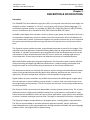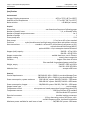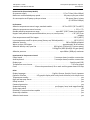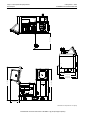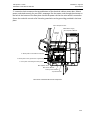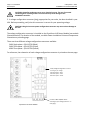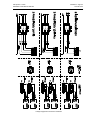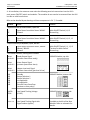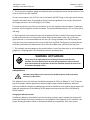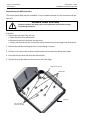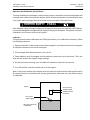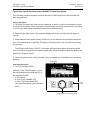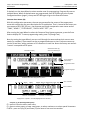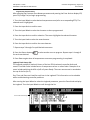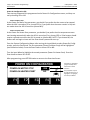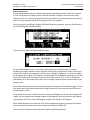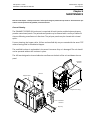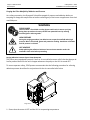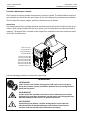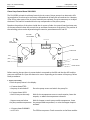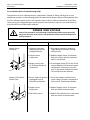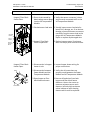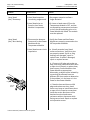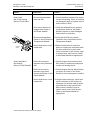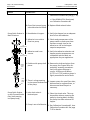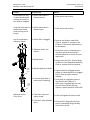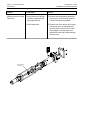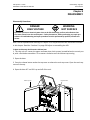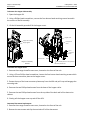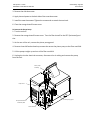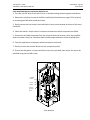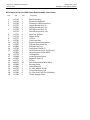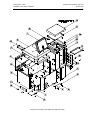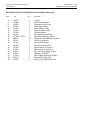
1
OPERATIONS & SERVICE MANUAL Manual # 20‐59P Revised 8/1/13 DYNAMELT S V6 SERIES ADHESIVE SUPPLY UNIT with Piston Pump and LCD Controller, 5/10 OPERATIONS AND SERVICE MANUAL Software Version 6.00 and up IMPORTANT ! ‐ READ ALL INSTRUCTIONS BEFORE OPERATING THIS EQUIPMENT It is the customer's responsibility to have all operators and service personnel read and understand this information. Contact your ITW Dynatec customer service representative for additional copies. NOTICE! Please be sure to include the model, serial number and software version of your application system each time you order replacement parts and/or supplies. This will enable us to send you the correct items that you require. ITW Dynatec Service Parts Direct Dial: 1‐800‐538‐9540 ITW Dynatec Technical Service Direct Dial: 1‐800‐654‐6711 ITW Dynatec c.2012 Page ii Revised 4/12 SAFETY INSTRUCTIONS GENERAL CONSIDERATIONS SERVICING EQUIPMENT 1. Read and follow these instructions. Failure to do this could result in severe personal injury or death. 1. Only trained personnel are to operate and service this equipment. 2. 2. Additional safety instructions and/ or symbols are located throughout this manual. They serve to warn maintenance personnel and operators about potentially hazardous situations. Never service or clean equipment while it is in motion. 3. Inspect the machine for unsafe conditions daily and replace all worn or defective parts. 4. Keep work area uncluttered and well lit. 5. All covers and guards must be in place before operating this equipment. Shut off the equipment and lock out all input power at the source before attempting any maintenance. 3. Follow the maintenance and service instructions in the manual. WARNING LABELS 1. Read and obey all of the warning labels, signs and caution statements on the equipment. 2. Do not remove or deface any of the warning labels, signs and caution statements on the equipment. 3. Replace any warning labels, signs and caution statements which have been removed or defaced. Replacements are available from ITW Dynatec. For precautions and definitions of safety symbols, refer to the Safety Chapter of the service manual. ADDITIONAL CONSIDERATIONS 1. To ensure proper operation of the equipment, use specified electrical and/ or air supply sources. 2. Do not attempt to alter the design of the equipment unless written approval is received from ITW Dynatec. 3. Keep all manuals readily accessible at all times and refer to it often for the best performance from your equipment. ITW Dynatec c.2012 Revised 4/12 ITW Dynatec c. 2012 DYNAMELT S ASU Manual #20‐59P Table of Contents Page iii Revised 4/12 TABLE OF CONTENTS Chapter 1 Safety Precautions Chapter ‐ Page # Safe Installation and Operation . . . . . . . . . . . . . . . . . . . . . . . . . . . . . . . . . . . . . . . . . . . . . . . . . . . . . . . . Eye Protection & Protective Clothing . . . . . . . . . . . . . . . . . . . . . . . . . . . . . . . . . . . . . . . . . . . . . . . . . . . . Electrical . . . . . . . . . . . . . . . . . . . . . . . . . . . . . . . . . . . . . . . . . . . . . . . . . . . . . . . . . . . . . . . . . . . . . . . . . . High Temperatures . . . . . . . . . . . . . . . . . . . . . . . . . . . . . . . . . . . . . . . . . . . . . . . . . . . . . . . . . . . . . . . . . High Pressure . . . . . . . . . . . . . . . . . . . . . . . . . . . . . . . . . . . . . . . . . . . . . . . . . . . . . . . . . . . . . . . . . . . . . . Protective Covers . . . . . . . . . . . . . . . . . . . . . . . . . . . . . . . . . . . . . . . . . . . . . . . . . . . . . . . . . . . . . . . . . . . Treatment for Burns From Hot Melt Adhesives . . . . . . . . . . . . . . . . . . . . . . . . . . . . . . . . . . . . . . . . . . . . Service . . . . . . . . . . . . . . . . . . . . . . . . . . . . . . . . . . . . . . . . . . . . . . . . . . . . . . . . . . . . . . . . . . . . . . . . . . . Explosion/ Fire Hazard . . . . . . . . . . . . . . . . . . . . . . . . . . . . . . . . . . . . . . . . . . . . . . . . . . . . . . . . . . . . . . . Lockout/ Tagout . . . . . . . . . . . . . . . . . . . . . . . . . . . . . . . . . . . . . . . . . . . . . . . . . . . . . . . . . . . . . . . . . . . . Use of PUR Adhesives . . . . . . . . . . . . . . . . . . . . . . . . . . . . . . . . . . . . . . . . . . . . . . . . . . . . . . . . . . . . . . . Safety Symbols in this Manual . . . . . . . . . . . . . . . . . . . . . . . . . . . . . . . . . . . . . . . . . . . . . . . . . . . . . . . . . 1‐1 1‐1 1‐2 1‐2 1‐2 1‐2 1‐3 1‐3 1‐3 1‐3 1‐3 1‐3 Chapter 2 Description & Specifications Description . . . . . . . . . . . . . . . . . . . . . . . . . . . . . . . . . . . . . . . . . . . . . . . . . . . . . . . . . . . . . . . . . . . . . . . . Specifications . . . . . . . . . . . . . . . . . . . . . . . . . . . . . . . . . . . . . . . . . . . . . . . . . . . . . . . . . . . . . . . . . . . . . . Installation Dimensions . . . . . . . . . . . . . . . . . . . . . . . . . . . . . . . . . . . . . . . . . . . . . . . . . . . . . . . . . . . . . . Amperage Calculation . . . . . . . . . . . . . . . . . . . . . . . . . . . . . . . . . . . . . . . . . . . . . . . . . . . . . . . . . . . . . . . Wattage Chart . . . . . . . . . . . . . . . . . . . . . . . . . . . . . . . . . . . . . . . . . . . . . . . . . . . . . . . . . . . . . . . . . . . . . DYNAMELT Model Designation Matrix . . . . . . . . . . . . . . . . . . . . . . . . . . . . . . . . . . . . . . . . . . . . . . . . . . 2‐1 2‐2 2‐4 2‐8 2‐9 2‐10 Chapter 3 Installation & Start Up Components of the DYNAMELT ASU . . . . . . . . . . . . . . . . . . . . . . . . . . . . . . . . . . . . . . . . . . . . . . . . . . . . Mounting the DYNAMELT ASU . . . . . . . . . . . . . . . . . . . . . . . . . . . . . . . . . . . . . . . . . . . . . . . . . . . . . . . . . Lifting the ASU . . . . . . . . . . . . . . . . . . . . . . . . . . . . . . . . . . . . . . . . . . . . . . . . . . . . . . . . . . . . . . . . . . . . . Installation . . . . . . . . . . . . . . . . . . . . . . . . . . . . . . . . . . . . . . . . . . . . . . . . . . . . . . . . . . . . . . . . . . . . . . . . Voltage Configuration Connector Schematics . . . . . . . . . . . . . . . . . . . . . . . . . . . . . . . . . . . . . . . . . . . . . Customer Electrical Connections . . . . . . . . . . . . . . . . . . . . . . . . . . . . . . . . . . . . . . . . . . . . . . . . . . . . . . . Adding Adhesive . . . . . . . . . . . . . . . . . . . . . . . . . . . . . . . . . . . . . . . . . . . . . . . . . . . . . . . . . . . . . . . . . . . . Changing the Adhesive Formula . . . . . . . . . . . . . . . . . . . . . . . . . . . . . . . . . . . . . . . . . . . . . . . . . . . . . . . Repositioning the HMI (Controller) . . . . . . . . . . . . . . . . . . . . . . . . . . . . . . . . . . . . . . . . . . . . . . . . . . . . . Operation and Calibration of the Level Sensor . . . . . . . . . . . . . . . . . . . . . . . . . . . . . . . . . . . . . . . . . . . . Field Installation of Controller Options . . . . . . . . . . . . . . . . . . . . . . . . . . . . . . . . . . . . . . . . . . . . . . . . . . Typical Start Up and Shut Down Procedures . . . . . . . . . . . . . . . . . . . . . . . . . . . . . . . . . . . . . . . . . . . . . Storage and Disposal of the Application System . . . . . . . . . . . . . . . . . . . . . . . . . . . . . . . . . . . . . . . . . . . 3‐1 3‐2 3‐2 3‐3 3‐5 3‐6 3‐7 3‐7 3‐8 3‐9 3‐10 3‐11 3‐12 Chapter 4 DynaControl Controller Set‐Up Temperature Control Functions in General . . . . . . . . . . . . . . . . . . . . . . . . . . . . . . . . . . . . . . . . . . . . . . . Defining DynaControl Temperature Control Terms . . . . . . . . . . . . . . . . . . . . . . . . . . . . . . . . . . . . . . . . . DynaControl V6 Display During Normal Operating Mode . . . . . . . . . . . . . . . . . . . . . . . . . . . . . . . . . . . . Error Indication Alarms . . . . . . . . . . . . . . . . . . . . . . . . . . . . . . . . . . . . . . . . . . . . . . . . . . . . . . . . . . . . . . Optional System Status (Stack) Lights . . . . . . . . . . . . . . . . . . . . . . . . . . . . . . . . . . . . . . . . . . . . . . . . . . . Settings for a Typical Operation . . . . . . . . . . . . . . . . . . . . . . . . . . . . . . . . . . . . . . . . . . . . . . . . . . . . . . . . System Values that are Factory Programmed (not customer accessible) . . . . . . . . . . . . . . . . . . . . . . . . Customer Programmable System Values Preset at the Factory . . . . . . . . . . . . . . . . . . . . . . . . . . . . . . . 4‐1 4‐1 4‐3 4‐3 4‐5 4‐5 4‐6 4‐6 Page iv Table of Contents Revised 4/12 ITW Dynatec c. 2012 DYNAMELT S ASU Manual #20‐59P Default Settings of the DynaControl Controller . . . . . . . . . . . . . . . . . . . . . . . . . . . . . . . . . . . . . . . . . . . . Optional Line Speed Tracking . . . . . . . . . . . . . . . . . . . . . . . . . . . . . . . . . . . . . . . . . . . . . . . . . . . . . . . . . . Helpful Tips for the User . . . . . . . . . . . . . . . . . . . . . . . . . . . . . . . . . . . . . . . . . . . . . . . . . . . . . . . . . . . . . Controller Features . . . . . . . . . . . . . . . . . . . . . . . . . . . . . . . . . . . . . . . . . . . . . . . . . . . . . . . . . . . . . . . . . 4‐7 4‐8 4‐8 4‐8 Chapter 5 Programming of DynaControl Controller DynaControl V6 LCD Interface . . . . . . . . . . . . . . . . . . . . . . . . . . . . . . . . . . . . . . . . . . . . . . . . . . . . . . . . . In General . . . . . . . . . . . . . . . . . . . . . . . . . . . . . . . . . . . . . . . . . . . . . . . . . . . . . . . . . . . . . . . . . . . . . . . . . Overview Screen Reference . . . . . . . . . . . . . . . . . . . . . . . . . . . . . . . . . . . . . . . . . . . . . . . . . . . . . . . . . . . Status Line . . . . . . . . . . . . . . . . . . . . . . . . . . . . . . . . . . . . . . . . . . . . . . . . . . . . . . . . . . . . . . . . . . . . . . . . Temperature Zone Symbols . . . . . . . . . . . . . . . . . . . . . . . . . . . . . . . . . . . . . . . . . . . . . . . . . . . . . . . . . . . Bar Graphs . . . . . . . . . . . . . . . . . . . . . . . . . . . . . . . . . . . . . . . . . . . . . . . . . . . . . . . . . . . . . . . . . . . . . . . . Scan Mode . . . . . . . . . . . . . . . . . . . . . . . . . . . . . . . . . . . . . . . . . . . . . . . . . . . . . . . . . . . . . . . . . . . . . . . . To Navigate Away from Overview Screen . . . . . . . . . . . . . . . . . . . . . . . . . . . . . . . . . . . . . . . . . . . . . . . . Setup Your System Parameters . . . . . . . . . . . . . . . . . . . . . . . . . . . . . . . . . . . . . . . . . . . . . . . . . . . . . . . . Temperature Zones . . . . . . . . . . . . . . . . . . . . . . . . . . . . . . . . . . . . . . . . . . . . . . . . . . . . . . . . . . . . . . . . . Pump Settings . . . . . . . . . . . . . . . . . . . . . . . . . . . . . . . . . . . . . . . . . . . . . . . . . . . . . . . . . . . . . . . . . . . . . Standard Piston Pump ASU . . . . . . . . . . . . . . . . . . . . . . . . . . . . . . . . . . . . . . . . . . . . . . . . . . . . ASUs with Optional Line Speed Tracking . . . . . . . . . . . . . . . . . . . . . . . . . . . . . . . . . . . . . . . . . . Main Menu . . . . . . . . . . . . . . . . . . . . . . . . . . . . . . . . . . . . . . . . . . . . . . . . . . . . . . . . . . . . . . . . . . . . . . . . Recipe Management . . . . . . . . . . . . . . . . . . . . . . . . . . . . . . . . . . . . . . . . . . . . . . . . . . . . . . . . . Standby/ Setback . . . . . . . . . . . . . . . . . . . . . . . . . . . . . . . . . . . . . . . . . . . . . . . . . . . . . . . . . . . . Setpoint Locking . . . . . . . . . . . . . . . . . . . . . . . . . . . . . . . . . . . . . . . . . . . . . . . . . . . . . . . . . . . . . 7‐Day Scheduler . . . . . . . . . . . . . . . . . . . . . . . . . . . . . . . . . . . . . . . . . . . . . . . . . . . . . . . . . . . . . Current Time‐of‐Day and Day‐of‐Week . . . . . . . . . . . . . . . . . . . . . . . . . . . . . . . . . . . . . . . . . . . Info Screen . . . . . . . . . . . . . . . . . . . . . . . . . . . . . . . . . . . . . . . . . . . . . . . . . . . . . . . . . . . . . . . . . System Configuration Menu . . . . . . . . . . . . . . . . . . . . . . . . . . . . . . . . . . . . . . . . . . . . . . . . . . . . . . . . . . Accessing the Parameters . . . . . . . . . . . . . . . . . . . . . . . . . . . . . . . . . . . . . . . . . . . . . . . . . . . . . Temperature Unit (Celsius or Fahrenheit) . . . . . . . . . . . . . . . . . . . . . . . . . . . . . . . . . . . . . . . . . Language Selection . . . . . . . . . . . . . . . . . . . . . . . . . . . . . . . . . . . . . . . . . . . . . . . . . . . . . . . . . . Zone Configuration . . . . . . . . . . . . . . . . . . . . . . . . . . . . . . . . . . . . . . . . . . . . . . . . . . . . . . . . . . Pump Configuration . . . . . . . . . . . . . . . . . . . . . . . . . . . . . . . . . . . . . . . . . . . . . . . . . . . . . . . . . . Setpoint Limitation . . . . . . . . . . . . . . . . . . . . . . . . . . . . . . . . . . . . . . . . . . . . . . . . . . . . . . . . . . Hi/Lo Alarm Tolerance . . . . . . . . . . . . . . . . . . . . . . . . . . . . . . . . . . . . . . . . . . . . . . . . . . . . . . . . Standby Configuration . . . . . . . . . . . . . . . . . . . . . . . . . . . . . . . . . . . . . . . . . . . . . . . . . . . . . . . . Level Detection . . . . . . . . . . . . . . . . . . . . . . . . . . . . . . . . . . . . . . . . . . . . . . . . . . . . . . . . . . . . . Heatup Sequence . . . . . . . . . . . . . . . . . . . . . . . . . . . . . . . . . . . . . . . . . . . . . . . . . . . . . . . . . . . . Access Code . . . . . . . . . . . . . . . . . . . . . . . . . . . . . . . . . . . . . . . . . . . . . . . . . . . . . . . . . . . . . . . . Temperature Offset . . . . . . . . . . . . . . . . . . . . . . . . . . . . . . . . . . . . . . . . . . . . . . . . . . . . . . . . . . Customer Zone Names . . . . . . . . . . . . . . . . . . . . . . . . . . . . . . . . . . . . . . . . . . . . . . . . . . . . . . . . Logbook/ Fault History . . . . . . . . . . . . . . . . . . . . . . . . . . . . . . . . . . . . . . . . . . . . . . . . . . . . . . . . Power‐On Configuration . . . . . . . . . . . . . . . . . . . . . . . . . . . . . . . . . . . . . . . . . . . . . . . . . . . . . . Global Setpoints . . . . . . . . . . . . . . . . . . . . . . . . . . . . . . . . . . . . . . . . . . . . . . . . . . . . . . . . . . . . . 5‐1 5‐1 5‐2 5‐3 5‐3 5‐4 5‐4 5‐4 5‐5 5‐5 5‐7 5‐7 5‐7 5‐9 5‐9 5‐10 5‐11 5‐12 5‐13 5‐14 5‐15 5‐15 5‐16 5‐16 5‐16 5‐16 5‐16 5‐17 5‐17 5‐18 5‐19 5‐19 5‐19 5‐20 5‐21 5‐22 5‐23 Chapter 6 Preventive Maintenance General Cleaning . . . . . . . . . . . . . . . . . . . . . . . . . . . . . . . . . . . . . . . . . . . . . . . . . . . . . . . . . . . . . . . . . . . Purging the Filter Manifold of Adhesive and Pressure . . . . . . . . . . . . . . . . . . . . . . . . . . . . . . . . . . . . . . Preventive Maintenance Schedule . . . . . . . . . . . . . . . . . . . . . . . . . . . . . . . . . . . . . . . . . . . . . . . . . . . . . Output Filter . . . . . . . . . . . . . . . . . . . . . . . . . . . . . . . . . . . . . . . . . . . . . . . . . . . . . . . . . . . . . . . . . . . . . . . Hose Fittings . . . . . . . . . . . . . . . . . . . . . . . . . . . . . . . . . . . . . . . . . . . . . . . . . . . . . . . . . . . . . . . . . . . . . . . Fasteners . . . . . . . . . . . . . . . . . . . . . . . . . . . . . . . . . . . . . . . . . . . . . . . . . . . . . . . . . . . . . . . . . . . . . . . . . Primary Filter Cleaning . . . . . . . . . . . . . . . . . . . . . . . . . . . . . . . . . . . . . . . . . . . . . . . . . . . . . . . . . . . . . . . 6‐1 6‐2 6‐4 6‐4 6‐5 6‐5 6‐6 ITW Dynatec c. 2012 DYNAMELT S ASU Manual #20‐59P Table of Contents Page v Revised 4/12 Summary of Preventive Maintenance Schedule . . . . . . . . . . . . . . . . . . . . . . . . . . . . . . . . . . . . . . . . . . . 6‐7 Flushing the System . . . . . . . . . . . . . . . . . . . . . . . . . . . . . . . . . . . . . . . . . . . . . . . . . . . . . . . . . . . . . . . . 6‐8 Chapter 7 Troubleshooting General Troubleshooting Notes . . . . . . . . . . . . . . . . . . . . . . . . . . . . . . . . . . . . . . . . . . . . . . . . . . . . . . . . Location of Components . . . . . . . . . . . . . . . . . . . . . . . . . . . . . . . . . . . . . . . . . . . . . . . . . . . . . . . . . . . . . High‐Temperature Redundant Overtemp Thermostat . . . . . . . . . . . . . . . . . . . . . . . . . . . . . . . . . . . . . . Lithium Battery . . . . . . . . . . . . . . . . . . . . . . . . . . . . . . . . . . . . . . . . . . . . . . . . . . . . . . . . . . . . . . . . . . . . . DynaControl V6 Modules . . . . . . . . . . . . . . . . . . . . . . . . . . . . . . . . . . . . . . . . . . . . . . . . . . . . . . . . . . . . . Handling Modules & Printed Circuit Boards . . . . . . . . . . . . . . . . . . . . . . . . . . . . . . . . . . . . . . . . . . . . . . V6 Base Module . . . . . . . . . . . . . . . . . . . . . . . . . . . . . . . . . . . . . . . . . . . . . . . . . . . . . . . . . . . . . . . . . . . . V6 Temperature Module . . . . . . . . . . . . . . . . . . . . . . . . . . . . . . . . . . . . . . . . . . . . . . . . . . . . . . . . . . . . . V6 Power Module . . . . . . . . . . . . . . . . . . . . . . . . . . . . . . . . . . . . . . . . . . . . . . . . . . . . . . . . . . . . . . . . . . . V6 Aux Power Module . . . . . . . . . . . . . . . . . . . . . . . . . . . . . . . . . . . . . . . . . . . . . . . . . . . . . . . . . . . . . . . Optional Printed Circuit Boards . . . . . . . . . . . . . . . . . . . . . . . . . . . . . . . . . . . . . . . . . . . . . . . . . . . . . . . . Piston Pump Control Board & Calibration . . . . . . . . . . . . . . . . . . . . . . . . . . . . . . . . . . . . . . . . . . . . . . . . Heater and Sensor Resistance Values . . . . . . . . . . . . . . . . . . . . . . . . . . . . . . . . . . . . . . . . . . . . . . . . . . . Resistance Tables . . . . . . . . . . . . . . . . . . . . . . . . . . . . . . . . . . . . . . . . . . . . . . . . . . . . . . . . . . . . . . . . . . . Error Indication Alarm Troubleshooting Guide . . . . . . . . . . . . . . . . . . . . . . . . . . . . . . . . . . . . . . . . . . . . Controller Messages Troubleshooting Guide . . . . . . . . . . . . . . . . . . . . . . . . . . . . . . . . . . . . . . . . . . . . . . Pneumatic Pressure Relief Valve Operation . . . . . . . . . . . . . . . . . . . . . . . . . . . . . . . . . . . . . . . . . . . . . . Operation of the ASU's Pump . . . . . . . . . . . . . . . . . . . . . . . . . . . . . . . . . . . . . . . . . . . . . . . . . . . . . . . . . Piston Pump Flow Diagram . . . . . . . . . . . . . . . . . . . . . . . . . . . . . . . . . . . . . . . . . . . . . . . . . . . . . . . . . . . Troubleshooting the ASU Pump . . . . . . . . . . . . . . . . . . . . . . . . . . . . . . . . . . . . . . . . . . . . . . . . . . . . . . . . Pump Troubleshooting Guide . . . . . . . . . . . . . . . . . . . . . . . . . . . . . . . . . . . . . . . . . . . . . . . . . . . . . . . . . 7‐1 7‐2 7‐3 7‐3 7‐3 7‐4 7‐5 7‐9 7‐10 7‐12 7‐13 7‐14 7‐16 7‐17 7‐18 7‐23 7‐25 7‐26 7‐27 7‐28 7‐29 Chapter 8 Disassembly & Re‐assembly Procedures Disassembly & Procedures . . . . . . . . . . . . . . . . . . . . . . . . . . . . . . . . . . . . . . . . . . . . . . . . . . . . . . . . . . . . Open & Remove the Electronics Cabinet Door . . . . . . . . . . . . . . . . . . . . . . . . . . . . . . . . . . . . . . . . . . . . To Remove the Hopper Lid Assembly . . . . . . . . . . . . . . . . . . . . . . . . . . . . . . . . . . . . . . . . . . . . . . . . . . . To Remove the Hopper Cover . . . . . . . . . . . . . . . . . . . . . . . . . . . . . . . . . . . . . . . . . . . . . . . . . . . . . . . . . Overtemp Thermostat Replacement . . . . . . . . . . . . . . . . . . . . . . . . . . . . . . . . . . . . . . . . . . . . . . . . . . . . To Remove the Pump . . . . . . . . . . . . . . . . . . . . . . . . . . . . . . . . . . . . . . . . . . . . . . . . . . . . . . . . . . . . . . . . Pump Seal Replacement . . . . . . . . . . . . . . . . . . . . . . . . . . . . . . . . . . . . . . . . . . . . . . . . . . . . . . . . . . . . . Hopper Sensor Replacement . . . . . . . . . . . . . . . . . . . . . . . . . . . . . . . . . . . . . . . . . . . . . . . . . . . . . . . . . . Note on the Cast‐In Heaters . . . . . . . . . . . . . . . . . . . . . . . . . . . . . . . . . . . . . . . . . . . . . . . . . . . . . . . . . . . Filter Manifold RTD Sensor and Heater Replacement . . . . . . . . . . . . . . . . . . . . . . . . . . . . . . . . . . . . . . . To Access the Electrical Components . . . . . . . . . . . . . . . . . . . . . . . . . . . . . . . . . . . . . . . . . . . . . . . . . . . Main On/ Off Power Switch Replacement . . . . . . . . . . . . . . . . . . . . . . . . . . . . . . . . . . . . . . . . . . . . . . . . Fuse Replacement . . . . . . . . . . . . . . . . . . . . . . . . . . . . . . . . . . . . . . . . . . . . . . . . . . . . . . . . . . . . . . . . . . Power Supply Replacement . . . . . . . . . . . . . . . . . . . . . . . . . . . . . . . . . . . . . . . . . . . . . . . . . . . . . . . . . . . Printed Circuit Board or Module Replacement . . . . . . . . . . . . . . . . . . . . . . . . . . . . . . . . . . . . . . . . . . . . Main or Aux Power Board Replacement . . . . . . . . . . . . . . . . . . . . . . . . . . . . . . . . . . . . . . . . . . . . . . . . . Module Replacement . . . . . . . . . . . . . . . . . . . . . . . . . . . . . . . . . . . . . . . . . . . . . . . . . . . . . . . . . . . . . . . . Control Panel Replacement . . . . . . . . . . . . . . . . . . . . . . . . . . . . . . . . . . . . . . . . . . . . . . . . . . . . . . . . . . . Re‐assembly Procedures & Cautions . . . . . . . . . . . . . . . . . . . . . . . . . . . . . . . . . . . . . . . . . . . . . . . . . . . . 8‐1 8‐1 8‐2 8‐2 8‐2 8‐3 8‐4 8‐4 8‐4 8‐5 8‐6 8‐6 8‐6 8‐7 8‐7 8‐7 8‐7 8‐8 8‐8 Chapter 9 Available Options & Accessories Service Kits . . . . . . . . . . . . . . . . . . . . . . . . . . . . . . . . . . . . . . . . . . . . . . . . . . . . . . . . . . . . . . . . . . . . . . . . 9‐1 Options . . . . . . . . . . . . . . . . . . . . . . . . . . . . . . . . . . . . . . . . . . . . . . . . . . . . . . . . . . . . . . . . . . . . . . . . . . . 9‐2 Page vi Table of Contents Revised 4/12 ITW Dynatec c. 2012 DYNAMELT S ASU Manual #20‐59P Recommended Service Parts List . . . . . . . . . . . . . . . . . . . . . . . . . . . . . . . . . . . . . . . . . . . . . . . . . . . . . . . 9‐5 Chapter 10 Component Illustrations & Bills of Material Sheet Metal Assembly . . . . . . . . . . . . . . . . . . . . . . . . . . . . . . . . . . . . . . . . . . . . . . . . . . . . . . . . . . . . . . . Electronics Assembly . . . . . . . . . . . . . . . . . . . . . . . . . . . . . . . . . . . . . . . . . . . . . . . . . . . . . . . . . . . . . . . . Hopper Assembly . . . . . . . . . . . . . . . . . . . . . . . . . . . . . . . . . . . . . . . . . . . . . . . . . . . . . . . . . . . . . . . . . . . Filter Manifold Assembly . . . . . . . . . . . . . . . . . . . . . . . . . . . . . . . . . . . . . . . . . . . . . . . . . . . . . . . . . . . . . Pump Drive . . . . . . . . . . . . . . . . . . . . . . . . . . . . . . . . . . . . . . . . . . . . . . . . . . . . . . . . . . . . . . . . . . . . . . . . Piston Pump Assembly . . . . . . . . . . . . . . . . . . . . . . . . . . . . . . . . . . . . . . . . . . . . . . . . . . . . . . . . . . . . . . . Electrical Enclosure Assembly . . . . . . . . . . . . . . . . . . . . . . . . . . . . . . . . . . . . . . . . . . . . . . . . . . . . . . . . . Pneumatic Pressure Relief Valve . . . . . . . . . . . . . . . . . . . . . . . . . . . . . . . . . . . . . . . . . . . . . . . . . . . . . . . Air Regulator Assembly . . . . . . . . . . . . . . . . . . . . . . . . . . . . . . . . . . . . . . . . . . . . . . . . . . . . . . . . . . . . . . 10‐2 10‐4 10‐6 10‐8 10‐10 10‐12 10‐14 10‐16 10‐18 Chapter 11 System Schematics & Engineering Drawings DynaControl Head Schematic: all models . . . . . . . . . . . . . . . . . . . . . . . . . . . . . . . . . . . . . . . . . . . . . . . . DynaControl Hose Schematic: all models . . . . . . . . . . . . . . . . . . . . . . . . . . . . . . . . . . . . . . . . . . . . . . . . Dynamelt S ASU Wiring Diagrams . . . . . . . . . . . . . . . . . . . . . . . . . . . . . . . . . . . . . . . . . . . . . . . . . . . . . . Optional System Status Lights (Stack Light) Assembly . . . . . . . . . . . . . . . . . . . . . . . . . . . . . . . . . . . . . . . Optional Pressure Transducer Kit . . . . . . . . . . . . . . . . . . . . . . . . . . . . . . . . . . . . . . . . . . . . . . . . . . . . . . 11‐1 11‐2 11‐3 11‐8 11‐9 Appendix Pressure Transducer . . . . . . . . . . . . . . . . . . . . . . . . . . . . . . . . . . . . . . . . . . . . . . . . . . . . . . . . . . . . . . . . . Appendix 1 Signal Isolator . . . . . . . . . . . . . . . . . . . . . . . . . . . . . . . . . . . . . . . . . . . . . . . . . . . . . . . . . . . . . . . . . . . . . . Appendix 5 Safety Page 1‐1 Revised 8/13 ITW Dynatec c. 2012 ALL MODELS Chapter 1 SAFETY PRECAUTIONS All operators and service personnel must read and understand this manual before operating or servicing equipment. All maintenance and service on this equipment must be performed by trained technicians. Safe Installation & Operation Read this manual before applying electrical power to the equipment. Equipment may be damaged by incorrect electrical connections. To avoid possible failure of hoses, make sure all hoses are routed to avoid kinking, tight radius turns (8” or less) and abrasive contact. Hot‐melt hoses should not have prolonged contact with heat‐absorbing surfaces such as cold floors or metal troughs. These heat‐absorbing surfaces can alter adhesive flow and cause incorrect calibration. Hoses should never be covered with materials that prevent heat dissipation, such as insulation or sheathing. Hoses should be spaced apart from each other, not making direct contact. Do not use adhesive that is dirty or that may be chemically contaminated. Doing so can cause system clogging and pump damage. When adhesive hand‐held applicators or other movable applicators are used, never point them at yourself or at any other person. Never leave a hand‐held applicator's trigger unlocked when not actually in use. Do not operate the hopper or other system components without adhesive for more than 15 minutes if the temperature is 150 degrees C (300 degrees F) or more. To do so will cause charring of the residual adhesive. Never activate the heads, hand‐held applicators and/ or other application devices until the adhesive's temperature is within the operating range. Severe damage could result to internal parts and seals. Never attempt to lift or move the unit when there is molten adhesive in the system. Eye Protection & Protective Clothing WARNING EYE PROTECTION REQUIRED PROTECTIVE CLOTHING REQUIRED It is very important that you PROTECT YOUR EYES when working around hot melt adhesive equipment! Wear a face shield conforming to ANSI Z87.1 or safety glasses with side shields which conform to ANSI Z87.1 or EN166. Failure to wear a face shield or safety glasses could result in severe eye injury. It is important to protect yourself from potential burns when working around hot melt adhesive equipment. Wear protective gloves and long‐sleeved, protective clothing to prevent burns that could result from contact with hot material or hot components. Always wear steel‐reinforced safety shoes. Page 1‐2 Safety Revised 4/12 ITW Dynatec c. 2012 ALL MODELS Electrical DANGER HIGH VOLTAGE Dangerous voltages exist at several points in this equipment. To avoid personal injury, do not touch exposed connections and components while input power is on. Disconnect, lockout and tag external electrical power before removing protective panels. A secure connection to a reliable earth ground is essential for safe operation. An electrical disconnect switch with lockout capability must be provided in the line ahead of the unit. Wiring used to supply electrical power should be installed by a qualified electrician. High Temperatures WARNING HOT SURFACE Severe burns can occur if unprotected skin comes in contact with molten adhesive or hot application system parts. Face shields (preferred) or safety glasses (for minimum protection), gloves and long‐ sleeved clothing must be worn whenever working with or around adhesive application systems. High Pressure WARNING HIGH PRESSURE PRESENT To avoid personal injury, do not operate the equipment without all covers, panels and safety guards properly installed. To prevent serious injury from molten adhesive under pressure when servicing the equipment, disengage the pumps and relieve the adhesive system's hydraulic pressure (e.g., trigger the heads, hand‐held applicators, and/or other application devices into a waste container) before opening any hydraulic fittings or connections. IMPORTANT NOTE: Even when a system's pressure gauge reads “0” psig, residual pressure and trapped air can remain within it causing hot adhesive and pressure to escape without warning when a filter cap or a hose or hydraulic connection is loosened or removed. For this reason, always wear eye protection and protective clothing. Either of the two High Pressure symbols shown may be used on ITW Dynatec equipment. Protective Covers WARNING DO NOT OPERATE WITHOUT GUARDS IN PLACE Keep all guards in place! To avoid personal injury, do not operate the application system without all covers, panels and safety guards properly installed. ITW Dynatec c. 2012 ALL MODELS Safety Page 1‐3 Revised 4/12 Treatment for Burns From Hot Melt Adhesives Burns caused by hot melt adhesive must be treated at a burn center. Provide the burn center's staff a copy of the adhesive's M.S.D.S to expedite treatment. cause severe burns. When working near a hot melt application system, always wear safety gloves, safety glasses and long‐sleeved, protective clothing. Care should be used when working with hot melt adhesives in the molten state. Because they rapidly solidify, they present a unique hazard. Always have first‐aid information and supplies available. Even when first solidified, they are still hot and can Call a physician and/or an emergency medical technician immediately. Service Refer all servicing to qualified personnel only. Explosion/ Fire Hazard Never operate this unit in an explosive environment. Use cleaning compounds recommended by ITW Dynatec or your adhesive supplier only. Flash points of cleaning compounds vary according to their com‐ position, so consult with your supplier to determine the maximum heating temperatures and safety pre‐ cautions. Lockout/ Tagout Follow OSHA 1910.147 (Lockout/ Tagout Regulation) for equipment's lockout procedures and other impor‐ tant lockout/ tagout guidelines. Be familiar with all lockout sources on the equipment. Even after the equipment has been locked out, there may be stored energy in the application system, par‐ ticularly in the capacitors within the panel box. To en‐ sure that all stored energy is relieved, wait at least one minute after removing power before servicing electrical capacitors. Use of PUR (Polyurethane) Adhesives PUR adhesives emit fumes (MDI and TDI) that can be dangerous to anyone exposed to them. These fumes cannot be detected by the sense of smell. ITW Dyna‐ tec strongly recommends that a power‐vented ex‐ haust hood or system be installed over any PUR sys‐ tem. Consult with your adhesive manufacturer for specifics about required ventilation. CAUTION: Because of the nature of PUR adhesives to strongly bond in the presence of moisture, care must be taken to prevent them from curing inside Dynatec equipment. If PUR adhesive solidifies in a unit, the unit must be replaced. Always purge old PUR adhesive from the system per your adhesive manufacturer's instructions and time table. ALLOWING PUR ADHESIVE TO CURE IN A UNIT OR ITS COMPONENTS VOIDS ITW DYNATEC'S WARRANTY. Safety Symbols In This Manual WARNINGS and CAUTIONS are found throughout this manual. WARNINGS mean that failure to observe the specific instructions may cause injury to personnel. CAUTIONS mean that failure to observe the specific instructions may damage the equipment. Page 1‐4 Safety Revised 4/12 ITW Dynatec c. 2012 ALL MODELS ITW Dynatec c. 2012 DYNAMELT S ASU Manual #20‐59P Description & Specifications Page 2‐1 Revised 4/12 Chapter 2 DESCRIPTION & SPECIFICATIONS Description The DYNAMELT S Series adhesive supply unit (ASU) is a computer‐controlled hot‐melt supply unit designed on metric standards. Its “all‐icon" control panel, with choice of display languages, is in‐ ternationally operator friendly. It is available for 240V (1Ph), 240V (3Ph Delta) or 400V (3Ph Wye) service. A transformer kit is available for 400V (3Ph Delta) and 480V (3Ph Delta). Available in two hopper sizes and with a choice of piston or gear pump, the Dynamelt S ASU uses a microprocessor temperature control to closely control the temperature of hot‐melt adhesive for up to six hoses and six heads. Temperature setpoints are operator‐selected for up to 16 zones and the system automatically provides warnings and alarms for operator errors and system malfunc‐ tions. The Dynamelt system provides accurate, proportionate temperature control for the hopper, filter manifold, hoses and applicators. Sequential heating delays may be programmed to enable hoses and heads. A “standby" temperature may be programmed so that the temperature zones can be maintained at a lower temperature when the ASU is not in active use, enabling rapid return to normal operation. A seven‐day scheduler and adhesive level sensor are standard features. With these flexible temperature programming features, the Dynamelt system increases adhesive life by eliminating prolonged high adhesive temperatures. It reduces energy consumption and brings the system up to normal operating temperatures in the shortest possible time. The temperature control can interlock with a parent machine using pre‐selected adhesive temper‐ atures so that production automatically begins when adhesive temperatures are correct for the application. All system temperature values can easily and quickly be programmed. Digital readout of system conditions is provided. Optional external audible signals or lights which alert the operator to alarm conditions may be wired in. A security code can restrict access to sys‐ tem programming and parameters. The CPU monitors the electronic circuitry and provides alarms for error conditions. The Dynamelt S ASU uses an extremely dependable, constant‐pressure piston pump. This air‐oper‐ ated pump ensures a high pressure adhesive output from a low pressure, compressed air input. Piston pumps are available for either hot‐melt or lotion applications. A gear pump is also available to assure a smoother and higher precision flow. The single or dual pump is driven by a single drive. The Dynamelt's hopper accepts adhesive in all popular forms, including pellets, slugs and blocks. The ASU can accommodate air‐actuated automatic applicators (heads), electric applicators, hand‐held applicators and/or special applicators. Among the options available are pressure gauge, pendant control, stack lights and line speed tracking. Page 2‐2 Description & Specifications Revised 4/12 ITW Dynatec c. 2012 DYNAMELT S ASU Manual #20‐59P Specifications Environmental Storage/ shipping temperature . . . . . . . . . . . . . . . . . . . . . . . . . . . . ‐40C to 70C (‐40F to 158F) Ambient service temperature . . . . . . . . . . . . . . . . . . . . . . . . . . . . . . . ‐7C to 50C (20F to 122F) Noise emission . . . . . . . . . . . . . . . . . . . . . . . . . . . . . . . . . . . . . . . . . . . . . . . . < 60 dbA (at 1 meter) Physical Dimensions . . . . . . . . . . . . . . . . . . . . . . . . . . . . . . . . . see dimensional layouts on following pages Number of heads/ hoses . . . . . . . . . . . . . . . . . . . . . . . . . . . . . . . . . . . . . . . 2, 4, or 6 heads/ hoses Number of hopper temperature zones . . . . . . . . . . . . . . . . . . . . . . . . . . . . . . . . . . . . . . . . . . 1 or 2 Number of pumps . . . . . . . . . . . . . . . . . . . . . . . . . . . . . . . . . . . . . . . . . . . . . . . . . . . . . . . . . . . . . . 1 Piston pump ratio . . . . . . . . . . . . . . . . . . . . . . . . . . . . . . . . . . . . . . . . . . . . . . . . . . . . . . . . . . . 12:1 Gear pumps . . . . . . . . . . . . . . . . . . . . . . . . . . . . . . . . . . . . . . . . . 1.5 cc/rev or 4.5 cc/rev standard Enclosure . . . . . . . . . . . styled, durable metal and high temp polymer,dust and splatter resistant Hose connections . . . . . . . . . . . . . . . . . standard = universal 15‐pin Amphenol connectors at ASU, wrench‐secured fluid fittings (#6 JIC) optional NDSN = 12-pin rectangular electrical connectors Hopper (tank) capacity . . . . . . . . . . . . . . . . . . . . . . . . . . . . . . . . . . . . . . . . DM S05 = 4.7 kg/ 10 lb DM S10 = 9.5 kg/ 20 lb Hopper construction . . . . . . . . . . . . . . . . . . . . . . . . . . . . . . . . . welded aluminum, cast‐in heaters Hopper coating . . . . . . . . . . . . . . . . . . . . . . . . . . . . . . . . . . . . . . . . . . . . . ceramic nano‐composite Filtration . . . . . . . . . . . . . . . . . . . . . . . . . . . . . . . . . . . . . . . . . . . . . . . . hopper: filter shut‐off valve filter manifold: large pleated pump outlet filter Weight, empty . . . . . . . . . . . . . . . . . . . . . . . . . . . . . . . . . . . . . . . . . . . . . DM S05 = 58.5 kg/ 129 lb DM S10 = 62.6 kg/ 138 lb Adhesive form . . . . . . . . . . . . . . . . . . . . . . . . . . . . . . . . . . . . . . . . . . . . . . . . . . accepts most forms Electrical Service Requirements . . . . . . . . . . . . . . . . 200‐240 VAC ASUs = 50‐60 Hz, see also Wattage Chart 380‐400 VAC ASUs = 50‐60 Hz, see also Wattage Chart Power consumption, system maximum . . . 200‐240 VAC system: DM S05/ DM S10 = 7200 watts 380‐400 VAC system: DM S05/ DM S10 = 9650 watts Power consumption, hopper . . . . . . . . . . . . 240/380 VAC system: DM S05 / DM S10 = 1500 watts Hopper heater type . . . . . . . . . . . . . . . . . . . . . . . . . . . . . . . . . . . . . . . . . . . . . . . . . . cast‐in tubular Temperature control . . . . . . . . . . . . microprocessor‐based proportional integral derivative (PID) Temperature sensors . . . . . . . . . . . . . . . . . . . . . . . . . . . . . . . . . . 100 Ohm Platinum RTD standard 120 Ohm Nickel RTD optional Electrical connectors . . . . . . . . . . . . . . . . . . . . . . . . . . . . . . . . . . . . . durable, latching connectors Motor . . . . . . . . . . . . . . . . . . . . . . . . . . . . . . . . . . . . . 1/4 hp, alternating current (AC) motor, with variable frequency drive, horizontal orientation Maximum power available for each hose or head . . . . . . . . . . . 240/380 VAC system: 1200 watts ITW Dynatec c. 2012 DYNAMELT S ASU Manual #20‐59P Description & Specifications Page 2‐3 Revised 4/12 Pressurized Air (Piston Pump Models) Air pressure supply . . . . . . . . . . . . . . . . . . . . . . . . . . . . . . . . . . . . . . . . 0.7 to 7.0 bar (10 to 100 psi) Maximum recommended pump speed . . . . . . . . . . . . . . . . . . . . . . . . . . 60 pump cycles per minute Air consumption at 60 pump cycles per minute . . . . . . . . . . . . . . . . . . . . . 90 normal liters/ minute (3.2 SCFM at 100 psi) Performance Adhesive temperature control range, standard models . . . . . . . . . . . 10C to 232C (50F to 450F) Adhesive temperature control accuracy . . . . . . . . . . . . . . . . . . . . . . . . . . . . . . . . . . . . + 1C (+ 1F) Standby adhesive temperature range . . . . . . . . . . . . . . . . . up to 80C (150F) lower than setpoint Hopper ready adhesive temperature deviation (factory set/ field adjustable) . . . . . . . . + 20 (36) from setpoint Over‐temperature cutoff for hopper . . . . . . . . . . . . . . . . . . . . . . . . . . . . . . . . . . . . . . . 232C (450F) Low‐temperature cutoff for piston pump (factory set/ field adjustable) . . . . . . . . . . . 135C (275F) Adhesive viscosity . . . . . . . . . . . . . . . . . . . . . . . . . . . . . . . . . . . . . . . . . . . . 500 to 50,000 centipoise Warm‐up time, full hopper . . . . . . . . . . . . . . . . . . . . . . . . . . . . . . . . . approximately 30‐40 minutes Adhesive delivery rate, open line . . . . . . . . . . . . . . . . . . 0.91 kg/min (2 lb/min)(12:1 piston pump) 0.38 kg/min (0.83 lb/min)(4.5cc gear pump) Adhesive pressure . . . . . . . . . . . . . . . . . . . . . . . . . . . . . . . . . . . . . up to 68 bar (1000 psi) maximum DynaControl V6 Temperature Control Power board . . . . . . . . . . . . . . . . . . . . . . . . . . . . . . . . . . . . 5 zones per board, modular construction Auxiliary board . . . . . . . . . . . . . . . . . . . . . . . . . . . . . . . . . . 5 zones per board, modular construction Display type . . . . . . . . . . . . . . . . . . . . . . . . . . . . . . . . . . . . . . . . . . . . . . . . . . . . . . liquid crystal (LCD) Temperature control zones . . . . . . . . . . . . . . . . . . . . . . . . . . . . . . . . . . . . . . . . . . . 5‐15 triac‐output Fuses . . . . . . . . . . . . . . . . . . . 13 on main power board, 10 on each auxiliary power board: 10 Amp Other Display languages . . . . . . . . . . . . . . . . . . . . . . . . . . . . . . English, German, Spanish, French, Japanese Operator interface . . . . . . . . . . . LCD graphic display with rotary‐knob controller, with simple icons Temperature standby . . . . . . . . . . . . . . . . . . . . . . . . . . . . . . . . . . . . . . . . . . . . . . . . . . . . . . . . . . yes High and low temp alarms . . . . . . . . . . . . . . . . . . . . . . . . . . . . . . . . . . . . . . . . . . . . . . . . . . . . . . . yes Ready interlock . . . . . . . . . . . . . . . . . . . . . . . . . . . . . . . . . . . . . . . . . . . . . . . . . . . . . . . . . . . . . . . yes Password protection . . . . . . . . . . . . . . . . . . . . . . . . . . . . . . . . . . . . . . . . . . . . . . . . . . . . . . . . . . . yes Sequential heating . . . . . . . . . . . . . . . . . . . . . . . . . . . . . . . yes (hopper, hose, head staged heating) Sensor open alarm . . . . . . . . . . . . . . . . . . . . . . . . . . . . . . . . . . . . . . . . . . . . . . . . . . . . . . . . . . . . . yes EtherNet/ IP communications capable . . . . . . . . . . . . . . . . . . . . . . . . . . . . . . . . . . . . . . . . . . . . . yes Seven‐day scheduler . . . . . . . . . . . . . . . . . . . . . . . . . . . . . . . . . . . . . . . . . . . . . . . . . . . . . . . . . . . yes Adhesive level sensor . . . . . . . . . . . . . . . . . . . . . . . . . . . . . . . . . . . . . . . . . . . . . . . . . . . . . . . . . . . yes ITW Dynatec c. 2012 DYNAMELT S ASU Manual #20‐59P 351.6 [13.84] Page 2‐4 Description & Specifications Revised 4/12 37.5 [1.48] 344.0 [13.54] 658.8 [25.95] 699.5 [27.54] 375.8 [14.79] 388.1 [15.28] 186.4 [7.34] Dimensions are expressed as “mm [inch]” Installation & Clearance Dimensions: DM SR05: 5 kg (10 lb) Hopper Capacity Description & Specifications Page 2‐5 Revised 4/12 ITW Dynatec c. 2012 DYNAMELT S ASU Manual #20‐59P 655.0 [25.79] 633.0 [24.92] 368.0 [14.19] 285.5 [11.24] 324.0 [12.76] 20.0 [0.79] 456.7 [17.98] 532.3 [20.96] 378.03 [14.88] 50.5 [1.99] 127.5 [5.02] 508.5 [20.02] 10.0 [0.39] Installation & Clearance Dimensions: DM SR05: 5 kg (10 lb) Hopper Capacity ITW Dynatec c. 2012 DYNAMELT S ASU Manual #20‐59P 351.6 [13.84] Page 2‐6 Description & Specifications Revised 4/12 699.5 [27.54] 862.5 [33.96] 37.5 [1.48] 186.4 [7.34] Installation & Clearance Dimensions: DM SR10: 10 kg (20 lb) Hopper Capacity 344.0 [13.54] 375.8 [14.79] 388.1 [15.28] Description & Specifications Page 2‐7 Revised 4/12 ITW Dynatec c. 2012 DYNAMELT S ASU Manual #20‐59P 368.0 [14.19] 285.5 [11.24] 655.0 [25.79] 633.0 [24.92] 20.0 [0.79] 324.0 [12.76] 660.4 [26.00] 532.3 [20.96] 378.03 [14.88] 50.5 [1.99] 10.0 [0.39] 127.5 [5.02] 508.5 [20.02] Installation & Clearance Dimensions: DM SR10: 10 kg (20 lb) Hopper Capacity ITW Dynatec c. 2012 DYNAMELT S ASU Manual #20‐59P Page 2‐8 Description & Specifications Revised 4/12 Amperage Calculation The Amperage Calculation chart assumes standard ITW Dynatec equipment. Applicator head/ air heater width is typically equal to the applicator's service block width. For non‐standard equip‐ ment, read the amperage from the equipment's data tag or consult with ITW Dynatec's Customer Service Dept. Wire gauge calculation assumes wire rating of 75C. CAUTION: The customer is responsible for providing appropriate over‐current protection. PN 117249 Rev. A Amperage Calculation Chart DM‐S (V6) Model Amp ASU Size Amps DM‐ S 05/10 9.5 9.5 Total Length of All Hoses Feet m Amp 12 3.7 1.5 24 7. 3 3 36 11 4.5 48 14. 6 6 60 18.3 7.5 72 84 96 22 25.6 29.3 9 10.5 12 4 102 2 8 203 4 12 305 6 16 406 8 Inches mm Amp 0 0 0 2 51 2.5 4 102 5 6 152 7.5 20 508 10 24 610 12 28 711 14 32 813 16 Add up all hoses Enter Amps + 36 40 44 914 1016 1118 18 20 22 16 18 406 457 20 22.5 STEP 2 144 156 168 180 43.9 47.6 51.2 54.9 18 19.5 21 22.5 48 1219 24 52 1320 26 56 1422 28 60 1524 30 Total Width of All Air Heaters 8 10 12 14 203 256 305 356 10 12.5 15 17.5 Enter 9.5 Amps + 108 120 132 33 36.6 40.3 13.5 15 16.5 Total Width of All Applicator Heads Inches mm Amp STEP 1 Enter Amps + 20 508 25 22 24 26 559 610 660 27.5 30 32.5 28 711 35 Total Current for SINGLE PHASE AC Input Voltage STEP 3 Add up all applicators STEP 4 Add up all air heaters Enter Amps = STEP 5 Add up total amps STEP 6 Recommended Wire Gauge and Over‐Current Protection for Your Power Source SINGLE PHASE AC INPUT VOLTAGE SPECIFICATIONS Amp 20 23 26 29 32 35 38 41 44 47 50 53 AWG 10 10 8 8 8 8 8 8 6 6 6 6 2 2.5 2.5 4 4 4 6 6 10 10 10 10 10 mm 56 59 62 Contact Dynatec Amp @ Single PH 240V Wire Gauge 3‐ PHASE, 240VAC INPUT VOLTAGE SPECIFICATIONS Amp 12 13 15 17 18 20 22 24 25 27 29 31 32 34 36 AWG 12 12 12 10 10 10 10 10 10 8 8 8 8 8 8 2 2.5 2.5 2.5 2.5 2.5 2.5 2.5 2.5 2.5 4.0 4.0 4.0 4.0 6.0 6.0 mm Amp @ 3PH 240V 7 8 9 AWG 12 12 12 12 12 12 12 12 12 12 10 10 10 10 10 2 2.5 2.5 2.5 2.5 2.5 2.5 2.5 2.5 2.5 2.5 2.5 2.5 2.5 2.5 2.5 mm 10 11 12 13 14 15 16 17 18 19 20 21 STEP 7 Select your AC input voltage Wire Gauge 3‐ PHASE, 400VAC INPUT VOLTAGE SPECIFICATIONS Amp Find the column with your total single phase amperage in chart at left Amp @ 3PH 400V Wire Gauge Find the corresponding maximum amperage and wire gauge Description & Specifications Page 2‐9 Revised 4/12 ITW Dynatec c. 2012 DYNAMELT S ASU Manual #20‐59P Wattage Chart The Wattage Chart shows the maximum current of the power service and the main power switch size.* Use it to determine the adequate power service for your ASU. Model Hopper Hose & Head 1/ 2 Hose & Head 3/ 4 SR05/10 2 Hoses 1500W 6.25 Amp 2400W 20 Amp n.a. SR05/10 4 Hoses 1500W 6.25 Amp 2400W 20 Amp 2400W 2 0Amp SR10 1500W 6.25 Amp 2400W 20 Amp 2400W 20 Amp Model Main Switch 3PH 400V Wye Main Switch 3 PH 240V Delta Max Amps 1 PH Main Switch 1 PH/240V SR05/10 2 Hoses 20 Amp PN 116879 20 Amp PN 116879 29 30 Amp PN 116879 SR05/10 4 Hoses 20 Amp PN 116879 30 Amp PN 116879 49 50 Amp PN 116879 SR10 30 Amp PN 116879 50 Amp PN 116879 n.a. 6 Hoses 6 Hoses * The PN 115823 main switch (63 amp) is used for all models. Hose & Head 5/ 6 n.a. n.a. 2400W 20 Amp n.a. ITW Dynatec c. 2012 DYNAMELT S ASU Manual #20‐59P Page 2‐10 Description & Specifications Revised 4/12 Dynamelt SR X N X XXXX X X ‐ X X X X X X X X X HOPPER SIZE: 5 = 5kg (10 lb) 1 = 10kg (20 lb) NO DROP‐IN GRID = N (A drop‐in grid is not available for 5 & 10 liter units) NUMBER OF HOSES: 2, 4 or 6 PUMP: P12 = Piston pump 12:1 (standard) PL12 = Piston pump 12:1 (oil or lotion) GGS = Gear pump 0.15cc single GGD = Gear pump 0.15cc dual GAS = Gear pump 1.5cc single GBS = Gear pump 3.2cc single GCS = Gear pump 4.5cc single GAD = Gear pump 1.5cc dual GBD = Gear pump 3.2cc dual GDD = Gear pump 0.55cc dual GDS = Gear pump 0.55cc single GES = Gear pump 10cc single GFS = Gear pump 20cc single FILTER MESH: 4 = 40 8 = 80 1 = 100 (standard) SHS = Gear pump 8.5cc single, high accuracy ZLS = Gear pump 0.160cc single, high accuracy ZDS = Gear pump 0.297cc single, high accuracy ZES = Gear pump 0.584cc single, high accuracy ZFS = Gear pump 1.168cc single, high accuracy ZGS = Gear pump 2.92cc single, high accuracy ZLD = Gear pump 0.160cc dual, high accuracy ZED = Gear pump 0.584cc dual, high accuracy ZFD = Gear pump 1.168cc dual, high accuracy SGD = Gear pump 2.92cc dual, high accuracy ZDD = Gear pump 0.297cc dual, high accuracy 5 = 150 2 = 200 VOLTAGE: 2 = 200 ‐ 240V/ 1 phase 3 = 380 ‐ 400V/ 3 phase, WYE 4 = 200 ‐ 240V/ 3 phase, DELTA 5 = 480V/ 3 phase, DELTA 6 = 400V/ 3 phase, DELTA, without neutral OPTIONAL ACCESSORIES: A = LCD HMI B = LED HMI C = Water resistant kit, hose connection covers D = Digital pressure control (LCD only) E = Pneumatic dump valve (gear pump only) G = Analog pressure gauge K = Signal isolator M = Ethernet I/P N = Nordson hose connectors O = Motor enable (gear pump only) P = Pendant controller W = Swirl kit, 2 hose, 240v WW = Swirl kit, 4 hose, 240v Y = Pressure dump kit (PRV) Z = Tank recirculation kit EXAMPLE: SR1N2P1212‐AG = Dynamelt SR ASU with 10 liter hopper, no drop‐in grid, 2 hoses, piston pump, 100 mesh filter, 240VAC 1 PH, with LCD controller and analog pressure gauge DYNAMELT S V.6 SERIES Model Designation Matrix Installation Page 3‐1 Revised 4/12 ITW Dynatec c. 2012 DYNAMELT S ASU Manual #20‐59P Chapter 3 INSTALLATION Components of the DYNAMELT S ASU Piston Pump Hopper Lid Hinged Access Cover Access Panel Mounting Point Air Regulator/ Gauge Control Panel Electronic Cabinet Access Door Wireway Access Mounting Point Main Power Switch (ON & OFF) Front View Hose/ Head Electrical Connections Motor/ Pump Access Panel Mounting Point Filter Manifold Filter Nut/ Filter Rear Wireway Access Gauge Port Pre‐Filter Pressure Relief Valve 1/4” Air Inlet Fitting Hopper Drain Plug with Discharge Chute Drip Tray Mounting Point Hose/ Head Adhesive Connections Back View Page 3‐2 Installation Revised 4/12 ITW Dynatec c. 2012 DYNAMELT S ASU Manual #20‐59P Mounting the DYNAMELT S ASU The DYNAMELT[ S SERIES ASU can be mounted on most flat surfaces, on either an open or a solid frame. Four mounting thru‐holes have been provided in the base of the unit. Electrical power and serial communications may be routed through the wire raceway under the unit from either the left or right side of the unit. For installation dimensions and required clearances, see illustrations in Chapter 2. Lifting the ASU WARNING The unit must be lifted by two persons, using proper lifting technique, one person at either end. Securely hold the unit under its base plate. No belts or hooks should be used. Never allow anyone to stand on the ASU. Pre‐Installation CAUTION: An appropriate power cord and overload protection must be provided by the customer as part of the ASU installation. To determine if your electrical system has the correct circuit breaker size and wire gauge for the installation of this hot‐melt system, including the ASU, hoses, applicator heads and air heaters, see the amperage calculation chart on page 2‐8 before proceeding. Installation Note: Re‐read Chapter 1 “Safety Precautions" before performing any installation procedures. All installation proced‐ ures must be performed by qualified, trained technicians. After the DYNAMELT S SERIES ASU has been properly mounted, the following general sequence should be followed for installation. Refer to the component drawings on page 3‐1 for orientation and location of described items. 1. Make sure that incoming line power to the ASU is disconnected and the unit's Main Power Switch is turned OFF. DANGER HIGH VOLTAGE Disconnect and lock out input power to the application system before starting any installation procedures. Make sure there is no electrical power on the leads you will be connecting. Installation Page 3‐3 Revised 4/12 ITW Dynatec c. 2012 DYNAMELT S ASU Manual #20‐59P 2. Loosen the latch screws on the top and bottom of the electrical cabinet access door. Select a power cord sized correctly for your ASU's amperage. Run the power cord through the wireway to the hole in the bottom of the base plate. Attach the power cord at the main switch's connectors. Secure the cord with a strain relief. Attach a ground wire to the ground lug provided in the base plate. Piston Pump Disconnect 24VDC Power Supply V6 Temperature Module V6 Base Module 2. Attach power cord's leads to connectors 3. Attach power cord's ground wire to ground lug 1. Insert power cord through wireway access Main ON/OFF Switch Main Power Module Auxiliary Power Module Top Latch Release Main Power Installation & Internal Components cont. Page 3‐4 Installation Revised 4/12 ITW Dynatec c. 2012 DYNAMELT S ASU Manual #20‐59P CAUTION: Grounding conductors never carry electrical current. The use of a neutral conducting wire as earth ground is incorrect and may cause damage to the DYNAMELT controller. 3. A voltage configuration connector (plug), appropriate for your order, has been installed in your ASU. Before proceeding, verify that this connector is correct for your operating voltage. CAUTION: Using the incorrect power configuration connector may cause serious damage to the unit. The voltage configuration connector is installed on the DynaControl V6 Power Module (see module illustration below). For location of the module, see Main Power Installation & Internal Components illustration on preceding page. There are three different voltage configuration connectors available: 240V Single phase = P/N 115724 (Black) 240V Three phase = P/N 115725 (Violet) 400V Three phase = P/N 115726 (Yellow) For reference, the schematics of each voltage configuration connector is printed on the next page. Verify Voltage Configuration Connector according to your voltage : 240V Single phase = Black 240V Three phase = Violet 400V Three phase = Yellow Connect to Main ON/OFF Switch according to your voltage (see chart on next page).‐ DynaControl V6 Power Module Installation Page 3‐5 Revised 12/12 ITW Dynatec c. 2012 DYNAMELT S ASU Manual #20‐59P Voltage Configuration Connector Schematics ITW Dynatec c. 2012 DYNAMELT S ASU Manual #20‐59P Page 3‐6 Installation Revised 4/12 4. At installation, the customer must make the following terminal connections into the ASU's main power (ON/OFF) switch and modules. The modules do not need to be removed from the ASU in order to make connections. Refer to the detailed layout drawings of these components in Ch. 7, if needed. Terminal Circuit Location Required connections for standard 240VAC, 1 phase ASU: ‐‐ PE Input Power from Main Power 240VAC Ground Main ON/OFF Switch/ L1, L2 Ground Lug Required connections for 240VAC 3 phase Delta ASU: ‐‐ PE Input Power from Main Power 240VAC Ground Main ON/OFF Switch/ L1, L2, L3 Ground Lug Required connections for 380/400VAC, 3 phase, WYE ASU: ‐‐ N PE Input Power from Main Power, 380VAC Neutral, 380VAC Ground Main ON/OFF Switch/ L1, L2, L3 Terminal on Main Switch Ground Lug Non‐essential connections; connect if feature is installed: RELAY OUTPUT 1 Ready Output Signal (contact closes when ready) V6 BASE Module, top side RELAY OUTPUT 2 Alarm Output Signal (contact opens when alarm) RELAY OUTPUT 3 Hopper Low Level Signal (contact closes when glue level is low) IN1 IN2 IN3 IN4 IN5 IN6 Standby Recipe Selection 1 Recipe Selection 2 not applicable not applicable External Pump Start/Stop (activate to start pump) V6 BASE Module, bottom side LINE & COM Line Speed Tracking Voltage (0‐10V) V6 BASE Module, bottom side G+I or L+I Line Speed Tracking Signal with Signal Isolator (option) Installed at the left of the Base Module. Refer to schematic for details. Installation Page 3‐7 Revised 4/12 ITW Dynatec c. 2012 DYNAMELT S ASU Manual #20‐59P 5. The air pressure regulator, gauge and solenoid valve assembly (located in the base frame on the front of the unit) are pre‐installed. Connect a one‐quarter inch (1/4”) air line to the female 1/4 NPT fitting on the right side of the unit, located in the base frame. Air supplied to the unit must be regulated, clean and dry. Recommen‐ ded supply pressure is 10 to 100 psig (0.7 to 6.8 bar). To increase pressure, use a flat tip screw driver to turn the regulator valve clockwise. To decrease pressure, turn the regulator counter‐clockwise. The recommended pressure is 0.7 to 6.8 bar (10 to 100 psig). 6. Nine hydraulic hose connection ports are located on the filter manifold. These ports are posi‐ tioned to allow for up to six hoses to be routed either from the back of the unit, or from the right‐hand side. It is recommended that you use a 45 fitting (available from ITW Dynatec) when using the three ports located on the corner of the filter manifold. ITW Dynatec recommends that hoses be connected to the bottom ports first, then the middle ports, and finally the top ports. 7. The hydraulic pressure gauge can be installed either in one of the hose ports or in the dedicated gauge port. The gauge port is not filtered by the unit's secondary filter. WARNING HOT SURFACE Do not remove the high‐temperature insulating foam cover from the filter manifold. This cover should remain in place during operation in order to prevent burns and maintain the temperature of the filter manifold. Replace the foam cover if it becomes damaged or dirty. Adding Adhesive CAUTION: Using adhesive with viscosity over 50,000 centipoise could cause motor stall and/ or pump failure. The adhesive level in the melt tank should be maintained at 25mm to 100mm (1" to 4") from the top of the hopper. Where applications demand a high output volume of adhesive, add small amounts of adhesive frequently. Adding large amounts of adhesive to an almost empty hopper will lower the temperature of the adhesive in the hopper and may cause the ASU to fall below its READY setpoint. Changing the Adhesive Formula If a different adhesive formulation from the one being currently used is needed, the system will have to be flushed if the two formulations are incompatible. See Chapter 6 of this manual for the proper flushing procedure. When in doubt about adhesive compatibility, flush your system. ITW Dynatec c. 2012 DYNAMELT S ASU Manual #20‐59P Page 3‐8 Installation Revised 4/12 Repositioning the HMI (Controller) The control panel (HMI) may be rotated 90 from its standard location for the convenience of the operator. DANGER HIGH VOLTAGE Disconnect and lock out input power to the application system before starting repositioning procedures. Procedure 1. Remove the top cover from the unit: a. Open the electronics cabinet door. b. Release the top latch and open the top cover. c. Loosen and remove the four screws that attach the top cover to the hinges (see illustration). 2. Remove the HMI by removing the four screws holding it in place. 3. Drill four 1/4” holes in the locations shown below and re‐attach the HMI at these holes. 4. Re‐install the top cover and close the cabinet door. 5. Plug the three visible holes on the top cover with hole plugs. Hinge Screws (1 of 4) HMI Screws Top Cover Drill 1/4” holes in these four pockets. ITW Dynatec c. 2012 DYNAMELT S ASU Manual #20‐59P Installation Page 3‐9 Revised 6/13 Operation and Calibration of Level Sensor The level of adhesive in the hopper is monitored by a sensor, mounted in the wall of the hopper and accessed from within the electronics cabinet, which informs the operator of a low adhesive level via a system status message (illustrated below) on the controller's Overview Screen. HOPPER EMPTY PRESS After a Hopper Empty message is displayed, the operator must press the controller's RETURN but‐ ton to acknowledge the message and then replenish the glue in the hopper. If the glue is not replen‐ ished within ten minutes, the alarm will repeat. Calibration The level sensor has been calibrated at the ITW Dynatec factory. If re‐calibration is necessary, follow the following sequence: 1. Open the electronics cabinet door as described on page 8‐1. Locate the level sensor housing with its calibration button on the side of the hopper. 2. Fill the hopper with adhesive and turn the unit On. 3. Pump adhesive out of the hopper until the adhesive reaches the top of the sensor. This is the level that will activate the Hopper Empty message. 4. On the level sensor housing, press and hold the calibration button for five seconds. 5. Turn Off the ASU, close the cabinet and re‐fill the hopper. Note: in the event removal of the hopper shroud is required, the level sensor housing will need to be removed also (it is attached by two screws/ ground wire). Afterward, the level sensor must be re‐calibrated. Hopper Sensor housing (outside hopper) Calibration button (recessed) Level sensor (within hopper) Glue level required for re-calibration Page 3‐10 Installation Revised 4/12 ITW Dynatec c. 2012 DYNAMELT S ASU Manual #20‐59P Field Installation of Controller Options Customers who choose to modify their adhesive supply unit with ITW Dynatec manufactured op‐ tions should assure that only qualified technicians perform such installations. The installation of op‐ tions that require specific procedures and/ or calibration are outlined in this chapter. Before controller options are installed, always turn the controller's main power switch OFF. In most cases, turning the controller OFF will assure that the controller will retain its programmed paramet‐ ers and configuration. Re‐booting is not necessary. Installation Page 3‐11 Revised 4/12 ITW Dynatec c. 2012 DYNAMELT S ASU Manual #20‐59P Typical Start‐Up and Shut Down of the DYNAMELT S Piston Pump System The following simplified sequence assumes that the LCD HMI DynaControl V6 Controller has been programmed. Start Up Procedures 1. Fill the ASU's hopper with clean hot‐melt adhesive to within a couple of centimeters (inches) of the top of the hopper. Close the hopper lid immediately to prevent contaminants from falling in. (Cover your bulk supply of adhesive to prevent contaminants also.) 2. Switch ON the Main Switch. The controller display will come on and the ASU will begin to heat up. 3. Allow adequate time (approximately 20‐30 min.) for the adhesive to melt and the temperat‐ ures of the heated zones to stabilize. The display will indicate when the unit reaches operating temperature: The LCD panel will display “READY” in the upper left‐hand corner when all zones are within their hi‐lo tolerance range of the setpoint temperature. More information about the display can be found in Chapters 4 and 5. 4. When temperatures are ready, the piston pump is enabled to pump adhesive and will begin pumping. Ready display Shut Down Procedures 1. Turn OFF the Main Switch. RUN However, if the 7‐Day Scheduler is in use the unit should be turned ON and OFF by the Scheduler On/Off: a. Press Menu b. Press 7‐Day Scheduler (F4) c. Press F2 for Sleep Mode (Off). (To cancel Sleep Mode, press the Input knob.) RUN Pump button Input knob (turn)/ Enter button (push) Page 3‐12 Installation Revised 4/12 ITW Dynatec c. 2012 DYNAMELT S ASU Manual #20‐59P Storage and Disposal of the DYNAMELT S Application System Temporary Storage of the Unit 1. Flush the adhesive application system with flushing fluid (PN L15653), following the instructions detailed in chapter 6 of this manual. 2. Relieve residual adhesive pressure. 3. Clean or replace both the outlet filter and the primary filter, following the instructions detailed in chapter 6. 4. Shut OFF all pressure and power sources. 5. Release residual air pressure. 6. Remove all residual adhesive and wipe components clean. 7. Remove all air lines and all power supply cables. 8. Pack the unit in a corrosion‐proof manner. 9. Store the unit in such a way that it is protected from damage. Disposal of the Unit 1. Shut OFF all pressure and power sources. 2. Relieve residual adhesive pressure. 3. Release residual air pressure. 4. Remove all residual adhesive. 5. Remove all air and adhesive supply hoses and all power supply cables. 6. Dismantle all components and sort into mechanical and electrical components. 7. Arrange for all components to be recycled. Controller Setup Page 4‐1 Revised 4/12 ITW Dynatec c. 2012 DYNAMELT S ASU Manual #20‐59P Chapter 4 DynaControl V6 CONTROLLER SET‐UP Temperature Control Functions in General The DynaControl microprocessor‐based proportional temperature control in the ASU performs a number of functions that help to maintain adhesive setpoints in all temperature zones of the DY‐ NAMELT system. It maintains permanent system values such as the maximum temperature setpoint. It enables the user to program temperature settings and heater on/off sequencing that are appro‐ priate to a specific application. It displays all programmed values, and it includes self‐diagnostic mal‐ function alerts and failure alarms. Note: Some DynaControl functions are direct temperature conver‐ sions between degrees Celsius and Fahrenheit. Other parameters are independently selected values. Defining DynaControl Temperature Control Terms Adhesive Temperature Control Range The temperature limits within which the ASU, hoses and applicators may be programmed and main‐ tained. Default Settings The factory‐set programmable system values that will be in effect if the user does not enter new val‐ ues. See page 4‐7 for the controller's defaults. Error Indication Alarms Controller alarms which indicate that the programmed over‐temperature values have been ex‐ ceeded for one or more hopper, hose or head zones or that a zone temperature has fallen beneath its hi‐lo tolerance. Alarms may also indicate an open or short‐circuited sensor. Main Power & Aux Power PCBs The Power printed circuit board (PCB) and Auxiliary PCBs provide power to all the temperature zones in the ASU's system. The standard unit's hopper, hoses and applicators are controlled by the Power PCB. Additional hoses and applicators are controlled by the Aux PCB(s). Mechanical High‐Temperature Protection A mechanical, redundant thermostat located on the hopper which turns OFF the system at 232C (450F) [or 246C (475F) for optional high temperature units]. Microprocessor‐based Proportional Temperature Control The built‐in control system that controls, monitors and displays all system temperature values. Page 4‐2 Controller Setup Revised 4/12 ITW Dynatec c. 2012 DYNAMELT S ASU Manual #20‐59P Over‐Temperature Setpoint ! The programmable temperatures that will cause alarms to occur when those temperatures are exceeded (over‐temp icon is shown at right). Power is not disconnected, the READY contact opens and the alarm contact opens. If an external alarm has been connected, it will activ‐ ate. The over‐temp setpoint is the upper limit of the ready temperature range of each zone. Pump Enable Temperature The pump enable temperature protects the pump, pump shaft, motor and motor control from damage by not allowing the pump to activate until a low limit (the programmed pump enable tem‐ perature) is achieved. RTD Sensors The standard Dynamelt system uses 100‐ohm platinum resistance temperature detector sensors for all temperature controls. Ready Temperature The programmable temperature which allows the ASU pump to turn ON. The default ready tem‐ perature range is a deviation of + 20C (+ 36F) from the setpoint. The setpoint minus the devi‐ ation is the low limit of the range, and the setpoint plus the deviation is the high limit of the range. Sequential Heating The heating sequence which allows the slower‐heating hopper to reach operating temperature without unnecessary use of electricity for faster‐heating hoses and applicators. Sequential heating is the time period during which the hoses and applicators remain OFF while the hopper (and op‐ tional drop‐in grid) heats up. Hoses and applicators may be independently programmed. If hopper temperature is above ready temperature when the ASU is turned ON, the hose and applicator se‐ quence is bypassed and they will be turned ON. Sequential heating is restored after Standby is turned from ON to OFF Sequential heating is not needed for most applications and can delay total system warm‐up time. Setpoints The temperatures that you have selected and programmed for each of the temperature zones. Setpoint Limitation This is a universal maximum temperature for all zones. The programmer cannot program a tem‐ perature setpoint higher than the setpoint limitation. If the actual temperature of any zone climbs higher than the setpoint limitation, all heaters will shut down. Standby Condition The system condition where the ASU, hose and head temperatures are maintained at predeter‐ mined reduced temperature values. Standby temperatures are set lower than setpoint temperat‐ ures in order to reduce adhesive degradation and energy consumption when the system is tem‐ porarily inactive, and to permit rapid system warm‐up when run condition is selected. When standby mode is activated, the controller will display STANDBY. Controller Setup Page 4‐3 Revised 4/12 ITW Dynatec c. 2012 DYNAMELT S ASU Manual #20‐59P Temperature Zone Enable The temperature zone enable allows the operator to disable unused temperature zones in such a way that they do not appear on the controller's display and heating is switched OFF. V6 Base Module The main control module of the system. It controls and communicates with the temperature control module, the operator interface and all auxiliary modules and I/O devices. V6 Temperature Module Monitors temperature signals from all heated zones and provides control signals to the Power and Auxiliary PCBs (modules). DynaControl V6 LCD Display During Normal Operating Mode System Status Time of Day Keypad Status Pump Status 7‐Day Scheduler Status Pump Status Status Line Zone Bar‐Graph 7‐Day Scheduler Status Zone Symbols RUN Pump Information: On/Off F1, F2, F3, F4, F5: Toggle “On/Off” selected functions Error Indication Alarms The following illustration shows the display screen that will be activated when one or more er‐ ror indication alarm conditions occur. The conditions that will trigger an alarm are: ∙ When a hopper, hose or head has exceeded its selected over‐temperature setpoint, which is the setpoint plus its Hi/Lo alarm setting, or when it is below its selected under‐temper‐ ature setpoint, which is the setpoint minus its Hi/Lo alarm setting . ∙ When a hopper, hose or head sensor has an open circuit. When an alarm condition occurs, the current display will be interrupted only if a sensor failure occurs. If more than one alarm condition occurs simultaneously, all alarm conditions will be dis‐ played sequentially. ITW Dynatec c. 2012 DYNAMELT S ASU Manual #20‐59P Page 4‐4 Controller Setup Revised 4/12 Error Indication Alarm Display Examples Active Zones Zone is cold Zone is at lower tolerance Zone is just under setpoint Zone is exactly at setpoint Zone is slightly above setpoint (”solid” bar‐graphs) Non‐Active Zones (”outlined” bar‐graphs) Zone has no sensor Zone is near setpoint Zone is cold Zone has a sensor fault Zone is over‐heating Operator Response to Error Indication Alarms If an alarm occurs during operation, the controller will switch off the internal power to the heaters and an appropriate error indication display will appear. Pressing the RETURN button resets the error. If several zones display alarms, each must be ac‐ knowledged by pressing RETURN. The alarm display is switched off. The operator must either switch OFF the indicated temperature zone(s) (via the DynaControl keypad) or troubleshoot to correct the problem. Low temperature alarms will not open the main contactor and are only indicated on the bar‐graph display and auxilary alarm output contacts. A sensor failure is displayed as a “?” on the bar‐graph and power is switched off to the zone. When the actual temperature exceeds the setpoint limitation plus a tolerance of a few degrees, a “!” is displayed on the bar‐graph and heater power is switched off. ITW Dynatec c. 2012 DYNAMELT S ASU Manual #20‐59P Controller Setup Page 4‐5 Revised 4/12 Optional System Status (Stack) Lights Stack lights ease remote monitoring of the system's status. On the basic, four‐color stack light, the lower, clear light illuminates when the system is turned ON. The green light indicates that the system has warmed up to tem‐ perature setpoints (“ready"). The upper, red light illuminates only in an alarm condition and is accompanied by an audible alarm. The audible alarm is housed within the upper (black) section of the stack. The blue light is user configurable. Other setups are possible, for example, the alarm may be wired to indicate low adhesive level, standby or open/shorted sensor. Black: audible alarm Red: alarm Blue: user configured Green: system ready Clear: system On Settings for a Typical Operation Note: The values given here are approximate settings for a typical packaging application. The val‐ ues you choose will be based on the type of equipment and adhesive you are using and the nature of your particular operation. If Application Temperature is 177C (350F): ∙ Hose and head temperature: 177C (350F). ∙ Hopper setpoint temperature: 163C (325F). ∙ Hi/ Lo limit deviation: 12C (20F). ∙ ASU operating range: 149C to 177C (300F to 350F). ∙ Standby condition temperature (deviation): 30C (50F). ∙ Hopper over‐temperature setpoint : 177C (350F) ∙ Mechanical thermostat (for the hopper) over‐temperature: 219C (425F) For most operations, temperature fluctuations will be very small and of short duration. For these reasons, the settings above are recommended. Page 4‐6 Controller Setup Revised 4/12 ITW Dynatec c. 2012 DYNAMELT S ASU Manual #20‐59P System Values That Are Factory Programmed (not customer programmable) ∙ Minimum setpoint value: 10C (50F). ∙ Maximum setpoint value (Setpoint limitation): 218C (425F). ∙ Maximum alarm deviation: 50 (C or F). ∙ Minimum alarm deviation: 5 (C or F). ∙ Maximum standby temperature: 150 (C or F) less than setpoint. ∙ Minimum standby temperature: 30 (C or F) less than setpoint. ∙ “Actual" temperature indication range: 0C to 260C (32F to 500F). Customer Programmable System Values Preset At The Factory ITW Dynatec can set the controller's system values to customer's specs, if provided. If customer's specs are not provided, the following values will be entered into the DynaControl controller at the factory. They may be changed by reprogramming through the controller. (These are not the “default" settings, see following section). ∙ Applicator (head) and hose setpoints: 177C (350F). ∙ Hopper setpoint: 150C (300F). ∙ All zones are switched off, except for the hopper and the manifold. ∙ Motor rpm: 0 in the “Manual" mode. ∙ Standby: 66C (150F) under setpoint. ∙ Hi and low alarms: + 20C (36F) from setpoint. ∙ Pump enable temperature: 135C (275F). ITW Dynatec c. 2012 DYNAMELT S ASU Manual #20‐59P Controller Setup Page 4‐7 Revised 4/12 Default Settings of the DynaControl V6 Controller ∙ Language: English ∙ Setting for Customer Access Code: “1111". ∙ Standby temperature for all zones: 66C (150F) lower than programmed setpoints. ∙ Hi/ lo limit deviation for all temperature zones: + 20C (36F). ∙ Temperature zone offset: 0C (0F). ∙ Setpoint limitation: 218C (425F). ∙ Pump enable temperature: 135C (275F). ∙ Automatic sleep mode: Off. ∙ Sequential heat‐up: Off. ∙ Power‐On motor Stop: No. ∙ Power‐On heater start: Yes. ∙ Global setpoints: No. Piston Models Equipped with Optional Line Speed Following: ∙ Minimum Pump Speed: 0% of full speed ∙ Maximum Pump Speed: 100% of full speed ITW Dynatec c. 2012 DYNAMELT S ASU Manual #20‐59P Page 4‐8 Controller Setup Revised 4/12 Helpful Tips for the User ∙ When the ASU is turned ON, all temperature setpoints and other operating parameters will be exactly where they were when the ASU was turned off. ∙ When the ASU is turned ON, all system heaters go ON unless they have previously been de‐activated (in which case they will be turned OFF) or if sequential heatups have been set. However, if hopper temperature is above ready temperature when the ASU is turned on, all hose and head sequential heatups will be bypassed and hoses and heads will be turned ON. Controller Features One‐button Shortcuts Press the “F” buttons to go to: F1 = the Hopper temperature zone F2 = the Hose temperature zone F3 = the first Applicator temperature zone F5 = toggle On/ Off Shortcut to Advance to System Configuration Parameters Press the System Configuration button (wrench button) on the Overview Screen once to advance to the System Configuration parameters. Press it again, repeatedly, to advance through the pages of parameters. Initial Heat‐up Progress Bar During heat up from a cold start, press the Input Wheel/ Knob for 5 seconds to see a progress bar which graphically tracks heat‐up until Ready status is attained and production can start. The scale shown is 0% to 100% fully heated. HEAT UP 0 HOLD 25% 100 Progress Bar Numeric Readout of Progress The ASU illustrated above is one‐quarter heated. If you would like to display the controller's Scan Mode in order to watch the active temperature zones scroll while the unit is heating, press the Input Knob once more. Controller Programming Page 5‐1 Revised 4/12 ITW Dynatec c. 2012 DYNAMELT S ASU Manual #20‐59P‐LCD Chapter 5 PROGRAMMING INSTRUCTIONS, PP‐LCD DynaControl CONTROLLER, for PISTON PUMP MODELS 5/10, V.6.00 and Up DynaControl (DCL) V6 LCD Interface DynaControl V6 controller technology is available as a liquid crystal display (LCD), which allows an instant overview of temperature zone and pump status, and with a combination Input Wheel/ Enter Knob to facilitate fast programming. LCD RUN Input Wheel/ Press Knob to Enter Return In General Press the Return button to return to the Overview Screen (seen above). When there is no operator activity on a screen for approximately 30 seconds, the controller will automatically return to the Overview Screen. Page 5‐2 Controller Programming Revised 4/12 ITW Dynatec c. 2012 DYNAMELT S ASU Manual #20‐59P‐LCD Overview Screen Reference System Status Time of Day Keypad Status Pump Status 7‐Day Scheduler Status Status Line Zone Bar‐Graph RUN Zone Symbols Pump Information: ON or OFF F1, F2, F3, F4, F5: Toggle “On/Off” selected functions or “Go To” selected screens Go to System Configuration Menu Toggle Pump On/ Off Go to Main Menu Input Wheel/ Press Knob to Enter Return to Previous Screen The Overview Screen gives a comprehensive view of the status of each of the temperature zones and the system as a whole. It gives the status (running or stopped) of the pump. The pump may be started or stopped by pressing either the F5 button or the Pump button on this screen. Controller Programming Page 5‐3 Revised 4/12 ITW Dynatec c. 2012 DYNAMELT S ASU Manual #20‐59P‐LCD Status Line The status line is the top line of the display. It always lists the System Status, the Time‐of‐Day and the Pump Status. It can also include the status of the Keypad (if locked) and the 7‐Day Scheduler (if active). An example of an Overview Screen status line is seen below. System Status Keypad is locked Time 7‐Day Scheduler is active Pump Status System Status The status of the “system”, ie. the ASU (melter) and its hoses and applicators, is listed as one of the following: HEAT‐UP READY ALARM STANDBY OVER‐TEMP FAULT HOPPER EMPTY No faults present, zones are heating but haven't reached their setpoint window No faults present and all zones are within the setpoint window At least one zone is outside the setpoint window (over or under temp) The system is in standby mode The hopper is in over temperature condition, all power circuits are shut off A temperature zone has a fault and all power circuits are shut off Adhesive in the hopper is low and must be replenished Pump Status The status of the adhesive pump is listed as one of the following: RUN STOP HOLD Pump has start signal and is actually running Pump is in Stop mode Pump is in Run mode but a low temperature condition prevents it from running Temperature Zone Symbols Each temperature zone is represented by a symbol on the display, as follows: ASU's Hopper ASU's Filter Block (Manifold) Hoses (up to 6) Applicator Heads (up to 6) ITW Dynatec c. 2012 DYNAMELT S ASU Manual #20‐59P‐LCD Page 5‐4 Controller Programming Revised 4/12 Bar‐Graphs The temperature status of each zone is shown by a bar‐graph. A solid bar‐graph indicates that the temperature zone is activated. An outlined bar‐graph indicates a temporarily de‐activated temperature zone. A question mark indicates that the zone's RTD sensor is not valid. An exclam‐ ation mark inside a solid bar‐graph means that the temperature of the zone is significantly out‐ side its setpoint window. Active Zones Non‐Active Zones (”solid” bar‐graphs) (”outlined” bar‐graphs) Zone has no sensor Zone is near setpoint Zone is cold Zone has a sensor fault Zone is over‐heating Zone is cold Zone is at lower tolerance Zone is just under setpoint Zone is exactly at setpoint Zone is slightly above setpoint Scan Mode Scan Mode allows the operator to watch the currently active temperature zones scroll one at a time on the Overview Screen. Each zone is displayed with its name, programmed setpoint, actual temperature and bar graph. To activate Scan Mode: On the Overview Screen, push the input knob. To stop Scan Mode: Turn the input wheel. To Navigate Away from the Overview Screen Press This Button System Configuration Menu Pump Return F1, F2, F3, F4, F5 To: Go to the System Configuration Menu to program the temperature unit, language, setpoint limitation, hi/ low tolerance, setback temperature, level control, heat‐up sequence, pump enable temperature, access code, temperature offset, customer zone names, power‐on configuration or view the logbook. Go to the Main Menu screen to program recipes, set‐back mode, keypad locking and the 7‐day scheduler or to go to the Help Screen Go to the Pump screen to program pump Return to the previous screen Go to the temperature zones (use as shortcuts) Controller Programming Page 5‐5 Revised 4/12 ITW Dynatec c. 2012 DYNAMELT S ASU Manual #20‐59P‐LCD Setup Your System's Parameters System Parameter Setup refers to the process of programming the controller to meet the specif‐ ic temperature requirements of your production. Temperature setpoints for each temperature zone must be programmed as well as a standby temperature and high/ low alarm tolerances. Choices must be made for program selection and pump. If desired, temperature zone offsets and/ or a temperature zone enable may be selected. The following is a step‐by‐step procedure for setting up the DynaControl with your system's parameters. Temperature Zones Selecting Temperature Zones From the Overview Screen, turn the Input Wheel slowly to view each temperature zone. As the wheel is turned, you will see the names of the individual temperature zones on the top line of the display. To select a zone, simply stop turning the wheel when the desired zone's name appears (example below: HEAD 1). To the right, displayed on the top line, is this zone's programmed setpoint (ex. SET: 320F) and the actual current temperature of the zone (ex. ACT: 319F). Below the zone's name is the bar‐graph with the selected zone highlighted. Below the bar‐graph you can see that this zone is #1 of the system's applicators. At the far right of the display, you can see that this zone is turned ON. Head 1 zone is selected Head 1's Setpoint Head 1's Actual (current) Temperature Bar‐Graph of all zones Head 1 is turned ON (I) Head 1 is highlighted on the bar‐graph Page 5‐6 Controller Programming Revised 4/12 ITW Dynatec c. 2012 DYNAMELT S ASU Manual #20‐59P‐LCD Selecting Temperature Setpoints After selecting a temperature zone, press the Enter Knob to highlight the setpoint. Turn the In‐ put Wheel to your desired setpoint value. To enter the new value, press the Enter Knob. Contin‐ ue programming by entering a setpoint for each zone. Turning a Temperature Zone ON or OFF When a temperature zone is not used, it can be de‐activated (turned OFF). A zone that is turned off no longer heats and is not monitored by the controller for over or under temperatures. Even when a zone is turned off, the controller remembers its temperature setpoint and it will be restored when the zone is turned back on. To toggle a temperature zone ON or OFF, press the Enter Knob. Then press F5. You will see the ON/ OFF switch change position. Press the Enter Knob. Zone is ON, Setpoint is highlighted. Zone is OFF, Setpoint is displayed as “‐ ‐ ‐” ON/ OFF switch Press F5 to turn zone ON or OFF Controller Programming Page 5‐7 Revised 4/12 ITW Dynatec c. 2012 DYNAMELT S ASU Manual #20‐59P‐LCD Pump Settings Return to the Overview Screen if necessary, by pressing the RETURN button. Standard Piston Pump ASU On a standard piston pump‐equipped ASU, the pump is either turned ON (RUN) or OFF (STOP). There are no other pump selections. To start or stop the pump, toggle either the F5 button or the Pump button on the Overview Screen. ASUs with Optional Line Speed Tracking On units utilizing the line speed tracking option, adhesive output is adjusted automatically through a parent machine. The Dynamelt S Pump Screen allows you to change the pump mode (Manual, stop or Automatic) and the pump scaling factor (a minimum and maximum percentage of full pump speed). Selecting Pump Mode AUTO Mode = the pump will be started and stopped by a parent machine (production line). MANUAL (MANU) Mode = the pump will be started and stopped manually by an operator. STOP Mode = the pump is stopped, until AUTO or MANUAL is selected. To select a pump mode, a. Use the function buttons: F2 = MANUAL Mode, F3 = STOP or F4 = AUTO Mode, or b. Use the Input Wheel: If Auto or Stop modes are desired, simply turn the Input Wheel to highlight that function. However, to select Manual mode, press the Input Wheel before turning the wheel. Pressing the Input Wheel here toggles between mode selection and percentage‐of‐full‐speed selection. Once you are in Manual mode and you have highlighted the percentage selection, turn the Input Wheel to your desired percentage value. % MANUAL Mode is selected, speed is 45 % of maximum pump speed % RPM 30-60-90 30-60-90 MIN: 10.0 % MAX: 80.0 AUTO Mode is selected, speed is 80 % of maximum pump speed Page 5‐8 Controller Programming Revised 4/12 ITW Dynatec c. 2012 DYNAMELT S ASU Manual #20‐59P‐LCD Manual Mode Adjustments In Manual Mode, turn the Input Wheel to increase or decrease the pump speed percentage. Or press F5 to scroll through the pre‐set speed shortcuts. The presets are 30%, 60% or 90%. Press F5 again until desired pre‐set is selected. No entry confirmation is necessary. Auto Mode Adjustments The ASU's pump must be programmed with a minimum and maximum percent of full (maxim‐ um) speed when Auto mode is used. The maximum speed is used as a scaling factor between the input signal (for example, a PLC) and the percent of full speed value of the pump. The minimum speed is necessary to keep the pump moving in order to maintain a minimum amount of adhesive pressure through the hose and applicator head. For instance, if the input signal is 10VDC at 100 meters per minute and the pump percent of full speed is 100% (maximum speed), but the system is putting out too much adhesive, adjusting the MAX value to 50 will allow the pump to slow down and adhesive output will decrease by 50%. To Adjust: Press the F5 button once to open the minimum percent (of speed) input field. Turn the Input Wheel to select desired minimum speed. Press the Enter Knob to confirm. Press F5 again to open the maximum percent (of speed) field. Turn the Input Wheel to select desired maximum speed. Press the Enter Knob to enter the value. Press the RETURN button to return to the Overview Screen. Controller Programming Page 5‐9 Revised 4/12 ITW Dynatec c. 2012 DYNAMELT S ASU Manual #20‐59P‐LCD Main Menu Press the Main Menu button on the Overview Screen to go to the following functions: F1: Recipe Management F2: Standby Mode F3: Setpoint Locking F4: 7‐Day Scheduler F5: Info Menu To select a function, press its “F” button (or turn the Input Wheel to highlight the desired func‐ tion and then press the Enter Knob to select). F1 Recipes F5 Info F3 Setpoint Locking F2 Standby/ Setback F4 7‐Day Scheduler Recipe Management (F1) A recipe (or “program”) is a set of temperature setpoints and parameters which the user has programmed and stored in the controller for future use. Up to four recipes may be stored in the DynaControl controller. Recipe # F5 = Confirm Page 5‐10 Controller Programming Revised 4/12 ITW Dynatec c. 2012 DYNAMELT S ASU Manual #20‐59P‐LCD To Save a Recipe (SAVE TO PROG): 1. Program the controller as you wish it to be setup for a recipe. Program the following paramet‐ ers: temperature setpoints and zone On/Off settings. 2. Press the Main Menu button, then press F1: Recipe Management. Turn the Input Wheel to SAVE TO PROG. Press the Enter Knob to enter. Turn the Input Wheel to select a program number (up to four recipes may be created and stored). Press F5 to confirm. To Load a Stored Recipe (LOAD FROM PROG): 1. Press the Main Menu button, then press F1: Recipe Management. Turn the Input Wheel to LOAD FROM PROG. Press the Enter Knob to enter. 2. Select the desired recipe by turning the Input Wheel until its recipe number is highlighted. Press F5 to confirm the selection. Notes: 1. Recipes that contain temperature zones that do not show valid RTD sensors (ie, zones with “?” in their bar‐graphs) will be turned Off after re‐loading, because the controller assumes those zones will not be used. 2. If you have loaded a recipe, any changes you make to the temperature or motor settings are not automatically stored in that recipe. If your changes need to be stored, go to the Recipe Man‐ agement Screen and follow the steps to SAVE TO PROG. Standby (F2) In Standby mode, the temperatures of all active temperature zones will decrease by a pre‐defined amount and the pump will stop (Note: the pre‐defined amount is programmed on page 2 of the System Configuration Menu). System is in Normal Mode System is in Standby Mode Press the Main Menu button, then press F2 to toggle between Normal mode (setpoints and pump are active) and Standby mode (setpoints are lowered and pump is stopped). Confirm Standby mode by pressing F2 again. After making a change, a screen message will indicate, “Standby ON” or “Standby Off”. Notes: Standby can also be activated via an external contact closure or via the 7‐Day Scheduler. See also Standby Configuration in this chapter. Controller Programming Page 5‐11 Revised 4/12 ITW Dynatec c. 2012 DYNAMELT S ASU Manual #20‐59P‐LCD Setpoint Locking (F3) When Setpoint Locking is on, temperature and motor setpoints and the System Configuration Menu are locked and cannot be changed. But even when locked, the pump can be stopped and the setpoints can be monitored. When Setpoint Locking is on, a small key symbol near the time‐of‐day display. can be seen on the Overview Screen, If setpoints are unlocked and you desire to lock them, press the Main Menu button, then press F3 twice. The controller's access code must be keyed‐in to unlock setpoints. To do so, press the Main Menu button, press F3, then enter your access code using the F1 thru F5 buttons. For example, if your access code is 2453, press the sequence “F2, F4, F5, F3” (Note: setup an access code on page 3 of the System Configuration Menu). The Dynamelt S ASU is shipped from ITW Dynatec with a default access code of “1111”. Keypad is unlocked, press F3 to lock it. Keypad is locked, enter access code to unlock it. 7‐Day Scheduler (F4) The 7‐Day Scheduler allows the user to program the ASU to automatically switch on or off at pre‐programmed times and days of the week. Up to three daily programs may be setup. Each daily program can have two “on” periods with a standby period between them. Switch On Switch Off Time to: Stand‐by Switch On Scheduler “Active” icon Days of the Week Daily Program #1 Daily Program #2 Daily Program #3 (days and times chosen are examples) Switch Off Time of Day SLEEP MODE Days of the Week Sleep Mode status (F2) “not used” indication Daily Programs status (F4) ITW Dynatec c. 2012 DYNAMELT S ASU Manual #20‐59P‐LCD Page 5‐12 Controller Programming Revised 4/12 Programming Sequence: Set‐up each Daily Program entirely before moving on to the next Daily Program. Up to three Daily Programs may be setup. All time selections are based on a 24‐hour clock. To Program Active Days of the Week: Turn the Input Wheel to the Days‐of‐the‐Week (Note: if you can no longer see the cursor when turning the wheel, turn the wheel in the opposite direction). The Days‐of‐the‐Week may be toggled Active (registers as “black” on the display) or Inactive (shown as “white”) by pressing the Enter Knob. Each day of the week can only be assigned to one program. To Program On/ Off Times: Turn the Input Wheel to select the first Switch‐On time; press the Enter Knob to highlight the time. Turn the Input Wheel to program your desired Switch‐On time (in hours and minutes) and press the Enter Knob. Turn the Input Wheel to select a Switch‐Off time or a Standby time, then press the Enter Knob to highlight it. As above, turn the Input Wheel to program your desired time (in hours and minutes), then press the Enter Knob. In the same manner, if desired, program another Switch‐On time and/or Switch‐Off time. To Program Additional Daily Programs: Turn the Input Wheel to the second or third set of Days‐of‐the‐Week to program Switch‐On and Switch‐Off times for Daily Program #2 or #3. Program in the same manner as above. To Choose Activate, Deactivate or Sleep Mode: Once the 7‐Day Scheduler's Daily Programs are setup, press F4 to Activate. This is indicated by the clock symbol in the status line. To deactivate the scheduler, press F4 again. Press F2 to put the ASU into SLEEP MODE (indicated below). In this state, the ASU will be activ‐ ated at the next programmed Switch‐On time of the scheduler or it can be manually started. System OFF Symbol for Push Enter Knob 7‐Day Scheduler Examples (as shown on the illustration on the previous page): Daily Program #1: On Mondays, Tuesdays, Wednesdays and Thursdays, the ASU will Switch‐On at 6:00am. It will go into Standby at 12:00 noon. It will come out of Standby at 1:00pm and Switch‐Off at 6:00pm. cont. ITW Dynatec c. 2012 DYNAMELT S ASU Manual #20‐59P‐LCD Controller Programming Page 5‐13 Revised 4/12 Daily Program #2: On Fridays, the ASU will Switch‐On at 5:30am. It will go into Standby at 12:30pm. It will come out of Standby at 1:00pm and will Switch‐Off at 4:30pm. Daily Program #3: On Saturdays, the ASU will Switch‐On at 8:15am and Switch‐Off at 12:15pm. Set Current Time‐of‐Day and Day‐of‐Week While in the 7‐Day Scheduler Set Up screen, press the Configuration button ( rent time and day. ) to set the cur‐ Press F5 to confirm your changes Turn the Input Wheel to select the item to be changed. Press the Enter Knob. Turn the Input Wheel to the desired time/ day and press F5 to confirm your entry. Page 5‐14 Controller Programming Revised 5/12 ITW Dynatec c. 2012 DYNAMELT S ASU Manual #20‐59P‐LCD Info Menu (F5) The info screens contain details about the hot melt system and can aid in troubleshooting. Info Screen #1: The first Info Screen lists temperature zone and pump configuration. It also provides the revision level of the controller's modules, the elapsed time on the Dynamelt S ASU's controller and the number of strokes that the piston has performed. Press F5 to go to the next Info Screen. Press F5 to go to the next Info Screen Info Screen #2: The second Info Screen lists each temperature zone individually. Scroll through the zones using the Input Wheel. The zone's description (ie, HOPPER), actual temperature and location of its cor‐ responding RTD sensor is given. The screen also shows the physical location of the RTD connectors of the temperature module. This information can help in troubleshooting errors in wiring. All zones are shown here, even those that are not in use on the ASU. Info Screen #3: The next Info Screen provides set‐up information for the unit's optional communication module. If that module is installed on your ASU, the set‐up info is provided on a supplemental CD. If the module is not installed, the Info Screens end here. Press RETURN to exit the Info screens and press RETURN again to return to the Overview Screen. Controller Programming Page 5‐15 Revised 4/12 ITW Dynatec c. 2012 DYNAMELT S ASU Manual #20‐59P‐LCD System Configuration Menu Press the System Configuration Menu button on the Overview Screen to program the following parameters: Temperature Unit ‐ Fahrenheit or Celsius Language Selection ‐ English, German, Spanish, French or Japanese Zone Configuration ‐ typically configured by ITW Dynatec Pump Configuration ‐ typically configured by ITW Dynatec Setpoint Limitation ‐ sets a limit on the maximum setpoint Hi/Low Tolerance ‐ the high and low temperature window which defines the Ready temperature Standby Configuration ‐ amount of temperature difference, time delay, activation method and sleep mode for the standby function Level Detector ‐ activates or de‐activates the low adhesive level detector Heat‐up Sequence ‐ simultaneous or sequential heat‐up of temperature zones Access Code ‐ setup an access code to prevent un‐authorized programming Temperature Offset ‐ fine‐tuning allows compensation for temperature gradients Customer Zone Names ‐ allows personalization of the temperature zone's names Logbook/ Fault History ‐ records the time and date of controller events and faults Power‐On Configuration ‐ allows custom settings for pump/motor and heaters at startup Global Setpoints ‐ allows easy one‐temperature programming of setpoints Accessing the Parameters There are four pages of configuration parameters. Four parameters are on each page. Turn the Input Wheel to select the parameter to be programmed. The slider graph (on the left) indicates the page # of the System Configuration Menu. Once you select (highlight) your desired parameter, many parameters can be changed simply by pressing the Enter Knob. Page #1 indicator Page 1 of 4 Pages of Parameters Slider Graph Selected parameter is unlocked and may be programmed. Reminder to press Enter Knob. Selected parameter is locked and cannot be programmed without the access code. Page 5‐16 Controller Programming Revised 4/12 ITW Dynatec c. 2012 DYNAMELT S ASU Manual #20‐59P‐LCD You may also progress through the pages by using the Configuration button ( ). When in the System Configuration Menu pages, you may return to the Overview Screen at any time by pressing the RETURN button twice. Temperature Unit (P1) After turning the Input Wheel to select the Temperature Unit parameter, toggle between de‐ grees Fahrenheit or degrees Celsius by pressing the Enter Knob. Language Selection (P1) After turning the Input Wheel to select the Language parameter, press the Enter Knob. The cur‐ rent language will flash. Turn the Input Wheel to select a language from the ones listed. Confirm your choice by pressing the Enter Knob. Zone Configuration (P1) This menu configures the controller's temperature zones by listing the number of each type of zone. Zone configuration is typically done at the ITW Dynatec factory and does not require pro‐ gramming by the user. Pump Configuration (P1) This menu configures the ASU's pump by listing pump type. Most pump parameters are setup at the ITW Dynatec factory. The only user‐serviceable pump parameter is the pump enable tem‐ perature. Pump Enable Programming: The Pump Enable Temperature serves as a low limit value. The controller will not allow the pump to come on until its enable temperature is achieved. By doing so, it protects the pump and pump shaft. After pressing the Enter Knob to select the Pump Enable parameter, turn the Input Wheel to in‐ crease or decrease the pump enable temperature. Confirm your choice by pressing the Enter Knob. Setpoint Limitation (P2) This parameter sets the maximum temperature zone setpoint. The setpoint limitation is useful for an adhesive with a low melt temperature. In this case, the maximum selectable setpoint could be lowered in order to avoid over‐heating the adhesive. After turning the Input Wheel to select the Setpoint Limitation parameter, press the Enter Knob, and then turn the Input Wheel to select your desired setpoint limitation value. Confirm your choice by pressing the Enter Knob. ITW Dynatec c. 2012 DYNAMELT S ASU Manual #20‐59P‐LCD Controller Programming Page 5‐17 Revised 4/12 Hi/Lo Tolerance (P2) A high and low temperature tolerance can be set for the temperature zones. During operation, these tolerances activate the error alarms which alert the operator to over‐temp and un‐ der‐temp conditions. The hi/ lo tolerance is a range (+ and ‐) from the setpoint. Thus a setpoint of 150C which has been programmed with a 10 hi/ lo tolerance will activate an under‐temp alarm when the zone's temperature falls below 140C and will activate an over‐temp alarm when the zone's temperat‐ ure rises above 160. When this zone's temperature is within the tolerances (140 and 160), it is considered “Ready”. When programming, only one value is chosen. This value applies to all temperature zones and is both the high and low tolerance. After turning the Input Wheel to select the Hi/Lo Tolerance parameter, press the Enter Knob and then turn the Input Wheel to select your desired tolerance value. Confirm your choice by press‐ ing the Enter Knob. Standby Configuration (P2) There are four ways to activate standby mode: 1. Manually, at the Main Menu's F2, 2. Automatically, via the 7‐Day Scheduler, 3. Remotely, via an external contact (program as described below), or 4. Automatically, after a pump stop (program as described below). Standby Configuration allows you to select #3 or #4 and program other standby parameters. Program a standby time delay Program a standby temperature difference Toggle to choose After External Contact or After Pump Stop Program a sleep mode after standby time delay Page 5‐18 Controller Programming Revised 4/12 ITW Dynatec c. 2012 DYNAMELT S ASU Manual #20‐59P‐LCD Standby Temperature Difference In Standby mode, the temperatures of all active temperature zones decrease by a programmed amount and the pump(s) stop pumping adhesive. The programmed decrease in zone temperatures is the standby temperature difference. The standby temperature difference applies to all zones once standby is activated. For example, if the difference temperature is 80F, and setpoints are 300F, then all zones will reduce to 220F (300 ‐ 80 = 220) when standby is activated. After turning the Input Wheel to select Standby Configuration, press the Enter Knob to advance to the screen. Press the Enter Knob to select the first parameter, ie. temperature difference. Press the Enter Knob again to highlight the temperature difference value. Then turn the Input Wheel to program your desired value. Confirm your choice by pressing the Enter Knob. Standby Time Delay and Activation The standby time delay is the programmed number of minutes until standby takes place after activation by either an external contact (for example: a PLC or an external switch) or by a pump stoppage. The default time delay is 0 minutes (immediately!). The programmable range of the standby time delay is 0‐150 minutes. Turn the Input Wheel to select the time delay parameter (ie. Standby X min. After…). Press the Enter Knob. Turn the Input Wheel again to select your desired minutes value. Confirm your choice by pressing the Enter Knob. Now turn the Input Wheel to select the After Ext Contact/ After Pump Stop field. Press the Enter Knob and then turn the Input Wheel to highlight your choice of activation. Confirm your choice by pressing the Enter Knob. Sleep Mode After Standby Sleep mode shuts the ASU off after it has been in standby for a programmed length of time. This length of time can be from one hour to 99 hours. Or you can choose to program the unit to have no sleep mode by programming “ ‐ ”. When the unit is in sleep mode, the Main Screen displays “System Off, Switch On with Enter Knob”. Turn the Input Wheel to select the Sleep Mode After # Hrs In Standby field. Press the Enter Knob to highlight the hours value. Turn the Input Wheel to select your desired hours value. Confirm your choice by pressing the Enter Knob. Press the RETURN button to return to the System Configuration Menu. Level Detection (P2) The level detection sensor triggers an alarm when the liquid adhesive level in the hopper falls below a certain level. Hopper Empty is the alarm message displayed on the controller's status line. ITW Dynatec c. 2012 DYNAMELT S ASU Manual #20‐59P‐LCD Controller Programming Page 5‐19 Revised 4/12 The level detection parameter allows the user to turn the level sensor function On or Off. After turning the Input Wheel to select the level detection parameter, press the Enter Knob to change the function from activate to deactivate (or vice versa). Heat‐Up Sequence (P3) The default heat‐up sequence is that all system temperature zones heat up simultaneously. But in some cases, it is preferred that the larger mass of adhesive in the hopper zones (including the pre‐melt, hopper and filter manifold) get a head start on the other zones (the hoses, applicators and auxiliary zones). Sequential heating is the choice that allows the hopper zones to heat to their ready temperature before the other zones begin heating. After turning the Input Wheel to select the Heat‐Up Sequence parameter, press the Enter Knob again to select On (YES) or Off (NO). Access Code (P3) An active access code prevents unauthorized programming of setpoints and other configuration parameters. To utilize the Setpoint Locking feature of the controller, your access code must be keyed in at the Main Menu, F3. The Dynamelt S is shipped from ITW Dynatec with a default code of 1111. To re‐program the ac‐ cess code, the current access code must be entered. All access codes must be 4‐digit numbers using the digits 1, 2, 3, 4 and 5 only. After turning the Input Wheel to select the Access Code parameter, enter the current access code using the F1 thru F5 numerals. Press the Enter Knob. Then enter your desired access code using the F1 thru F5 numerals. Confirm your choice by pressing the Enter Knob. Temperature Offset (P3) Temperature Zone Offsets are mathematical factors which compensate for differences in tem‐ perature within components. Each temperature zone may be programmed with an offset, if de‐ sired. Standard equipment does not usually require temperature offsets. Note: Entering a positive‐numbered offset will raise the temperature reading of that zone. Since the controller attempts to equate setpoint and actual temperature, this actually lowers the ac‐ tual temperature by the amount of the offset. For example: Setpoint and actual temperature both equal 300F. An offset of +10F is pro‐ grammed. Initially the display will read 310F, but the controller will lower the output power un‐ til the actual temperature value is back to 300F. After turning the Input Wheel to select the Temperature Offset parameter, press the Enter Knob to display a list of all temperature zones. Turn the Input Wheel to select a zone for programming and press the Enter Knob. Turn the Input Wheel to program the desired temperature offset for that zone. Press the Enter Knob to confirm your selection. ITW Dynatec c. 2012 DYNAMELT S ASU Manual #20‐59P‐LCD Page 5‐20 Controller Programming Revised 4/12 If desired, turn the Input Wheel to select another zone for programming. Program this zone as outlined above. When all desired zones are programmed, press RETURN to go to the System Configuration Menu (page 1), then press RETURN again to go to the Overview Screen. Customer Zone Names (P4) With this configuration parameter, the user may personalize the names of the temperature zones with names that are more descriptive for his application. That is, instead of the factory‐set zone names of Z01, Z02, Z03, etc., the customer may prefer temperature zone names such as “TANK”, “HEAD 1”, “FILTER BLOCK”, “SUPPLY HOSE ‐ LEFT”, etc. After turning the Input Wheel to select the Customer Zone Names parameter, press the Enter Knob to display YES. To enter programming mode, press F3 (Change Text). Now, by turning the Input Wheel, you can scroll through the zones and see their current zone names (or numbers). These names can be re‐programmed one at a time. Each new name may consist of two lines, with a maximum of 12 characters in each line. Note: the factory‐set numeric “names“ correspond to RTD inputs. Selected character (E) with cursor below (^) it Selected zone (Z6) Zone indicators (see below) Programmed name Programming keys Customer Zone Name Programming Screen Z1 Z2 Z3 Z4 Z5 Z6 Z7 Z8 Z9 Z10 Z11 Z12 Z13 Z14 Z15 Z16 Zone numbers Zone indicators This line = 12 characters This line = 11 characters “Supply Hose ‐ Left Side” = Zone #6 (highlighted zone indicator) Using F2, F3, F4 & F5 Programming Keys F5 = press to Clear the entire zone name. F2 = press to select upper or lower case letters, to select numbers or to select special characters. F3 & F4 = press to Copy (F4) and Paste (F3) the name of one zone into another. Controller Programming Page 5‐21 Revised 4/12 ITW Dynatec c. 2012 DYNAMELT S ASU Manual #20‐59P‐LCD Programming the Zone Names After selecting the Customer Zone Names parameter and pressing the Enter Knob to display YES, press F3 (Change Text) to begin programming. 1. Turn the Input Wheel to select desired temperature zone (refer to corresponding RTD). The selected zone is highlighted. 2. Press the Input Knob to confirm zone. 3. Turn the Input Wheel to select the character to be re‐programmed. 4. Press the Input Knob to confirm selection. The cursor highlights the selected character. 5. Turn the Input Knob to select the new character. 6. Press the Input Knob to confirm the new character. 7. Repeat steps 3 through 6 to spell desired zone name. 8. Press the Return button for each zone desired. to select another zone to program. Repeat steps 1 through 6 9. Press Return again when all temperature zone name programming is completed. Logbook/ Fault History (P4) The Logbook provides a read‐only history of the last 250 (maximum) controller faults and events. Controller faults include sensor or temperature errors or motor faults. Examples of an event include switching the ASU on/off or System Ready. The most recent event is recorded at the top of the list (No. 1). Day, Time and Event are listed for each item in the Logbook. This information can be valuable when troubleshooting controller problems. After turning the Input Wheel to select the Logbook parameter, press the Enter Knob to display the Logbook. Turn the Input Wheel to scroll through the list. #1 is most recent entry ITW Dynatec c. 2012 DYNAMELT S ASU Manual #20‐59P‐LCD Page 5‐22 Controller Programming Revised 4/12 Power‐On Configuration (P4) Two start‐up parameters are programmed at the Power‐On Configuration screen, and they are set by choosing YES or NO: Power‐On Motor Stop At the Power‐On Motor Stop parameter, you decide if you prefer the the motor to be stopped when the ASU is turned on (if so, choose YES) or if you prefer that the motor remain in its previ‐ ous mode when the ASU is turned on (choose NO). Power‐On Heater Start At the Power‐On Heater Start parameter, you decide if you prefer that the temperature zones start heating automatically when the ASU is turned on (if so, choose YES) or if the heaters should require a manual start when the ASU is turned on (choose NO). NOTE: If you choose NO, the heaters will not begin to heat until the Enter Knob is pressed at start‐up. From the System Configuration Menu: after turning the Input Wheel to select Power‐On Config‐ uration, press the Enter Knob. The first parameter (Power‐On Motor Stop) will be highlighted (see illustration below). Press the Enter Knob to choose YES or NO. Turn the Input Wheel to highlight the second parameter (Power‐On Heater Start). Press the Enter Knob to choose YES or NO. After programming, press RETURN twice to return to the Overview Screen. POWER ON CONFIGURATION POWER-ON MOTOR STOP YES POWER-ON HEATER START NO Parameter is highlighted (programmable). Press Enter Knob to make selection. This parameter may not be programmed until is is highlighted. To highlight, turn the Input Wheel. ITW Dynatec c. 2012 DYNAMELT S ASU Manual #20‐59P‐LCD Controller Programming Page 5‐23 Revised 4/12 Global Setpoints (P4) Setpoint programming may be simplified by programming Global Setpoints. With this paramet‐ er, the user programs a hopper setpoint and the controller configures all of the other zones. However, to do so, it must be appropriate for all your hoses to be programmed to one setpoint, and for all your applicator heads to be programmed to one setpoint. After turning the Input Wheel to select the Global Setpoints parameter, press the Enter Knob to turn Global Setpoints On/Off (YES/NO). Then press F3 to open the Global Setpoints menu. On the Global Setpoints menu, you set up simple mathematical relationships (increases) between the hopper setpoint and the setpoints of the hoses and applicator heads. Pressing the Input Knob increases the temperature of the hose (or head) by 5 degrees, or, if you press again, by 10 degrees (press again for 15 degrees, and press again for 20 degrees). Once setup, all of the hoses will increase over the hopper setpoint by the same amount (0, 5, 10, 15 or 20 degrees) and likewise, all of the heads will increase over the hopper setpoint by the same amount as you program here. Once Global Setpoints are setup, you simply program the hopper (as described on page 5‐5) and your hoses and heads will automatically be programmed to the increases you specified on the Global Setpoints menu. For example: If you setup a Global Setpoint increase of 10 degrees for Hoses and 15 degrees for Heads, and you program your Hopper setpoint to 290 degrees, then the controller will automat‐ ically program all of the hoses to 300 degrees and all of the heads to 305 degrees. When Global Setpoints are turned On (YES) and a temperature setpoint is changed, the display will not show the selected zone's name. Instead it will display GLOBAL SET:. You can still turn individual zones Off and On while using Global Setpoints. Page 5‐24 Controller Programming Revised 4/12 ITW Dynatec c. 2012 DYNAMELT S ASU Manual #20‐59P‐LCD Maintenance Page 6‐1 Revised 4/12 ITW Dynatec c. 2012 DYNAMELT S ASU Manual #20‐59P Chapter 6 MAINTENANCE Note: Re‐read Chapter 1 “Safety Precautions" before performing any maintenance procedures. All maintenance pro‐ cedures must be performed by qualified, trained technicians. General Cleaning The DYNAMELT S SERIES ASU enclosure is comprised of both injection‐molded nylon and epoxy powder‐coated steel panels. The painted steel panels may be cleaned with a variety of industrial cleaners following manufacturers' directions. The polymer panels may be cleaned with mineral spirits. For easy cleaning, the hopper collar, lid liner and manifold drip tray are coated with the same PTFE release coating used in the adhesive hopper. The manifold insulator is replaceable in the event it becomes dirty or is damaged. The unit should not be operated without this insulator in place. The ASU was designed to channel adhesive overflow out the back of the unit and down the rear panel. Overflow Channel Lid Liner Hopper Collar Hopper Drain Plug Purge Valve Manifold Insulator Drip Tray Page 6‐2 Maintenance Revised 4/12 ITW Dynatec c. 2012 DYNAMELT S ASU Manual #20‐59P Purging the Filter Manifold of Adhesive and Pressure As a safety precaution, the Dynamelt S should be purged of pressure and adhesive before at‐ tempting to change the output filter or before removing any of the hoses or applicators from their manifold ports. WARNING PPE REQUIRED Failure to wear a face shield or safety glasses could result in severe eye injury during these procedures. Protect yourself from potential burns by wearing insulated gloves and arm guards. HIGH PRESSURE During the purging procedure, hot adhesive can escape the manifold under high pressure. Wear a face shield, gloves and protective clothing. Stand clear of the ASU until all pressure is relieved. HOT ADHESIVE Avoid splashing hot adhesive. Position a heat‐resistant container under the manifold's drain valve before proceeding. Purging Adhesive Pressure from a Piston Pump Unit The piston pump‐equipped Dynamelt S uses an air‐controlled pressure relief valve that dumps ad‐ hesive pressure back into the unit's hopper whenever the pump or the ASU is turned OFF. To ensure operator safety, ITW Dynatec recommends that the following procedure for relieving adhesive pressure be utilized in conjunction with the air‐controlled relief valve. Purge Valve 1. Ensure that the motor is OFF and the ASU is at operating temperature. ITW Dynatec c. 2012 DYNAMELT S ASU Manual #20‐59P Maintenance Page 6‐3 Revised 4/12 2. Locate the purge valve (screw) on the side of the filter manifold. The purge valve is the bot‐ tom‐most port on the manifold. 3. With a 5mm allen wrench, slowly loosen the purge screw. Do not attempt to remove the purge screw. Allow the pressure and adhesive to drain. 4. After adhesive pressure has been relieved, re‐tighten the purge screw. Page 6‐4 Maintenance Revised 4/12 ITW Dynatec c. 2012 DYNAMELT S ASU Manual #20‐59P Preventive Maintenance Schedule The Dynamelt S requires periodic maintenance to function reliably. The Elapsed Hours feature of the controller (on Info Screen #1, see Chapter 5) can aid in determining a maintenance schedule. The ASU parts that require regular, periodic maintenance are as follows: Output Filter The output (pump) filter cartridge should be replaced monthly during the first few months of op‐ eration. After you gain experience with your system, you can determine how often you need to replace it. The output filter is located on the output filter manifold on the hose connection panel of the ASU. See illustration. EZ Spin Filter Nut O‐ring PN 812616 O‐ring PN A69X133 O‐ring PN N00187 EZ Spin Filter Cartridge 40 mesh kit PN 117145 80 mesh kit PN 117146 100 mesh kit PN 117147 150 mesh kit PN 117148 200 mesh kit PN 117149 (for details see pg. 9‐1) Use the following procedure to replace the output filter. WARNING PPE REQUIRED Failure to wear a face shield or safety glasses could result in severe eye injury during this procedure. Protect yourself from potential burns by wearing insulated gloves and arm guards. HIGH PRESSURE Use the output filter manifold's drain valve to relieve adhesive pressure before performing any pump filter maintenance. See the section titled “Purging the Filter Manifold of Adhesive and Pressure” for detailed instructions. HOT ADHESIVE Avoid splashing hot adhesive. The filter cartridge will be covered with hot adhesive and must be handled with proper tools. Position a heat‐resistant container under the manifold's drain valve before proceeding. ITW Dynatec c. 2012 DYNAMELT S ASU Manual #20‐59P Maintenance Page 6‐5 Revised 4/12 1. The system should be at operating temperature before starting this procedure. 2. Before proceeding, verify that the pump is OFF. 3. Position a heat‐resistant container below the drain valve discharge chute. Remove the mani‐ fold insulator to prevent adhesive from accumulating on its surface. 4. Wearing insulated gloves, arm guards and a face shield, use a flat‐tip screwdriver to open the purge screw within the drain valve. A small amount of adhesive will pop out of the drain valve, relieving stored pressure in the manifold. Allow the adhesive to drain into the container. Close the drain valve purge screw after pressure has been relieved. 5. After all pressure has been drained from the manifold, remove the filter nut and the attached filter cartridge with a 25mm (1”) wrench. 6. All the o‐rings and the filter cartridge are attached to the filter nut. To loosen and remove the filter cartridge, turn it to the right, relative to the filter nut. Note: the threads that attach the fil‐ ter cartridge to the filter nut are left‐handed. 7. Inspect the filter nut and o‐rings for damage and replace as necessary. When replacing o‐rings, lubricate the new o‐ring with o‐ring lubricant prior to installation. 8. Install a new filter cartridge onto the filter nut. Turn it to the left to thread it onto the stud. 9. Re‐install the filter assembly into the manifold. Tighten the filter nut to 15‐20 ft.‐lbs., being careful not to damage the o‐ring seal. Note: when correctly installed, the filter nut sits below the top surface of the manifold. Replace the manifold insulator. Hose Fittings All hose fittings should be checked for tightness after every three months of operation. Fasteners Check that all fasteners are tight after the first ten hours of operation. Re‐check all fasteners after every three months of operation. Page 6‐6 Maintenance Revised 4/12 ITW Dynatec c. 2012 DYNAMELT S ASU Manual #20‐59P Primary Filter Cleaning Access Cover Primary Filter: Horizontal knob position = closed/ OFF (shown) Vertical knob position = open/ ON 1. Pump all the adhesive out of the hopper. Then shut off the pump. 2. Lower the temperature of the application system to the adhesive's softening point. WARNING HOT SURFACE The ASU will still be hot when this procedure is being done. Use insulated gloves and protective clothing when removing the primary filter. 3. Remove the orange access cover by loosening the captive screw and lifting the panel off of the base rail. 4. Wearing gloves, unscrew the filter retaining nut and pull the primary filter out of the hopper. 5. Immerse the clogged filter in flushing fluid (PN L15653) to loosen contaminants. Remove filter from fluid and use a hot air gun (if necessary) and rags to clean all contaminants from the filter. 6. Apply a coat of anti‐seize compound onto the threads of the filter retaining nut and re‐install into the hopper. 7. Note the orientation of the filter shut‐off knob. When the knob is rotated to the left, flow is cut off to the pump. 8. Replace the orange access cover and restore the ASU to normal operation. ITW Dynatec c. 2012 DYNAMELT S ASU Manual #20‐59P Maintenance Page 6‐7 Revised 4/12 Summary of Preventive Maintenance Schedule Monthly Inspect output filter cartridge and replace as required. Check for adhesive residue in the manifold drip tray. If residue is found, inspect and replace the pump seal, as required. Every Three Months Check all hose fittings. Check all fasteners. Inspect primary filter. Clean or replace the filter as required. ITW Dynatec c. 2012 DYNAMELT S ASU Manual #20‐59P Page 6‐8 Maintenance Revised 4/12 Flushing the System Contaminated adhesive, accumulation of residue in the system and hopper, or changing the adhes‐ ive formulation may require the system to be flushed. To flush the system, have at least 6 liters (1.5 gallons) of flushing fluid on hand (PN L15653). WARNING HOT ADHESIVE The flushing fluid will splash easily. Wear protective clothing, gloves and a face shield to prevent severe burns. 1. Pump out as much of the molten adhesive from the hopper as possible. 2. Reduce the ASU's pump pressure to zero. Note: the hose used in the following process is merely for the convenience of depositing flushing fluid. This procedure does not have to be repeated for each hose in the system. 3. Disconnect one of the supply hose's adhesive feed from its applicator head. Do not disconnect the electrical power to the head (since that would disable the pump). Put the hose in a secured posi‐ tion within a heat‐resistant container which will catch the used flushing fluid. 4. Add flushing fluid to the hopper and allow approximately fifteen minutes for it to reach hopper temperature. Carefully stir the flushing fluid to mix with any adhesive remaining in the hopper. 5. Slowly increase the pump pressure. Pump about half of the fluid through the hopper, pump and adhesive supply hose into the flushing container. WARNING HOT ADHESIVE Avoid splashing the flushing fluid from the end of the hose. 6. Reduce the pump pressure to zero. 7. Add new adhesive to the hopper and allow it to reach application temperature. 8. Slowly increase air pressure to the pump. 9. Actuate each of the heads until all the flushing fluid is removed and a steady stream of new ad‐ hesive flows. 10. Remove the output filter and replace the filter cartridge. Install a new o‐ring on the filter nut (lubricate the new o‐ring with o‐ring lubricant prior to installation) and tighten the filter nut. ITW Dynatec c. 2012 DYNAMELT S ASU Manual #20‐59P 11. Re‐adjust the pump air pressure for the desired flow. 12. Re‐fill the hopper with adhesive. The system is now ready for production. Maintenance Page 6‐9 Revised 4/12 Page 6‐10 Maintenance Revised 4/12 ITW Dynatec c. 2012 DYNAMELT S ASU Manual #20‐59P ITW Dynatec c. 2012 DYNAMELT S ASU Manual #20‐59P Troubleshooting Page 7‐1 Revised 4/12 Chapter 7 TROUBLESHOOTING General Troubleshooting Notes DANGER HIGH VOLTAGE WARNING HOT SURFACE Dynamelt systems use electrical power that can be life threatening and hot‐melt adhesives that can cause serious burns. Re‐read Chapter 1 “Safety Precautions" before performing any troubleshooting or repair procedures. All troubleshooting and repair procedures must be per‐ formed by qualified, trained technicians. CAUTION: Printed circuit boards (PCBs) are prone to damage from static electrical charges during handling. Read the section on “Handling Printed CIrcuit Boards" before handling or attempting service on Dynamelt's PCBs. The Dynamelt's DynaControl includes malfunction self‐diagnostics, alerts and error indication alarms. The error indication alarms (the alarms displayed on the DynaControl readout) are triggered whenever there is a sensor failure and whenever there is an over‐temperature condi‐ tion. The operation of the error indication alarms is described in Chapter 4 of this manual. Preliminary Checks: Verify the following before proceeding: 1. The ASU is switched on. 2. The ASU is supplied with power. 3. The ASU is supplied with pneumatic air (if applicable). 4. Pneumatic and electrical connections are correct. 5. Adhesive is in the hopper. Error Messages: The controller indicates an error by displaying the word FAULT or ALARM in either the System Status or the Pump Status fields of the HMI. FAULT System Status Display Pump Status See examples of controller error messages in the Troubleshooting Guides section of this chapter. Hose/ Applicator Troubleshooting Tip Hose or applicator problems can be isolated by electrically connecting the applicator and hose to an alternate socket on the ASU. If the malfunction goes with the applicator and hose, the problem will usually be in the applicator or hose that was moved. If the malfunction does not move with the applicator and hose, the problem is probably in the ASU. Before disconnecting a hose or applicator, always turn its temperature zone OFF at the controller. This will avoid controller alarms and possible system shutdown. Page 7‐2 Troubleshooting Revised 4/12 ITW Dynatec c. 2012 DYNAMELT S ASU Manual #20‐59P Operator Panel PCB Assembly Piston Pump Disconnect V6 Base Module V6 Temperature Module Primary Filter Power PCB Auxiliary Power PCB(s) Over‐temp Thermostat (push to re‐set) Location of Components Troubleshooting Page 7‐3 Revised 5/12 ITW Dynatec c. 2012 DYNAMELT S ASU Manual #20‐59P High‐Temperature Redundant Overtemp Thermostat The Dynamelt S Series ASU includes a mechanical (redundant) overtemp thermostat that acts as a safety backup. If the ASU's hopper temperature should exceed 232C (450F), the thermostat will cause the ASU's power relays to open and power to the hopper and all hoses and heads will be cut off. The mechanical thermostat must be manually re‐set after the hopper temperature falls below 204C (400F). The overtemp thermostat is located on the front side of the hopper, behind the access cover (see illustration on previous page). To reset: turn OFF the ASU's main power switch; loosen the captive screw to remove the access cover; push the center of the thermostat's insulator to re‐set; restart the ASU. Lithium Battery on Operator's Panel Printed Circuit Board The operator display panel's printed circuit board contains a lithium battery which powers the sev‐ en‐day scheduler's clock. The normal life of this battery is about ten years. When the battery needs replacement, the scheduler's clock does not function, but other controller features remain intact. Return the board to ITW Dynatec for battery replacement. DynaControl V6 Modules The DynaControl V6 control package is built from encapsulated modules that snap onto the DIN rail within the ASU. The modules communicate via a proprietary serial communication. Each mod‐ ule has a status LED (ON/ERR). This LED shows the module's status, as follows: Blinking green = Solid red = No Light = Everything o.k. Communication is working Communication fault Module is defective or no voltage supply LED 7‐Day Scheduler Use with Pendant Control Units which are controlled via the optional pendant controller must remain connected to the pendant if the 7‐Day Scheduler feature is employed. The 7‐Day Scheduler will not function when the pendant controller is disconnected. ITW Dynatec c. 2012 DYNAMELT S ASU Manual #20‐59P Page 7‐4 Troubleshooting Revised 4/12 Handling DynaControl Modules and Printed Circuit Boards (PCBs) The Dynamelt ASU and DynaControl controller utilize several modules and printed circuit boards (PCBs). These boards are extremely sensitive to electrostatic charges. When working near or with these components, the following procedures must be followed to avoid damage to them. DANGER HIGH VOLTAGE Before unplugging connectors from the modules or I/O PCBs, ground yourself to the ASU by touching any available unpainted cool metal surface, mounting screws, etc. This will avoid electrical discharge to the assembly when you are removing and replacing connectors. CAUTION: Modules and printed circuit boards (PCBs) should be handled using the following procedures: 1. Wear a wrist grounding strap. If a grounding strap is not available, frequently touch a bare metal part of the ASU (unpainted frame, mounting screw, etc.) to safely discharge any electrostatic buildup on your body. 2. Handle a PCB by its edges only. Don't grip a PCB across its surface. 3. When removed from the ASU, each PCB must be individually packaged inside a metallized, static drain envelope. Do not place the removed PCB on a table, counter, etc. until it has first been placed in or on a static drain envelope. 4. When handing a PCB to another person, touch the hand or wrist of that person to eliminate any electrostatic charge before you hand the PCB to him. 5. When unwrapping a PCB from its static drain envelope, place the envelope on a grounded, non‐ metallic surface. 6. To cushion modules or PCBs for shipment, use only static‐drain bubble pack. Do not use foam pea‐ nuts or bubble pack not known to be static draining. The following pages detail the Dynamelt SR Series modules and PCBs. Troubleshooting Page 7‐5 Revised 4/12 ITW Dynatec c. 2012 DYNAMELT S ASU Manual #20‐59P V6 Base Module PN 115734 The V6 Base Module is the main control module of the DynaControl V6 controller. Most of the in‐ ternal and external components are connected to the Base module. The Base module is always the left‐most module on the DIN‐rail. 1 2 4 +24V PRES 3 5 MOTOR ENABLE TRIGGER 6 9 7 8 cont. Page 7‐6 Troubleshooting Revised 4/12 ITW Dynatec c. 2012 DYNAMELT S ASU Manual #20‐59P V6 Base Module, cont. Description of Components The following items are referenced to the illustration on page 7‐5: Item #1 The controller runs on standard 24VDC. The supply voltage, coming from the 24VDC power supply, is connected to this terminal. The input is polarity sensitive. Item #2 The operator's panel connects to this header via a ribbon cable. There are several types of operator's panels available. They are interchangeable. Item #3 This connector provides customer accessible relay contacts. There are three pairs of dry contacts which are designed for maximum 240 VAC/1A. The default functions of the relays are: Relay 1: Ready Signal This contact closes once the system is in ready condition (ready condition = all active temperature zones are within their tolerances and there is no other alarm message pending). Normally open. Relay 2: Alarm Signal This contact opens whenever a critical situation arises. A critical situation could be a defective temperature sensor, an over or under temperature situation, a motor driver fault, etc. Normally closed. Relay 3: Hopper Empty Signal This contact closes when the adhesive level in the hopper drops below a certain level. It can be used to indicate this situation via an external light or an audible alarm. Normally open. Note: Depending on the controller's settings, one or more of the relay outputs may be re‐pro‐ grammed for different purposes. In this case, refer to corresponding set‐up instructions. Item #4 This connector is used for a module‐to‐module connection. It provides the power‐on signal to the power board through the TEMP board. In the case of a critical alarm, this 24 VDC sig‐ nal will drop, cutting off the heater power on the power boards. Item #5 This connector accepts external input signals that can be used to con‐ trol the ASU. The inputs require contact closure. External voltage is not re‐ quired, but if such a voltage signal is used, it must be 15 to 30VDC. P/N jumper You may choose either NPN (sinking) or PNP (sourcing) inputs. To make this choice, set the P/N jumper in its corresponding position. For simple switch closure, the jumper position is not important, however the refer‐ ence for the switch must match the jumper selection. If the jumper is in the N position (the factory default), the inputs must be switched to terminals COM. If the jumper position is P, the inputs must be switched to terminals +24V. When servicing the Base Module, the jumper should be returned to its proper position since N6 is used for Motor stop/start and the pump will not run without the jumper. See illustrations of alternative input signals on the following page. Troubleshooting Page 7‐7 Revised 4/12 ITW Dynatec c. 2012 DYNAMELT S ASU Manual #20‐59P V6 Base Module, cont. Alternative Input Signals Switch Closure Using PNP Setting Proximity Sensor with PNP Output Voltage Input with Common Ground The first three inputs (IN1, IN2, IN3) are designated for default functions. Inputs 4 thru 6 are cus‐ tomer programmable. Input 1: External Standby/ Setback Activating this input sets the ASU in Standby Mode. In standby mode, all temperature zones will lower their temperatures by a programmed amount. Opening that contact will return to normal mode. Input 2 & 3: External Program/ Recipe Selection By activating these inputs it is possible to load one of four programs (recipes) into the controller. The two inputs are coded in the following way: Activate input2 while input3 is not activated: Load Program 1 Activate input3 while input2 is not activated: Load Program 2 Activate input2 while input3 is activated: Load Program 3 Activate input3 while input2 is activated: Load Program 4 Notes: the controller loads the new program when the corresponding input is activated. Deactivat‐ ing an input does not affect the process. It is possible to load a new program manually, independent from the input situation. Item #6 This output signal provides 24VDC for the piston pump enable solenoid. The solenoid valve activates the piston pump when all temperature zones are within tolerance and the custom‐ er has switched the pump into run mode. Item #7 This input is connected to the over‐temperature thermostat on the hopper. In the un‐ likely event that that hopper temperature exceeds 450F (232C), the thermostat will open and cause the power to all the heaters to be cut off. A corresponding alarm message will appear on the controller's display. The thermostat must be manually re‐set after the hopper temperature falls below 400F (204C). cont. ITW Dynatec c. 2012 DYNAMELT S ASU Manual #20‐59P Page 7‐8 Troubleshooting Revised 4/12 V6 Base Module, cont. Item #8 This connects to the motor driver. It is used on gear pump models only. MB / MC: Alarm contact indicating driver fault SC / S1: Pump start signal A1 / AC: 0‐10V pump speed signal Item #9 If the ASU is equipped with a digital pressure read‐ out, it connects to this terminal. The transducer type is two‐wire 4‐20mA. +24V PRES In order to monitor the actual pump speed, a RPM reading device is connected to this terminal (for gear pump models only). In order for a gear pump to follow the line speed of a parent ma‐ chine, a 0‐10VDC voltage is required. This input voltage is connec‐ ted to these terminals. The input is polarity sensitive. ITW Dynatec c. 2012 DYNAMELT S ASU Manual #20‐59P Troubleshooting Page 7‐9 Revised 5/12 V6 Temperature Module PN 115735 The V6 TEMP module is mounted to the right of the V6 base Module on the din‐rail. It requires 24VDC supply voltage. It is responsible for the temperature control of all heated temperature zones. The RTD temperature sensors connect to this module and the TEMP module provides cor‐ responding output signals to the power boards. Depending on the configuration of the ASU, the RTDs can be PT100 or NI120. Each of the maximum 15 zones has a status LED which shows its heating status in the following manner: ‐ if the zone is switched off, the LED is Off, ‐ if the zone is heating, the LED is On, ‐ if the zone is near or at the setpoint temperature, the LED blinks. ITW Dynatec c. 2012 DYNAMELT S ASU Manual #20‐59P Page 7‐10 Troubleshooting Revised 4/12 V6 Power Module PN 115732 The V6 POWER module provides controlled power to the heater of the first five zones. It receives its control signals from the V6 TEMP module. The Power Module also has protected outputs for the DC power supply and motor drive. Fuses (under protective cover) Connect to V6 TEMP Module Head 2 Heater Hose 2 Heater Voltage Configuration Connector Head 1 Heater Hose 1 Heater Power supply for additional power boards Hopper Heater Trigger L1 Motor Drive (gear pump models) Trigger N DC Power supply Main Voltage Supply (from main On/Off switch) ITW Dynatec c. 2012 DYNAMELT S ASU Manual #20‐59P Troubleshooting Page 7‐11 Revised 4/12 V6 Power Module, cont. Fuses The fuses of the POWER Module are located underneath a protective cover. The cover should only be removed after the ASU is switched Off and disconnected from the main power supply. After checking or replacing fuses, the cover must be re‐installed. Heater and motor driver circuits are fused on both legs with a 10AF fuse. The output for the DC power supply has a 1A fuse. Always replace fuses with the same type of fuse. Voltage Configuration Connector The appropriate voltage configuration plug must be installed for the machine to operate properly. Three different connectors (plugs) are available: PN 115724 ‐ 240V single phase (black) PN 115725 ‐ 240V three phase, Delta (violet) PN 115726 ‐ 400V three phase, Wye (yellow) Page 7‐12 Troubleshooting Revised 4/12 ITW Dynatec c. 2012 DYNAMELT S ASU Manual #20‐59P V6 Aux Power Module PN 115733 The V6 AUX module provides controlled power to the heater of the additional five zones. It re‐ ceives its control signals from the V6 TEMP module. Depending on the configuration of the ASU, there could be one or two of these modules in the system. The fuses of the AUX Module are located underneath a protective cover. The cover should only be removed after the ASU is switched Off and disconnected from the main power supply. After checking or replacing fuses, the cover must be re‐installed. All heater circuits are fused on both legs with a 10AF fuse. Always replace fuses with the same type of fuse. Fuses (under protective cover) Head 4/6 Heater Hose 4/6 Heater Voltage Supply from Power Board Head 3/5 Heater Hose 3/5 Heater Heater Premelt Grid or Filter Block Connect to V6 TEMP Module ITW Dynatec c. 2012 DYNAMELT S ASU Manual #20‐59P Troubleshooting Page 7‐13 Revised 5/12 Optional Printed Circuit Boards Wiring diagrams and other details on the following optional PCBs can be found on the main ASU schematic (PN 115894) in Chapter 11: Adhesive Level Sensor (hopper low level detection) Stack Lite (system status lights) Signal Isolator (gear pump models/ auto mode)/ Line Speed Following (piston pump models/ line speed tracking) Trigger Switch Pump Enable (hand‐held applicators/ swirl kits) EtherNet/ IP (communications protocol) ITW Dynatec c. 2012 DYNAMELT S ASU Manual #20‐59P Page 7‐14 Troubleshooting Revised 4/12 Piston Pump Control Board PN 115801 The PN 115801 printed circuit board controls the air motor/ piston pump via an electronic shift‐ ing mechanism. Its electronics are factory calibrated and normally do not need service. However, if the PCB or other parts of the air motor assembly are replaced, it may be necessary to re‐adjust the board. The board is located within the top compartment of the piston pump. Based on the position of the piston inside the air motor cylinder. the control board activates one of the two solenoid valves that control the up and down movement of the piston. The position of the switching points can be adjusted using the two trim potentiometers R1 and R2. ’BOTTOM’ ADJUSTMENT DOWN DYNATEC ONLY DOWN ’TOP’ ADJUSTMENT 1 ’UP’ LED UP R1 ’DOWN’ LED R2 +24V (SIG) DN J2 1 J3 COM 1 + ’UP’ VALVE -+ ’DOWN’ VALVE -- Before starting, be sure there is pressurized air connected to the ASU and that the ASU and the pump are switched On. Open the electronics cover. Depending on the status of the pump, follow these procedures: 1. Pump is not stroking Check the pump status in the display. a. If status shows STOP: ‐ the pump is switched off. b. If status shows HOLD: ‐ the ASU may not be ready Go to the pump screen and switch the pump On. Wait for the temperature zones to reach setpoint, lower the setpoint, or widen the temperature tolerance. ‐ Hopper zones are below Wait for hopper to reach pump enable temperature, lower the pump enable temperature the pump enable temperature, or raise the hopper setpoint and wait. c. If status shows RUNNING: ‐ no LED is lit The PCB has no power. Check connection to the Base module. Troubleshooting Page 7‐15 Revised 4/12 ITW Dynatec c. 2012 DYNAMELT S ASU Manual #20‐59P ‐ UP LED is lit Perform Calibration Procedure 1 ‐ DN LED is lit Perform Calibration Procedure 2 2. Pump is stroking, but may need calibration Check the UP and DN LEDs. a. UP LED is lit The controller is attempting to move the piston to the upper‐ most position, but has not reached the upper shift point. Perform Calibration Procedure 1 and then Procedure 2. b. DN LED is lit The controller is attempting to move the piston to the lower‐ most position, but has not reached the lower shift point. Perform Calibration Procedure 2 and then Procedure 1. Calibration Procedure #1 1. Turn the R2 trim potentiometer ten turns counter‐clockwise. 2. Turn the R2 trim potentiometer clockwise until the pump strokes downward without hitting the upper mechanical end stop. Notes: Turning R2 clockwise lowers the top switching point and also decreases the total stroke length. Turning R2 counter‐clockwise raises the top switching point to the point where the upper stop is reached or the pump stalls. If you cannot make the pump stroke downward: 1. Check the air pressure and the air supply tubes. 2. Check the UP solenoid valve: a. Listen for the solenoid to go on and off, b. Check the voltage (24V), c. Manually shuttle the solenoid valve (push the poppet) and see if the pump moves. 3. Replace the pump controller PCB. Calibration Procedure #2 1. Turn the R1 trim potentiometer ten turns clockwise. 2. Turn the R1 trim potentiometer counter‐clockwise until the pump strokes upward without hit‐ ting the lower mechanical end stop. Notes: Turning R1 counter‐clockwise raises the bottom switching point and decreases the total stroke length. Turning R1 clockwise lowers the bottom switching point until the bottom stop is reached or the pump stalls. If you cannot make the pump stroke upward: 1. Check the air pressure and air supply tubes. 2. Check the DOWN solenoid valve. a. Listen for the solenoid to go on and off, b. Check the voltage (24V), c. Manually shuttle the solenoid valve (push the poppet) and see if the pump moves. 3. Replace the pump controller PCB. ITW Dynatec c. 2012 DYNAMELT S ASU Manual #20‐59P Page 7‐16 Troubleshooting Revised 4/12 Heater and Sensor Resistance Values The resistance values given in the four tables on the following page will aid in troubleshooting when a sensor or heater malfunction is suspected. The “Temperature Sensor Resistance" table gives values for various temperatures. If you know the approximate temperature of the suspected sensor, you can check to see if the sensor resistance approximates the value given in the table by unplugging the affected head or hose connection and measuring resistance across the affected pins (see wiring diagram in Chapter 11 for pin numbers). The “Nominal Hose Heater Resistance" table gives the heater resistance for hoses. A suspected hose heater problem can be quickly isolated by measuring hose heater resistance and comparing it to the correct resistance for your hose length and voltage as shown. The “Nominal Head Heater Resistance" table gives values for several different head wattages. A suspected head heater problem can be isolated by measuring head heater resistance and compar‐ ing it to the resistance for the appropriate wattage of your system. The “Nominal Hopper Heater Resistance" table gives heater resistance for the hopper heaters of each Dynamelt S Series model and for the (optional) drop‐in grids. DANGER HIGH VOLTAGE Before unplugging connectors from the PCBs, ground yourself to the ASU by touching any available unpainted cool metal surface, mounting screws, etc. This will avoid electrical discharge to the PCB assembly when you are removing and replacing connectors. Troubleshooting Page 7‐17 Revised 4/12 ITW Dynatec c. 2012 DYNAMELT S ASU Manual #20‐59P Temperature F C 32 50 68 86 104 122 140 158 176 194 212 230 248 268 284 302 320 338 356 374 392 410 428 Resistance in Ohms 0 10 20 30 40 50 60 70 80 90 100 110 120 130 140 150 160 170 180 190 200 210 220 Hose Length Meters Feet 100 104 108 112 116 119 123 127 131 135 139 142 146 150 154 157 161 164 168 172 176 180 183 1.2 1.8 2.4 3 3.7 4.9 7.3 4 6 8 10 12 16 24 466‐544 279‐326 236‐275 189‐221 155‐181 118‐137 77‐90 Nominal Hose Heater Resistance for #6 DynaFlex Hoses Watts Resistance in Ohms 200 270 350 500 700 288 213 165 115 82 Nominal Head Heater Resistance Temperature Sensor Resistance (0.00385 PT 100 RTD) ASU's Heaters Hopper Filter Manifold Qty. Heaters 2 1 71.96 ‐ 80.65 66.3 ‐ 82.3 Resistance in Ohms for each heater Resistance in Ohms Nominal Heater Resistance Note: Resistance is measured at ambient temperature (20C/ 68F). ITW Dynatec c. 2012 DYNAMELT S ASU Manual #20‐59P Page 7‐18 Troubleshooting Revised 4/12 Error Indication Alarm Troubleshooting Guide The operation of error indication alarms is described in Chapter 4. When checking for correct equipment operation in the following guide, be aware that all heaters will go off immediately after an error indication alarm occurs if the operator takes no action. With the exception of the fuses, there are no user‐replaceable parts on the printed circuit boards. If there is a non‐fuse failure on any of the PCBs, the PCB must be replaced. DANGER HIGH VOLTAGE Some of the procedures in the following Troubleshooting Guide require potentially dangerous electricity to be present. Only qualified service personnel should perform these procedures. Problem Possible Cause Solution Hopper (tank) Overtemp 1. Setpoints have been programmed without enough deviation. 1. Re‐program setpoints, allowing a larger deviation between the high and low limits. 2. Hopper sensor inoperative. 2. Replace hopper sensor if resistance does not comply with the resistance table in this manual. 3. Hopper control triac on V6 Power Module is inoperative. 3. If the hopper status LED on the Temp‐ erature Module is Off and the hopper temperature continues to rise, the triac on the power module has failed. The module must be replaced. 1. Sensor cable has become unplugged from V6 Temperature Module. 1. Verify that hopper and filter block sensor cable is properly connected at X3 on the V6 Temperature Module. 2. Hopper sensor inoperative. 2. Replace hopper sensor if resistance does not match resistance table. 3. Filter block sensor. 3. Replace filter block sensor if resistance does not match resistance table. Sensor Hopper/ Filter Block Sensor Open Sensor Troubleshooting Page 7‐19 Revised 4/12 ITW Dynatec c. 2012 DYNAMELT S ASU Manual #20‐59P Problem Possible Cause Solution Hopper/ Filter Block Sensor Short 1. Short‐circuit caused by 1. Verify that sensor connector is clean debris where sensor plugs and correctly connected at X3 on the into the V6 Temperature V6 Temperature Module. Module. 2. Pinched sensor lead wire. 2. Visually inspect sensor lead wire for break, kink, damage, etc. If no obvious damage, use an ohmmeter to measure continuity from the sensor lead to the plug at the V6 Temperature Module. Repair or replace any damaged wire. 3. Hopper/ Filter Block sensor inoperative. 3. Replace hopper sensor if resistance does not comply with resistance table. Hopper/ Filter Block Heater Open 1. Disconnection in hopper heater circuit. 1. Inspect hopper heater wiring for proper connections. Heater 2. Disconnection between Power Module and the Temperature Module. 2. Verify that all connections are properly made between the Power Module and V6 Temperature Module. 3. Open hopper or filter block heater element. 3.Remove all lead wires from both hopper and filter block heater elements. Use an ohm meter to measure resistance across each element. Infinitely high resistance values indicate an open heating element which must be replaced. Cartridge Heater Sensor Gasket Ceramic Terminal Blocks 72‐81 OHMS ITW Dynatec c. 2012 DYNAMELT S ASU Manual #20‐59P Page 7‐20 Troubleshooting Revised 4/12 Problem Possible Cause Solution Hose/ Head (No.)* Overtemp 1. Hose/ Head setpoints incorrectly programmed. 1. Re‐program setpoint to allow a larger deviation. 2. Hose/ Head triac on Power or Aux Power Module is inoperative. 2. If a hose or head status LED on the Temperature Module is OFF, and the corresponding temperature continues to rise, the corresponding triac on its Power Module has failed. The module must be replaced. Hose/ Head (No.)* Not Heating 1. Disconnection between 1. Verify that Power and Aux Power Power and/ or Aux Power Module are properly connected to the Module and the V6 Temperature Module. Temperature Module. 2. Hose/ Head sensor circuit 2. a. Visually examine hose/ head inoperative. socket connections. Verify that pins are properly seated. If pins or plug housings are damaged, repair or replace hose. If socket is damaged, repair or replace harness. b. If hose‐to‐ASU plug and socket are okay, hose may have intermittent short or open circuit. Repair or replace hose, hose harness, Power Module or Aux Power Module as appropriate. Alternately, problem can be isolated by connecting the affected hose to a different ASU hose socket to determine if the problem is in the hose or in the Power or Aux Power Module. Plug Sensor & Heater * Check each Hose/ Head circuit on the system. c. If head‐to‐hose and hose‐to‐ASU plugs and sockets are okay, head sensor may have an intermittent short or open circuit. Examine connections inside the service block area of the head and monitor head sensor resistance with an ohmmeter while flexing sensor leads. Repair or replace an inoperative sensor. Troubleshooting Page 7‐21 Revised 4/12 ITW Dynatec c. 2012 DYNAMELT S ASU Manual #20‐59P Problem Possible Cause Solution Hose/ Head (No.)* Not Heating (Sensor Circuit Open) 1. Disconnection between hose and ASU. 1. Visually examine connector for proper contact and seating. If pins or housings are damaged, repair or replace hose or hose harness (in ASU). 2. Hose sensor harness un‐ plugged from Power or Aux Power Module. 2. Verify that affected hose is properly connected to Power or Aux Power Module. Replace or repair damaged hose harness as necessary. 3. Disconnection between Power or Aux PCB and the Temperature Module. 3.Verify that all PCBs are properly inserted in their connections on the Temperature Module. 4. Hose/ Head sensor circuit inoperative. 4. Replace head sensor if resistance does not comply with resistance table. Use hose schematic to check hose sensor resistance at ASU socket, repair or replace hose, hose harness, Power or Aux Power Module as appropriate. Plug Sensor & Heater Hose/ Head (No.)* 1. Debris at connection Not Heating between hose/ head and (Sensor Circuit Shorted) ASU. 1. Visually inspect hose connector and ASU socket for cleanliness and proper contact and seating of pins. 2. Debris at connection between hose/ head harness and Power or Aux Power Module. 2. Visually inspect that the affected hose connector at Power or Aux Power Module is clean and properly installed. 3. Hose/ Head sensor circuit inoperative. 3.Using the hose schematic, check hose sensor resistance at ASU socket. An ohmmeter can also be used to isolate a pinched wire in the hose harness. When cause is isolated, repair or replace sensor, hose, hose harness, Power or Aux Power Module as appropriate. * Check each Hose/ Head circuit on the system. ITW Dynatec c. 2012 DYNAMELT S ASU Manual #20‐59P Page 7‐22 Troubleshooting Revised 4/12 Problem Possible Cause Solution Hose/ Head (No.)* Not Heating (Heater Circuit Open) 1. Disconnection between hose/ head and ASU. 1. Visually examine affected hose/ head plug and ASU socket for cleanliness and proper contact and seating. Refer to wiring diagram for pin identifica‐ tion. The problem can be isolated by plugging the affected hose/ head into another ASU socket. If the new hose number is then displayed as malfunc‐ tioning, the problem is in the hose that was moved. Repair or replace hose or head or ASU hose/ head harness as appropriate. 2. Disconnection between hose/ head harness and Power or Aux Power Module. 2. Verify that the hose harness is properly inserted into its Power or Aux Power Module plug. Check for loose leads, debris and proper contact. 3. Disconnection between cartridge heater and cable assembly inside head. 3. Visually inspect wiring inside head. Verify that cartridge heater leads are properly connected in the service block area. Plug Sensor & Heater 4. Open head heater element. 5. Head fuse on Power Module or Aux Power Module inoperative. 6. Open wiring inside ASU. * Check each Hose/ Head circuit on the system. 4. Use an ohmmeter to measure resis‐ tance of head cartridge heater. Refer to resistance table for resistance values. Infinitely high resistance indi‐ cates an open heater. Replace cartridge heater as appropriate. 5. If a fuse is found to be blown, do not replace it without first finding cause. Look for a short circuit to ground in the head heater circuit, particularly inside the head at the connections in the service block area. If replaced fuse also blows, Power or Aux Power Module may be the cause. However, fuse failure is usually due to a problem in the head heater circuit, not the Power or Aux Power Module. 6. Visually inspect ASU wiring and use an ohmmeter and the wiring diagram to locate an open wire in head heater cir‐ cuit. Repair or replace ASU hose har‐ ness or other ASU wiring as necessary. Troubleshooting Page 7‐23 Revised 4/12 ITW Dynatec c. 2012 DYNAMELT S ASU Manual #20‐59P Controller Messages Troubleshooting Guide The following are examples of System Status or controller display error messages and solutions. HOLD 1. EXT CON The jumper connection from IN6 to COM (or IN6 to 24V) is not made on the Base Module. 2. MOTOR FAULT This fault could be caused by one of the following problems: a. there may be a motor short circuit (solution = replace the motor), b. there may be a faulty motor drive (solution = replace the motor drive), c. there may be a motor overload (contact ITW Dynatec, Technical Service). 3. SYSTEM FAULT ! This fault, seen on the controller display, will result if the V6 modules on the din‐rail are not connec‐ ted properly. A bus connector, near the rail, connects one module to the next. Modules can become disconnected during transport or during repair procedures. 4. FAULT CONFIRM WITH A fault such as this indicates an over‐temperature or an RTD sensor fault. The solution is not simply to press the RETURN button to confirm. The solution is to troubleshoot and solve the problem which caused the fault, and then confirm with the RETURN button. 5. Alarm TEMP ALARM HOLD ? PRESS Press to return to production AFTER problem is solved. The alarm shown above can occur on any screen. Its question mark indicates a problem with the RTD sensor the Head #1 zone. After about 20 seconds, the following display is shown: ITW Dynatec c. 2012 DYNAMELT S ASU Manual #20‐59P Page 7‐24 Troubleshooting Revised 4/12 TEMP TEMP SENS SENS FAULT FAULT PRESS PRESS ?? Status Status F5 = Zone Off Advance to the temperature zones display to see which zone is affected. The two status lines shown above will alternate in this mode. As seen above, the question mark is placed on the zone with the faulty sensor (ie, Head #1). After troubleshooting the fault (reference the Error Indication Alarm Troubleshooting Guide on the previous pages of this chapter) and solving the problem with the sensor, press the RETURN button. Or, if Head #1 is not in use, press F5 to turn the zone Off. ITW Dynatec c. 2012 DYNAMELT S ASU Manual #20‐59P Troubleshooting Page 7‐25 Revised 4/12 Pneumatic Pressure Relief Valve Operation For location of the pneumatic pressure relief valve, see the exploded‐view drawing in Chapter 10. Valve Operation The Dynamelt S ASU is equipped with a pneumatic pressure relief valve that has two functions. It controls output adhesive pressure during pump operation and also lowers adhesive pressure when the pump is switched off. The pneumatic pressure relief valve regulates adhesive pressure proportional to air pressure sup‐ plied to the pump. The relief valve operates at a 14:1 adhesive to air pressure ratio. Ten psi of air pressure will regulate the adhesive pressure to a maximum of 140 psi. The valve is designed to de‐ liver a maximum adhesive pressure of 1000 psi. When air pressure is cut off from the relief valve, the valve will open and dump adhesive pressure by relieving adhesive back to the hopper. Air pressure may be cut off from the relief valve by per‐ forming any or all of the following actions: Turning Off the pump at the ASU's control panel, Switching the ASU's main power Off, or Shutting Off air supply to the ASU. Adjustment Air pressure supplied to the pneumatic relief valve is adjusted by turning the pressure regulator built into the front of the ASU with clockwise (to increase pressure) or counter‐clockwise (to de‐ crease pressure). Maximum adhesive pressure can be determined by reading the air pressure from the built‐in gauge and multiplying by 14. For example, if the air pressure gauge reads 25 psi, then adhesive pressure will be limited to 350 psi. Page 7‐26 Troubleshooting Revised 4/12 ITW Dynatec c. 2012 DYNAMELT S ASU Manual #20‐59P Operation of the ASU's Piston Pump The pump is double‐acting and provides constant pressure. However, the pump does not provide the same volume of adhesive with each piston stroke. When operating, the pump shaft will move more slowly during the forward stroke (into the pump body) and more quickly during the reverse stroke out of the pump body. During the forward stroke of the pump, the piston's movement forces the input check valve to close. The pressure generated by the piston opens the output check valve. During the forward stroke, the adhesive pressure is uniform within the pump and in the output. During the reverse stroke, the piston moves to the left and low‐pressure adhesive pushes the in‐ put check valve open and fills the cylinder. At the same time, the higher back‐pressure from the pump output holds the output check valve closed. Troubleshooting Page 7‐27 Revised 4/12 ITW Dynatec c. 2012 DYNAMELT S ASU Manual #20‐59P Piston Pump Flow Diagram The illustrations below demonstrate how adhesive flows through the piston pump. Step 1, upper drawing: On the first (priming) upstroke of the piston pump, the upper check valve closes and the lower check valve opens, allowing the plunger to pull adhesive into the lower pump cavity at full volume. Upper Check Valve Closed Lower Glue Flow Chamber Full Volume Lower Check Valve Open Step 2, lower left drawing: On the downstroke of the piston pump, the upper check valve opens and the lower check valve closes, forcing adhesive up into the shaft cavity and causing it to escape through the outlet in the shaft. The ad‐ hesive then spills into the upper pump chamber at half volume. Half Volume Full Pressure Lower Glue Flow Lower Chamber 1/2 Volume Full Volume Full Pressure Lower Glue Flow Lower Chamber Full Volume Upper Check Valve Open Lower Check Valve Closed Lower Check Valve Open Adhesive Flow through the Piston Pump Step 3, lower right drawing: Once both chambers are full, the adhesive pressure is con‐ stant on both the upward and downward strokes, with the downward strokes having ap‐ proximately half the volume of the upward stroke. Upper Check Valve Closed ITW Dynatec c. 2012 DYNAMELT S ASU Manual #20‐59P Page 7‐28 Troubleshooting Revised 4/12 Troubleshooting the ASU Pump NOTE: Before troubleshooting your pump, first determine if your DYNAMELT ASU is equipped with a piston pump or a gear pump. This chapter contains separate Troubleshooting Guides for each. No special tools are needed for working on the ASU pump. See Chapter 8 of this manual for disas‐ sembly/ assembly procedures for the ASU pump, and Chapter 10 for locating pump parts on the component illustrations (exploded‐view drawings). Piston Pump Priming/ Start‐Up WARNING HIGH PRESSURE To avoid accidental splashing of hot melt adhesive, always relieve pressure by opening the filter drain on the pump manifold before working on the pump. WARNING Observe manufacturer's procedures for selecting and using cleaning solvents. Be sure to read and comply with the safety procedures outlined in Chapter 1 of this manual before proceeding, particularly the section entitled, “Preventing Explosions and Fire". The pump is self priming. Before starting the pump, make sure a hose is attached with an open line. WARNING HOT ADHESIVE Use a stable, deep container to collect hot‐melt adhesive while priming the pump. Begin with ASU electrical power OFF and the Air Control/ Filter Unit adjusted to zero air pressure. Turn the ASU power switch ON and slowly increase air pressure to the pump and the Air Control/ Filter Unit. Increase air pressure until the pump begins to stroke very slowly. By allowing the pump to stroke very slowly it will gradually purge itself of air. As the pump begins to run smoothly, gradually in‐ crease the air pressure to normal operating pressure (1.4 to 5.4 bar or 20 to 80 PSI). Troubleshooting Page 7‐29 Revised 4/12 ITW Dynatec c. 2012 DYNAMELT S ASU Manual #20‐59P Piston Pump Troubleshooting Guide WARNING HOT SURFACE & ADHESIVE Some of the procedures in the following Troubleshooting Guide require working near hot adhesive. Be sure to wear protective gloves, safety glasses and clothing and use proper tools for handling hot melt components. Problem Possible Cause Solution Pump Will Not Stroke 1. No air pressure. 1. Verify system has been provided with at least 0.5 SCFM of air at 10‐100 psi (.014 std. cubic meters/ minute at 6.8 bar). 2. Hopper or filter block temperature is below ready setpoint. 2. Air valve cannot pass air until hopper has reached ready condition. Verify that hopper has reached ready. Re‐ program hopper operating setpoint. 3. 2‐way solenoid valve is closed. 3. Verify that valve is properly con‐ nected (electrically) inside ASU. Verify that valve is properly con‐ nected to Air Control/ Filter Unit. Disconnect valve electrical leads and verify that air is passed through when 24VDC is applied to the valve terminals. Replace valve if defective. Piston pump assembly Electrical connection Air-operated pressure relief valve Air inlet 4. Fault in compressed air fitting on ASU. Solenoid valve Air pressure gauge Air regulator 5. Pump is switched Off at the control panel. 6. ASU has not reached setpoint temperature. 7. If pump status shows RUN, then ‐ ‐ . 4. Inspect the system for improper connections, loose tubing or fit‐ tings, or kinked tubing. Repair or replace tubing or fittings as necessary. 5. If pump status shows STOP, the pump is switched off. Go to the Pump Screen to switch the pump on. 6. Wait for the ASU to reach setpoint temperature or increase temperature tolerance. 7. Remove the electrical cover from the top of the piston pump assembly, and a. If neither LED is illuminated, the pump is not receiving power. Check the electrical connection with the ASU. b. If the UP LED is illuminated, run ITW Dynatec c. 2012 DYNAMELT S ASU Manual #20‐59P Page 7‐30 Troubleshooting Revised 4/12 Problem Possible Cause Solution Calibration Procedure #1 (see pg. 7‐15). c. If the DOWN LED is illuminated, run Calibration Procedure #2. Pump Quick‐Strokes in Both Directions 8. One of the internal pump solenoid valves has failed. 8. Replace failed solenoid valve. 1. No adhesive in hopper. 1. Verify that hopper has an adequate level of hot melt adhesive. 2. Adhesive is too cold to flow into pump. 2. Check ready temperature of the pump enable to make sure there has been enough time for the adhesive to rise to the hopper setpoint temperature. R1 potentiometer 3. Adhesive used is too viscous. 3. Verify that adhesive selection and hopper setpoint temperature are compatible and that both are appropriate for your application. 4. Problem with pump shaft piston. 4. Remove the shaft and piston from the pump. See Chapter 8 for dis‐ assembly/ assembly procedures. Verify that piston diameter is correct: 19.63mm to19.66mm (0.773" to 0.774") and that piston is tightly assembled to end of shaft. R2 potentiometer Outlet check valve Inlet check valve Pump Quick‐Strokes on the Forward‐Stroke Only (shaft moving into pump body) 5. There is a large opening 5. Inspect system for open filter drain, in the system downstream disconnected or ruptured hose, or of the pump. disconnected head. Repair as necessary. 1. Inlet check valve is blocked open. 2. Pump is out of calibration. 1. Clean inlet check valve. This may be possible without removing the pump by cleaning debris through the pump inlet hole at bottom of hopper. 2. Run Calibration Procedure #2, then Calibration Procedure #1. See page 7‐15 for details. Troubleshooting Page 7‐31 Revised 4/12 ITW Dynatec c. 2012 DYNAMELT S ASU Manual #20‐59P Problem Possible Cause Solution Pump Motion on the Forward Stroke (shaft moving into pump) is very slow or stopped. 1. Outlet check valve is blocked closed. 1. Clean outlet check valve. Pump Quick‐Strokes on 1. Outlet check valve is the Reverse Stroke blocked open. (shaft moving out of pump) 1. Clean outlet check valve. Low or Inconsistent Adhesive Output 1. Outlet filter is clogged. 1. Remove and inspect outlet filter. Clean or replace as necessary. See Chapter 6 “Preventive Maintenance" for procedure. 2. Adhesive used is too viscous. 2. Verify that system components are at proper temperature and that selected adhesive is correct for your application. 3. Blocked hose. Outlet check valve 4. Blocked applicator heads. 5. Pressure relief valve in outlet block is opening. Inlet check valve Adhesive Leak at Filter Drain 1. Filter drain valve not tightly closed. 2. Filter drain valve blocked open. 3. Inspect hose for kinks, internal plugs of debris or char (degraded adhesive). Clean or replace hoses as required. 4. Inspect heads for plugged nozzles, proper air valve operation or plugged filters. Clean or repair heads as needed. 5. Verify that air supplied to pump is less than 6.8 bar (100 psi). If relief valve is opening with air pres‐ sure less than 6.8 bar (100 psi), adjust or replace pressure relief valve. 1. Close and tighten filter drain valve. 2. Remove filter plug assembly from pump. Disassemble plug assembly, clean and re‐install. ITW Dynatec c. 2012 DYNAMELT S ASU Manual #20‐59P Page 7‐32 Troubleshooting Revised 4/12 Problem Possible Cause Solution Adhesive Leak at Pump Shaft Seal 1. Pump seal out of proper position inside seal and bearing assembly. 1. Remove seal and bearing assembly from pump. Verify that all compon‐ ents are correctly assembled. 2. Seal inoperative. 2. Remove seal from pump and inspect it. Replace worn or damaged seal. Be sure there are no burrs or other sharp edges on pump shaft or on installation tools that could damage the new seal. Seal cartridge assembly Disassembly Page 8‐1 Revised 4/12 ITW Dynatec c. 2012 DYNAMELT S ASU Manual #20‐59P Chapter 8 DISASSEMBLY Disassembly Procedures DANGER HIGH VOLTAGE WARNING HOT SURFACE Dynamelt systems use electrical power that can be life threatening and hot‐melt adhesives that can cause serious burns. Re‐read Chapter 1 “Safety Precautions" before performing any repair pro‐ cedures. All troubleshooting and repair procedures must be performed by qualified, trained tech‐ nicians. Note: Use the exploded‐view drawings in Chapter 10 in conjunction with the instructions outlined in this chapter. Read the “cautions" on page 8‐8 before re‐assembling the ASU. To Open and Remove the Electronics Cabinet Door 1. Turn the unit off. Loosen the upper and lower door latch screws, located below the control pan‐ el, with a flat‐blade screwdriver. Turn counter‐clockwise until the latches stop turning. 2. Open the door. 3. Press the release button under the top cover to release the main top cover. Open the main top cover all the way. 4. Open the door 45 and lift it up and off of the unit. Main top cover Release button Page 8‐2 Disassembly Revised 4/12 ITW Dynatec c. 2012 DYNAMELT S ASU Manual #20‐59P To Remove the Hopper Lid Assembly 1. Open the hopper lid. 2. Using a Phillips‐head screwdriver, remove the four button‐head retaining screws located in the corners of the lid assembly. 3. Lift the lid assembly up and off of the hopper cover. Hopper cover Hopper lid assembly Pump access cover Hopper gasket Hose connector plate Access cover Hopper Lid Assembly Removal Filter shutoff (shown in “Off” position) Over‐temp thermostat To Remove the Hopper Cover 1. Remove the orange shutoff access cover, located on the front of the unit. 2. Using a 2.5mm Phillips‐head screwdriver, loosen the four button‐head retaining screws which secure the hose connector plate to the hopper cover. 3. Rotate the top of the hose connector plate away from the ASU and pull it up to disengage the mounting tabs. 4. Remove the two Phillips‐head screws from the base of the hopper collar. 5. Remove the two Phillips‐head screws from the top side of the back wall of the electronics cabinet. 6. Gently pull the hopper cover up and off the ASU. Overtemp Thermostat Replacement 1. Remove the orange shutoff access cover, located on the front of the unit. 2. Remove the two screws and slip the terminals off of the thermostat. Disassembly Page 8‐3 Revised 4/12 ITW Dynatec c. 2012 DYNAMELT S ASU Manual #20‐59P 3. Remove the old thermostat. 4. Apply thermal paste to the back side of the new thermostat. 5. Install the new thermostat. Tighten the screws and re‐attach the terminals. 6. Close the orange shutoff access cover. To Remove the Piston Pump 1. Turn the unit off. 2. Remove the orange shutoff access cover. Turn the filter shutoff to the OFF (horizontal) posi‐ tion. 3. At the rear of the unit, remove the piston pump guard. 4. Remove three M6 socket‐head cap screws that secure the piston pump to the filter manifold. 5. Lift the pump straight up and out of the filter manifold. 6. Unplug the circular electrical connector, disconnect the air tubing and remove the pump from the unit. Piston pump assembly Pump snout Piston pump guard Hose/ head electrical connection plate Filter manifold Page 8‐4 Disassembly Revised 4/12 ITW Dynatec c.2012 DYNAMELT S ASU Manual #20‐59P Piston Pump Seal Replacement A piston pump seal kit is available from ITW Dynatec. See details in Chapter 9. Remove the upper and lower o‐rings from the piston pump's snout and replace. Hopper Sensor Replacement A Hopper Sensor Repair Kit is available from ITW Dynatec. See details in Chapter 9. 1. Remove the hose/ head electrical connection plate via four screws. The sensor is located be‐ hind the hole in the sheet metal panel. 2. Pull the sensor out and disconnect it from the terminal block. Discard the old sensor. 3. Crimp ferrules onto the two wires of the replacement RTD sensor and insert them into the terminal block. 4. Plug the new sensor into the hole in the hopper. 5. Re‐assemble the hose/ head electrical connection plate. Note on the Cast‐in Heaters The two cast‐in heaters installed in the base of the hopper are not replaceable and will last the life of the ASU. Disassembly Page 8‐5 Revised 4/12 ITW Dynatec c. 2012 DYNAMELT S ASU Manual #20‐59P Filter Manifold RTD Sensor and Heater Replacement 1. Turn the unit Off. Wait for the unit to cool, or handle wearing protective gloves and sleeves. 2. Remove the cap from the top of the filter manifold (see illustration on page 8‐3 for location) by removing two M4 socket head cap screws. 3. Gently remove the two ceramic terminal blocks from a pocket located at the top of the mani‐ fold block. 4. Check the heater's and/or sensor's resistance to determine which component has failed. 5. Disconnect the failed component from the terminal block and remove it from the manifold. Note: the heater cavity has a knockout hole bored through the bottom of the manifold block. 6. Coat the replacement component with thermal paste and Install. 7. Gently re‐insert the terminal blocks into the receptacle pocket. 8. Ensure that the gasket is in place and that wires are not pinched, then secure the cap to the manifold using the two M4 screws. Cartridge heater Sensor Gasket Ceramic terminal blocks Filter Manifold ITW Dynatec c.2012 DYNAMELT S ASU Manual #20‐59P Page 8‐6 Disassembly Revised 4/12 To Access Electrical Components 1. Turn the unit Off. 2. Open the electrical cabinet door. 3. Press the release button under the top cover to release the main top cover. Open the main top cover all the way. Note: the electrical cabinet door may be removed by opening it 45 and lifting it straight up and off of the unit. Main ON/OFF (Power) Switch The switch body is mounted to the center divider panel with two M4 Phillips‐head screws. Fuse Replacement There are several fuses on both the Main Power PCB and the Auxiliary Power PCB. All fuses are beneath a protective cover (see below). To access the fuses, lift the fuse cover up off the retain‐ ing standoffs, then slide the cover out of the unit. Control panel assembly Power supply, 24VDC Motor speed control Release tab Power IN Neutral connection Main power board Auxiliary power board Fuses Fuse cover ITW Dynatec c. 2012 DYNAMELT S ASU Manual #20‐59P Disassembly Page 8‐7 Revised 4/12 Power Supply Replacement The power supply is attached to the center panel with two M3 screws. Printed Circuit Board or Module Replacement When removing the unit's PCBs or modules, all connectors must be removed, therefore it is im‐ portant to label or use the illustrations in Chapter 7 to note the re‐connection points. Note: the only replaceable components on the PCBs are the fuses. There are no replaceable components on the modules. For any other failure, the PCB or module must be replaced. Main or Auxiliary Power Board Replacement To Remove: 1. Unplug all connectors on the PCB, noting re‐connection points. 2. Loosen the two M4 screws at the front of the board. 3. Tilt the board up approximately 5 degrees and pull it straight back out of the unit. To Replace: 1. Engage the lip on the heat sink plate to the hold‐down bar in the back of the unit. 2. Tilt the board down to lock against the hold‐down bar. 3. Tighten the two M4 screws at the front of the board. 4. Plug in all connectors. Module Replacement To Remove: 1. Unplug all connectors on the module, noting re‐connection points. 2. Slide the module to the right to disengage the communication buss. Note: you may have to move adjacent modules out of the way. 3. Using a flat‐blade screwdriver, unlatch both the top and bottom orange catch on the module and pull the module off of the DIN rail. To Replace: 1. Snap the module onto the DIN rail. 2. Slide the module to the left until it is flush. 3. Slide any modules that were re‐positioned during removal until flush. 4. Plug in all connectors. Page 8‐8 Disassembly Revised 4/12 ITW Dynatec c.2012 DYNAMELT S ASU Manual #20‐59P Control Panel Replacement The entire control panel and shell is replaced as a unit. To remove the control panel, loosen the four M4 Phillips‐head attachment screws and unplug the ribbon cable from the V6 Base Module. Re‐Assembly Procedures Unless noted, the S Series ASU's re‐assembly is simply the reverse sequence of the disassembly procedures. However, the following “cautions" should be followed (whenever they apply) for proper re‐assembly: CAUTION: In general, all O‐RINGS AND SEALS should be replaced whenever hot‐melt equipment is re‐assembled. All new o‐rings should be lubricated with o‐ring lube (PN 108689). CAUTION: TAPERED PIPE THREADS are found on air line fittings used with the pump air supply and on the outlet filter manifold. Apply thread sealant (PN N02892) whenever tapered pipe threaded parts are re‐assembled. CAUTION: SOME FITTINGS used for adhesive on the ASU have straight threads and o‐ring seals. Use of thread sealant is not necessary with these parts, but the o‐ring seals should be clean and lubricated. Tighten straight‐threaded parts and fittings until their shoulders are firmly seated against the pump body (or other surface). Excessive torque may damage straight‐threaded parts and the use of power wrenches is not recommended. CAUTION: HOT‐MELT RESIDUE should be cleaned from parts before they are re‐assembled, particularly from threaded parts. As a precaution against adhesive residue preventing proper re‐assembly, threaded parts should always be re‐tightened at operating temperature. Options Page 9‐1 Revised 4/12 ITW Dynatec c. 2012 DYNAMELT S ASU Manual #20‐59P Chapter 9 OPTIONS & ACCESSORIES Service Kits Filter Kits Each filter kit contains three o‐rings, (size ‐127, ‐124 and ‐020) one easy‐spin filter cartridge and silicone lubricant. PN 117145 Service Kit containing a 40 mesh filter. PN 117146 Service Kit containing a 80 mesh filter. PN 117147 Service Kit containing a 100 mesh filter. PN 117148 Service Kit containing a 150 mesh filter. PN 117149 Service Kit containing a 200 mesh filter. Hopper/ Manifold Sensor Kit, DCL: PN 117152 Hopper/ Manifold Sensor Kit, NDSN: PN 117416 Service kit contains a manifold sensor assembly and a ceramic terminal block. Manifold Heater Kit: PN 117154 Service kit contains a manifold heater assembly and a ceramic terminal block. Manifold Rebuild Kit (requires Filter Kit also): PN 117201 Service kit contains both a manifold heater and sensor assembly, o‐rings, pump seal, ceramic ter‐ minal block and an electrical cover gasket. Piston Pump Repair Kit: PN 117257 Service kit contains the following items needed to rebuild the 12:1 piston pump: PN Description Qty. PN Description Qty. L16569 108700 116033 116024 116877 Bearing & Shaft Seal Assy. Lube, Seal, 1/4 oz. Inlet Check Valve Assy. Seat, Outlet Check Ring, Retaining, Ext. 1 1 1 1 1 N03812 A69X134 116023 111339 O‐ring, 125 O‐ring 128 Spring, Outlet Check Ball, SST, 0.312 dia. 1 1 1 1 Piston Pump Airmotor Repair Kit: PN 117256 Service kit contains seals, wear ring and lubricant for the piston pump's airmotor. Piston Pump Master Repair Kit: PN 117258 Master service kit contains both the Airmotor Repair Kit and the Piston Pump Repair Kit, contents listed above. Page 9‐2 Options Revised 4/12 ITW Dynatec c. 2012 DYNAMELT S ASU Manual #20‐59P Solenoid Valve Replacement Kit: PN 117264 Service kit contains a three‐way, 24 VDC solenoid valve assembly, mounting screws and instruc‐ tions for pump stroke re‐calibration. Pump Control Printed Circuit Board Replacement Kit: PN 117265 Service kit contains the pump's control PCB, mounting screws and instructions for pump stroke re‐calibration. Pump Electrical Enclosure Service Kit: PN 117266 Service kit contains a piston pump enclosure assembly (see pages 10‐14 and 10‐15 for contents and illustration) and instructions for pump stroke re‐calibration. Pneumatic Pressure Relief Valve Repair Kit: PN 116326 Contains the following items needed to repair the PN 115540 Pneumatic Pressure Relief Valve: PN Description Qty. PN Description Qty. 108700 N00179 N05733 N01601 N00184 Lube, Seal, 1/4 oz. O‐ring, 012 Backup Ring, 012, Split O‐ring 908 O‐ring, 017 1 1 1 1 1 115438 115537 115539 115437 Fitting, 90 deg.M5x1/4” Piston Seal Compression Seal Stem Seal 1 1 1 1 Analog Pressure Gauge Kit: PN 101175 An optional analog pressure gauge can be mounted on the outlet filter manifold, either pre or post filter. Reading the adhesive pressure at the manifold, rather than in‐line on a hose, allows for more precise monitoring of system pressure. It is also useful for troubleshooting and main‐ tenance. Pressure Transducer Kit: PN 116878 (contains PN 812340 Xducer, 4‐20 BSP) A pressure transducer is an electronic probe that allows the melted adhesive's pressure to be processed by the ASU's control system. They are used to monitor system operating pressures and their limits. They troubleshoot clogged nozzles and filters. Norsdson (NDSN) Compatible ASU This adhesive supply unit is a drop‐in replacement for Nordson units. It is built with Nordson hose and head‐compatible harnesses and utilizes Nickel Iron RTD sensors in the hopper and manifold. ITW Dynatec c. 2012 DYNAMELT S ASU Manual #20‐59P Options Page 9‐3 Revised 4/12 ASU Roll Cart: PN 108838 A gray enamel, flush top cart of welded steel construction (24" x 30", 1800 lb. capacity). Includes two rigid and two swivel, locking 5" casters. Flow Control: PN 104890 The flow control valve (installed between the outlet filter manifold and the hose) adjusts adhesive output, resulting in a more even flow. Harting Connector Set: PN 115879 The addition of a Harting connection provides dedicated hardware for making terminal connec‐ tions. The male and female 18 pin connector simplifies installations and makes them safe and reli‐ able and provides one connection for all electrical devices. Piston Pump Line Speed Tracking: PN 117144 The assembly controls line speed changes and adjusts adhesive volume output proportionately. It follows a 0‐10V or 4‐20mA input signal proportional to line speed. Signal Isolator: PN 117143 A signal isolator conditions a parent machine's production line's DC speed voltage or current refer‐ ence to allow the ASU to track the application's line speed. It accepts 0‐10V, 0‐5V, 4‐20mA inputs and outputs a proportional 0‐10V signal to DynaControl's electronics. Dual (PN 117245) and Quad (PN 117246) Swirl Kits Used with hand‐held applicators, swirl kits allow quick coverage of a wide area with sprayed ad‐ hesive. A dual swirl kit is used with two hand‐held applicators and a quad swirl kit accommodates four applicators. 480V Step Down Transformer Kits: PN 115872 (2 Hose), 115874 (4 Hose), 115877 (6 Hose) The kits convert incoming power from 480V Delta (without neutral) to 240V and can be configured for two, four or six hose/ head zones. A maximum of 1800W is available to each set of two hoses and two heads. Page 9‐4 Options Revised 5/13 ITW Dynatec c. 2012 DYNAMELT S ASU Manual #20‐59P Controller Options: System Status Light Kit: PN 116848 Remote monitoring of system status is made easier with this four‐color stack light. Wired into the controller, the lights illuminate to indicate “Power On", “Ready" and “Alarm". An audible signal accompanies the “Alarm" light. The alarm may also be wired to indicate either high/low temperature, low adhesive level or open/short sensor. Pendant Control Assembly: PN 117237 The pendant control option provides keypad mobility via either a 13' or 26' cable. The pendant HMI replaces the built‐in controller of the standard Dynamelt S ASU and has magnets on its back side for mounting. Ethernet/ IP Adapter Kit: PN 117381 This kit connects the DMS ASU to an Ethernet network so that all system parameters can be transmitted and received, allowing full remote operation of the ASU. ITW Dynatec c. 2012 DYNAMELT S ASU Manual #20‐59P Options Page 9‐5 Revised 8/12 Recommended Service Parts List, DMSR 05/10, Piston Pump Category Part No. Description Qty. 108689 N02937 L15653 116326 115842 116033 115846 N06006 812816 A69X133 N01010 N00175 N00187 A69X134 N03812 115891 117201 117264 Silicone Lubricant, O‐ring, Dow 112, 0.25 Thread Sealant Flushing Fluid Kit, 1 gallon Pneumatic Pressure Relief Valve Repair Kit Valve, Regulator/ Solenoid Assembly. Inlet Check Assy Pressure Gauge, 0‐100 PSI O‐ring 224 O‐ring 127 O‐ring 124 O‐ring 021 O‐ring 008 O‐ring 020 O‐ring 128 (piston pump snout, upper) O‐ring 125 (piston pump snout, lower) Filter Manifold Insulator Manifold Rebuild Service Kit (requires Filter Service Kit) Solenoid Valve Replacement Kit 1 1 1 1 1 1 1 2 1 1 2 2 2 1 1 1 1 1 117154 117152 104166 115738 115823 112568 117807 Manifold Heater Service Kit Hopper/ Manifold Sensor Service Kit Over‐Temp Thermostat & Insulator Power Supply, 24V Main ON/OFF Disconnect Switch, 63 amp Fuse, 10AF, fast blow (Power and Aux Power PCBs) Fuse, 1AT, slow blow (Power PCB) 1 1 1 1 1 25 5 Electrical: Printed Circuit Boards & Modules: 115719 HMI Assembly 115733 Aux Power PCB, V6 115732 Power PCB, V6 115734 Base Module, V6 115735 Temperature Module, V6 117265 Pump Control PCB Replacement Kit 1 1 1 1 1 1 Filter Replacements: 117147 117145 117146 117148 117149 814018 115717 2 2 2 2 2 1 1 Filter Service Kit, 100 mesh (standard) Filter Service Kit, 40 mesh (option) Filter Service Kit, 80 mesh (option) Filter Service Kit, 150 mesh (option) Filter Service Kit, 200 mesh (option) Filter Nut, ES Filter Shutoff, 5/10 Page 9‐6 Options Revised 4/12 ITW Dynatec c. 2012 DYNAMELT S ASU Manual #20‐59P Component Illustrations Page 10‐1 Revised 4/12 ITW Dynatec c. 2012 DYNAMELT S ASU Manual #20‐59P Chapter 10 COMPONENT ILLUSTRATIONS & BILLS OF MATERIAL WARNING All parts must be periodically inspected and replaced if worn or broken. Failure to do this can affect equipment's operation and can result in personal injury. Chapter Format This chapter contains the component illustrations (exploded‐view drawings) for each assembly of the DYNAMELT S SERIES ASU. These drawings are useful for finding part numbers as well as for use when maintaining or repairing the unit. Note: most common nuts, bolts and fasteners can be obtained locally at your hardware store. Spe‐ cialty fasteners are available by contacting Dynatec's Customer Service. Page 10‐2 Component Illustrations Revised 4/12 ITW Dynatec c. 2012 DYNAMELT S ASU Manual #20‐59P Bill of Materials for PN 115881 Sheet Metal Assembly, Piston Pump Item PN 1 2 3 4 115730 115744 115760 115762 115814 115764 115731 115770 115776 115777 115785 115789 115836 115840 115790 115835 115839 115778 115838 115833 115772 680159 115896 115849 101156 115719 107389 117268 5 6 7 8 9 10 11 13 14 15 16 17 18 19 22 24 25 26 27 28 29 Qty. 1 1 1 1 1 1 1 1 1 1 1 1 1 1 1 1 1 1 1 1 1 40 1 1 4 1 9 1 Description Base Frame Assy Electronics Backplane Electronics Cabinet Door Assy Hopper Shroud Assy, 5L Hopper Shroud Assy, 10L Shut Off Access Door, 5L Shut Off Access Door, 10L Main Top, Molded Hopper Collar Lid Liner Front Panel Assy Bracket, Access Panel Mount Stiffener Plate, Main Top Manifold Drip Tray Pump Access Panel, PP Hose Connector Plate, DynaControl Hose Connector Plate, NDSN Lid Hinge Rod Incoming Power Access Regulator Panel, PP Lid Top Pan Hd Scr M4x8 w/Wshr Black Raceway Cover Power Blank Off Scr, SHC, M6x20, Stl, Blk Control Panel Assy, LCD Scr, Php, M4‐0.7x8, Zinc, w/Washer Gasket, Hopper Collar ITW Dynatec c. 2012 DYNAMELT S ASU Manual #20‐59P Component Illustrations Page 10‐3 Revised 4/12 27 Component Illustration: PN 115881 Sheet Metal Assembly Page 10‐4 Component Illustrations Revised 6/13 ITW Dynatec c. 2012 DYNAMELT S ASU Manual #20‐59P Bill of Materials for PN 115898 Electronics Assembly, Piston Pump Item 4 5 6 9 10 11 12 13 15 16 17 18 19 21 22 23 24 25 26 29 PN 115729 115808 115823 115732 115738 115733 115734 115735 117382/ 117479 680159 115719 105162 106328 117143 117477 105251 105252 117370 105256 115015 Qty. 1 1 1 1 1 2 1 1 1 10 1 2 3 1 1 1 1 1 2 2 Description Din Rail Power Board Bracket Disconnect Switch Assy Main Power Board Power Supply, 24vdc Auxiliary Power Board V6 Base Module V6 Temperature Module V6 Ethernet Module, Option Phillips Pan Hd M4x8 Black w/Wshr V6 LCD Control Assy Screw, M3x6 Phillips SHC Screw, M4x16 Zinc Signal Isolator V6, Option Level Sensor Control Assy Blk, Term, Dual, Wk4e/ U,10a Endplate for 105251 Swirl Trigger Board Assy, Option End Stop, Din Rail, ES35 Screw, FH, CR, M4x0.7x10, Blk ITW Dynatec c. 2012 DYNAMELT S ASU Manual #20‐59P Component Illustrations Page 10‐5 Revised 6/13 Component Illustration: PN 115898 Electronics Assembly Page 10‐6 Component Illustrations Revised 6/13 ITW Dynatec c. 2012 DYNAMELT S ASU Manual #20‐59P Bill of Materials for 5/10 Liter Hopper Assembly* Item PN 1 2 3 5 7 8 9 10 11 12 13 14 15 16 See Tab 104166 115717 107389 See Tab 115867 105097 117415 117476 Qty. Description 1 1 1 3 1 1 2 1 1 Hopper Weldment Overtemp T'stat Filter Shutoff 5/10L Screw, PH, M4x8, w/Wshr, Zp RTD Sensor Assy Gasket SHS Screw, M6x30, Blk Ox Harness, DMSR Hopper Sensor Probe Assy, Hopper Level Sensor A/R 1 A/R A/R Heat Transfer Compound (not shown) Level Sensor Assy Antiseize Compound (not shown) RTV Adhesive Sealant (not shown) not used 001V061 117477 107324 N08171 HOPPER ASSY* 115829 115868 117411 117412 DESCRIPTION Hopper Assy, 5‐Liter Base, DCL Hopper Assy, 10‐Liter Base, DCL Hopper Assy, 5‐Liter Base, NDSN Hopper Assy, 10‐Liter Base, NDSN Item 1 WELDMENT 115809 115810 115809 115810 Item 7 SENSOR 117081 117081 117414 117414 ITW Dynatec c. 2012 DYNAMELT S ASU Manual #20‐59P Component Illustration: 5/10 Liter Hopper Assembly Component Illustrations Page 10‐7 Revised 6/13 Page 10‐8 Component Illustrations Revised 4/12 ITW Dynatec c. 2012 DYNAMELT S ASU Manual #20‐59P Bill of Materials for PN 115715 Manifold Assembly, Piston Pump, DCL Bill of Materials for PN 117447 Manifold Assembly, Piston Pump, NDSN Item No. 1 2 3 4 5 6 7 8 9 10 11 13 14 15 16 17 18 19 20 21 22 23 24 PN 115714 N01703 101624 101625 814018 See pg. 9‐1 812816 A69X133 N00187 115540 115822 808344 117083 117081 117414 107881 115851 117055 100908 104852 101833 106328 107389 078D022 Qty. 1 4 See Tab See Tab 1 1 1 1 1 1 1 2 1 1 1 2 1 1 2 1 1 5 1 1 MANIFOLD ASSY TABULATION: # HOSES QTY 101624 2 2 4 4 6 6 Description Manifold, Piston Pump Ftg, Skt Plug, #4 O‐Seal Ftg, Adptr, Str, G1/4, 6J, Stl Ftg, Plg, G1/4, 6mm Soc, Stl Nut, Filter DMS Easy Spin Filter Cartridge O‐ring, ‐127, 75 Duro Viton O‐ring, ‐124, 75 Duro Viton O‐ring, ‐20, 70 Duro, Viton Valve Asy, Pneu Prv, Cp 208 Discharge Chute Assy Scr, SHC, M4‐0.70x12, Zp Assy, Htr, Sr PP Manifold Assy, Snsr, Sr Manifold Block, DynaControl Assy, Snsr, Sr Manifold Block, NDSN Term Blk, 2 Pos, Ceramic Harness, Mnfld Htr Gasket, Manifold Htr Scr, SHC, M4‐.7x25, Zinc Pl Scr, SS, M10x12 Cone, Relief Scr, Tmpr Pnhd, 10‐32x.5 Scr, SHC, M4‐0.7x16, Zp Scr, Php, M4x8 w/ Wshr Nut, Jam, 9/16‐18 QTY 101625 9 7 5 Component Illustrations Page 10‐9 Revised 4/12 ITW Dynatec c. 2012 DYNAMELT S ASU Manual #20‐59P Component Illustration: Manifold Asy., PP Page 10‐10 Component Illustrations Revised 4/12 ITW Dynatec c. 2012 DYNAMELT S ASU Manual #20‐59P Bill of Materials for PN 116857 Piston Pump Drive Item No. PN Qty. 1 2 3 4 5 6 7 8 9 10 11 12 13 14 15 16 105134 4 1 1 1 1 1 1 1 2 3 1 1 4 4 4 2 115704 115715 115816 115891 115865 116125 680159 117156 117376 111898 105061 105126 N00688 107389 Description Spacer, .33id X .500 Thk 5 Liter Hopper Assembly (shown for reference) Manifold Seal Tube Assembly Piston Pump Manifold Assembly Piston Pump Guard Piston Pump Manifold Insulator Regulator/ Gauge Assembly Piston Pump Assembly Scr, Php, M4‐0.7x8, Blk, w/Washer Scr, SHCS, M10x110, Zinc Ftg, Blkhd, 1/4tubx1/4fpt, Brs Grom, .38id, .50dx.09, Rbr Stud, M8x50, Allen Head Nut, Lock, Insrt, M8x1.25 Wshr, .312, Plain, .688 O Scr, Php, M4‐0.7x8, Zinc, w/Washer Component Illustrations Page 10‐11 Revised 4/12 N01010 O-ring 021 N00187 O-ring 020 Pneumatic Pressure Relief Valve ITW Dynatec c. 2012 DYNAMELT S ASU Manual #20‐59P Component Illustration: PN 116857 Piston Pump Drive Page 10‐12 Component Illustrations Revised 4/12 ITW Dynatec c. 2012 DYNAMELT S ASU Manual #20‐59P Bill of Materials for PN 116125 Electronic Piston Pump Assembly Item No. PN Qty. 01 02 02a 02b 02c 02d 02e 03 03a 03b 03c 03d 03e 04 05 06 07 08 09 09a 09b 09c 10 10a 10b 10c 11 12 13 14 15 16 17 18 19 20 21 22 23 116854 116033 116032 N00004 N04483 L16532 N06967 116025 116875 111339 116023 116024 116877 L16569 116855 116876 116026 116028 117205 117191 116068 N06006 116067 116614 116072 116073 116031 117193 117204 A69x134 N03812 117173 108700 108669 116619 115816 107389 N00175 N06006 1 1 1 1 1 1 1 1 1 1 1 1 1 1 1 2 4 1 1 1 1 1 1 1 2 1 1 1 1 1 1 3 A/R A/R A/R 1 2 2 1 Description Body, Piston Pump Inlet Check Valve Asy Seat, Inlet Check Valve Ball, Bearing, 5/8" Dia. Spring, Compression‐ Retainer, Spring‐ Rtng Ring, Int, Inv Lug, .813" Bore Shaft Asy Shaft/Pin Asy, Pump Ball, Bearing, 5/16" Dia. Spring, Compression Seat, Outlet Check Vlv Retaining Ring, Ext, #5103‐56 Seal Cartridge Asy Retainer, Seal Cart Asy Scr, SHC, M5‐0.8 X 12 Tie Rod, Cylinder, M6 Spacer Tube Lower Cyl Head Asy, 5/16" Tube Cylinder Head, Lower, 5/16" Tube Seal, Rod O‐ring, ‐224, Viton Piston Asy Piston/Magnet Asy Seal, Piston Wear Ring, Piston Cylinder Tube, Composite Transfer Tube, 5/16" Elec Encl/Upp Cyl Head Asy, 5/16" Tube O‐ring, ‐128, Viton O‐ring, ‐125, Viton Scr, SHC, M6‐1.0 X 25, Zp Lube, TFE Pre‐pack Threadlocker, Hi‐temp Lube, Piston Seal, Magnalube‐g Cover, Pump Shaft Scr, M4‐0.7 X 8, Sems O‐ring, ‐008, Viton O‐ring, ‐224, Viton ITW Dynatec c. 2012 DYNAMELT S ASU Manual #20‐59P Component Illustrations Page 10‐13 Revised 4/12 Assembled View Component Illustration: PN 116125 Electronic Piston Pump Assembly Page 10‐14 Component Illustrations Revised 4/12 ITW Dynatec c. 2012 DYNAMELT S ASU Manual #20‐59P Bill of Materials for PN 117204 Electrical Enclosure Assembly (a sub‐assembly of PN 116125 Electronic Piston Pump Assembly) Item No. PN 01 02 03 04 05 06 07 08 09 10 11 12 13 14 15 16 117192 117194 116075 110420 072x529 115801 116497 116592 117202 100036 N03727 N07432 106324 116071 116037 116078 Qty. 1 2 4 2 1 1 3 1 1 1 1 4 4 4 1 4 Description Upp Cyl Head/Elec Encl Vlv, Sol, 3‐Way,Base Mount, 24v, 4w Scr, Fil Hd, #2‐56 X 3/4", SST Muffler, Low‐Profile, 1/8 NPT Ftg, 1/4tube X 1/8 NPT PCB Asy, Hall Eff, Pstn Pump Scr, Pan Hd, M3x8, Sems Cable Clamp, M8 Cable Asy, Power Supply, 4‐Wire Vlv, Sol, 3‐Way ,Base Mount, 24v, 4w Backshell, Size 11 Contact, Pin, 20‐26 Ga, Type 3+ Washer, Flat, M6, Zp Nut, M6x1, Self‐Locking Cover, Enclosure Scr, Pan Hd, M3x10, Zp PN 117204 Wiring Connections ITW Dynatec c. 2012 DYNAMELT S ASU Manual #20‐59P Component Illustrations Page 10‐15 Revised 6/12 Assembled View, without Cover Component Illustration: PN 117204 Electrical Enclosure Assembly Page 10‐16 Component Illustrations Revised 4/12 ITW Dynatec c. 2012 DYNAMELT S ASU Manual #20‐59P Bill of Materials for PN 115540 Pneumatic Pressure Relief Valve Item PN Qty. 01 02 03 04 05 06 07 08 09 10 11 12 13 14 15 115532 115437 115534 115533 115539 115535 115537 115536 N00184 115538 115438 N01601 N05733 N00179 108700 1 1 1 1 1 1 1 1 1 1 1 1 1 1 A/R Description Valve Body Seal, Stem Seal Retainer Stem, Valve Spring, Compression Piston, Lower Piston Seal Retainer, Piston Seal O‐ring, ‐017, Viton Cap, Valve Body Ftg, 90°, M5 X 1/4" Tube O‐ring, ‐908, Viton Backup Ring, ‐012, Split Ptfe O‐ring, ‐012, Viton Lube, TFE Pre‐pack ITW Dynatec c. 2012 DYNAMELT S ASU Manual #20‐59P Component Illustrations Page 10‐17 Revised 4/12 Component Illustration: PN 115540 Pneumatic Pressure Relief Valve Page 10‐18 Component Illustrations Revised 4/12 ITW Dynatec c. 2012 DYNAMELT S ASU Manual #20‐59P Bill of Materials for PN 115865 Air Regulator Assembly Item No. 1 2 3 4 5 6 7 PN 115842 115846 N06436 115713 N06412 115833 N07677 Qty. 1 1 1 1 2 1 0.333' Description Valve, Reg/Sol Asy, 24VDC Gauge, 40mm Panel Mnt. Ftg, El. 1/8npt X 1/4 Tube Ftg, Conn 1/8fpt X 1/4 Tube Ftg, El. 1/4npt X 1/4 Tube Bracket, Regulator Solenoid Tubing, TFE, .25 OD. .125 ID. ITW Dynatec c. 2012 DYNAMELT S ASU Manual #20‐59P Component Illustrations Page 10‐19 Revised 4/12 Component Illustration: PN 115865 Air Regulator Assembly Page 10‐20 Component Illustrations Revised 4/12 ITW Dynatec c. 2012 DYNAMELT S ASU Manual #20‐59P Schematics Page 11‐1 Revised 4/12 ITW Dynatec c. 2012 DYNAMELT S ASU Manual #20‐59 Chapter 11 SCHEMATICS Notes: 1. ALL WIRE MIL-W-22759/10 OR 12, MINIMUM 600 VOLTS, 260 DEG. C 2. SOLENOID(S) VOLTAGE AND TIMING METHOD DEPENDS ON APPLICATION. 3. RTD WILL BE PLATINUM 100 OHM. DynaControl Head Schematic PN 103117 Rev. B Page 11‐2 Schematics Revised 4/12 ITW Dynatec c. 2012 DYNAMELT S ASU Manual #20‐59 DynaControl Hose Schematic PN 101082 Rev. G, ASU to Applicator ITW Dynatec c. 2012 DYNAMELT S ASU Manual #20‐59 Schematics Page 11‐3 Revised 12/12 See Chapter 7 for detailed drawings of printed circuit boards and modules. Schematics DM‐SR5/10, Power & Heater Circuits, PN 115894 Rev. E, page 1 of 5 Page 11‐4 Schematics Revised 12/12 ITW Dynatec c. 2012 DYNAMELT S ASU Manual #20‐59 Schematics DM‐SR5/10, Voltage Configuration, PN 115894 Rev. E, page 2 of 5 ITW Dynatec c. 2012 DYNAMELT S ASU Manual #20‐59 Schematics DM‐SR5/10, Control Modules, PN 115894 Rev. E, page 3 of 5 Schematics Page 11‐5 Revised 12/12 Page 11‐6 Schematics Revised 6/13 ITW Dynatec c. 2012 DYNAMELT S ASU Manual #20‐59 Schematics DM‐SR5/10, Voltage Configuration, PN 115894 Rev. E*, page 4 of 5 ITW Dynatec c. 2012 DYNAMELT S ASU Manual #20‐59 Schematics DM‐SR5/10, Control Modules, PN 115894 Rev. E, page 5 of 5 Schematics Page 11‐7 Revised 12/12 ITW Dynatec c. 2012 DYNAMELT S ASU Manual #20‐59 Page 11‐8 Schematics Revised 4/12 White Item No. PN Qty. Description Item No. Green PN Blue Qty. Optional System Status Lights (Stack Lights) Assembly PN 116848 Rev. A Red Description Audible Alarm Schematics Page 11‐9 Revised 4/12 ITW Dynatec c. 2012 DYNAMELT S ASU Manual #20‐59 1 Item No. PN Qty. Description Optional Pressure Transducer Kit PN 116878 Rev. B Page 11‐10 Schematics Revised 4/12 ITW Dynatec c. 2012 DYNAMELT S ASU Manual #20‐59 Appendix 1 Revised 4/12 ITW Dynatec c. 2012 DYNAMELT S ASU Manual #20‐59P PN 812340 Pressure Transducer Oil Filled Melt Pressure Transmitters, WE Series, Output 4…20mA The WE series of Gefran, are pressure transmitters for using in High temperature environment. The main characteristic of this series is the capability to read temperature of the media up to 315ºC. The constructive principle is based on the hydraulic tra-smission of the pressure. The fluid--filled system assures the temperature stability. The phisical measure is transformed in a electrical mea-sure by means the strain--gauge technology. ITW Dynatec PN 812340 MAIN FEATURES S Pressure ranges from: 0--35 to 0--1000 bar / 0--500 to 0--15000 psi S Accuracy: < 0.25% FSO (H); < 0.5% FSO (M) S TECHNICAL SPECIFICATIONS Accuracy (1) H<0.25%FSO (100...1000 bar) M <0.5%FSO (35...1000 bar) Resolution Measurement range Maximum overpressure (without degrading performances) Infinite 0..35 to 0..1000bar 0..500 to 0..15000psi 2 x FS 1.5 x FS above 500bar/7500psi Measurement principle Oil filling volume: WE0 (30mm3); WE1, WE2, WE3 (40mm3) S 17--7 PH corrugated diaphragm with GTP coating for ranges below 100 bar--1500 psi GTP (advanced protection) Coating with high resistance against corrosion, abrasion and high temperature Power supply 32mA Insulation resistance (at 50Vdc) >1000 MOhm Output signal Full Scale (FSO) 20mA Zero balance (tollerance 0.25% FSO) 4mA Zero signals adjustment (tollerance 0.25% FSO) “Autozero” function Span adjustment within 5% FSO See Manual Maximum allowed load See diagram Response time (10...90% FSO) ~ 4ms Output noise (RMS 10--400Hz) < 0.025% FSO Calibration signal 80% FSO Output short circuit ingress and reverse polarity protection Voltage spike protection All signal variations in the absence of pressure can be eliminated by using the Autozero function. This function is activated by closing a magnetic contact located on the transmitter housing. The procedure is permitted only with pressure at zero. CE conformity (89/336 direttive) Thanks to internal self--compensation, the WSP series transmitter cancels the effect of pressure signal variation caused by variation of Melt temperature. This reduces at the minimum the read error caused by heating of the filling fluid (typical of all sensors built with “filled” technology). 10...30Vdc Maximum current absorption AUTOZERO FUNCTION AUTO-COMPENSATES INFLUENCE OF MELT TEMPERATURE Extensimetric YES > 2KV burst test, to EN61000--4--4 EMC Emissions EN61000--6--3 EMC Immunity EN61000--6--2 (10V/m) Compensed temperature range 0...+85ºC Operating temperature range --30...+105ºC Storage temperature range Thermal drift in compesated range: Zero / Calibration / Sensibility --40...+125ºC < 0.02% FSO/ºC Diaphragm maximum temperature 315ºC Zero drift due to change in process temperature (zero) < 0.04 bar/ºC Zero drift temperature for Autocompensated version (SP) within the temperature range 20ºC--315ºC inclusive the drift temperature of the housing Standard Material in contact with process medium < 0.005 bar/ºC 100 p < 500 bar 0.0022 %FS/ºC p 500 bar Diaphragm: S 17--7PH corrugated diaphragm S 17--4 PH Thermocouple (model WE2) FSO = Full scale output (1) BFSL method (Best Fit Straight Line): includes combined effects of Non-Linearity, Hysteresis and Repeatability. Protection degree (with 6--pole female connector) STD: type “J” (isolated junction) IP65 ITW Dynatec c. 2012 DYNAMELT S ASU Manual #20‐59P 15 [0.59”] 15 [0.59”] Appendix 2 Revised 4/12 ø26.5 [1.04”] ø26.5 [1.04”] D4 Ch. D5 D5 26 [1.02”] ø7.5 [0.30”] ø10.67 [ ø0.42” ] ø12.7 [ ø0.5” ] D1 --0.26 [ 0.22” --0.01 ] D5 11.2 [ 0.44” ] 15.74 [ 0.62” ] Ch [Hex] [ 5/8” ] D1 M18x1.5 D4 16 45 D5 A 100 [3.94”] 457 [18”] 45.2 [1.78”] ø28 [1.10”] 12.7 [0.5”] 771.1 [30.4”] 26 [1.02”] B Ch. 152.4 [6”] D5 D4 B A C 45 WE2 D3 D2 C Ch [Hex] 15 [0.59”] [ ø0.63” --0.016 ] ø18 [ ø0.71” ] 6 --0.26 [ 0.24” --0.01 ] 14.8 --0.4 [ 0.58” --0.016 ] 19 [ 0.75” ] 19 [ 3/4” ] NOTE : dimensions refer to rigid stem length option “4” (153 mm – 6 ”) W ARNING : For installation use a maximum tightening torque of 56 Nm (500 in--lb) 440 [17.32”] ø7.5 [0.30”] ø16 --0.4 ø26.5 [1.04”] ø7.5 [0.30”] Capillare esposto Exposed capillary D1 1/2--20UNF ø1.6 [0.063”] D2 .307/.305” [7.80/7.75mm] D3 .414/.412” Ch. [10.52/10.46mm] A .125/.120” [3.18/3.05mm] D1 B .318/.312” 45 [8.08/7.92mm] C .81” [20.6mm] ø9 [0.35”] 15 [0.59”] 76.5 D4 ø16 --0.08 [ ø0.63” --0.003 ] 76.5 D3 26 [1.02”] ø26.5 [1.04”] WE1 ø10 --0.05 [ ø0.394” --0.002] C 15 [0.59”] D2 255 [10”] WE0 D2 D3 B A D2 D3 D1 D1 B A B A C C 45 5.56 152.4 [6”] 152.4 [6”] B C --0.025 Ch. A D4 ø10.5 [ ø0.41” --0.001 ] 457 [18”] 12.7 [0.5”] 259.6 [10.22”] D3 ø7.8 --0.05 [ ø0.31” --0.002 ] 12.7 [0.5”] D2 1/2 - 20UNF 25.5 [1”] D1 752.4 [29.62”] 15.7 [0.62”] 76.5 76.5 MECHANICAL DIMENSIONS D3 D2 WE3 Appendix 3 Revised 4/12 ITW Dynatec c. 2012 DYNAMELT S ASU Manual #20‐59P ELECTRICAL CONNECTIONS CURRENT OUTPUT (4...20mA, two wires) Supply voltage CONTROLLER (10...30Vdc) Signal (4...20mA) 6-pin + A n.c. C -B AMPL./CONV. Calibration shunt C E -- F E -- F 6-pin Supply voltage + A (10...30Vdc) n.c. C Signal -B (4...20mA) n.c. Autozero G -- H n.c. 6 pin connector VPT07RA10--6PT2 (PT02A--10--6P) 8-pin B A D D n.c. EXTERNAL AUTOZERO MAGNETIC AUTOZERO n.c. 8-pin B A D D C E -- F E -- F G -- H Shield drain wire is tied to connector via cable clamp 8 pin connector PC02E--12--8P Bendix AUTOZERO FUNCTION LOAD RESISTANCEL R LOAD DIAGRAM 42 [1.65”] SUPPLY VOLTAGE The Autozero function is activated through a magnetic contact (exter-nal magnet supplied with the sensor). See the manual for a complete Autozero func-tion explanation. The diagram show the optimum ratio between the load and supply voltage of the 4…20mA transmitter. For a correct use, choose any combination of load resistance and supply voltage, in the shaded area. ACCESSORIES Connectors 6--pin mating connector (IP65 protection degree) 8--pin mating connector CON300 CON307 Extension cables 6--pin connector with 8m (25ft) cable 6--pin connector with 15m (50ft) cable 6--pin connector with 25m (75ft) cable 6--pin connector with 30m (100ft) cable C08WLS C15WLS C25WLS C30WLS Other lengths consult factory Accessories Mounting bracket Dummy plug for 1/2--20UNF Dummy plug for M18x1.5 Drill kit for 1/2--20UNF Drill kit for M18x1.5 Cleaning kit for 1/2--20UNF Cleaning kit for M18x1.5 Fixing pen clip Autozero pen SF18 SC12 SC18 KF12 KF18 CT12 CT18 PKIT309 PKIT312 Thermocouple for WE2 model Type “J” (153mm -- 6” stem) TTER 601 Cable color code Conn. Wire A Red B Black C White D Green E Blue F Orange ITW Dynatec c. 2012 DYNAMELT S ASU Manual #20‐59P Appendix 4 Revised 4/12 ORDER CODE W Autocompensation (*) Standard SP - (*) available for ranges > to 100bar OUTPUT SIGNAL E 4...20mA VERSION Rigid stem 0 1 Rigid stem + flexible 2 With thermocouple 3 Exposed capillary CONNECTOR Standard 6 pin 8 pin 6 8 000 000= Standard version Special or customized versions available on request E - External autozero Magnetic autozero FLEXIBLE LENGTH (mm / inches) (*) Standard (WE0) 0 none Standard (WE1, WE2) 18” D 457mm 24” E 610mm 30” F 760mm Standard (WE3) L 711mm 28” Available on request A 3” 76mm 6” B 152mm 12” C 300mm RIGID STEM LENGTH (mm / inches) (*) Standard (WE0, WE1, WE2) ACCURACY CLASS 0.25% FSO H (ranges 100 bar/1500 psi) 0.5% FSO M bar 35 50 70 100 200 350 500 700 RANGE psi 500 B35U 750 B05D B07D 1000 B01C 1500 B02C 3000 B35D 5000 B05C 7500 B07C 10000 P05C P75D P01M P15C P03M P05M P75C P10M 1000 B01M 15000 P15M Examples WE2-6-M-B07C-1-4-D-000 4 153mm 6” 5 318mm 12.5” Standard (WE3) 0 none Available on request 1 1.5” 38mm 2” 2 50mm 3 3” 76mm 14” 6 350mm 16” 7 400mm 18” 8 456mm (*) max combined stem/flexible length is 914mm -- 36 ” THREAD Standard 1 1/2 -- 20 UNF 4 M18 x 1.5 Melt pressure transmitter with type “J” thermocouple, 4...20mA output, 6--pin connector, 1/2--20UNF thread, 700 bar full scale, 0,5% accuracy class, 153 mm (6 ”) rigid stem, 457mm (18”) flexible capillary. WSPM0-6-M-P03M-1-4-0-000 Melt pressure transmitter autocompensated version, rigid stem, 4...20mA output, 6--pin connector, 1/2--20UNF thread, 3000 psi full scale, 0,5% accuracy class, 153 mm (6 ”) rigid stem. GEFRAN reserves the right to make any kind of design or functional modification at any moment without prior notice. DTS_WE_0807_ENG Appendix 5 Revised 4/12 ITW Dynatec c. 2012 DYNAMELT S ASU Manual #20‐59P PN 117143 Signal Isolator, V6 cont. Appendix 6 Revised 4/12 ITW Dynatec c. 2012 DYNAMELT S ASU Manual #20‐59P