1
FILE NO. SVM-09029
10. PART REPLACEMENT
10-1. Indoor Unit
No.
1
Part name
Front panel
Procedures
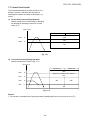
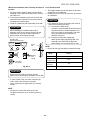
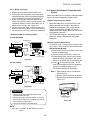
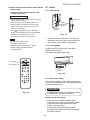
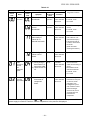
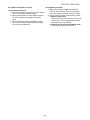
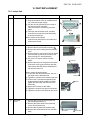
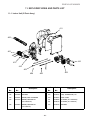
How to remove the front panel
1) Stop the operation of the air conditioner and
turn off its main power supply.
2) Pull the air inlet grille toward you to open it
and remove the air inlet grille.
Then remove the 2 screws fixing the front
panel.
3) First open the horizontal louver, and then
remove the front panel from the back body
by pulling it toward you.
Remarks
2
2
2
2 2-Screws
3
How to mount the front panel
Push the front panel back in and make sure
all hooks are locked.
2
Electrical part
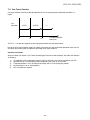
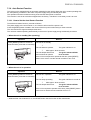
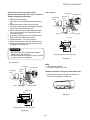
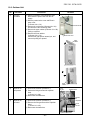
How to remove the electrical part.
1) Remove the front panel with procedure 1 .
2) Remove the screw holding the electrical part
cover.
3) Disconnect the 3 connectors 2-(3P) for the fan
motor and the connector (5P) for the louver
motor from the P.C. board assembly.
4) Pull out the TC sensor from the sensor
holder.
5) Remove the screw for the ground connection,
remove the screw for the electrical part box.
Then remove the LED and the electrical part
box from the main unit.
2 Screws
4 TC Sensor
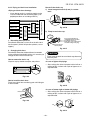
How to mount the electrical part.
1) To put back the electrical part box, lock it to
the upper hook of the back body.
2) Tighten the screws on the electrical part box.
3) Connect the 3 connectors and arrange the
wiring same as original condition and then
tighten the screw from the LED unit to the
back body.
4) Attach the TC sensor to the holder.
5) Tighten the screw for the ground connection.
6) Tighten the screw on the electrical part cover.
3
Horizontal
louver
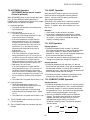
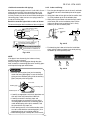
1) Remove the front panel and the electrical
part following procedure 2.
2) Remove the center shaft of the horizontal
louver from the back body.
3) Remove the left shaft from the back body.
4) Remove the horizontal louver from the back
body.
− 65 −
3
3-Connectors
5 Screws
3 Left shaft
2 Center shaft