1
FILE NO. SVM-9029
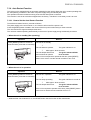
9-4. Self-Diagnosis by Remote Controller (Check Code)
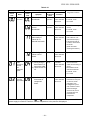
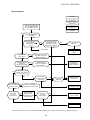
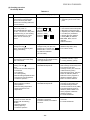
1. If the lamps are indicated as shown B to E in Table 9-3-1, execute the self-diagnosis by the remote controller.
2. When the remote controller is set to the service mode, the indoor controller diagnoses the operation condition and indicates the information of the self-diagnosis on the display of the remote controller with the check
codes. If a fault is detected, all lamps on the indoor unit will flash at 5Hz and it will beep for 10 seconds
(Beep, Beep, Beep ... ). The timer lamp usually flashes (5Hz) during self-diagnosis.
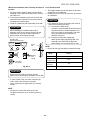
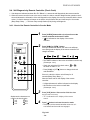
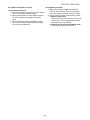
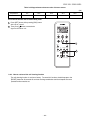
9-4-1. How to Use Remote Controller in Service Mode
1
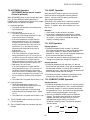
Press [CHECK] button with a tip of pencil to set the
remote controller to the service mode.
• “
” is indicated on the display of the remote
controller.
2
TOSHIBA
PR ESET
Press [ON ] or [OFF ] button
If there is no fault with a code, the indoor unit will beep
once (Beep) and the display of the remote controller will
change as follows :
FAN
•••
T E MP
ONE -T OUC H
TEMP
QUIE T
S WING
MODE
• The TIMER indicator of the indoor unit flashes continuously.
(5 times per 1 sec.)
C OMF OR T
SLEEP
• Check the unit with all 52 check codes (
as shown in Table-11-4-1.
F IX
Hi-P OWE R
ON
OF F
• Press [ON ] or [OFF
code backward.
ECO
T IME R
CLR
SLEEP
F IL T E R
)
] button to change the check
If there is a fault, the indoor unit will beep for 10
seconds (Beep, Beep, Beep...).
SET
C HK
to
Note the check code on the display of the remote
controller.
C L OC K
• 2-digits alphanumeric will be indicated on the display.
• All indicators on the indoor unit will flash.
(5 times per 1 sec.)
3
Alphanumeric characters are
used for the check codes.
is 5.
is 6.
is A.
is B.
is C.
is D.
4
Press [CLR] button. After service finish for clear
service code in memory.
• "7F" is indicated on the display of the remote
control.
Press [ ] button to release the service mode.
• The display of the remote controller returns to as it
was before service mode was engaged.
Fig. 9-4-1
− 50 −