1
MODEL 5600SE Upflow - V2.0
Master Programming Mode (Cont’d.)
6.
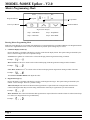
Regeneration Cycle Step Programming (1) (2) (3) (4) (5) (6) (Cont’d.)
Examples: Regeneration Cycle Step #4 - cancelled
-
Regeneration Cycle Step #4 - 8.5 minutes -
[
[
]
]
(Metric Format)
Depress the Extra Cycle Button once per display to advance through Regeneration Cycle Step Programming.
The 5600SE control has a separate brine tank fill cycle. Your desired salt setting must be calculated, using the blue (.25 gpm)
or black (.5 gpm) rate of refill (in gpm) times your timer setting. Then using one gallon of fresh water dissolving
approximately 3 lbs. of salt, calculate your refill time.
Example:
lbs. salt 3 ÷ B.L.F.C. Size = refill time in minutes, 10 lbs. salt ÷ 3 ÷ .25 = 13.3 minute refill
The Set UP and DOWN Buttons will adjust these values.
7.
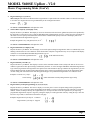
Flow Meter Size (F)
Depress the Extra Cycle Button. The next display is used to set the flowmeter size. This option setting is identified by the letter
F in the first digit. In this display set the proper amount of pulses generated by the flow meter for each gallon or liter of water
flow. This setting will not be viewed with Timeclock Regeneration Type selected.
Examples -
[
[
]
]
3/4″ Turbine Flow Meter (US Format)
3/4″ Turbine Flow Meter (Metric Format)
The Set UP and DOWN Buttons will adjust this value.
8.
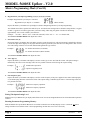
Valve Type (o)
Depress the Extra Cycle Button. This display is used to set the type of valve used with the control. This option setting is
identified by the letter o in the first digit. There are two possible selections with #1 being the required setting:
Examples -
[
[
]
]
5600SE Valve Operation.
Option Not Typically Used.
The Set UP and DOWN Buttons will adjust this value.
9.
Line Frequency (LF)
Depress the Extra Cycle Button. This display is used to set the frequency of the power applied to the control. When properly
set, all timekeeping functions will remain accurate. This option setting is identified by the letter o in the first digit. There are
two possible selections.
Examples -
[
[
]
]
50Hz Line Frequency Operation.
60Hz Line Frequency Operation.
The Set UP and DOWN Buttons will adjust this value.
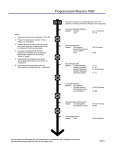
Exiting This Option Setting Level
Push the Extra Cycle Button once per display until all have been viewed. The Program Mode will be exited and normal operation
resumed.
Resetting Permanent Programming Memory Push and hold the Set Up and Down Buttons for 25 seconds or until the Time Of Day Display resets to 12:00 P.M. All option
settings will then reset to default values. Control programming will then have to be reset as necessary.
Page 4
P/N 41675
Printed in U.S.A.
Rev. A