1
INSTALLATION
INSTRUCTIONS
Accessory
Application
18” ALUMINUM WHEEL
P/N 08W18-SJC-100
2009 RIDGELINE
Publications No.
AII 40326
Issue Date
AUG 2008
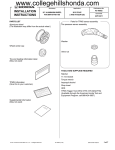
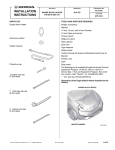
PARTS LIST
Parts for TPMS sensor assembly
Aluminum wheel
(The illustration may differ from the actual wheel.)
Tire pressure sensor assembly
Wheel center cap
(The illustration may differ from the actual center cap.)
Washer
Valve nut
Center cap emblem
TOOLS AND SUPPLIES REQUIRED
Rachet wrench
11 mm Socket
Torque wrench
Isopropyl alcohol
2
Push nuts
Shop towel
Tire pressure information label
Wheel cleaning information
(Give this information to your customer.)
© 2008 American Honda Motor Co., Inc. – All Rights Reserved.
AII 40326 (0808)
08W18-SJC-1000-91
1 of 4
SPECIFICATIONS
1.
Rim size
18 x 7 1/2 J (offset 45)
Tire size
P245/60R18 104T
Bolt hole PCD
120 (5 holes)
Tire pressure
Front
Rear
Using isopropyl alcohol on a shop towel, clean the
area where the center cap emblem will attach.
CENTER CAP
EMBLEM
PIN
220 kpa
(2.2 kgf/cm2, 32 psi)
PUSH NUT
(Note the direction
of the push nuts.)
WHEEL
CENTER CAP
220 kpa
(2.2 kgf/cm2, 32 psi)
2 PUSH
NUTS
WHEEL CENTER
CAP
INSTALLATION
Customer Information: The information in this
installation instruction is intended for use only by skilled
technicians who have the proper tools, equipment, and
training to correctly and safely add equipment to your
vehicle. These procedures should not be attempted by
“do-it-yourselfers.”
ADHESIVE
BACKING
CENTER CAP
2 PINS
EMBLEM
6912030B
NOTE:
• This aluminum wheel is designed for use on TPMS
(Tire Pressure Monitoring System) equipped vehicles.
• This aluminum wheel is equipped with a TPMS sensor.
See the Service Manual for tire replacement procedure
and TPMS sensor installation procedure.
• The illustrations of the aluminum wheels are shown for
reference purposes only.
2.
Remove the adhesive backing from the center cap
emblem.
3.
Attach the center cap emblem to the wheel center
cap by aligning two pins with the holes on the wheel
center cap. Hold the emblem firmly against the
wheel center cap with the palm of your hand for 30
seconds.
4.
Slide two push nuts to the pins on the center cap
emblem. Note the direction of the push nuts.
• Install the correct size tire.
• Follow the instructions described in the Owner’s
Manual when jacking up the vehicle and removing and
installing the wheels. Do not overtighten the wheel nuts
by placing your weight on the wrench or by using a pipe
for added leverage.
• Wheel nut torque: 127 N·m (95 lbf·ft).
• Use a tire changer to install and remove the tires as
described in the Operation Manual furnished with the
tire changer. Do not use a tire lever, as it may cause
damage to the tire and aluminum wheel.
• Do not damage the wheel center cap when installing
the emblems.
• The center cap emblem kit should be installed only if
the ambient air temperature is 15°C (60°F) or above.
• To allow the adhesive to cure, do not wash the vehicle
for 24 hours.
2 of 4
AII 40326 (0808)
© 2008 American Honda Motor Co., Inc. – All Rights Reserved.
5.
Clean the mating surface of the sensor and the
aluminum wheel.
NOTE:
• Do not reuse torqued grommets. Doing so may cause
the valve stem to leak.
WASHER
GROMMET
• Do not use pneumatic or electric tools on the valve nut.
• Tightening the nut above the specified torque can
damage the grommet.
VALVE
NUT
VALVE
STEM
SENSOR
HOUSING
SURFACE
8.
Install the tires according to the instructions in the
Service Manual.
9.
Install the wheels on the vehicle and torque the
wheel nuts to127 N·m (95 lbf·ft).
OUTSIDE
WASHER
TIRE
PRESSURE
SENSOR
WHEEL
CENTER
PROTRUSION
OF WHEEL
VALVE NUT
4 N·m (3 lbf·ft)
ALUMINUM
WHEEL
TIRE PRESSURE SENSOR HOUSING
SENSOR
SURFACE
VIEWED FROM THE INSIDE
OF THE ALUMINUM WHEEL
771211AX
6.
Install the tire pressure sensor and the washer on the
aluminum wheel, and tighten the valve nut finger tight. Make sure the pressure sensor is resting on the
wheel.
7.
While holding the tire pressure sensor to keep it from
rotating, torque the valve nut to 4 N·m (3 lbf·ft). (You
may hear a snap or pop as you torque the nut; this is
normal).
NOTE:
• Install the tire pressure sensor so that the sensor
housing surface does not protrude into the bead area
of the wheel.
© 2008 American Honda Motor Co., Inc. – All Rights Reserved.
AII 40326 (0808)
3 of 4
Perform step 10 for models not equipped with
standard 18” wheels.
10. Open the driver’s door. Using isopropyl alcohol,
thoroughly clean the area where the accessory Tire
Pressure Information Label will attach. Remove the
adhesive backing from the label, and attach it over
the standard label as shown.
TIRE PRESSURE
INFORMATION LABEL
ACCESSORY
TIRE PRESSURE
INFORMATION
LABEL
STANDARD TIRE
PRESSURE
INFORMATION
LABEL
810802AY
11. Drive the vehicle for at least 40 seconds at a speed
of 15 mph (24 km/h) or more, and all the sensor IDs
will be memorized automatically.
12. Be sure to give the wheel cleaning information to
your customer.
4 of 4
AII 40326 (0808)
© 2008 American Honda Motor Co., Inc. – All Rights Reserved.