1
SECTION 5
DISASSEMBLY
Replacing Transport and Motor Drive Belts
1. Unplug system from power source.
2. Remove the computer monitor, keyboard and mouse from the monitor stand.
3. Unplug and disconnect all of the wires from the printer.
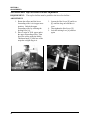
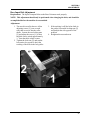
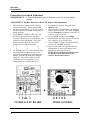
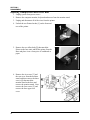
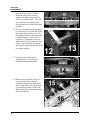
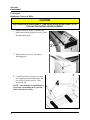
4. Unlock the two Printer latches [1] on the front and
rear of the printer.
5. Remove the two Allen bolts [2] that attach the
Printer to the base unit, and lift the printer from the
Base and place it on a clean piece of cardboard or
paper.
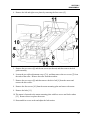
6. Remove the six screws [3] and
the rear cover from the monitor
stand, and then remove the three
screws [4] that attach the
monitor stand to the base and
remove the monitor stand. Next
remove the four screws [5] and
remove the base upper rear
cover.
52