1
0048-0838
A 3/29/12
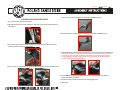
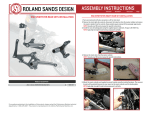
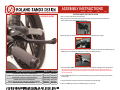
5. Remove the pivot bushing from the stock lever and install into the RSD Avenger lever.
AVENGER CLUTCH LEVER INSTALLATION
1. Turn your motorcycle off and disconnect the battery.
2. Slide rubber boot away from the clutch cable adjuster. Using a 9/16” and 1/2” wrench completely collapse the
clutch adjuster.
6. Remove the plastic anti-rattle tab from the stock clutch lever and install onto the RSD Avenger lever.
3. Using a snap ring pliers remove the retaining ring from the pivot pin located on the underside of the clutch
pivot housing. Save the retaining ring, it will be reused.
7. Install the RSD Avenger clutch lever, plastic clutch cable pivot pin, clutch cable, main pivot pin, and retaining clip.
Warning: 2007-up models are equipped with a clutch interrupt switch. Care must be taken during installation
to not damage the switch and rubber boot. Failure to install carefully and correctly may result in damage to
the switch. RSD is not responsible for damage caused by improper installation. For additional instructions
consult the service manual for your specific model.
4. Remove the pivot pin, stock clutch lever, and the plastic clutch cable pin. Save these parts, they will be reused.
8. Once the RSD Avenger clutch lever is in position adjust the clutch cable. Consult the service manual for
specific clutch adjustment procedures.
9. Reconnect the battery and make sure the clutch lever is disengaging the clutch.
%
&
%
#
$
"
!
10. Go for a ride!