1
CHAPTER 4 - ADVANCED WORKOUTS
In addition to manual and program modes, Personal Climber includes features to make workouts
more enjoyable and useful: calorie goal setting, races against a computerized pacer, a fitness test,
and custom programs. You use all of these options by pressing the correct program key.
Setting a Calorie Goal
If it’s important to you to burn a certain number of calories during your workout, the calorie goal
option is for you. With this feature, the Personal Climber sets the climbing speed so you burn the
number of calories you want in the time you have allotted. To set a calorie goal:
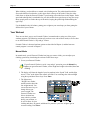
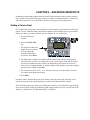
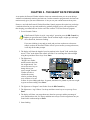
1. Get on the Personal
Climber.
2. Press the Calorie Goal
key.
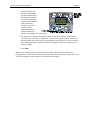
3. The console will show the
length of the last workout.
You can change this
using the up and down
arrow keys. Press Enter.
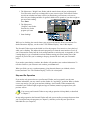
4. The light next to “Weight” now flashes, and the console shows the last weight entered.
You can use the arrow keys to change this to your correct weight. The Personal Climber
uses this to calculate how many calories you burn during your workout, so be sure to
allow for your clothing and shoes. In general, add about five pounds to your base weight to
get an accurate reading. Press Enter.
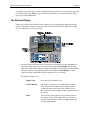
5. The console now shows “Cals = xxx.” Use the arrow keys to set the number of calories
you want to burn during the workout.
6. Press Enter.
Personal Climber calculates the speed you’ll need to reach your calorie goal in the time you’ve
entered. It ramps up to this speed, then keeps you there for the duration of the workout.
The level display shows your calorie goal. During the workout, you can adjust this by pressing the
arrow keys. Personal Climber will adjust the speed setting to match your new goal. The rest of the
display is as described in “The Workout Display” in Chapter 3.