1
RK
O
T
C
R
O Installation
R
Instructions:
P
O
T
S
C
R
K
O
R
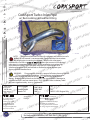
CorkSport
Pipe
PMZR 2.3 DISI Inlet
T
S
CO
R
K
O
R
Fittings
P
Ow/ Recirc & Breather
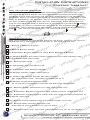
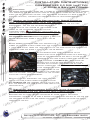
TRemove Intercooler Cover
S
C
R
K
O
1:
R
Tintercooler cover is attachedCO
SP
R
The
with two 10mm bolts
K
O
R
O
connect the the cover
to the intercooler. Use
SP which
C
RTdrive
K
O
R
your
10mm
Socket
and
3/8”
ratchet to remove
the
P
O
T
S
C
Rthe
Kin Diagram 1. Lift the front
two bolts shown
of
O
R
P
O
T
S
C
R
intercooler cover off of the intercooler
and push the
Kof
O
R
P
O
T
S
entire
cover
toward
the
firewall
and
off
C
R back of the intercooler.TLift the covertheoutcatch
K
O
R
P
O
at
the
of
S the engine bay and placePitOon
C
R
K
R
your
workbench.
CO
RT
KS
O
R
P
O
T
C
KS
OR Diagram 1
R
P
O
T
S
C
R
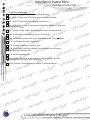
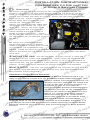
K2: Remove the Battery
O
R
Cover.
P
O
T
S on with two clips POR
C The battery box coverORisKheld
T
shown in DiagramC2, pry the clips outward byRKS
R
O
hand and lift
the front of the lid upward and
SP
CO then
K
OlidRT
R
pull S
the
forward out of the latchT
mechanism at
P
CO
R
Kback of the box.
the
O
R
P
O
C
RT
KS
O
R
P
O
T
C Terminals, HoldORKS
R
O
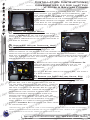
3: Disconnect
Battery
P
T
S
C
R
K
O and Battery. RT
Down Bracket
R 2
P
O
S
Diagram
C
K
A) Use
a
10mm
end
wrench
and
disconnect
the
Oone nearest the firewall),Rplace
P
OR terminal of the battery
T the battery
S
Cnegative
(the
K
O
R
P
O
negative
lead
out
of
the
way
between
the
battery
box
and
fenderwell,
T
Cpainted fender. DisconnectORtheKSpositive lead making
OR
sure not to scratch
the
the
P
T pull the leads clear of theCfront of the batteryusing
R
K
10mm end wrench
and
to
make
itS
O
R
P
O
T
S the battery.
easier to
remove
C
R
K
O
R
P
T 3b
Sthe
CO
R
K
O
R
B)
Remove
two
10mm
nuts
shown
in
Diagram
SPand lift the
COthe battery hold-down O
RT
K
O
from
bracket
R
P
S
Cplacing it on your
RT bracket free of the studs,
O
RK
P
O
T
workbench.
S
C
R
K
O
P
T place it
S
COR
Rand
K
C) Lift O
the
Battery free of the battery P
box,
O
R
T
S
C location.
R
in a safe
K
O
R
P
O
C Cover, ECU
RT
O
RKS
P
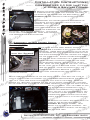
4:
Remove
the
Front
Battery
O
T ECU Plugs.
S 3b Cover, and Disconnect
C
R
K
Diagram
O
R
T
SPplace on two grooves inPthe
CObattery cover is just slid
Rmain
K
A) The front
into
O
R
O
T
Citself.
box, and it sits on two pegs
that are at
R top front
KS
Obattery
R
P
the
corners
of
the
box
However,
O
T
S
OR loom straps that RT C
are three wiring
harness
P
ORK there
S
C
K the battery box by a setSofPO
are held in placeRto
O
T
C
push lock connectors.
These are removed
R
Kby
O
R
P
O
T
compressing
their
latching
features
with
a
pair
of
C
KS
OR or straight needle nosed
R
angled
pliers and
P
O
T
S
C
R hole they are
K
O
them back through
the
P
T
S
COR pushing
attached to. It is helpful
to then pivot them out OR
RKnot reconnect
Odo
of the way so they
into the KSP
C
RT
O
R
hole. Remove
all
three
of
these
connectors
P
O
T
S 4a
C
R
K
O
shown
in diagram 4a and remove the front cover
R
Diagram
P
O
C
RT
K
ofSthe battery box.
O
R
P
O
C
RT
KS
O
R
P
O
T
C
RT
KS
O
R
P
O
T
C
KS
OR
R
P
O
T
S
C
R
K
O
R
P
O
T
C
R
KS installation, call S360-260-CORK
For help R
with
(2675)
O
P
O
T
C
R
O
RK
O
CORKSPORT
KSP
1
1Now would be a good time to take a look at your intercooler and see if you have any bent fins or debris
lodged in the intercooler fins or between the fins and the cover or tanks. removal of any and all debris
and straightening of the fins will improve the performance of the unit.