1
HSD-440P Programming
9. Regeneration Day Override (A)
Press the Program button. The next display is used to set the Regeneration Day Override Option Setting. The
Regeneration Day Override Option Setting sets the maximum amount of days that the filter can be in service
without a regeneration, regardless of water usage or the lack of a sensor signal. Regeneration begins at the
set regeneration time or at the previous regen time. An OFF setting will cancel this option with all regeneration
types except Timeclock Regeneration. A day override setting is required for timeclock regeneration systems.
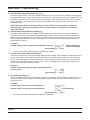
Examples: Override every 7 days
[A-----7]
Cancel setting[ A - - -OFF ]
— Use the Set Up and Set Down buttons to adjust these settings.
10.Volume Override (b)
Press the Program button. The next display viewed is used to set the maximum amount of water that can be
used before a regeneration cycle is called for. When this feature is used with delayed regeneration systems, it
is up to the programmer to determine a reserve capacity. The control will no longer keep track of the reserve
capacity. This option is typically used to bypass standard reserve or capacity calculations made by the control.
Examples:Override every 700 gallons
Override cancelled
[ b - - - 700 ]
[ b - - OFF ]
— Use the Set Up and Set Down buttons to adjust these settings.
11.US/Metric Display Format (U)
Press the Program button. This display is used to set the desired display format for the timer to use.
There are five possible settings:
The U.S. Format uses gallons for volume and gallons per minute for flow rate related data/displays with a
12 hour timekeeping format. Option settings P and 8 as well as Regeneration Types #7 and #8 will not be
displayed.
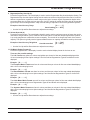
Example: [U - - - - - 1 ]
The European Metric Format uses liters for volume and liters per minute for flow rate related data/displays
with a 24 hour timekeeping format. Example: [U - - - - - 2 ]
The Standard Metric Format uses liters for volume and liters per minute for flow rate related data/displays
with a 24 hour timekeeping format. Option settings P and 8 as well as Regeneration Types #7-8 will not be
displayed.
Example: [U - - - - - 3 ]
The Cubic Meter Metric Format uses m3 for volume and liters per minute for flow rate related data/displays
with a 24 hour timekeeping format. Regeneration Types #7 and #8 will not be displayed.
Example: [U - - - - - 4 ]
The Japanese Metric Format uses liters for volume and liters per minute for flow rate related data/displays
with a 24 hour timekeeping format. Option settings P and 8 as well as Regeneration Types #7-8 will not be
displayed.
Example: [U - - - - - 5 ]
— Use the Set Up and Set Down buttons to adjust these settings.
Page 21