1
SPECIFICATIONS
SETTING / OPERATING INSTRUCTIONS
Enclosure: Indoor/Outdoor Type (NEMA 3R)
Non-corroding, UV resistant thermo plastic
featuring 3 point mounting and (5) 1/2-3/4 inch
concentric knockouts; one each side; two on
the bottom and one on the back.
Timer: Microprocessor based 24 hour clock
Power Consumption: 8VA
Battery Reserve: Type CR2032 1.5V.
Lithium
Battery Life: 3 Years Min.
Minimum Interval: 1 Minute
# of Programming Periods: 8 ON / 8 OFF
Programming Instructions
To Set or Change the Time of Day: To clear entire
memory, press key. Hold down the CLOCK key
while pressing either the HOUR or MINUTE keys.
Continue pressing until the desired number is shown.
Then simply lift finger off the CLOCK key to set.
To Set Program (ON/OFF times): Press TIMER key
once to enter into program mode. Display will show
“1 ON – – – –”. Press the HOUR key and then the
MINUTE key to select the desired first ON time. Press
TIMER key once. Display will show “1 OFF – – – –”.
Repeat previous step to select the desired first OFF
time. Repeat the entire sequence to complete up to
eight total ON/OFF times as desired. When programming is done, press the CLOCK key then the SELECT
key repeatedly until the indicator bar is above the word
“AUTO”.
To Review Program: Press TIMER key repeatedly.
When done, press CLOCK key to return to the time
of day.
INSTALLATION AND INTERNAL WIRING
Make sure the intended load is within the capacity of the Timer, see ratings on page 1.
1.Select the proper location (see Important Safety Instructions on page 1) for the proper enclosure of your
choice and install it on a vertical surface or other support, using hardware suitable for the purpose.
2.Prepare the necessary conduit runs as required by the installation layout and pull-in the specified
conductors.
3.Install timer mechanism in enclosure and follow wiring diagram on page 4, make wire connections as
shown.
4.Turn ON power and test installation, using the SELECT button on face of the Timer. Replace wiring
compartment cover,
make sure the installation is secure and raintight.
5.Set Timer, see Operating Instructions on page 3.
To Cancel/Change Part of the Program: Press
TIMER key repeatedly until the particular ON or OFF
time appears. Set new ON or OFF time. (See: To Set
Programs)
To Override the Automatic Operation one time:
Press OVR. KEY.
Display
Reset port
to cancel all
prior settings
ON/AUTO/OFF
Select Key
Indicator LED “ON”
when connected to
power source and
contacts are closed
Function Keys
To Override Automatic Operation Permanently:
Press SELECT key to move indicator bar to the desired
ON or OFF position. Note: Timer will not resume
automatic
operation until indicator bar is repositioned above
the word AUTO.
NOTE: Timer will resume automatic operation with
the next opposite setpoint.
TROUBLESHOOTING
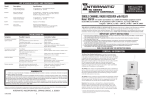
120V RELAY
240V RELAY
2
Timer will not respond
to programming
Memory is full . . . . . . . . . . . . . . . . . . . Press
Timer is ON at all times
to clear memory
Timer is in ON mode . . . . . . . . . . . . . . See above
Defective timer . . . . . . . . . . . . . . . . . . . Replace timer
Defective relay . . . . . . . . . . . . . . . . . . . Replace relay
RED
BLACK
P1103FE
WHITE
BLUE
YELLOW
BLACK
RED
BLUE
YELLOW
P1102FE
Possible Cause(s)
Corrective Action
Discharged battery . . . . . . . . . . . . . . . . Replace battery
Defective timer . . . . . . . . . . . . . . . . . . . Replace timer
Timer will not function
Timer is not in auto . . . . . . . . . . . . . . . Press SELECT key and move
as programmed
indicator bar over to AUTO
120V TIMER
240V TIMER
Symptom
Blank Display 3