1
GE MEDICAL SYSTEMS - KRETZTECHNIK
DIRECTION KTI105989, REVISION 1
3-8-3-1
DRAFT
VOLUSON® 730EXPERT (BT´05)
SERVICE MANUAL
How to enter Date and Time
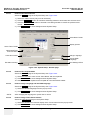
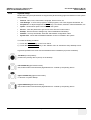
Select the GENERAL page in the System Setup see: Figure 3-50.
1.) Select the “Date Format” (only one can be active).
2.) Click the DATE/TIME button to activate a sub dialog window to enter date, time and time zone.
3.) Click the TIME FORMAT button to activate a sub dialog window to choose the preferred time
format.
4.) Click SAVE&EXIT to save Settings and exit System Setup.
select Date Format
Display options
select Time Format
select Date/Time
and Time Zone
enter Clinic Name
change Language
change EUM
Language
Exit without saving
Save Settings & Exit
Figure 3-50 System Setup - General page
3-8-3-2
How to enter Hospital Name
Select the GENERAL page in the System Setup see: Figure 3-50.
1.) Select the text box to enter a new “Clinic Name” with the keyboard.
2.) Click SAVE&EXIT to save Settings and exit System Setup.
The clinic name will be copied into the Hospital ID in the information header.
3-8-3-3
How to change Language and the EUM Language
Select the GENERAL page in the System Setup see: Figure 3-50.
1.) Select the desired language from the pop-up menu.
2.) Click SAVE&EXIT to save Settings and exit System Setup.
NOTE:
3-8-3-4
After changing the language the system has to reboot.
How to change Touch Panel Scheme
Select the USER SETTING page in the System Setup.
1.) Select the desired color scheme display of the Touch Panel from the pop-up menu.
2.) Click SAVE&EXIT to save Settings and exit System Setup.
3-42
Section 3-8 - System Configuration