1
Performing a Checkweighment in Sample Mode
You can repeatedly press the
SELECT key to view the items
listed in the Sample and Limits
modes on this page.
1. With your target weight set as described above, place your item on
the scale. . .
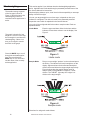
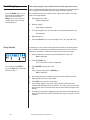
If the weight is correct, 0 is displayed and the TARGET annunciator lights. If the weight varies from the target value, upper or lower
segments may be lit and the weight will show a plus or minus
weight reading for the deviation from the target weight.
2. Repeat step 1 for all products of this weight.
Using Cutoffs in Checkweigher Application
Standard Cutoffs
If enabled, you can use the cutoff (trips) function while in the checkweigher
application. Cutoffs are enabled in a password protected menu. See the
Service Manual for instructions. Follow these steps to set up to three
outputs:
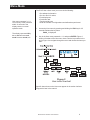
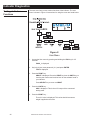
1. With the indicator powered up in normal checkweighing mode, press
and hold the F1 key until. . .
OP1 is displayed.
2. Press the PRINT key. . .
The current value for OP1 is displayed.
3. Press ENTER to accept this value
OR
Key in a value and press the ENTER key.
OP1 is displayed.
4. Scroll through all three outputs by using the left and right arrow keys.
5. Repeat steps 2 and 3 for each output.
6. Press ESC key to exit the cutoffs setup. . .
7. As you apply weight to the scale, output one will activate above its
setpoint and deactivate below its setpoint. The same is true for the other
two setpoints. When activated each output’s annunciator will light on the
display.
Target Cutoffs
18
If cutoffs are configured for Target mode in the Supervisor menu, cutoffs will
follow the limits and accept values. This means there is no additional
configuration required.
Model E1070 Indicator User’s Manual