1
Removal and Installation - Electronics Module (Main PCA and PSU)
8. Remove one T-15 screw that secures the
Electronics Module to the printer.
9. Carefully lift the Electronics Module out of
the printer.
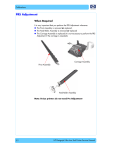
When you install the
Electronics Module make sure
it is correctly aligned with the
mounting rail.
When you finish installing or replacing this component, you must perform the
necessary Service Calibrations. To find which calibrations you must perform,
Refer to page 8-4, Service Calibration Guide to Removal and Installation.
HP Designjet T1100/T1100ps/T610 Printer Series — Service Manual
8-143