1
Gilson Company, Inc.
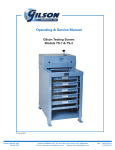
PS-3 & PS-4 Porta-Screen
Models PS-3 and PS-4
The Gilson Porta-Screen is a portable shaker for field control of construction aggregates
and for quality control in asphalt and ready-mix plants. It is designed for best separation in the
2" (50.8mm) to No. 16 (1.18mm) range. Model PS-3 holds five screen trays and a pan;
PS-4's capacity is seven trays and a pan.
I. Unpacking & Installation
The Porta-Screen, packed for shipment, weighs
between 225 and 255 lbs, depending on the model
and the number of trays packed inside. Use equipment to adequately to handle this weight safely.
7. Choose your operating site:
A. The Porta-Screen requires a properly-wired,
three-pronged, grounded receptacle with appropriate electrical current for the machine.
1. The Porta-Screen is shipped in a cardboard
carton. Before you accept the shipment, check
the carton for visible damage. Note any damage on the freight bill, and proceed with inspection.
2. Place the carton on its side so that you can
remove the staples from the bottom. Open the
bottom flaps and set the machine upright again.
Lift off the carton and set it aside until you are
sure that the Porta-Screen is in acceptable
condition.
B. Choose a well-ventilated site.
C. Set the Porta-Screen on a solid, stable floor,
platform, or other surface.
8. When you have placed the Porta-Screen in its
operating location, and each time you move it,
level the unit by adjusting the three leveling legs.
To extend a leg, place your foot on the edge of
the pad, and lift up on the machine above
the leg.
3. Check the machine for shipping damage. If you
find concealed damage after you have signed
for the Porta-Screen, call the delivering carrier
immediately for an inspection. Save all packing materials, and leave the Porta-Screen as it
is.
To contract a leg, depress the leg lock tab,
which extends from the case above each
footpad.
Use the bullseye level in the top frame crossbar
as a guide.
4. Check the tag on the electric motor of the PortaScreen to be sure that the machine is wired as
ordered.
After you have placed the Porta-Screen into
service, observe the distribution of sample
material in the trays at the end of a test. If the
material is not evely distributed, re-level the
machine.
5. Release clamping pressure on the Porta-Screen
trays by rotating the clamp levers outward and
upward 180˚.
6. Remove trays by sliding them out the front of
the machine.
9. Reinstall the trays in the Porta-Screen. Leave
them unclamped.
10. Do not plug in the Porta-Screen until you are
ready to use it.
Page 2