1
Figure 3–3 Attaching the Ground Wire............................................................................... 3-5
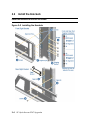
Figure 3–4 Installing the 2P Drawer ................................................................................... 3-6
Figure 3–5 Installing the IP Cables..................................................................................... 3-7
Figure 3–6 Cabling the Drawer........................................................................................... 3-8
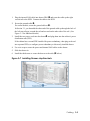
Figure 3–7 Installing Drawer-stop Brackets ....................................................................... 3-9
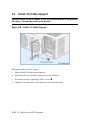
Figure 3–8 Install I/O Cable Support ................................................................................ 3-10
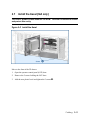
Figure 3–9 Install the Bezel .............................................................................................. 3-11
Figure 3–10 Replacing the Side Panel .............................................................................. 3-12
Figure 3–11 Setting Drawer ID......................................................................................... 3-14
Figure 3–12 ID Numbers .................................................................................................. 3-15
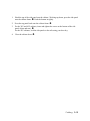
Figure 3–13 Restore Power............................................................................................... 3-16
Tables
Table 1
Table 1–1
Table 1–2
Table 1–3
Table 1–4
Table 1.5
Table 3–1
Table 3–2
Table 3–3
Table 4–1
Table 4–2
Table 4–3
Table 4–4
Table 4–5
HP AlphaServer ES47 Documentation ................................................................. x
Upgrade Steps .................................................................................................... 1-3
ES47 Tower to M2 Cabinet Upgrade Kit (3X-BA60B-AA/AF)........................ 1-4
ES47 M2 to M4 Upgrade Kit (3X-BA60B-AH) ................................................ 1-4
ES47 Rack Kit Contents (3X-BA60A-AA) ....................................................... 1-5
OCP LEDs ......................................................................................................... 1-6
Recommended Bracket Alignment for 2P Drawers ........................................... 3-5
Drawer IDs....................................................................................................... 3-15
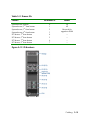
OCP LED Table............................................................................................... 3-16
Set Membership Commands .............................................................................. 4-3
Troubleshoot Vaux........................................................................................... 4-12
Troubleshoot Internal LAN.............................................................................. 4-12
Troubleshoot with the OCP.............................................................................. 4-13
Troubleshoot 48V Issues.................................................................................. 4-13
vii