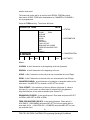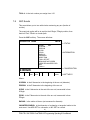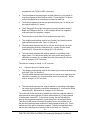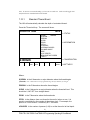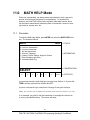
1
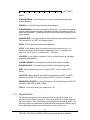
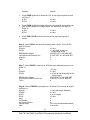
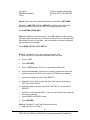
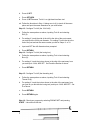
TRAK® TRL 1840 CSS &
ProtoTRAK® LX3
Programming, Operating & Care Manual
Document: P/N 21210
Version:
030700
SOUTHWESTERN INDUSTRIES, INC.
Plant location: 2615 Homestead Place
P. O. Box 9066
Rancho Dominguez, CA 90220-5610
Compton, CA 90224-9066
Phn: (310) 608-4422 ¡ Fax: (310) 764-2668
Copyright 2000, Southwestern Industries, Inc. All rights are reserved. No part of this publication
may be reproduced, stored in a retrieval system, or transmitted, in any form or by any means,
mechanical, photocopying, recording or otherwise, without the prior written permission of
Southwestern Industries, Inc.
While every effort has been made to include all the information required for the purposes of this
guide, Southwestern Industries, Inc. assumes no responsibility for inaccuracies or omission and
accepts no liability for damages resulting from the use of the information contained in this guide.
All brand names and products are trademarks or registered trademarks of their respective
holders.
Southwestern Industries, Inc.
2615 Homestead Place
Rancho Dominguez, CA 90220
Phn 310/608-4422 Fax 310/764-2668
Service Department
Phn 800/367-3165 Fax 310/886-8029
| i
_______________________
Section
____________
Section
____________
2.1
2.2
2.3
2.4
2.5
1.0
Introduction
2.0
Safety, Specifications & Lubrication
Safety Publications
Danger, Warning, Caution and Note Labels
and Notices As Used In This Manual
Safety Precautions
Specifications
Lubrication
Section
____________
3.1
3.2
3.3
3.4
3.5
3.6
3.7
TABLE OF CONTENTS
3.0
1
3
4
6
8
9
Description
LX3 Keyboard
LX3 Soft Keys
LX3 CRT Screen
LX3 Pendant Back Panel
TRL Switch Panel
LX3 Computer Cabinet
The TRL 1840 CSS Lathe
_________________________________________________________________
Southwestern Industries, Inc.
TRAK TRL 1840 CSS & ProtoTRAK LX3 Programming, Operating & Care Manual
11
12
12
12
12
13
13
ii |
Section
____________
4.1
4.2
4.3
4.4
4.5
4.6
4.7
4.8
4.9
4.10
____________
Section
TRAK TRL 1840 CSS Machine Operation
Switching the TRAK TRL On/Off
Switching the ProtoTRAK LX3 On/Off
Spindle Forward/Off/Reverse
Changing Spindle Speeds
Using the Electronic Handwheels
Using the Jog Stick
Emergency Stop
Tool Pedestal
Tail Stock
Coolant System
Section
5.1
5.2
5.3
5.4
5.5
5.6
5.7
5.8
5.9
5.10
5.11
4.0
5.0
19
19
20
20
21
21
21
22
22
22
Definitions, Terms & Concepts
ProtoTRAK LX3 Axis Conventions
Absolute & Incremental Reference
Referenced and Non-Referenced Data
Tool Tip Radius Compensation
Tool Offset
Connective Events
Conrad
Chamfer
Absolute, Tool, and Program References
Feedrate Conventions
Spindle Speed Conventions
23
23
24
24
25
26
26
27
28
28
29
| iii
____________
6.1
6.2
6.3
6.4
6.5
6.6
6.7
6.8
6.9
6.10
6.11
6.12
6.13
6.14
6.15
6.16
6.17
DRO Mode
Enter DRO Mode
Clear Entry
Inch to MM or MM to Inch
Reset One Axis
Preset
Reset Absolute Reference
Preset Absolute Reference
Recall Absolute Position of All Axes
Recall Absolute Position of One Axis
Change from Fine to Coarse Handwheel Resolution & Feed
Tool Number
Power Feed
Manual Go To
Return to Home
Do One Events
Tool Tip Radius Compensation in DRO Mode
Changing Spindle Speeds
Section
____________
7.1
7.2
7.3
7.4
7.5
7.6
7.7
7.8
7.9
7.10
7.11
7.12
7.13
7.14
7.15
6.0
7.0
31
31
32
32
32
32
32
32
33
33
33
33
34
34
35
37
37
Program Mode
Enter Program Mode & Assign a Part Number
Incremental Reference Position
Programming Strategy and Procedures
Position Events
Drill Events
Bore Events
Turn Events
Arc Events
Cycle Events
Thread Event
Repeat Events
Aborting a Partially Programmed Event
Editing Data While Programming an Event
Finish Cuts
Sample Program
39
40
40
42
43
44
45
46
47
51
54
55
55
55
56
iv |
Section
____________
8.1
8.2
8.3
8.4
8.5
____________
9.0
____________
10.0
63
63
65
65
65
Set Up Mode
Enter Set Up Mode
Tool Set Up
A Practical Technique for Accurate Tool Setting
Tool Set Up When Adding or Changing Tools
Setting Home Position
Draw Part Graphics
Tool Path Graphics
Limiting Spindle Speed
Saving Tool Data
Tool Groups
Service Codes
Section
10.1
10.2
10.3
10.4
10.5
10.6
10.7
10.8
10.9
10.10
Edit Mode
Enter Edit Mode
Recall and Data Correction
Adding an Event
Deleting an Event
Erasing a Program
Section
9.1
9.2
9.3
9.4
9.5
9.6
9.7
9.8
9.9
9.10
9.11
8.0
67
67
70
70
70
71
71
72
72
72
75
Program Run Mode
Enter Run Mode
Starting to Run
Program Run
Program Run Messages
TRAKING
Stop
Feedrate and Spindle Speed Override
Threading Exceptions
Data Errors
Fault Messages
77
77
78
80
80
81
81
81
81
82
| v
Section
____________
11.1
11.2
11.3
____________
12.5
12.6
Math Help Mode
Procedure
Calculator-Math and Trig Procedures
Math Help Types
Section
12.1
12.2
12.3
12.4
11.0
12.0
83
85
86
Program In/Out Mode
Cautions About Storing & Retrieving Programs
Program Formats and Labeling
Enter Program In/Out Mode
Storing & Retrieving Programs from the ProtoTRAK LX3
Built-In Floppy Disk Drive
Backing Up Your LX3 Programs
Storing and Retrieving Programs through the RS232 Port Including CAD/CAM Generated Programs
89
90
90
91
92
92
1.0 Introduction
Congratulations! Your TRAK TRL 1840 CSS is a unique, one-of-a-kind, machine tool
that combines the simplicity of manual machining with the contouring capability of CNC
turning centers.
The TRAK TRL 1840 CSS has been designed to maximize the interplay between
manual and CNC machining.
It acts like an advanced digital readout in manual machine operation.
It acts like a turning center when programmed to do complex contouring jobs.
And it acts with the best qualities of each when you manually feed programmed
contours with the powerful TRAKing feature.
Section 2 of this manual describes the necessary SAFETY PRECAUTIONS
which must be learned and followed by each operator.
Section 3 of this manual provides a brief description of the TRAK TRL 1840 CSS.
Section 4 of this manual describes the operation of the lathe.
Section 5 defines some terms and concepts useful in learning to program and
operate the ProtoTRAK LX3.
The ProtoTRAK LX3 is organized into seven Modes of operation which are described in
the following sections.
Section 6 DRO: Digital Readout, and powerfeed, and Do One Programs
Section 7 PROGRAM: All input in simple machinist language.
Section 8 EDIT: Program review and edit.
Section 9 SET UP: Tool information and part graphics.
Section 10 RUN: Machining the part.
Section 11 MATH HELP: Sophisticated routines to automatically calculate
points of intersection, tangency, etc.
Section 12 PROGRAM IN/OUT: CAD/CAM interface, and program storage and
retrieval.
1
Southwestern Industries, Inc.
TRAK TRL 1840 CSS & ProtoTRAK LX3 Programming Operating & Care Manual
2
Southwestern Industries, Inc.
TRAK TRL 1840 CSS & ProtoTRAK LX3 Programming Operating & Care Manual
2.0 Safety Specifications & Lubrication
The safe operation of the TRAK TRL 1840 CSS depends on its proper use and
the precautions taken by each operator.
2.1
Read and study this TRAK TRL 1840 CSS & ProtoTRAK LX3
Programming, Operating, and Care Manual. Be certain that every operator
understands the operation and safety requirements of this machine
before its use.
Always wear safety glasses and safety shoes.
Always stop the spindle and check to ensure the CNC control is in the
stop mode before changing or adjusting the tool or workpiece.
Never wear gloves, rings, watches, long sleeves, neckties, jewelry, or
other loose items when operating, or around the machine.
Use adequate point of operation safeguarding. It is the responsibility of
the employer to provide and ensure point of operation safeguarding per
ANSI B11.6-1984.
Safety Publications
Refer to and study the following publications for assistance in enhancing the
safe use of this machine:
Safety Requirements For The Construction, Care And Use of Lathes
(ANSI B11.6-1984). Available from the American National Standards
Institute, 11 West 42nd Street, New York, NY 10036.
Concepts And Techniques Of Machine Safeguarding (OSHA Publication
Number 3067). Available from The Publication Office - O.S.H.A., U.S.
Department of Labor, 200 Constitution Avenue, NW, Washington, DC
20210.
All other regulations specific to the State in which the machine is installed.
3
Southwestern Industries, Inc.
TRAK TRL 1840 CSS & ProtoTRAK LX3 Programming Operating & Care Manual
2.2
Danger, Warning, Caution, and Note Labels and Notices As
Used In This Manual
DANGER - Immediate hazards which will result in severe personal injury or
death. Danger labels on the machine are red in color.
WARNING - Hazards or unsafe practices which could result in severe
personal injury and/or damage to the equipment. Warning labels on the
machine are gold in color.
CAUTION - Hazards or unsafe practices which could result in minor
personal injury or equipment/product damage. Caution labels on the
machine are gold in color.
NOTE - Call attention to specific issues requiring special attention or
understanding.
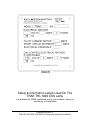
115 Volts
230 Volts
i00187
i00188
i00129
Safety & Information Labels Used On The
TRAK TRL 1840 CSS Lathe
It is forbidden by OSHA regulations and by law to deface, destroy or
remove any of these labels
4
Southwestern Industries, Inc.
TRAK TRL 1840 CSS & ProtoTRAK LX3 Programming Operating & Care Manual
I00470
Safety & Information Labels Used On The
TRAK TRL 1840 CSS Lathe
It is forbidden by OSHA regulations and by law to deface, destroy or
remove any of these labels
5
Southwestern Industries, Inc.
TRAK TRL 1840 CSS & ProtoTRAK LX3 Programming Operating & Care Manual
2.3
Safety Precautions
WARNING!
Use only chucks which are rated to the maximum RPM of the lathe.
1.
Do not operate this machine before the TRAK TRL 1840 CSS &
ProtoTRAK LX3 Programming, Operating and Care Manual have been
studied and understood.
2.
Do not run this machine without knowing the function of every control
key, button, knob, or handle. Ask your supervisor or a qualified
instructor for help when needed.
3.
Protect your eyes. Wear approved safety glasses (with side shields) at
all times.
4.
Don't get caught in moving parts. Before operating this machine,
remove all jewelry, including watches and rings, neckties, and any
loose-fitting clothing.
5.
Keep your hair away from moving parts. Wear adequate safety head
gear.
6.
Protect your feet. Wear safety shoes with oil-resistant, anti-skid soles,
and steel toes.
7.
Take off gloves before you start the machine. Gloves are easily
caught in moving parts.
8.
Remove all tools (wrenches, chuck keys, etc.) from the machine before
you start. Loose items can become dangerous flying projectiles.
9.
Never operate any machine tool after consuming alcoholic beverages,
or taking strong medications, or while using non-prescription drugs.
10.
Protect your hands. Stop the machine spindle and ensure that the
CNC control is in the STOP mode:
Before changing tools
Before changing parts
Before you clear away the chips, oil or coolant. Always use a chip
scraper or brush
Before you make an adjustment to the part, chuck, coolant nozzle
or take measurements
Before you open safeguards (protective shields, etc.). Never reach
for the part, tool, or fixture around a safeguard.
11.
Protect your eyes and the machine as well. Don't use a compressed
air hose to remove the chips or clean the machine (oil, coolant, etc.).
6
Southwestern Industries, Inc.
TRAK TRL 1840 CSS & ProtoTRAK LX3 Programming Operating & Care Manual
2.4
12.
Stop and disconnect the power to the machine before you change
belts, pulley, gears, etc.
13.
Keep work area well lighted. Ask for additional light if needed.
14.
Do not lean on the machine while it is running.
15.
Prevent slippage. Keep the work area dry and clean. Remove the
chips, oil, coolant and obstacles of any kind around the machine.
16.
Avoid getting pinched in places where the spindle, carriage, crossslide or sliding door create "pinch points" while in motion.
17.
Securely clamp and properly locate the workpiece in the chuck or in
the fixture. Use proper tool holding equipment.
18.
Use correct cutting parameters (speed, feed, and depth of cut) in order
to prevent tool breakage.
19.
Use proper cutting tools for the job.
20.
Prevent damage to the workpiece or the cutting tool. Never start the
machine (including the rotation of the spindle) if the tool is in contact
with the part.
21.
Don't use dull or damaged cutting tools. They break easily and may
become airborne. Inspect the sharpness of the edges, and the
integrity of cutting tools and their holders.
22.
Large overhangs on cutting tools when not required result in accidents
and damaged parts.
23.
Prevent fires. When machining certain materials (magnesium, etc.) the
chips and dust are highly flammable. Obtain special instruction from
your supervisor before machining these materials.
24.
Prevent fires. Keep flammable materials and fluids away from the
machine and hot, flying chips.
25.
Never change gears when the spindle is rotating.
26.
Do not rotate the spindle by hand unless the Red Emergency Stop
button is pressed.
Specifications
TRL 1840 CSS
7
Southwestern Industries, Inc.
TRAK TRL 1840 CSS & ProtoTRAK LX3 Programming Operating & Care Manual
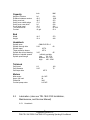
Capacity
Inch
MM
Height of Centers
Distance between centers
Swing over bed
Swing over saddle wings
Swing over cross-slide
Cross-slide travel
Tool section max
Coolant
9.0
40.2
18.5
17.0
9.0
13.0
1x1
13 gal.
230
1000
470
430
230
330
25 x 25
50 L
14.5
13.4
370
340
Bed
Width
Height
Headstock
Spindle nose
Spindle through hole
Spindle taper
Taper reduction sleeve
Spindle dia at front bearing
Number of spindle speeds
Spindle speed range
CAMLOCK D1-6
2.36
60
MT-6
MT-4
3.35
85
infinitely variable
Low
50 - 270
Medium 150 - 850
High
450 - 2500
Tailstock
Quill travel
Quill diameter
Quill taper hole
6.3
2.95
160
75
MT-5
Motors
Main motor
Amps, full load
Phase/Hz
Coolant pump motor
2.5
10.0 HP
36
3/60
0.25 HP
Lubrication (also see TRL 1840 CSS Installation,
Maintenance, and Service Manual)
2.5.1
Headstock
8
Southwestern Industries, Inc.
TRAK TRL 1840 CSS & ProtoTRAK LX3 Programming Operating & Care Manual
Check the site glass on the headstock periodically each day to make sure oil is
being pumped to the headstock. The level of the oil in the headstock oil
reservoir can be checked by the sight level located under the spindle cover. If
low, fill to the sight level with Mobil DTE 24 or equivalent oil. The headstock oil
reservoir holds approximately 3 1/2 gallons.
Depending on operating conditions, usually about once a year, the headstock
should be drained and wiped out before adding new oil. A drain valve is located
under the spindle cover. Refill the headstock with oil to the site level.
Note: The headstock oil pump runs when power is turned on. The emergency stop
button will shut the pump down when it is pressed. We recommend pressing the
E-Stop at the end of each working day
2.5.2
Carriage, Cross-Slide, and Ballscrews
The auto lube system provides centralized automatic lubrication for the cross
slide, saddle and ballscrews. The lube pumps 2-liter reservoir is serviced with
S.A.E. 30 weight oil. The pump is factory set to pump for 15 seconds every 60
minutes of spindle time. There is an internal memory on the pump so that the
pump will not reset every time the spindle is turned off.
The pump output can be regulated electronically to control the pause time
between pumping cycles, and the duration of the pumping cycle. The following
describes the buttons used to program the lube pump. In order to modify any of
the settings the spindle must be on.
INT (Interval) – this button programs the interval between pumping cycles. Each
press of the button increases the interval by one minute.
DIS (Discharge) – this button programs the amount of time the pump will
discharge each pumping cycle. Each press of the button increases the
discharge time by one minute.
FEED – this button is used to manually feed the ways, ballscrews, and yokes.
RST – this button tells the pump to discharge for the time programmed.
2.5.3
Tail Stock
9
Southwestern Industries, Inc.
TRAK TRL 1840 CSS & ProtoTRAK LX3 Programming Operating & Care Manual
Weekly oil the tail stock through its oilers with a high grade S.A.E. 30 oil.
10
Southwestern Industries, Inc.
TRAK TRL 1840 CSS & ProtoTRAK LX3 Programming Operating & Care Manual
3.0 DESCRIPTION
3.1
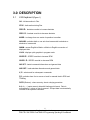
LX3 Keyboard (Figure 1)
GO: initiates motion in Run
STOP: halts motion during Run
FEED Ï: feedrate override to increase feedrate
FEED Ð : feedrate override to decrease feedrate
MODE: to change from one mode of operation to another
INC/ABS: switches both or one axis from incremental to absolute or
absolute to incremental
IN/MM: causes English to Metric or Metric to English conversion of
displayed data
LOOK: displays quick graphics in program mode
SPEED Ï: SPEED override to increase RPM
SPEED Ð : SPEED override to decrease RPM
INC SET: loads incremental dimensions and general data
ABS SET: loads absolute dimensions and general data
X, Z: selects axis for subsequent commands
F/C: switches from fine to coarse or back for manual feed in DRO and
TRAKing
RSTR (Restore): clears an entry, aborts a keying procedure
0-9, +/-, . : inputs numeric data with floating point format. Data is
automatically + unless +/- key is pressed. All input data is automatically
rounded to the system's resolution.
11
Southwestern Industries, Inc.
TRAK TRL 1840 CSS & ProtoTRAK LX3 Programming Operating & Care Manual
3.2
LX3 Soft Keys
Beneath the CRT screen are 8 keys that are not labeled. These keys are
called software programmable or soft keys. A description of the function or
use of each of these keys will be shown at the bottom of the CRT screen
directly above each key. If, at any time, there is no description above a key,
that key will not operate.
3.3
LX3 CRT Screen (Figure 1)
The information displayed on the CRT screen is nearly always divided into 4
sections or areas.
The top line, or status line, shows the system's current status. This includes
the mode, inch or mm measurement, part numbers, servo on or off status as
applicable, and fine/coarse handwheel resolution. The RPM of the spindle will
also be shown here.
Beneath the status line, and filling most of the screen, is the information
area. Position data, program data, graphics, etc. are shown here.
Beneath the information area is a single "conversation" line. All instructions,
prompts, messages, etc. that the control needs to communicate to you are
shown on this line.
At the bottom of the CRT are boxes describing the current function or use of
each soft key located under the box.
3.4
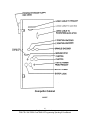
LX3 Pendant Back Panel (Figure 2)
See Figure 2 for a description of the fuses, switches, and connectors on the
pendant back panel.
3.5
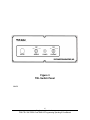
TRL Switch Panel (Figure 3)
The Switch Panel, located on the door, contains the E-Stop button, the spindle
on/off switch, and the coolant on/off/auto switch.
12
Southwestern Industries, Inc.
TRAK TRL 1840 CSS & ProtoTRAK LX3 Programming Operating & Care Manual
3.6
LX3 Computer Cabinet (Figure 4)
The computer cabinet, located inside the main electrical cabinet, contains the
ProtoTRAK LX3 computer systems. See Figure 4 for a description of each
connector.
3.7
The TRL 1840 CSS Lathe (Figure 5)
i00457
Figure 1
LX3 Pendant
13
Southwestern Industries, Inc.
TRAK TRL 1840 CSS & ProtoTRAK LX3 Programming Operating & Care Manual
Figure 2
LX3 Pendant Back
i00005
14
Southwestern Industries, Inc.
TRAK TRL 1840 CSS & ProtoTRAK LX3 Programming Operating & Care Manual
Figure 3
TRL Switch Panel
i00453
15
Southwestern Industries, Inc.
TRAK TRL 1840 CSS & ProtoTRAK LX3 Programming Operating & Care Manual
Figure 4
Computer Cabinet
i00547
16
Southwestern Industries, Inc.
TRAK TRL 1840 CSS & ProtoTRAK LX3 Programming Operating & Care Manual
Figure 5
i00454
Item No.
1
2
3
4
5
6
7
8
9
10
11
12
13
14
15
16
17
18
19
20
Description
Computer Cabinet
Headstock
Chuck
Door
Control
Viewing window
Tailstock
Carriage
Tool post
Crosslide
Z-axis motor
Lube pump
Chip pan
Leveling pad
Base
Bed
Coolant pump
X-axis motor
Apron
Door switch panel
17
Southwestern Industries, Inc.
TRAK TRL 1840 CSS & ProtoTRAK LX3 Programming Operating & Care Manual
18
Southwestern Industries, Inc.
TRAK TRL 1840 CSS & ProtoTRAK LX3 Programming Operating & Care Manual
4.0 TRAK TRL 1840 CSS Machine Operation
4.1
Switching the TRAK TRL 1840 CSS On/Off
Power to the TRAK TRL 1840 CSS is turned on through the main on/off switch
located on the back of the main electrical cabinet.
4.2
Switching the ProtoTRAK LX3 On/Off
To turn the ProtoTRAK LX3 on, move the toggle switch on the display back
panel to the Up position.
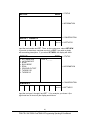
The display will read "Loading LX3", indicating that the system's operating
software is being loaded from its floppy disk to its internal memory. This
takes about one minute. When complete, the screen will show:
SELECT MODE
DRO
PROG
EDIT
SETUP
RUN
MATH
PROG
HELP
IN/OUT
Select the mode of operation by pressing the soft key beneath the labeled
box.
It is recommended that the system be switched on only once each day, and
then turned off at night.
19
Southwestern Industries, Inc.
TRAK TRL 1840 CSS & ProtoTRAK LX3 Programming Operating & Care Manual
If the system is not used (either by a keystroke or by counting) for 20
continuous minutes, the CRT will turn itself off. Press any key to bring the
screen back to its previous display. The key you press will be ignored except
to turn the screen on.
Note: When you turn the ProtoTRAK LX3 off, always wait a few seconds before turning it
back on.
4.3
Spindle Forward/Off/Reverse (Figure 3)
The Spindle Forward/Off/Reverse switch is located on the right side of the Estop on the door.
Turn it to the right to activate the spindle in the forward (spindle rotates counterclockwise) direction.
Turn it to the left to activate the spindle in the reverse (spindle rotates
clockwise) direction.
Off is the center.
4.4
Changing Spindle Speeds
WARNING
DO NOT SHIFT HEADSTOCK GEARS WHILE THE SPINDLE OR
MOTOR IS RUNNING.
The following table is located on the TRL 1840 CSS headstock label
plate:
Speed
Range
RPM
H
M
450 - 2500 150 - 850
L
50 -270
To select the proper spindle R.P.M., locate the speed you wish, shift the lever
to the appropriate position.
Note: You may have to rotate the spindle a little by hand to help engage the gears. Only do
this with the Emergency Stop switch pushed in.
4.5
Using the Electronic Handwheels
20
Southwestern Industries, Inc.
TRAK TRL 1840 CSS & ProtoTRAK LX3 Programming Operating & Care Manual
The X (cross-slide), and Z (carriage) handwheels are located on the apron.
They are electronic, that is they are not mechanically connected to the
machine, but rather create electronic signals to command the servo motors
to drive the ball screws which, in turn, drive the carriage and cross-slide.
The handwheels will not work unless the ProtoTRAK LX3 is turned on, and in
the DRO mode, or in the Set Up mode, or in the TRAKing feature in the Run
mode.
Counterclockwise motion on the Z handwheel moves the carriage left 0.40"
per revolution in .002" increments in coarse feed, or .10" per revolution in
.0005" increments in fine feed. See Section 6.10 to switch from coarse to
fine and back.
Clockwise motion on the X handwheel moves the cross-slide away from you
.10" per revolution in .0005" increments (on diameter) in coarse feed, or .02"
per revolution in .0001" increments in fine feed. See Section 6.10 to switch
from coarse to fine and back.
4.6
Using the Jog Stick
The jog stick is located on the carriage apron in between the X and Z
handwheel. The jog stick will operate only if the ProtoTRAK LX3 is turned
on, and in the DRO mode or Set-Up mode, or in the TRAKing feature in the
Run mode.
Move the stick left or right to move the carriage left or right at 150 inches per
minute. Move the stick up or down to move the cross-slide in or out at 100
inches per minute of diameter, or 50 inches per minute of actual cross-slide
speed.
4.7
Emergency Stop
There is one red Emergency Stop (E-STOP) mushroom button. It is
located on the door to the left of the spindle on/off switch. Press the button to
shut off power to the spindle motor, carriage and cross-slide drive motors and
headstock oil pump. Rotate the switch to turn it off only when the emergency
condition has been rectified.
21
Southwestern Industries, Inc.
TRAK TRL 1840 CSS & ProtoTRAK LX3 Programming Operating & Care Manual
4.8
Tool Pedestal
The tool pedestal is held to the top of the cross-slide with four bolts with T nuts.
A T-slot is machined on top of the pedestal that will accommodate most
common tool posts.
4.9
Tail Stock
The tail stock may be positioned along its V-way by releasing the lock with
the lock handle. The tail stock can also be locked with the nut located on the
operator side of the tail stock. The quill may be locked with the quill lock at any
position along its travel. The tail stock may be centered with the spindle through
the set screw on the tail stock base.
4.10 Coolant System
The coolant piping system is mounted to the rear of the saddle with two
screws. A 1/2 inch diameter hose connects the piping to the pump and
reservoir located in the right pedestal base (see Figure 5). Access is through
the right side through a back access panel. The reservoir holds 13 gallons of
coolant and may be filled through the access, or by pouring the coolant into the
chip pan.
The coolant pump (and therefore the flow) may be turned on, off or on
automatic with a switch located on the right side of the door. A nozzle on the
piping allows you to regulate the flow. The automatic feature turns the coolant
on in Run mode automatically when the go button is pushed, or when in
TRAKing mode. In DRO mode the auto coolant comes on whenever the spindle
is turned on.
22
Southwestern Industries, Inc.
TRAK TRL 1840 CSS & ProtoTRAK LX3 Programming Operating & Care Manual
5.0 Definitions, Terms & Concepts
5.1
ProtoTRAK LX3 Axis Conventions
Z Axis: positive Z axis motion is defined as the carriage moving to the right
when facing the lathe. Measurement away from the chuck is positive on the
workpiece.
X Axis: positive X axis motion is defined as the cross-slide moving toward
you. Measurement away from the part centerline and toward you is positive
on the workpiece. All X motion is displayed as diameter (not radius)
dimensions.
5.2
Absolute & Incremental Reference
The ProtoTRAK LX3 may be programmed and operated in either (or in a
combination) of absolute or incremental dimensions. An absolute reference
from which all absolute dimensions are measured (in DRO, and program
operation) can be set at any point on or even off the workpiece.
To help understand the difference between absolute and incremental
position, consider the following example:
i00222
23
Southwestern Industries, Inc.
TRAK TRL 1840 CSS & ProtoTRAK LX3 Programming Operating & Care Manual
5.3
Referenced and Non-Referenced Data
Data is always loaded into the ProtoTRAK LX3 by using the INC SET or
ABS SET key. X, Z positions are referenced data. In entering any X, or Z
position data, you must note whether it is an incremental or absolute
dimension and enter it accordingly. All other information (non-referenced
data), such as tool offset, feedrate, etc. is not a position and may,
therefore, be loaded with either the INC SET or ABS SET key. This manual
uses the term SET when either INC SET or ABS SET may be used
interchangeably.
5.4
Tool Tip Radius Compensation
When turning along the side of a part (constant X), or along the face
(constant Z), the tool tip radius is not particularly important. However,
as soon as you begin to machine a taper or contour, the tool tip radius has
a substantial impact.
Consider the drawing below. If you had an infinitely sharp tool (no tool
tip radius), assume its point was at X0, Z0. Another tool with a tool tip
radius of R1 and another of R2 are also shown. Note that all three
positioned as shown have the same X contact (X0, X1, X2) and if moved
sideways, would cut the same diameter. Likewise, they all have the same Z
contact, and if moved in would cut the same face length. However, if moved
on a 45 degree taper (or any other angle) so that the cutting point was in the
middle of the radius, the three tools would cut or contact along much
different lines.
i00217
24
Southwestern Industries, Inc.
TRAK TRL 1840 CSS & ProtoTRAK LX3 Programming Operating & Care Manual
5.5
Tool Offset
When you define the shape of the part to be turned, you must also specify
where the tool should be relative to the part. This is done by looking
along the direction of the tool motion and declaring whether the tool is to
the right or left of the part.
Examples of tool left are:
i00218
Examples of tool right are:
i00219
Tool center may be programmed for special circumstances where you wish
to ignore the effects of tool geometry and radius.
25
Southwestern Industries, Inc.
TRAK TRL 1840 CSS & ProtoTRAK LX3 Programming Operating & Care Manual
5.6
Connective Events
Connective events occur between two turning events (either Turn or Arc)
when the X and Z ending points of the first event are in the same location as
the X and Z starting points of the next event. In addition, the tool offset
and tool number of both events must be the same.
5.7
Conrad
Conrad is a unique feature of the ProtoTRAK that allows you to program a
tangentially connecting radius between connective events.
For the figure below, you simply program a Turn event from X1, Z1 to X2,
Z2 with tool left offset, and another Turn event from X2, Z2 to X3, Z3 also
with tool left offset. During the programming of the first Turn event, the
system will prompt for Conrad at which time you input the numerical value of
the tangentially connecting radius (r=k). The system will calculate the
tangent points T1 and T2, and direct the tool cutter to move continuously
from X1, Z1 through T1, r=k, T2 to X3, Z3.
i00238
For the figure below, you program an Arc event from X1, Z1 to X2, Z2 with
tool offset left, and another Arc event from X2, Z2 to X3, Z3 also with tool
offset left. During the programming of the first Arc event, the system will
prompt for Conrad at which time you input the numerical value of the
tangentially connecting radius r=k3. The system will calculate the tangent
points T1 and T2 and direct the tool cutter to move continuously from X1, Z1
through T1, r=k3, T2 to X3, Z3.
26
Southwestern Industries, Inc.
TRAK TRL 1840 CSS & ProtoTRAK LX3 Programming Operating & Care Manual
k1
k2
i00239
k3
Note: Conrad must always be the same as or larger than the tool radius for inside
corners. If conrad is less than the tool radius, and an inside corner is machined,
the ProtoTRAK LX3 will ignore the Conrad.
Note: If you program an arc using Conrad rather than an ARC, never use a
Conrad whose radius is as large or larger than the length of either line connected by
the Conrad plus the tool tip radius. In the figure below, R plus the tool nose radius
must be less than the programmed line ab or bc; otherwise, program the arc with
an ARC Event.
i00220
5.8
Chamfer
The ProtoTRAK LX3 also allows for easy chamfer input. A chamfer may be
programmed between two turn events, two arcs, or a turn and an arc.
i00221
In both cases above a chamfer programmed with dimension b will cut a
chamfer along line c.
27
Southwestern Industries, Inc.
TRAK TRL 1840 CSS & ProtoTRAK LX3 Programming Operating & Care Manual
5.9
Absolute, Tool, and Program References
When you operate a lathe, what you are interested in is where your tool is
relative to the workpiece. However, what the LX3 monitors is how far the
carriage and cross-slide move. This creates two problems.
The first has to do with using more than one tool. When you change tools,
the tip on one will, most likely, not be in the same position relative to the
part as the previous tool. Just changing the tool doesn't move the carriage
or cross-slide, so the LX3 doesn't know that the new tip isn't where the other
was. Obviously, what's needed is for you to tell the LX3 what the
differences (or offsets) are from tool to tool (this is done in the Set Up
Mode), and to always tell the control which tool you are using at any given
time.
The second problem has to do with establishing the machine and part
reference. When you turn the TRAK TRL and ProtoTRAK LX3 on, they have
no idea where the carriage, cross-slide, or tool tip are. They only know how
far they have moved since the last input reference (all references are lost
when the control is turned off). Also, if you are going to turn a part, the
control has no idea where you have chucked it. Is it sticking out of the
chuck a little? A lot? What you need to do is select a tool--and always tell
the control which one--and tell the LX3 where that tool is, relative to the
workpiece.
In general, most programs and parts will have their centerline as the
absolute zero reference in the X axis. For the Z axis, two handy references
are the end of the part (generally after it has been faced), or any face of the
chuck.
5.10
Feedrate Conventions
Carriage feedrate (Z motion) and cross slide feedrate (X motion) may, in most
cases, be input directly as inches per minute (ipm) or as inches per revolution
(ipr) of the spindle. The relationship between these is:
ipm = ipr x RPM
or
ipr = ipm/RPM
Math Help 30 will calculate these values for you.
All feedrates must be programmed between 0.100 and 100 ipm (2.5 - 2500
mm/min) or between 0.001 and 0.099 ipr (0.025 and 2.5 mm/rev)
5.11
Spindle Speed Conventions
28
Southwestern Industries, Inc.
TRAK TRL 1840 CSS & ProtoTRAK LX3 Programming Operating & Care Manual
For programmed parts, spindle speed may be set as direct RPM or as a
surface speed in surface feet per minute (SFM) or surface meters per minute
(SMM).
The relationship between RPM and SFM is
SFM = RPM x Diameter X π
12
or
SFM = 0.26 x RPM x Diameter
(in inches)
For example, when you are cutting at a diameter of 3 inches and a RPM of 600,
then your SFM would be 0.26 x 600 x 3 = 468. Math help 31 will calculate RPM
or SFM for you.
Surface speed is the relative speed between the workpiece and the tool during
a cut. That is, it is the speed that the workpiece passes across the tool.
Notice in the formula above that if you wanted the SFM to be constant during
the cut you would have to change RPM as the tool moved to a different
diameter - for example while facing.
When you program the spindle speed as SFM in the program mode the TRAK
LX3 will assume that you want to maintain constant surface speed (CSS) and
will automatically vary the spindle RPM to maintain the program value.
Note that if you program with constant surface speeds and inch per revolution
feeds, then not only does the spindle RPM increase as you face cut towards the
centerline but the cross slide will move at a faster rate as well.
29
Southwestern Industries, Inc.
TRAK TRL 1840 CSS & ProtoTRAK LX3 Programming Operating & Care Manual
30
Southwestern Industries, Inc.
TRAK TRL 1840 CSS & ProtoTRAK LX3 Programming Operating & Care Manual
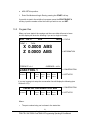
6.0 DRO Mode
The ProtoTRAK LX3 operates in DRO Mode as a sophisticated 2-axis digital
readout with jog (through the jog stick), power feed capability, and the
manual Go To Function.
6.1
Enter DRO Mode
Press MODE, select DRO soft key. The CRT screen will show:
DRO
TOOL #1
RPM
COARSE INCH
X 0.0000 INC
Z 0.0000 INC
> STATUS
>INFORMATION
>CONVERSATION
6.2
POWER
DO
TOOL
MANUAL
RETURN
SPIN
FEED
ONE
#
GO TO
HOME
SPEED
RETURN
>SOFT KEYS
Clear Entry
Press RSTR, then re-enter all keys.
31
Southwestern Industries, Inc.
TRAK TRL 1840 CSS & ProtoTRAK LX3 Programming Operating & Care Manual
6.3
Inch to MM or MM to Inch
Press IN/MM and note CRT screen status line.
6.4
Reset One Axis
Press X or Z, INC SET. This zeros the incremental position in the selected
axis.
6.5
Preset
Press X or Z, numeric data, INC SET to preset selected axis.
6.6
Reset Absolute Reference
Press X or Z, ABS SET to set selected axis absolute to zero at the current
position. See 6.8 and 6.9 to display this data.
Note: This will also reset the incremental dimension if the absolute position is being
displayed when it is reset.
6.7
Preset Absolute Reference
Press X or Z, numeric data, ABS SET to set the selected axis absolute to a
preset location for the current machine position. See 6.8 and 6.9 to
display this data.
Note: This will also reset the incremental dimension if the absolute position is being
displayed when it is preset.
6.8
Recall Absolute Position of All Axes
Press INC/ABS. Note the dimension for each axis is labeled INC or ABS.
Press INC/ABS again to revert to the original reading.
6.9
Recall Absolute Position of One Axis
32
Southwestern Industries, Inc.
TRAK TRL 1840 CSS & ProtoTRAK LX3 Programming Operating & Care Manual
Press X or Z, INC/ABS. Note the INC or ABS label for each axis. Repeat to
get selected axis back to original reading.
6.10 Change From Fine to Coarse Handwheel Resolution and
Feed
Press the F/C key to switch back and forth from fine to coarse.
X Fine
Coarse
Z Fine
Coarse
Resolution
.0001"/.005mm
.0005"/.02mm
.0005"/.02mm
.002"/.05mm
Travel/Revolution
.02"/1mm
.10"/4mm
.10"/4mm
.40"/10mm
6.11 Tool Number
As discussed in Section 5.8, it is always necessary to tell the ProtoTRAK LX3
which tool number you want to use. This is because you want the readout to
represent where the tool tip is (which changes from tool to tool), not where
the carriage and cross-slide are.
Each time you change tools in the DRO mode, it is mandatory that you press
the TOOL # soft key (the conversation line will show the current tool
number), input the correct tool number and SET. Of course, it is also
necessary that the LX3 know what the offset differences are from tool to tool
which is explained in Section 9.2.
6.12 Power Feed
The servo motors can be used as a power feed for the carriage or crossslide.
a.
Press the PWR FEED soft key.
b.
The conversation line will read "Power Feed 10 ipm indicating the status
and feed rate. To powerfeed in ipr press the ipr soft key. This key will
toggle between ipm and ipr. The ipr default is 0.010”.
c.
Press FEED Ï or FEED Ð to adjust the feedrate from 1 ipm to 100 ipm or
0.001 and 0.099 ipr. See Math Help 30 (section 11.3F) to determine the
proper feedrate in ipm if you know the inch per revolution feed.
d.
Press X or Z, the dimension you wish to move to, and INC SET.
33
Southwestern Industries, Inc.
TRAK TRL 1840 CSS & ProtoTRAK LX3 Programming Operating & Care Manual
e.
Press GO to begin power feed.
f.
Press STOP to halt power feed for any reason. Press GO to resume.
g.
When the movement is complete, the system will revert to normal DRO
operation.
6.13 Manual Go To
The Manual Go To feature allows you to input an absolute position in X
and/or Z, where the ProtoTRAK LX3 will disable the electronic handwheels
and/or jog stick. In other words, it creates a barrier that the tool tip cannot
move past. This allows you to move to a position without slowing way down
to prevent overshoot. For example, in making several turning passes to a
prescribed shoulder dimension.
To input a Go To position, press the Manual Go To soft key. The
conversation line will show the current X and Z Go To position or barrier.
Press X or Z, the new position you wish, and SET. Move the axis with the
handwheel or jog stick and it will automatically stop at the position. You may
move in the opposite direction away from the Go To position.
6.14 Return to Home
At any time during manual DRO operation you may automatically move the
tool tip to your home location in X and Z by pressing the RETURN HOME soft
key. When you do, the conversation line will read "Check Tool then press GO."
Make sure your tool and its path is clear and press the GO key. When you do,
the carriage and cross-slide will move at rapid speed to your X and Z home
position. Home position is established in the Set Up Mode.
34
Southwestern Industries, Inc.
TRAK TRL 1840 CSS & ProtoTRAK LX3 Programming Operating & Care Manual
6.15 Do One Events
The purpose of the Do One Events is to allow you to make simple chamfer,
taper, radius, and fillet moves, one at a time, within the DRO Mode and
without the need for creating an entire program.
When you select the DO ONE soft key from Section 6.1, the conversation
line and soft keys will read:
SELECT
TAPER
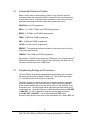
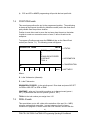
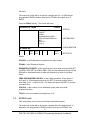
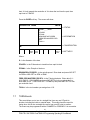
6.15.1
RADIUS
FILLET
RETURN
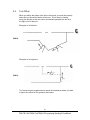
Taper Do One
When you select the TAPER soft key, the display will read:
TAPER ANGLE = 45.0
RETURN
The system defaults to a positive 45 degree taper angle for a convenient
chamfer. If this is the angle you wish, acknowledge so by pressing SET.
You may specify any other angle by inputting the number and pressing SET.
The conversation line will be back lit when you press SET
Turning the Z handhweel counterclockwise, or the X clockwise, will move the
tool from Point A (where you are), towards or past Point B as long as you
turn the handwheel (see below).
i00223
Press RETURN to revert back to normal DRO operation.
35
Southwestern Industries, Inc.
TRAK TRL 1840 CSS & ProtoTRAK LX3 Programming Operating & Care Manual
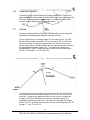
6.15.2
Radius Do One
When you select the RADIUS soft key, the display will read:
RADIUS R =
RETURN
Input and SET the radius you want through the keyboard. The radius may be
positive or negative.
Turning the Z handwheel counterclockwise, or the X clockwise will move the
tool from Point A (where you are), towards Point B (see below). The tool will
automatically stop when you reach B.
i00224
Press RETURN to revert back to normal DRO operation.
6.15.3
Fillet Do One
When you select the FILLET soft key, the display will read:
FILLET R =
RETURN
Input and SET the fillet radius you want through the keyboard. The radius
may be positive or negative.
36
Southwestern Industries, Inc.
TRAK TRL 1840 CSS & ProtoTRAK LX3 Programming Operating & Care Manual
Turning the Z handwheel counterclockwise, or the X clockwise will move the
tool from Point A (where you are), towards Point B (see below). The tool will
automatically stop when you reach B.
i00225
Press RETURN to revert back to normal DRO operation.
6.16 Tool Tip Radius Compensation in DRO Mode
As mentioned in Section 5.4, the tool tip radius is not important when you are
turning along the side of a part (moving only Z), or along the face (moving
only X). And in manual operation in the DRO Mode, these are the only
motions which you can do. It's just not possible to move X and Z
simultaneously with both hands along a precisely coordinated path.
Therefore, even if your tool has a radius, the DRO will display point X0, Z0 in
the figure in Section 5.4. In other words, it will display the X and Z contact
line positions which is where the tool will cut when you move either of the
handwheels.
In Do One operation the tool is moved simultaneously in both the X and Z
axes, but the readout still refers to point X0, Z0 in the figure in Section 5.4.
This theoretical point will be driven through the taper or radius. As a
consequence, if the tool tip radius is large, you may not machine the exact
dimension you expect. These errors will generally be insignificant and can
be eliminated all together by using a full program (see Section 7).
6.17 Changing Spindle Speed
The programmed spindle speed in RPM or surface speed in surface feet per
minute (SFM) or surface meters per minute (SMM) is shown in the status line.
Pressing the SPIN SPEED soft key can modify the speed. The conversation
line will show the current speed. Check to make sure you are in the proper
gear range. Then input the speed you wish and press INC SET to
program RPM or ABS SET to program SFM. You may do this procedure while
the spindle is running or still. (NOTE: the spindle must be turned off to change the gear
speed range.) If you do input a speed that is beyond the available range for the
37
Southwestern Industries, Inc.
TRAK TRL 1840 CSS & ProtoTRAK LX3 Programming Operating & Care Manual
gear speed range that you have selected, the spindle will default to the
minimum or maximum of the range and flash that RPM display in the status
line.
38
Southwestern Industries, Inc.
TRAK TRL 1840 CSS & ProtoTRAK LX3 Programming Operating & Care Manual
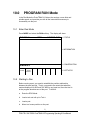
7.0 PROGRAM Mode
7.1
Enter Program Mode and Assign a Part Number
Press MODE, select PROGRAM soft key. For a new program to be written,
there cannot already be a program in the active or current program memory.
If a program does not already exist when you enter the Program Mode, the
conversation line will read "Program Part Number." Enter the part number
(up to 8 digits) and press INC SET or ABS SET.
Note: It is not necessary to enter a part number. If none is entered and the INC
SET or ABS SET button is pushed, the system will assume a part number 0.
If there is already a program when the Program Mode is entered, the last
event of this program will appear on the screen. Additional events may be
added after the last event of this program. It will be necessary to erase
this program first before creating a new program. The procedure to erase
a program in order to create a new program is found in Section 8.5. The
procedure to save a program for future use before erasing is found in
Section 12.
When a new Part Number (for a new program) has been entered, the display
will show the Select Event screen:
PROG P/N 12345
INCH
> STATUS
EVENT 1
> INFORMATION
> CONVERSATION
SELECT EVENT
POSN
DRILL
BORE
TURN
ARC
CYCLE
THREAD
REPEAT
> SOFT KEYS
39
Southwestern Industries, Inc.
TRAK TRL 1840 CSS & ProtoTRAK LX3 Programming Operating & Care Manual
7.2
Incremental Reference Position
When X and Z data for the beginning position of any event are input as
incremental data, this increment must be measured from some known point
in the previous event. Following are the positions for each event type from
which the incremental moves are made in the subsequent event:
POSITION: X and Z programmed
DRILL: X = 0 ABS, Z FINAL and Z RAPID programmed
BORE: X, Z FINAL, and Z RAPID programmed
TURN: X END and Z END programmed
ARC: X END and Z END programmed
CYCLE: the last X and Z programmed
REPEAT: The appropriate reference position for the event prior to the first
event which was repeated.
THREAD: The X END and Z END programmed
For example, if an ARC event followed a TURN event, a 2.0 inch incremental
Z BEG would mean that in the Z direction the beginning of the ARC event is
2.0 inches from the end of the TURN event.
7.3
Programming Strategy and Procedures
The ProtoTRAK LX3 makes programming easy by allowing you to program
the actual part geometry as defined by the print. The Select Event screen
(7.1) is basically a list of all the types of geometry.
The basic strategy is to select the soft key event type (geometry) and then
follow all instructions in the conversation line. When an event is selected,
all the prompts which need to be input will be shown on the right side of the
information area. The first prompt will be highlighted and also shown in the
conversation line. Input the dimension or data requested and press INC SET
or ABS SET. For X or Z dimension data it is very important to properly
select INC SET or ABS SET. For all other data either SET will do.
As data is being entered it will show in the conversation line. When SET, the
40
Southwestern Industries, Inc.
TRAK TRL 1840 CSS & ProtoTRAK LX3 Programming Operating & Care Manual
data will be transferred to the information area, and the next prompt will be
shown in the conversation line.
You may press the DATA FWD or DATA BACK soft keys to go back to edit
any data within an event. Simply shift forward or back to get the prompt in
the conversation line and reinput the data. At any time before the event is
complete you may cancel the event by pressing the ABORT EVENT soft key.
When all data for an event has been entered, the entire event will be shifted
to the left side of the screen and the conversation line will ask you to select
the next event.
7.3.1 Assumed Tool Offset, Feedrate, and Tool #
The ProtoTRAK LX3 will automatically program the following:
TOOL OFFSET: for a Turn or Arc Event, same as the last event if that
event was a Turn or Arc event
FEED PER MIN/FEED PER REV: same as last event if that event was a Turn,
Arc, or Cycle
RPM/SURFACE SPEED: same as last event
TOOL #: same as last event
You may change these assumed inputs by simply inputting the correct data
when the event is programmed.
7.3.2 Programming Spindle Speeds and Feedrates
If you are not completely familiar with working with constant surface speed
(CSS) programming, please go back and review sections 5.10 and 5.11 to be
sure you understand them. With this knowledge we suggest the following:
a)
If you program with CSS (by inputting SFM or SMM) the X absolute zero
must be at the part or spindle centerline. Fortunately this is the only logical
place anyway.
b)
When you program for CSS we recommend that you program feeds in
inches per revolution (IPR) or millimeters per minute (MMPR). If you use
IPM or MMPM and CSS you can end up with some unexpected cuts,
especially if the workpiece has both small and large diameters.
c)
Check the machinery handbook or your insert supplier charts for
recommended SFM or SMM speeds. These recommendations are often
broad so experiment cautiously.
41
Southwestern Industries, Inc.
TRAK TRL 1840 CSS & ProtoTRAK LX3 Programming Operating & Care Manual
d)
7.4
CSS and IPR or MMPR programming will provide the best part finish.
POSITION Events
This event type positions the tool to the programmed position. The positioning
is always at rapid speed (modified by feedrate override) and in the most direct
path possible from the previous location.
Position is most often used to move the tool away from the part so that when
it rapids to a next non-connective event or home, it will not crash into the
workpiece.
To program a Position event press the POSN soft key on the Select Event
screen (see Section 7.1). The following screen will appear:
PROG P/N 12345
INCH
EVENT_ _ _ POSITION
X
Z
RPM/SURFACE SPEED
CONTINUE
TOOL #
> STATUS
> INFORMATION
> CONVERSATION
X
DATA
DATA
ABORT
FWD
BACK
EVENT
>SOFT KEYS
Where:
X: is the X dimension (diameter)
Z: is the Z dimension
RPM/SURFACE SPEED: is the spindle speed. Enter data and press INC SET
for RPM or ABS SET for SFM or SMM
CONTINUE: asks you if you wish to continue on to the next event (press 1,
SET), or pause after the tool is at position (press 0, SET)
TOOL#: is the tool number you assign from 1-50
7.5
DRILL Events
This event allows you to drill a hole at the centerline of the part (X = 0 ABS)
using the carriage and cross-slide. In many instances it may be more
convenient to program a Position event with a No continue, and drill with the
42
Southwestern Industries, Inc.
TRAK TRL 1840 CSS & ProtoTRAK LX3 Programming Operating & Care Manual
tail stock.
The event tool motion will be to rapid in a straight line to X = 0 ABS and the
programmed Z RAPID position, then feed to Z FINAL, then rapid out to Z
RAPID.
Press the DRILL soft key. The screen will show:
PROG P/N 12345
INCH
EVENT_ _ _ DRILL
Z RAPID
Z FINAL
RPM/SURFACE SPEED
FEED PER MIN/FEED PER
REV
# PECKS
TOOL #
> STATUS
> INFORMATION
> CONVERSATION
Z RAPID
DATA
DATA
ABORT
FWD
BACK
EVENT
>SOFT KEYS
Where:
Z RAPID: is the Z dimension to transition from rapid to feed
Z FINAL: is the Z depth of the hole
RPM/SURFACE SPEED: is the spindle speed. Enter data and press INC SET
for RPM or ABS SET for SFM or SMM. If the drill is programmed using CSS the
RPM will be calculated based on what drill diameter you enter to tool setup
mode.
FEED PER MIN/FEED PER REV: is the Z drilling feedrate. Enter data (0.1 99.9 ipm/2.5 - 2500 mmpm) and press INC SET for inch per minute feed or
enter data (0.001 - 0.099 ipr/0.025 - 2.5 mmpr) and press ABS SET for inch per
revolution feed
# PECKS: is the number of tool withdrawal cycles (each cycle drills
progressively less)
TOOL#: is the tool number you assign from 1-50
7.6
BORE Events
This event allows you to bore a part using a standard boring bar.
The event tool motion will be to rapid in a straight line to the programmed X
dimension, the programmed Z RAPID position, then feed to Z FINAL, then
43
Southwestern Industries, Inc.
TRAK TRL 1840 CSS & ProtoTRAK LX3 Programming Operating & Care Manual
feed .01 inch towards the centerline in X to clear the tool from the part, then
rapid out to Z RAPID.
Press the BORE soft key. The screen will show:
PROG P/N 12345
INCH
EVENT_ _ _ BORE
X
Z RAPID
Z FINAL
RPM/SURFACE SPEED
FEED PER MIN/FEED PER
REV
TOOL #
> STATUS
> INFORMATION
> CONVERSATION
X
DATA
DATA
ABORT
FWD
BACK
EVENT
>SOFT KEYS
Where:
X: is the diameter of the bore
Z RAPID: is the Z dimension to transition from rapid to feed
Z FINAL: is the Z depth of the bore
RPM/SURFACE SPEED: is the spindle speed. Enter data and press INC SET
for RPM or ABS SET for SFM or SMM
FEED PER MIN/FEED PER REV: is the Z boring feedrate. Enter data (0.1 99.9 IPM/2.5 - 2500 MMPM) and press INC SET for inch per minute feed or
enter data (0.001 - 0.099 IPR/0.025 - 2.5 MMPR) and press ABS SET for inch
per revolution feed
TOOL#: is the tool number you assign from 1-50
7.7
TURN Events
This event allows you to turn in a straight line from any one XZ point to
another, including an inside or outside taper. This event should be used for
facing since this is also a straight line move from one XZ point to another.
The event may be programmed with a CHAMFER or CONRAD if it is connective
44
Southwestern Industries, Inc.
TRAK TRL 1840 CSS & ProtoTRAK LX3 Programming Operating & Care Manual
with the next event.
The event tool motion will be to rapid to the X BEGIN, Z BEGIN position,
then feed to X END, Z END with consideration for CHAMFER or CONRAD if
one is programmed.
Press the TURN soft key. The screen will show:
PROG P/N 12345
INCH
EVENT_ _ _ TURN
X BEGIN
Z BEGIN
X END
Z END
CHAMFER
TOOL OFFSET
RPM/SURFACE SPEED
FEED PER MIN/FEED PER
REV
TOOL #
> STATUS
> INFORMATION
> CONVERSATION
X BEGIN
DATA
DATA
ABORT
FWD
BACK
EVENT
>SOFT KEYS
Where:
X BEGIN: is the X dimension to the beginning of the cut (diameter)
Z BEGIN: is the Z dimension to the beginning of the cut
X END: is the X dimension to the end of the cut; incremental is from X Begin
Z END: is the Z dimension to the end of the cut; incremental is from Z Begin
CHAMFER/CONRAD: is the dimension of a chamfer or tangential radius to the
next event. Use ABS SET for chamfer, or INC SET for conrad.
TOOL OFFSET: is the selection of the tool offset to right (input 1), offset to
left (input 2), or tool center--no offset (input 0) relative to the programmed
edge and direction of tool cutter movement (see Section 5.5)
RPM/SURFACE SPEED: is the spindle speed. Enter data and press INC SET
for RPM or ABS SET for SFM or SMM
FEED PER MIN/FEED PER REV: is the turning feedrate. Enter data (0.1 99.9 IPM/2.5 - 2500 MMPM) and press INC SET for inch per minute feed or
enter data (0.001 - 0.099 IPR/0.025 - 2.5 MMPR) and press ABS SET for inch
per revolution feed
45
Southwestern Industries, Inc.
TRAK TRL 1840 CSS & ProtoTRAK LX3 Programming Operating & Care Manual
TOOL #: is the tool number you assign from 1-50
7.8
ARC Events
This event allows you to turn with circular contouring any arc (fraction of
a circle).
The event tool motion will be to rapid to the X Begin, Z Begin position, then
feed to X End, Z End in a circular path.
Press the ARC soft key. The screen will show:
PROG P/N 12345
INCH
EVENT _ _ _ ARC
X BEGIN
Z BEGIN
X END
Z END
RADIUS
CHAMFER
DIRECTION
TOOL OFFSET
RPM/SURFACE SPEED
FEED PER MIN/FEED PER
REV
TOOL #
> STATUS
>INFORMATION
> CONVERSATION
X BEGIN
DATA
DATA
ABORT
FWD
BACK
EVENT
>SOFT KEYS
Where:
X BEGIN: is the X dimension to the beginning of the arc cut (diameter)
Z BEGIN: is the Z dimension to the beginning of the arc cut
X END: is the X dimension to the end of the arc cut; incremental is from
X Begin
Z END: is the Z dimension to the end of the arc cut; incremental is from
Z Begin
RADIUS: is the radius of the arc (not measured in diameter)
CHAMFER/CONRAD: is the dimension of a chamfer or tangential radius to the
next event. Use ABS SET for a chamfer, or INC SET for conrad.
46
Southwestern Industries, Inc.
TRAK TRL 1840 CSS & ProtoTRAK LX3 Programming Operating & Care Manual
DIRECTION: is the clockwise (input 1), or counterclockwise (input 2) direction
of the arc looking down from the top
TOOL OFFSET: is the selection of the tool offset to right (input 1), offset to
left (input 2), or tool center--no offset (input 0) relative to the programmed
edge and direction of tool cutter movement (see Section 5.5)
RPM/SURFACE SPEED: is the spindle speed. Enter data and press INC SET
for RPM or ABS SET for SFM or SMM
FEED PER MIN/FEED PER REV: is the turning feedrate. Enter data (0.1 99.9 IPM/2.5 - 2500 MMPM) and press INC SET for inch per minute feed or
enter data (0.001 - 0.099 IPR/0.025 - 2.5 MMPR) and press ABS SET for inch
per revolution feed
TOOL #: is the tool number you assign from 1-50
7.9
Cycle Events (I.D. and O.D)
The Cycle Event is not a single event, but rather a group of events. It allows
you to program complex shapes (including the shape of the starting material)
that require several roughing passes without the need to program each tool
motion step.
i00226
Consider the part above that is being machined from a rough casting.
Lines 1-6 represent the finished part, and lines 7-9 represent the casting, or
something a little bigger than the casting.
In creating a cycle event you must select whether you are basically O.D., or I.D.
machining.
The rules for creating an Outside, or O.D. cycle are:
a.
The line segments representing the part (1-6 in the above figure) must be
47
Southwestern Industries, Inc.
TRAK TRL 1840 CSS & ProtoTRAK LX3 Programming Operating & Care Manual
programmed with TURN or ARC events only.
b.
The line segments representing the original material (or just outside it)
must be programmed with Position events. These are lines 7-9 above,
and are programmed by entering the end point of each line.
c.
The first line segment must be one representing the part ("a" above) not
the original material ("b" above).
d.
The X End and Z End of the last segment must be the same as the X
Begin and Z Begin of the first. In the example above, line segment 9
must end where line segment 1 begins.
e.
There may be no more than 20 line segments for any Cycle.
f.
The roughing and finishing tools for the Outside Cycle events must be
right-hand turning tools (see Type 1 in Section 9).
g.
The lines which represent the part (1-6 in the above figure) can never
move toward the centerline (decreasing X), or away from the chuck
(increasing Z). Moves with no change in X or Z are okay.
h.
The lines which represent the original material or something a little
bigger (lines 7-9 in the above figure) can never move away from the
centerline (increasing X), or toward the chuck (decreasing Z). Moves
with no change in X or Z are okay.
The rules for creating an Inside, or I.D. cycle are:
a.-e.
f.
g.
h.
Same as above for Outside cycles.
The roughing and finishing tools for the Inside Cycle events must be boring
tools (see Type 3 in Section 9).
The lines which represent the finished part can never move away from the
centerline (increasing X), or away from the chuck (increasing Z). Moves
with no change in X or Z are okay.
The lines which represent the original material or something a little bigger
can never move toward the centerline (decreasing X), or toward the chuck
(decreasing Z). Moves with no change in X or Z are okay.
The event tool motion depends on whether you select to rough the material
with successive turning passes (Z motion with constant X), or facing passes
(X motion with constant Z). If you choose turning, the tool will rapid to a
point at the programmed material--a point along line 8 in the figure above.
Then the tool will feed at a constant X position across until it nears one of
the part lines leaving enough material for the programmed finish cut. This is
repeated until the part is completely roughed. Then the tool will feed along
the part lines standing off an amount equal to the finish cut. Then the
48
Southwestern Industries, Inc.
TRAK TRL 1840 CSS & ProtoTRAK LX3 Programming Operating & Care Manual
carriage will move to home and call out the finish tool. This tool will rapid to
the beginning of the first line and turn the part to its final dimension.
Press the CYCLE soft key. The screen will show:
PROG P/N 12345
INCH
EVENT _ _ _ CYCLE
SIDE
# OF PASSES
APPROACH
RPM/SURFACE SPEED
FEED PER MIN/FEED PER REV
TOOL #
FIN CUT
FIN RPM/SURFACE SPEED
FIN FEED PER MIN/FEED PER REV
FIN TOOL #
> STATUS
> INFORMATION
>
CONVERSATION
0=inside, 1=outside:
DATA
DATA
ABORT
FWD
BACK
EVENT
>SOFT KEYS
The purpose of this screen is to define the overall parameters of the cycle
event through the following prompts:
SIDE: is to select an inside (input 0, SET), or outside (input 1, SET) cycle
# OF PASSES: is the number of equal depth cuts used to rough the part
APPROACH: is to select if the roughing is to be done along X with facing
passes (input 0, SET), or along Z with turning passes (input 1, SET)
RPM/SURFACE SPEED: is the spindle speed. Enter data and press INC SET
for RPM or ABS SET for SFM or SMM
FEED PER MIN/FEED PER REV: is the roughing feedrate. Enter data (0.1 99.9 IPM/2.5 - 2500 MMPM) and press INC SET for inch per minute feed or
enter data (0.001 - 0.099 IPR/0.025 - 2.5 MMPR) and press ABS SET for inch
per revolution feed
TOOL #: is the number you assign to the roughing tool
FIN CUT: is the depth of the final finish cut made with the finish tool
FIN RPM/SURFACE SPEED: is the spindle speed. Enter data and press INC
SET for RPM or ABS SET for SFM or SMM
FIN FEED PER MIN/FEED PER REV: is the finish feedrate. Enter data (0.1 99.9 IPM/2.5 - 2500 MMPM) and press INC SET for inch per minute feed or
49
Southwestern Industries, Inc.
TRAK TRL 1840 CSS & ProtoTRAK LX3 Programming Operating & Care Manual
enter data (0.001 - 0.099 IPR/0.025 - 2.5 MMPR) and press ABS SET for inch
per revolution feed
FIN TOOL #: is the number you assign to the finishing tool
When the screen is complete, the ProtoTRAK LX3 will prompt you to input a
series of TURN, ARC and POSITION events to describe the part and the
original material.
The first screen will have the soft keys:
SELECT
TURN
ARC
ABORT
EVENT
Select the appropriate event type to define your first line segment on your
part and program it as you would any other TURN or ARC event.
When the first line is defined, the screen will show the following soft keys:
SELECT
POSN
TURN
ARC
CW
ARC
CCW
END
CYCLE
Where you should continue to define the part with TURN, ARC CW or ARC
CCW events followed by defining the original material with POSITION events.
When the last POSITION event is defined (remember it must end where the
first event began), press the END CYCLE key when the display prompts the
above.
7.10 Thread Event
This event allows you to machine standard or custom I.D. or O.D. threads.
They may be straight or tapered, and may be one through ten multiple leads.
The event tool motion will be to rapid to the X Begin, Z Begin position, then
feed to a depth equal to the total thread depth adjusted for the number of
passes, then feed to X End, Z End, then rapid away from the thread, then
return to X Begin, Z Begin and repeat for the total number of passes.
The spindle speed for a thread can be programmed in either RPM or CSS.
It should be noted that the spindle speed will not increase for each pass if the
thread is programmed in CSS. The initial speed calculated will be used for each
pass in the thread.
50
Southwestern Industries, Inc.
TRAK TRL 1840 CSS & ProtoTRAK LX3 Programming Operating & Care Manual
Note: To activate a custom threading cycle use Service Code 144. Code 144 will toggle back
and forth between standard and custom threads.
7.10.1
Standard Thread Event
The LX3 will automatically calculate the depth of a standard thread.
Press the Thread soft key. The screen will show:
PROG P/N 12345
INCH
EVENT _ _ _ THREAD
X BEGIN
Z BEGIN
X END
Z END
PITCH
# PASSES
# SPRING PASSES
PLUNGE ANGLE
SIDE
# OF STARTS
RPM/SURFACE SPEED
TOOL #
> STATUS
> INFORMATION
> CONVERSATION
X BEGIN
DATA
DATA
ABORT
FWD
BACK
EVENT
>SOFT KEYS
Where:
X BEGIN: is the X dimension or major diameter where the thread begins
(diameter) Note: ID threads are also programmed using the major diameter for X begin.
Z BEGIN: is the Z dimension where the thread begins
X END: is the X dimension or major diameter when the thread will end. This
should be 0, INC SET for a straight thread
Z END: is the Z dimension where the thread ends
PITCH: is the distance from one thread to the next in inches or mm. It is
equal to one divided by the number of threads per inch. For example, the
pitch for a 1/4-20 screw is 1 divided by 20 = .05 inches.
# PASSES: is the number of passes (1-99) to cut the thread to its final depth
51
Southwestern Industries, Inc.
TRAK TRL 1840 CSS & ProtoTRAK LX3 Programming Operating & Care Manual
(excludes spring passes)
# SPRING PASSES: is the number of passes (0-99) at the final depth
PLUNGE ANGLE: is the angle the tool feeds into the beginning depth. The
default 29.5 degrees is recommended
SIDE: selects whether this is an I.D. (input 0,SET), or O.D. (input 1,SET)
thread
# STARTS: selects whether the thread is single lead (input SET or 1,SET),
double lead (input 2,SET), triple lead (input 3,SET), etc. (up to 10 leads)
RPM/SURFACE SPEED: is the spindle speed. Enter data and press INC SET
for RPM or ABS SET for SFM or SMM
TOOL #: is the tool number you assign from 1-50
7.10.2
Custom Thread Event
This event allows you to machine a non-standard or custom thread such as an
Acme or Butress thread.
Press the THREAD soft key. The screen will show:
PROG P/N 12345
INCH
EVENT _ _ _ CUSTOM THREAD
X MAJOR BEGIN
Z BEGIN
X MINOR BEGIN
X MAJOR END
Z END
PITCH
# PASSES
# SPRING PASSES
PLUNGE ANGLE
SIDE
# OF STARTS
RPM/SURFACE SPEED
TOOL #
> INFORMATION
> CONVERSATION
X BEGIN
DATA
> STATUS
DATA
ABORT
52
Southwestern Industries, Inc.
TRAK TRL 1840 CSS & ProtoTRAK LX3 Programming Operating & Care Manual
FWD
BACK
EVENT
>SOFT KEYS
Where:
X MAJOR BEGIN: is the X dimension or major diameter where the thread
begins (diameter)
Z BEGIN: is the Z dimension where the thread begins
X MINOR BEGIN: is the minor diameter of the thread. If you want to program a
custom tapered thread the ending minor diameter will be calculated from the X
major end information. In other words, the minor diameter will be parallel to the
major diameter.
X MAJOR END: is the X dimension or major diameter when the thread will end.
This should be 0, INC SET for a straight thread
Z END: is the Z dimension where the thread ends
PITCH: is the distance from one thread to the next in inches or mm. It is
equal to one divided by the number of threads per inch. For example, the
pitch for a 1/4-20 screw is 1 divided by 20 = .05 inches.
# PASSES: is the number of passes (1-99) to cut the thread to its final depth
(excludes spring passes)
# SPRING PASSES: is the number of passes (0-99) at the final depth
PLUNGE ANGLE: is the angle the tool feeds into the beginning depth.
SIDE: selects whether this is an I.D. (input 0,SET), or O.D. (input 1,SET)
thread
# STARTS: selects whether the thread is single lead (input SET or 1,SET),
double lead (input 2,SET), triple lead (input 3,SET), etc. (up to 10 leads)
RPM/SURFACE SPEED: is the spindle speed. Enter data and press INC SET
for RPM or ABS SET for SFM or SMM
TOOL #: is the tool number you assign from 1-50
7.11 Repeat Events
The Repeat event allows you to repeat an event or a group of events up to
99 times with an offset in X and/or Z. This can be useful for a simple roughing
cycle (and where a full CYCLE event is inappropriate) at increasing depths. It is
also very useful in programming rough and finish events without having to worry
about adjusting the dimensions for the finish cut (see Section7.14).
53
Southwestern Industries, Inc.
TRAK TRL 1840 CSS & ProtoTRAK LX3 Programming Operating & Care Manual
Repeat events may be "nested" five deep. That is, you can repeat a repeat
event, of a repeat event, of a repeat event of some programmed event(s).
One new tool number may be assigned for each Repeat Event.
Press the REPEAT soft key. The display will show:
PROG P/N 12345
INCH
EVENT_ _ _ REPEAT
FIRST EVENT #
LAST EVENT #
X OFFSET
Z OFFSET
# REPEATS
TOOL #
> STATUS
> INFORMATION
> CONVERSATION
FIRST EVENT #
DATA
DATA
ABORT
FWD
BACK
EVENT
>SOFT KEYS
Where:
FIRST EVENT #: is the event number of the first event to be repeated
LAST EVENT #: is the event number of the last event to be repeated; if
only one event is to be repeated, the Last Event # is the same as the First
Event #
X OFFSET: is the incremental X offset from event to be repeated (diameter)
Z OFFSET: is the incremental Z offset from event to be repeated
# REPEATS: is the number of times events are to be repeated up to 99
TOOL #: is the tool number you assign from 1-50
7.12 Aborting a Partially Programmed Event
If you wish to not program an event (or start over) after you have started to
program, press the ABORT EVENT soft key. The screen will show the
"Select Event" screen as described in Section 7.1. Re-select the event
type or another.
7.13 Editing Data While Programming an Event
All data is entered by pressing the appropriate numeric keys and pressing
INC SET or ABS SET. If you enter an incorrect number before you press
INC SET or ABS SET you may clear the number by pressing RSTR
(Restore). Then, input the correct number and press SET.
If incorrect data has been entered and SET, you may correct it as long as
54
Southwestern Industries, Inc.
TRAK TRL 1840 CSS & ProtoTRAK LX3 Programming Operating & Care Manual
you are still programming that same event. Press the DATA BACK or DATA
FWD (Forward) soft key until the incorrect prompt and data are highlighted
and shown in the conversation line. Enter the correct number and SET. The
ProtoTRAK LX3 will not allow you to skip past prompts (by pressing DATA
FWD) that need to be entered to complete an event.
Previous events may be edited in the Edit Mode (see Section 8).
7.14 Finish Cuts
The Cycle event is designed with a built-in finish cut routine. You may,
however, want to program a roughing cut and a finish cut on a part which
has been defined by BORE, TURN, and ARC events.
The hard way to do this is to adjust all the X and Z dimensions (this is
especially tricky for arcs) for the roughing cut, then program the correct part
dimensions for the finish cut.
The easy way is to use the following technique:
a.
Program the actual part shape and ignore the need to leave material for
a finish cut.
b.
Use one Repeat event to repeat all the events in "a" above, but call out
a different tool number even if you are actually using the same tool.
In Set-Up Mode input an XMOD and ZMOD for the tool in the events
programmed in "a" above that is equal to the finish cut material you wish
to leave. See Section 9 for how to input this data.
c.
d.
In Set-Up Mode make NO special adjustment to XMOD or ZMOD for the
tool programmed in the Repeat event in "b" above.
When the part is being run the XMOD and ZMOD from "c" will command the
tool to stay away by this amount when the events from "a" are machined.
However, when these events are repeated from "b", the correct dimensions
will be cut on the part.
7.15 Sample Program
55
Southwestern Industries, Inc.
TRAK TRL 1840 CSS & ProtoTRAK LX3 Programming Operating & Care Manual
i00227
Step 1 - Decide how the part will be machined.
Saw a piece of material from 3 inch stock slightly longer than 4", and face
the end which will be held in the step jaws of the chuck. The material used in
this example is 1020 steel.
NOTE: The part below was programmed, as an example, using 2 different speed and feed
values: CSS and in/rev and also RPM and in/min. The speed and feeds can be programmed
using any combination. See section 7.3.2 for some more information on this topic.
Establish the program absolute zero as the centerline for X, and the left side
of the part (against the chuck jaw step) for Z.
The program strategy will be:
a.
Use a Turn Event to face the part to length with a roughing Turn/Face
Tool (see Section 9.2).
b.
Use a Cycle Event to rough (with the above tool) and finish (with a
finishing Turn/Face tool) the outside shape.
c.
Use a Drill Event and a 13/16 drill to open the hole.
d.
Use a Bore Event and boring tool to size the hole.
e.
Use a Thread Event and thread insert to make the 1"-8 thread.
Step 2 - Erase any program that is in the current memory.
a.
Be sure you have stored the current program (see Section 12) if you
wish to save it.
b.
Press MODE, select EDIT, press ERASE PROG, press YES.
Step 3 - Enter the Program Mode and input the part number.
56
Southwestern Industries, Inc.
TRAK TRL 1840 CSS & ProtoTRAK LX3 Programming Operating & Care Manual
Step 4 - Select TURN and input the following data to face the part for
Event 1:
X Begin
Z Begin
X End
Z End
Chamfer
Tool Offset
RPM/Surface Speed
Feed per minute/Feed per rev
Tool #
3.1 abs
4.0 abs
0 abs
0 inc (or 4.0 abs set)
set (a 0 is not required)
1 for Right
1000 INC SET or 400 ABS SET
5 INC SET or 0.005 ABS SET
1
Step 5 - Create the program for the outside profile by inputting the following
data:
a.
Press CYCLE to define the overall parameters and input for Event 2:
Side
1
# of Passes
10
Approach
1 for Z
RPM/Surface Speed
1000 INC SET or 400 ABS SET
Feed per minute/Feed per rev
5 INC SET or 0.005 ABS SET
Tool #
1
Fin Cut
.005
Fin RPM/Surface Speed
1000 INC SET or 400 ABS SET
Fin Feed per minute/Feed per rev
3.0 INC SET or 0.003 ABS SET
Fin Tool #
2
b.
Press TURN to define the 1.5 O.D. and chamfer to the next event and
input for Event 3:
X End
0 inc
Z End
2.5 abs
Chamfer
.05 abs set
c.
Press ARC CW to define the .25 radius arc and input for Event 4:
X End
2.0 abs
Z End
-.25 inc
Radius
.25
Chamfer
abs set
d.
Press TURN to define the 2.0 O.D. and input for Event 5:
X End
0 inc
Z End
1.5 abs
Chamfer
abs set
e.
Press TURN to define the taper and input for Event 6:
X End
3.0 abs
Z End
.75 abs
57
Southwestern Industries, Inc.
TRAK TRL 1840 CSS & ProtoTRAK LX3 Programming Operating & Care Manual
Chamfer
abs set
f.
Press POSN (position) to define the O.D. of the original stock and input
for Event 7:
X End
3.0 abs
Z End
4.0 abs
g.
Press POSN to define the right side end of the material and position you
back to the X Begin and Z Begin where you started (b) and input for
Event 8:
X End
1.5 abs
Z End
4.0 abs
h.
Press END CYCLE to declare the end of the cycle event group of
events.
Step 6 - Select DRILL and input the following data to drill a 13/16 (.8125)
hole for Event 9:
Z Rapid
4.1 abs
Z Final
1.7 abs (drill .3 farther to
compensate for tip)
RPM/Surface Speed
425 INC SET or 100 ABS SET
Feed per minute/Feed per rev
2.0 INC SET or 0.005 ABS SET
# Pecks
5
Tool #
3
Step 7 - Select BORE to size hole to .875 (the minor diameter) and input for
Event 10:
X
.875 abs
Z Rapid
4.1 abs
Z Final
1.95 abs (a little clearance for the
thread insert)
RPM/Surface Speed
625 INC SET or 150 ABS SET
Z Feed per minute/Feed per rev
3 INC SET or 0.005 ABS SET
Tool #
4
Step 8 - Select THREAD to program the 1"-8 thread 2.0 inch deep and input
for Event 11:
X Begin
1.0 abs (the major diameter)
Z Begin
4.1 abs
X End
0 inc (no taper)
Z End
2.0 abs
Pitch
.1
# of Passes
6
# of Spring Passes
2
Plunge Angle
29.5 (use recommended default)
Side
0 for inside
58
Southwestern Industries, Inc.
TRAK TRL 1840 CSS & ProtoTRAK LX3 Programming Operating & Care Manual
# of Starts
RPM/Surface Speed
Tool #
1 (this is a single lead thread)
625 INC SET or 150 ABS SET
5
Step 9 - Enter the Set-Up Mode (see Section 9) and select SET HOME.
Press X, 4., ABS SET and Z, 6., ABS SET to identify a point well off the
part where the tool will go at Run start, tool change, and Run End.
Press RETURN, MODE, DRO.
Step 10 - Load the part into the chuck. In the DRO Mode and with a facing
tool, take a skin cut on the face of the part so that you have a consistent and
flat surface to touch-off your tools. Use a micrometer or vernier to measure
the part diameter and length.
Press MODE, SET UP, TOOL SET UP.
Step 11 - Configure Tool # 1 (the roughing turn/face tool).
a. Mount the tool into its holder and mount on the tool post.
b.
Press 1, SET.
c.
Press SET NEW.
d.
Press 1, SET because Tool #1 is a right-hand turn/face tool.
e.
Using the handwheels, move the tool so that it touches the side of the
part as shown by the SET X line on the ProtoTRAK screen diagram.
f.
Input the part diameter (say 3.004), ABS SET.
g.
Move the tool so that it touches the face of the part as shown by the
SET Z line on the screen.
h.
Input the length of the part (say 4.073), ABS SET or you may input 0,
ABS SET.
i.
j.
Input the tool tip radius and SET. If you are using inserts, this radius will
be shown on the box.
Ignore XMOD and ZMOD for now.
k.
Press RETURN.
Step 12 - Configure Tool #2 (the finish turn/face tool).
a. Mount the tool as in Step 11.
59
Southwestern Industries, Inc.
TRAK TRL 1840 CSS & ProtoTRAK LX3 Programming Operating & Care Manual
b.
Press 2, SET.
c.
d.
Press SET NEW.
Press 1, SET because Tool #1 is a right-hand turn/face tool.
e-k. Follow the directions in Step 11 being sure in (h) to touch off the same
place and input the same dimension as you used before.
Step 13 - Configure Tool #3 (the 13/16 drill).
a.
Follow the same pattern as above, inputting Tool #3 and selecting
Drill (5).
b.
For setting X, touch the side of the drill to the side of the part nearest
you and input the 3.004 part diameter. For setting Z, touch the tip to the
end of the part and set the same number you did for Steps 11 or 12.
c.
Input and SET the drill diameter when prompted.
d. Press RETURN.
Step 14 - Configure Tool #4 (the boring bar).
a.
Follow the same pattern as above, inputting Tool #4 and selecting
Bore (3).
b.
For setting X, touch the tool as shown to the side of the part away from
you and input -3.004, ABS SET. Set Z and the Radius as above.
c.
Press RETURN.
Step 15 - Configure Tool #5 (the threading tool).
a.
Follow the same pattern as above, inputting Tool #5 and selecting
Thread ID (8).
b.
For setting X, touch the tool as shown to the side of the part away from
you (just as you did with the boring tool) and input -3.004, ABS SET. Set
Z as above.
c.
Press RETURN.
d.
Press RETURN again.
Step 16 - Check your program by selecting DRAW PART and pressing
START. It should look like this:
60
Southwestern Industries, Inc.
TRAK TRL 1840 CSS & ProtoTRAK LX3 Programming Operating & Care Manual
i00228
Step 17 - Run the part.
a.
Press MODE and select DRO.
b.
Load Tool #1 and press TOOL #, 1, SET.
c.
In the Z direction, touch Tool #1 to the bottom of the jaw step and set
Z = 0 ABS SET.
d.
Load a part and measure its diameter.
e.
Touch Tool #1 to the side of the part and set X = 3.004 ABS SET (or
the diameter you measured in [d] above).
f.
Press MODE, and select RUN.
g.
Press START. The carriage will rapid so that Tool #1 is at home
(X=4., Z=6.).
h.
Start the spindle at an appropriate RPM. Note all feeds in the program
assume an aluminum part. Adjust if necessary.
i.
Press TRAKING.
j.
Turn the Z handwheel counterclockwise and machine the first part.
k.
If you wish to run in pure CNC instead of TRAKING, press STOP, CNC
RUN, GO.
Step 18 - Correcting the program to get a more accurate part.
It is difficult in Tool Set Up, Steps 11-15, to touch off the part with necessary
precision. As a consequence, your part dimensions may not be exactly to
print. To correct, or "tweak" a program:
a.
Run and then measure the first part.
b.
Enter Set Up Mode and Select TOOL SET UP.
61
Southwestern Industries, Inc.
TRAK TRL 1840 CSS & ProtoTRAK LX3 Programming Operating & Care Manual
c.
Enter the tool number that created the inaccurate cut. Select EDIT.
d.
Press DATA FWD to XMOD or ZMOD. Input the dimension equal to the
part error. Remember a plus XMOD makes the diameter bigger, and a
plus ZMOD makes the part longer.
e.
Re-run the part.
f.
If you can't risk ruining the first part, input a plus (for O.D.), or minus (for
I.D.) .02 XMOD and ZMOD for every tool. Then run the part, measure
your errors, adjust the XMOD and ZMOD, and re-run.
62
Southwestern Industries, Inc.
TRAK TRL 1840 CSS & ProtoTRAK LX3 Programming Operating & Care Manual
63
Southwestern Industries, Inc.
TRAK TRL 1840 CSS & ProtoTRAK LX3 Programming Operating & Care Manual
8.0 EDIT Mode
The ProtoTRAK LX3 allows for complete editing of programs including the
recall (and correction) of data, adding events in the middle of a program,
deleting events within the program, and erasing programs.
8.1
Enter Edit Mode
Press MODE and select the EDIT soft key. The display will show:
EDIT P/N 12345
INCH
> STATUS
> INFORMATION
> CONVERSATION
SELECT
RECALL
8.2
ADD
DELETE
ERASE
EVENT
EVENT
PROG
>SOFT KEYS
Recall and Data Correction
To recall the data in your current program select the RECALL soft key. The
conversation line will prompt "EVENT #" asking for the event number you
wish to review. Input the event number and SET. If you wish to change the
part number, recall event 0. Assuming you requested Event 4, the display will
show, for example:
PROG P/N 12345
INCH
EVENT 3 POSITION
X
3.42 abs
Z
7.5 abs
SURFACE SPEED 400
CONTINUE
YES
TOOL #
2
EVENT 4 TURN
X BEGIN
2.4370 abs
Z BEGIN
7.2950 abs
X END
1.5000 inc
Z END
2.0000 inc
CONRAD
NONE
TOOL OFFSET
RIGHT
SURFACE SPEED 400
FEED PER REV
0.005
TOOL #
2
> STATUS
> INFORMATION
> CONVERSATION
X BEGIN 2.4370 abs
PAGE
PAGE
DATA
DATA
ABORT
FWD
BACK
FWD
BACK
EVENT
>SOFT KEYS
Where:
63
Southwestern Industries, Inc.
TRAK TRL 1840 CSS & ProtoTRAK LX3 Programming Operating & Care Manual
The event you recalled is shown with its data on the right side of the
information area.
The previous event is shown to the left.
The conversation line shows the first prompt for the selected event.
The PAGE FWD (Forward) soft key indexes the event forward by one
(from 3 and 4, to 4 and 5 in the above example).
The PAGE BACK soft key indexes the event back by one (from 3 and 4,
to 2 and 3 in the above example).
The DATA FWD (Forward) soft key steps the highlight and conversation
line to the next prompt and data (Z Begin 7.2950A in the above
example).
The DATA BACK soft key steps the highlight and conversation line to
the previous prompt.
The EVENT # soft key allows you to input and recall another event
without repeatedly paging.
The RETURN soft key brings you back to the screen shown in
Section 8.1.
To correct any data, use the EVENT #, PAGE and DATA soft keys to get the
data you wish to correct into the conversation line. Re-input and SET the
correct data.
Note: If the Feedrate is edited in any event it will automatically be edited in every
subsequent and contiguous event with the same Tool number and feedrate. For
example, let's say events 5 through 10, and 13 through 16 were all programmed with
tool number 2, and 5 inches per minute feedrate. If you edit the feedrate in Event 7
to 3 inches per minute, it will automatically change Events 8, 9, and 10 also. Events
5, 6, 13, 14, 15, and 16 will not be affected.
If you request Event 0, the status line will prompt for a new program part
number. It may be changed if you wish by inputting the new number and
pressing SET.
64
Southwestern Industries, Inc.
TRAK TRL 1840 CSS & ProtoTRAK LX3 Programming Operating & Care Manual
8.3
Adding an Event
Events may be added to the program at the beginning, middle, or end of the
program one at a time.
To do so, press the ADD EVENT soft key from the screen shown in Section
8.1. The conversation line will state "After Event #." Input the event number
which the event you wish to add will follow and press SET. The screen will
ask you to "Select Event," and program as you normally would (as described
in Section 7).
When an event has been added, all subsequent events will be renumbered
accordingly. Appropriate adjustments will automatically be made to
Repeat events.
8.4
Deleting an Event
Events may be deleted one at a time or in continuous groups.
To do so, press the DELETE EVENT soft key from the screen shown in
Section 8.1. The conversation line will state "Delete From #." Input the
first event number of the group to be deleted, and press SET. The
conversation line will then read "Delete to #" asking you to input the last
event number of the group to be deleted, and press SET. If only one event
is to be deleted, input its event number for both "Delete From #" and "Delete
To #."
When an event or group of events have been deleted, all subsequent events
will be renumbered to eliminate any number gaps. All event numbers in any
Repeat event will also be renumbered.
8.5
Erasing a Program
You may erase your current program by pressing the ERASE PROG
soft key shown in the screen in Section 8.1. However, if you ever wish to
reuse this program, you must be certain that it has been saved on the
ProtoTRAK LX3 floppy disk memory, or saved offline (see Section 12).
When you press the ERASE PROG soft key, the conversation line will
65
Southwestern Industries, Inc.
TRAK TRL 1840 CSS & ProtoTRAK LX3 Programming Operating & Care Manual
be highlighted and state "ARE YOU SURE YOU WISH TO ERASE THIS
PROGRAM?". If you are, press the YES soft key. If you are not, press the
NO soft key. The display will return to the Select Mode screen.
66
Southwestern Industries, Inc.
TRAK TRL 1840 CSS & ProtoTRAK LX3 Programming Operating & Care Manual
9.0 SET-UP Mode
The Set-Up Mode is used to input tool data, set a home position, and visually
check out a program.
9.1
Enter Set-Up Mode
Press MODE and select the SET-UP soft key. The display will show:
SET-UP P/N 12345
INCH
> STATUS
> INFORMATION
>
CONVERSATION
SELECT
9.2
TOOL
SET
DRAW
TOOL
MAX
SERV
SAVE
TOOL
SET-UP
HOME
PART
PATH
RPM
CODES
TOOLS
GROUPS
> SOFT KEYS
Tool Set-Up
Please refer to Section 5.4 Tool Tip Radius Compensation, 5.9 Absolute, Tool,
and Program References and 6.11 Tool Number. It is important that you fully
understand the concepts in these sections before you Set-Up your tools.
The purpose of Tool Set-Up is to define each tool's type, offset from the other
tools, tip radius, and modifiers. The MOD's, or modifiers, are simply small
adjustments to the offsets which can be used to adjust for offset errors, tool wear,
part deflection, or finish cuts (see Section 7.14)
Press the TOOL SETUP soft key. The screen will show:
67
Southwestern Industries, Inc.
TRAK TRL 1840 CSS & ProtoTRAK LX3 Programming Operating & Care Manual
SET-UP
INCH
> STATUS
> INFORMATION
> CONVERSATION
INPUT TOOL #
RETURN
> SOFT KEYS
Input the tool number and SET. Then, on the next screen, select SET NEW
if you wish to describe a complete new tool, or EDIT if you wish to simply
edit an existing description. If you select SET NEW, the display will show:
SET-UP
1.
2.
3.
4.
5.
6.
7.
8.
RH TURN/FACE
LH TURN/FACE
BORE
BACK BORE
DRILL
GROOVE/CUTOFF
THREAD OD
THREAD ID
INCH
> STATUS
TOOL # _ _ _ _
> INFORMATION
> CONVERSATION
SELECT
RETURN
>SOFT KEYS
Input the tool type 1 through 8 and SET. If, for example, you chose 1 (the
right-hand turn or face tool) the display would show:
68
Southwestern Industries, Inc.
TRAK TRL 1840 CSS & ProtoTRAK LX3 Programming Operating & Care Manual
SET-UP P/N 12345
500 RPM
INCH
TOOL #
RH TURN/FACE
X
Z
R
X MOD
Z MOD
X=1.2345
> INFORMATION
Z -6.7890
MOVE to known X value, INPUT and SET
DATA
DATA
FWD
BACK
> STATUS
> CONVERSATION
RETURN
>SOFT KEYS
Where:
X: will prompt "move to known X value, input and SET" which means, touch
the tool to some known reference at SET X in the picture on the left side of
the screen, then input this reference X dimension and SET
Z: will prompt "Move to known Z value, input and set" which means, touch
the tool to some known reference at SET Z in the picture on the left side of
the screen, then input this reference Z dimension and SET
R: is to define the tool nose radius
X MOD: is to input an adjustment or modifier to the X offset. A positive X
MOD will make the part O.D. or I.D. diameter larger by this amount
Z MOD: is to input an adjustment or modifier to the Z offset. A positive Z
MOD will shift the part away from the chuck
Repeat the above procedure for all of the tools.
Note: The RPM value will be shown in the status line. To change the value it must be done in
DRO mode.
CAUTION
The objective of Tool Set-Up is to establish the position of each tool relative to the
others. To do this, the procedure must be conducted with one common counting or
absolute reference. That is, between setting one tool and the next it is crucial that
you do not go back into the DRO mode and change the absolute reference. If this
happens, see Section 9.4
69
Southwestern Industries, Inc.
TRAK TRL 1840 CSS & ProtoTRAK LX3 Programming Operating & Care Manual
9.3
A Practical Technique for Accurate Tool Setting
The problem with setting tools as described in Section 9.2 above is that it
is generally not possible to touch a tool off with high precision. Furthermore,
under real cutting conditions the tool, part and machine deflect a little so that
what you move and what you cut are not exactly the same.
If the parts you are machining require a high level of accuracy you should do
the following:
a.
b.
c.
d.
9.4
Set the tools as described in Section 9.2.
Machine a test part that is as similar to your part as possible--same
material, shape, etc.
Measure the test part carefully noting which tool cut which dimension.
Input X and Z modifiers which will maximize the parts accuracy.
Tool Set-Up When Adding or Changing Tools
For tool setting, it is absolutely necessary for every tool to be set with the
same absolute reference. Therefore, if you add a new tool, or reset an
existing one, you must be certain that your absolute reference is correct for
the existing tools. Follow this procedure:
a.
b.
c.
d.
e.
f.
9.5
Load one of the existing tools.
Enter DRO Mode and call out the above Tool #.
Touch off the side of a known diameter and X preset it in absolute.
Touch off the end of a part or the chuck and Z preset it in absolute.
Load the new tool.
Set the new tool as you would in Section 9.2 measuring X diameter as you
normally would, and measuring Z from the same position as "d" above.
Setting Home Position
Home is the location the tool will move to at the beginning of the run, for
each tool change, and at the end of the run. This dimension is measured
from the part program absolute zero.
Note: Home is defined as the position of the tool tip, not the position of the carriage and crossslide. Make sure there is sufficient carriage and cross-slide travel for the tip of every tool to
reach the Home location.
To set Home, press the SET HOME soft key from the screen in Section 9.1.
The current X and Z Home locations will be displayed in the conversation
line. To change them, press X or Z, the new value, and SET.
NOTE: a home position must be set before a program can be run.
9.6
Draw Part Graphics
70
Southwestern Industries, Inc.
TRAK TRL 1840 CSS & ProtoTRAK LX3 Programming Operating & Care Manual
The ProtoTRAK LX3 allows you to draw the part represented by your current
program. To do so, press the DRAW PART soft key from the screen shown
in Section 9.1. The display will show:
SET-UP P/N 12345
INCH
> STATUS
> INFORMATION
> CONVERSATION
START
SINGLE
STEP
ZOOM
Ï
Ð
Í
Î
PLUS
RETURN
> SOFT KEYS
Where:
START: will draw the entire part scaled to fit within the screen drawing
area. There may be a few seconds delay while the ProtoTRAK computes the
proper scale.
SINGLE STEP: will draw one step at a time scaled to fit within the screen
drawing area. The display line will show the event #.
Ï : will shift the drawing up by 10% for each press.
Ð : will shift the drawing down by 10% for each press
Î : will shift the drawing to the right by 10% for each press
Í : will shift the drawing to the left by 10% for each press
ZOOM PLUS: will expand the size of the drawing by 10% for each press.
Press the +/- key, and then the ZOOM MINUS key to shrink the drawing.
Press and hold the START soft key for 3 seconds to set the scale and shift
back to the center of the screen.
RETURN: brings the display back to the Set-Up Select screen in Section 9.1
9.7
Tool Path Graphics
The ProtoTRAK LX3 allows you to graphically show the tool path associated
with your current program. All movements at a programmed feedrate
are shown as a solid line. All rapid position paths are shown as broken lines.
To show the tool path, press the TOOL PATH soft key from the screen shown in Section 9.1.
The display will show the identical screen as the Draw Part Graphics screen (see Section
9.6). The soft keys also operate the same as for Draw Part Graphics.
Tool path graphics also checks the validity of your program, so always draw a
71
Southwestern Industries, Inc.
TRAK TRL 1840 CSS & ProtoTRAK LX3 Programming Operating & Care Manual
part once before you run a new program.
9.8
Limiting Spindle Speed - MAX RPM
The ProtoTRAK allows you to limit the maximum spindle speed. When a maximum
spindle speed is set it will limit the RPM of the spindle to this value no matter what speed
is programmed. If a speed is programmed higher than the maximum limit, the maximum
RPM limit programmed will flash in the status line.
When programming the maximum RPM limit you have the choice of entering the
number desired and pressing SET, or teaching the speed desired. The following describes how
to TEACH the maximum RPM.
•
•
To TEACH the maximum RPM, press the MAX RPM soft key in SETUP mode and turn
on the spindle. The spindle RPM will default to the lowest RPM in that gear.
To set the maximum RPM press the SPEED UP or SPEED DOWN key. The RPM will
increase with each press. Once you reach the desired RPM, press INC SET. This value
will be stored until the next time you press INC SET in maximum RPM mode. The
factory default for MAX RPM Is set at 1000 RPM.
WARNING!
Set a maximum RPM that will not exceed maximum RPM of chuck.
9.9
Saving Tool Data
Tool types, offsets, radii, and modifiers are not saved with the program (see
Section 12 for Program In/Out). To save this data, press the SAVE TOOLS
softkey from the screen in Section 9.1.
WARNING!
If you turn the ProtoTRAK LX3 off (or if you lose power) and you have not saved your
tools, all of your tool data will be lost! It is a good habit to do a simple SAVE TOOLS
after you have made any tool additions or changes.
WARNING!
For any one tool number, only one set of tool data may exist at any time. When you
do a SAVE TOOLS, the data for each tool number will be updated and the previous data
(if different) will be lost.
9.10 Tool Groups
The Tool Groups soft key gives you the option of running programs using a single
setup or a gang tooling setup. You can switch back and forth between either one of
these setups at any time. The software will default to this single tool mode every
time the control is turned on, a new program is written or a program is retrieved from
the floppy disk.
Note: Before running any program, always draw the tool path to verify the tool is following the
path you want.
72
Southwestern Industries, Inc.
TRAK TRL 1840 CSS & ProtoTRAK LX3 Programming Operating & Care Manual
9.10.1
Single Tool Setup
When using a single tool setup, the carriage will return to the programmed home
position for each tool change. Once the tool reaches this position the spindle will
turn off and the control will prompt you to load the next tool. Turn the spindle on
and press GO to continue the program. If you are using the coolant pump in
AUTO mode the coolant pump will come back on automatically once you press
the go button or go into TRAKing mode. Please refer to Section 9.2 for
procedures on how to setup up tools.
9.10.2
Gang Tool Setup
If you choose a gang tooling setup, all tools mounted on the cross-slide and
called out in the program will carry out their operations without shutting down the
spindle or turning off the coolant. The gang tooling feature allows you to mount
as many tools as you can across the cross-slide. This machine leads itself well
to this type of setup because of its long X-axis travel. Once the tools are bolted
down to the cross-slide the tool setup procedures will be the same as the single
tool setup (see Section 9.2). You will need to make sure the tools are positioned
such that there is enough travel for the tools to complete their programmed path
without exceeding the travel limits of the X-axis. A home position will only need
to be set in the Z direction. After each tool completes its machining, the tool will
retract only in the Z direction back to the set home position. From here, the next
tool will follow a direct path to its starting point. It will be important to add the
necessary position moves to make sure the next tool does not take a direct line
into the material and cause a crash. This could very well be the case if you are
using a tool that is mounted on the back side of the piece but is programmed to
machine on the front side of the piece. Before running the program, draw the
tool path in setup mode to verify the tools are following the correct path. At the
end of your program the spindle will turn off and prompt you to start the next part.
The only time the spindle will shut down and prompt you to press GO during a
program is when you enter continue NO in a position event. This will be useful if
you need to flip the part around in the chuck jaws in the middle of a program.
The TRAKing feature works the same way in gang tooling mode.
The following message will be displayed in the conversation line when you are in
gang tooling mode: PRESS GO FOR GANG TOOL RUN. It is very important to
understand what TOOL GROUP mode you are in before running a program. If
you are unsure go back into TOOL GROUP and select the mode you want to
use. Failure to recognize which mode you are in may cause a crash. A good
example of this would be if you think you are in single tool mode but you actually
are in gang tooling mode. Gang tooling mode will change tools automatically
without prompting you to load the next tool or press GO.
The gang tooling kit consists of 6 tooling blocks, one (1) side tool holder and six
(6) riser blocks. The six tool blocks will include: (2) facing tool blocks - single,
(1) facing tool block double and (3) boring bar holders.
9.10.3
Indexer Setup
73
Southwestern Industries, Inc.
TRAK TRL 1840 CSS & ProtoTRAK LX3 Programming Operating & Care Manual
Use the Indexer setup if you are running a part program that uses the Dorian®
Smartdex CNC Indexer. If you choose the indexer option in the Tool Group
menu, the ProtoTRAK LX3 will index to the proper tool when it is called out in the
program. It will carry out the machining operation without shutting down the
spindle or turning off the coolant as it indexes from one tool to the next. To enter
the Indexer Mode, choose INDEXER in the TOOL GROUPS menu located in
SETUP Mode.
Note: If this option does not appear in the TOOL GROUPS menu, choose the SERV CODE
option also located in SETUP mode and enter Service Code 145. To disable the index feature in
the TOOL GROUPS menu, enter Service Code 146.
The Dorian® Smartdex CNC Indexer is an eight station, electro-pneumatic style
indexer that uses an electrical stepper motor to index the different tools, and an
air cylinder to lock and unlock the spline. You can set up to eight standard 3/4"
tools in the indexer. Two boring bar holders that can hold a maximum boring bar
diameter of 1.25" are supplied with the indexer. The indexer has a position and
repeatability accuracy of +/- .0006° and .0017° with respect to the centerline of
the lathe, respectively.
Once the tools are set in the indexer, setup procedures will be basically the same
as the single tool setup (see Section 9.2) with the following exception: When you
initially enter Tool Setup and input the tool number you want to set, the display
will read "Move to Clearance and Press GO to Continue." Move the carriage to
where no other tool will crash into the workpiece. Once you are clear of the
workpiece, press GO to index the new tool to position. At this point you can
either edit the tool or set up a new tool.
Note: You can input Tool 1-50 even through there are only eight tool stations. Tool #9
corresponds with Tool Station #1; Tool #10 corresponds with Tool Station #2, and so on. You may
want to set up a Tool #9 if you want to add a modifier to your Tool #1 that was previously set up.
Before running the program, draw the tool path in setup mode to verify the tools
are following the correct path. Also check to ensure you tools are arranged in the
tool stations so that they do not crash into the chuck/collet during the program
run.
Note: If at any time you are unsure if a tool is aligned properly, run Service Code 147 to home its
true position. This may be necessary after you have hit the emergency stop button, or power was
disconnected to the indexer while a tool was being indexed.
The following message will be displayed in the conversation line when you are
ready to run a program to indexer mode: PRESS GO FOR INDEXER RUN. It is
very important to understand what TOOL GROUP mode you are in before
running a program. If you are unsure, go back into TOOL GROUP and select the
mode you want to use. Failure to recognize which mode you are in may cause a
crash. A good example of this would be if you think you are in single tool mode
but you are actually in indexer mode.
Once you begin the program run, the indexer will index the shortest route to the
appropriate tool without prompting for a tool change. The only time the spindle
74
Southwestern Industries, Inc.
TRAK TRL 1840 CSS & ProtoTRAK LX3 Programming Operating & Care Manual
will shut down and prompt you to press GO during a program is when you enter
continue NO in a position event. This will be useful if you need to flip the part
around in the chuck jaws in the middle of a program. At the end of your program
the spindle will turn off and prompt you to start the next part. The TRAKing
feature works the same way in the indexer mode.
Note: During the program run, coolant will be supplied directly to the tip of the tool through a
coolant line that is directly connected to the indexer. The nozzle that supplies the coolant to the
tip of the tool can be easily adjusted by inserting a small Allen wrench or set screw into the nozzle
to redirect the flow of the coolant as needed.
For service, maintenance and troubleshooting information please refer to the
TRAK TRL 1840 CSS Safety, Installation, Maintenance, Service and Parts
Manual.
9.11 Service Codes
These are special codes that may be entered into the ProtoTRAK LX3 to
call up routines used in installation checkout and service.
9.11.1
Metric Default: Code 66
If you wish to have the ProtoTRAK LX3 power up in the metric measurement
mode use the following procedure:
a.
b.
Press the SERV CODES soft key from the screen in Section 9.1.
Press 66 SET when the conversation line prompts "CODE".
9.11.2
English Default: Code 67
If you wish to have the ProtoTRAK LX3 power up in the English
measurement mode use the following procedure:
a.
b.
Press the SERV CODES soft key from the screen in Section 9.1.
Press 67 SET when the conversation line prompts "CODE".
9.11.3
Preset All Defaults: Code 126
If you wish to have all service defaults reset to those standardized at the
factory use the following procedure:
a.
b.
Press the SERV CODES soft key from the screen in Section 9.1.
Press 126 SET when the conversation line prompts "CODE".
9.11.4
Software ID: Code 33
If you wish to check the revision of the software in your ProtoTRAK LX3 use
the following procedure:
a.
b.
Press the SERV CODES soft key from the screen in Section 9.1.
Press 33 SET when the conversation line prompts "CODE". The
software identification will be shown in the Information area of the
screen.
75
Southwestern Industries, Inc.
TRAK TRL 1840 CSS & ProtoTRAK LX3 Programming Operating & Care Manual
9.11.5
Adjust Following Error: Code 129
When the ProtoTRAK LX3 operates at high feedrates it may create small part
machining errors as it goes around sharp corners. This exists on all CNC’s and
is commonly called a “following error.” The ProtoTRAK LX3 is factory preset to
allow a maximum following error of 0.005 inch. So that the limit is not violated,
the feedrate will automatically be adjusted around sharp corners.
You may adjust the maximum following error to a value as small as .0001 inch.
However, the smaller the value, the slower the feedrate around corners.
To input a few Following Error use the following procedure:
a. Press the SERV CODES soft key from the screen in set-up mode.
b. Press 129 SET when the conversation line prompts “CODE”.
c. Follow the instructions on the screen and input the Following Error value
(from .0001 to .0100) and press INC SET.
9.11.6
Initialize Entire Tool Table: Code 139
If you wish to erase the entire tool table including offsets, radii and modifiers,
use the following procedure:
a.
b.
Press the SERV CODES soft key from the screen in Section 9.1.
Press 139 SET when the conversation line prompts “CODE.” The tool
table will automatically be completely erased and lost.
9.11.7
Custom Threading Event: Code 144
If you wish to activate a custom threading cycle use the following procedure:
a.
b.
c.
Press the SERV CODES soft key in SETUP mode.
Press 144 SET when the conversation line prompts “CODE.” The custom
thread event will replace the standard thread event.
Entering Code 144 again will return the thread event back to standard.
76
Southwestern Industries, Inc.
TRAK TRL 1840 CSS & ProtoTRAK LX3 Programming Operating & Care Manual
10.0
PROGRAM RUN Mode
In the Run Mode the ProtoTRAK LX3 drives the carriage, cross-slide and
spindle speed, and provides you with all the instructions necessary to
successfully run the part.
10.1 Enter Run Mode
Press MODE and select the RUN soft key. The display will show:
RUN P/N 12
RPM
COURSE INCH
> STATUS
> INFORMATION
SELECT
> CONVERSATION
START
> SOFT KEYS
START
EVENT #
10.2 Starting to Run
Before running a part, you need to establish the position relationship
between the part and tool. That is, you need to be certain that when the
readout displays X=0 ABS and Z=0 ABS for any input tool, then that tool is
at the program absolute zero of the part. To do this:
a.
Enter the DRO Mode.
b.
Load a tool and call up its Tool #.
c.
Load a part.
d.
Move to a known position on the part.
77
Southwestern Industries, Inc.
TRAK TRL 1840 CSS & ProtoTRAK LX3 Programming Operating & Care Manual
e.
ABS SET this position.
f.
Enter Run Mode and begin Run by pressing the START soft key.
If you wish to start in the middle of a program, press the START EVENT #
soft key, input the number of the first event you wish to run, and SET.
10.3 Program Run
When you have started, the carriage and the cross-slide will move to home
and the display will show the following if you are in single tool setup:
RUN
P/N 12
EVENT 1
INCH > STATUS
RPM
TURN
X 0.0000 ABS
Z 0.0000 ABS
FEEDRATE = 0.0
> INFORMATION
OVERRIDE = 100%
> CONVERSATION
LOAD TOOL 1
TRAKING
SHOW
SHOW
SHOW
SHOW
ABS
INC
PATH
PROG
> SOFT KEYS
If you are in gang tool setup the conversation line will display the following (see
Section 9.10.2):
PRESS GO FOR GANG TOOL RUN
TRAKING
SHOW
SHOW
SHOW
SHOW
ABS
INC
PATH
PROG
> CONVERSATION
> SOFT KEYS
Where:
The part number being run is shown in the status line.
78
Southwestern Industries, Inc.
TRAK TRL 1840 CSS & ProtoTRAK LX3 Programming Operating & Care Manual
The programmed RPM is shown in the status line. This speed may be
adjusted with the SPEED Ï and SPEED Ð keys.
The event number and type being run is shown at the top of the
information area.
The current X, Z absolute positions are shown in the information area.
The actual tool Feedrate is shown at the bottom of the information area.
The current Feedrate Override % (as controlled by the FEED Ï and
FEED Ð keys) is shown at the bottom of the Information Area.
The conversation line will show all appropriate messages.
The TRAKING soft key (lit only in a STOP condition) activates the
TRAKING feature (see Section 10.5).
The SHOW ABS soft key (which is automatically assumed if one of the
other 3 show keys are not selected) will show the absolute X, Z
positions as the part is run. The display will always show the point
defined by the intersection of the SET X and SET Z lines from the screen
figures in the Set Up mode (except X for a drill is the drill centerline).
This is also point X0, Z0 in Section 5.4.
The SHOW INC soft key will show the incremental (or distance to go
within the event) X, Z positions as the part is run. The display will
always show the point defined by the intersection of the SET X and SET
Z lines from the screen figures in the Set Up mode (except X for a drill is
the drill centerline). This is also point X0, Z0 in Section 5.4.
The SHOW PATH soft key will show the tool path graphics as the part is
run (as described in Section 9.7).
The SHOW PROG soft key will show the programmed data for the event
being run, and the next event as the part is run.
The run procedure is very simple. Follow the instructions on the
conversation line and proceed by pressing the GO key.
10.4 Program Run Messages
During Program Run, all messages that will help you to run the part will
appear in the conversation line. The messages you will usually see are:
79
Southwestern Industries, Inc.
TRAK TRL 1840 CSS & ProtoTRAK LX3 Programming Operating & Care Manual
Load Tool __ __: Means to load the tool requested and press GO to
continue.
Run Over: Means that the program run is complete. If you are running
a second part which will be fixtured/clamped in the exact same position as
the first part, you do not need to relocate the absolute 0 and restart.
Instead, press the NEXT PART soft key when the conversation line states
"Run Over" and system will proceed directly to Event 1.
10.5 TRAKING
The TRAKING feature allows you to progress through the program run using
either the X or Z handwheel to control both axes of motion.
The TRAKING soft key will be lit whenever the program run is in a STOP
condition. Press the TRAKING soft key to activate this feature and use as
follows:
a.
Rotate the Z handwheel counterclockwise (motion into the part) to move
the carriage AND cross-slide through the programmed path.
b.
Or, rotate the X handwheel clockwise (motion into the part) to move the
carriage AND cross-slide through the programmed path.
c.
The F/C, fine/coarse resolution selection is activated.
d.
The faster you move the handwheel, the faster you will move the tool.
e.
If you stop turning the handwheel, the tool will stop.
f.
If you reverse the handwheel, you will move backwards through the
program for up to three line segments.
g.
You may use the jog stick to jog away from your programmed position
(handy for clearing a stringy chip or making a measurement). Turning
the handwheel will bring you back to the programmed position you left in a
straight line.
h.
To resume CNC run, press STOP. The TRAKING and CNC RUN soft
keys will light. Press the CNC RUN soft key and the GO key to resume
CNC run. Or press TRAKING to resume TRAKing.
10.6 Stop
At any time, pressing the STOP key may halt the program. This
freezes the program at that point. To continue, press the GO key or
TRAKING soft key.
80
Southwestern Industries, Inc.
TRAK TRL 1840 CSS & ProtoTRAK LX3 Programming Operating & Care Manual
10.7 Feedrate and Spindle Speed Override
The run feedrate may be changed at any time by pressing the FEED Ï or
FEED Ð keys. Each press increases or reduces the programmed feedrate,
as well as rapid by 10%.
The spindle speed (in RPM or SFM or SMM) may be changed at any time by
pressing the SPEED Ï and SPEED Ð keys. Each press increases or
decreases the programmed speed by 5%.
10.8 Threading Exceptions
If your program contains a thread event and you are using the TRAKing
feature, the CNC run automatically takes over for the actual threading pass.
The run reverts to TRAKing to reposition for the next pass or for the next
event.
If you cut a thread and then wish to adjust the XMOD for a more precise
thread, you may re-run the event without cross-threading the part.
However, you may NOT change RPM from the first run to the next.
10.9 Data Errors
The Program Mode in Section 7 describes several rules that must be
followed to successfully program a part. In addition, a program must make
sense geometrically.
Data errors will nearly always be detected when the ProtoTRAK LX3 runs
through a program--either as a Trial Run or on an actual part run. They may
also be detected in the Set Up mode when using the Draw Part or Tool Path
Graphics routines.
Whenever the ProtoTRAK LX3 detects a data error the display will change to
a screen typified by the example below.
> STATUS
EXPLANATION
The programmed arc or circle is a point.
XZ begin, end, center are the same.
> INFORMATION
81
Southwestern Industries, Inc.
TRAK TRL 1840 CSS & ProtoTRAK LX3 Programming Operating & Care Manual
SOLUTION
Check all XZ dimensions.
Data Error 5013 around event 21
RETURN
> CONVERSATION
> SOFT KEYS
The Conversation Line displays the error number (not necessarily important
to you) and the event where the error was detected. This is not necessarily
the event which is in error since the system often "looks ahead" to make
sure there is compatibility from one event to another.
In addition, an explanation is given for each data error type as well as a
suggested solution. Press the RETURN soft key to go back to the Select
Mode screen, correct your error, and proceed.
10.10 Fault Messages
The ProtoTRAK performs a number of automatic checks or self-diagnostics
on itself. If problems are found it will signal you through the display. The
conversation line will display "Fault __ __ __ __". The information area will
display an explanation and suggested solution. Press the RETURN key to
get back to the Select Mode screen.
82
Southwestern Industries, Inc.
TRAK TRL 1840 CSS & ProtoTRAK LX3 Programming Operating & Care Manual
11.0
MATH HELP Mode
Prints are, unfortunately, not always drawn and labeled in such a way as to
provide all of the points necessary for programming. To minimize this
problem, the ProtoTRAK LX3 provides a graphic math help function which
can be used to automatically calculate points of intersection, centers of arcs,
trig functions, square roots, etc.
11.1 Procedure
To enter the Math Help Mode, press MODE and select the MATH HELP soft
key. The screen will show:
MATH
A
B
C
D
E
F
G
INCH
Line-Line Intersection
Line-Arc Intersection
Arc-Arc Intersection
Line-Arc Tangency
Centers, Points, Radius, Angles of Circles
Polar-Cartesian and Other
Calculator-Math/Trig
> INFORMATION
> CONVERSATION
SELECT
A
B
> STATUS
C
D
E
F
G
TYPE #
> SOFT KEYS
If you already know the math help type you want (see Section 11.3) press the
TYPE # soft key and enter the number and SET.
If you do not know the type, select from A through G using the soft keys.
NOTE: For selections A-F, all X dimensions should be input and read as diameters, not radii.
If, for example, you wish to find the intersection of a straight line and an arc
or circle, press the B soft key. The screen will show:
83
Southwestern Industries, Inc.
TRAK TRL 1840 CSS & ProtoTRAK LX3 Programming Operating & Care Manual
MATH Line-Arc Intersection
INCH
> STATUS
TYPE 13: Find the intersection of a line and an arc
when 2 points are known on the line, and
the arc’s center and radius are known
> INFORMATION
TYPE 14: Find the intersection of a line and an arc
when 2 points are known on the line, two
points are known on the arc, and the arc
radius is known
> CONVERSATION
SELECT
13
14
RETURN
> SOFT KEYS
If the information you know about the line and arc correspond to Type 13,
then select the 13 soft key. The screen will then show:
MATH Line-Arc Intersection
INCH
> STATUS
TYPE 13
X1
Z1
X2
Z2
X CENTER
Z CENTER
R1
> INFORMATION
> CONVERSATION
X1
DATA
DATA
ABORT
FWD
BACK
TYPE
> SOFT KEYS
Input the known data in the same way you would program an event. When
all of the data is entered, the solution (or solutions if there are more than
one) will be shown on the left side of the information area.
There are often multiple solutions for geometry problems. For example, in
the Type 13 example above, a line will often intersect an arc or circle in two
places. In these cases all possible solutions will be calculated and displayed.
In most cases a careful inspection of the print and some common sense will
tell you which solution applies to your problem.
11.2 Calculator-Math and Trig Procedures
84
Southwestern Industries, Inc.
TRAK TRL 1840 CSS & ProtoTRAK LX3 Programming Operating & Care Manual
NOTE: For these math calculations in Section 11.2, X must represent its physical dimension,
not automatically doubled to show diameter.
If you select soft key G from the first screen in Section 11.1, the display will
show:
MATH Calculator-Math/Trig
INCH
> STATUS
> INFORMATION
> CONVERSATION
+
_
x
/
=
SQUARE
TRIG
RETURN
> SOFT KEYS
ROOT
Use the soft keys like a simple calculator, but always press = for each
calculation. Press RSTR to Clear Entry. For example, for
(3 + 9 - 2) 27
4.5
press 3 + 9 = - 2 = x 27 = / 4.5 = to get the correct answer = 60
To calculate a square root, press RSTR, the number you wish to find the
square root of, and the SQUARE ROOT soft key.
To perform trigonometry functions, press the TRIG soft key. The display will
show:
MATH Calculator-Math/Trig
INCH
> STATUS
85
Southwestern Industries, Inc.
TRAK TRL 1840 CSS & ProtoTRAK LX3 Programming Operating & Care Manual
> INFORMATION
> CONVERSATION
SINE
COS
TAN
ARC
ARC
ARC
TRI-
SINE
COS
TAN
ANGLE
RETURN
> SOFT KEYS
To calculate the sine, cosine or tangent of an angle, input the angle in
degrees and press the SINE, COS or TAN soft key.
To calculate the arcsine, arccosine, or arctangent of a number, input the
number and press the ARC SINE, ARC COS or ARC TAN soft key to
compute the angle in degrees.
Press TRIANGLE to find unknown angles or side lengths of a (90 degree) right
triangle. The left side of the screen shows a right triangle with sides A, B, C
and angles G and H. Simply input the data you know, and when the
ProtoTRAK knows enough it will automatically show the rest.
11.3 Math Help Types
NOTE: X should always be given and read in diameter, not radius.
A. Line-Line Intersection
Type 10 : Find the intersection of 2 lines when any 2 points are known
on each line.
Type 11: Find the intersection of 2 lines when 2 points are known on
one line, one point is known on the other line, and the angle between the
lines is known.
Type 12: Find the intersection of 2 lines when 2 points are known on
one, one point is known on the other, a radius tangent to both lines is
known, and when one of the points on the two known point lines is also
on the radius.
86
Southwestern Industries, Inc.
TRAK TRL 1840 CSS & ProtoTRAK LX3 Programming Operating & Care Manual
B. Line-Arc Intersection
Type 13: Find the intersection of a line and an arc when 2 points are
known on the line and the arc's center and radius are known.
Type 14: Find the intersection of a line and an arc when 2 points are
known on the line, 2 points are known on the arc, and the radius is
known.
C. Arc-Arc Intersection
Type 15: Find the intersection of 2 arcs when the center and radius of
each are known.
D. Line-Arc Tangency
Type 16: Find the intersection of a line tangent to 2 arcs when the
centers and radii of each are known.
Type 17: Find the intersection of a line tangent to an arc when one point
is known on the line and the arc's center and radius are known.
Type 18: Find the intersection of a line tangent to 2 arcs when the
centers and radii of each are known. Line crosses centers.
Type 19: Find the intersection of an arc tangent to 2 other arcs when the
centers and radii of the 2 are known, and the radius of the first is known.
E. Centers, Points, Radius and Angles of Circles
Type 20: Calculate the center of an arc when 2 points on the arc and its
radius are known.
Type 21: Calculate a point on an arc when the center, another point on
the arc, and the angle between the arc points are known.
Type 22: Calculate the radius of an arc or circle when one point on the
arc and the center are known.
Type 23: Calculate the center of an arc or circle when 2 points on the arc
87
Southwestern Industries, Inc.
TRAK TRL 1840 CSS & ProtoTRAK LX3 Programming Operating & Care Manual
and the angle between them are known.
Type 24: Calculate the center and radius of an arc or circle when 3
different points on the arc or circle are known.
F. Polar-Cartesian, Other
Type 25: Calculate the cartesian (X and Z) location when the polar (R
and angle) coordinates are known.
Type 26: Calculate the decimal angle from an angle given in degrees,
minutes, and seconds.
Type 30: Calculate ipm (mmpm) or ipr (mmpr) when one and the RPM is
known.
Type 31: Calculate RPM or Surface Speed (SFM or SMM) when one and
the diameter is known.
88
Southwestern Industries, Inc.
TRAK TRL 1840 CSS & ProtoTRAK LX3 Programming Operating & Care Manual
12.0
Program In/Out Mode
You may store and retrieve programs in two different ways:
1.
The ProtoTRAK LX3 has two built-in floppy disk drives. One holds the
system's operating software and is not accessible. The other is
accessible through a door in the computer cabinet and can store 192
moderate size programs.
2.
You may store and retrieve programs through an RS232 link to most
computers. The RS232 port is located on the back of the pendant box.
This same link is used to load programs which have been written via a
CAD/CAM system.
All programs are transmitted through the ProtoTRAK LX3's current or computer
program memory. Programs are sent from the computer memory (that is, a current
program) to one of the above two permanent memory locations. Or programs are
retrieved from one of the two, and loaded into the ProtoTRAK LX3's computer memory.
Programs may not be sent directly from one of the above two storage devices to
another.
Note: The programs will be saved under the LX2 extension. See the note below.
12.1 Cautions About Storing and Retrieving Programs
Care must be taken to keep from losing a program you wish to keep. This
can happen two ways.
First, whenever a program is retrieved, it is loaded into the ProtoTRAK
LX3's computer program memory. When this happens, your existing current
program is erased. Therefore, if your current program is one you want to
keep, be certain to store it before you retrieve another program.
Second, to store a program it must have a part number so that the
ProtoTRAK LX3 can find it if you want it retrieved. However, no two
programs can have the same part number (how would the system decide
which to retrieve?). Therefore, if you store a program with any particular
part number, it will automatically erase any other program with that same
part number.
Note: All old LX2 software generations are compatible with the speed-controlled software. The
speed programming lines that are not available on old LX2 software will be filled in with an
arbitrary value when that program is retrieved. The programmer must edit the program to fill in
the desired speeds and feeds. Backward compatibility, from speed programmed software to non
speed programmed software, is also possible, but the feedrates will need to be reprogrammed.
To ensure accuracy, thoroughly check the program before running it on the LX2 control.
89
Southwestern Industries, Inc.
TRAK TRL 1840 CSS & ProtoTRAK LX3 Programming Operating & Care Manual
12.2 Program Formats and Labeling
The ProtoTRAK LX3 has its own unique programming system--one that
organizes the program into events rather than codes and blocks. Most
CAD/CAM systems output their programs in an RS274 format--commonly
referred to as a G-code format.
The ProtoTRAK LX3 software will accept an RS274 CAD/CAM generated
program (as configured through a post processor similar to a Fanuc 6T) and
convert it to an LX3 event type program. This can occur by directly
downloading the program through an RS232 connection from your personal
computer to the ProtoTRAK LX3 (see Section 12.6) or by transferring your
personal computer floppy disk directly to the LX3 accessible floppy disk
drive.
12.3 Enter Program In/Out Mode
Press MODE, and select the PROGRAM IN/OUT soft key. The display will
show:
PROG IN/OUT
INCH
> STATUS
> INFORMATION
SELECT PROGRAM STORAGE DEVICE
LX2
> CONVERSATION
> SOFT KEYS
RS232
FLOPPY
Where:
LX2 FLOPPY: selects the ProtoTRAK LX3's built-in floppy disk drive
RS232: selects a computer via the RS232 port
12.4 Storing and Retrieving Programs from the ProtoTRAK LX3
Built-In Floppy Disk Drive
90
Southwestern Industries, Inc.
TRAK TRL 1840 CSS & ProtoTRAK LX3 Programming Operating & Care Manual
When you select the LX2 FLOPPY soft key from the screen shown in
Section 12.3, the display will show:
PROG IN/OUT
1
6
24
97
132
841
2492
8725
15029
28197
87132
252841
PT LX3
INCH
LX2
LX2
LX2
LX2
LX2
CAM
LX2
CAM
LX2
LX2
LX2
CAM
> INFORMATION
> CONVERSATION
PART NUMBER 12345
STORE
> STATUS
RETRV
RETRV
LX2
CAM
ERASE
PAGE
PAGE
FWD
BACK
RETURN
> SOFT KEYS
Where:
All part numbers in the ProtoTRAK LX3 floppy disk are listed in the
Information Area. The listing shows the part numbers followed by LX2 or
CAM. Programs are saved under the LX2 extension so that they can be
loaded into the LX3 from the ProtoTRAK LX2 control.
The part number of the current program is shown in the conversation
line.
The PAGE FWD (Forward) soft key will continue the part number
list if there are too many to be shown on the screen.
The PAGE BACK soft key will shift back the part number list if there are
too many to be shown on the screen.
The RETURN soft key will bring back the screen in Section 12.3.
If you wish to store a program:
a.
b.
Check the part number shown in the conversation line. It may be edited
by inputting the part number you wish.
Press the STORE soft key. The stored part number will be added to the
list.
If you wish to retrieve a program:
91
Southwestern Industries, Inc.
TRAK TRL 1840 CSS & ProtoTRAK LX3 Programming Operating & Care Manual
a.
Input the part number so it is shown in the conversation line. Be certain
it is a part number in the list.
b.
Press the RETRV LX2 soft key if the part is labeled as one generated
by the LX2 or LX3. This program will now be your current program.
c.
Press the RETRV CAM soft key if the part is labeled as one generated
with a CAM (see Section 12.6). This program will now be your current
program.
If you wish to erase a program from the list:
a.
Input the part number so it is shown in the conversation line.
Be certain it is a part number in the list.
b.
Press the ERASE soft key. The program will be permanently erased
from the floppy disk and the part number will be eliminated from the list.
12.5 Backing Up Your LX3 Programs
It is strongly recommended that important programs not be solely stored on
the LX3 accessible floppy disk drive. A back-up may be made in two ways:
a.
Remove the LX3 accessible floppy diskette that holds the part
programs and, using an IBM compatible computer, make a copy or store
the data on its hard drive.
b.
Use the RS232 link (see Section 12.6) to transfer programs to your
computer for storage.
If at any time you feel the program data on the LX3 floppy diskette is lost or
damaged, use your back-up to reproduce the programs.
12.6 Storing and Retrieving Programs through the RS232 Port Including CAD/CAM Generated Programs
If you wish to use the RS232 port to communicate between your ProtoTRAK
LX3 and your computer, call the Customer Service Group at Southwestern
Industries and let us know what computer you wish to interface to. The
telephone number is 310/608-4422.
You will be sent the necessary equipment and installation instructions at no
cost. Please be certain the installation is correct before attempting to use
the RS232 Store and Retrieve functions.
When you select the RS232 soft key from the screen in Section 12.3, the
display will show:
92
Southwestern Industries, Inc.
TRAK TRL 1840 CSS & ProtoTRAK LX3 Programming Operating & Care Manual
PROG IN/OUT
INCH
> STATUS
> INFORMATION
> CONVERSATION
PART NUMBER 12345
STORE
RETRVE
RETRVE
LX2
CAM
RETURN
> SOFT KEYS
Where:
The part number of the current program is shown in the conversation
line.
The RETURN soft key will bring back the screen in Section 12.3.
If you wish to store a program:
a.
Be certain the program you wish to store is in the LX3 current or
computer memory. It does not matter what part number is shown since
the stored part number is assigned at the personal computer (see "d"
below)
b.
Be certain the communication port of the computer is properly
configured. For IBM PC compatible computers, type MODE
COM1:4800,e,7,1
c.
At the computer, type COPY COM1, the program part number,
and the "ENTER" key. For example, COPY COM1 12345, then
press ENTER. If you have a computer that is not IBM compatible,
use the standard send message.
d.
At the ProtoTRAK LX3 press the STORE soft key. The program will be
sent, and the conversation line will read "STORING." When complete,
the screen will revert to the one shown in Section 12.3.
If you wish to retrieve a program that has been stored or written by a
CAD/CAM system:
93
Southwestern Industries, Inc.
TRAK TRL 1840 CSS & ProtoTRAK LX3 Programming Operating & Care Manual
a.
Input the part number you wish the program to be assigned in the LX3.
b.
Press the RETRVE LX2 soft key if the program you wish to retrieve is in
the LX3 event type format. Press the RETRVE CAM soft key if the
program you wish to retrieve is in the CAD/CAM, RS274, G-code format.
c.
Be certain the communication port at the computer is properly
configured. For IBM PC compatible computers, type MODE
COM1:4800,e,7,1
Note: If you write a program using a CAD/CAM system on your computer and intend
to enter it into the ProtoTRAK LX3 via the RS232 port, you must name the program
with one to eight numerical digits followed by a decimal point, followed by CAM (for
example, 123.CAM or 87654321.CAM). If these rules are not followed the LX3
will not recognize the program.
d.
At the computer, type COPY, the program part number, COM1 and
the ENTER key. For example, COPY 12345.LX2 COM1, then press
ENTER. If you have a computer that is not IBM compatible, use the
standard send procedure.
e.
When the program has been completely received by the LX3, the screen
will revert to the one shown in Section 12.3.
Note: Do not attempt to write LX3 formatted programs through your CAD/CAM
programming system.
Remember, all LX3 programs are saved under the LX2 extension.
94
Southwestern Industries, Inc.
TRAK TRL 1840 CSS & ProtoTRAK LX3 Programming Operating & Care Manual
95
Southwestern Industries, Inc.
TRAK TRL 1840 CSS & ProtoTRAK LX3 Programming Operating & Care Manual
Addendum
TRAK TRL 1840 CSS & ProtoTRAK LX3
Programming Operating & Care Manual
P/N 21210
Indexer Setup (Section 9.10.3)
The Indexer set-up is used when you are running a part program that uses the
Dorian® Smartdex CNC Indexer. If you choose the indexer option in the Tool
Group menu, the ProtoTRAK LX3 will index to the proper tool when it is called
out in the program. It will carry out the machining operation without shutting
down the spindle or turning off the coolant as it indexes from one tool to the next.
To enter the indexer mode, choose INDEXER in the TOOL GROUPS menu
located in SETUP Mode.
Note: If this option does not appear in the TOOL GROUPS menu, choose the SERV CODE
option also located in SETUP mode and enter Service Code 145. To disable the index feature in
the TOOL GROUPS menu, enter Service Code 146.
The Dorian® Smartdex CNC Indexer is an eight-station, electro-pneumatic style
indexer that uses an electrical stepper motor to index the different tools, and an
air cylinder to lock and unlock the spline. You can set up to eight standard ¾”
tools in the indexer. Two boring bar holders that can hold a maximum boring bar
diameter of 1.25” are supplied with the indexer. The indexer has a position and
repeatability accuracy of +/- .0006° and .0017° with respect to the centerline of
the lathe respectively.
Once the tools are set in the indexer, setup procedures are basically the same as
the single tool setup (see Section 9.2) with the following exception: when you
initially enter Tool Setup and input the tool number you want to set, the display
will read “Move to Clearance and Press GO to Continue”. Move the carriage to
a position that ensures no other tool will crash into the workpiece. Once you are
clear of the workpiece, press GO to index the new tool to position. At this point
you can either edit the tool or set up a new tool.
Note: You can input tools 1 –50 even though there are only eight tool stations. Tool # 9
corresponds with Tool Station #1, Tool # 10 corresponds with Tool Station #2 and so on. You may
want to set-up a Tool #9 if you want to add a modifier to your Tool #1 that was previously set up.
Before running the program, draw the tool path in setup mode to verify the tools
are following the correct path. Also check to make sure that your tools are
arranged in the tool stations so that they do not crash into the chuck/collet during
the program run.
Note: If at any time you are unsure about a tool's proper alignment, run Service Code 147 to
home it to its true position. This may be necessary after you have hit the emergency stop button,
or if power was disconnected to the indexer while a tool was being indexed.
The following message will be displayed in the conversation line when you are
ready to run a program in indexer mode: PRESS GO FOR INDEXER RUN. It is
very important to understand what TOOL GROUP mode you are in before
1
Southwestern Industries, Inc.
running a program. If you are unsure, go back into TOOL GROUP and select the
mode you want to use. Failure to recognize which mode you are in may cause a
crash (i.e. you think you are in Single Tool Mode when you are actually in
Indexer Mode).
Once you begin the program run the indexer will index in the shortest route to the
appropriate tool without prompting for a tool change. The only time the spindle
will shut down and prompt you to press GO during a program is when you enter
continue, NO in a position event. This will be useful if you need to flip the part
around in the chuck jaws in the middle of a program. At the end of your program
the spindle will turn off and prompt you to start the next part. The TRAKing
feature works the same way in the indexer mode.
Note: During the program run, coolant will be supplied directly to the tip of the tool through a
coolant line that is directly connected to the indexer. The nozzles that supplies the coolant to the
tip of the tool can be easily adjusted by inserting a small Allen wrench or set screw into the nozzle
to redirect the flow of the coolant as needed.
For service, maintenance and troubleshooting information please refer to the
TRAK TRL 1840 CSS Safety, Installation, Maintenance, Service and Parts
Manual.
2
Southwestern Industries, Inc.
Warranty Statement
Trav-A-Dial and TRAK
Warranty
Trav-A-Dial and TRAK products are warranted to the original purchaser to be free from defects in
workmanship and materials for the following periods:
Product
New Trav-A-Dial
New TRAK
Any Exchange Unit
Warranty Period
Materials
Factory Labor
1 Year
1 Year
90 Days
1 Year
1 Year
90 Days
The warranty period starts on the date of the invoice to the original purchaser from Southwestern
Industries, Inc. (Southwestern Industries, Inc.) or its authorized distributor.
If a unit under warranty proves to be defective in workmanship or materials, it will be repaired or
exchanged at our option for a properly functioning unit in similar or better condition. Such repairs
or exchanges will be made FOB Factory/Los Angeles.
Disclaimers of Warranties
♦
This warranty is expressly in lieu of any other warranties, express or implied, including any
implied warranty of merchantability or fitness for a particular purpose, and of any other
obligation or liability on the part of SWI (or any producing entity, if different).
♦
Warranty repairs/exchanges do not cover incidental costs such as installation, labor, freight,
etc.
♦
SWI is not responsible for consequential damages from use or misuse of any of its products,
even if SWI has been notified of the possibility of such damages.
♦
Trav-A-Dial/TRAK products are precision mechanical/electromechanical measurement
systems and must be given the reasonable care that these types of instruments require:
◊
Proper shop facilities are the responsibility of the customer. This warranty does not
apply if the facilities, e.g., flooring or electricity, are not adequate for the installation
and use of the products.
◊
Proper use of shop equipment such as air hoses. Consequently, the warranty does
not apply if the customer uses poor machine shop practices and blows chips into
machine gibs, glass scale, TRAK Sensor or control instruments.
◊
Proper maintenance and lubrication as directed in the product manual is the
responsibility of the customer. This warranty does not apply if the customer does not
properly maintain the unit.
♦
Accidental damage, beyond the control of SWI, is not covered by the warranty. Thus, the
warranty does not apply if an instrument has been abused, dropped, hit, disassembled or
opened.
♦
Improper use or installation by or at the direction of the customer in such a way that the
product consequently fails, is considered to be beyond the control of the manufacturer and
outside the scope of the warranty.
Policy G-7, Rev101597,RY