1
4.
SETUP
Navigation Characters
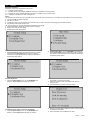
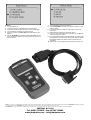
Characters used to help navigate the scan tool are:
"!" -- Indicates current selection.
"3" -- A flashing Down Arrow indicates additional information is available on the next screen.
"1" -- A flashing UP Arrow indicates additional information is available on the previous screen.
"Pd" -- Identifying a Pending DTC when viewing DTCs.
Power
The external power of the scan tool is provided via the vehicle Data Link Connector (DLC). Just follow the steps below to turn on the scan tool:
1 Connect the OBD II Cable to scan tool.
2 Find DLC on vehicle.
3 A plastic DLC cover may be found for some vehicles and you need to remove it before plugging the RJ1966 connector.
4 Plug RJ1966 Cable to the vehicle's DLC.
The scan tool allows you to make the following adjustments and settings:
1 Contrast adjustment: Adjusts the contrast of the LCD display.
2 Display Test: Tests the LCD display.
3 Keyboard test: Tests the keyboard.
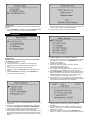
To enter the setup menu mode
1 From the keyboard: Press and hold the N button for at least 3
seconds until the System Setup menu shows. Follow the
instructions to make adjustments and settings as described in
the following setup options.
2
From the Main Menu: Use the UP/DOWN Scroll Buttons to
select System Setup and then press the Y button. Follow the
instructions to make adjustments and settings as described in
the following setup options.
Contrast Adjustment
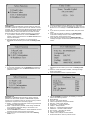
1 From the System Setup menu, use the UP/DOWN scroll
buttons to select Contrast, and press the Y button.
2
From the Contrast menu, use the UP/DOWN scroll buttons
to decrease or increase the contrast.
Press the Y button to save your selection and return to
previous menu.
Press the N button to return to previous menus.
3
4
Display Test
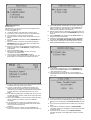
The Display Test is used to check the LCD display.
1 From the System Setup menu, use the UP/DOWN scroll
buttons to select Display Test and press the Y button.
2
3
Press the Y button again to start test. Look for missing spots in
the solid black characters.
When completed, press the N button to return.
VS862 - 1 - 040107