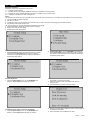
1
Oil
1
2
3
4
5
6
Reset
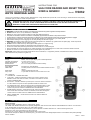
Turn the ignition off.
Locate the vehicle's 16-pin Data Link Connector (DLC).
Plug into the scan tool cable connector to the vehicle's DLC.
Turn the ignition on. But do not start the engine.
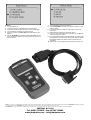
Press the Y button. The Main Menu will be observed on the
display.
Use the UP/DOWN scroll buttons to select Oil Reset from the
menu. Press the Y button to accept the option and to move to
the next screen.
7
a
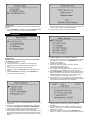
Do the following to select menu options:
Use the UP/DOWN scroll buttons to move the cursor (!) and
select an option.
b Press the Y button to accept the option and to move to the
next screen.
c Repeat a and b to select the necessary options.
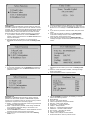
8 Follow any on-screen instructions. Optionally, use the N button
to return to previous screens.
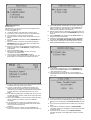
9 If the Service Reset Failed message appears, then there might
be problems for the scan tool to communicate with the vehicle
being tested. Refer to the vehicle service manual for more
information.
10 When done, turn off the ignition and disconnect the scan tool.
NOTE: It is our policy to continually improve products and as such we reserve the right to alter data, specifications and component parts without prior notice. IMPORTANT: No liability is accepted
for incorrect use of product. WARRANTY: Guarantee is 12 months from purchase date, proof of which will be required for any claim.
INFORMATION: For a copy of our latest catalogue and promotions call us on 01284 757525 and leave your full name and address, including postcode.
JHM Butt & Co Ltd
Sole UK Distributor
01284 719481
757500
Tel: 01302
710868 - Fax: 01302
Sealey Group,
www.jhmbuttco.com
Bury St. Edmunds, Suffolk. - [email protected]
01284 703534
Web
email
www.sealey.co.uk
[email protected]